menu PORSCHE CAYMAN 2009 1.G Owners Manual
[x] Cancel search | Manufacturer: PORSCHE, Model Year: 2009, Model line: CAYMAN, Model: PORSCHE CAYMAN 2009 1.GPages: 284, PDF Size: 5.94 MB
Page 42 of 284

40
Operation, Safety
Multi-Functional Steering Wheel
Warning!
There is a danger of accident if you set or
operate the on-board computer, radio,
navigation system, telephone or other
equipment when driving.
Operating these devices while driving could
distract you from traffic and cause you to
lose control of the vehicle.
f Operate these components while driving only if
the traffic situation allows you to do so safely.
f Carry out any complicated operating or setting procedures only while the vehicle is stationary.
Depending on the equipment in your vehicle, you
can use the function keys of the multi-functional
steering wheel to operate the following Porsche
communication systems:
–PCM
– Telephone
– Radio with CD-Drive
–CD-Audio
Readiness for operation of multi-
functional steering wheelThe multi-functional steering wheel is ready for
operation when the ignition and PCM are switched
on.
Operating the function keysf Please read the separate PCM operating
instructions before operating the function
keys.
The rotary knobs at the top left and right of the
steering wheel can also be pressed.
Turn volume control
Upwards – increase volume.
Downwards – decrease volume.
Press volume control
To switch volume/mute on and off.
Turn rotary knob
To select/mark function in the PCM within
a menu. To do this, turn the rotary knob
upward or downward.
Press rotary knob
To activate selected function.
Press screen button
To call the stored PCM function.
The button can be assigned the desired
function in the PCM.
Press Back button
To move back in the PCM menu.
Press Handset Pickup button
To accept a telphone call.
Press Handset Hangup button
To end or refuse a telephone call.
Page 127 of 284
Instruments, On-Board Computer, Warnings
125
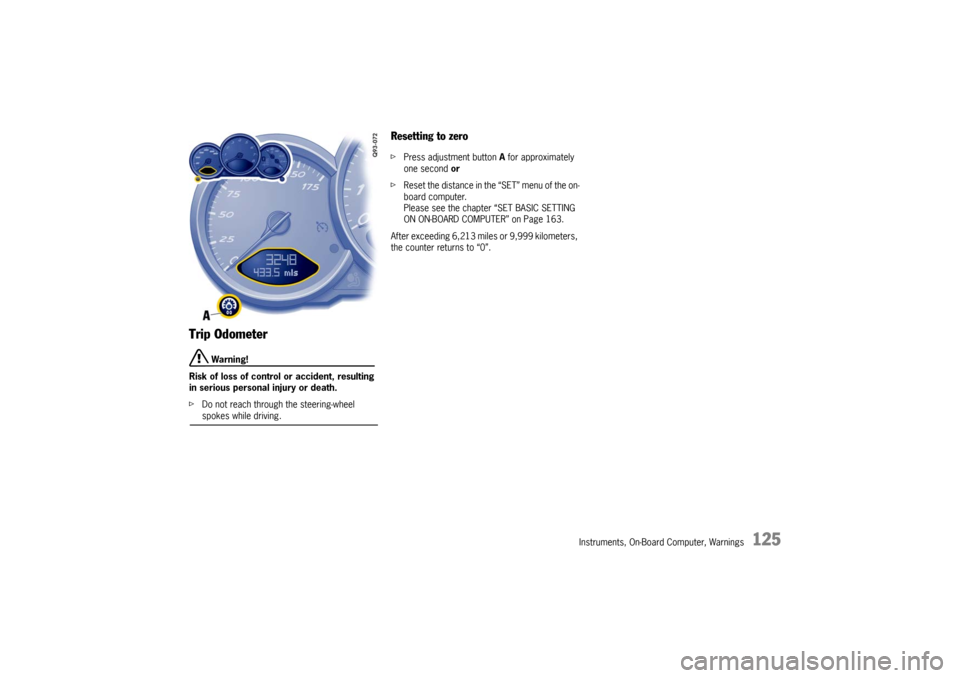
Trip Odometer
Warning!
Risk of loss of control or accident, resulting
in serious personal injury or death.
f Do not reach through the steering-wheel spokes while driving.
Resetting to zero fPress adjustment button A for approximately
one second or
f Reset the distance in the “SET” menu of the on-
board computer.
Please see the chapter “SET BASIC SETTING
ON ON-BOARD COMPUTER” on Page 163.
After exceeding 6,213 mile s or 9,999 kilometers,
the counter returns to “0”.
Page 128 of 284
126
Instruments, On-Board Computer, Warnings
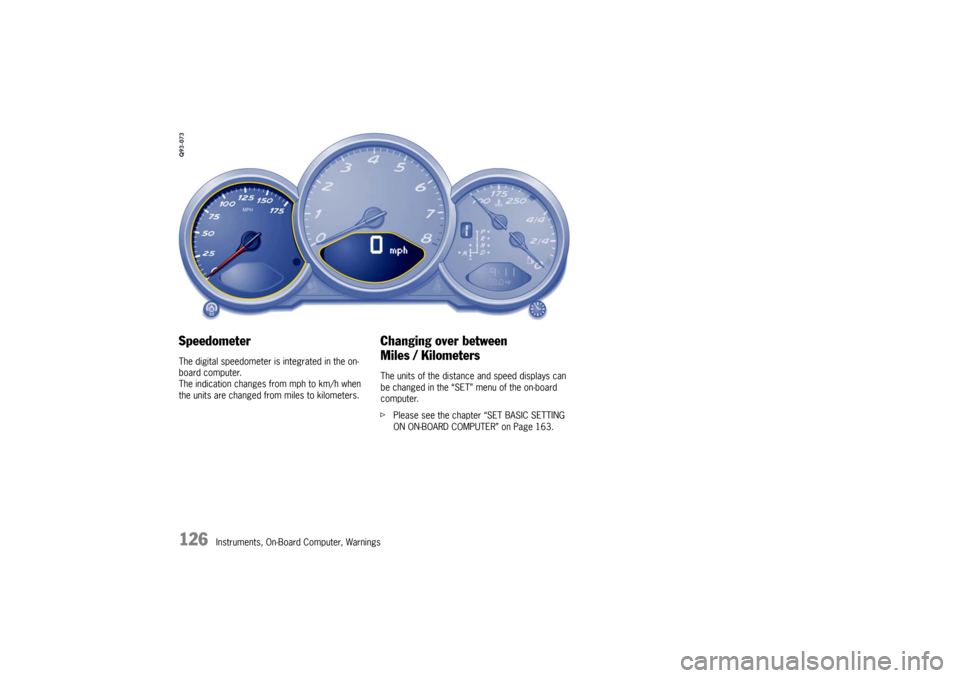
Speedometer The digital speedometer is integrated in the on-
board computer.
The indication changes from mph to km/h when
the units are changed from miles to kilometers.
Changing over between
Miles / Kilometers The units of the distance and speed displays can
be changed in the “SET” menu of the on-board
computer.
fPlease see the chapter “SET BASIC SETTING
ON ON-BOARD COMPUTER” on Page 163.
Page 134 of 284
132
Instruments, On-Board Computer, Warnings
If the battery voltage drops abruptly, a warning
m e s s a g e w i l l b e d i s p l a y e d b y t h e o n - b o a rd c o m p u -
ter.
If the warning is displayed by the on-board
computer while the engine is running or while
driving:
f
Stop the car in a safe place and stop the
engine.
Possible causes
– Defect in the battery charging system.
– Broken drive belt.
Warning!
Risk of engine damage with resultant loss of
control and accident, leading to serious per-
sonal injury or death.
A broken drive belt means there is no power
assistance to the steering (more effort is re-
quired to steer) and coolant pump function
will stop.
f Do not continue driving.
f Have the fault remedied at the nearest author-ized Porsche dealer. The central warning light on the instrument panel
lights up if there are warning messages in the
INFO menu.
The messages can be called in the on-board
computer INFO menu:
f
Please see the chapter “INFO WARNING MES-
SAGES” on Page 140. The warning light on the instrument panel lights
up:
– if the handbrake is on,
– if the brake fluid level is low,
– if the brake pads have
reached the wear limit,
– if the brake circuit division is defective.
Additionally, a warning is displayed by the on-
board computer.
f Please see the chapter “WARNINGS ON THE
INSTRUMENT PANEL AND THE ON-BOARD
COMPUTER” on Page 166.
Battery
Central Warning Light
Brake Warning Light USA
Brake Warning Light Canada
Page 136 of 284

134
Instruments, On-Board Computer, Warnings
On-Board Computer (BC)Display fieldThe display field is beneath the tachometer.Readiness for operation– With ignition switched on,
– with engine running.
Operation, controlsIt is not possible to describe all details of the on-
board computer functions in this Owner’s Manual.
However, the examples will quickly familiarize you
with the operational principle and help you to
navigate through the menu structure.
You can restore the factory default settings at any
time by using the “SET” menu.
Operating leverThe on-board computer is operated with the lower
left lever on the steering column.
Selecting functions of the on-board
computer
f Push lever up 3 or down 4.
Confirming selection (Enter)
f Push the lever forward 1 .
Moving back one or several selection levels
f Pull the lever back 2 once or several times or
f Select the arrow on the on-board compu-
ter display with the operating lever and push
the operating lever forward 1.
Note
You can always return to the basic menu by pulling
the operating lever several times.
5 - Button for voice control
f Please refer to the separate operating
instructions for Porsche Communication
Management (PCM).
Page 137 of 284
Instruments, On-Board Computer, Warnings
135
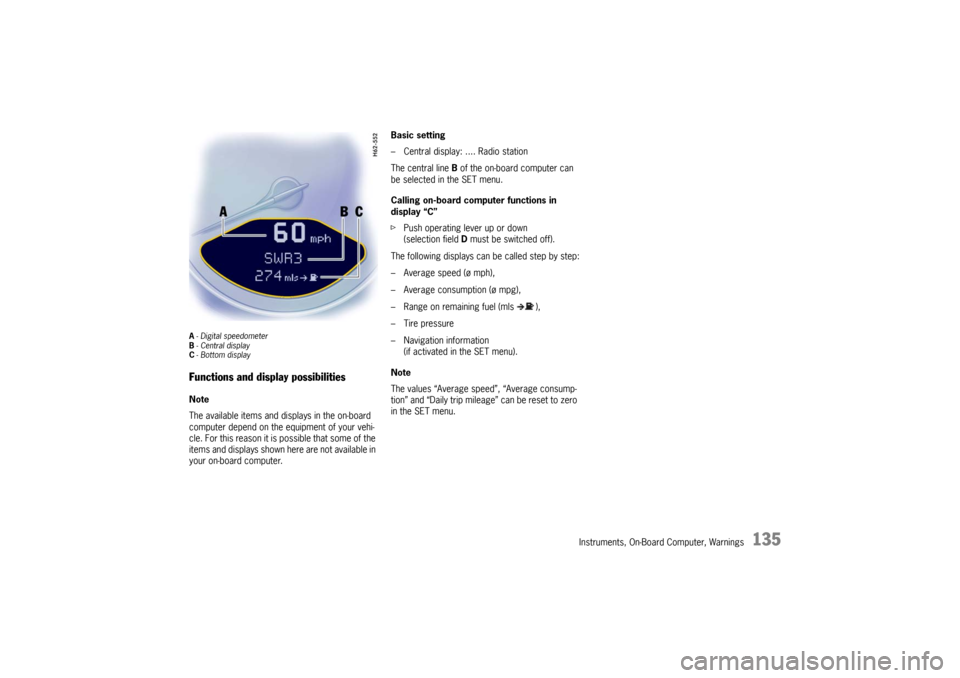
A- Digital speedometer
B -Central display
C - Bottom displayFunctions and display possibilitiesNote
The available items and displays in the on-board
computer depend on the equipment of your vehi-
cle. For this reason it is possible that some of the
items and displays shown here are not available in
your on-board computer. Basic setting
– Central display: .... Radio station
The central line
B of the on-board computer can
be selected in the SET menu.
Calling on-board computer functions in
display “C”
f Push operating lever up or down
(selection field D must be switched off).
The following displays can be called step by step:
– Average speed (ø mph),
– Average consumption (ø mpg),
– Range on remaining fuel (mls ),
– Tire pressure
– Navigation information (if activated in the SET menu).
Note
The values “Average speed”, “Average consump-
tion” and “Daily trip mileag e” can be reset to zero
in the SET menu.
Page 138 of 284
136
Instruments, On-Board Computer, Warnings
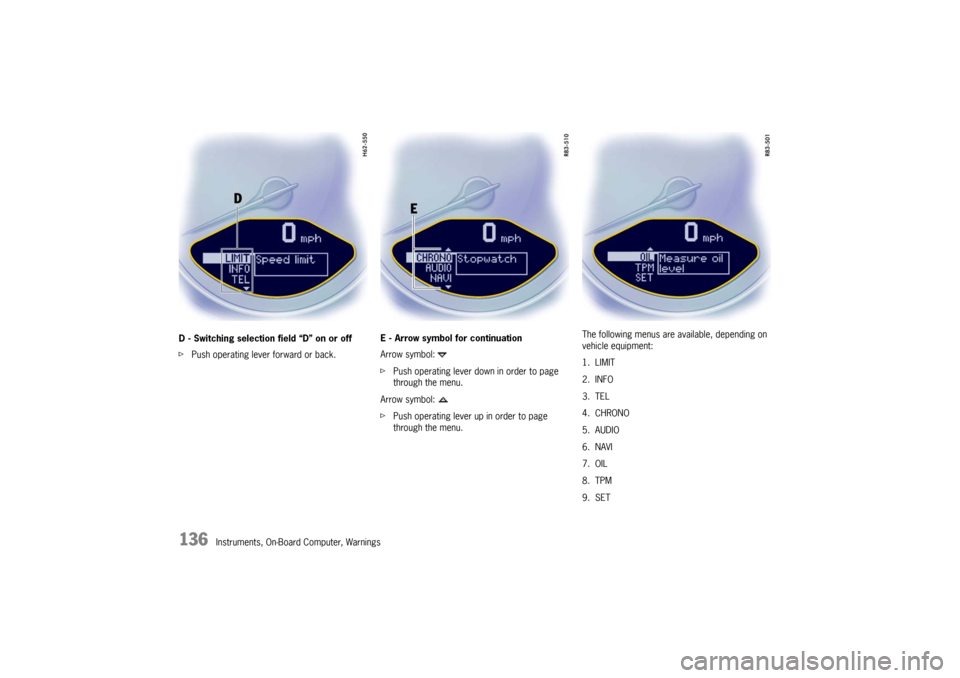
D - Switching selection field “D” on or off
f
Push operating lever forward or back. E - Arrow symbol for continuation
Arrow symbol:
f
Push operating lever down in order to page
through the menu.
Arrow symbol:
f Push operating lever up in order to page
through the menu. The following menus are available, depending on
vehicle equipment:
1. LIMIT
2. INFO
3. TEL
4. CHRONO
5. AUDIO
6. NAVI
7. OIL
8. TPM
9. SET
Page 142 of 284

140
Instruments, On-Board Computer, Warnings
INFO
Warning messagesSwitching on selection field “D”
fPush operating lever forward.
Calling warning messages
f Select INFO with the operating lever. f
Push operating lever forward.
f Select “Messages” with the operating lever.
f Push operating lever forward.
Any existing warning messages can be called us-
ing the operating lever.
You also can call warning messages which were
cancelled during the journey (but only until the next
time the ignition is switched on). f
Push operating lever forward.
f Push operating lever forwards or pull back-
wards.
The display returns to the Info menu.
Page 144 of 284
142
Instruments, On-Board Computer, Warnings
Note
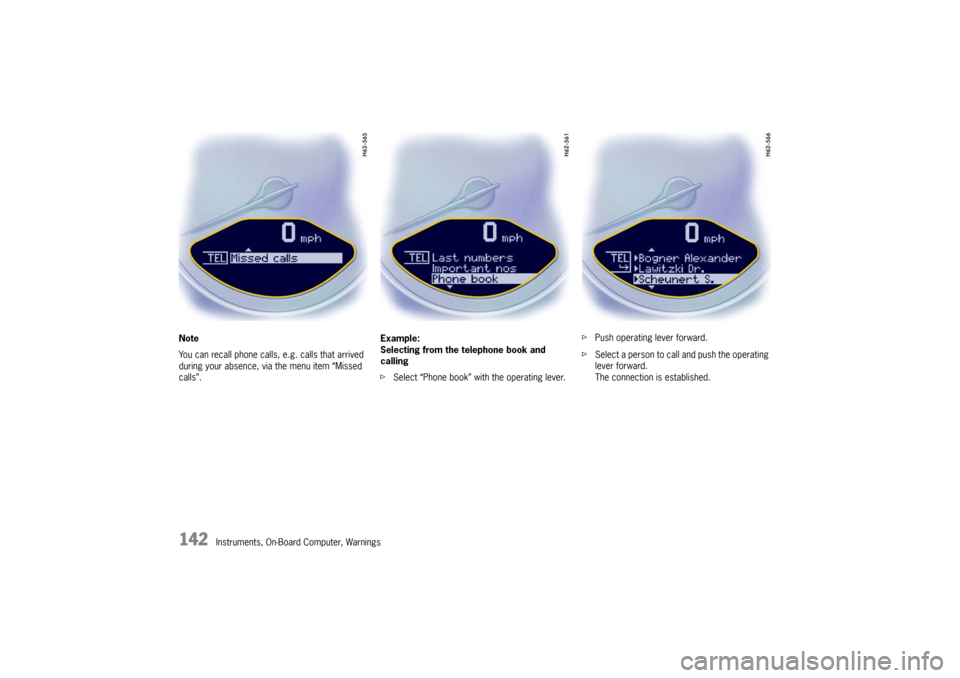
You can recall phone calls, e.g. calls that arrived
during your absence, via the menu item “Missed
calls”.
Example:
Selecting from the telephone book and
calling
f
Select “Phone book” with the operating lever. f
Push operating lever forward.
f Select a person to call and push the operating
lever forward.
The connection is established.
Page 145 of 284
Instruments, On-Board Computer, Warnings
143
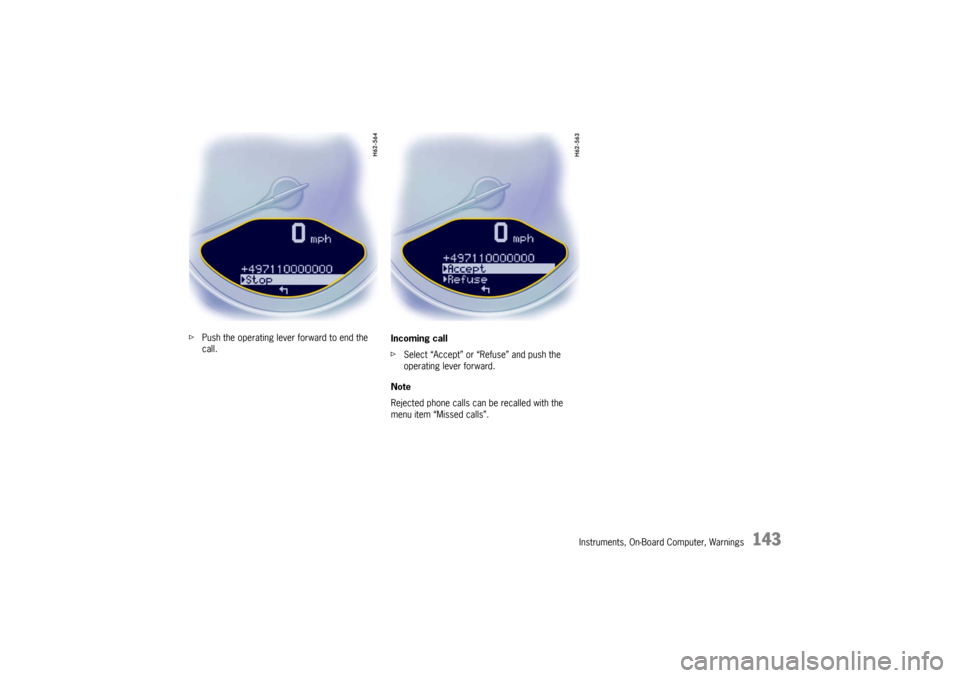
fPush the operating lever forward to end the
call. Incoming call
f
Select “Accept” or “Refuse” and push the
operating lever forward.
Note
Rejected phone calls can be recalled with the
menu item “Missed calls”.