Computer PORSCHE CAYMAN 2010 1.G Owner's Manual
[x] Cancel search | Manufacturer: PORSCHE, Model Year: 2010, Model line: CAYMAN, Model: PORSCHE CAYMAN 2010 1.GPages: 284, PDF Size: 5.94 MB
Page 95 of 284

Operation, Safety
93
A - Opening front luggage compartment lid
B - Opening rear luggage compartment lid Front Luggage Compartment LidUnlocking the lidf Operate pull-button A next to the driver’s seat
or corresponding button of the remote control.
When the lid is open, the luggage compart-
ment is lit.
f Please see the chapter “LOAD SWITCH-OFF AF-
TER 2 HOURS OR 7 DAYS” on Page 236.
f Please see the chapter “KEYS” on Page 15. Important Note
If the vehicle battery is discharged, the front lug-
gage compartment lid can be opened only by con-
necting an external electrical power source.
f
Please see the chapter “EMERGENCY UNLO-
CKING OF THE FRONT LUGGAGE COMPART-
MENT LID” on Page 238.
or the description inside the fuse box lid.
A warning message in the on-board computer
comes on if the lids are not completely closed.
f Fully close the lid.
Opening front luggage compartment lid
Caution!
Risk of damage to lu ggage compartment lid
or windshield wipers.
f Make sure that the windshield wipers are not folded out forwards when opening the lid.
f Raise lid slightly and unlatch the safety catch
with the red lever ( arrow).
Warning message
Page 97 of 284

Operation, Safety
95
A - Opening front luggage compartment lid
B - Opening rear luggage compartment lid Rear LidReleasing the rear lidf Operate pull-button B next to the driver’s seat
or corresponding button of the remote control.
Opening the rear lid
Caution!
Risk of damage to the paint on the rear lid if
this touches the load transported on the roof
rack when opening.
f Only open the rear lid if this cannot touch the load.
The rear lid can be held open in 2 positions.
The luggage compartment is illuminated when the
respective lid is open.
f Please see the chapter “LOAD SWITCH-OFF AF-
TER 2 HOURS OR 7 DAYS” on Page 236.
f Position 1: Raise rear lid up to pressure point.
f Position 2: Raise rear lid beyond the pressure
point.
Closing the rear lidf Pull down the rear lid on the handle and allow it
to fall into the lock.
Check that the rear lid has correctly engaged
in the lock.
A warning message in the on-board computer
comes on if the lids are not completely closed.
f Fully close the lid.
Warning message
Page 102 of 284
100
Operation, Safety
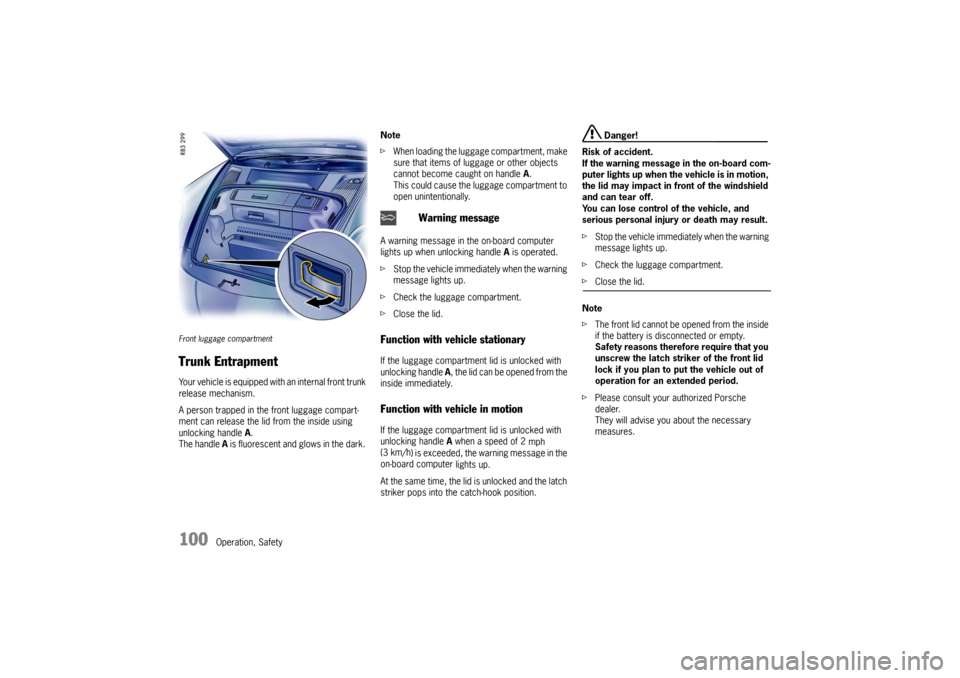
Front luggage compartment Trunk Entrapment Your vehicle is equipped with an internal front trunk
release mechanism.
A person trapped in the front luggage compart-
ment can release the lid from the inside using
unlocking handle A.
The handle A is fluorescent and glows in the dark. Note
f
When loading the luggage compartment, make
sure that items of luggage or other objects
cannot become caught on handle A.
This could cause the luggage compartment to
open unintentionally.
A warning message in the on-board computer
lights up when unlocking handle A is operated.
f Stop the vehicle immediately when the warning
message lights up.
f Check the luggage compartment.
f Close the lid.
Function with vehicle stationary If the luggage compartm ent lid is unlocked with
unlocking handle A, the lid can be opened from the
inside immediately. Function with vehicle in motion If the luggage compartm ent lid is unlocked with
unlocking handle A when a speed of 2
mph
(3 km/h ) is exceeded, the warning message in the
on-board computer lights up.
At the same time, the lid is unlocked and the latch
striker pops into the catch-hook position.
Danger!
Risk of accident.
If the warning message in the on-board com-
puter lights up when th e vehicle is in motion,
the lid may impact in front of the windshield
and can tear off.
You can lose control of the vehicle, and
serious personal injury or death may result.
f Stop the vehicle immediately when the warning
message lights up.
f Check the luggage compartment.
fClose the lid.
Note
f The front lid cannot be op ened from the inside
if the battery is disconnected or empty.
Safety reasons therefore require that you
unscrew the latch striker of the front lid
lock if you plan to put the vehicle out of
operation for an extended period.
f Please consult your authorized Porsche
dealer.
They will advise you about the necessary
measures.
Warning message
Page 103 of 284

Operation, Safety
101
Porsche Communication
Management (PCM) fRefer to the separate operating instructions
before putting the PCM into operation.
f Please see the chapter “LOAD SWITCH-OFF
AFTER 2 HOURS OR 7 DAYS” on Page 236.
Warning!
There is a danger of accident if you set or
operate the on-board computer, radio, navi-
gation system, telephone or other equipment
when driving.
This could distract you from the traffic and
cause you to lose control of the vehicle re-
sulting in serious personal injury or death.
f Operate the components while driving only if
the traffic situation allows you to do so safely.
f Carry out any complicated operating or setting procedures only with the vehicle stationary.
The reception conditions for the radio module
integrated in the PCM ch ange continuously as you
drive. Interference from buildings, terrain and the
weather is unavoidable.
FM stereo reception is particularly susceptible to
varying reception conditions.
Electronic accessories should only be retrofitted
by your authorized Porsche dealer. Accessories which have not been tested and
approved by Porsche may impair radio function
and reception.
NavigationWhen put into operation for the first time, a
distance of approx. 30 miles (50 km) must be
driven in order for the navigation system to
complete the process of fine calibration.
The same applies when the tires are changed (e.g.
summer/snow tires) or new tires fitted.
Full location accuracy is not yet achieved during
the fine-calibration process.
If the vehicle has been transported (e.g. ferry, car
train), the system may take a few minutes to deter-
mine the current locati
on after it has been
switched on.
Serious tire slip (e.g. spinning wheels on snow)
may result in temporaril y inaccurate navigation.
When the battery has been disconnected, it may
take up to 15 minutes before the navigation
system is operational again.
Car Audio Operation/Tips For radio operation see your radio manual
which is included with your on-board litera-
ture.
f Please see the chapter “LOAD SWITCH-OFF AF-
TER 2 HOURS OR 7 DAYS” on Page 236.
FM reception
A vehicle is not an ideal pl ace to listen to a radio.
Because the vehicle moves, reception conditions
are constantly changing.
Buildings, terrain, signal distance and noise from
other vehicles are all working against good recep-
tion.
Some conditions affecting FM may appear to be
problems when they are not.
The following characteristics are completely nor-
mal for a given reception area, and they do not in-
dicate any problem with the radio itself.
Note
Electronic accessories shou ld only be installed by
your authorized Porsche dealer.
Equipment which has not been tested and ap-
proved by Porsche may impair radio reception.
Page 121 of 284

Instruments, On-Board Computer, Warnings
119
Instruments, On-Board Computer, Warnings
Instrument Panel USA Models ..................... 120
Instrument Panel Canada Models ................ 122
Automatic Speed Control Indicator light ...... 124
Instrument Illumination
............................... 124
Trip Odometer ....... ................................... 125
Speedometer .............. .............................. 126
Changing over between Miles / Kilometers .. 126
Tachometer ................ .............................. 127
Turn Signal Indicator Light ......................... 127
High Beam Indicator Light .......................... 127
Gear Shift Indicator
(in vehicles with manual transmission) ......... 127
Cooling System ...... ................................... 128
Porsche Doppelkupplung (PDK) .................. 129
Fuel ............... ......................... .................. 130
Clock ............ ......................... .................. 131
Outside Temperature ................................. 131
Check Engine (Emission Control) ................ 133
On-Board Computer (BC) ............................ 134
Warnings on the instrument panel and
the on-board computer .............................. 166
Page 122 of 284

120
Instruments, On-Board Computer, Warnings
Instrument Panel USA Models Also refer to the corresponding chapters in
the Owner’s Manual.1. Speedometer with analogue display
2. Automatic speed control indicator light
3. Tire pressure warning light
4. Turn signal indicator light, left/right
5. Tachometer
6. High beam indicator light
7. ABS warning light
8. Cooling system Temperature gage, warning light
9. Fuel Level gage, warning light
10.Adjustment button for instrument illumination and trip counter
11.Odometer and daily trip mileage display
12.Light sensor for instrument illumination
13.Airbag warning light 14.Check Engine warning light
(Emission control warning light)
15.Central warning light
16.On-board computer display
17.Porsche Stability Management PSM Multifunctional light
18.Brake warning light
19.Safety belt warning light
20.Gear display
21.PDK transmission, selector lever position
22.Clock and outside temperature display
23.Adjustment button for clock When the ignition is switched on, the warning
lights light up for a lamp check.
Note
Warnings that have been given are stored in the
appropriate control unit me
mory and can be read
out at an authorized Porsche dealer.
This information can help to warn you about situa-
tions which may be hazardous to you or your car.
Page 123 of 284

Instruments, On-Board Computer, Warnings
121
Page 124 of 284

122
Instruments, On-Board Computer, Warnings
Instrument Panel Canada Models Also refer to the corresponding chapters in
the Owner’s Manual.1. Speedometer with analogue display
2. Automatic speed control indicator light
3. Tire pressure warning light
4. Turn signal indicator light, left/right
5. Tachometer
6. High beam indicator light
7. ABS warning light
8. Cooling system Temperature gage, warning light
9. Fuel Level gage, warning light
10.Adjustment button for instrument illumination and trip counter
11.Odometer and daily trip mileage display
12.Light sensor for instrument illumination
13.Airbag warning light 14.Check Engine warning light
(Emission control warning light)
15.Central warning light
16.On-board computer display
17.Porsche Stability Management PSM Multifunctional light
18.Brake warning light
19.Safety belt warning light
20.Gear display
21.PDK transmission, selector lever position
22.Clock and outside temperature display
23.Adjustment button for clock When the ignition is switched on, the warning
lights light up for a lamp check.
Note
Warnings that have been given are stored in the
appropriate control unit me
mory and can be read
out at an authorized Porsche dealer.
This information can help to warn you about situa-
tions which may be hazardous to you or your car.
Page 125 of 284

Instruments, On-Board Computer, Warnings
123
Page 126 of 284
124
Instruments, On-Board Computer, Warnings
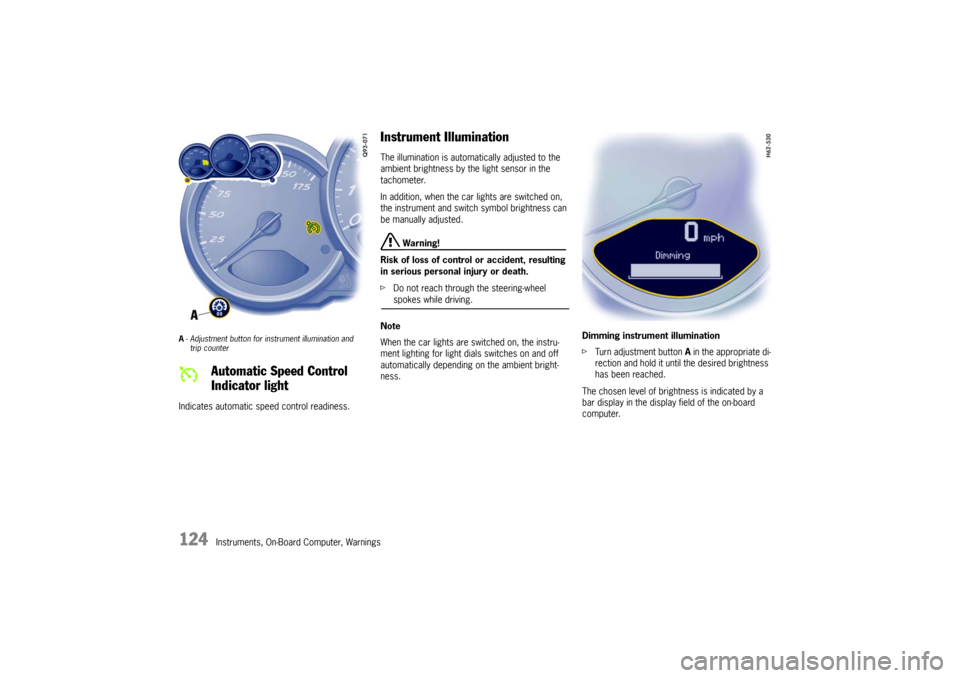
A- Adjustment button for in strument illumination and
trip counter Indicates automatic speed control readiness.
Instrument Illumination The illumination is automatically adjusted to the
ambient brightness by the light sensor in the
tachometer.
In addition, when the car lights are switched on,
the instrument and switch symbol brightness can
be manually adjusted.
Warning!
Risk of loss of control or accident, resulting
in serious personal injury or death.
f Do not reach through the steering-wheel spokes while driving.
Note
When the car lights are switched on, the instru-
ment lighting for light dials switches on and off
automatically depending on the ambient bright-
ness. Dimming instrument illumination
f
Turn adjustment button A in the appropriate di-
rection and hold it unti l the desired brightness
has been reached.
The chosen level of brightness is indicated by a
bar display in the display field of the on-board
computer.
Automatic Speed Control
Indicator light