buttons PORSCHE CAYNNE 2010 1.G User Guide
[x] Cancel search | Manufacturer: PORSCHE, Model Year: 2010, Model line: CAYENNE, Model: PORSCHE CAYENNE 2010 1.GPages: 379, PDF Size: 13.91 MB
Page 61 of 379
Seats, Mirrors and Steering Wheel
61
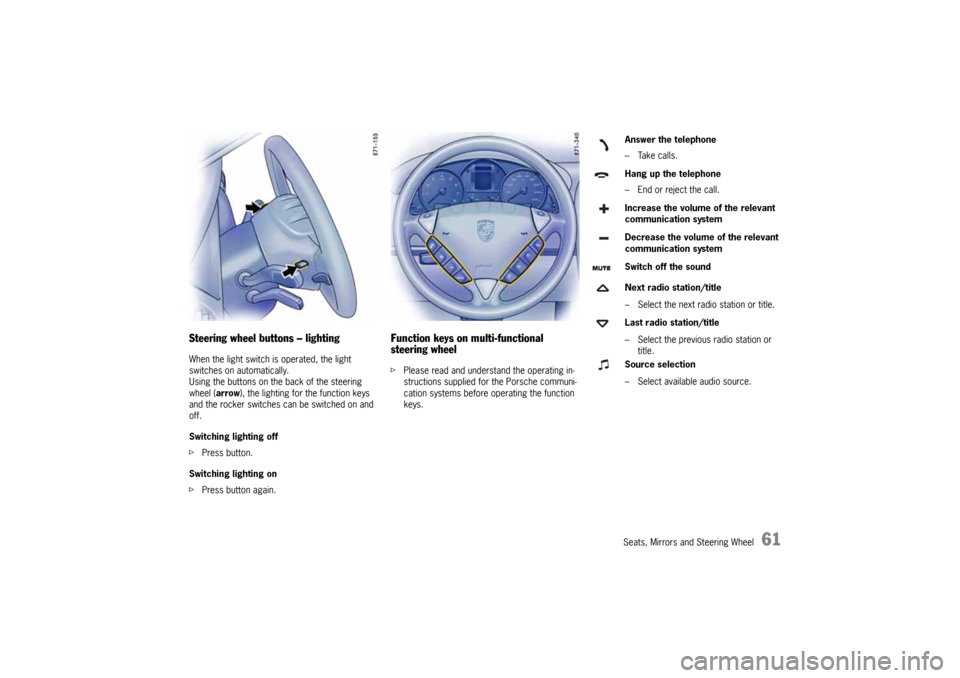
Steering wheel buttons – lightingWhen the light switch is operated, the light
switches on automatically.
Using the buttons on the back of the steering
wheel (arrow), the lighting for the function keys
and the rocker switches can be switched on and
off.
Switching lighting off
fPress button.
Switching lighting on
fPress button again.
Function keys on multi-functional
steering wheelfPlease read and understand the operating in-
structions supplied for the Porsche communi-
cation systems before operating the function
keys.
Answer the telephone
–Take calls.
Hang up the telephone
– End or reject the call.
Increase the volume of the relevant
communication system
Decrease the volume of the relevant
communication system
Switch off the sound
Next radio station/title
– Select the next radio station or title.
Last radio station/title
– Select the previous radio station or
title.
Source selection
– Select available audio source.
10_Cayenne_21_KW17.book Seite 61 Donnerstag, 9. April 2009 3:33 15
Page 77 of 379
Air Conditioning, Parking Heater and Heated Rear Window
77
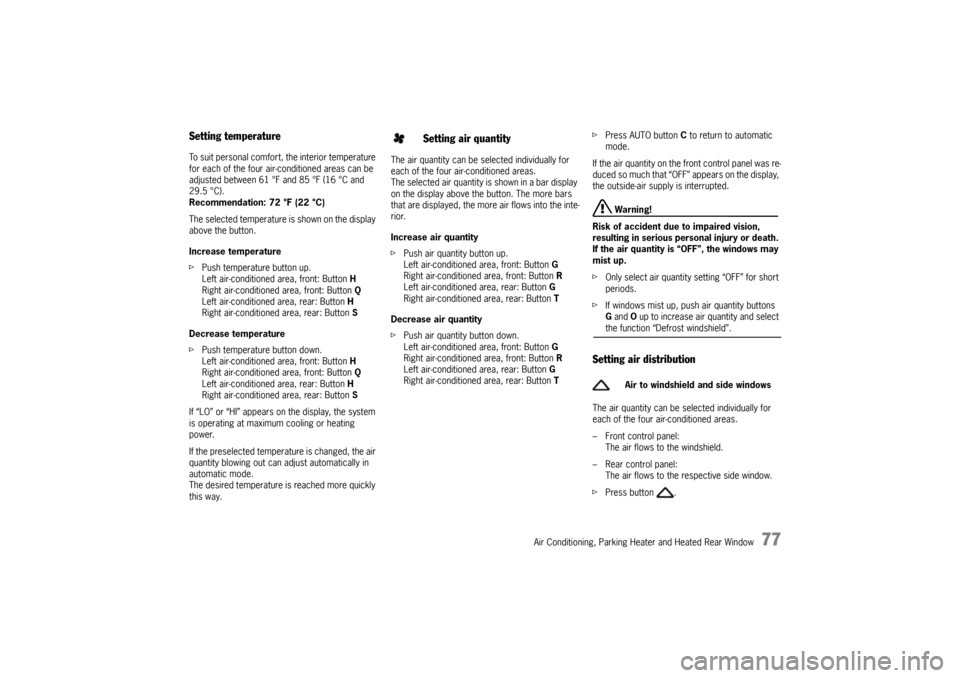
Setting temperatureTo suit personal comfort, the interior temperature
for each of the four air-conditioned areas can be
adjusted between 61 °F and 85 °F (16 °C and
29.5 °C).
Recommendation: 72 °F (22 °C)
The selected temperature is shown on the display
above the button.
Increase temperature
fPush temperature button up.
Left air-conditioned area, front: Button H
Right air-conditioned area, front: Button Q
Left air-conditioned area, rear: Button H
Right air-conditioned area, rear: Button S
Decrease temperature
fPush temperature button down.
Left air-conditioned area, front: Button H
Right air-conditioned area, front: Button Q
Left air-conditioned area, rear: Button H
Right air-conditioned area, rear: Button S
If “LO” or “HI” appears on the display, the system
is operating at maximum cooling or heating
power.
If the preselected temperature is changed, the air
quantity blowing out can adjust automatically in
automatic mode.
The desired temperature is reached more quickly
this way.The air quantity can be selected individually for
each of the four air-conditioned areas.
The selected air quantity is shown in a bar display
on the display above the button. The more bars
that are displayed, the more air flows into the inte-
rior.
Increase air quantity
fPush air quantity button up.
Left air-conditioned area, front: Button G
Right air-conditioned area, front: Button R
Left air-conditioned area, rear: Button G
Right air-conditioned area, rear: Button T
Decrease air quantity
fPush air quantity button down.
Left air-conditioned area, front: Button G
Right air-conditioned area, front: Button R
Left air-conditioned area, rear: Button G
Right air-conditioned area, rear: Button TfPress AUTO button C to return to automatic
mode.
If the air quantity on the front control panel was re-
duced so much that “OFF” appears on the display,
the outside-air supply is interrupted.
Warning!
Risk of accident due to impaired vision,
resulting in serious personal injury or death.
If the air quantity is “OFF”, the windows may
mist up.
fOnly select air quantity setting “OFF” for short
periods.
fIf windows mist up, push air quantity buttons
G and O up to increase air quantity and select the function “Defrost windshield”.
Setting air distributionThe air quantity can be selected individually for
each of the four air-conditioned areas.
– Front control panel:
The air flows to the windshield.
– Rear control panel:
The air flows to the respective side window.
fPress button .
Setting air quantity
Air to windshield and side windows
10_Cayenne_21_KW17.book Seite 77 Donnerstag, 9. April 2009 3:33 15
Page 79 of 379
Air Conditioning, Parking Heater and Heated Rear Window
79
Disabling control panel for
air-conditioned areas at the rearPower windows, central locking buttons on the
rear doors and rear control panel for the air condi-
tioning can be disabled using the safety button in
the armrest of the driver’s door.
fPress the safety button to switch child
protection on and off.
The symbol in the safety button lights up if
child protection is active.fPress button .
The Symbol appears on the display.
The rear air-conditioned areas can be
controlled from the front control panel.
Ending the function
fPress button again.
Note on operation
The function is ended automatically 10 seconds
after the last settings are made.
Rear seat heatingThe rear seats can also be heated in vehicles with
four-zone air conditioning.
fFor further information on the rear seat
heating:
Please see the chapter “REAR SEAT HEATING
IN VEHICLES WITH AN FOUR-ZONE AIR CONDI-
TIONING SYSTEM” on Page 41.
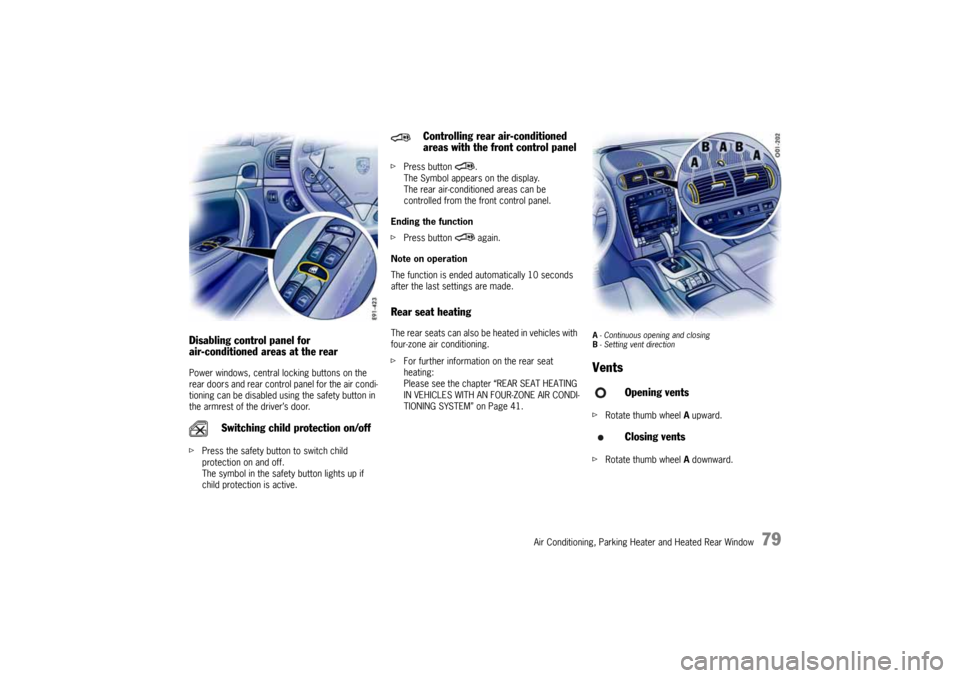
A- Continuous opening and closing
B- Setting vent directionVentsfRotate thumb wheel A upward.
fRotate thumb wheel A downward.
Switching child protection on/off
Controlling rear air-conditioned
areas with the front control panel
Opening vents
Closing vents
10_Cayenne_21_KW17.book Seite 79 Donnerstag, 9. April 2009 3:33 15
Page 81 of 379
Air Conditioning, Parking Heater and Heated Rear Window
81
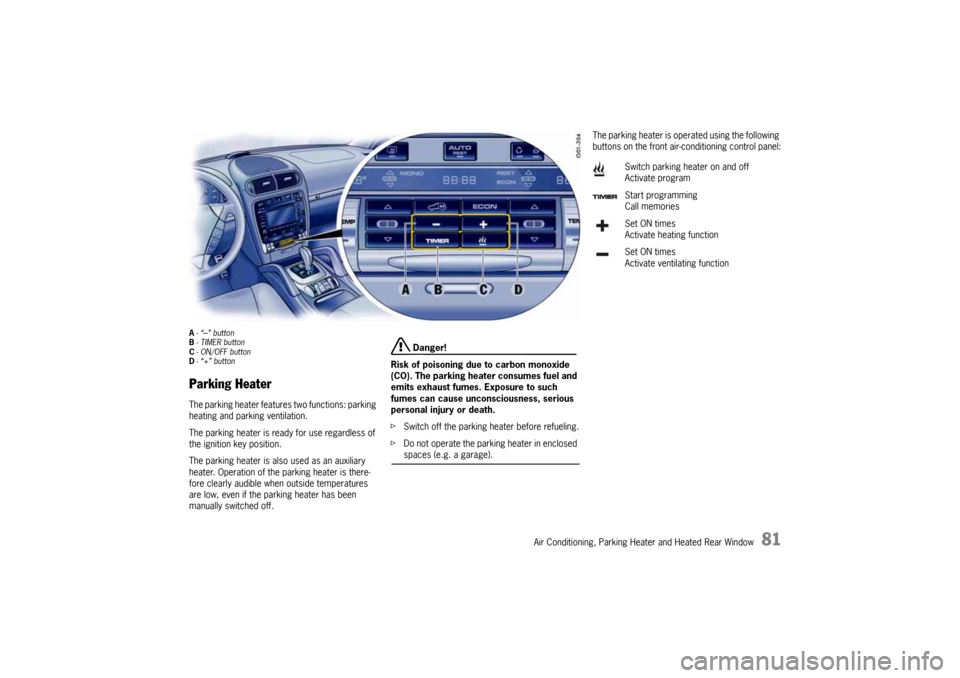
A-“
–” button
B-TIMER button
C- ON/OFF button
D-“+” button
Parking HeaterThe parking heater features two functions: parking
heating and parking ventilation.
The parking heater is ready for use regardless of
the ignition key position.
The parking heater is also used as an auxiliary
heater. Operation of the parking heater is there-
fore clearly audible when outside temperatures
are low, even if the parking heater has been
manually switched off.
Danger!
Risk of poisoning due to carbon monoxide
(CO). The parking heater consumes fuel and
emits exhaust fumes. Exposure to such
fumes can cause unconsciousness, serious
personal injury or death.
fSwitch off the parking heater before refueling.
fDo not operate the parking heater in enclosed spaces (e.g. a garage).
The parking heater is operated using the following
buttons on the front air-conditioning control panel:
Switch parking heater on and off
Activate program
Start programming
Call memories
Set ON times
Activate heating function
Set ON times
Activate ventilating function
10_Cayenne_21_KW17.book Seite 81 Donnerstag, 9. April 2009 3:33 15
Page 84 of 379
84
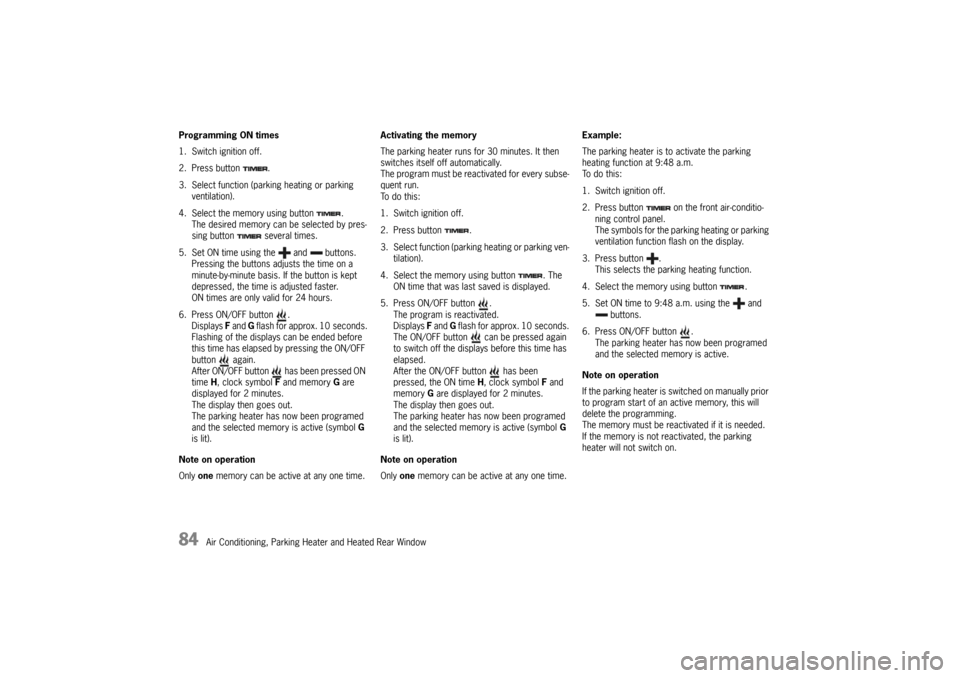
Air Conditioning, Parking Heater and Heated Rear Window Programming ON times
1. Switch ignition off.
2. Press button .
3. Select function (parking heating or parking
ventilation).
4. Select the memory using button .
The desired memory can be selected by pres-
sing button several times.
5. Set ON time using the and buttons.
Pressing the buttons adjusts the time on a
minute-by-minute basis. If the button is kept
depressed, the time is adjusted faster.
ON times are only valid for 24 hours.
6. Press ON/OFF button .
Displays F and G flash for approx. 10 seconds.
Flashing of the displays can be ended before
this time has elapsed by pressing the ON/OFF
button again.
After ON/OFF button has been pressed ON
time H, clock symbol F and memory G are
displayed for 2 minutes.
The display then goes out.
The parking heater has now been programed
and the selected memory is active (symbol G
is lit).
Note on operation
Only one memory can be active at any one time.Activating the memory
The parking heater runs for 30 minutes. It then
switches itself off automatically.
The program must be reactivated for every subse-
quent run.
To do this:
1. Switch ignition off.
2. Press button .
3. Select function (parking heating or parking ven-
tilation).
4. Select the memory using button . The
ON time that was last saved is displayed.
5. Press ON/OFF button .
The program is reactivated.
Displays F and G flash for approx. 10 seconds.
The ON/OFF button can be pressed again
to switch off the displays before this time has
elapsed.
After the ON/OFF button has been
pressed, the ON time H, clock symbol F and
memory G are displayed for 2 minutes.
The display then goes out.
The parking heater has now been programed
and the selected memory is active (symbol G
is lit).
Note on operation
Only one memory can be active at any one time.Example:
The parking heater is to activate the parking
heating function at 9:48 a.m.
To do this:
1. Switch ignition off.
2. Press button on the front air-conditio-
ning control panel.
The symbols for the parking heating or parking
ventilation function flash on the display.
3. Press button .
This selects the parking heating function.
4. Select the memory using button .
5. Set ON time to 9:48 a.m. using the and
buttons.
6. Press ON/OFF button .
The parking heater has now been programed
and the selected memory is active.
Note on operation
If the parking heater is switched on manually prior
to program start of an active memory, this will
delete the programming.
The memory must be reactivated if it is needed.
If the memory is not reactivated, the parking
heater will not switch on.
10_Cayenne_21_KW17.book Seite 84 Donnerstag, 9. April 2009 3:33 15
Page 88 of 379
88
Windows and Sliding Roofs
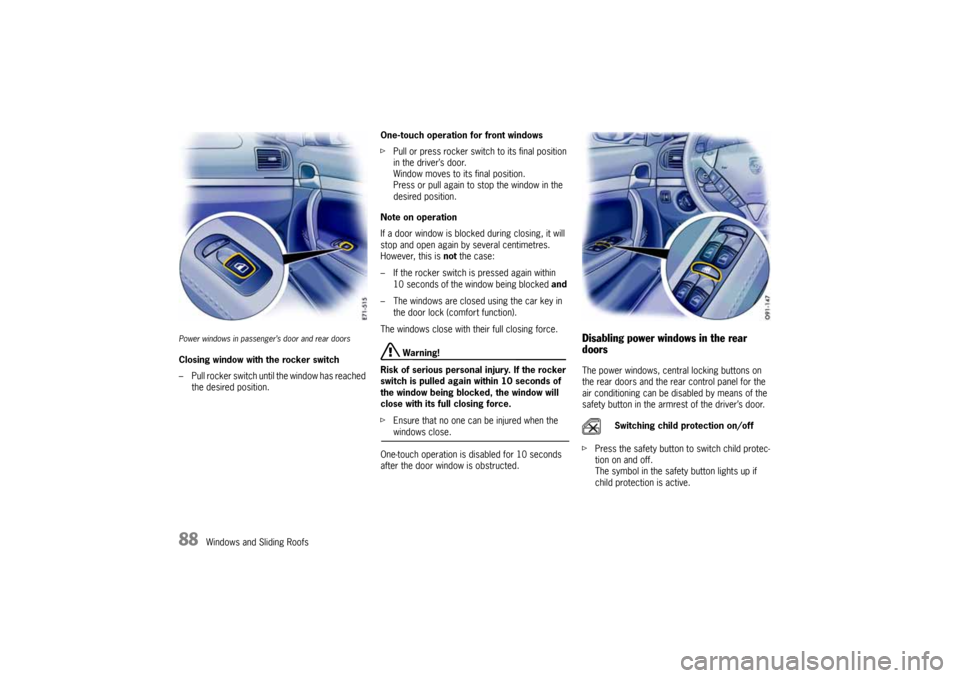
Power windows in passenger’s door and rear doorsClosing window with the rocker switch
– Pull rocker switch until the window has reached
the desired position.One-touch operation for front windows
fPull or press rocker switch to its final position
in the driver’s door.
Window moves to its final position.
Press or pull again to stop the window in the
desired position.
Note on operation
If a door window is blocked during closing, it will
stop and open again by several centimetres.
However, this is not the case:
– If the rocker switch is pressed again within
10 seconds of the window being blocked and
– The windows are closed using the car key in
the door lock (comfort function).
The windows close with their full closing force.
Warning!
Risk of serious personal injury. If the rocker
switch is pulled again within 10 seconds of
the window being blocked, the window will
close with its full closing force.
fEnsure that no one can be injured when the windows close.
One-touch operation is disabled for 10 seconds
after the door window is obstructed.
Disabling power windows in the rear
doorsThe power windows, central locking buttons on
the rear doors and the rear control panel for the
air conditioning can be disabled by means of the
safety button in the armrest of the driver’s door.
fPress the safety button to switch child protec-
tion on and off.
The symbol in the safety button lights up if
child protection is active.
Switching child protection on/off
10_Cayenne_21_KW17.book Seite 88 Donnerstag, 9. April 2009 3:33 15
Page 128 of 379
128
Multi-Purpose Display and Instruments
Operating the telephone via the
multi-purpose displayNote
The telephone function of the multi-purpose
display is linked to both the PCM and the multi-
functional buttons on the steering wheel as well as
the control stalk.
A SIM card must be inserted in the drawer of
the PCM as a prerequisite for telephone
operation.
If the link to the network is lost, no PIN is entered,
no SIM card is inserted or the telephone is
switched off, a corresponding indication will
appear.
Note
The phone number of an incoming call is shown on
the multi-purpose display. The name of the caller
is shown only if the caller is stored in the telephone
book.Notes on operation
If the rocker switch is pressed for longer than one
second, the initial letters for which entries exist
are shown.
This allows the desired entry to be found more
quickly.
fFor information on the operating principle of
the multi-purpose display:
Please see the chapter “OPERATING
PRINCIPLE” on Page 124.
Accepting, refusing, ending a callIncoming calls are shown on the multi-purpose
display (PHONE INFO must be activated).
Displaying telephone calls on the multi-
purpose displayAutomatic indication of an incoming call on the
multi-purpose display can be switched on or off
with the PHONE INFO menu.Displaying last numbers and last-number
redialThe LAST NUMBERS menu shows the most recent
entries dialled via the respective SIM card. 1.Press the ENTER button.
The display reverts to the last menu.
Display on display screen
1.Select ACCEPT or
REFUSE.
2.Confirm selection.
After the call is accepted, END appears in the
menu.
Ending a call
3.Select END.
4.Confirm selection.
1.MAIN MENU
> PHONE
> PHONE INFO
Select and confirm.
2.Select ON or OFF.
3.Confirm selection.
The selected item is then accepted.1.MAIN MENU
> PHONE
> LAST NUMBERS
Select and confirm.
2.Select entry from the list.
3.Confirm selection.
10_Cayenne_21_KW17.book Seite 128 Donnerstag, 9. April 2009 3:33 15
Page 241 of 379
Parking
241
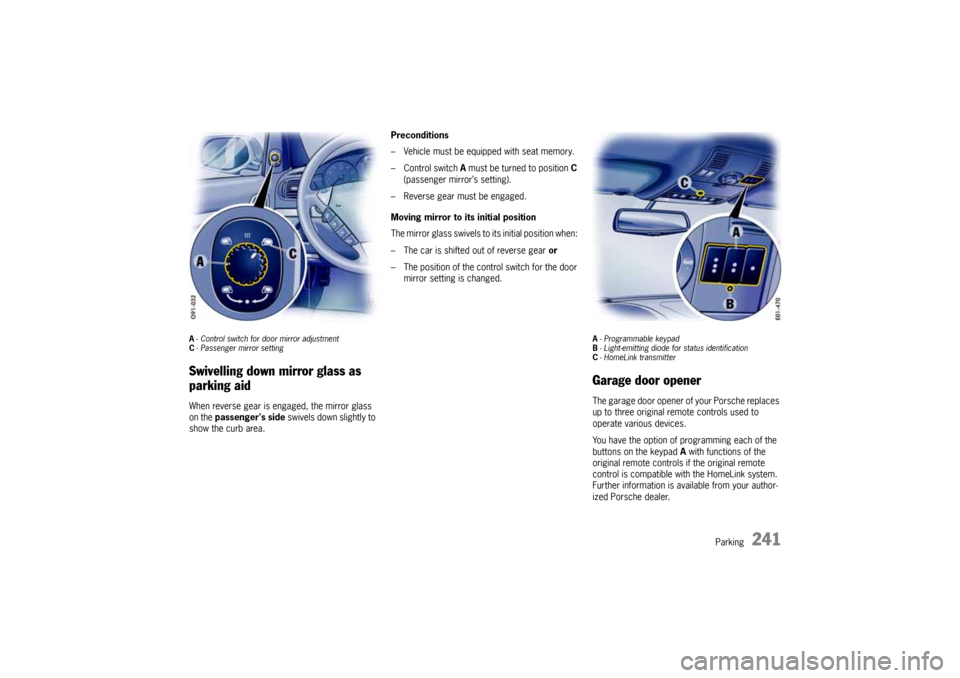
A-Control switch for door mirror adjustment
C- Passenger mirror settingSwivelling down mirror glass as
parking aidWhen reverse gear is engaged, the mirror glass
on the passenger's side swivels down slightly to
show the curb area.Preconditions
– Vehicle must be equipped with seat memory.
–Control switch A must be turned to position C
(passenger mirror’s setting).
– Reverse gear must be engaged.
Moving mirror to its initial position
The mirror glass swivels to its initial position when:
– The car is shifted out of reverse gear or
– The position of the control switch for the door
mirror setting is changed.
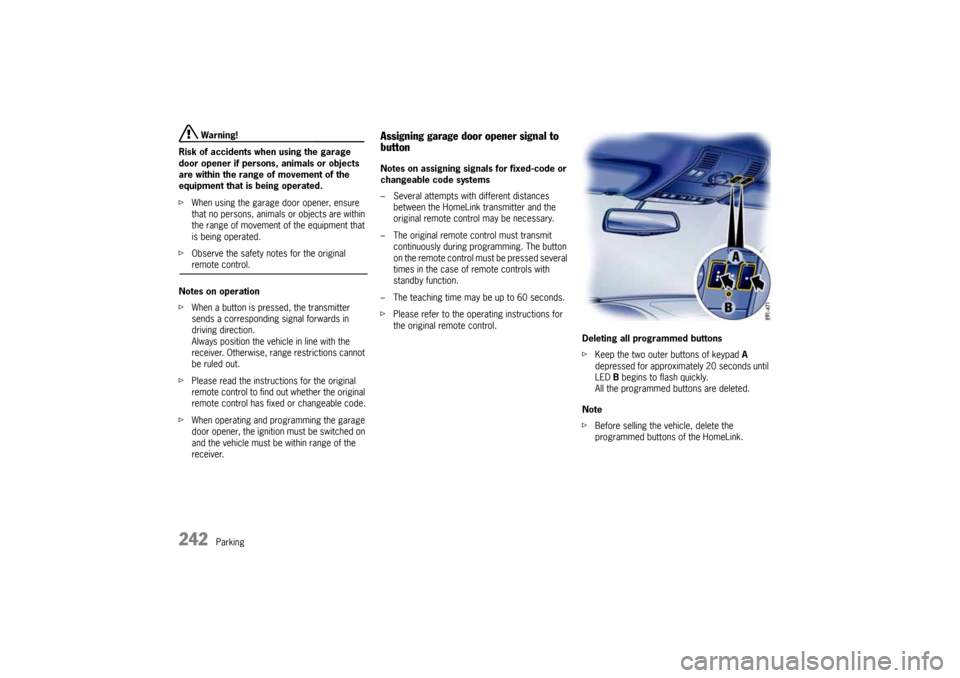
A- Programmable keypad
B- Light-emitting diode for status identification
C- HomeLink transmitterGarage door openerThe garage door opener of your Porsche replaces
up to three original remote controls used to
operate various devices.
You have the option of programming each of the
buttons on the keypad A with functions of the
original remote controls if the original remote
control is compatible with the HomeLink system.
Further information is available from your author-
ized Porsche dealer.
10_Cayenne_21_KW17.book Seite 241 Donnerstag, 9. April 2009 3:33 15
Page 242 of 379
242
Parking
Warning!
Risk of accidents when using the garage
door opener if persons, animals or objects
are within the range of movement of the
equipment that is being operated.
fWhen using the garage door opener, ensure
that no persons, animals or objects are within
the range of movement of the equipment that
is being operated.
fObserve the safety notes for the original remote control.
Notes on operation
fWhen a button is pressed, the transmitter
sends a corresponding signal forwards in
driving direction.
Always position the vehicle in line with the
receiver. Otherwise, range restrictions cannot
be ruled out.
fPlease read the instructions for the original
remote control to find out whether the original
remote control has fixed or changeable code.
fWhen operating and programming the garage
door opener, the ignition must be switched on
and the vehicle must be within range of the
receiver.
Assigning garage door opener signal to
buttonNotes on assigning signals for fixed-code or
changeable code systems
– Several attempts with different distances
between the HomeLink transmitter and the
original remote control may be necessary.
– The original remote control must transmit
continuously during programming. The button
on the remote control must be pressed several
times in the case of remote controls with
standby function.
– The teaching time may be up to 60 seconds.
fPlease refer to the operating instructions for
the original remote control.
Deleting all programmed buttons
fKeep the two outer buttons of keypad A
depressed for approximately 20 seconds until
LED B begins to flash quickly.
All the programmed buttons are deleted.
Note
fBefore selling the vehicle, delete the
programmed buttons of the HomeLink.
10_Cayenne_21_KW17.book Seite 242 Donnerstag, 9. April 2009 3:33 15
Page 243 of 379
Parking
243
Programming a button on the keypad
Caution!
Risk of damage. When programming a gara-
ge door or gate, the door or gate may open
and close several times in quick succession,
causing the motor to overheat.
fUnplug the garage door or gate during the pro-
gramming procedure to prevent the motor from overheating.
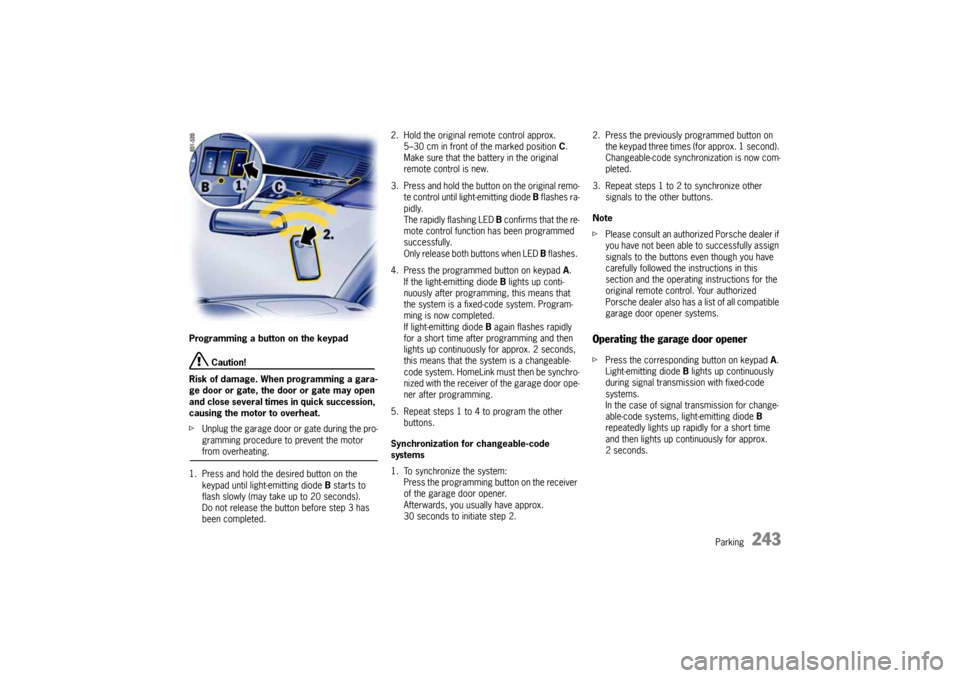
1. Press and hold the desired button on the
keypad until light-emitting diode B starts to
flash slowly (may take up to 20 seconds).
Do not release the button before step 3 has
been completed.2. Hold the original remote control approx.
5–30 cm in front of the marked position C.
Make sure that the battery in the original
remote control is new.
3. Press and hold the button on the original remo-
te control until light-emitting diode B flashes ra-
pidly.
The rapidly flashing LED B confirms that the re-
mote control function has been programmed
successfully.
Only release both buttons when LED B flashes.
4. Press the programmed button on keypad A.
If the light-emitting diode B lights up conti-
nuously after programming, this means that
the system is a fixed-code system. Program-
ming is now completed.
If light-emitting diode B again flashes rapidly
for a short time after programming and then
lights up continuously for approx. 2 seconds,
this means that the system is a changeable-
code system. HomeLink must then be synchro-
nized with the receiver of the garage door ope-
ner after programming.
5. Repeat steps 1 to 4 to program the other
buttons.
Synchronization for changeable-code
systems
1. To synchronize the system:
Press the programming button on the receiver
of the garage door opener.
Afterwards, you usually have approx.
30 seconds to initiate step 2.2. Press the previously programmed button on
the keypad three times (for approx. 1 second).
Changeable-code synchronization is now com-
pleted.
3. Repeat steps 1 to 2 to synchronize other
signals to the other buttons.
Note
fPlease consult an authorized Porsche dealer if
you have not been able to successfully assign
signals to the buttons even though you have
carefully followed the instructions in this
section and the operating instructions for the
original remote control. Your authorized
Porsche dealer also has a list of all compatible
garage door opener systems.
Operating the garage door openerfPress the corresponding button on keypad A.
Light-emitting diode B lights up continuously
during signal transmission with fixed-code
systems.
In the case of signal transmission for change-
able-code systems, light-emitting diode B
repeatedly lights up rapidly for a short time
and then lights up continuously for approx.
2seconds.
10_Cayenne_21_KW17.book Seite 243 Donnerstag, 9. April 2009 3:33 15