warning PORSCHE CAYNNE 2010 1.G Workshop Manual
[x] Cancel search | Manufacturer: PORSCHE, Model Year: 2010, Model line: CAYENNE, Model: PORSCHE CAYENNE 2010 1.GPages: 379, PDF Size: 13.91 MB
Page 99 of 379

Windows and Sliding Roofs
99
Comfort function on vehicles without
Porsche Entry & DriveOpening and closing the Panorama roof
system
fHold the car key in the door lock in the
unlocking or locking position until the windows
and the Panorama roof system have reached
the desired position.Comfort function on vehicles with
Porsche Entry & DriveOpening and closing the Panorama roof
system
fHold the car key in the door lock in the
unlocking or locking position until the windows
and the Panorama roof system have reached
the desired position.
Closing the Panorama roof system
fHold the button in the door handle when
locking the vehicle until the windows and the
Panorama roof system have reached the
desired position.
Force limiter for the Panorama roof
system All roof elements are equipped with a force limiter.
If the sliding roof or the sliding/lifting roof element
is obstructed during the closing or opening
process, the respective roof element opens or
closes again immediately.
Closing a roof element after triggering the
force limiter
1. Remove the obstruction.
2. Turn knob to position A again.Electric emergency closing function
Warning!
Risk of injury from the emergency closing
function for the Panorama roof system. The
force limiter is not available and the roof
elements will close with full force.
fEnsure that no one can be injured when the Panorama roof system is closing.
If the roof cannot be closed due to dirt, ice, or
similar substances:
1. Turn knob to position A.
2. Hold the knob in position A until all roof
elements are completely closed.
Save final position of the Panorama roof
systemAfter disconnecting/reconnecting the vehicle
battery or if the vehicle battery is discharged, or
after emergency starting with jumper cables, the
final positions of the Panorama roof system are
lost.
Warning!
Risk of injury when closing the Panorama
roof system. The force limiter is not available
and the roof elements will close with full
force.
fEnsure that no one can be injured when the Panorama roof system is closing.
1. Switch ignition off.
2. Turn knob to position A.
3. Switch ignition on.
4. Press knob up at its front edge in position A
and keep pressed.
The teaching process begins after around
5 seconds. Hold the knob pressed in position
until the roller blind and all roof elements have
completely stopped moving. The procedure
lasts a maximum of 20 seconds.
5. Release the knob.
The raised sliding/lifting roof element 3 clo-
ses automatically. The teaching process is
then completed.
10_Cayenne_21_KW17.book Seite 99 Donnerstag, 9. April 2009 3:33 15
Page 105 of 379
Lights, Turn Signals and Windshield Wipers
105
Note on operation
Fog is not recognized.
fIn the event of fog, the driving light must be
switched on manually.
Warning!
Risk of accident due to driving without lights.
fAlways carefully monitor the automatic driving light control.
Highway function
The light is switched on at speeds of over 87 mph
(140 km/h). If you are travelling slower than
40 mph (65 km/h), the driving light is switched off
after a delay of approx. 2 minutes, if the external
lighting conditions permit.
Rain function
The driving light is switched on after five seconds
of continuous wiper operation.
The driving light is switched off approx. 4 minutes
after the wipers have stopped.
Off delay and door-surrounding lighting
Off delay and door-surrounding lighting are active
when the automatic driving light assistant is
switched on.
fPlease see the chapter “DOOR-SURROUNDING
LIGHTING” on Page 109.fPlease see the chapter “COMING HOME
FUNCTION (AUTO SHUT OFF DELAY)” on
Page 109.
Daytime driving lightsRegulations for switching daytime driving lights on
and off vary according to the legal requirements in
each country.
The position lights at the front and rear and the low
beam headlight come on when the ignition is
switched on.
The instrument and switch illumination in the
interior of the vehicle remains off.
The daytime driving lights go off when the ignition
is switched off. A warning message appears on
the multi-purpose display in the instrument panel if
the light switch is in position 0 (light switched off).
Switch on the light at the light switch if necessary
(e.g. when you switch off the ignition at a closed
rail crossing).
fFor information on warning messages on the
multi-purpose display:
Please see the chapter “OVERVIEW OF
WARNING MESSAGES” on Page 149.
USA only:
You can activate/deactivate the daytime driving
lights on the multi-purpose display in the instru-
ment panel.
fPlease see the chapter “SWITCHING DAYTIME
DRIVING LIGHTS ON/OFF” on Page 145.
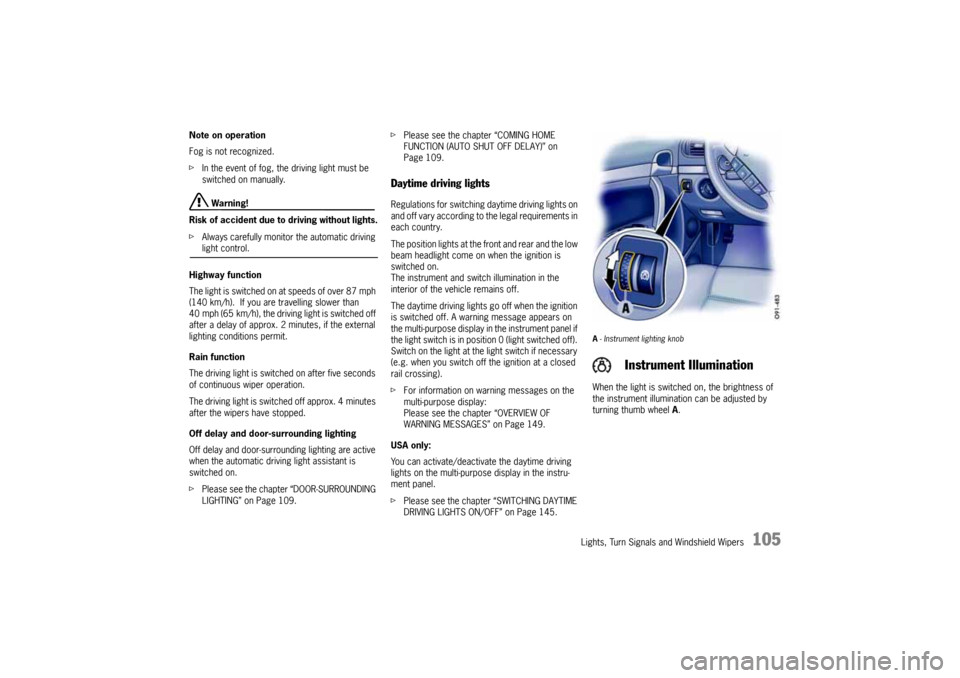
A- Instrument lighting knobWhen the light is switched on, the brightness of
the instrument illumination can be adjusted by
turning thumb wheel A.
Instrument Illumination
10_Cayenne_21_KW17.book Seite 105 Donnerstag, 9. April 2009 3:33 15
Page 107 of 379
Lights, Turn Signals and Windshield Wipers
107
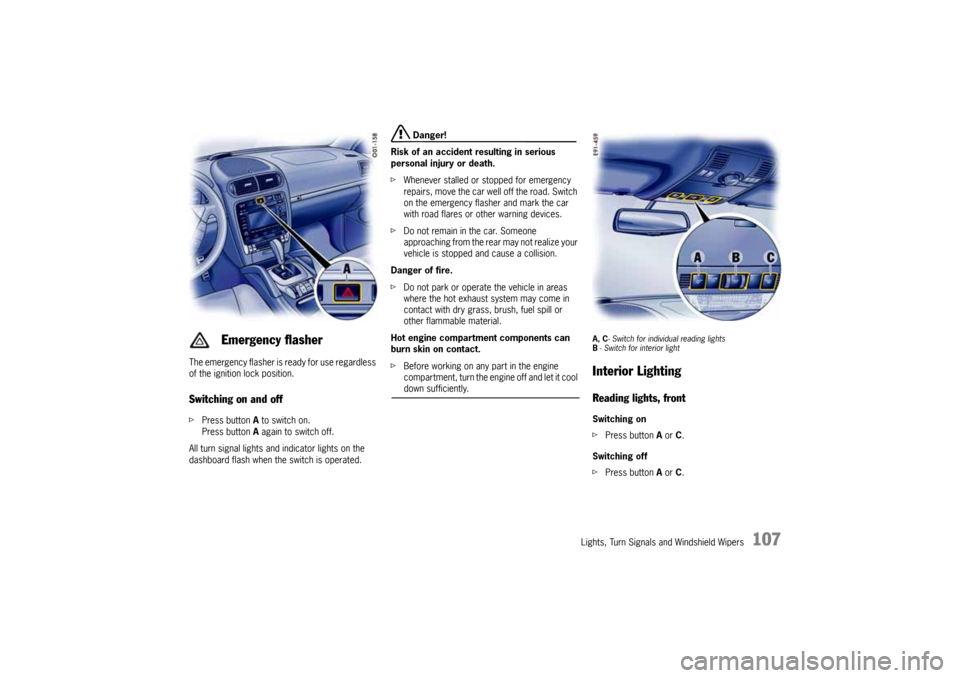
The emergency flasher is ready for use regardless
of the ignition lock position.Switching on and offfPress button A to switch on.
Press button A again to switch off.
All turn signal lights and indicator lights on the
dashboard flash when the switch is operated.
Danger!
Risk of an accident resulting in serious
personal injury or death.
fWhenever stalled or stopped for emergency
repairs, move the car well off the road. Switch
on the emergency flasher and mark the car
with road flares or other warning devices.
fDo not remain in the car. Someone
approaching from the rear may not realize your
vehicle is stopped and cause a collision.
Danger of fire.
fDo not park or operate the vehicle in areas
where the hot exhaust system may come in
contact with dry grass, brush, fuel spill or
other flammable material.
Hot engine compartment components can
burn skin on contact.
fBefore working on any part in the engine
compartment, turn the engine off and let it cool down sufficiently.
A, C- Switch for individual reading lights
B- Switch for interior lightInterior LightingReading lights, frontSwitching on
fPress button A or C.
Switching off
fPress button A or C.
Emergency flasher
10_Cayenne_21_KW17.book Seite 107 Donnerstag, 9. April 2009 3:33 15
Page 110 of 379

110
Lights, Turn Signals and Windshield Wipers
Brief overview – Windshield wipersThis brief overview does not replace the informati-
on provided in the chapter “Windshield wiper/
washer stalk”.
In particular, warnings are not replaced by this
brief overview.
Windshield wiper stalk Rain sensor rotary switch
What do I want to do?
What do I have to do?
Automatic wiping at front
(rain sensor)Press the stalk to detent position 1.
Rain sensor adjustment
Adjust rotary switch A in the stalk upwards (wipe more often) or downwards (wipe less often).
Wiping at front
Slow: Move the stalk to detent position 2.
Fast: Move the stalk to detent position 3.
Once: Briefly press stalk to position 4.
Spraying and wiping at front
Pull stalk to position 5 and hold.
Wiping at rear
Normal: Press stalk to position 6.
Once: Briefly move stalk to position 7.
Spraying and wiping at rear
Keep stalk pressed in position 7.
10_Cayenne_21_KW17.book Seite 110 Donnerstag, 9. April 2009 3:33 15
Page 111 of 379

Lights, Turn Signals and Windshield Wipers
111
Windshield Wiper/Washer Stalk
Warning!
Danger of injury when the windshield wipers
operate unintentionally.
Risk of damage to the engine compartment
lid, windshield and wiper system.
fOnly wipe the windshield when sufficiently wet,
otherwise it could be scratched.
fLoosen frozen wiper blades before driving off.
fDo not operate headlight washer when it is
frozen.
fAlways switch off windshield wipers in car
wash to prevent them wiping unintentionally
(rain sensor operation).
fDo not operate headlight washer in car
washes.
fAlways switch off windshield wipers before
cleaning the windshield to avoid unintentional
operation (rain sensor operation).
fAlways hold the wiper arm securely when
replacing the wiper blade.fAlways switch the windshield wipers off (wiper
stalk in position 0) before opening the engine
compartment lid. If the wiper arms are not in
end position, they will automatically move to
this position when the engine compartment lid
is opened. This will happen even if the ignition
is off.
The wiper arms remain in this position until the
lid is closed and the wiper system is switched
off and then on again.
0 – Windshield wipers off
1 – Front windshield wiper – rain sensor
operation
fMove wiper stalk upwards to the first click.
Notes on operation
The amount of precipitation which has settled on
the windshield is measured. Wiper speed is auto-
matically adjusted accordingly.
10_Cayenne_21_KW17.book Seite 111 Donnerstag, 9. April 2009 3:33 15
Page 115 of 379
Multi-Purpose Display and Instruments
115 Multi-Purpose Display and Instruments
Instrument Panel USA Models ......................117
Instrument Panel Canada Models ..................119
Oil Temperature Gage.................................120
Tachometer ................................................120
Clock .........................................................120
Fuel Gage ...................................................120
Speedometer..............................................120
Odometer ...................................................121
Voltmeter ...................................................121
Cooling System ..........................................122
Emission Control .........................................123
Operating the multi-purpose display on the
instrument panel .........................................124
Opening the main menu...............................125
Operating example: Displaying average
consumption...............................................125
Displaying/resetting average speed .............127
Displaying range on remaining fuel ...............127
Displaying tire pressure ...............................127
Displaying compass ....................................127
Displaying navigation information..................127
Operating the telephone via the
multi-purpose display...................................128
Setting speed limit on the multi-purpose
display .......................................................129
Displaying warning messages ......................130
Displaying status of level control ..................131
Displaying status of locks/reduction .............131
Displaying average consumption ..................132
Setting Tire Pressure Monitoring ..................132Switching off passenger compartment
monitoring on the multi-purpose display ....... 142
Synchronous adjustment of door mirrors ..... 143
Changing settings for opening and locking
the vehicle ................................................. 143
Switching daytime driving lights on/off ......... 145
Setting lighting off delay ............................. 146
Setting the clock ........................................ 146
Setting compass ........................................ 147
Changing language for displays ................... 148
Changing units for displays ......................... 148
Resetting display to factory settings ............ 148
Overview of warning messages.............. 149
10_Cayenne_21_KW17.book Seite 115 Donnerstag, 9. April 2009 3:33 15
Page 117 of 379
Multi-Purpose Display and Instruments
117
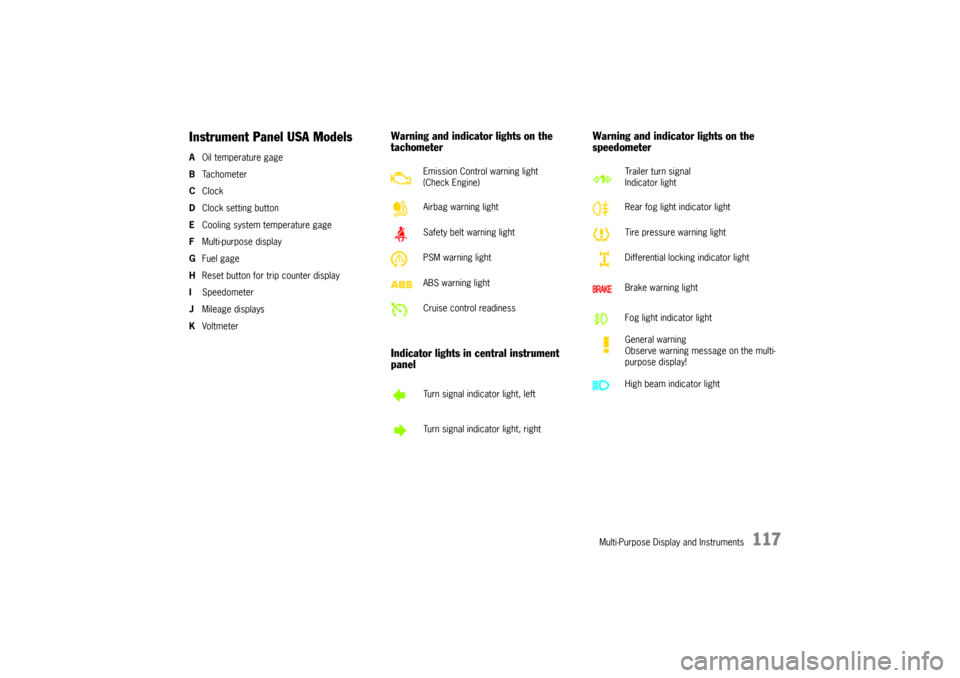
Instrument Panel USA ModelsAOil temperature gage
BTa c h o m e t e r
CClock
DClock setting button
ECooling system temperature gage
FMulti-purpose display
GFuel gage
HReset button for trip counter display
ISpeedometer
JMileage displays
KVoltmeter
Warning and indicator lights on the
tachometer
Indicator lights in central instrument
panelWarning and indicator lights on the
speedometer
Emission Control warning light
(Check Engine)
Airbag warning light
Safety belt warning light
PSM warning light
ABS warning light
Cruise control readiness
Turn signal indicator light, left
Turn signal indicator light, right
Trailer turn signal
Indicator light
Rear fog light indicator light
Tire pressure warning light
Differential locking indicator light
Brake warning light
Fog light indicator light
General warning
Observe warning message on the multi-
purpose display!
High beam indicator light
10_Cayenne_21_KW17.book Seite 117 Donnerstag, 9. April 2009 3:33 15
Page 119 of 379
Multi-Purpose Display and Instruments
119
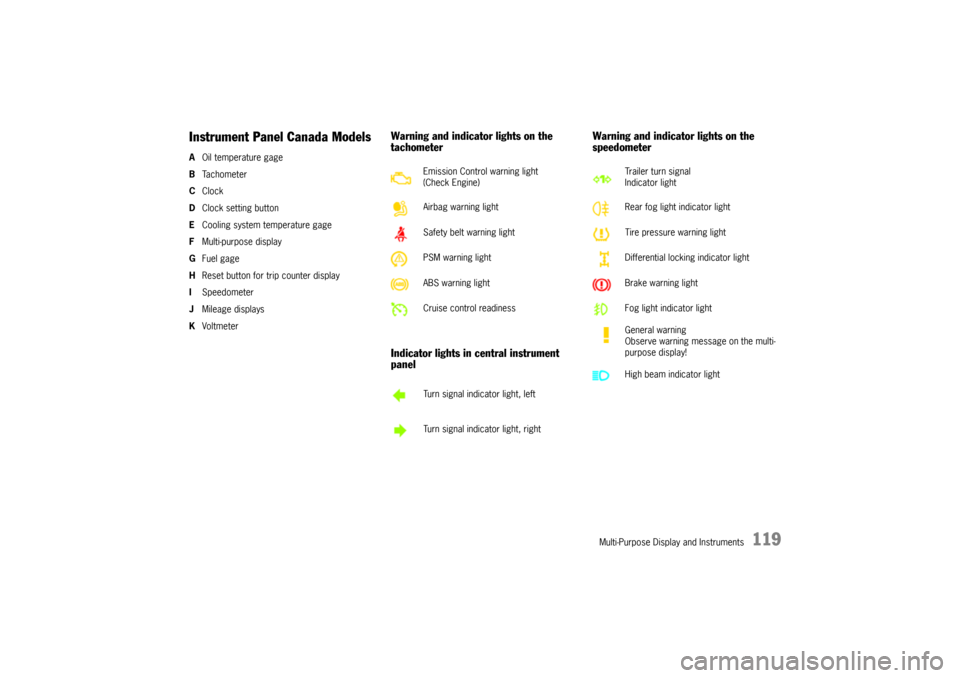
Instrument Panel Canada ModelsAOil temperature gage
BTa c h o m e t e r
CClock
DClock setting button
ECooling system temperature gage
FMulti-purpose display
GFuel gage
HReset button for trip counter display
ISpeedometer
JMileage displays
KVoltmeter
Warning and indicator lights on the
tachometer
Indicator lights in central instrument
panelWarning and indicator lights on the
speedometer
Emission Control warning light
(Check Engine)
Airbag warning light
Safety belt warning light
PSM warning light
ABS warning light
Cruise control readiness
Turn signal indicator light, left
Turn signal indicator light, right
Trailer turn signal
Indicator light
Rear fog light indicator light
Tire pressure warning light
Differential locking indicator light
Brake warning light
Fog light indicator light
General warning
Observe warning message on the multi-
purpose display!
High beam indicator light
10_Cayenne_21_KW17.book Seite 119 Donnerstag, 9. April 2009 3:33 15
Page 120 of 379
120
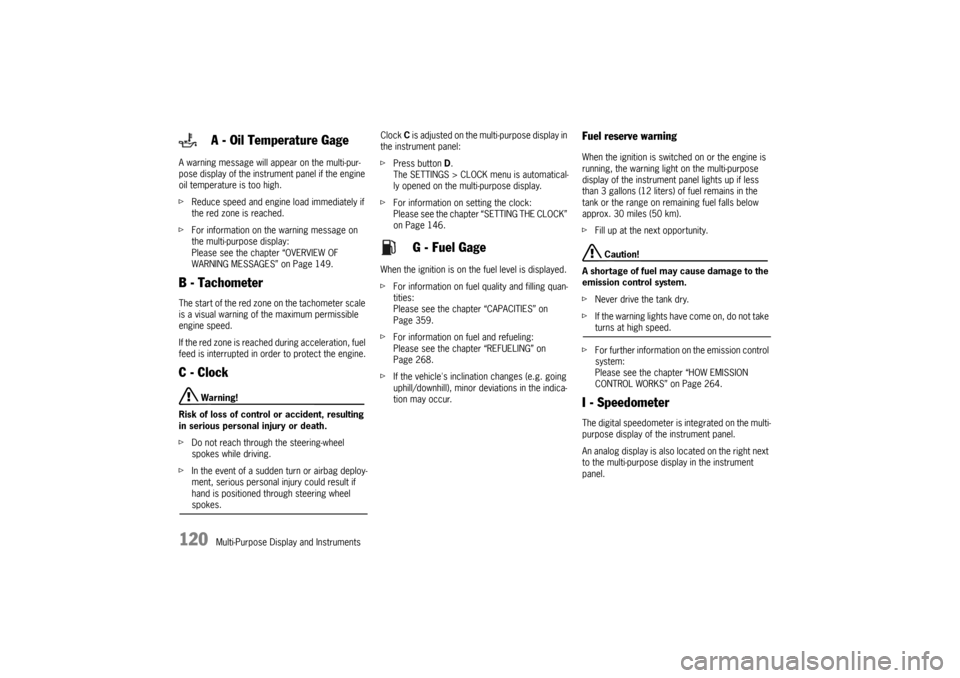
Multi-Purpose Display and Instruments A warning message will appear on the multi-pur-
pose display of the instrument panel if the engine
oil temperature is too high.
fReduce speed and engine load immediately if
the red zone is reached.
fFor information on the warning message on
the multi-purpose display:
Please see the chapter “OVERVIEW OF
WARNING MESSAGES” on Page 149.
B - TachometerThe start of the red zone on the tachometer scale
is a visual warning of the maximum permissible
engine speed.
If the red zone is reached during acceleration, fuel
feed is interrupted in order to protect the engine.C - Clock
Warning!
Risk of loss of control or accident, resulting
in serious personal injury or death.
fDo not reach through the steering-wheel
spokes while driving.
fIn the event of a sudden turn or airbag deploy-
ment, serious personal injury could result if
hand is positioned through steering wheel spokes.Clock C is adjusted on the multi-purpose display in
the instrument panel:
fPress button D.
The SETTINGS > CLOCK menu is automatical-
ly opened on the multi-purpose display.
fFor information on setting the clock:
Please see the chapter “SETTING THE CLOCK”
on Page 146.
When the ignition is on the fuel level is displayed.
fFor information on fuel quality and filling quan-
tities:
Please see the chapter “CAPACITIES” on
Page 359.
fFor information on fuel and refueling:
Please see the chapter “REFUELING” on
Page 268.
fIf the vehicle's inclination changes (e.g. going
uphill/downhill), minor deviations in the indica-
tion may occur.
Fuel reserve warningWhen the ignition is switched on or the engine is
running, the warning light on the multi-purpose
display of the instrument panel lights up if less
than 3 gallons (12 liters) of fuel remains in the
tank or the range on remaining fuel falls below
approx. 30 miles (50 km).
fFill up at the next opportunity.
Caution!
A shortage of fuel may cause damage to the
emission control system.
fNever drive the tank dry.
fIf the warning lights have come on, do not take turns at high speed.
fFor further information on the emission control
system:
Please see the chapter “HOW EMISSION
CONTROL WORKS” on Page 264.
I - SpeedometerThe digital speedometer is integrated on the multi-
purpose display of the instrument panel.
An analog display is also located on the right next
to the multi-purpose display in the instrument
panel.
A - Oil Temperature Gage
G - Fuel Gage
10_Cayenne_21_KW17.book Seite 120 Donnerstag, 9. April 2009 3:33 15
Page 121 of 379
Multi-Purpose Display and Instruments
121
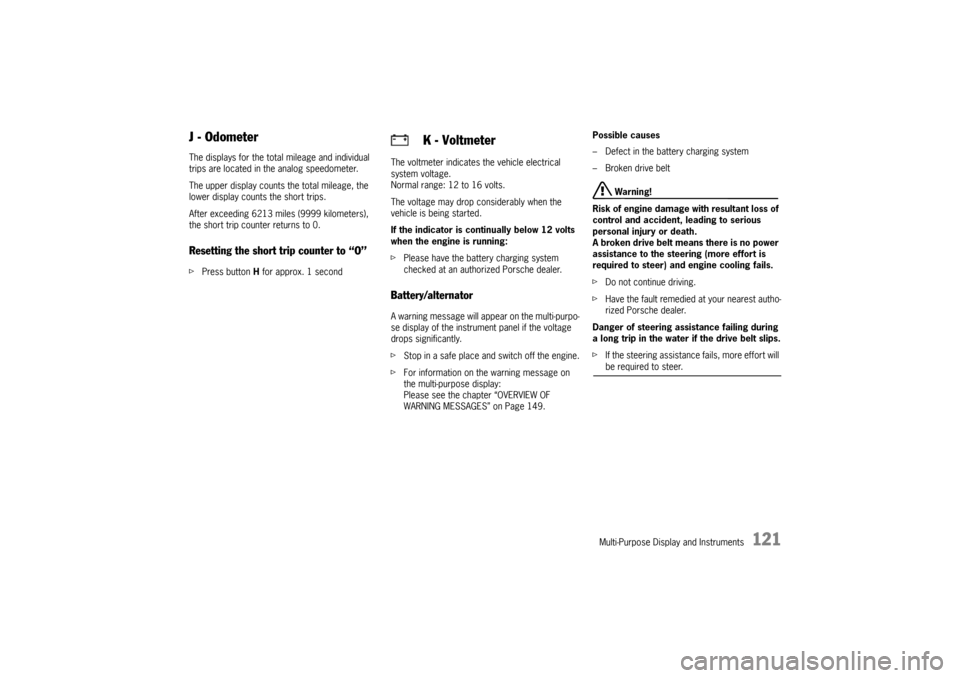
J - OdometerThe displays for the total mileage and individual
trips are located in the analog speedometer.
The upper display counts the total mileage, the
lower display counts the short trips.
After exceeding 6213 miles (9999 kilometers),
the short trip counter returns to 0.Resetting the short trip counter to “O”fPress button H for approx. 1 secondThe voltmeter indicates the vehicle electrical
system voltage.
Normal range: 12 to 16 volts.
The voltage may drop considerably when the
vehicle is being started.
If the indicator is continually below 12 volts
when the engine is running:
fPlease have the battery charging system
checked at an authorized Porsche dealer.
Battery/alternatorA warning message will appear on the multi-purpo-
se display of the instrument panel if the voltage
drops significantly.
fStop in a safe place and switch off the engine.
fFor information on the warning message on
the multi-purpose display:
Please see the chapter “OVERVIEW OF
WARNING MESSAGES” on Page 149.Possible causes
– Defect in the battery charging system
– Broken drive belt
Warning!
Risk of engine damage with resultant loss of
control and accident, leading to serious
personal injury or death.
A broken drive belt means there is no power
assistance to the steering (more effort is
required to steer) and engine cooling fails.
fDo not continue driving.
fHave the fault remedied at your nearest autho-
rized Porsche dealer.
Danger of steering assistance failing during
a long trip in the water if the drive belt slips.
fIf the steering assistance fails, more effort will be required to steer.
K - Voltmeter
10_Cayenne_21_KW17.book Seite 121 Donnerstag, 9. April 2009 3:33 15