ESP PORSCHE CAYNNE S 2006 1.G Owner's Manual
[x] Cancel search | Manufacturer: PORSCHE, Model Year: 2006, Model line: CAYENNE S, Model: PORSCHE CAYENNE S 2006 1.GPages: 420, PDF Size: 3.81 MB
Page 124 of 420

124
Controls, Safety, Instruments
Warning Lights and Warning MessagesIf a warning message appears, always refer to the corresponding chapters in this Owner's Manual.
Warning messages are issued only if all measurement preconditions are met.
Therefore, check all fluid levels regularly – in particular, always check the engine oil level after refuelling.
Instrument
panelMulti-purpose
displayText display Meaning/measures
Steering faulty Steering lock engaged.
Have the fault remedied at an authorized Porsche dealer.
Ignition lock faulty Do not continue driving.
Have the fault remedied at an authorized Porsche dealer.
System fault – Workshop Have the fault remedied at an authorized Porsche dealer.
Key not recognised in vehicle Make sure that you have the remote control with you.
Turn ignition key to left for
2 secondsEngage the steering lock.
Key: replace battery Replace the remote-control battery.
Move the steering wheel Turn the steering wheel so that the steering wheel lock can
engage/disengage.
Key not found Make sure that you have the remote control with you.
Switch selector lever to position “P”.Tiptronic S: The vehicle could roll away.
The ignition key can be withdrawn only in selector lever
positionP.
Apply the brake Apply the brake when starting.
Move selector lever to position
“P” or “N”Tiptronic S: The vehicle can be started only in position P or N.
Applying the clutch Manual transmission: Apply the clutch when starting.
Page 133 of 420

Controls, Safety, Instruments
133
Automatic driving light assistantThe driving light assistant is a comfort function.
Your Porsche’s driving light (low beam) is switched
on and off automatically, irrespective of the ambi-
ent brightness.
Despite possible support by the driving light assis-
tant, it is the responsibility of the driver to switch
on the driving light using the conventional light
switch in accordance with the relevant national
regulations.
Activating the headlights using the driving light as-
sistant does not therefore absolve the driver
of responsibility for the correct operation of the
driving light.
The low beam is switched on automatically in the
following situations:
–Dusk
–Darkness
– Travelling through tunnels
– Rain (in conjunction with the rain sensor)
– Highway driving
Note on operation
Fog is not recognised.
fIn the event of fog, the driving light must be
switched on manually.
Warning!
Risk of accident due to driving without lights.
fAlways carefully monitor the automatic driving light control.
Off delay and door-surrounding lighting
Off delay and door-surrounding lighting are active
when the automatic driving light assistant is
switched on.
fPlease observe the chapter “DOOR-SURROUN-
DING LIGHTING” on Page 168.
fPlease observe the chapter “COMING HOME
FUNCTION (AUTO SHUT OFF DELAY)” on
Page 168.
Highway function
The light is switched on at speeds of over 87 mph
(140 km/h). If you are travelling slower than
40 mph (65 km/h), the driving light is switched off
after a delay of approx. 2 minutes, if the external
lighting conditions permit.
Rain function
The driving light is switched on after five seconds
of continuous wiper operation.
The driving light is switched off approx. 4 minutes
after the wipers have stopped.
Bi-Xenon main headlights with
dynamically controlled cornering lightThe Bi-Xenon main headlights are equipped with
an additional light in vehicles with a cornering
light. As a result of its particular positioning, the
additional light provides significantly better lane
lighting to the left and right of the main light beam.
Page 145 of 420
Controls, Safety, Instruments
145
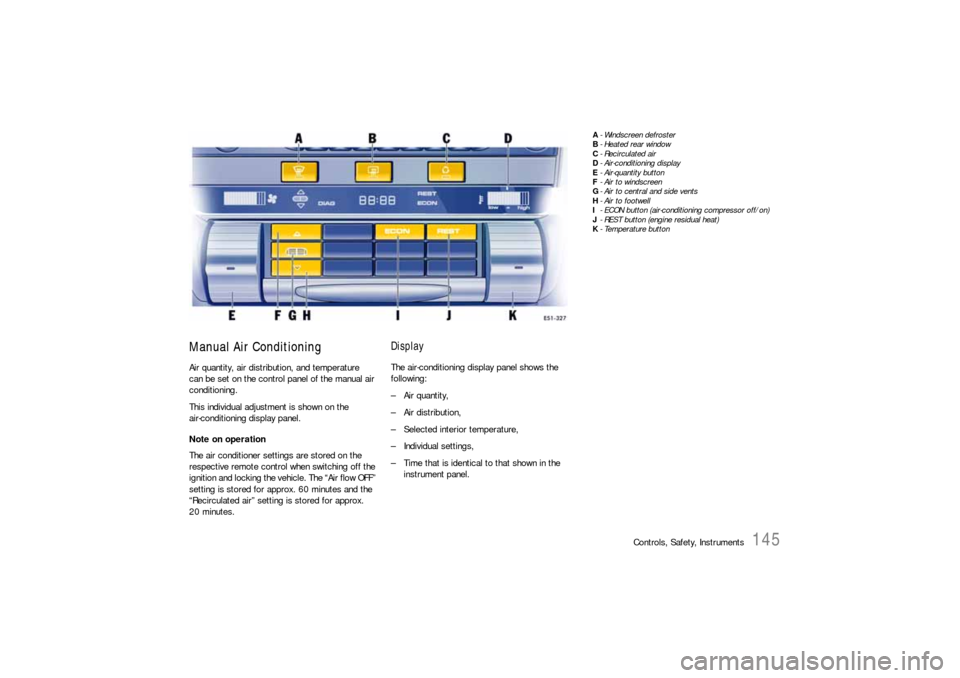
Manual Air ConditioningAir quantity, air distribution, and temperature
can be set on the control panel of the manual air
conditioning.
This individual adjustment is shown on the
air-conditioning display panel.
Note on operation
The air conditioner settings are stored on the
respective remote control when switching off the
ignition and locking the vehic l e . T he “A i r fl o w O F F ”
setting is stored for approx. 60 minutes and the
“Recirculated air” setting is stored for approx.
20 minutes.
DisplayThe air-conditioning display panel shows the
following:
– Air quantity,
–Air distribution,
– Selected interior temperature,
– Individual settings,
– Time that is identical to that shown in the
instrument panel.
A- Windscreen defroster
B-Heated rear window
C- Recirculated air
D- Air-conditioning display
E- Air-quantity button
F-Air to windscreen
G- Air to central and side vents
H- Air to footwell
I- ECON button (air-conditioning compressor off/on)
J- REST button (engine residual heat)
K-Temperature button
Page 156 of 420
156
Controls, Safety, Instruments The air quantity can be selected individually for
each of the four air-conditioned areas.
– Front control panel:
The air flows to the windscreen.
– Rear control panel:
The air flows to the respective side window.
fPress button I or O.
fPress button K or P.
– Front control panel:
The air flows from the front central and side
vents.
– Rear control panel:
The air flows to the center vents.
fVents must be open.
fPress button L.
The air flows to the footwell.
Ending air distribution functions
fPress the relevant button again or
fPress the AUTO button.
ECON modeThe outside air that is flowing in does not dry up if
the air-conditioning compressor is switched off.
Warning!
Risk of accident due to hampered vision.
If the air-conditioning compressor is
switched off, the windows may mist up.
fDo not switch off the air-conditioning compres-sor in damp weather.
Switching air-conditioning compressor off
Whenever outside temperatures exceed 37.4°F
(3°C), the air-conditioning compressor is always
switched on in automatic mode.
The compressor can be switched off to save fuel,
but control comfort is then limited:
fPress ECON button N on the front control pan-
el. The air-conditioning compressor is
switched off.
Switching air-conditioning compressor on
fIf the interior temperature is too high:
Press ECON button N or
Press the AUTO button C.
Information on air-conditioning
compressorThe air-conditioning compressor:
– Can switch off briefly if engine is under an ex-
treme load to ensure sufficient engine cooling.
– Switches off automatically at temperatures be-
low approx. 37.4°F (3°C) and cannot be
switched on, even manually.
– Operates most effectively with windows
closed.
If the car has been in the sun for a long time,
however, it is a good idea to ventilate the inte-
rior briefly with the windows open.
Notes on operation
Depending on the outside temperature and humid-
ity, condensation can drip from the evaporator
and form a pool under the car.
This is normal and not a sign of leakage.
If uncooled air flows out when the lowest temper-
ature has been set (“LO”), switch off the air-condi-
tioning compressor and have the fault remedied at
an authorized Porsche dealer.
Air to windshield and side windows
Air to central and side vents
Air to footwell
Page 173 of 420
Controls, Safety, Instruments
173
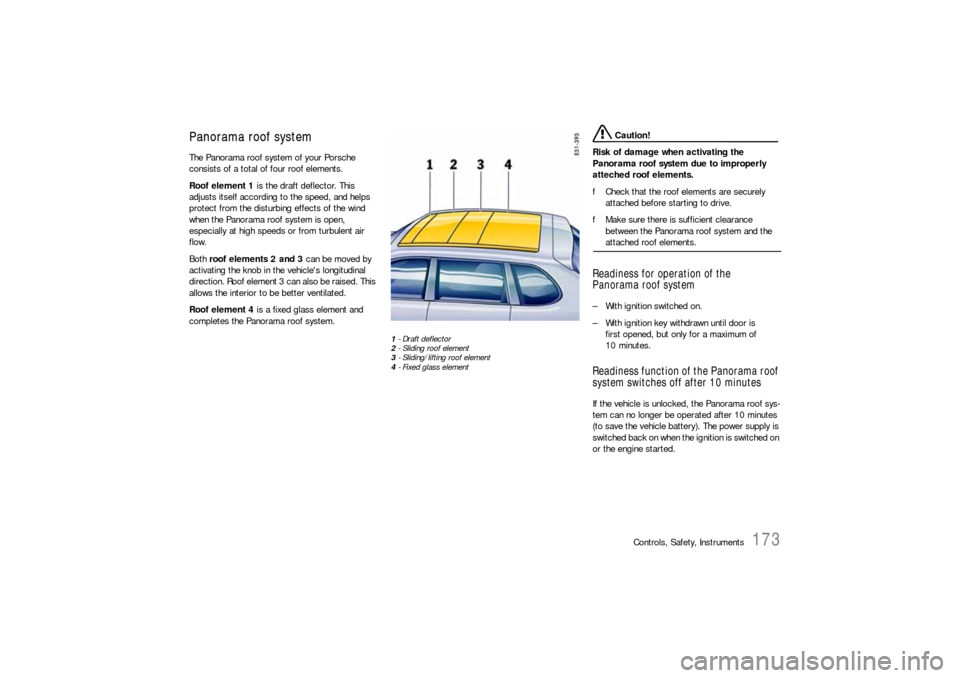
Panorama roof systemThe Panorama roof system of your Porsche
consists of a total of four roof elements.
Roof element 1 is the draft deflector. This
adjusts itself according to the speed, and helps
protect from the disturbing effects of the wind
when the Panorama roof system is open,
especially at high speeds or from turbulent air
flow.
Both roof elements 2 and 3 can be moved by
activating the knob in the vehicle's longitudinal
direction. Roof element 3 can also be raised. This
allows the interior to be better ventilated.
Roof element 4 is a fixed glass element and
completes the Panorama roof system.
1-Draft deflector
2- Sliding roof element
3- Sliding/lifting roof element
4- Fixed glass element
Caution!
Risk of damage when activating the
Panorama roof system due to improperly
atteched roof elements.
fCheck that the roof elements are securely
attached before starting to drive.
fMake sure there is sufficient clearance
between the Panorama roof system and the attached roof elements.
Readiness for operation of the
Panorama roof system– With ignition switched on.
– With ignition key withdrawn until door is
first opened, but only for a maximum of
10 minutes.Readiness function of the Panorama roof
system switches off after 10 minutesIf the vehicle is unlocked, the Panorama roof sys-
tem can no longer be operated after 10 minutes
(to save the vehicle battery). The power supply is
switched bac k o n whe n the ignition is switched on
or the engine started.
Page 175 of 420

Controls, Safety, Instruments
175
Comfort function on vehicles without
Porsche Entry & DriveOpening and closing the Panorama roof
system
fHold the vehicle key in the door lock in the
unlocking or locking position until the windows
and the Panorama roof system have reached
the desired position.Comfort function on vehicles with
Porsche Entry & DriveOpening and closing the Panorama roof
system
fHold the vehicle key in the door lock in the
unlocking or locking position until the windows
and the Panorama roof system have reached
the desired position.
Closing the Panorama roof system
fHold the button in the door handle when
locking the vehicle until the windows and the
Panorama roof system have reached the
desired position.
Force limiter for the Panorama roof
system All roof elements are equipped with a force limiter.
If the sliding roof or the sliding/lifting roof element
is obstructed during the closing or opening
process, the respective roof element opens or
closes again immediately.
Closing a roof element after triggering the
force limiter
1. Remove the obstruction.
2. Turn knob to position A again.Electric emergency closing function
Warning!
Risk of injury from the emergency closing
function for the Panorama roof system. The
force limiter is not available and the roof
elements will close with full force.
fTake care to ensure that nobody can be injured when the Panorama roof system is closing.
If the roof cannot be closed due to dirt, ice, or
similar substances:
1. Turn knob to position A.
2. Hold the knob in position A until all roof
elements are completely closed.
Save final position of the Panorama roof
systemAfter disconnecting/reconnecting the vehicle
battery or if the vehicle battery is discharged, or
after emergency starting with jumper cables, the
final positions of the Panorama roof system are
lost.
Warning!
Risk of injury when closing the Panorama
roof system. The force limiter is not available
and the roof elements will close with full
force.
fTake care to ensure that nobody can be injured when the Panorama roof system is closing.
1. Switch ignition off.
2. Turn knob to position A.
3. Switch ignition on.
4. Hold knob in position A. The closing process
begins after around 5 seconds. Hold the knob
in position until the roller blind and all roof
elements are completely closed. The proce-
dure lasts approximately 20 seconds.
Note on operation
If the procedure is interrupted, saving the final po-
sitions must be started from the beginning.
Page 179 of 420
Controls, Safety, Instruments
179
Parking AidsParkAssistParkAssist provides a visual and acoustic indica-
tion to the driver of the distance between the
vehicle and a large obstacle.
ParkAssist is switched on automatically when the
ignition is switched on and remains active up to a
speed of approx. 9 mph (14 km/h).
ParkAssist is switched off automatically at high
speed. ParkAssist is switched on again auto-
matically when the speed drops below approx.
9 mph (14 km/h).
The selector lever position determines activation
levels for ParkAssist and the corresponding area
that is monitored.
Selector lever position:
–P – ParkAssist is not activated.
–R, N – ParkAssist is activated for the front and
rear areas.
–D, M – ParkAssist is activated for the front ar-
ea.Gearshift lever position:
–R – ParkAssist is activated for the front and
rear areas.
–In all other gearshift positions – ParkAssist
is activated for the front area.
Note
On vehicles with manual transmission, the parking
assistant is not switched on in the rear area if the
vehicle rolls backward without reverse gear en-
gaged.
Danger!
Risk of serious personal injury or death.
ParkAssist cannot detect small objects such
as children and pets.
Even when using ParkAssist, the driver is still
responsible for taking due care when park-
ing and when assessing obstacles.
fMake sure that no persons especially small
children, animals or obstacles are within the maneuvering area.Switching ParkAssist on and off
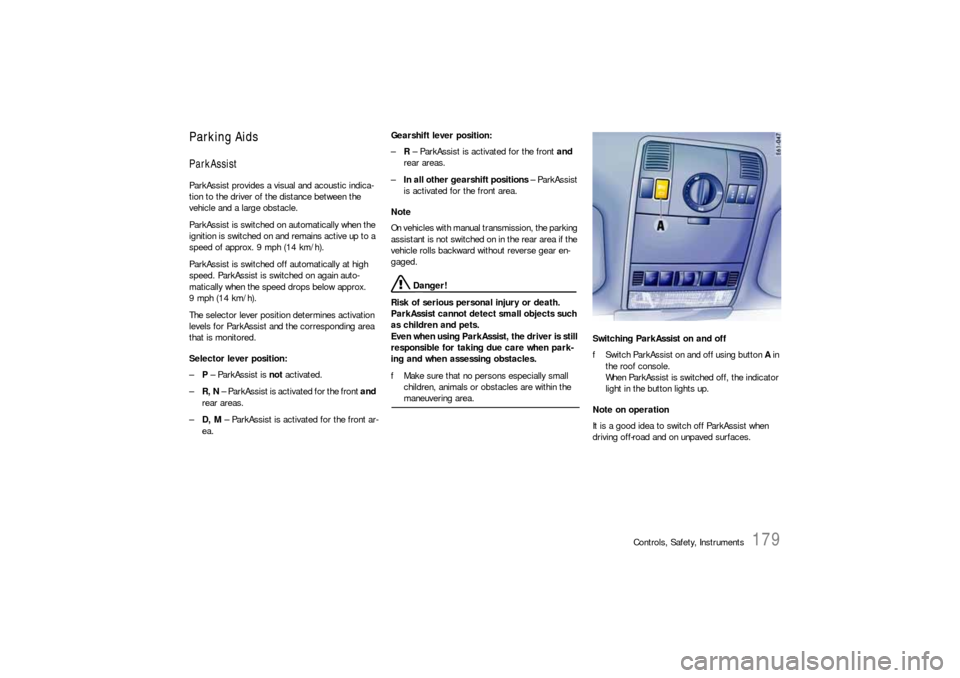
fSwitch ParkAssist on and off using button A in
the roof console.
When ParkAssist is switched off, the indicator
light in the button lights up.
Note on operation
It is a good idea to switch off ParkAssist when
driving off-road and on unpaved surfaces.
Page 181 of 420
Controls, Safety, Instruments
181
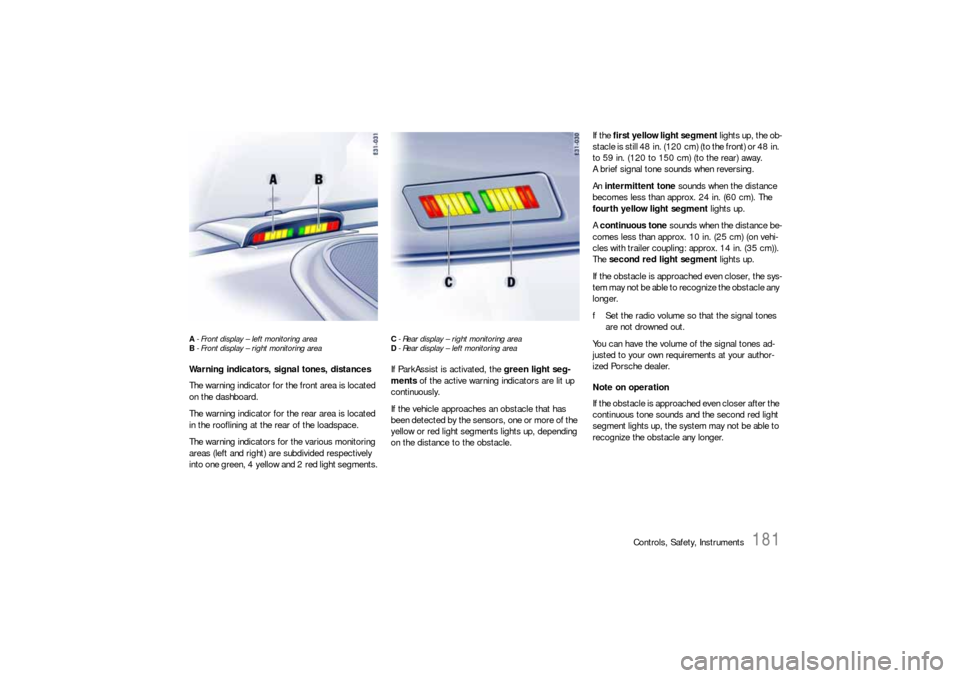
A- Front display – left monitoring area
B- Front display – right monitoring areaWarning indicators, signal tones, distances
The warning indicator for the front area is located
on the dashboard.
The warning indicator for the rear area is located
in the rooflining at the rear of the loadspace.
The warning indicators for the various monitoring
areas (left and right) are subdivided respectively
into one green, 4 yellow and 2 red light segments.
C- Rear display – right monitoring area
D- Rear display – left monitoring areaIf ParkAssist is activated, the green light seg-
ments of the active warning indicators are lit up
continuously.
If the vehicle approaches an obstacle that has
been detected by the sensors, one or more of the
yellow or red light segments lights up, depending
on the distance to the obstacle.If the first yellow light segment lights up, the ob-
stacle is still 48 in. (120 cm) (to the front) or 48 in.
to 59 in. (120 to 150 cm) (to the rear) away.
A brief signal tone sounds when reversing.
An intermittent tone sounds when the distance
becomes less than approx. 24 in. (60 cm). The
fourth yellow light segment lights up.
A continuous tone sounds when the distance be-
comes less than approx. 10 in. (25 cm) (on vehi-
cles with trailer coupling: approx. 14 in. (35 cm)).
The second red light segment lights up.
If the obstacle is approached even closer, the sys-
tem may not be able to recognize the obstacle any
longer.
fSet the radio volume so that the signal tones
are not drowned out.
You can have the volume of the signal tones ad-
justed to your own requirements at your author-
ized Porsche dealer.
Note on operation
If the obstacle is approached even closer after the
continuous tone sounds and the second red light
segment lights up, the system may not be able to
recognize the obstacle any longer.
Page 189 of 420

Controls, Safety, Instruments
189
Car Audio Operation/TipsFor radio operation see your radio manual
which is included with your on-board litera-
ture.FM receptionA vehicle is not an ideal place to listen to a radio.
Because the vehicle moves, reception conditions
are constantly changing.
Buildings, terrain, signal distance and noise from
other vehicles are all working against good recep-
tion.
Some conditions affecting FM may appear to be
problems when they are not.
The following characteristics are completely nor-
mal for a given reception area, and they do not in-
dicate any problem with the radio itself.
Note
Electronic accessories should only be installed by
your authorized Porsche dealer.
Equipment which has not been tested and ap-
proved by Porsche may impair radio reception.Fading and drifting
FM range is limited to about 25 miles (40 km), ex-
cept for some high power stations.
If a vehicle is moving away from the desired sta-
tion's transmitter, the signal will tend to fade and/
or drift. This condition is more prevalent with FM
than AM, and is often accompanied by distortion.
Fading and drifting can be minimized to a certain
degree by careful attention to fine tuning or selec-
tion of a stronger signal.
Static and fluttering
When the line-of-sight link between a transmitter
and vehicle is blocked by large buildings or moun-
tains, the radio sound may be accompanied with
static or fluttering because of the characteristic of
FM.
In a similar effect, a fluttering noise is sometimes
heard when driving along a tree-lined road.
This static and fluttering can be reduced by adjust-
ing the tone control for greater bass response un-
til the disturbance has passed.Multipath
Because of the reflecting characteristics of FM, di-
rect and reflected signals may reach the antenna
at the same time (multipath) and cancel each other
out.
As a vehicle moves through these electronic dead
spots, the listener may hear a momentary flutter
or loss of reception.
Station swapping
When two FM stations are close to each other, and
an electronic dead spot, such as static or multip-
ath area, interrupts the original signal, sometimes
the stronger second signal will be selected auto-
matically until the original one returns.
This swapping can also occur as you drive away
from the selected station and approach another
station of a stronger signal.
Page 200 of 420
200
Controls, Safety, Instruments
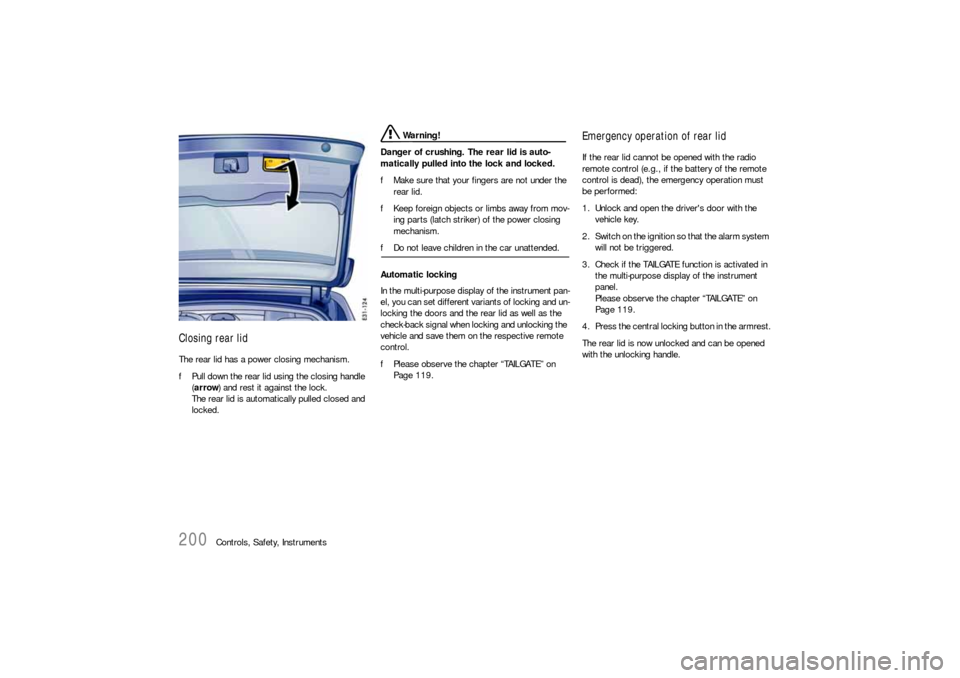
Closing rear lidThe rear lid has a power closing mechanism.
fPull down the rear lid using the closing handle
(arrow) and rest it against the lock.
The rear lid is automatically pulled closed and
locked.
Warning!
Danger of crushing. The rear lid is auto-
matically pulled into the lock and locked.
fMake sure that your fingers are not under the
rear lid.
fKeep foreign objects or limbs away from mov-
ing parts (latch striker) of the power closing
mechanism.
fDo not leave children in the car unattended.
Automatic locking
In the multi-purpose display of the instrument pan-
el, you can set different variants of locking and un-
locking the doors and the rear lid as well as the
check-back signal when locking and unlocking the
vehicle and save them on the respective remote
control.
fPlease observe the chapter “TAILGATE” on
Page 119.
Emergency operation of rear lidIf the rear lid cannot be opened with the radio
remote control (e.g., if the battery of the remote
control is dead), the emergency operation must
be performed:
1. Unlock and open the driver's door with the
vehicle key.
2. Switch on the ignition so that the alarm system
will not be triggered.
3. Check if the TAILGATE function is activated in
the multi-purpose display of the instrument
panel.
Please observe the chapter “TAILGATE” on
Page 119.
4. Press the central locking button in the armrest.
The rear lid is now unlocked and can be opened
with the unlocking handle.