reset PORSCHE CAYNNE S 2006 1.G Owner's Manual
[x] Cancel search | Manufacturer: PORSCHE, Model Year: 2006, Model line: CAYENNE S, Model: PORSCHE CAYENNE S 2006 1.GPages: 420, PDF Size: 3.81 MB
Page 117 of 420
Controls, Safety, Instruments
117
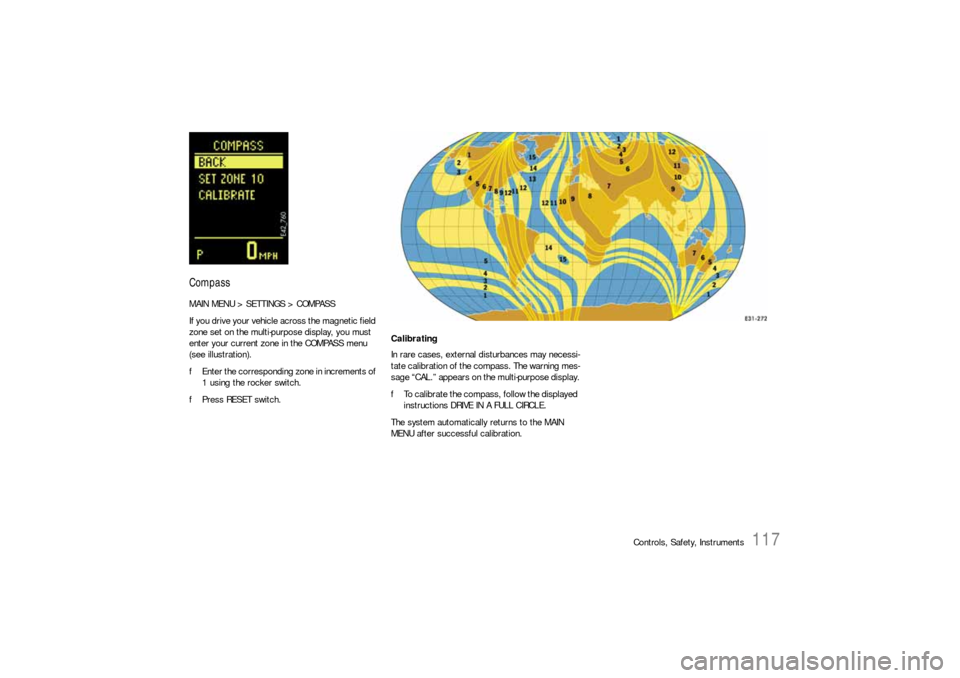
CompassMAIN MENU > SETTINGS > COMPASS
If you drive your vehicle across the magnetic field
zone set on the multi-purpose display, you must
enter your current zone in the COMPASS menu
(see illustration).
fEnter the corresponding zone in increments of
1 using the rocker switch.
fPress RESET switch.
Calibrating
In rare cases, external disturbances may necessi-
tate calibration of the compass. The warning mes-
sage “CAL.” appears on the multi-purpose display.
fTo calibrate the compass, follow the displayed
instructions DRIVE IN A FULL CIRCLE.
The system automatically returns to the MAIN
MENU after successful calibration.
Page 118 of 420

118
Controls, Safety, Instruments
ComfortMAIN MENU > SETTINGS > COMFORT
The COMFORT menu offers the following
submenus:
–Alarm
– Door opening
–Mirrors
fSelect the entry with the rocker switch.
fPress RESET switch.
Note on operation
Comfort settings can be made only when the vehi-
cle is stationary.Alarm
MAIN MENU > SETTINGS > COMFORT > ALARM
The passenger compartment monitoring system
and the inclination sensor (protection against
towing) can be temporarily deactivated in the
ALARM menu.
When locked again, the ultrasound passenger
compartment monitoring system and inclination
sensor are activated once more.
fPlease observe the chapter “TEMPORARILY
DEACTIVATING PASSENGER COMPARTMENT
MONITORING SYSTEM AND INCLINATION SEN-
SOR” on Page 29.Passenger compartment
The alarm is triggered if motion is detected in the
interior with the doors closed (e.g. if a window is
broken in a theft).
fSelect INTERIOR with the rocker switch.
fPress RESET switch.
This activates/deactivates passenger com-
partment monitoring.
Inclination
The alarm is triggered if the vehicle is raised mark-
edly at one end with the doors closed (e.g. theft
attempt by towing).
fSelect ANGLE with the rocker switch.
fPress RESET switch.
This activates/deactivates the inclination sen-
sor.
Page 119 of 420
Controls, Safety, Instruments
119
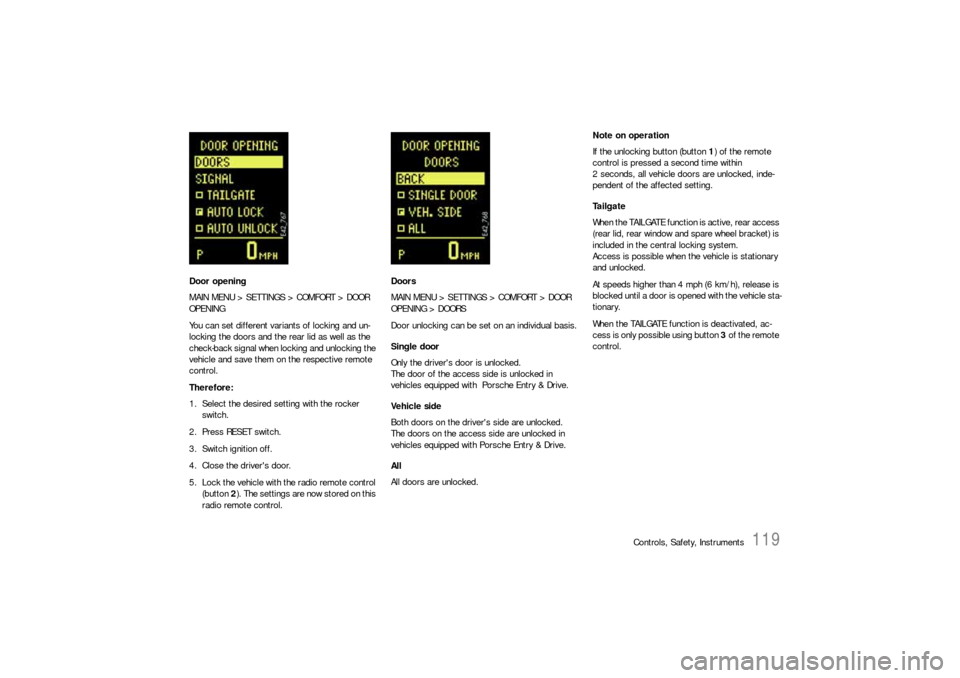
Door opening
MAIN MENU > SETTINGS > COMFORT > DOOR
OPENING
You can set different variants of locking and un-
locking the doors and the rear lid as well as the
check-back signal when locking and unlocking the
vehicle and save them on the respective remote
control.
Therefore:
1. Select the desired setting with the rocker
switch.
2. Press RESET switch.
3. Switch ignition off.
4. Close the driver's door.
5. Lock the vehicle with the radio remote control
(button 2). The settings are now stored on this
radio remote control.Doors
MAIN MENU > SETTINGS > COMFORT > DOOR
OPENING > DOORS
Door unlocking can be set on an individual basis.
Single door
Only the driver's door is unlocked.
The door of the access side is unlocked in
vehicles equipped with Porsche Entry & Drive.
Vehicle side
Both doors on the driver's side are unlocked.
The doors on the access side are unlocked in
vehicles equipped with Porsche Entry & Drive.
All
All doors are unlocked.Note on operation
If the unlocking button (button 1) of the remote
control is pressed a second time within
2 seconds, all vehicle doors are unlocked, inde-
pendent of the affected setting.
Ta i l g a t e
When the TAILGATE function is active, rear access
(rear lid, rear window and spare wheel bracket) is
included in the central locking system.
Access is possible when the vehicle is stationary
and unlocked.
At speeds higher than 4 mph (6 km/h), release is
blocked until a door is opened with the vehicle sta-
tionary.
When the TAILGATE function is deactivated, ac-
cess is only possible using button 3 of the remote
control.
Page 121 of 420
Controls, Safety, Instruments
121
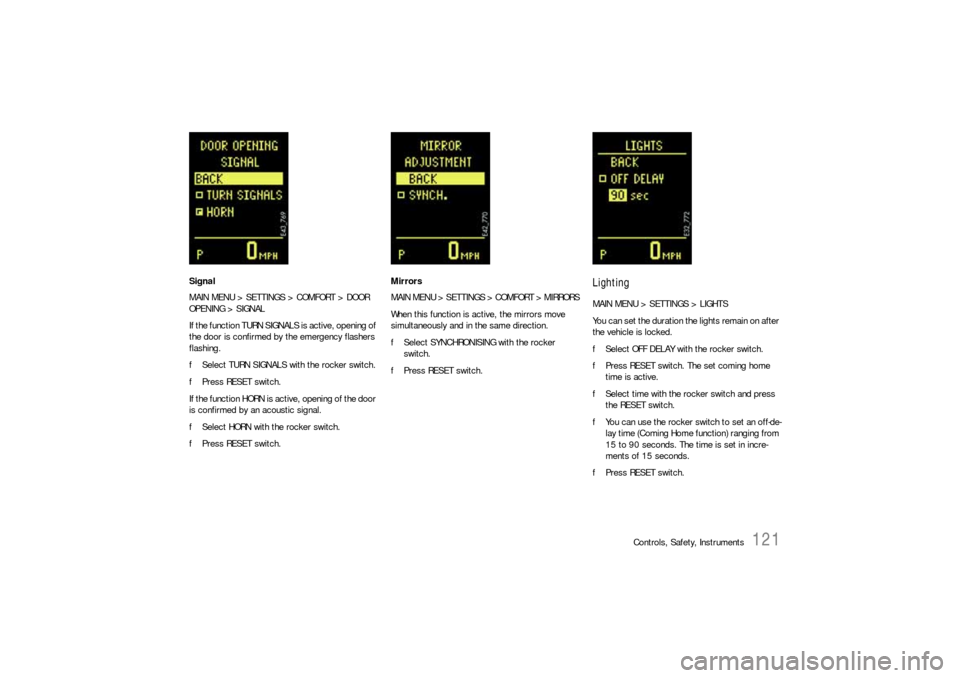
Signal
MAIN MENU > SETTINGS > COMFORT > DOOR
OPENING > SIGNAL
If the function TURN SIGNALS is active, opening of
the door is confirmed by the emergency flashers
flashing.
fSelect TURN SIGNALS with the rocker switch.
fPress RESET switch.
If the function HORN is active, opening of the door
is confirmed by an acoustic signal.
fSelect HORN with the rocker switch.
fPress RESET switch.Mirrors
MAIN MENU > SETTINGS > COMFORT > MIRRORS
When this function is active, the mirrors move
simultaneously and in the same direction.
fSelect SYNCHRONISING with the rocker
switch.
fPress RESET switch.
LightingMAIN MENU > SETTINGS > LIGHTS
You can set the duration the lights remain on after
the vehicle is locked.
fSelect OFF DELAY with the rocker switch.
fPress RESET switch. The set coming home
time is active.
fSelect time with the rocker switch and press
the RESET switch.
fYou can use the rocker switch to set an off-de-
lay time (Coming Home function) ranging from
15 to 90 seconds. The time is set in incre-
ments of 15 seconds.
fPress RESET switch.
Page 122 of 420
122
Controls, Safety, Instruments
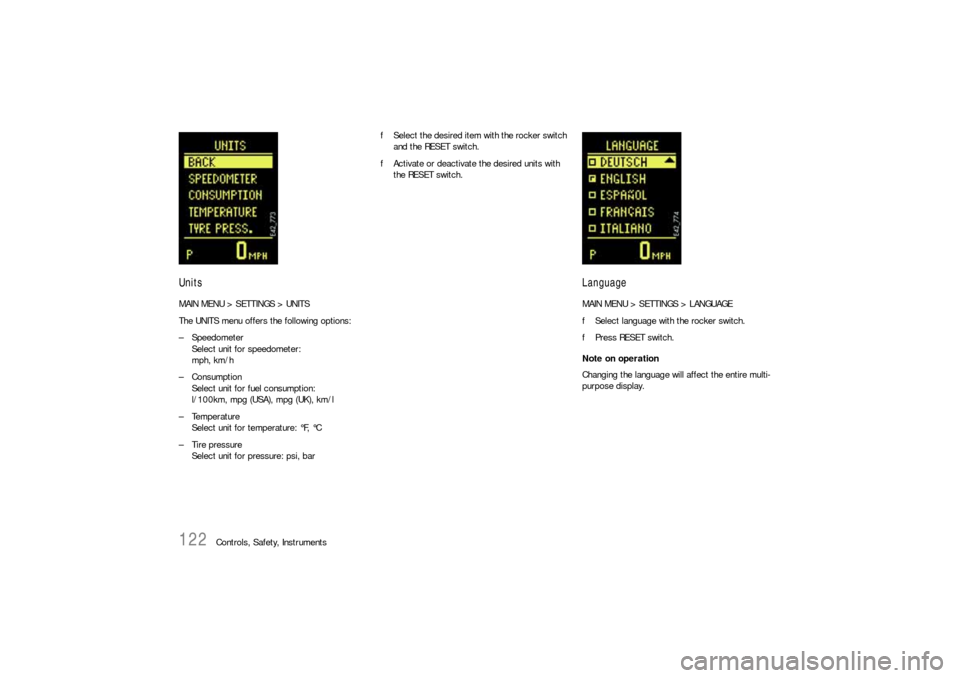
UnitsMAIN MENU > SETTINGS > UNITS
The UNITS menu offers the following options:
– Speedometer
Select unit for speedometer:
mph, km/h
– Consumption
Select unit for fuel consumption:
l/100km, mpg (USA), mpg (UK), km/l
– Temperature
Select unit for temperature: °F, °C
– Tire pressure
Select unit for pressure: psi, barfSelect the desired item with the rocker switch
and the RESET switch.
fActivate or deactivate the desired units with
the RESET switch.
LanguageMAIN MENU > SETTINGS > LANGUAGE
fSelect language with the rocker switch.
fPress RESET switch.
Note on operation
Changing the language will affect the entire multi-
purpose display.
Page 123 of 420
Controls, Safety, Instruments
123
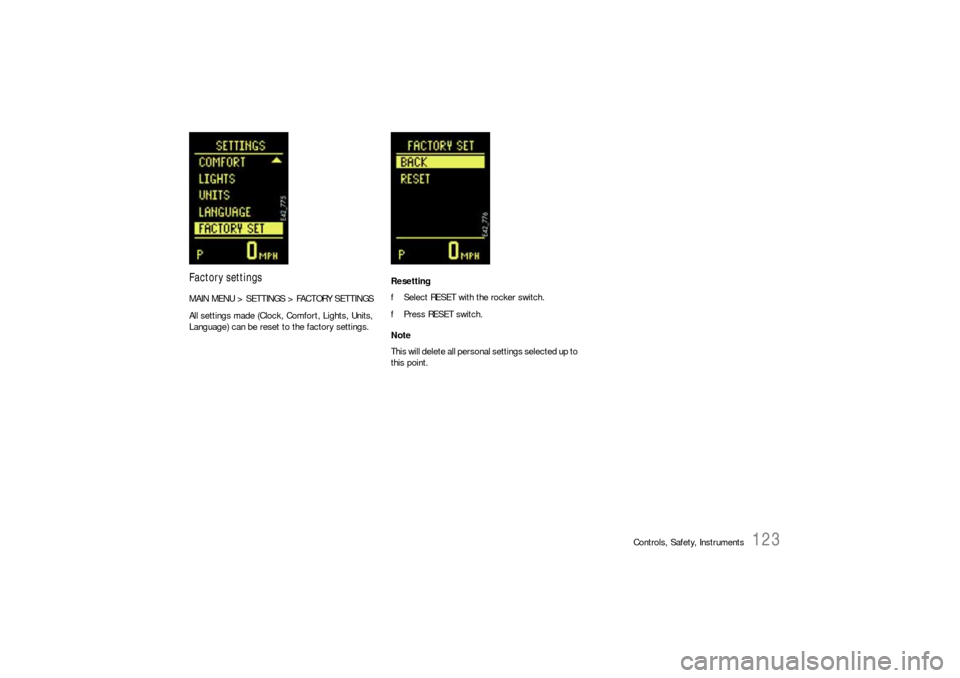
Factory settingsMAIN MENU > SETTINGS > FACTORY SETTINGS
All settings made (Clock, Comfort, Lights, Units,
Language) can be reset to the factory settings.Resetting
fSelect RESET with the rocker switch.
fPress RESET switch.
Note
This will delete all personal settings selected up to
this point.
Page 139 of 420

Controls, Safety, Instruments
139
6 – Rear window wiper – intermittent
operation
fMove wiper stalk forwards to the first click.
The rear window wiper wipes at preset
intervals.
7 – Rear window wiper – one-touch
operation
fPush wiper stalk forward briefly. The washer
system sprays and the rear window wiper goes
through three wipe cycles.
8 – Rear window wiper and washer system
fPush wiper stalk forwards as far as it will go.
The washer system sprays and wipes while the
lever is pulled away from the steering wheel.
When the wiper lever is released, a few drying
wipes are executed.Maintenance note
If the wiper blades rub or squeak, this can be as a
result of the following:
– If the vehicle is washed in an automatic car
wash, residues may adhere to the windshield.
These residues can only be removed using a
special cleaning solution.
Please contact your authorized Porsche dealer
for further information.
– The wiper blades may be damaged or worn.
fReplace the damaged wiper blades
immediately.
Page 148 of 420
148
Controls, Safety, Instruments
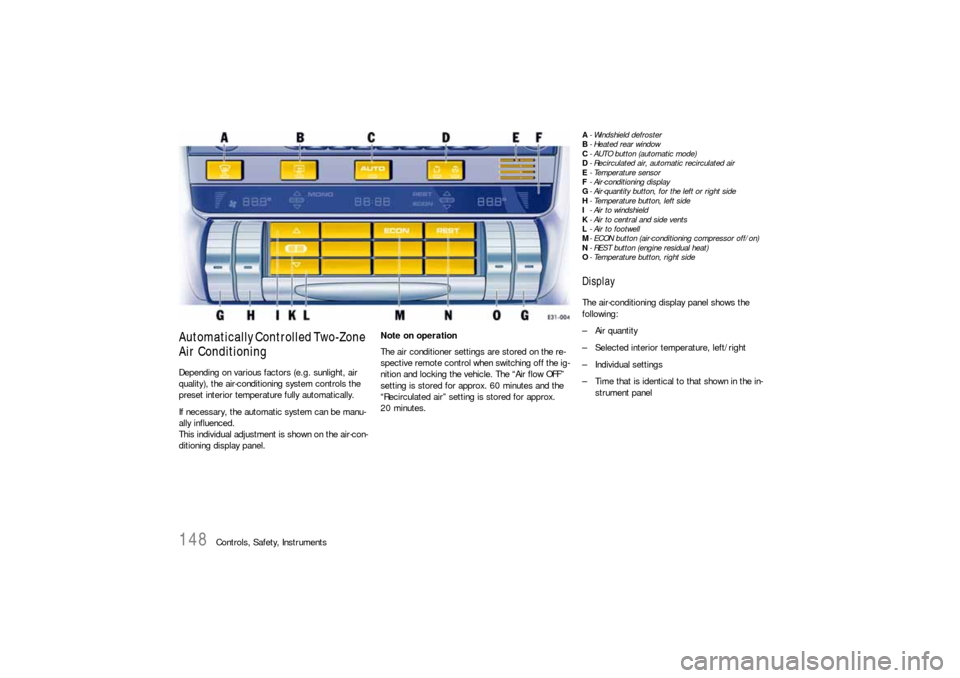
Automatically Controlled Two-Zone
Air ConditioningDepending on various factors (e.g. sunlight, air
quality), the air-conditioning system controls the
preset interior temperature fully automatically.
If necessary, the automatic system can be manu-
ally influenced.
This individual adjustment is shown on the air-con-
ditioning display panel.Note on operation
The air conditioner settings are stored on the re-
spective remote control when switching off the ig-
nition and locking the vehicle. The “Air flow OFF”
setting is stored for approx. 60 minutes and the
“Recirculated air” setting is stored for approx.
20 minutes.
A- Windshield defroster
B-Heated rear window
C- AUTO button (automatic mode)
D- Recirculated air, automatic recirculated air
E-Temperature sensor
F- Air-conditioning display
G- Air-quantity button, for the left or right side
H- Temperature button, left side
I- Air to windshield
K- Air to central and side vents
L- Air to footwell
M- ECON button (air-conditioning compressor off/on)
N- REST button (engine residual heat)
O- Temperature button, right sideDisplayThe air-conditioning display panel shows the
following:
– Air quantity
– Selected interior temperature, left/right
– Individual settings
– Time that is identical to that shown in the in-
strument panel
Page 152 of 420
152
Controls, Safety, Instruments
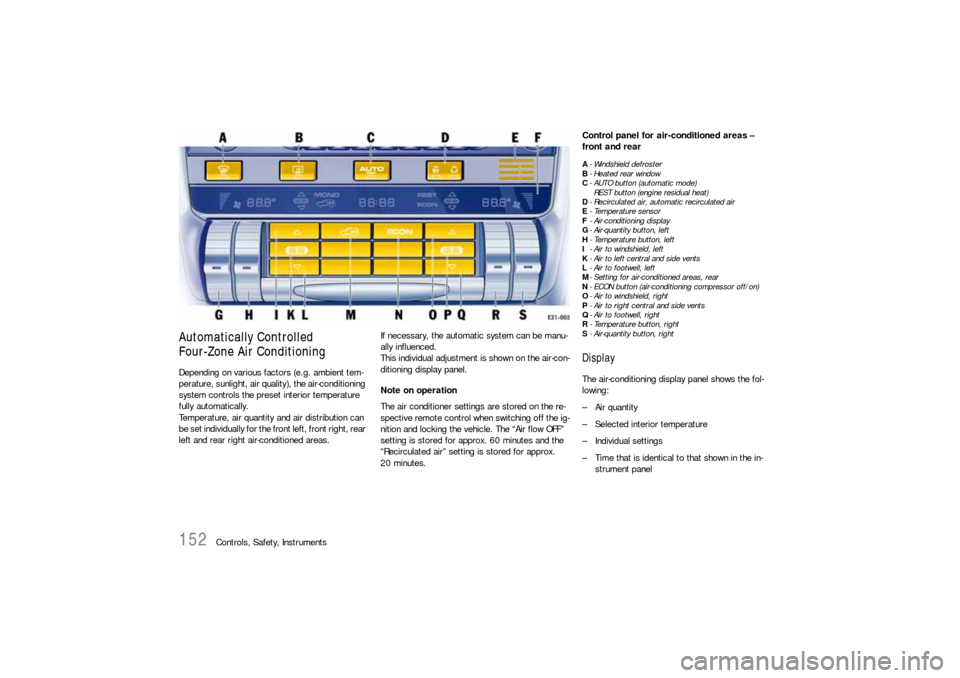
Automatically Controlled
Four-Zone Air ConditioningDepending on various factors (e.g. ambient tem-
perature, sunlight, air quality), the air-conditioning
system controls the preset interior temperature
fully automatically.
Temperature, air quantity and air distribution can
be set individually for the front left, front right, rear
left and rear right air-conditioned areas.If necessary, the automatic system can be manu-
ally influenced.
This individual adjustment is shown on the air-con-
ditioning display panel.
Note on operation
The air conditioner settings are stored on the re-
spective remote control when switching off the ig-
nition and locking the vehicle. The “Air flow OFF”
setting is stored for approx. 60 minutes and the
“Recirculated air” setting is stored for approx.
20 minutes.
Control panel for air-conditioned areas –
front and rearA- Windshield defroster
B-Heated rear window
C- AUTO button (automatic mode)
REST button (engine residual heat)
D- Recirculated air, automatic recirculated air
E-Temperature sensor
F- Air-conditioning display
G- Air-quantity button, left
H- Temperature button, left
I- Air to windshield, left
K- Air to left central and side vents
L- Air to footwell, left
M- Setting for air-conditioned areas, rear
N- ECON button (air-conditioning compressor off/on)
O- Air to windshield, right
P-Air to right central and side vents
Q- Air to footwell, right
R- Temperature button, right
S- Air-quantity button, rightDisplayThe air-conditioning display panel shows the fol-
lowing:
– Air quantity
– Selected interior temperature
– Individual settings
– Time that is identical to that shown in the in-
strument panel
Page 169 of 420
Controls, Safety, Instruments
169
Sliding/Lifting RoofThe electric sliding/lifting roof is made of single-
sheet safety glass. It is equipped with a sliding-
roof cover that can be infinitely adjusted manually
to protect against the sun.
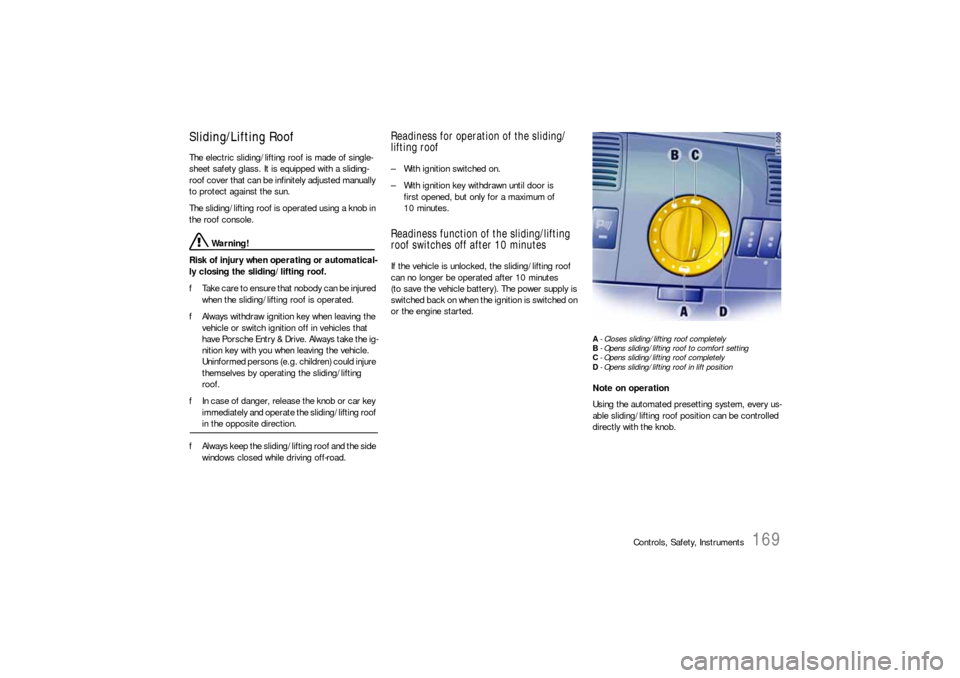
The sliding/lifting roof is operated using a knob in
the roof console.
Warning!
Risk of injury when operating or automatical-
ly closing the sliding/lifting roof.
fTake care to ensure that nobody can be injured
when the sliding/lifting roof is operated.
fAlways withdraw ignition key when leaving the
vehicle or switch ignition off in vehicles that
have Porsche Entry & Drive. Always take the ig-
nition key with you when leaving the vehicle.
Uninformed persons (e.g. children) could injure
themselves by operating the sliding/lifting
roof.
fIn case of danger, release the knob or car key
immediately and operate the sliding/lifting roof in the opposite direction.
fAlways keep the sliding/lifting roof and the side
windows closed while driving off-road.
Readiness for operation of the sliding/
lifting roof– With ignition switched on.
– With ignition key withdrawn until door is
first opened, but only for a maximum of
10 minutes.Readiness function of the sliding/lifting
roof switches off after 10 minutesIf the vehicle is unlocked, the sliding/lifting roof
can no longer be operated after 10 minutes
(to save the vehicle battery). The power supply is
switched back on when the ignition is switched on
or the engine started.
A- Closes sliding/lifting roof completely
B- Opens sliding/lifting roof to comfort setting
C- Opens sliding/lifting roof completely
D- Opens sliding/lifting roof in lift positionNote on operation
Using the automated presetting system, every us-
able sliding/lifting roof position can be controlled
directly with the knob.