radio PORSCHE PANAMERA 2009 1.G Information Manual
[x] Cancel search | Manufacturer: PORSCHE, Model Year: 2009, Model line: PANAMERA, Model: PORSCHE PANAMERA 2009 1.GPages: 343, PDF Size: 7.96 MB
Page 137 of 343
Instrument Panel and Multi-Function Display
135
No monitoringIn the event of faults, Tire Pressure Monitoring
cannot monitor the tire pressure.
The warning light on the instrument panel lights up
and a corresponding message appears on the
multi-function display.
Monitoring is not active:
– if Tire Pressure Monitoring is faulty,
– if wheel transmitters for Tire Pressure Monitoring are missing,
– during the learning phase after the tire settings have been updated,
– after a wheel change without updating the tire settings,
– if more than four wheel transmitters are recognized,
– if there is external interference by other radio sources, e.g. wireless headphones,
– if tire temperatures are too high.
f Please see the chapter “OVERVIEW OF
WARNING MESSAGES” on page 152.
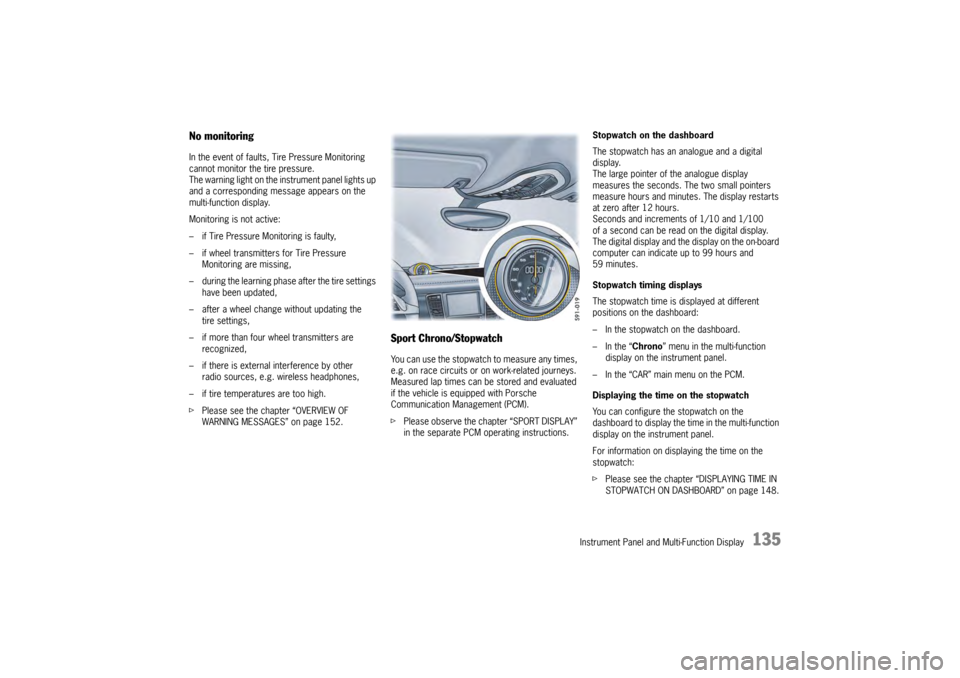
Sport Chrono/StopwatchYou can use the stopwatch to measure any times,
e.g. on race circuits or on work-related journeys.
Measured lap times can be stored and evaluated
if the vehicle is equipped with Porsche
Communication Management (PCM).
fPlease observe the chapter “SPORT DISPLAY”
in the separate PCM operating instructions. Stopwatch on the dashboard
The stopwatch has an analogue and a digital
display.
The large pointer of the analogue display
measures the seconds. The two small pointers
measure hours and minutes. The display restarts
at zero after 12 hours.
Seconds and increments of 1/10 and 1/100
of a second can be read on the digital display.
The digital display and the
display on the on-board
computer can indicate up to 99 hours and
59 minutes.
Stopwatch timing displays
The stopwatch time is displayed at different
positions on the dashboard:
– In the stopwatch on the dashboard.
– In the “ Chrono” menu in the multi-function
display on the instrument panel.
– In the “CAR” main menu on the PCM.
Displaying the time on the stopwatch
You can configure the stopwatch on the
dashboard to display the ti me in the multi-function
display on the instrument panel.
For information on displaying the time on the
stopwatch:
f Please see the chapter “DISPLAYING TIME IN
STOPWATCH ON DASHBOARD” on page 148.
Page 141 of 343
Instrument Panel and Multi-Function Display
139
Resetting to factory settingsAll settings made in the multi-function display
can be reset to the factory settings:
Note
All personal settings that have already been stored
will be lost as a result of resetting to factory
settings.
Adapting appearance of multi-function
displayThe contents and appearance of the multi-function
display can be adapted individually.
Selecting main menu display contents
Individual elements in the main menu can be
hidden and shown as required.
The main menu items “ Audio”, “Navigation”,
“ Map ”, “Phone ”, “Tr i p ”, “Tire pressure” and
“ Sport Chrono” can be hidden or shown.
The “ Settings ” menu item cannot be hidden. Adapting display contents of audio main
menu
In the audio main menu, you can display either
a list of all radio stations currently within range or
a list of all stored radio stations.
Available display contents:
–“
Station list ”
List of stations currently within range.
–“ Preset list ”
List of stored stations.
For information on the station and preset lists:
f Please observe the separate operating manual
for the Porsche communication Management
(PCM).
1.Select
> “Vehicle ”
> “ Settings ”
2. “Fact. settings ”
and confirm.
3. Select “ Ye s”
and confirm.
1. Select
> “Vehicle ”
> “Settings ”
> “ Display ”
and confirm.1. Select
> “Vehicle ”
> “Settings ”
> “ Display ”
2. “Menu scope ”
and confirm.
3. Select the desired main menu items.
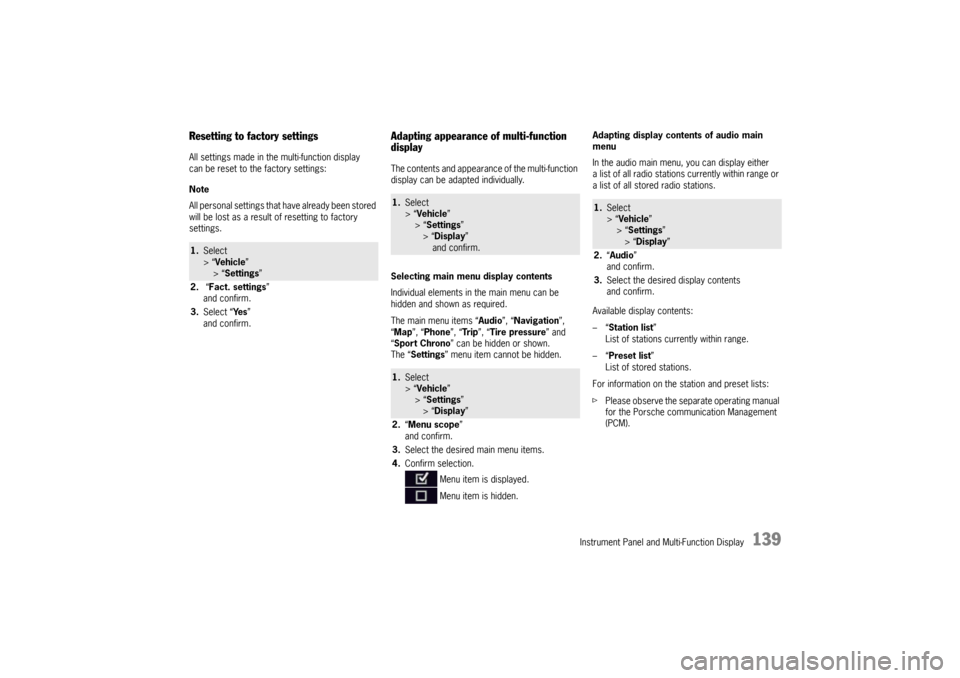
4. Confirm selection.
Menu item is displayed.
Menu item is hidden.
1.Select
> “Vehicle ”
> “ Settings ”
> “Display ”
2. “Audio”
and confirm.
3. Select the desired display contents
and confirm.
Page 142 of 343
140
Instrument Panel and Multi-Function Display
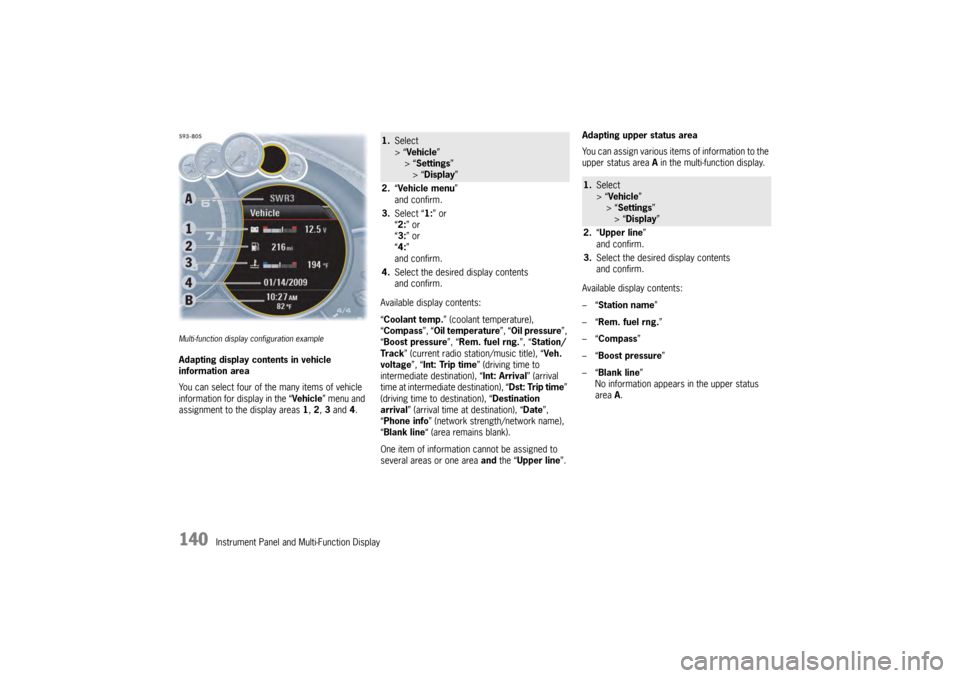
Multi-function display configuration exampleAdapting display contents in vehicle
information area
You can select four of the many items of vehicle
information for display in the “Vehicle” menu and
assignment to the display areas 1, 2 , 3 and 4. Available display contents:
“
Coolant temp. ” (coolant temperature),
“ Compass ”, “Oil temperature ”, “Oil pressure ”,
“ Boost pressure ”, “Rem. fuel rng. ”, “Station/
Track ” (current radio station/music title), “ Veh.
voltage ”, “Int: Trip time ” (driving time to
intermediate destination), “Int: Arrival ” (arrival
time at intermediate destination), “ Dst: Trip time”
(driving time to destination), “ Destination
arrival ” (arrival time at destination), “ Date”,
“ Phone info ” (network strength/network name),
“ Blank line “ (area remains blank).
One item of information cannot be assigned to
several areas or one area and the “ Upper line ”.Adapting upper status area
You can assign various items of information to the
upper status area
A in the multi-function display.
Available display contents:
–“ Station name”
–“ Rem. fuel rng. ”
–“ Compass”
–“ Boost pressure ”
–“ Blank line ”
No information appears in the upper status
area A.
1. Select
> “Vehicle ”
> “ Settings ”
> “Display ”
2. “Vehicle menu ”
and confirm.
3. Select “ 1:” or
“ 2: ” or
“ 3: ” or
“ 4: ”
and confirm.
4. Select the desired display contents
and confirm.
1.Select
> “Vehicle ”
> “Settings ”
> “Display ”
2. “Upper line ”
and confirm.
3. Select the desired display contents
and confirm.
Page 153 of 343
Instrument Panel and Multi-Function Display
151
Adjusting volume of warning tones
The volume of the warning tones can be adjusted
individually.
Available setting options:
–“Loud ”
–“ Medium”
–“ Low ”
Changing button assignment on multi-
function steering wheelThe assignment of the MFS button on the multi-
function display can be changed individually.
Functions from the multi-function display or PCM
can be assigned to the MFS button.
Available PCM functions:
–“Source change ”
Change audio source.
–“ Voice control ”
Activate voice control.
–“ Dri. instr. (Rep) “
Repeat voice instruction from the navigation
system.
–“ Station/track < ”
Previous radio station/title.
–“ Station/track > ”
Next radio station/track. –“
Map ”
Display navigation map in PCM.
–“ Menu change ”
Change main menu area.
Available instrument cluster functions:
–“ Start/Stop Chr. ”
Start/stop timing.
–“ Vehicle menu ”
Display vehicle menu.
–“ Tr i p m e n u ”
Display trip menu.
–“ TPM menu ”
Display TPM menu.
–“ Chrono menu”
Display chrono menu.
–“ ACC menu ”
Display ACC menu.
–“ Audio menu ”
Display audio menu.
–“ Phone menu ”
Display telephone menu.
–“ Navi menu ”
Display navigation menu.
–“ Map menu ”
Display navigation map on the multi-function
display.
1. Select
> “Vehicle ”
> “ Settings ”
> “Volume ”
2. “Warn. tones ”.
3. Select desired setting
and confirm.
1.Select
> “Vehicle ”
> “Settings ”
> “ Steering wheel op. ”
2. “Multif. key ”
and confirm.
3. Select “PCM function” or
“ Inst. clus. fun. ”
and confirm.
4. Select desired function assignment
and confirm.
Page 167 of 343

Driving and Driving Safety
165
To remove the ignition key:
fStop the vehicle.
f Move PDK selector lever to position P.
f Switch ignition off.
f Remove the ignition key.Ignition lock position 1 – Ignition onfTurn ignition key to position 1.
All electrical equipment can be switched on. The
warning lights on the inst rument panel light up for
alamp check.
f Please see the chapter “INSTRUMENT PANEL
USA MODELS” on page 107.
If an electrical consumer is not switched on for
10 minutes after switching on the ignition, the
ignition must be switched off then on again.
Ignition lock position 2 – Start enginef Turn ignition key to ignition lock position 2.
The car key is reset automa tically from position 2
to position 1 when you start the engine.Ignition lock position 3 – Activate
steering column lock on vehicles with
Porsche Entry & Drivef Please see the chapter “Manually locking the
steering column on vehicles with Porsche
Entry & Drive” on page 165.Steering column lockVehicles without Porsche Entry & Drive
The steering column is locked automatically
when the ignition key is removed from the ignition
lock and unlocked automatically when the
ignition key is inserted into the ignition lock.
Vehicles with Porsche Entry & Drive
The steering column is locked automatically
when the driver’s door is opened when the ignition
is switched off. Manually locking the steering column on
vehicles with Porsche Entry & Drive
f
Once the ignition is switched off, turn the
control unit to ignition lock position 3 again
and hold it there for 2seconds.
The steering column is locked when you hear
a clicking noise.
The steering column can be unlocked
automatically by turning the control unit to
ignition lock position 1.
Emergency operation with Porsche
Entry & DriveInterference in radio tr ansmission between the
vehicle and ignition lock or a discharged ignition
lock battery can disable the Porsche Entry & Drive
comfort function.
If this happens, the control unit can be removed
from the ignition lock and the vehicle can be
started using the standard ignition key.
Removing the control unit from the
ignition lock
1. Turn the control unit to ignition lock position 3
and hold it there for about 10 seconds.
Once you hear the clicking sound, you can remove
the control unit in ignition lock position 0.
Page 181 of 343

Driving and Driving Safety
179
Radiofrequency radiation exposure
Information
This equipment complies with FCC radiation
exposure limits set forth for an uncontrolled
environment. This equipment should be installed
and operated with minimum distance of 8 in.
(20 cm) between the radiator and your body.
This transmitter must not be co-located or
operating in conjunction wi th any other antenna or
transmitter
Warning!
Risk of accidents. Rada r sensor vision can be
impaired by rain, snow, ice or heavy spray.
Vehicles in front will not be detected properly
or may not be detected at all.
f Do not use adaptive cruise control under these conditions.
Warning message
Adaptive cruise control can be deactivated
automatically if the radar sensor is very dirty or
iced up, obstructed , in unfavorable weather
conditions (heavy rain) or when driving through
tunnels.
The message “Fault ACC sensor” will appear on
the multi-function display in the instrument panel.
For information on warning messages on the
multi-function display:
f Please see the chapter “OVERVIEW OF
WARNING MESSAGES” on page 152. Notes
This device complies with Part 15 of the FCC
Rules and with RSS-210 of Industry Canada.
Operation is subject to the following two
conditions:
1. This device may not cause harmful
interference, and
2. this device must accept any interference received, including interference that may
cause undesired operation.
Changes or modifications made to this equipment
not expressly approved by Porsche may void the
FCC authorization to operate this equipment.
This equipment has been tested and found to
comply with the limits for a Class A digital device,
pursuant to Part 15 of the FCC Rules. These limits
are designed to provide reasonable protection
against harmful interference when the equipment
is operated in a commercial environment. This
equipment generates, uses, and can radiate radio
frequency energy and, if not installed and used in
accordance with the instruction manual, may
cause harmful interference to radio
communications. Operation of this equipment in a
residential area is likely to cause harmful
interference in which case the user will be required
to correct the interferen ce at his own expense.
This Class A digital apparatus complies with
Canadian ICES-003.
Cet appareil numérique de la classe A est
conforme à la norme NMB-003 du Canada.
Operating principle of adaptive cruise
controlNo vehicle detected in front – open road
driving
Adaptive cruise control operates like a cruise
control system. The desired speed that was set is
maintained constantly.
Vehicle detected in front – driving in traffic
If a vehicle travelling ahead of you in the same lane
is detected as driving slower than the selected
desired speed, adaptive cruise control will
automatically maintain a set distance from the
vehicle in front.
If the vehicle in front stop s, adaptive cruise control
will slow your vehicle down to a stop provided this
is possible within the cont rol limits of the system.
Adaptive cruise control actively keeps your vehicle
at a standstill.
If the vehicle in front drives off, automatic speed
control and distance control can be resumed.
Page 191 of 343

Driving and Driving Safety
189
Car Audio Operation/TipsFor radio operation see your radio manual
which is included with your on-board
literature.FM receptionA vehicle is not an ideal place to listen to a radio.
Because the vehicle moves, reception conditions
are constantly changing.
Buildings, terrain, signal distance and noise from
other vehicles are all working against good
reception.
Some conditions affecting FM may appear to be
problems when they are not.
The following characteristics are completely
normal for a given reception area, and they do not
indicate any problem with the radio itself.
Note
Electronic accessories should only be installed by
your authorized Porsche dealer.
Equipment which has not been tested and
approved by Porsche may impair radio reception.Fading and drifting
FM range is limited to about 25 miles (40 km),
except for some high power stations.
If a vehicle is moving
away from the desired
station's transmitter, the signal will tend to fade
and/or drift. This condition is more prevalent with
FM than AM, and is often accompanied by
distortion.
Fading and drifting can be minimized to a certain
degree by careful attention to fine tuning or
selection of a stronger signal.
Static and fluttering
When the line-of-sight link between a transmitter
and vehicle is blocked by large buildings or
mountains, the radio sound may be accompanied
with static or fluttering because of the
characteristic of FM.
In a similar effect, a flutt ering noise is sometimes
heard when driving along a tree-lined road.
This static and flutteri ng can be reduced by
adjusting the tone control for greater bass
response until the disturbance has passed. Multipath
Because of the reflecting
characteristics of FM,
direct and reflected signals may reach the antenna
at the same time (multipath) and cancel each other
out.
As a vehicle moves through these electronic dead
spots, the listener may hear a momentary flutter
or loss of reception.
Station swapping
When two FM stations are close to each other, and
an electronic dead spot, such as static or
multipath area, interrupts the original signal,
some-times the stronger second signal will be
selected automatically until the original one
returns.
This swapping can also occur as you drive away
from the selected station and approach another
station of a stronger signal.
Page 192 of 343

190
Driving and Driving Safety
Compact disc player
Caution!
To avoid damage to compact disc player and
discs.
f Use only compact discs labeled as shown,
having no dirt, damage or warpage.
f Never attempt to disassemble or oil any part
of the player unit. Do not insert any object
other than a disc into the slot.Remember there
are no user-serviceable parts inside the
compact disc player.
f Do not allow the disc to sustain any
fingerprints, scrapes or stickers on the
surfaces. This may cause poor sound quality.
Hold the disc only on the edge or center hole.
f When not in use, take the disc out of the player,
put the disc back into its case and store it
away from dust, heat, damp and direct
sunlight.
Leaving the disc on the dashboard in the sun
can damage the disc. f
If the disc gets dirty, clean the disc by wiping
the surfaces from the center to the outside in
a radial direction with a soft cloth.
Do not use a conventional record cleaner or
anti-static record preservative.
Disc cleaners are available in audio stores.
Car Telephone and Aftermarket Alarms Important legal and safety information
regarding the use of cellular telephones
Some states may prohibit the use of cellular
telephones while driving a vehicle. Check the laws
and regulations on the use of cellular telephones
in the areas where you drive.
Danger!
Risk of an accident.
Severe personal injury or death can result in
the event of an accident.
Looking away from the road or turning your
attention away from your driving can cause
an accident and lead to serious personal
injury or death.
When using your cellular telephone, you should
always:
f Give full attention to your driving – pull off the
road and park before making or answering a
call if traffic conditions so require, and f
Keep both hands on the steering wheel – use
hands-free operation (if available) – pull off the
road and park before using a hand-held
telephone.
It is essential to observe the telephone
manufacturer’s instructions before operating
the telephone.
Any portable telephone or radio transmitter which
is used in a Porsche must be properly installed in
accordance with the technical requirements of
Porsche.
The transmission power must not exceed
10 W.
The devices must possess a type approval for
your vehicle and have an “e” symbol.
If you should require equipment with transmission
power values greater than 10 W, please consult
your authorized Porsche dealer for this purpose.
They are familiar with the technical requirements
for installing devices of this kind.
The antennas for all radios and telephones with a
transmitting antenna must be externally mounted.
The improper installation of radios or telephones
or use of a radio or tele phone with a transmitting
antenna inside the car may cause the warning
lights to come on.
Improper installation of such equipment can
create a discharged battery or excessive current
draw from added equipment.
Page 193 of 343

Driving and Driving Safety
191
If aftermarket systems are installed by non-
dealership technicians or outside the selling
dealer, problems may result. Installation of
aftermarket equipment is not covered under the
New Car Warranty.
fConsult your authorized Porsche dealer about
the installation of non-Porsche approved
equipment.
Reception quality
The reception quality of your car telephone will
change constantly when you are driving.
Interference caused by buildings, landscape and
weather is unavoidable. It may become particu-
larly difficult to hear when using the hands-free
function due to external noise such as engine and
wind noise.
Automatic car-wash
f Unscrew external antennas before using an
automatic car-wash.
Porsche Communication
Management (PCM)
Warning!
There is danger of accident if you set or
operate the on-board computer, radio,
navigation system, telephone or other
equipment when driving.
This could distract you from traffic and
cause you to lose control of the vehicle
resulting in serious personal injury or death.
f Operate the components while driving only if
the traffic situation allows you to do so safely.
f Carry out any complicated operating or setting
procedures only with the vehicle stationary.
f If it is necessary to operate these components
while the vehicle is in motion, use the function keys on the multi-functional steering wheel.
f Refer to the separate operating instructions
before putting the PCM into operation.
When put into operation for the first time, a
distance of approx. 3 miles (5 km) must be driven
in order for the navigation system to complete the
process of fine calibration. The same applies
when the tires are changed (e.g. summer/winter
tires) or new tires fitted. Full location accuracy is
not yet achieved during the fine-calibration
process. If the vehicle has been tr
ansported (e.g. ferry, car
train), the system may ta ke a few minutes after
being switched on before it determines the current
location.
Serious tire slip (e.g. spinning wheels on snow)
may result in temporarily inaccurate navigation.
When the battery has been disconnected, it may
take up to 15 minutes before the navigation
system is operational once more.
Satellite radioYou must have the satellit e radio activated before
you can put it into operation. You will need a
contract with a provider in order to use this radio.
f Refer to the separate radio operating
instructions before putting into operation.
Page 249 of 343

Alarm System and Theft Protection
247
Alarm System and Passenger
Compartment MonitoringThis device complies with:
Part 15 of the FCC Rules
RSS-210 of Industry Canada.
Operation of this device is subject to the following
two conditions:
– It may not cause harmful interference, and
– it must accept any interference received including interference that may cause
undesired operation.
Note
The manufacturer is not responsible for any radio
or TV interference caused by unauthorized
modifications to this equipment.
Such modification could void the user's authority
to operate the equipment.
Warning!
Any changes or modifications not expressly ap-
proved by Porsche could void the user’s authority
to operate this equipment.
The alarm system monitors the following alarm
contacts:
– Alarm contacts in doors, tailgate, engine compartment lid and headlights
– Interior surveillance: Movement in the interior when the vehicle is locked, e.g. attempted
theft after breaking a window.
– Inclination sensor: Tilting of the vehicle (e.g. attempt to tow away the vehicle).
If one of these alarm contacts is interrupted,
the alarm horn sounds for approx. 30 seconds
and the emergency flasher flashes on and off.
After 5 seconds of interruption, the alarm is
triggered again. This cycle is repeated ten times.Switching onf The alarm system is activated when the vehicle
is locked. Switching offfThe alarm system is deactivated when the
vehicle is unlocked. Note on operation
f
If you unlock the vehicle with the emergency
key in the door lock, you must switch the
ignition on (ignition lock position 1) within
10 seconds of opening the door in order to
prevent the alarm system from being
triggered.
The vehicle is locked ag ain automatically after
20 seconds if no doors are opened.
Switching off the alarm system if it is
triggeredf Unlock vehicle doors with the remote control
or
Switch on ignition.Switching off interior surveillance and
inclination sensorIf people or animals are remaining in the locked
vehicle or the vehicle is being transported on
a train or ship, for example, the interior
surveillance system and inclination sensor must
be switched off temporarily.
f Inform any persons remaining in the vehicle
that the alarm system will be triggered if the
door is opened.
USA: KR55WK50138
Canada: 7812D-5WK50138