radio PORSCHE PANAMERA 2009 1.G Information Manual
[x] Cancel search | Manufacturer: PORSCHE, Model Year: 2009, Model line: PANAMERA, Model: PORSCHE PANAMERA 2009 1.GPages: 343, PDF Size: 7.96 MB
Page 4 of 343
2Throughout this booklet, left is designated as the
driver's side of the vehicle, and right as the
passenger's side of the vehicle.
Text, illustrations and specifications in this manual
are based on the information available at the time
of printing.
It has always been Porsche’s policy to continu-
ously improve its products. Porsche, therefore,
reserves the right to make changes in design and
specification, and to make additions or improve-
ments in its product wi thout incurring any obliga-
tion to install them on products previously manu-
factured.
We wish you many miles of safe and pleasurable
driving in your Porsche.
Important!
For your own protection and longer service life of
your car, please heed all operating instructions
and special warnings. These special warnings use
the safety alert symbol, followed by the words
Danger, Warning and Caution . These special
warnings contain important messages regarding
your safety and/or the potential for damage to
your Porsche. Ignoring them could result in
serious mechanical failure, serious personal injury
or death. f
Do not alter your Porsche. Any alteration could
create dangerous conditions or defeat safety
engineering features built into your car.
f Do not misuse your Porsche. Use it safely, and
consistently with the law, according to the
driving conditions, and the instructions in this
manual.
Alteration or misuse of your Porsche could
cause accidents and seri ous personal injury
or death.
Note to ownersIn Canada, this manual is also available in French.
To obtain a copy contact your dealer or write to:Note aux proprietairesAu Canada on peut se procurer un exemplaire de
ce Manuel en français auprès du concessionaire
ou du:
Porsche Cars Canada, Ltd.
Automobiles Porsche Canada, LTEE
5925 Airport Road
Suite 420
Mississauga, Ontario
Canada, L4V 1W1
Telephone number for customer assistance:
1-800-PORSCHE / Option 3
Setting and operating vehicle compon-
ents when driving
Warning!
There is a danger of accident if you set or
operate the on-board computer, radio,
navigation system, telep hone or other equip-
ment when driving.
This could distract you from the traffic and
cause you to lose control of the vehicle
resulting in serious personal injury or death.
f Operate the components while driving only if
the traffic situation allows you to do so safely.
f Carry out any complicated operating or setting procedures only with the vehicle stationary.
Engine Exhaust
Danger!
Engine exhaust is dangerous if inhaled.
Engine exhaust fumes have many compo-
nents which you can smell. They also contain
carbon monoxide (CO), which is a colorless
and odorless gas.
Carbon monoxide can cause unconscious-
ness and even death if inhaled.
f Never start or let the engine run in an en-
closed, unventilated area.
It is not recommended to sit in your car for
prolonged periods with the engine on and the car not moving.
Page 20 of 343

18
Opening and Locking
Never invite car theft!An unlocked car with the key in the ignition lock
invites car theft.
A steering wheel lock and a gong alarm are
standard equipment in your Porsche. The gong
alarm will sound if you open the driver's door while
the key is still in the ignition lock. It is your
reminder to pull the key out of the ignition lock and
to lock the doors.
Warning!
Any uncontrolled movement of the vehicle
may result in property damage, serious
personal injury or death.
Never leave your vehicle unattended with the
key in the ignition lock, especially if children
and/or pets are left unattended in the
vehicle. They can operate power windows
and other controls. If the engine is left
running, they may accidentally engage the
shift lever. Serious personal injury or death
could result from loss of control of the
vehicle.
f Always remove the ignition key.
f Always set the electric parking brake.
f Lock the doors with the key or with the remote control.
Warning!
Risk of a serious accident.
The steering column will lock when you
remove the key while you are driving or as
the car is rolling to a stop. You will not be
able to steer the car.
Serious personal injury or death could result
from loss of control of the vehicle.
f Never remove the key from the steering lock while you are driving. To protect your vehicle and your possessions
from theft, you should always proceed as
follows when leaving your vehicle:
f
Close windows.
f Close slide/tilt roof.
f Remove ignition key (switch ignition off in
vehicles that have Porsche Entry & Drive).
f Engage steering lock.
f Remove valuables (e.g. car documents, radio
control module, cell phones, house keys) from
the car.
f Lock doors.
f Lock the glove compartment.
f Close storage trays.
f Cover luggage compartment with the luggage
compartment cover.
f Close rear lid.
Page 22 of 343
20
Opening and Locking
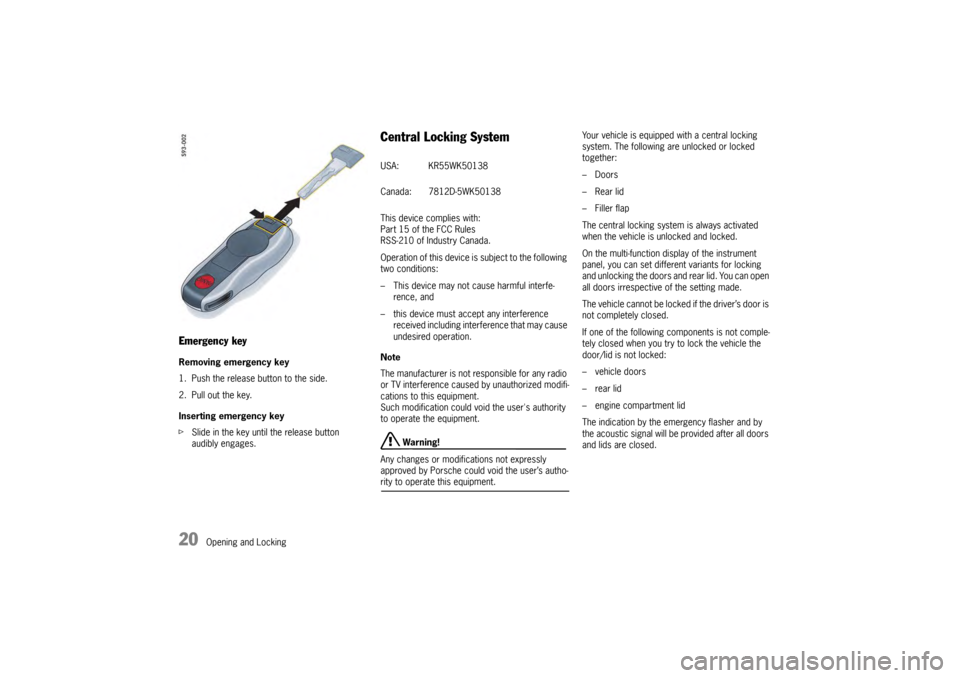
Emergency keyRemoving emergency key
1. Push the release button to the side.
2. Pull out the key.
Inserting emergency key
fSlide in the key until the release button
audibly engages.
Central Locking SystemThis device complies with:
Part 15 of the FCC Rules
RSS-210 of Industry Canada.
Operation of this device is subject to the following
two conditions:
– This device may not cause harmful interfe-
rence, and
– this device must accept any interference received including interference that may cause
undesired operation.
Note
The manufacturer is not responsible for any radio
or TV interference caused by unauthorized modifi-
cations to this equipment.
Such modification could void the user's authority
to operate the equipment.
Warning!
Any changes or modifications not expressly
approved by Porsche could void the user’s autho-
rity to operate this equipment. Your vehicle is equipped with a central locking
system. The following are unlocked or locked
together:
– Doors
–Rear lid
– Filler flap
The central locking system is always activated
when the vehicle is unlocked and locked.
On the multi-function di
splay of the instrument
panel, you can set different variants for locking
and unlocking the doors and rear lid. You can open
all doors irrespective of the setting made.
The vehicle cannot be locked if the driver’s door is
not completely closed.
If one of the following components is not comple-
tely closed when you try to lock the vehicle the
door/lid is not locked:
–vehicle doors
– rear lid
– engine compartment lid
The indication by the emergency flasher and by
the acoustic signal will be provided after all doors
and lids are closed.USA: KR55WK50138
Canada: 7812D-5WK50138
Page 37 of 343

Opening and Locking
35
Malfunctions When Opening and
ClosingEmergency operation of tailgateIf the tailgate cannot be opened with the radio
remote control (e.g. if th e battery of the remote
control is dead), the emergency operation must
be performed:
1. Unlock and open the driver’s door with the car key.
2. Switch on the ignition within 10 seconds to prevent the alarm system from
triggering.
3. Press the central locking button on the front or rear center console.
The tailgate is now unlocked and can be
opened with the unlocking handle.
Only one door is unlockedOn the multi-function di splay in the instrument
panel, you can set different variants for locking
and unlocking the doors and tailgate. You can
open all doors irrespective of the setting made.
f Press button on the key twice within
2seconds.The vehicle cannot be unlockedThe remote control of the key may
– not function correctly due to radio waves (also
radio contact between remote control and
vehicle in the case of Porsche Entry & Drive),
– fail due to a fault,
– fail due to a flat key battery.
f Unlock the vehicle using the emergency key
in the door lock.
If the vehicle was unlocked using the
emergency key in the door lock, only the
driver’s door can be opened.
In order to prevent the alarm system from
being triggered, switch the ignition on
within 10 seconds of opening the door .
The vehicle cannot be lockedThis is recognizable by the fact that the
emergency flasher does not flash and there is no
locking noise.
The remote control of the key may
– not function correctly due to radio waves (also radio contact between remote control
and vehicle in the case of Porsche Entry &
Drive),
– fail due to a fault,
– fail due to a flat key battery.
f Lock the vehicle usin g the emergency key
in the door lock.
If the central locking system is defective,
operating the lock cylinder in the driver’s door will
lock all functioning lockin g elements of the central
locking system.
For information on lockin g the doors by means of
the emergency operation:
f Please see the chapter “NOT ALL VEHICLE
DOORS ARE LOCKED” on page 36.
f Have faults in the central locking system
repaired.
Please contact a qualified specialist workshop.
We recommend that you have an authorized
Porsche dealer to do this work as they have
trained workshop personnel and the necessary
parts and tools.
Page 65 of 343
Seats, Mirrors and Steering Wheel
63
Multi-Function Steering Wheel
Warning!
There is a risk of accident if you set or
operate the multi-funct ion display, radio,
navigation system, telephone or other
equipment while driving.
Operating these devices while driving could
distract you from traffic and cause you to
lose control of the vehicle.
f Operate the equipment while driving only if the
traffic situation allows you to do so safely.
f Carry out any complicated operating or setting procedures only when the vehicle is stationary.
Depending on the equipment in your vehicle, you
can use the function keys of the multi-function
steering wheel to operate the following Porsche
communication systems:
– Telephone
–PCM
– Multi-function display in the instrument panel
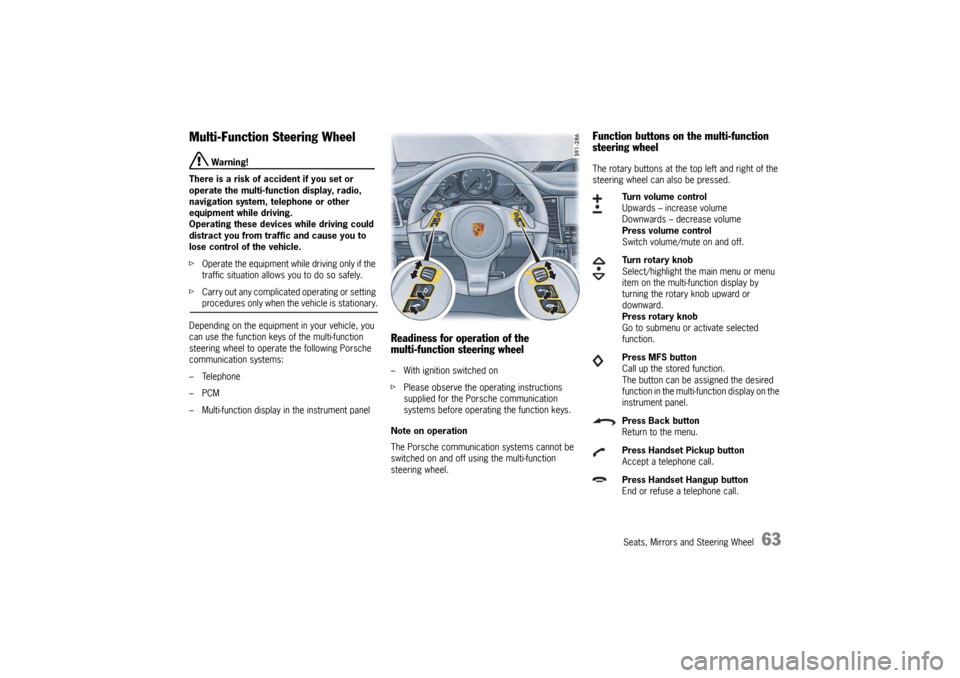
Readiness for operation of the
multi-function steering wheel– With ignition switched on
f Please observe the operating instructions
supplied for the Porsche communication
systems before operating the function keys.
Note on operation
The Porsche communication systems cannot be
switched on and off using the multi-function
steering wheel.
Function buttons on the multi-function
steering wheelThe rotary buttons at the top left and right of the
steering wheel can also be pressed.
Turn volume control
Upwards – increase volume
Downwards – decrease volume
Press volume control
Switch volume/mute on and off.
Turn rotary knob
Select/highlight the main menu or menu
item on the multi-function display by
turning the rotary knob upward or
downward.
Press rotary knob
Go to submenu or activate selected
function.
Press MFS button
Call up the stored function.
The button can be assigned the desired
function in the multi-fu nction display on the
instrument panel.
Press Back button
Return to the menu.
Press Handset Pickup button
Accept a telephone call.
Press Handset Hangup button
End or refuse a telephone call.
Page 117 of 343
Instrument Panel and Multi-Function Display
115
Operating the Multi-Function
Display in the Instrument PanelOn the multi-function display, you can view
information relating to the relevant vehicle
equipment, operate the audio source (radio, CD,
iPod, etc.), check the oil level, check the tire
pressure, use the stopwatch or operate the
navigation system.
You can also modify different vehicle settings in
the Vehicle menu.
It is not possible to desc ribe all details of the
functions in this Owner’s Manual. The examples
clearly demonstrate the functional principle and
clarify the menu structure.
Warning!
There is a risk of accident if you set or
operate the multi-funct ion display, radio,
navigation system, telephone or other
equipment while driving. Operating these
devices while driving could distract you from
traffic and cause you to lose control of the
vehicle.
f Operate the equipment while driving only if the
traffic situation allows you to do so safely.
f Carry out any complicated operating or setting procedures only when the vehicle is stationary.
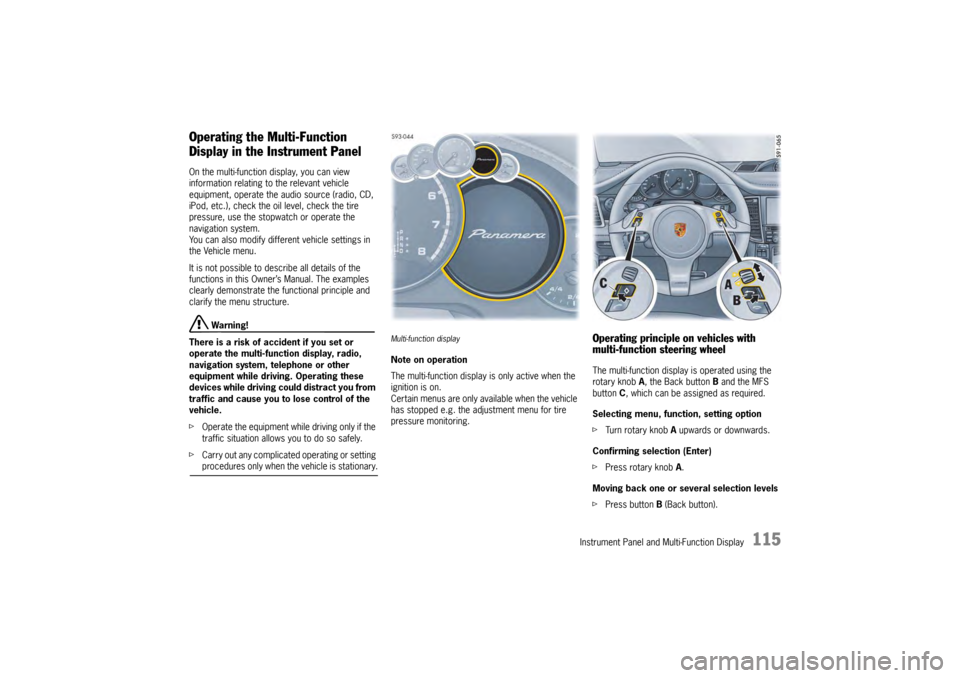
Multi-function displayNote on operation
The multi-function display is only active when the
ignition is on.
Certain menus are only available when the vehicle
has stopped e.g. the adjustment menu for tire
pressure monitoring.
Operating principle on vehicles with
multi-function steering wheelThe multi-function display is operated using the
rotary knob A , the Back button B and the MFS
button C, which can be assigned as required.
Selecting menu, function, setting option
f Turn rotary knob A upwards or downwards.
Confirming selection (Enter)
f Press rotary knob A .
Moving back one or several selection levels
f Press button B (Back button).
Page 118 of 343
116
Instrument Panel and Multi-Function Display
Porsche Communication Management (PCM)
functions or multi-function display functions can be
assigned to the MFS button in the multi-function
display on the instrument panel. Audio source
selection is preset by default.
For information on individual assignment of the
MFS button:
f
Please see the chapter “CHANGING BUTTON
ASSIGNMENT ON MULTI-FUNCTION STEERING
WHEEL” on page 151.
For information on Porsche Communication
Management:
f Please refer to the separate PCM operating
instructions.
Operating principle on vehicles without
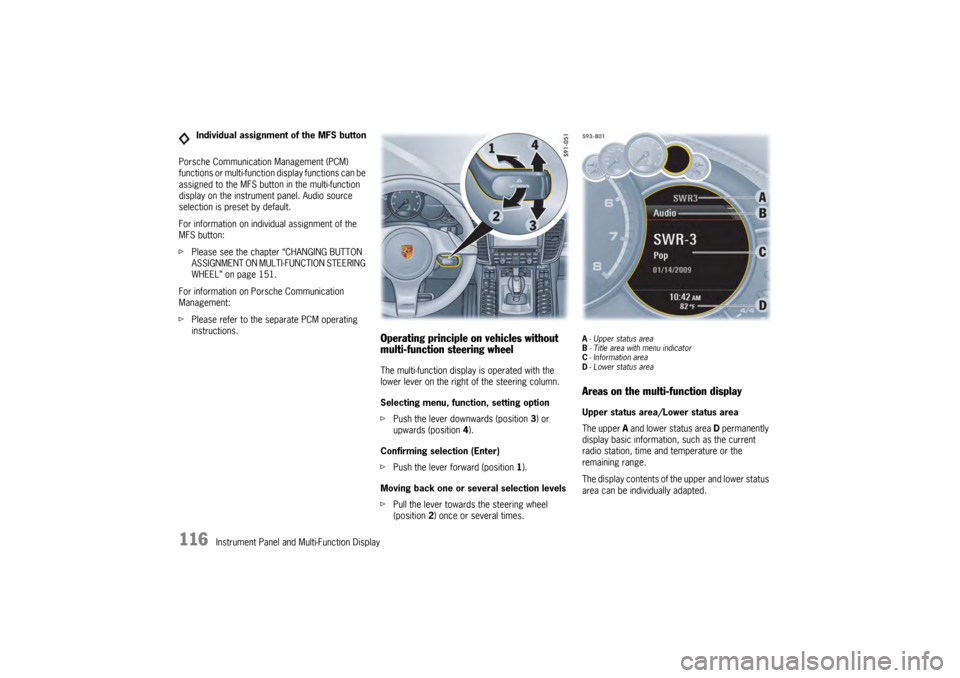
multi-function steering wheelThe multi-function display is operated with the
lower lever on the right of the steering column.
Selecting menu, function, setting option
fPush the lever downwards (position 3) or
upwards (position 4).
Confirming selection (Enter)
f Push the lever forward (position 1).
Moving back one or several selection levels
f Pull the lever towards the steering wheel
(position 2 ) once or several times.
A-Upper status area
B - Title area with menu indicator
C - Information area
D - Lower status areaAreas on the multi-function displayUpper status area/Lower status area
The upper A and lower status area D permanently
display basic information, such as the current
radio station, time and temperature or the
remaining range.
The display contents of th e upper and lower status
area can be individually adapted.
Individual assignment of the MFS button
Page 119 of 343
Instrument Panel and Multi-Function Display
117
For information on adapting the multi-function
display:
fPlease see the chapter “ADAPTING
APPEARANCE OF MULTI-FUNCTION DISPLAY”
on page 139.
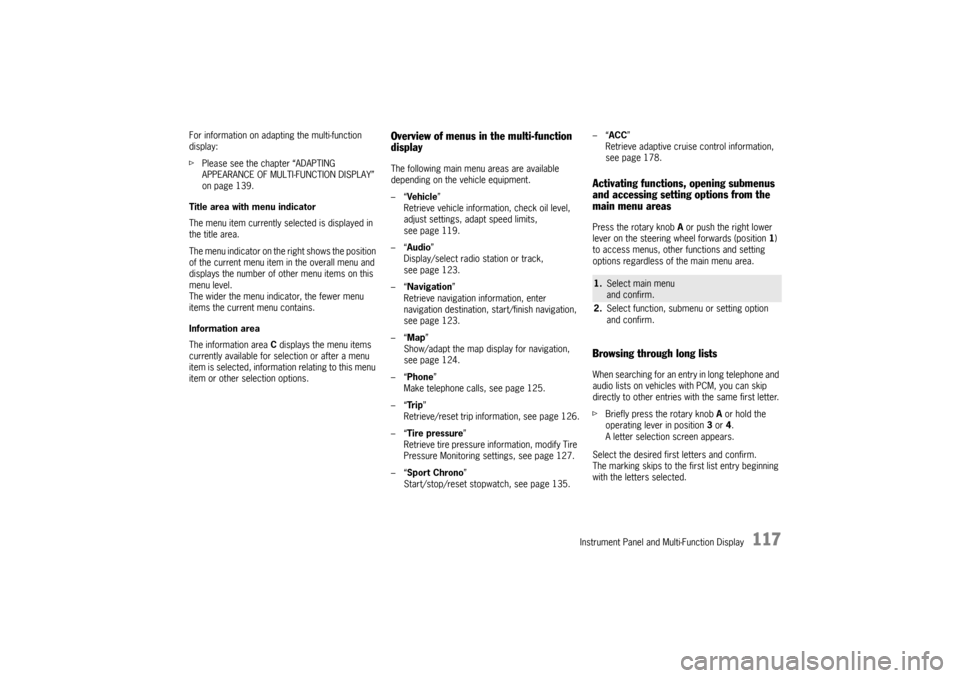
Title area with menu indicator
The menu item currently selected is displayed in
the title area.
The menu indicator on the right shows the position
of the current menu item in the overall menu and
displays the number of other menu items on this
menu level.
The wider the menu indicator, the fewer menu
items the current menu contains.
Information area
The information area C displays the menu items
currently available for selection or after a menu
item is selected, information relating to this menu
item or other selection options.
Overview of menus in the multi-function
displayThe following main menu areas are available
depending on the vehicle equipment.
–“ Vehicle ”
Retrieve vehicle inform ation, check oil level,
adjust settings, adapt speed limits,
see page 119.
–“ Audio”
Display/select radio station or track,
see page 123.
–“ Navigation ”
Retrieve navigation information, enter
navigation destination, start/finish navigation,
see page 123.
–“ Map ”
Show/adapt the map display for navigation,
see page 124.
–“ Phone ”
Make telephone calls, see page 125.
–“ Tr i p”
Retrieve/reset trip information, see page 126.
–“ Tire pressure ”
Retrieve tire pressure information, modify Tire
Pressure Monitoring settings, see page 127.
–“ Sport Chrono”
Start/stop/reset stopwatch, see page 135. –“
ACC ”
Retrieve adaptive cruise control information,
seepage178.
Activating functions, opening submenus
and accessing setting options from the
main menu areasPress the rotary knob A or push the right lower
lever on the steering wheel forwards (position 1)
to access menus, other functions and setting
options regardless of the main menu area.Browsing through long listsWhen searching for an entry in long telephone and
audio lists on vehicles with PCM, you can skip
directly to other entries with the same first letter.
f Briefly press the rotary knob A or hold the
operating lever in position 3 or 4.
A letter selection screen appears.
Select the desired first letters and confirm.
The marking skips to the first list entry beginning
with the letters selected.1. Select main menu
and confirm.
2. Select function, submenu or setting option
and confirm.
Page 125 of 343
Instrument Panel and Multi-Function Display
123
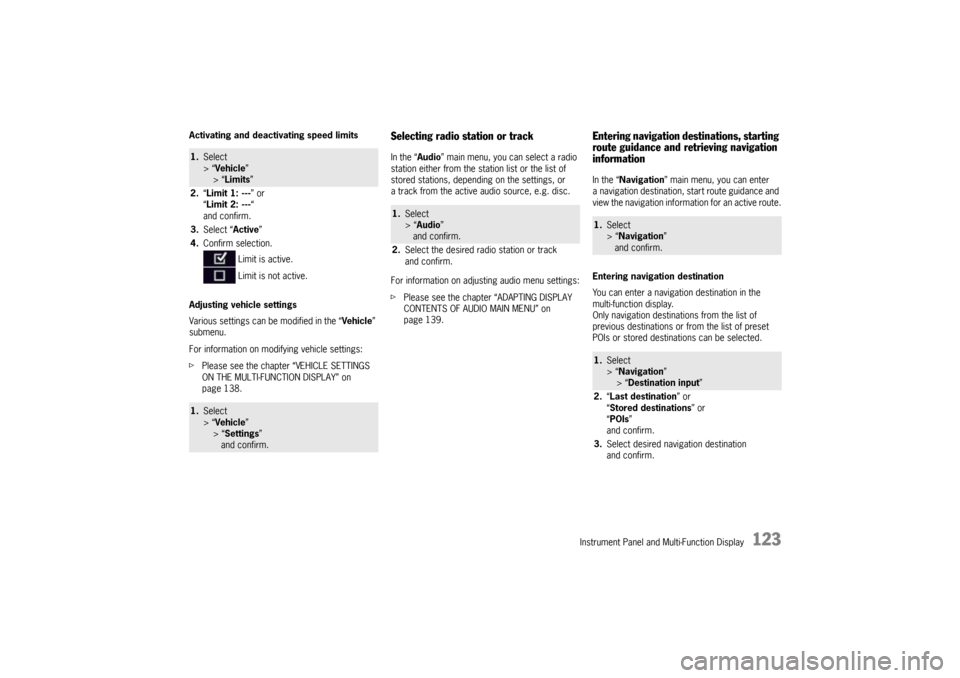
Activating and deactivating speed limits
Adjusting vehicle settings
Various settings can be modified in the “Vehicle”
submenu.
For information on modifying vehicle settings:
f Please see the chapter “VEHICLE SETTINGS
ON THE MULTI-FUNCTION DISPLAY” on
page 138.
Selecting radio station or trackIn the “ Audio” main menu, you can select a radio
station either from the st ation list or the list of
stored stations, depending on the settings, or
a track from the active audio source, e.g. disc.
For information on adjusting audio menu settings:
f Please see the chapter “ADAPTING DISPLAY
CONTENTS OF AUDIO MAIN MENU” on
page 139.
Entering navigation destinations, starting
route guidance and retrieving navigation
informationIn the “ Navigation” main menu, you can enter
a navigation destination, start route guidance and
view the navigation information for an active route.
Entering navigation destination
You can enter a navigatio n destination in the
multi-function display.
Only navigation destinations from the list of
previous destinations or from the list of preset
POIs or stored destinations can be selected.
1. Select
> “Vehicle ”
> “ Limits ”
2. “Limit 1: --- ” or
“ Limit 2: --- “
and confirm.
3. Select “ Active”
4. Confirm selection.
Limit is active.
Limit is not active.1.Select
> “Vehicle ”
> “ Settings ”
and confirm.
1. Select
> “Audio”
and confirm.
2. Select the desired radio station or track
and confirm.
1.Select
> “Navigation”
and confirm.1. Select
> “Navigation”
> “ Destination input ”
2. “Last destination ” or
“ Stored destinations” or
“ POIs ”
and confirm.
3. Select desired navigation destination
and confirm.
Page 136 of 343

134
Instrument Panel and Multi-Function Display
If necessary, fill in ti
re sealant and set the
correct tire pressure.
This tire pressure warning also appears when
driving and can be acknowledged.
The tire pressure warning light on the instrument
panel goes out only when the tire pressure has
been corrected.
System learningTire Pressure Monitoring begins to “learn” the
wheels after a wheel change, wheel transmitter
replacement or update of the tire settings . During
this process, Tire Pressu re Monitoring recognizes
the wheels and their locations.
The following message appears on the multi-
function display (example):
“No monitoring, system is learning”.
The wheel learning process takes place
exclusively when the vehicle is being driven
(vehicle speed above 16 mph (25 km/h)).
Tire Pressure Monitoring requires a certain
amount of time to learn the wheels. During this
time, the current tire pressures are not available
on the multi-function display:
– The tire pressure warning light remains lit until all wheels have been learned.
– Lines (-.-) appear on the display of the “Tire pressure” function. – The required pressures for cold tires (68 °F
(20 °C)) are indicated under “Fill info” in the tire
pressure menu.
Position and pressure information is displayed as
soon as Tire Pressure Monitoring has assigned
the wheels recognized as belonging to the vehicle
to the correct wheel positions.
f Check the tire pressure for all wheels under
“Fill info ”.
f Correct the tire pressure to the required
pressure if necessary.
Changing a wheel and replacing tiresfNew wheels must be fitted with radio
transmitters for Tire Pressure Monitoring.
Before tires are changed, the battery charge
condition of the wheel transmitters should be
checked.
Please contact a qualified specialist workshop.
We recommend that you have an authorized
Porsche dealer to do this work as they have
trained workshop personnel and the necessary
parts and tools.
f Switch off the ignition when changing a wheel.
The tire settings on the mu lti-function display must
be updated after changing a wheel.
If the tire settings are not updated, the message
“Tire change? Update settings!” is displayed on the
multi-function display.
f Update the multi-function display settings the
next time the vehicle is stationary.
Pressure increase as the result of
temperature increaseIn accordance with physical principles, the tire
pressure changes as the temperature
changes.The tire pressure increases or decreases
by 0.1 bar (1.5 psi) for
every 18 °F (10 °C) change in temperature.Partial monitoringMonitoring of the other wheels is continued if there
is a fault in one or two wheel transmitters.
– The tire pressure warning light lights up.
– The message “Restricted monitoring” appears
on the multi-function display.
– No tire pressures are displayed on the multi-function display for wheels with faulty
wheel transmitters.