reset PORSCHE PANAMERA 2009 1.G Information Manual
[x] Cancel search | Manufacturer: PORSCHE, Model Year: 2009, Model line: PANAMERA, Model: PORSCHE PANAMERA 2009 1.GPages: 343, PDF Size: 7.96 MB
Page 118 of 343
116
Instrument Panel and Multi-Function Display
Porsche Communication Management (PCM)
functions or multi-function display functions can be
assigned to the MFS button in the multi-function
display on the instrument panel. Audio source
selection is preset by default.
For information on individual assignment of the
MFS button:
f
Please see the chapter “CHANGING BUTTON
ASSIGNMENT ON MULTI-FUNCTION STEERING
WHEEL” on page 151.
For information on Porsche Communication
Management:
f Please refer to the separate PCM operating
instructions.
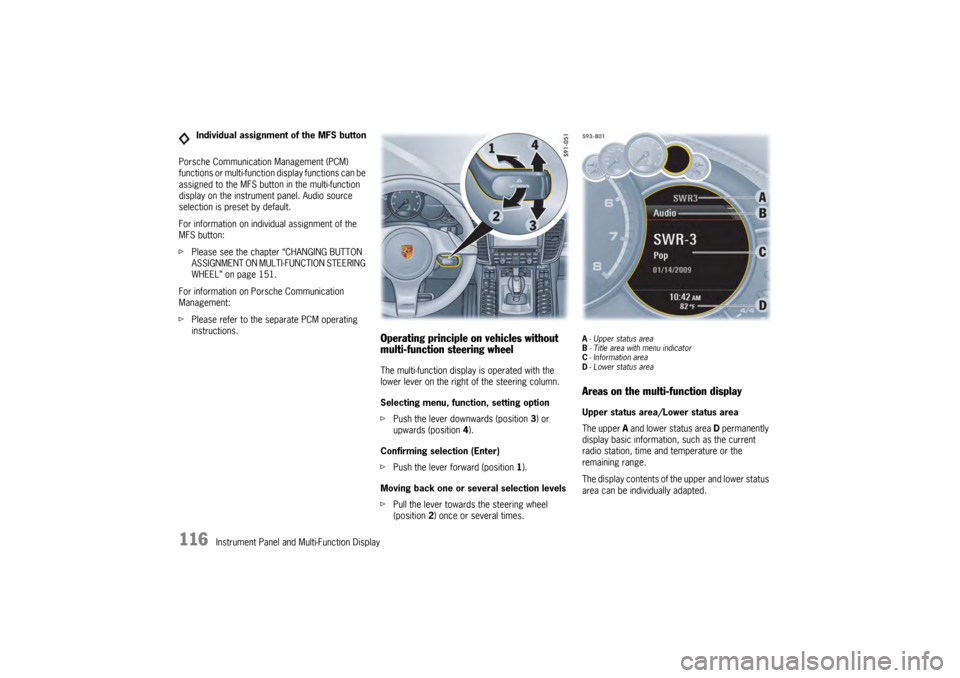
Operating principle on vehicles without
multi-function steering wheelThe multi-function display is operated with the
lower lever on the right of the steering column.
Selecting menu, function, setting option
fPush the lever downwards (position 3) or
upwards (position 4).
Confirming selection (Enter)
f Push the lever forward (position 1).
Moving back one or several selection levels
f Pull the lever towards the steering wheel
(position 2 ) once or several times.
A-Upper status area
B - Title area with menu indicator
C - Information area
D - Lower status areaAreas on the multi-function displayUpper status area/Lower status area
The upper A and lower status area D permanently
display basic information, such as the current
radio station, time and temperature or the
remaining range.
The display contents of th e upper and lower status
area can be individually adapted.
Individual assignment of the MFS button
Page 119 of 343
Instrument Panel and Multi-Function Display
117
For information on adapting the multi-function
display:
fPlease see the chapter “ADAPTING
APPEARANCE OF MULTI-FUNCTION DISPLAY”
on page 139.
Title area with menu indicator
The menu item currently selected is displayed in
the title area.
The menu indicator on the right shows the position
of the current menu item in the overall menu and
displays the number of other menu items on this
menu level.
The wider the menu indicator, the fewer menu
items the current menu contains.
Information area
The information area C displays the menu items
currently available for selection or after a menu
item is selected, information relating to this menu
item or other selection options.
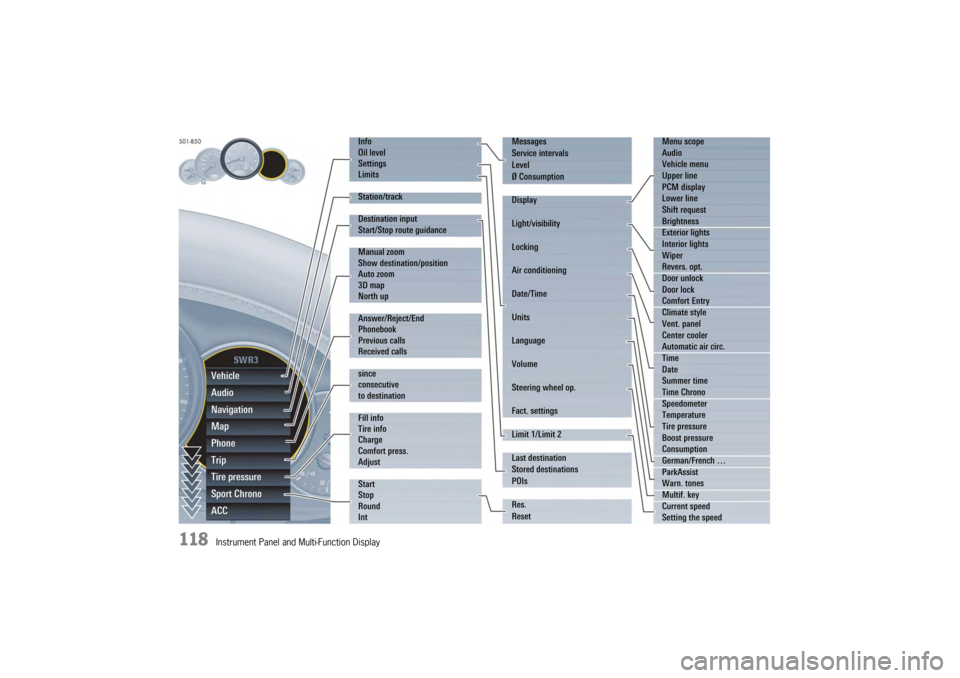
Overview of menus in the multi-function
displayThe following main menu areas are available
depending on the vehicle equipment.
–“ Vehicle ”
Retrieve vehicle inform ation, check oil level,
adjust settings, adapt speed limits,
see page 119.
–“ Audio”
Display/select radio station or track,
see page 123.
–“ Navigation ”
Retrieve navigation information, enter
navigation destination, start/finish navigation,
see page 123.
–“ Map ”
Show/adapt the map display for navigation,
see page 124.
–“ Phone ”
Make telephone calls, see page 125.
–“ Tr i p”
Retrieve/reset trip information, see page 126.
–“ Tire pressure ”
Retrieve tire pressure information, modify Tire
Pressure Monitoring settings, see page 127.
–“ Sport Chrono”
Start/stop/reset stopwatch, see page 135. –“
ACC ”
Retrieve adaptive cruise control information,
seepage178.
Activating functions, opening submenus
and accessing setting options from the
main menu areasPress the rotary knob A or push the right lower
lever on the steering wheel forwards (position 1)
to access menus, other functions and setting
options regardless of the main menu area.Browsing through long listsWhen searching for an entry in long telephone and
audio lists on vehicles with PCM, you can skip
directly to other entries with the same first letter.
f Briefly press the rotary knob A or hold the
operating lever in position 3 or 4.
A letter selection screen appears.
Select the desired first letters and confirm.
The marking skips to the first list entry beginning
with the letters selected.1. Select main menu
and confirm.
2. Select function, submenu or setting option
and confirm.
Page 120 of 343
118
Instrument Panel and Multi-Function DisplayVehicle
Audio
Navigation
Map
Phone
Trip
Tire pressure
Sport Chrono
ACC
Info
Oil level
Settings
Limits
Station/track
Destination input
Start/Stop route guidance
Manual zoom
Show destination/position
Auto zoom
3D map
North up
Answer/Reject/End
Phonebook
Previous calls
Received calls
since
consecutive
to destination
Fill info
Tire info
Charge
Comfort press.
Adjust
Start
Stop
Round
IntMessages
Service intervals
Level
Ø Consumption
Display
Light/visibility
Locking
Air conditioning
Date/Time
Units
Language
Volume
Steering wheel op.
Fact. settings
Limit 1/Limit 2
Last destination
Stored destinations
POIs
Res.
Reset
Menu scope
Audio
Vehicle menu
Upper line
PCM display
Lower line
Shift request
Brightness
Exterior lights
Interior lights
Wiper
Revers. opt.
Door unlock
Door lock
Comfort Entry
Climate style
Vent. panel
Center cooler
Automatic air circ.
Time
Date
Summer time
Time Chrono
Speedometer
Temperature
Tire pressure
Boost pressure
Consumption
German/French …
ParkAssist
Warn. tones
Multif. key
Current speed
Setting the speed
Page 122 of 343
120
Instrument Panel and Multi-Function Display
Displaying service intervals
The internal mileage count
er indicates when the
next vehicle service is due.
Available service interval displays:
–“ Service ”
–“ Intermediate service ”
–“ Oil change ” Displaying the selected chassis setting
You can view information
on the current chassis
setting.
Displaying and resetting average fuel
consumption
You can display and reset the average fuel
consumption if required.
Displaying average fuel consumption Resetting average fuel consumption
Note on operation
Resetting the average fuel consumption also
resets the “
consecutive ” vehicle data display in
the “Tr i p ” menu.
For information on the driving data display:
f Please see the chapter “TRIP INFORMATION”
on page 126.
1.Select
> “Vehicle ”
> “ Info ”
2. “Service intervals”
and confirm.
3. Select the desired service interval
and confirm.
1.Select
> “Vehicle ”
> “ Info ”
2. “Level ”
and confirm.1. Select
> “Vehicle ”
> “ Info ”
> “Ø Consumption ”
and confirm.1. Select
> “Vehicle ”
> “ Info ”
> “Ø Consumption ”
2. “Consumption”
and confirm.
1. Select
> “Vehicle ”
> “Info ”
> “Ø Consumption ”
2. “Reset ”
and confirm.
Page 124 of 343
122
Instrument Panel and Multi-Function Display
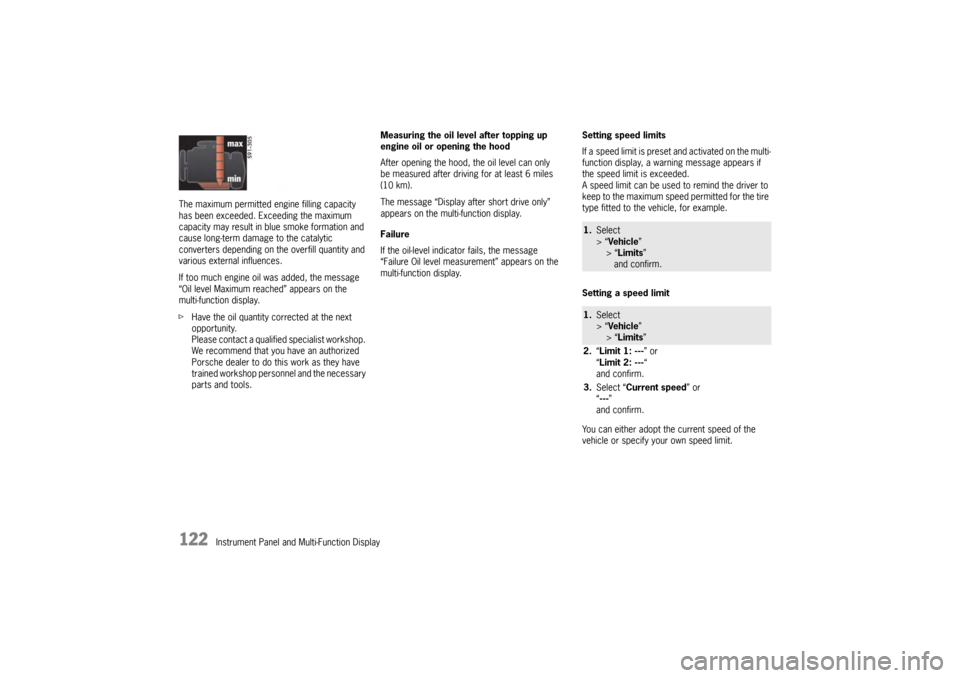
The maximum permitted en
gine filling capacity
has been exceeded. Exceeding the maximum
capacity may result in blue smoke formation and
cause long-term damage to the catalytic
converters depending on the overfill quantity and
various external influences.
If too much engine oil was added, the message
“Oil level Maximum reached” appears on the
multi-function display.
f Have the oil quantity corrected at the next
opportunity.
Please contact a qualif ied specialist workshop.
We recommend that you have an authorized
Porsche dealer to do this work as they have
trained workshop personnel and the necessary
parts and tools. Measuring the oil level after topping up
engine oil or opening the hood
After opening the hood, the oil level can only
be measured after driving for at least 6 miles
(10 km).
The message “Display after short drive only”
appears on the multi-function display.
Failure
If the oil-level indicator fails, the message
“Failure Oil level measurement” appears on the
multi-function display.
Setting speed limits
If a speed limit is preset and activated on the multi-
function display, a warni
ng message appears if
the speed limit is exceeded.
A speed limit can be used to remind the driver to
keep to the maximum speed permitted for the tire
type fitted to the vehicle, for example.
Setting a speed limit
You can either adopt th e current speed of the
vehicle or specify your own speed limit.
1. Select
> “Vehicle ”
> “Limits ”
and confirm.1. Select
> “Vehicle ”
> “Limits ”
2. “Limit 1: --- ” or
“ Limit 2: --- “
and confirm.
3. Select “Current speed ” or
“ --- ”
and confirm.
Page 125 of 343
Instrument Panel and Multi-Function Display
123
Activating and deactivating speed limits
Adjusting vehicle settings
Various settings can be modified in the “Vehicle”
submenu.
For information on modifying vehicle settings:
f Please see the chapter “VEHICLE SETTINGS
ON THE MULTI-FUNCTION DISPLAY” on
page 138.
Selecting radio station or trackIn the “ Audio” main menu, you can select a radio
station either from the st ation list or the list of
stored stations, depending on the settings, or
a track from the active audio source, e.g. disc.
For information on adjusting audio menu settings:
f Please see the chapter “ADAPTING DISPLAY
CONTENTS OF AUDIO MAIN MENU” on
page 139.
Entering navigation destinations, starting
route guidance and retrieving navigation
informationIn the “ Navigation” main menu, you can enter
a navigation destination, start route guidance and
view the navigation information for an active route.
Entering navigation destination
You can enter a navigatio n destination in the
multi-function display.
Only navigation destinations from the list of
previous destinations or from the list of preset
POIs or stored destinations can be selected.
1. Select
> “Vehicle ”
> “ Limits ”
2. “Limit 1: --- ” or
“ Limit 2: --- “
and confirm.
3. Select “ Active”
4. Confirm selection.
Limit is active.
Limit is not active.1.Select
> “Vehicle ”
> “ Settings ”
and confirm.
1. Select
> “Audio”
and confirm.
2. Select the desired radio station or track
and confirm.
1.Select
> “Navigation”
and confirm.1. Select
> “Navigation”
> “ Destination input ”
2. “Last destination ” or
“ Stored destinations” or
“ POIs ”
and confirm.
3. Select desired navigation destination
and confirm.
Page 128 of 343
126
Instrument Panel and Multi-Function Display
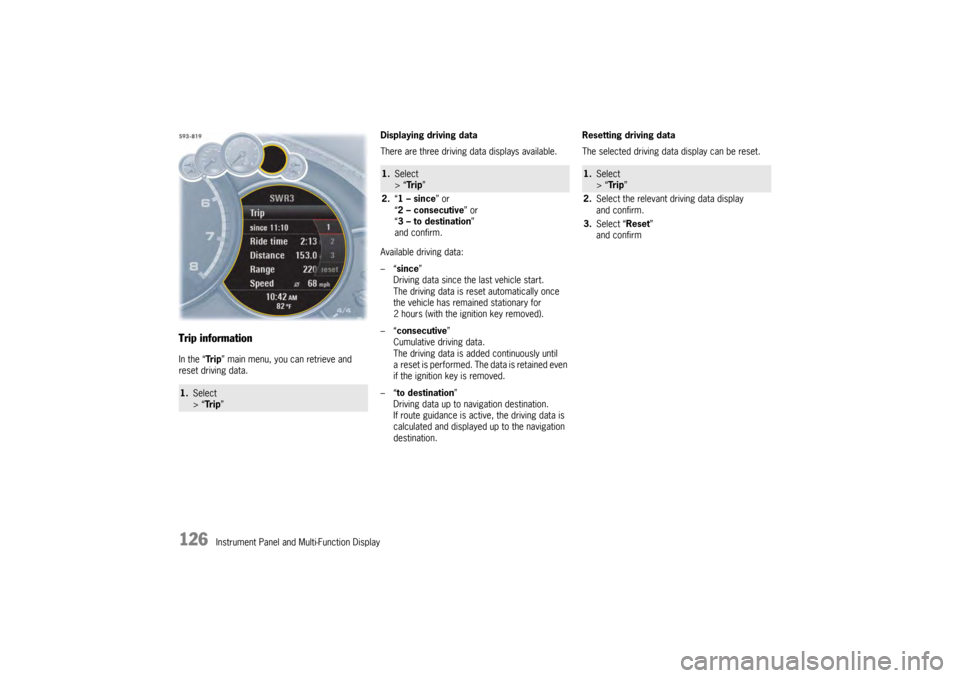
Trip informationIn the “Tr i p” main menu, you can retrieve and
reset driving data. Displaying driving data
There are three driving data displays available.
Available driving data:
–“
since ”
Driving data since the last vehicle start.
The driving data is reset automatically once
the vehicle has remained stationary for
2 hours (with the ignition key removed).
–“ consecutive ”
Cumulative driving data.
The driving data is added continuously until
a reset is performed. The data is retained even
if the ignition key is removed.
–“ to destination ”
Driving data up to navigation destination.
If route guidance is active, the driving data is
calculated and displayed up to the navigation
destination. Resetting driving data
The selected driving data display can be reset.1.
Select
> “Tr i p ”
1.Select
> “Tr i p ”
2. “1 – since ” or
“ 2 – consecutive ” or
“ 3 – to destination ”
and confirm.
1. Select
> “Tr i p ”
2. Select the relevant driving data display
and confirm.
3. Select “Reset ”
and confirm
Page 133 of 343
Instrument Panel and Multi-Function Display
131
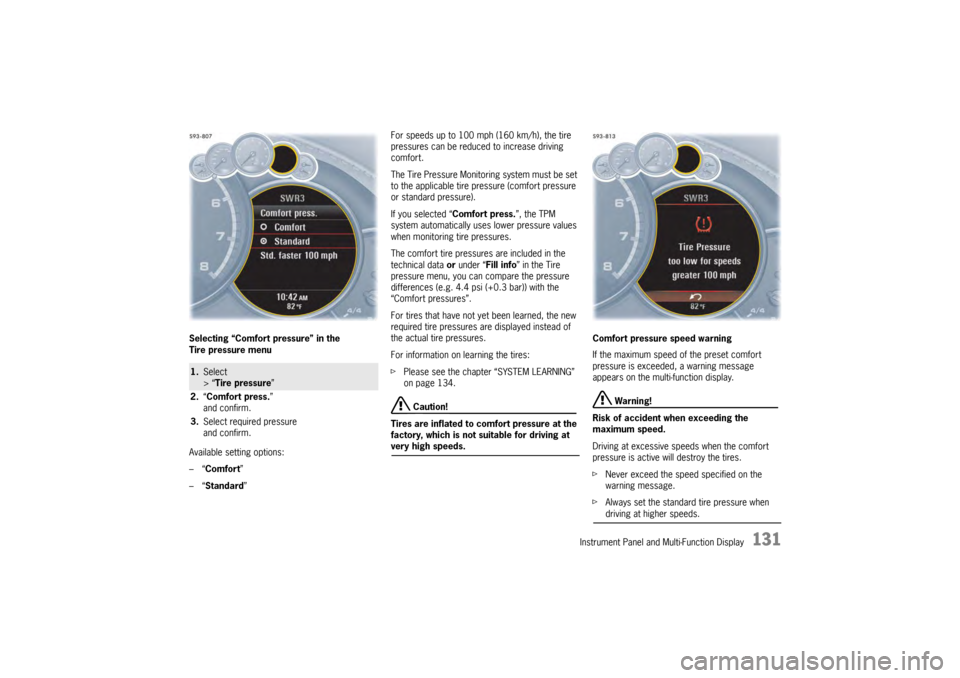
Selecting “Comfort pressure” in the
Tire pressure menu
Available setting options:
–“Comfort ”
–“ Standard ” For speeds up to 100 mph (160 km/h), the tire
pressures can be reduced to increase driving
comfort.
The Tire Pressure Monitoring system must be set
to the applicable tire pressure (comfort pressure
or standard pressure).
If you selected “
Comfort press.”, the TPM
system automatically uses lower pressure values
when monitoring tire pressures.
The comfort tire pressures are included in the
technical data or under “Fill info” in the Tire
pressure menu, you can compare the pressure
differences (e.g. 4.4 psi (+0.3 bar)) with the
“Comfort pressures”.
For tires that have not ye t been learned, the new
required tire pressures are displayed instead of
the actual tire pressures.
For information on learning the tires:
f Please see the chapter “SYSTEM LEARNING”
on page 134.
Caution!
Tires are inflated to comfort pressure at the
factory, which is not suitable for driving at
very high speeds. Comfort pressure speed warning
If the maximum speed of the preset comfort
pressure is exceeded, a warning message
appears on the multi-function display.
Warning!
Risk of accident when exceeding the
maximum speed.
Driving at excessive speeds when the comfort
pressure is active will destroy the tires.
f Never exceed the speed specified on the
warning message.
f Always set the standard tire pressure when driving at higher speeds.
1.Select
> “Tire pressure”
2. “Comfort press. ”
and confirm.
3. Select required pressure
and confirm.
Page 138 of 343
136
Instrument Panel and Multi-Function Display
Sport Chrono on multi-function display
All stopwatch displays are started and stopped in
the “Chrono” menu on the multi-function display.
For instructions on using the multi-function
display:
f
Please see the chapter “OPERATING THE
MULTI-FUNCTION DISPLAY IN THE
INSTRUMENT PANEL” on page 115.
Notes on operation
If you exit the “Chrono ” menu while the stopwatch
is running, measurement will continue.
The stopwatch stops after the ignition is switched
off. If the ignition is switched on again within
approximately 4 minutes, the stopwatch will
continue to run.
The only way to reset th e stopwatch to zero is
by selecting “ Reset” in the “ Chrono” menu.
For information on re setting the stopwatch:
f Please see the chapter “RESETTING THE
STOPWATCH TIME” on page 137.
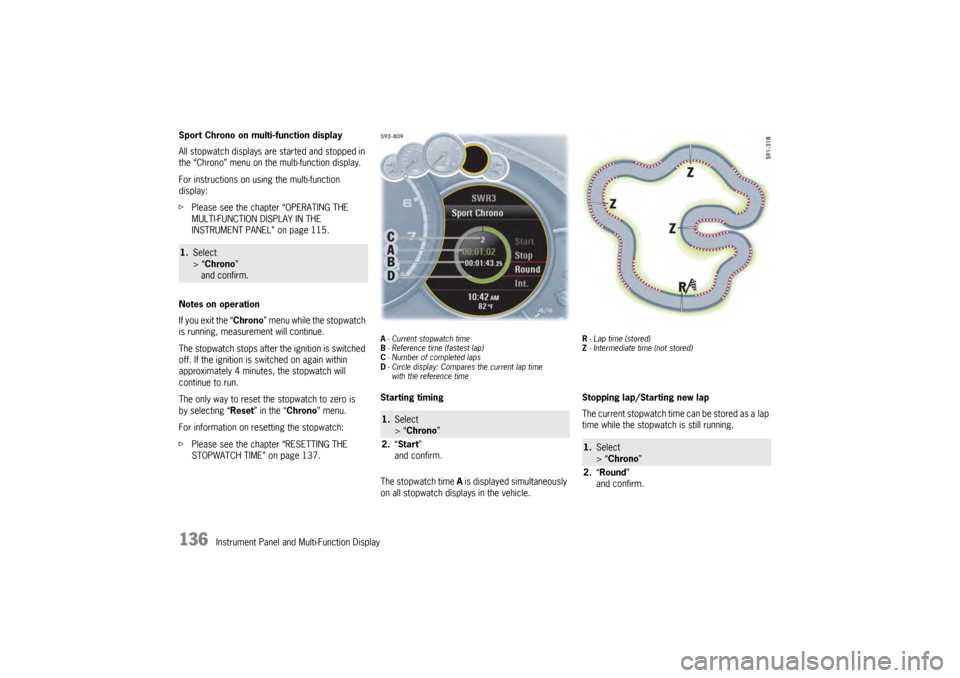
A- Current stopwatch time
B - Reference time (fastest lap)
C - Number of completed laps
D - Circle display: Compares the current lap time
with the reference timeStarting timing
The stopwatch time A is displayed simultaneously
on all stopwatch displays in the vehicle.
R - Lap time (stored)
Z - Intermediate time (not stored)Stopping lap/Starting new lap
The current stopwatch time can be stored as a lap
time while the stopwatch is still running.
1. Select
> “Chrono”
and confirm.
1. Select
> “Chrono”
2. “Start”
and confirm.
1. Select
> “Chrono ”
2. “Round ”
and confirm.
Page 139 of 343
Instrument Panel and Multi-Function Display
137
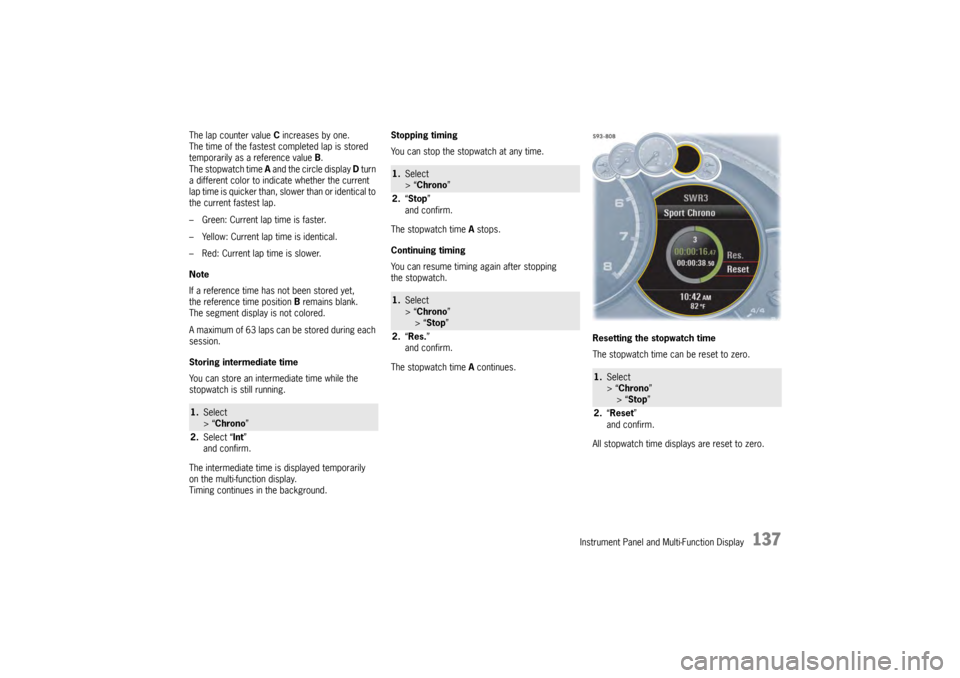
The lap counter value C increases by one.
The time of the fastest completed lap is stored
temporarily as a reference value B.
The stopwatch time A and the circle display D turn
a different color to indicate whether the current
lap time is quicker than, slower than or identical to
the current fastest lap.
– Green: Current lap time is faster.
– Yellow: Current lap time is identical.
– Red: Current lap time is slower.
Note
If a reference time has not been stored yet,
the reference time position B remains blank.
The segment display is not colored.
A maximum of 63 laps can be stored during each
session.
Storing intermediate time
You can store an intermediate time while the
stopwatch is still running.
The intermediate time is displayed temporarily
on the multi-function display.
Timing continues in the background. Stopping timing
You can stop the stopwatch at any time.
The stopwatch time
A stops.
Continuing timing
You can resume timing again after stopping
the stopwatch.
The stopwatch time A continues. Resetting the stopwatch time
The stopwatch time can be reset to zero.
All stopwatch time displays are reset to zero.1.
Select
> “Chrono”
2. Select “ Int”
and confirm.
1. Select
> “Chrono ”
2. “Stop ”
and confirm.1. Select
> “Chrono ”
> “Stop ”
2. “Res. ”
and confirm.
1. Select
> “Chrono”
> “ Stop ”
2. “Reset ”
and confirm.