warning light PORSCHE PANAMERA 2009 1.G Information Manual
[x] Cancel search | Manufacturer: PORSCHE, Model Year: 2009, Model line: PANAMERA, Model: PORSCHE PANAMERA 2009 1.GPages: 343, PDF Size: 7.96 MB
Page 135 of 343
Instrument Panel and Multi-Function Display
133
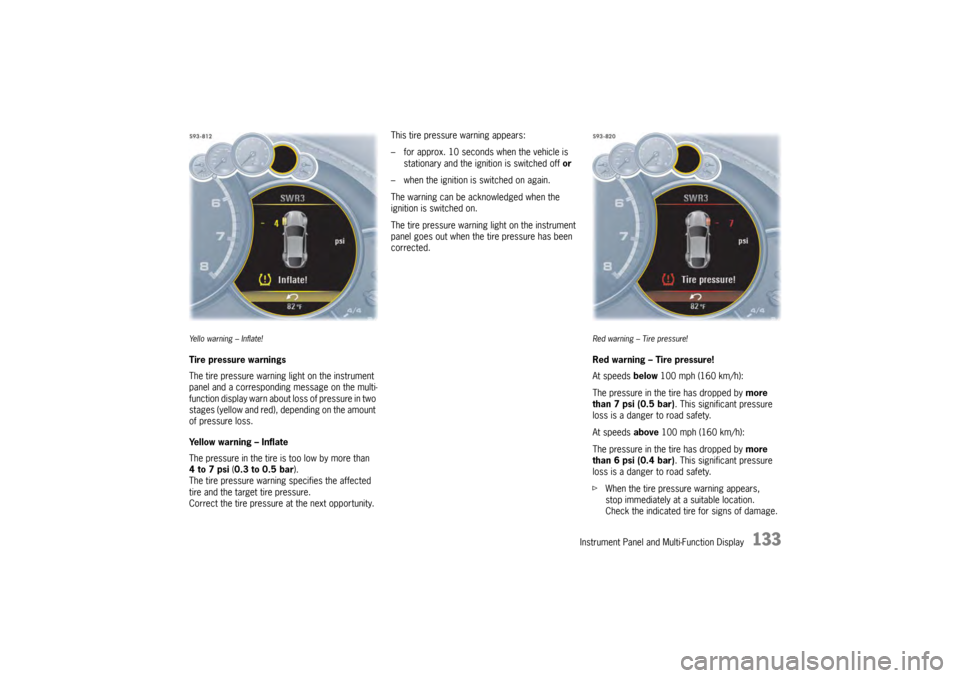
Ye l l o w a r n i n g – I n f l a t e !Tire pressure warnings
The tire pressure warning light on the instrument
panel and a corresponding message on the multi-
function display warn about loss of pressure in two
stages (yellow and red), depending on the amount
of pressure loss.
Yellow warning – Inflate
The pressure in the tire is too low by more than
4to7psi (0.3 to 0.5 bar ).
The tire pressure warning specifies the affected
tire and the target tire pressure.
Correct the tire pressure at the next opportunity. This tire pressure warning appears:
– for approx. 10 seconds when the vehicle is
stationary and the ignition is switched off or
– when the ignition is switched on again.
The warning can be acknowledged when the
ignition is switched on.
The tire pressure warning light on the instrument
panel goes out when the tire pressure has been
corrected.
Red warning – Tire pressure!Red warning – Tire pressure!
At speeds below 100 mph (160 km/h):
The pressure in the tire has dropped by more
than 7 psi (0.5 bar). This significant pressure
loss is a danger to road safety.
At speeds above 100 mph (160 km/h):
The pressure in the tire has dropped by more
than 6 psi (0.4 bar). This significant pressure
loss is a danger to road safety.
f When the tire pressure warning appears,
stop immediately at a suitable location.
Check the indicated tire for signs of damage.
Page 136 of 343

134
Instrument Panel and Multi-Function Display
If necessary, fill in ti
re sealant and set the
correct tire pressure.
This tire pressure warning also appears when
driving and can be acknowledged.
The tire pressure warning light on the instrument
panel goes out only when the tire pressure has
been corrected.
System learningTire Pressure Monitoring begins to “learn” the
wheels after a wheel change, wheel transmitter
replacement or update of the tire settings . During
this process, Tire Pressu re Monitoring recognizes
the wheels and their locations.
The following message appears on the multi-
function display (example):
“No monitoring, system is learning”.
The wheel learning process takes place
exclusively when the vehicle is being driven
(vehicle speed above 16 mph (25 km/h)).
Tire Pressure Monitoring requires a certain
amount of time to learn the wheels. During this
time, the current tire pressures are not available
on the multi-function display:
– The tire pressure warning light remains lit until all wheels have been learned.
– Lines (-.-) appear on the display of the “Tire pressure” function. – The required pressures for cold tires (68 °F
(20 °C)) are indicated under “Fill info” in the tire
pressure menu.
Position and pressure information is displayed as
soon as Tire Pressure Monitoring has assigned
the wheels recognized as belonging to the vehicle
to the correct wheel positions.
f Check the tire pressure for all wheels under
“Fill info ”.
f Correct the tire pressure to the required
pressure if necessary.
Changing a wheel and replacing tiresfNew wheels must be fitted with radio
transmitters for Tire Pressure Monitoring.
Before tires are changed, the battery charge
condition of the wheel transmitters should be
checked.
Please contact a qualified specialist workshop.
We recommend that you have an authorized
Porsche dealer to do this work as they have
trained workshop personnel and the necessary
parts and tools.
f Switch off the ignition when changing a wheel.
The tire settings on the mu lti-function display must
be updated after changing a wheel.
If the tire settings are not updated, the message
“Tire change? Update settings!” is displayed on the
multi-function display.
f Update the multi-function display settings the
next time the vehicle is stationary.
Pressure increase as the result of
temperature increaseIn accordance with physical principles, the tire
pressure changes as the temperature
changes.The tire pressure increases or decreases
by 0.1 bar (1.5 psi) for
every 18 °F (10 °C) change in temperature.Partial monitoringMonitoring of the other wheels is continued if there
is a fault in one or two wheel transmitters.
– The tire pressure warning light lights up.
– The message “Restricted monitoring” appears
on the multi-function display.
– No tire pressures are displayed on the multi-function display for wheels with faulty
wheel transmitters.
Page 137 of 343
Instrument Panel and Multi-Function Display
135
No monitoringIn the event of faults, Tire Pressure Monitoring
cannot monitor the tire pressure.
The warning light on the instrument panel lights up
and a corresponding message appears on the
multi-function display.
Monitoring is not active:
– if Tire Pressure Monitoring is faulty,
– if wheel transmitters for Tire Pressure Monitoring are missing,
– during the learning phase after the tire settings have been updated,
– after a wheel change without updating the tire settings,
– if more than four wheel transmitters are recognized,
– if there is external interference by other radio sources, e.g. wireless headphones,
– if tire temperatures are too high.
f Please see the chapter “OVERVIEW OF
WARNING MESSAGES” on page 152.
Sport Chrono/StopwatchYou can use the stopwatch to measure any times,
e.g. on race circuits or on work-related journeys.
Measured lap times can be stored and evaluated
if the vehicle is equipped with Porsche
Communication Management (PCM).
fPlease observe the chapter “SPORT DISPLAY”
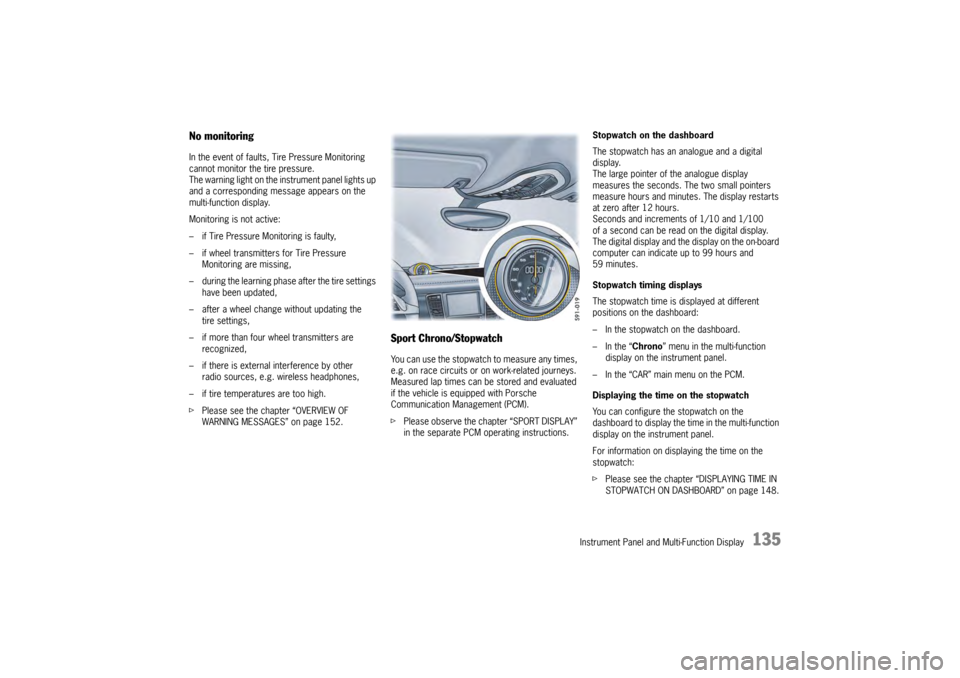
in the separate PCM operating instructions. Stopwatch on the dashboard
The stopwatch has an analogue and a digital
display.
The large pointer of the analogue display
measures the seconds. The two small pointers
measure hours and minutes. The display restarts
at zero after 12 hours.
Seconds and increments of 1/10 and 1/100
of a second can be read on the digital display.
The digital display and the
display on the on-board
computer can indicate up to 99 hours and
59 minutes.
Stopwatch timing displays
The stopwatch time is displayed at different
positions on the dashboard:
– In the stopwatch on the dashboard.
– In the “ Chrono” menu in the multi-function
display on the instrument panel.
– In the “CAR” main menu on the PCM.
Displaying the time on the stopwatch
You can configure the stopwatch on the
dashboard to display the ti me in the multi-function
display on the instrument panel.
For information on displaying the time on the
stopwatch:
f Please see the chapter “DISPLAYING TIME IN
STOPWATCH ON DASHBOARD” on page 148.
Page 140 of 343
138
Instrument Panel and Multi-Function Display
Vehicle Settings on the Multi-
Function DisplayDifferent settings can be adjusted in the
multi-function display on the instrument panel
depending on the vehicle equipment.
On vehicles with comfort memory, the settings are
stored on the car key or the person buttons in the
driver’s door.
For information on the comfort memory:
fPlease see the chapter “COMFORT MEMORY”
on page 40.
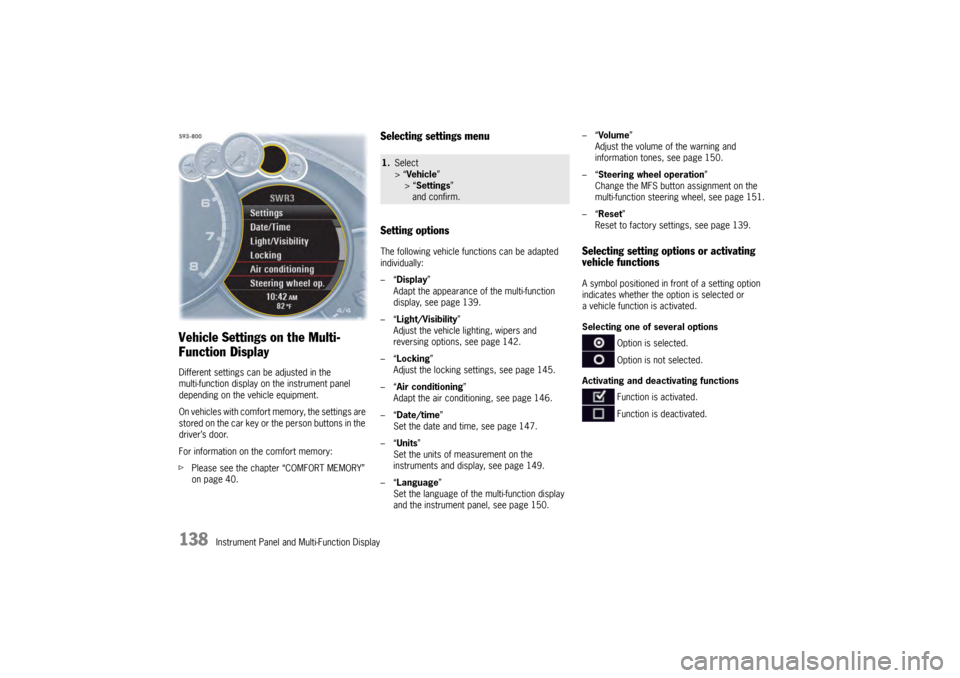
Selecting settings menu
Setting optionsThe following vehicle functions can be adapted
individually:
–“ Display ”
Adapt the appearance of the multi-function
display, see page 139.
–“ Light/Visibility ”
Adjust the vehicle lighting, wipers and
reversing options, see page 142.
–“ Locking ”
Adjust the locking settings, see page 145.
–“ Air conditioning ”
Adapt the air conditioning, see page 146.
–“ Date/time ”
Set the date and time, see page 147.
–“ Units ”
Set the units of measurement on the
instruments and display, see page 149.
–“ Language”
Set the language of the multi-function display
and the instrument panel, see page 150. –“
Volume ”
Adjust the volume of the warning and
information tones, see page 150.
–“ Steering wheel operation”
Change the MFS button assignment on the
multi-function steering wheel, see page 151.
–“ Reset ”
Reset to factory settings, see page 139.
Selecting setting options or activating
vehicle functionsA symbol positioned in front of a setting option
indicates whether the option is selected or
a vehicle function is activated.
Selecting one of several options
Option is selected.
Option is not selected.
Activating and deactivating functions Function is activated.
Function is deactivated.
1.Select
> “Vehicle ”
> “ Settings ”
and confirm.
Page 154 of 343
152
Instrument Panel and Multi-Function Display
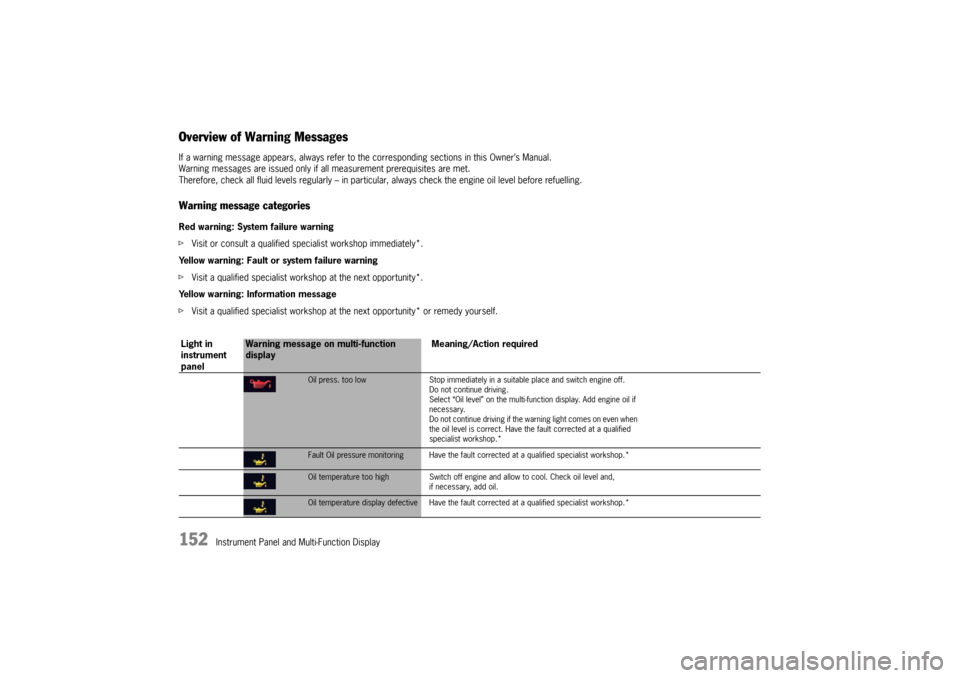
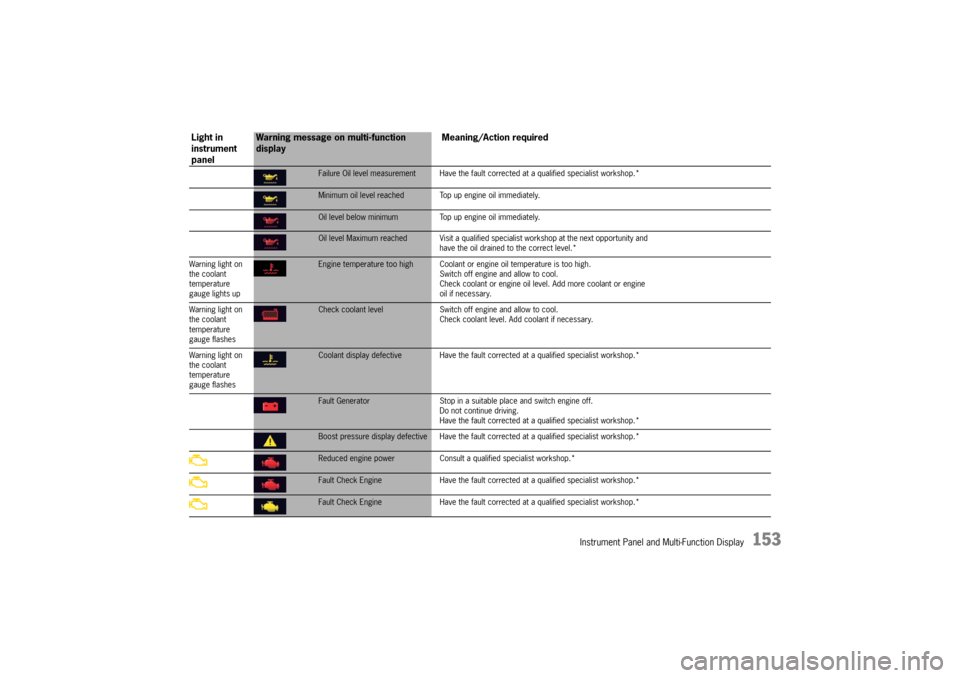
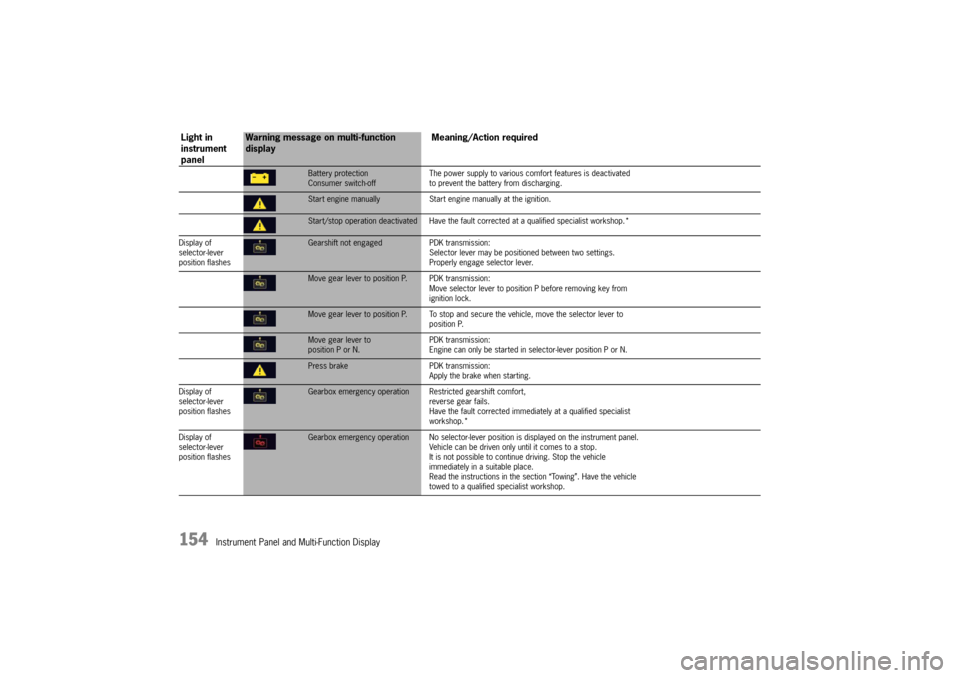
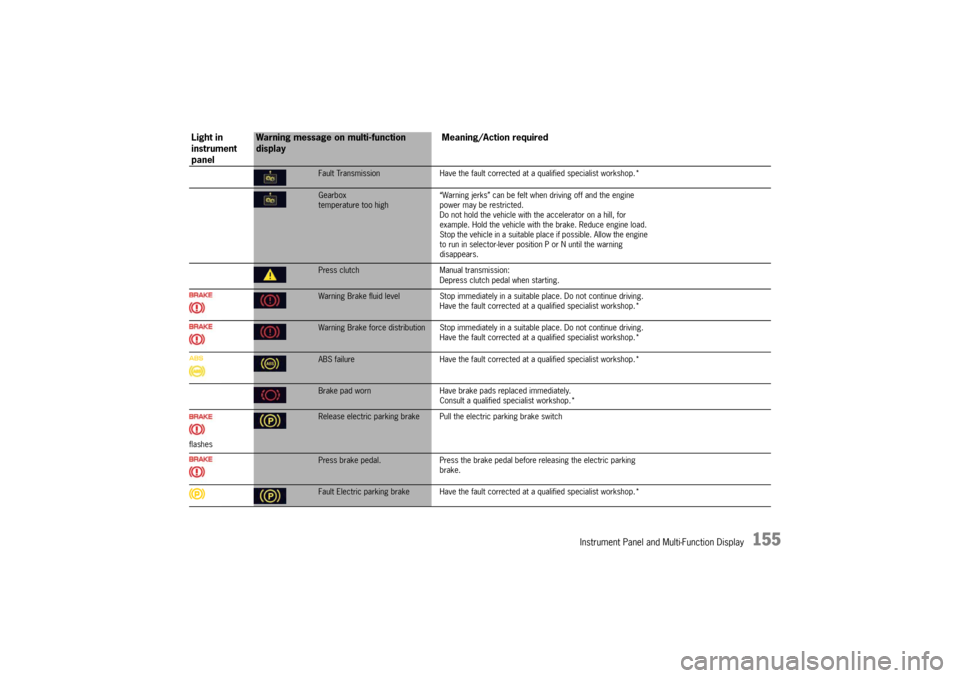
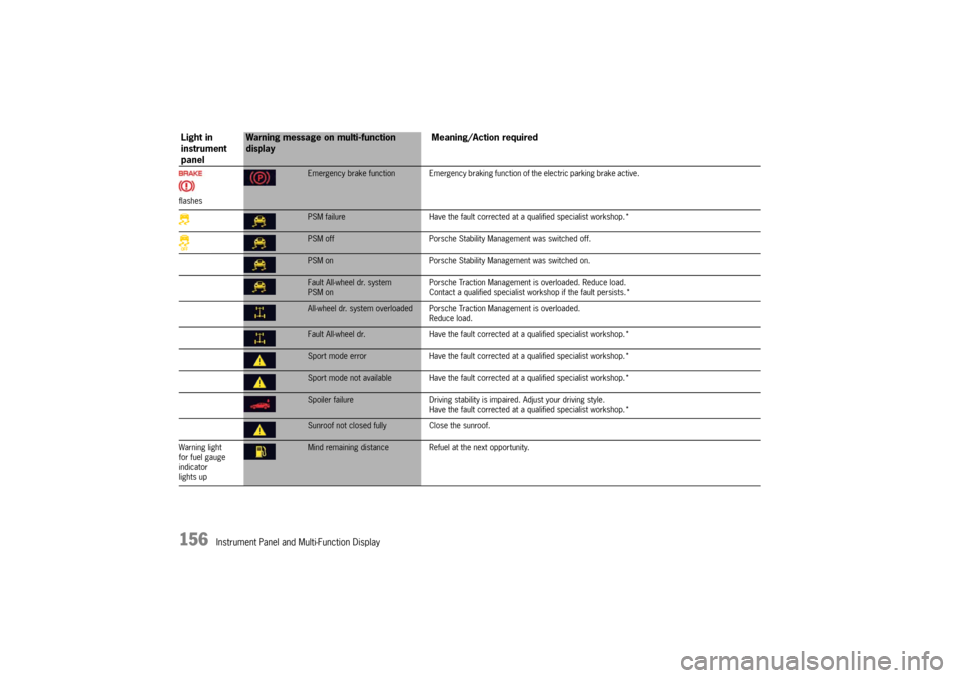
Overview of Warning MessagesIf a warning message appears, always refer to the corresponding sections in this Owner’s Manual.
Warning messages are issued only if all measurement prerequisites are met.
Therefore, check all fluid levels regu larly – in particular, always check the engine oil level before refuelling.Warning message categoriesRed warning: System failure warning
fVisit or consult a qualified spec ialist workshop immediately*.
Yellow warning: Fault or system failure warning
f Visit a qualified specialist worksh op at the next opportunity*.
Yellow warning: Information message
f Visit a qualified specialist workshop at the next opportunity* or remedy yourself.
Light in
instrument
panel
Warning message on multi-function
display Meaning/Action required
Oil press. too low
Stop immediately in a suitable place and switch engine off.
Do not continue driving.
Select “Oil level” on the multi-func tion display. Add engine oil if
necessary.
Do not continue driving if the wa rning light comes on even when
the oil level is correct. Have the fault corrected at a qualified
specialist workshop.*Fault Oil pressure monitoring Have the faul t corrected at a qualified specialist workshop.*Oil temperature too highSwitch off engine and allow to cool. Check oil level and,
if necessary, add oil.Oil temperature display defective Have the faul t corrected at a qualified specialist workshop.*
Page 155 of 343
Instrument Panel and Multi-Function Display
153
Failure Oil level measurement Have the fault corrected at a qualified specialist workshop.*Minimum oil level reached Top up engine oil immediately.Oil level below minimum Top up engine oil immediately.Oil level Maximum reached Visit a qualified spec ialist workshop at the next opportunity and
have the oil drained to the correct level.*
Warning light on
the coolant
temperature
gauge lights upEngine temperature too high Coolant or engine oil temperature is too high.
Switch off engine and allow to cool.
Check coolant or engine oil leve l. Add more coolant or engine
oil if necessary.
Warning light on
the coolant
temperature
gauge flashesCheck coolant level Switch off engine and allow to cool.
Check coolant level. Add coolant if necessary.
Warning light on
the coolant
temperature
gauge flashesCoolant display defective Have the fault corr ected at a qualified specialist workshop.*Fault Generator Stop in a suitable place and switch engine off.
Do not continue driving.
Have the fault corrected at a q ualified specialist workshop.*Boost pressure display defective Have the fault corrected at a qualified specialist workshop.*Reduced engine power Consult a qualified specialist workshop.*Fault Check Engine Have the fault corrected at a qualified specialist workshop.*Fault Check Engine Have the fault corrected at a qualified specialist workshop.*
Light in
instrument
panel
Warning message on multi-function
display Meaning/Action required
Page 156 of 343
154
Instrument Panel and Multi-Function Display
Battery protection
Consumer switch-offThe power supply to various comf
ort features is deactivated
to prevent the battery from discharging.Start engine manually Start engine manually at the ignition.Start/stop operation deactivated Have the faul t corrected at a qualified specialist workshop.*
Display of
selector-lever
position flashesGearshift not engaged PDK transmission:
Selector lever may be positi oned between two settings.
Properly engage selector lever.Move gear lever to position P. PDK transmission:
Move selector lever to position P before removing key from
ignition lock.Move gear lever to position P. To stop and se cure the vehicle, move the selector lever to
position P.Move gear lever to
position P or N. PDK transmission:
Engine can only be started in selector-lever position P or N.Press brake
PDK transmission:
Apply the brake when starting.
Display of
selector-lever
position flashesGearbox emergency operation R estricted gearshift comfort,
reverse gear fails.
Have the fault corrected immediately at a qualified specialist
workshop.*
Display of
selector-lever
position flashesGearbox emergency operation No selector-lever po sition is displayed on the instrument panel.
Vehicle can be driven only until it comes to a stop.
It is not possible to contin ue driving. Stop the vehicle
immediately in a suitable place.
Read the instructions in the se ction “Towing”. Have the vehicle
towed to a qualified specialist workshop.
Light in
instrument
panel
Warning message on multi-function
display Meaning/Action required
Page 157 of 343
Instrument Panel and Multi-Function Display
155
Fault TransmissionHave the fault corrected at a qualified specialist workshop.*Gearbox
temperature too high “Warning jerks” can be felt when driving off and the engine
power may be restricted.
Do not hold the vehicle with the accelerator on a hill, for
example. Hold the vehicle with
the brake. Reduce engine load.
Stop the vehicle in a suitable plac e if possible. Allow the engine
to run in selector-lever posi tion P or N until the warning
disappears.Press clutch Manual transmission:
Depress clutch pedal when starting.Warning Brake fluid level Stop immediately in a suitable place. Do not continue driving.
Have the fault corrected at a q ualified specialist workshop.*Warning Brake force distribution Stop immediately in a suitable place. Do not continue driving.
Have the fault corrected at a q ualified specialist workshop.*ABS failure Have the fault corrected at a qualified specialist workshop.*Brake pad worn Have brake pads replaced immediately.
Consult a qualified specialist workshop.*
flashesRelease electric parking brake Pull the electric parking brake switchPress brake pedal.Press the brake pedal before releasing the electric parking
brake.Fault Electric parking brake Have the fault co rrected at a qualified specialist workshop.*
Light in
instrument
panel
Warning message on multi-function
display Meaning/Action required
Page 158 of 343
156
Instrument Panel and Multi-Function Display
flashes
Emergency brake function Emergency braking function of the electric parking brake active.PSM failureHave the fault corrected at a qualified specialist workshop.*PSM off Porsche Stability Management was switched off.PSM on Porsche Stability Management was switched on.Fault All-wheel dr. system
PSM on Porsche Traction Management is overloaded. Reduce load.
Contact a qualified specialist workshop if the fault persists.*All-wheel dr. system overloaded Porsche
Traction Management is overloaded.
Reduce load.Fault All-wheel dr. Have the fault corrected at a qualified specialist workshop.*Sport mode error Have the fault corrected at a qualified specialist workshop.*Sport mode not available Have the fault co rrected at a qualified specialist workshop.*Spoiler failureDriving stability is impaired. Adjust your driving style.
Have the fault corrected at a qualified specialist workshop.*Sunroof not closed fully Close the sunroof.
Warning light
for fuel gauge
indicator
lights upMind remaining distance Refuel at the next opportunity.
Light in
instrument
panel
Warning message on multi-function
display Meaning/Action required
Page 159 of 343
Instrument Panel and Multi-Function Display
157
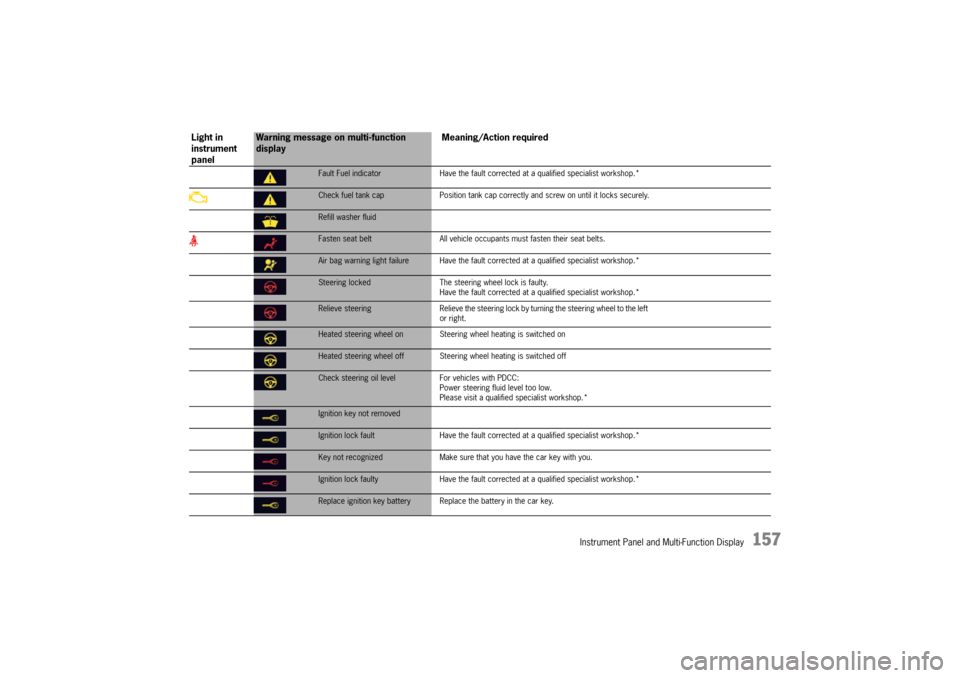
Fault Fuel indicatorHave the fault corrected at a qualified specialist workshop.*Check fuel tank cap Position tank cap correctly and screw on until it locks securely.Refill washer fluidFasten seat belt All vehicle occupants must fasten their seat belts.Air bag warning light failure Have the fault co rrected at a qualified specialist workshop.*Steering locked The steering wheel lock is faulty.
Have the fault corrected at a q ualified specialist workshop.*Relieve steering Relieve the steering lock by turning the steering wheel to the left
or right.Heated steering wheel on Steering wheel heating is switched onHeated steering wheel off Steering wheel heating is switched offCheck steering oil level For vehicles with PDCC:
Power steering fluid level too low.
Please visit a qualified specialist workshop.*Ignition key not removedIgnition lock fault Have the fault corrected at a qualified specialist workshop.*Key not recognized Make sure that you have the car key with you.Ignition lock faulty Have the fault corrected at a qua lified specialist workshop.*Replace ignition key battery Repla ce the battery in the car key.
Light in
instrument
panel
Warning message on multi-function
display Meaning/Action required