warning lights PORSCHE PANAMERA 2010 1.G Owner's Manual
[x] Cancel search | Manufacturer: PORSCHE, Model Year: 2010, Model line: PANAMERA, Model: PORSCHE PANAMERA 2010 1.GPages: 343, PDF Size: 7.96 MB
Page 137 of 343
Instrument Panel and Multi-Function Display
135
No monitoringIn the event of faults, Tire Pressure Monitoring
cannot monitor the tire pressure.
The warning light on the instrument panel lights up
and a corresponding message appears on the
multi-function display.
Monitoring is not active:
– if Tire Pressure Monitoring is faulty,
– if wheel transmitters for Tire Pressure Monitoring are missing,
– during the learning phase after the tire settings have been updated,
– after a wheel change without updating the tire settings,
– if more than four wheel transmitters are recognized,
– if there is external interference by other radio sources, e.g. wireless headphones,
– if tire temperatures are too high.
f Please see the chapter “OVERVIEW OF
WARNING MESSAGES” on page 152.
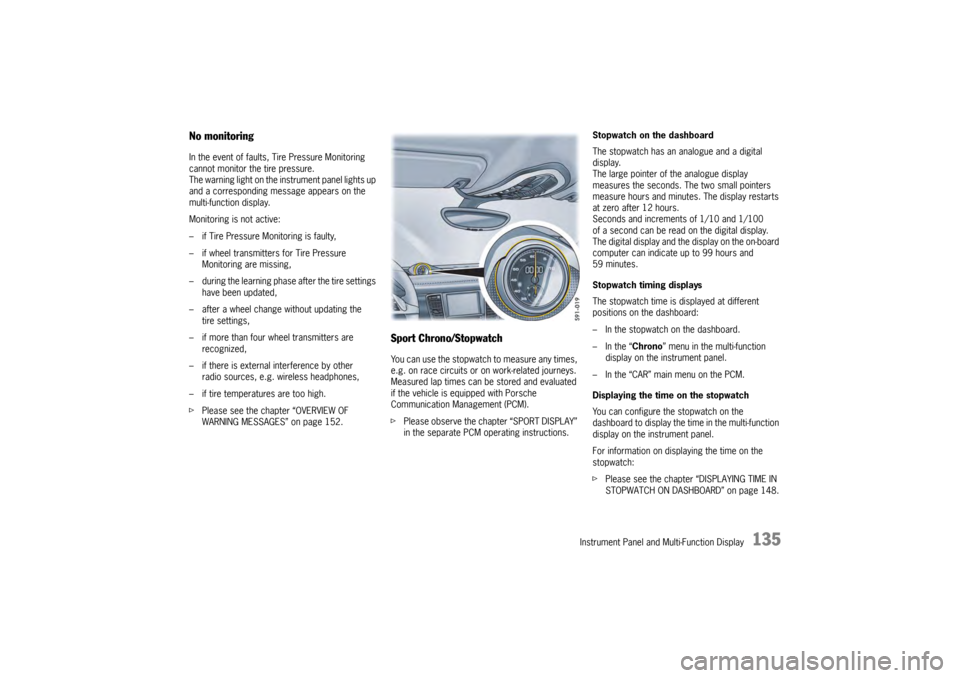
Sport Chrono/StopwatchYou can use the stopwatch to measure any times,
e.g. on race circuits or on work-related journeys.
Measured lap times can be stored and evaluated
if the vehicle is equipped with Porsche
Communication Management (PCM).
fPlease observe the chapter “SPORT DISPLAY”
in the separate PCM operating instructions. Stopwatch on the dashboard
The stopwatch has an analogue and a digital
display.
The large pointer of the analogue display
measures the seconds. The two small pointers
measure hours and minutes. The display restarts
at zero after 12 hours.
Seconds and increments of 1/10 and 1/100
of a second can be read on the digital display.
The digital display and the
display on the on-board
computer can indicate up to 99 hours and
59 minutes.
Stopwatch timing displays
The stopwatch time is displayed at different
positions on the dashboard:
– In the stopwatch on the dashboard.
– In the “ Chrono” menu in the multi-function
display on the instrument panel.
– In the “CAR” main menu on the PCM.
Displaying the time on the stopwatch
You can configure the stopwatch on the
dashboard to display the ti me in the multi-function
display on the instrument panel.
For information on displaying the time on the
stopwatch:
f Please see the chapter “DISPLAYING TIME IN
STOPWATCH ON DASHBOARD” on page 148.
Page 155 of 343
Instrument Panel and Multi-Function Display
153
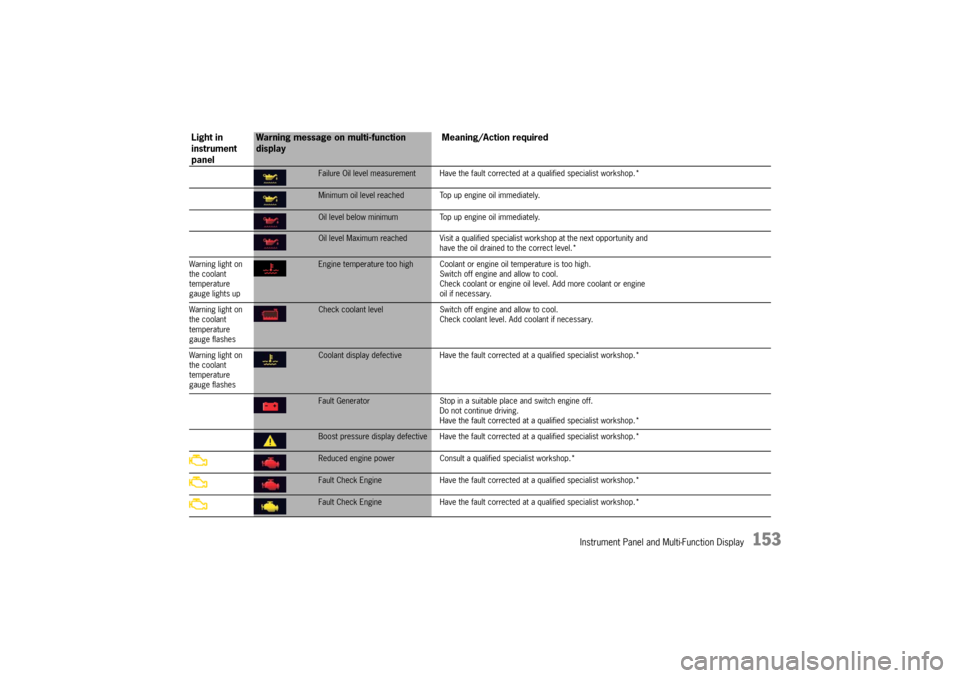
Failure Oil level measurement Have the fault corrected at a qualified specialist workshop.*Minimum oil level reached Top up engine oil immediately.Oil level below minimum Top up engine oil immediately.Oil level Maximum reached Visit a qualified spec ialist workshop at the next opportunity and
have the oil drained to the correct level.*
Warning light on
the coolant
temperature
gauge lights upEngine temperature too high Coolant or engine oil temperature is too high.
Switch off engine and allow to cool.
Check coolant or engine oil leve l. Add more coolant or engine
oil if necessary.
Warning light on
the coolant
temperature
gauge flashesCheck coolant level Switch off engine and allow to cool.
Check coolant level. Add coolant if necessary.
Warning light on
the coolant
temperature
gauge flashesCoolant display defective Have the fault corr ected at a qualified specialist workshop.*Fault Generator Stop in a suitable place and switch engine off.
Do not continue driving.
Have the fault corrected at a q ualified specialist workshop.*Boost pressure display defective Have the fault corrected at a qualified specialist workshop.*Reduced engine power Consult a qualified specialist workshop.*Fault Check Engine Have the fault corrected at a qualified specialist workshop.*Fault Check Engine Have the fault corrected at a qualified specialist workshop.*
Light in
instrument
panel
Warning message on multi-function
display Meaning/Action required
Page 158 of 343
156
Instrument Panel and Multi-Function Display
flashes
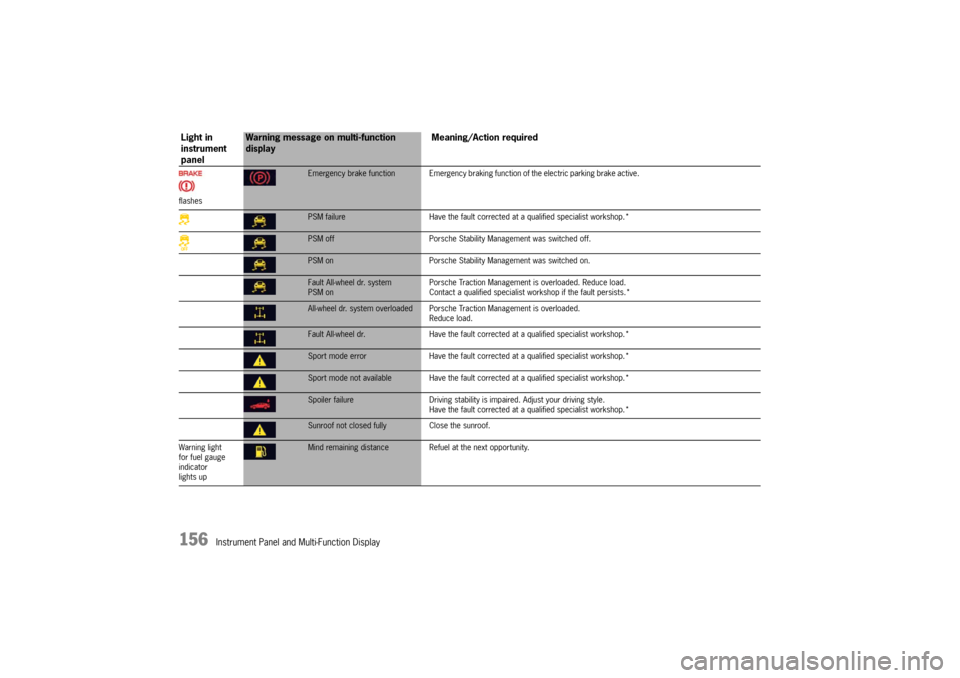
Emergency brake function Emergency braking function of the electric parking brake active.PSM failureHave the fault corrected at a qualified specialist workshop.*PSM off Porsche Stability Management was switched off.PSM on Porsche Stability Management was switched on.Fault All-wheel dr. system
PSM on Porsche Traction Management is overloaded. Reduce load.
Contact a qualified specialist workshop if the fault persists.*All-wheel dr. system overloaded Porsche
Traction Management is overloaded.
Reduce load.Fault All-wheel dr. Have the fault corrected at a qualified specialist workshop.*Sport mode error Have the fault corrected at a qualified specialist workshop.*Sport mode not available Have the fault co rrected at a qualified specialist workshop.*Spoiler failureDriving stability is impaired. Adjust your driving style.
Have the fault corrected at a qualified specialist workshop.*Sunroof not closed fully Close the sunroof.
Warning light
for fuel gauge
indicator
lights upMind remaining distance Refuel at the next opportunity.
Light in
instrument
panel
Warning message on multi-function
display Meaning/Action required
Page 162 of 343
160
Instrument Panel and Multi-Function Display
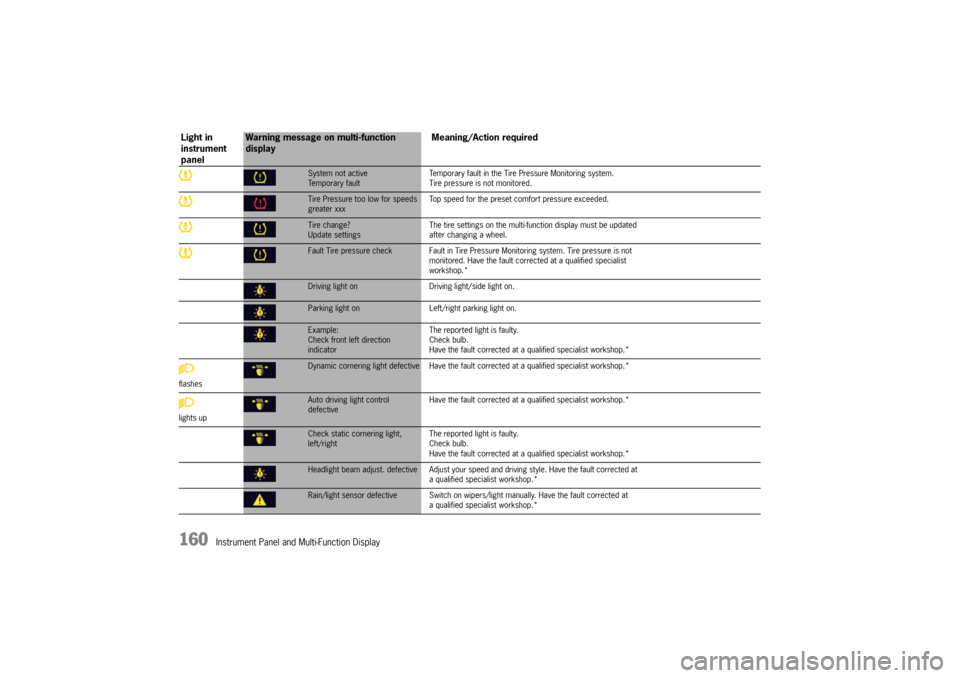
System not active
Temporary faultTemporary fault in the Tire Pressure Monitoring system.
Tire pressure is not monitored.Tire Pressure too low for speeds
greater xxx
Top speed for the preset co
mfort pressure exceeded.Tire change?
Update settings The tire settings on the multi-f
unction display must be updated
after changing a wheel.Fault Tire pressure check Fault in Tire Pressu re Monitoring system. Tire pressure is not
monitored. Have the fault corrected at a qualified specialist
workshop.*Driving light on Driving light/side light on.Parking light on Left/right parking light on.Example:
Check front left direction
indicator The reported light is faulty.
Check bulb.
Have the fault corrected at
a qualified specialist workshop.*
flashesDynamic cornering light defective Have the faul t corrected at a qualified specialist workshop.*
lights upAuto driving light control
defective Have the fault corrected at
a qualified specialist workshop.*Check static cornering light,
left/right The reported light is faulty.
Check bulb.
Have the fault corrected at
a qualified specialist workshop.*Headlight beam adjust. defective Adjust your speed and driving style. Have the fault corrected at
a qualified specialist workshop.*Rain/light sensor defective Switch on wipers/ light manually. Have the fault corrected at
a qualified specialist workshop.*
Light in
instrument
panel
Warning message on multi-function
display Meaning/Action required
Page 163 of 343
Instrument Panel and Multi-Function Display
161
flashes
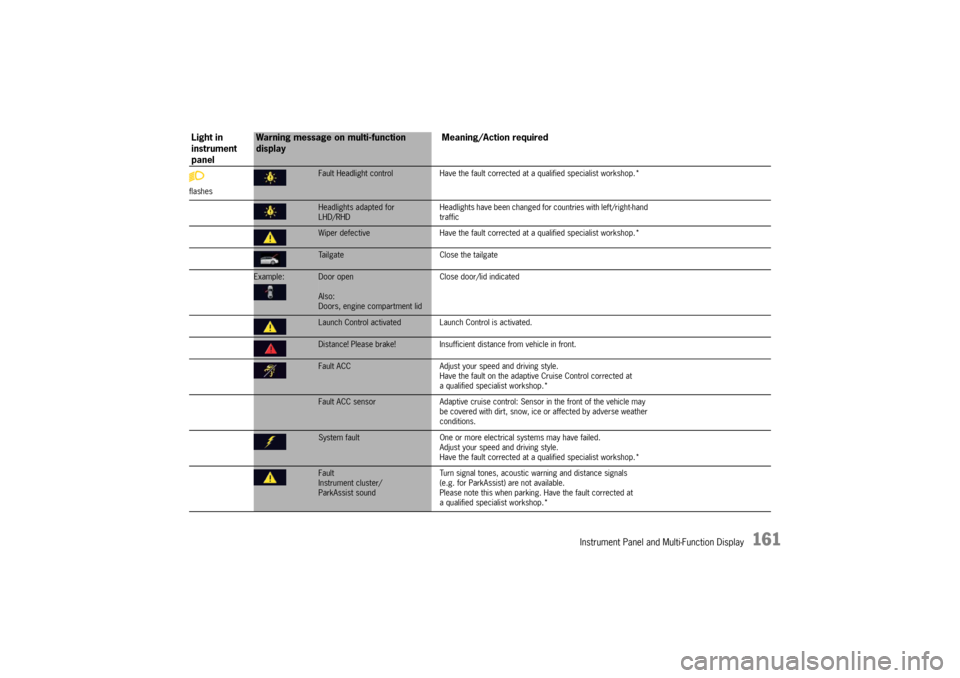
Fault Headlight controlHave the fault corrected at a qualified sp ecialist workshop.*Headlights adapted for
LHD/RHD Headlights have been changed for
countries with left/right-hand
trafficWiper defective Have the fault corrected at a qualified specialist workshop.*Tailgate Close the tailgate
Example:
Door open
Also:
Doors, engine compartment lidClose door/lid indicatedLaunch Control activated Lau
nch Control is activated.Distance! Please brake!Insufficient distance from vehicle in front.Fault ACC Adjust your speed and driving style.
Have the fault on the adaptive Cruise Control corrected at
a qualified specialist workshop.*Fault ACC sensor Adaptive cruise control: Sensor in the front of the vehicle may
be covered with dirt, snow, ice or affected by adverse weather
conditions.System fault One or more electrical systems may have failed.
Adjust your speed and driving style.
Have the fault corrected at a q ualified specialist workshop.*Fault
Instrument cluster/
ParkAssist sound Turn signal tones, acoustic
warning and distance signals
(e.g. for ParkAssist) are not available.
Please note this when parking. Have the fault corrected at
a qualified specialist workshop.*
Light in
instrument
panel
Warning message on multi-function
display Meaning/Action required
Page 167 of 343

Driving and Driving Safety
165
To remove the ignition key:
fStop the vehicle.
f Move PDK selector lever to position P.
f Switch ignition off.
f Remove the ignition key.Ignition lock position 1 – Ignition onfTurn ignition key to position 1.
All electrical equipment can be switched on. The
warning lights on the inst rument panel light up for
alamp check.
f Please see the chapter “INSTRUMENT PANEL
USA MODELS” on page 107.
If an electrical consumer is not switched on for
10 minutes after switching on the ignition, the
ignition must be switched off then on again.
Ignition lock position 2 – Start enginef Turn ignition key to ignition lock position 2.
The car key is reset automa tically from position 2
to position 1 when you start the engine.Ignition lock position 3 – Activate
steering column lock on vehicles with
Porsche Entry & Drivef Please see the chapter “Manually locking the
steering column on vehicles with Porsche
Entry & Drive” on page 165.Steering column lockVehicles without Porsche Entry & Drive
The steering column is locked automatically
when the ignition key is removed from the ignition
lock and unlocked automatically when the
ignition key is inserted into the ignition lock.
Vehicles with Porsche Entry & Drive
The steering column is locked automatically
when the driver’s door is opened when the ignition
is switched off. Manually locking the steering column on
vehicles with Porsche Entry & Drive
f
Once the ignition is switched off, turn the
control unit to ignition lock position 3 again
and hold it there for 2seconds.
The steering column is locked when you hear
a clicking noise.
The steering column can be unlocked
automatically by turning the control unit to
ignition lock position 1.
Emergency operation with Porsche
Entry & DriveInterference in radio tr ansmission between the
vehicle and ignition lock or a discharged ignition
lock battery can disable the Porsche Entry & Drive
comfort function.
If this happens, the control unit can be removed
from the ignition lock and the vehicle can be
started using the standard ignition key.
Removing the control unit from the
ignition lock
1. Turn the control unit to ignition lock position 3
and hold it there for about 10 seconds.
Once you hear the clicking sound, you can remove
the control unit in ignition lock position 0.
Page 169 of 343

Driving and Driving Safety
167
Starting and Stopping the EngineThe immobilizer can be deactivated and the
engine started only using an authorised
ignition key.
fPlease see the chapter “IMMOBILIZER” on
page 250.
Warning!
Risk of poisoning. Exhaust gas contains
colorless and odorless carbon monoxide
(CO), which is toxic even in low
concentrations. Carbon monoxide can cause
unconsciousness and even death if inhaled.
f Never start or let the engine run in an
enclosed, unventilated area. It is not
recommended to sit in your car for prolonged
periods with the engine on and the car not
moving.
An unattended vehicle with a running engine
is potentially hazardous. If warning lights
should come on to indicate improper
operation, they would go unnoticed.
f Never leave the engine idling unattended.
Danger of fire close to the hot exhaust
system.
f Do not park or drive your vehicle where
combustible materials, such as dry grass or
leaves, can come into contact with the hot
exhaust system. For information on the emission control system:
f
Please see the chapter “EMISSION CONTROL
SYSTEM” on page 262.
f If your car catches on fire for any reason, call
the fire department. Do not endanger your life
by attempting to put out the fire.
Starting the vehicle f Operate the footbrake.
f Move PDK selector lever to position P or N.
f Do not press the accelerator pedal.
The engine control unit will provide the correct
starting mixture.
f Turn the ignition key or control unit (Porsche
Entry & Drive) to ignition lock position 2.
The starting process is carried out and
completed automatically as soon as ignition
lock position 2 (start engine) is reached.
The ignition key or control unit is reset
automatically to ignition lock position 1
(ignition on).
f Do not operate the starter for more than
approx. 10 seconds. If necessary, repeat the
starting procedure after a pause of approx.
10 seconds. Turn the ignition key back to
ignition lock position 0 (initial position) first.
The first operation of the starter is ended
automatically when the engine starts.
If the engine does not start, subsequent
starter operations will not be ended
automatically.
Page 171 of 343

Driving and Driving Safety
169
Auto Start Stop FunctionThe engine stops automatically when the vehicle is
stopped, e.g. at traffic lights or in a traffic jam.
The Auto Start Stop function thus helps to
save fuel.
The ignition stays on even when the engine
switches off automatically. All safety functions
are still available.Stopping the engineThe Auto Start Stop function stops the engine
as soon as the vehicle stops moving.
1. Use the footbrake to hold the vehicle in place.
2. Keep the footbrake pressed.or
Move PDK selector lever to position P.
Preconditions for stopping the engine
– Engine compartment lid closed.
– Driver detected: driver’s seat belt fastened and driver’s door closed.
– PDK selector lever in position D, N or P or
transmission range 1 or 2 selected manually.
– Engine, transmission and battery are at operating temperature.
– Vehicle was driven at a speed of more than approx. 1 mph (2 km/h) for at least
1.5 seconds since the engine last stopped
automatically.
Starting the engineThe Auto Start Stop func tion starts the engine:
f In PDK selector-lever position D, N or manually
selected transmission range 1 or 2:
Release the footbrake.
or
Press the accelerator.
or
f Move PDK selector lever to position R.
You can drive off normally.
Note
The engine will start automatically in certain
situations, e.g. if the vehicle starts rolling, if air
conditioning causes reduced comfort, or if the
brake booster vacuum is reduced.
Starting the engine manually after leaving
the vehicle
If the driver’s seat belt is unbuckled or the driver’s
door is opened after the engine was stopped
automatically, the engine will not start
automatically.
Furthermore, if the brake is released, the engine
has to be started manually.
The message “Please start engine manually”
will appear on the multi-function display in the
instrument panel.
f Please see the chapter “OVERVIEW OF
WARNING MESSAGES” on page 152.
Exceptions for the Auto Start Stop
functionThe Auto Start Stop function is not available in the
following situations, for example:
– When Sport mode is activated.
– When PSM is off.
– In Maneuvering mode.
– When AC MAX mode is activated.
– When the “Windshield defrost” function is active.
– While adjusting the chassis level.
– When the rear fog light is on.
The Auto Start Stop fu nction is available with
limited functionality in the following situations,
for example:
– If the air conditioning or passenger compartment heating is operated at a high
setting or if the defrost function is run for long
time periods.
– If the battery charging condition is low.
– On upward or downward slopes.
– During internal vehicle test procedures, e.g. automatic engine checks.
Note
If one of these situations arises after the engine
has stopped automatically, the engine can be
restarted automatically.
Page 172 of 343
170
Driving and Driving Safety
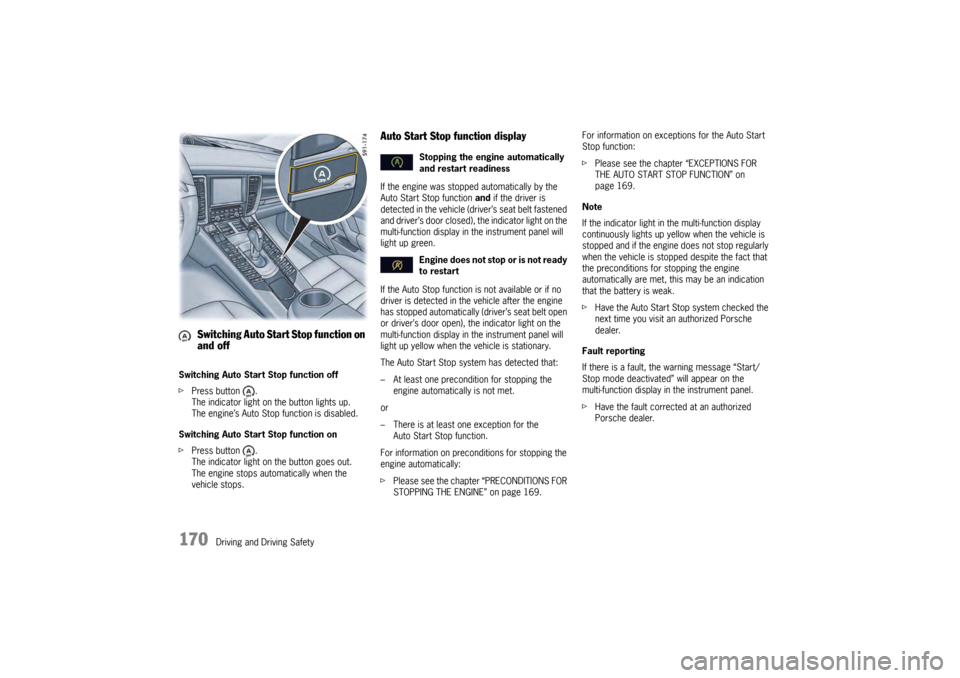
Switching Auto Start Stop function off
f
Press button .
The indicator light on the button lights up.
The engine’s Auto Stop function is disabled.
Switching Auto Start Stop function on
f Press button .
The indicator light on the button goes out.
The engine stops automatically when the
vehicle stops.
Auto Start Stop function displayIf the engine was stoppe d automatically by the
Auto Start Stop function and if the driver is
detected in the vehicle (driver’s seat belt fastened
and driver’s door closed), the indicator light on the
multi-function display in the instrument panel will
light up green.
If the Auto Stop function is not available or if no
driver is detected in the vehicle after the engine
has stopped automatically (driver’s seat belt open
or driver’s door open), the indicator light on the
multi-function display in the instrument panel will
light up yellow when the vehicle is stationary.
The Auto Start Stop system has detected that:
– At least one precondition for stopping the engine automatically is not met.
or
– There is at least one exception for the Auto Start Stop function.
For information on preconditions for stopping the
engine automatically:
f Please see the chapter “PRECONDITIONS FOR
STOPPING THE ENGINE” on page 169. For information on exceptions for the Auto Start
Stop function:
f
Please see the chapter “EXCEPTIONS FOR
THE AUTO START STOP FUNCTION” on
page 169.
Note
If the indicator light in the multi-function display
continuously lights up yellow when the vehicle is
stopped and if the engine does not stop regularly
when the vehicle is stoppe d despite the fact that
the preconditions for stopping the engine
automatically are met, this may be an indication
that the battery is weak.
f Have the Auto Start Stop system checked the
next time you visit an authorized Porsche
dealer.
Fault reporting
If there is a fault, the warning message “Start/
Stop mode deactivated” will appear on the
multi-function display in the instrument panel.
f Have the fault corrected at an authorized
Porsche dealer.
Switching Auto Start Stop function on
and off
Stopping the engine automatically
and restart readiness
Engine does not stop or is not ready
to restart
Page 173 of 343
Driving and Driving Safety
171
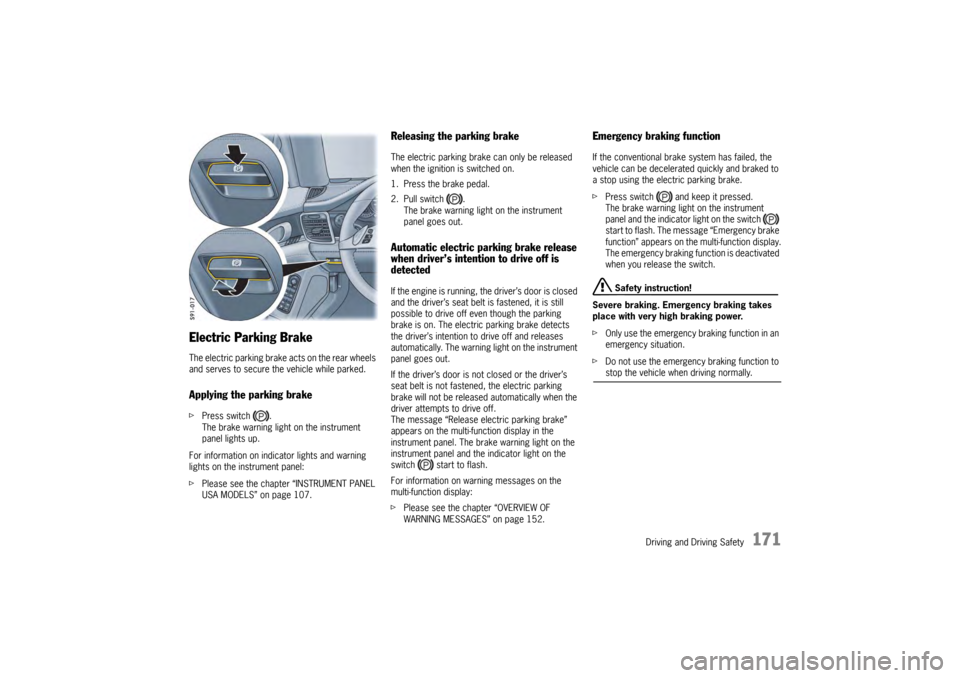
Electric Parking BrakeThe electric parking brake acts on the rear wheels
and serves to secure the vehicle while parked.Applying the parking brakefPress switch .
The brake warning light on the instrument
panel lights up.
For information on indi cator lights and warning
lights on the instrument panel:
f Please see the chapter “INSTRUMENT PANEL
USA MODELS” on page 107.
Releasing the parking brakeThe electric parking brake can only be released
when the ignition is switched on.
1. Press the brake pedal.
2. Pull switch .
The brake warning light on the instrument
panel goes out.Automatic electric parking brake release
when driver’s intention to drive off is
detectedIf the engine is running, the driver’s door is closed
and the driver’s seat belt is fastened, it is still
possible to drive off even though the parking
brake is on. The electric parking brake detects
the driver’s intention to drive off and releases
automatically. The warning light on the instrument
panel goes out.
If the driver’s door is not closed or the driver’s
seat belt is not fastened, the electric parking
brake will not be released automatically when the
driver attempts to drive off.
The message “Release electric parking brake”
appears on the multi-function display in the
instrument panel. The brake warning light on the
instrument panel and the indicator light on the
switch start to flash.
For information on warning messages on the
multi-function display:
fPlease see the chapter “OVERVIEW OF
WARNING MESSAGES” on page 152.
Emergency braking functionIf the conventional brak e system has failed, the
vehicle can be decelerated quickly and braked to
a stop using the electric parking brake.
f Press switch and keep it pressed.
The brake warning light on the instrument
panel and the indicator light on the switch
start to flash. The messa ge “Emergency brake
function” appears on the multi-function display.
The emergency braking function is deactivated
when you release the switch.
Safety instruction!
Severe braking. Emergency braking takes
place with very high braking power.
f Only use the emergency braking function in an
emergency situation.
f Do not use the emergency braking function to stop the vehicle when driving normally.