climate control Ram 1500 2013 User Guide
[x] Cancel search | Manufacturer: RAM, Model Year: 2013, Model line: 1500, Model: Ram 1500 2013Pages: 734, PDF Size: 5.47 MB
Page 318 of 734
Front Blower Control
There are four blower speeds. Use this
control to regulate the amount of air
forced through the system in any
mode you select. The blower speed
increases as you move the control
clockwise from the OFF position.
NOTE: For vehicles equipped with Remote Start, the
climate controls will not function during Remote Start
operation if the blower control is left in the OFF position.
Temperature Control
Use this control to regulate the tem-
perature of the air inside the passenger
compartment. Rotating the knob coun-
terclockwise, from top center into the
blue area of the scale, indicates cooler
temperatures. Rotating the knob clock-
wise, into the red area, indicates
warmer temperatures.
NOTE: If your air conditioning performance seems
lower than expected, check the front of the A/C con-
denser (located in front of the radiator), for an accumu-
lation of dirt or insects. Clean with a gentle water spray
from behind the radiator and through the condenser.
Fabric front fascia protectors may reduce airflow to the
condenser, reducing air conditioning performance.
316 UNDERSTANDING YOUR INSTRUMENT PANEL
Page 321 of 734
•In cold or damp weather, the use of the Recirculation
mode will cause windows to fog on the inside because
of moisture buildup inside the vehicle. For maximum
defogging, select the outside air position.
• The A/C can be deselected manually without disturb-
ing the mode control selection by pressing the A/C
button.
Air Outlets
The airflow from each of the instrument panel outlets can
be adjusted for direction, and turned on or off to control
airflow.
NOTE: For maximum airflow to the rear, the center
instrument panel outlets can be directed toward the rear
seat passengers.
Economy Mode
If ECONOMY mode is desired, press the A/C button to
turn off the LED indicator and the A/C compressor. Rotate the temperature control knob to the desired tem-
perature. Also, make sure to select only Panel, Bi-Level or
Floor modes.
Stop/Start System – If Equipped
While in an Autostop, the Climate Controls system may
automatically adjust airflow to maintain cabin comfort.
Customer settings will be maintained upon return to an
engine running condition.
Air Conditioning Operation
Push the A/C button to engage the Air
Conditioning (A/C). A LED will illu-
minate when the A/C system is
engaged.
4
UNDERSTANDING YOUR INSTRUMENT PANEL 319
Page 322 of 734
MAX A/C
For maximum cooling, when MAX A/C is selected the
A/C is turned on automatically and the air is
recirculated.
NOTE:A/C cannot be deselected when in MAX A/C
position. The LED will blink three times if the A/C
button is pushed.
Manual Climate Controls With Touch-Screen — If
Equipped
Hard-Keys
The hard-keys are located below the radio touch-screen.
Climate Controls — Hard-keys
320 UNDERSTANDING YOUR INSTRUMENT PANEL
Page 325 of 734
•Panel Mode
Air comes from the outlets in the instrument
panel. Each of these outlets can be individually
adjusted to direct the flow of air. The air vanes of
the center outlets and outboard outlets can be moved up
and down or side to side to regulate airflow direction.
There is a shut off wheel located below the air vanes to
shut off or adjust the amount of airflow from these
outlets.
• Bi-Level Mode
Air comes from the instrument panel outlets and
floor outlets. A slight amount of air is directed
through the defrost and side window demister
outlets.
NOTE: BI-LEVEL mode is designed under comfort con-
ditions to provide cooler air out of the panel outlets and
warmer air from the floor outlets. •
Floor Mode
Air comes from the floor outlets. A slight amount
of air is directed through the defrost and side
window demister outlets.
• Mix Mode
Air comes from the floor, defrost and side window
demister outlets. This mode works best in cold or
snowy conditions.
6. Blower Control
Blower control is used to regulate the amount of air forced
through the climate system. There are seven blower speeds
available. Adjusting the blower will cause automatic mode
to switch to manual operation. The speeds can be selected
using either hard-keys or soft-keys as follows:
Hard-key
The blower speed increases as you turn the control
clockwise from the lowest blower setting. The blower
speed decreases as you turn the knob counter-clockwise.
4
UNDERSTANDING YOUR INSTRUMENT PANEL 323
Page 326 of 734
Soft-key
Use the small blower icon to reduce the blower setting
and the large blower icon to increase the blower setting.
Blower can also be selected by pressing the blower bar
area between the icons.
7. Climate Control OFF Button
Press and release this button to turn the Climate Control
ON/OFF.
8. Temperature Control Down Button
Push the button for cooler temperature settings. On the
touch-screen, slide the temperature bar towards the blue
arrow soft-key for cooler temperature settings.
9. Temperature Control Up Button
Push the button for warmer temperature settings. On the
touch-screen, slide the temperature bar towards the blue
arrow soft-key for cooler temperature settings.Recirculation Control
When outside air contains smoke, odors, or
high humidity, or if rapid cooling is desired,
you may wish to recirculate interior air by
pressing the RECIRCULATION control button.
Recirculation mode should only be used temporarily. The
recirculation LED will illuminate on the blower control
knob when this button is selected. Push the button a
second time to turn off the Recirculation mode LED and
allow outside air into the vehicle.
NOTE: In cold weather, use of Recirculation mode may
lead to excessive window fogging. The Recirculation
mode is not allowed in Defrost mode to improve window
clearing operation. Recirculation will be disabled auto-
matically if these modes are selected.
324 UNDERSTANDING YOUR INSTRUMENT PANEL
Page 327 of 734
Automatic Climate Controls With Touch-Screen
— If Equipped
Hard-Keys
The hard-keys located below the radio touch-screen.Soft-Keys
Soft-keys are accessible on the radio touch-screen.
Dual Zone Automatic Climate Controls — Hard-keys
Dual Zone Automatic Temperature Controls — Soft-keys
4
UNDERSTANDING YOUR INSTRUMENT PANEL 325
Page 330 of 734
•Floor Mode
Air comes from the floor outlets. A slight amount
of air is directed through the defrost and side
window demister outlets.
• Mix Mode
Air comes from the floor, defrost and side window
demister outlets. This mode works best in cold or
snowy conditions.
6. Blower Control
Blower control is used to regulate the amount of air forced
through the climate system. There are seven blower speeds
available. Adjusting the blower will cause automatic mode
to switch to manual operation. The speeds can be selected
using either hard-keys or soft-keys as follows:
Hard-key
The blower speed increases as you turn the control
clockwise from the lowest blower setting. The blower
speed decreases as you turn the knob counter-clockwise. Soft-key
Use the small blower icon to reduce the blower setting
and the large blower icon to increase the blower setting.
Blower can also be selected by pressing the blower bar
area between the icons.
7. Climate Control OFF Button
Press and release this button to turn the Climate Control
ON/OFF.
8. Driver Temperature Controls
Push the Up button for warmer temperature settings.
Push the Down button for cooler temperature settings.
On the touch-screen, slide the temperature bar towards
the red arrow soft-key for warmer temperature settings
or slide the temperature bar towards the blue arrow
soft-key for cooler temperature settings.
328 UNDERSTANDING YOUR INSTRUMENT PANEL
Page 349 of 734
To Activate The Autostop Mode, The Following Must
Occur:
1. The system must be in STOP/START READY state. ASTOP/START READY message will be displayed in
the Electronic Vehicle Information Center (EVIC)
within the Stop/Start section. Refer to “Electronic
Vehicle Information Center (EVIC)” in “Understand-
ing Your Instrument Panel” for further information.
2. The vehicle must be completely stopped.
3. The transmission Gear Selector must be in Drive and the brake pedal depressed.
The engine will shut down, the tachometer will move to
the zero position and the stop/start telltale will illumi-
nate indicating you are in an Autostop. While in an Autostop, the Climate Controls system may automati-
cally adjust airflow to maintain cabin comfort. Customer
settings will be maintained upon return to an engine
running condition.
Possible Reasons The Engine Does Not AUTO
STOP
Prior to engine shut down, the system will check many
safety and comfort conditions to see if they are fulfilled.
In following situations the engine will not stop:
•
Driver ’s seat belt is not buckled
• Driver ’s door is not closed
• Outside temperature is less than 1°F (–17°C) or greater
than 104°F (40°C)
• The vehicle is on a steep grade
• Cabin heating or cooling is in process and an accept-
able cabin temperature has not been achieved
5
STARTING AND OPERATING 347
Page 679 of 734
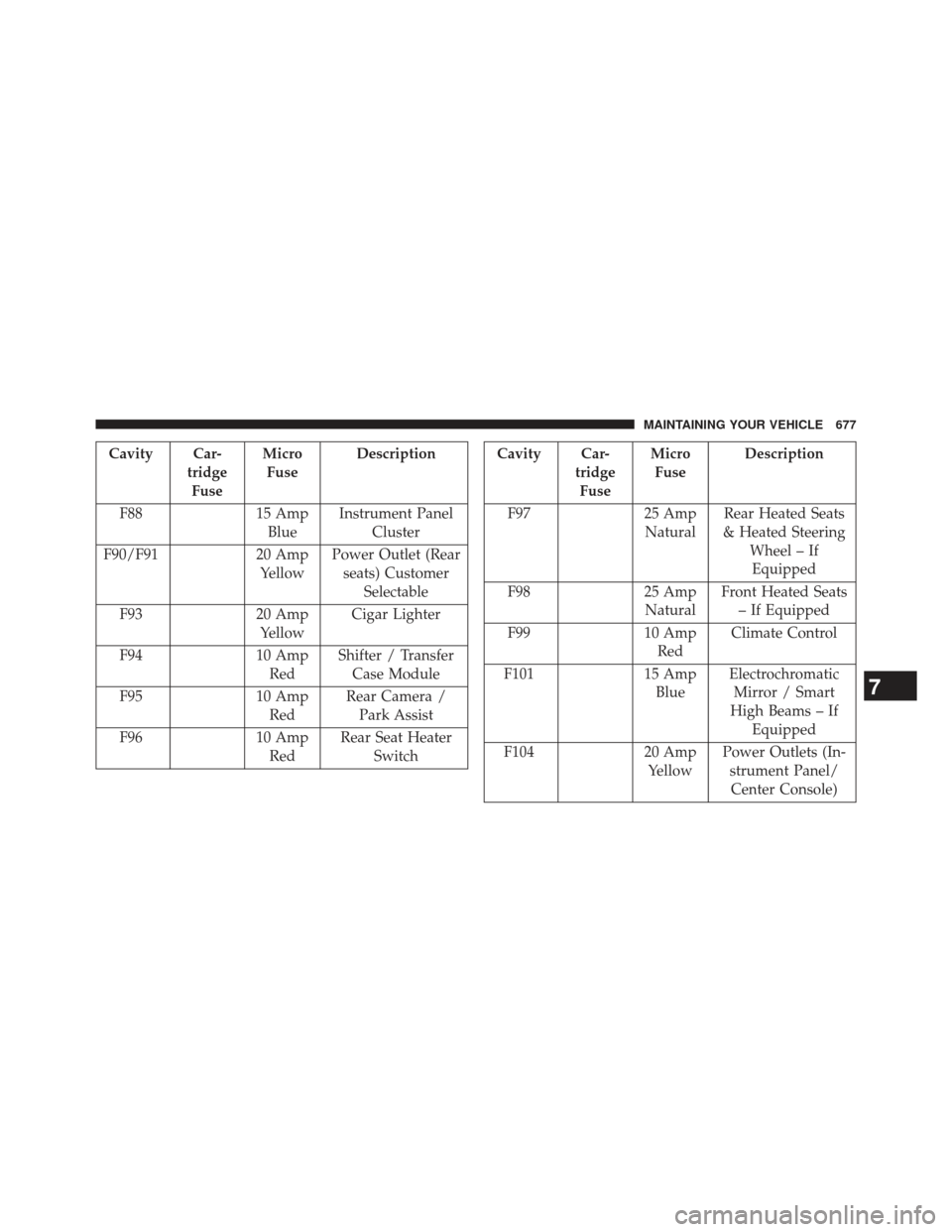
Cavity Car-tridgeFuse Micro
Fuse Description
F88 15 Amp
Blue Instrument Panel
Cluster
F90/F91 20 Amp
Yellow Power Outlet (Rear
seats) Customer Selectable
F93 20 Amp
Yellow Cigar Lighter
F94 10 Amp
Red Shifter / Transfer
Case Module
F95 10 Amp
Red Rear Camera /
Park Assist
F96 10 Amp
Red Rear Seat Heater
SwitchCavity Car- tridgeFuse Micro
Fuse Description
F97 25 Amp
Natural Rear Heated Seats
& Heated Steering Wheel – IfEquipped
F98 25 Amp
Natural Front Heated Seats
– If Equipped
F99 10 Amp
Red Climate Control
F101 15 Amp
Blue Electrochromatic
Mirror / Smart
High Beams – If Equipped
F104 20 Amp
Yellow Power Outlets (In-
strument Panel/Center Console)
7
MAINTAINING YOUR VEHICLE 677
Page 713 of 734
Call toll free at:
•1–800–890–4038 (U.S.)
• 1–800–387–1143 (Canada)
Or
Visit us on the Worldwide Web at:
• www.techauthority.com
DEPARTMENT OF TRANSPORTATION UNIFORM
TIRE QUALITY GRADES
The following tire grading categories were established by
the National Highway Traffic Safety Administration. The
specific grade rating assigned by the tire’s manufacturer
in each category is shown on the sidewall of the tires on
your vehicle.
All passenger car tires must conform to Federal safety
requirements in addition to these grades.
Treadwear
The Treadwear grade is a comparative rating, based on
the wear rate of the tire when tested under controlled
conditions on a specified government test course. For
example, a tire graded 150 would wear one and one-half
times as well on the government course as a tire graded
100. The relative performance of tires depends upon the
actual conditions of their use, however, and may depart
significantly from the norm due to variations in driving
habits, service practices, and differences in road charac-
teristics and climate.
Traction Grades
The Traction grades, from highest to lowest, are AA, A, B,
and C. These grades represent the tire’s ability to stop on
wet pavement, as measured under controlled conditions
on specified government test surfaces of asphalt and
9
IF YOU NEED CONSUMER ASSISTANCE 711