horn Ram 1500 2013 User Guide
[x] Cancel search | Manufacturer: RAM, Model Year: 2013, Model line: 1500, Model: Ram 1500 2013Pages: 734, PDF Size: 5.47 MB
Page 295 of 734
Wheel Alignment Mode – If Equipped
Before performing a wheel alignment this mode must be
enabled. Refer to your authorized dealer for further
information.
Horn with Remote Lower – If Equipped
When this feature is selected, a short horn sound will
occur when the RKE transmitter REMOTE LOWER but-
ton is pressed. To make your selection, press and release
the SELECT button until a check-mark appears next to
the feature showing the system has been activated or the
check-mark is removed showing the system has been
deactivated.
Lights with Remote Lower – If Equipped
When this feature is selected, the front and rear turn
signals will flash when the RKE transmitter REMOTE
LOWER button is pressed. This feature may be selected
with or without the sound horn on lower feature selected.To make your selection, press and release the SELECT
button until a check-mark appears next to the feature
showing the system has been activated or the check-mark
is removed showing the system has been deactivated.
Trailer Select
When this feature is selected, the Trailer Type can be
selected between “Trailer 1”, “Trailer 2”, “Trailer 3” and
“Trailer 4”. To make your selection, scroll up or down
until the preferred setting is highlighted, then press and
release the SELECT button until a check-mark appears
next to the setting, showing that the setting has been
selected.
Trailer Brake Type
When this feature is selected, the Trailer Brake Type can
be changed between “Light Electric”, “Heavy Electric”,
“Light EOH” and “Heavy EOH”. To make your selection,
scroll up or down until the preferred setting is high-
lighted, then press and release the SELECT button until a
4
UNDERSTANDING YOUR INSTRUMENT PANEL 293
Page 306 of 734
•Flash Headlights With Lock
When this feature is selected, the headlights will flash
when the doors are locked or unlocked with the Remote
Keyless Entry (RKE) transmitter. This feature may be
selected with or without the sound horn on lock feature
selected. To make your selection, touch the Flash Head-
lights with Lock soft-key, until a check-mark appears
next to setting, showing that setting has been selected.
Touch the back arrow soft-key to return to the previous
menu.
Doors & Locks
After pressing the Doors & Locks soft-key the following
settings will be available.
• Auto Unlock On Exit
When this feature is selected, all doors will unlock when
the vehicle is stopped and the transmission is in the
PARK or NEUTRAL position and the driver’s door is opened. To make your selection, touch the Auto Unlock
On Exit soft-key, until a check-mark appears next to
setting, showing that setting has been selected. Touch the
back arrow soft-key to return to the previous menu.
•
Sound Horn With Lock
When this feature is selected, the horn will sound when
the door locks are activated. To make your selection,
touch the Sound Horn With Lock soft-key, until a check-
mark appears next to setting, showing that setting has
been selected. Touch the back arrow soft-key to return to
the previous menu.
• Sound Horn With Remote Start
When this feature is selected, the horn will sound when
the remote start is activated. To make your selection,
touch the Sound Horn With Remote Start soft-key, until a
check-mark appears next to setting, showing that setting
has been selected. Touch the back arrow soft-key to
return to the previous menu.
304 UNDERSTANDING YOUR INSTRUMENT PANEL
Page 308 of 734
NOTE:The seat will return to the memorized seat
location (if Recall Memory with Remote Key Unlock is set
to ON) when the Remote Keyless Entry (RKE) transmitter
is used to unlock the door. Refer to “Driver Memory
Seat” in “Understanding The Features Of Your Vehicle”
for further information.
Auto-On Comfort & Remote Start
After pressing the Auto-On Comfort & Remote Start
soft-key the following settings will be available.
• Horn With Remote Start
When this feature is selected, the horn will sound when
the remote start is activated. To make your selection,
touch the Sound Horn With Remote Start soft-key, until a
check-mark appears next to setting, showing that setting
has been selected. Touch the back arrow soft-key to
return to the previous menu. •
Auto-On Driver Heated/Ventilated Seat & Steering
Wheel With Vehicle Start — If Equipped
When this feature is selected the driver’s heated seat and
heated steering wheel will automatically turn on when
temperatures are below 40° F (4.4° C). When tempera-
tures are above 80° F (26.7° C) the driver vented seat will
turn on. To make your selection, touch the Auto Heated
Seats soft-key, until a check-mark appears next to setting,
showing that setting has been selected. Touch the back
arrow soft-key to return to the previous menu.
Engine Off Options
After pressing the Engine Off Options soft-key the fol-
lowing settings will be available.
• Engine Off Power Delay
When this feature is selected, the power window
switches, radio, Uconnect® phone system (if equipped),
DVD video system (if equipped), power sunroof (if
306 UNDERSTANDING YOUR INSTRUMENT PANEL
Page 311 of 734
NOTE:Bass/Mid/Treble allow you to simply slide your
finger up or down to change the setting as well as touch
directly on the desired setting.
• Speed Adjusted Volume
This feature increases or decreases volume relative to
vehicle speed. To change the Speed Adjusted Volume
touch the Off, 1, 2 or 3 soft-key. Then touch the arrow
back soft-key.
• Surround Sound
This feature provides simulated surround sound mode.
To make your selection, touch the Surround Sound
soft-key, select On or Off followed by pressing the arrow
back soft-key.
Phone/Bluetooth
After pressing the Phone/Bluetooth soft-key the follow-
ing settings will be available. •
Paired Devices
This feature shows which phones are paired to the
Phone/Bluetooth system. For further information, refer
to the Uconnect® Access User’s Manual.
Air Suspension – If Equipped
After pressing the Suspension soft-key the following
settings will be available.
• Sound Horn with Remote Lower
When this feature is selected, a short horn sound will
occur when the RKE transmitter REMOTE LOWER but-
ton is pressed. Touch the box next to your selection and
a check-mark appears next to the feature showing the
system has been activated or the check-mark is removed
showing the system has been deactivated..
4
UNDERSTANDING YOUR INSTRUMENT PANEL 309
Page 312 of 734
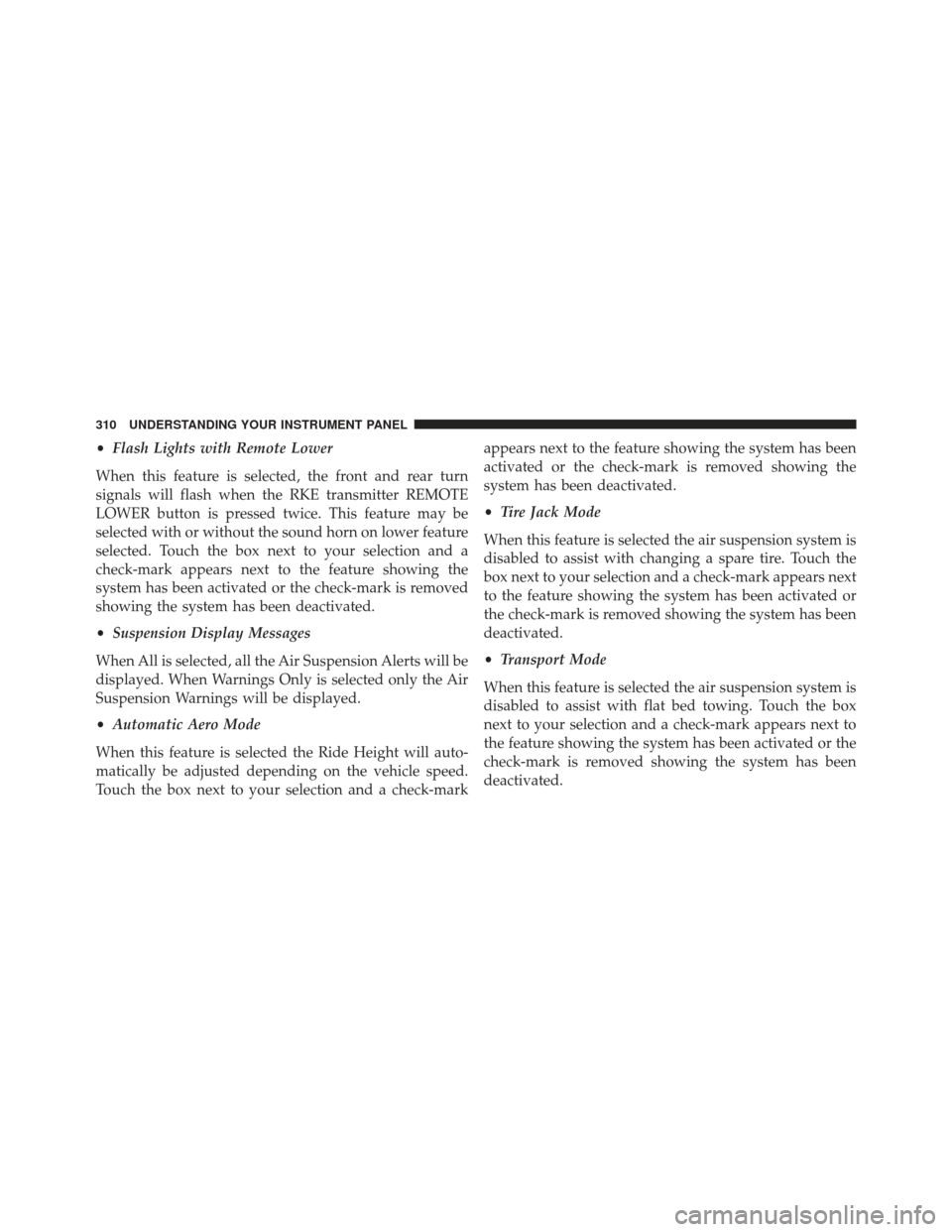
•Flash Lights with Remote Lower
When this feature is selected, the front and rear turn
signals will flash when the RKE transmitter REMOTE
LOWER button is pressed twice. This feature may be
selected with or without the sound horn on lower feature
selected. Touch the box next to your selection and a
check-mark appears next to the feature showing the
system has been activated or the check-mark is removed
showing the system has been deactivated.
• Suspension Display Messages
When All is selected, all the Air Suspension Alerts will be
displayed. When Warnings Only is selected only the Air
Suspension Warnings will be displayed.
• Automatic Aero Mode
When this feature is selected the Ride Height will auto-
matically be adjusted depending on the vehicle speed.
Touch the box next to your selection and a check-mark appears next to the feature showing the system has been
activated or the check-mark is removed showing the
system has been deactivated.
•
Tire Jack Mode
When this feature is selected the air suspension system is
disabled to assist with changing a spare tire. Touch the
box next to your selection and a check-mark appears next
to the feature showing the system has been activated or
the check-mark is removed showing the system has been
deactivated.
• Transport Mode
When this feature is selected the air suspension system is
disabled to assist with flat bed towing. Touch the box
next to your selection and a check-mark appears next to
the feature showing the system has been activated or the
check-mark is removed showing the system has been
deactivated.
310 UNDERSTANDING YOUR INSTRUMENT PANEL
Page 674 of 734
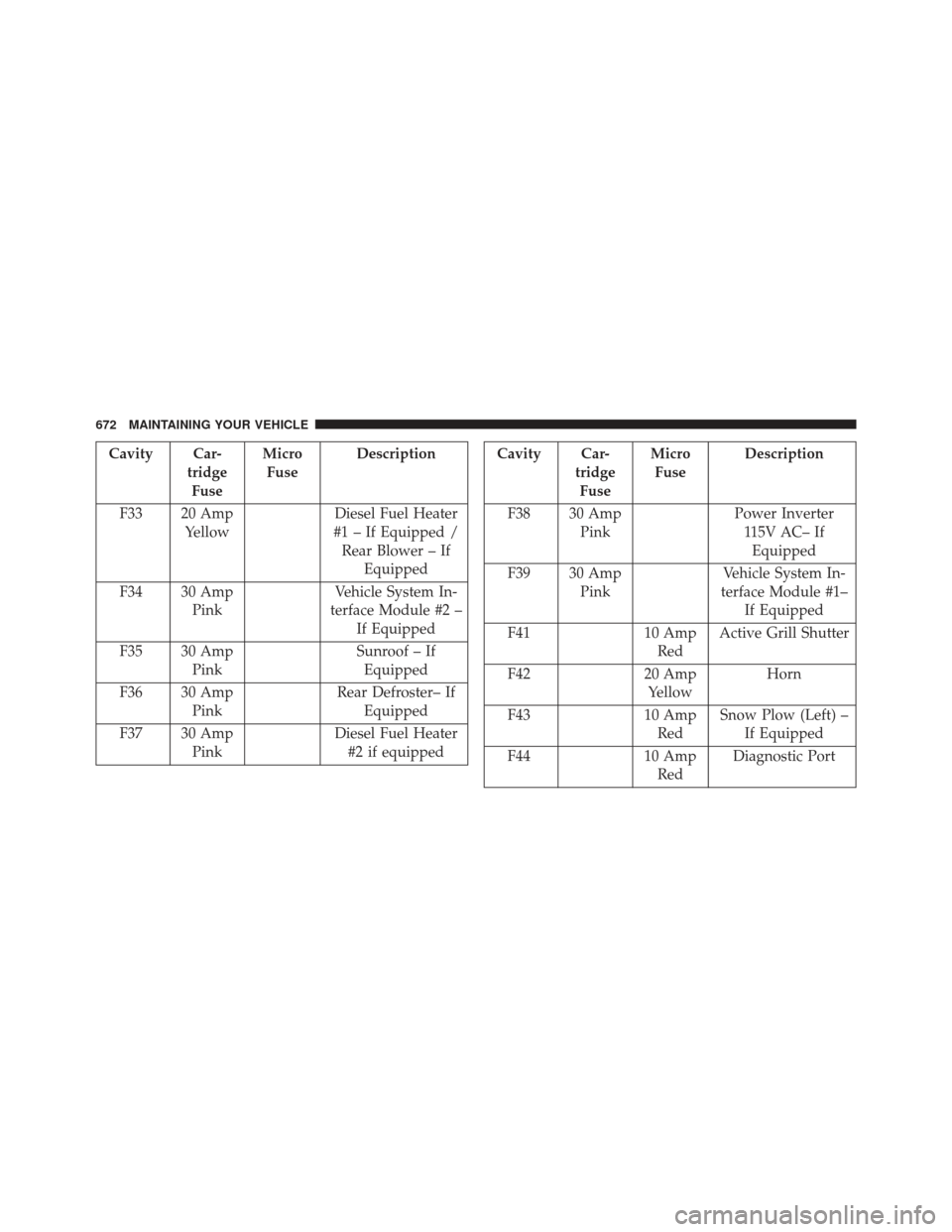
Cavity Car-tridgeFuse Micro
Fuse Description
F33 20 Amp Yellow Diesel Fuel Heater
#1 – If Equipped / Rear Blower – If Equipped
F34 30 Amp Pink Vehicle System In-
terface Module #2 – If Equipped
F35 30 Amp Pink Sunroof – If
Equipped
F36 30 Amp Pink Rear Defroster– If
Equipped
F37 30 Amp Pink Diesel Fuel Heater
#2 if equippedCavity Car- tridgeFuse Micro
Fuse Description
F38 30 Amp Pink Power Inverter
115V AC– IfEquipped
F39 30 Amp Pink Vehicle System In-
terface Module #1– If Equipped
F41 10 Amp
Red Active Grill Shutter
F42 20 Amp
Yellow Horn
F43 10 Amp
Red Snow Plow (Left) –
If Equipped
F44 10 Amp
Red Diagnostic Port
672 MAINTAINING YOUR VEHICLE