light Ram 1500 2013 Owner's Manual
[x] Cancel search | Manufacturer: RAM, Model Year: 2013, Model line: 1500, Model: Ram 1500 2013Pages: 734, PDF Size: 5.47 MB
Page 570 of 734

5. Turn the engine OFF. Shift automatic transmission intoPARK. On 8-speed transmissions the shifter will auto-
matically select PARK when the engine is turned off.
6. Release the brake pedal (and clutch pedal on a manual transmission).
7. Disconnect vehicle from the tow vehicle.
8. Start the engine.
9. Press and hold the brake pedal.
10. Release the parking brake.
11. Shift the transmission into gear, release the brake pedal (and clutch pedal on manual transmissions),
and check that the vehicle operates normally. NOTE:
With electronic shift transfer case:
• Steps 3 and 4 are requirements that must be met prior
to pressing the button to shift out of NEUTRAL (N),
and must continue to be met until the shift has been
completed. If any of these requirements are not met
before pressing the button or are no longer met during
the shift, the NEUTRAL (N) indicator light will flash
continuously until all requirements are met or until the
button is released.
• The ignition switch must be in the ON/RUN position
for a shift to take place and for the position indicator
lights to be operable. If the ignition switch is not in the
ON/RUN position, the shift will not take place and no
position indicator lights will be on or flashing.
• A flashing NEUTRAL (N) position indicator light
indicates that shift requirements have not been met.
568 STARTING AND OPERATING
Page 604 of 734
CAUTION!
Before raising the wheel off the ground, make sure
that the jack will not damage surrounding truck parts
and adjust the jack position as required.
NOTE: If the bottle jack will not lower by turning the
dial (thumbwheel) by hand, it may be necessary to use
the jack drive tube in order to lower the jack.
4. By rotating the wheel wrench clockwise, raise the vehicle until the wheel just clears the surface.
WARNING!
Raising the vehicle higher than necessary can make
the vehicle unstable and cause a collision. It could
slip off the jack and hurt someone near it. Raise the
vehicle only enough to remove the tire. 5. Remove the wheel nuts and pull the wheel off. On
single rear-wheel (SRW) trucks, install the spare wheel
and wheel nuts with the cone shaped end of the wheel
nuts toward the wheel. On 3500 dual rear-wheel
models (DRW) the wheel nuts are a two-piece assem-
bly with a flat face. Lightly tighten the wheel nuts. To
avoid the risk of forcing the vehicle off the jack, do not
fully tighten the wheel nuts until the vehicle has been
lowered.
6. Using the lug wrench, finish tightening the wheel nuts using a crisscross pattern. The correct wheel nut
tightness for a cone type wheel nut is 120–140 ft lbs
(160–190 N·m) torque, for a flanged type wheel nut is
130–160 ft lbs (175–215 N·m) torque. If in doubt about
the correct tightness, have them checked with a torque
wrench by your authorized dealer or at a service
station.
602 WHAT TO DO IN EMERGENCIES
Page 614 of 734
JUMP-STARTING PROCEDURES
If your vehicle has a discharged battery it can be jump-
started using a set of jumper cables and a battery in
another vehicle or by using a portable battery booster
pack. Jump-starting can be dangerous if done improperly
so please follow the procedures in this section carefully.
NOTE:When using a portable battery booster pack
follow the manufacturer ’s operating instructions and
precautions.
CAUTION!
Do not use a portable battery booster pack or any
other booster source with a system voltage greater
than 12 Volts or damage to the battery, starter motor,
alternator or electrical system may occur.
WARNING!
Do not attempt jump-starting if the battery is frozen.
It could rupture or explode and cause personal injury.
Preparations For Jump-Start
The battery in your vehicle is located in the front of the
engine compartment, behind the left headlight assembly.
NOTE: The positive battery post is covered with a
protective cap. Lift up on the cap to gain access to the
positive battery post.
612 WHAT TO DO IN EMERGENCIES
Page 635 of 734
ONBOARD DIAGNOSTIC SYSTEM (OBD II)
Your vehicle is equipped with a sophisticated onboard
diagnostic system called OBD II. This system monitors
the performance of the emissions, engine, and automatic
transmission control systems. When these systems are
operating properly, your vehicle will provide excellent
performance and fuel economy, as well as engine emis-
sions well within current government regulations.
If any of these systems require service, the OBD II system
will turn on the “Malfunction Indicator Light (MIL).” It
will also store diagnostic codes and other information to
assist your service technician in making repairs. Al-
though your vehicle will usually be drivable and not
need towing, see your authorized dealer for service as
soon as possible.
CAUTION!
•Prolonged driving with the MIL on could cause
further damage to the emission control system. It
could also affect fuel economy and drivability. The
vehicle must be serviced before any emissions tests
can be performed.
• If the MIL is flashing, while the engine is running,
severe catalytic converter damage and power loss
will soon occur. Immediate service is required.
Loose Fuel Filler Cap Message
If the vehicle diagnostic system determines
that the fuel filler cap is loose, improperly
installed, or damaged, a loose gascap indicator
will display in the EVIC telltale display area.
Refer to “Electronic Vehicle Information Center (EVIC) in7
MAINTAINING YOUR VEHICLE 633
Page 636 of 734
“Understanding Your Instrument Panel” for further in-
formation. Tighten the fuel filler cap properly and press
the SELECT button to turn off the message. If the
problem continues, the message will appear the next time
the vehicle is started.
A loose, improperly installed, or damaged fuel filler cap
may also turn on the Malfunction Indicator Light (MIL).
EMISSIONS INSPECTION AND MAINTENANCE
PROGRAMS
In some localities, it may be a legal requirement to pass
an inspection of your vehicle’s emissions control system.
Failure to pass could prevent vehicle registration.For states that require an Inspection and Mainte-
nance (I/M), this check verifies the “Malfunction
Indicator Light (MIL)” is functioning and is not
on when the engine is running, and that the OBD II
system is ready for testing. Normally, the OBD II system will be ready. The OBD II
system may
notbe ready if your vehicle was recently
serviced, recently had a dead battery or a battery replace-
ment. If the OBD II system should be determined not
ready for the I/M test, your vehicle may fail the test.
Your vehicle has a simple ignition key-actuated test,
which you can use prior to going to the test station. To
check if your vehicle’s OBD II system is ready, you must
do the following:
1. Turn the ignition switch to the ON position, but do not crank or start the engine.
2. If you crank or start the engine, you will have to start this test over.
3. As soon as you turn the ignition switch to the ON position, you will see the MIL symbol come on as part
of a normal bulb check.
634 MAINTAINING YOUR VEHICLE
Page 663 of 734
NOTE:If it is necessary to check the transmission below
the operating temperature, the fluid level should be
between the two “COLD” (lower) holes on the dipstick
with the fluid at 60-70°F / 16-21°C. Only use the COLD
region of the dipstick as a rough reference when setting
the fluid level after a transmission service or fluid
change. Re-check the fluid level, and adjust as required,
once the transmission reaches normal operating tempera-
ture.
CAUTION!
If the fluid temperature is below 50°F (10°C) it may
not register on the dipstick. Do not add fluid until
the temperature is elevated enough to produce an
accurate reading. Run the engine at idle, in PARK, to
warm the fluid.
8. Check for leaks. Release the parking brake. NOTE:
To prevent dirt and water from entering the
transmission after checking or replenishing fluid, make
sure that the dipstick cap is properly reseated. It is
normal for the dipstick cap to spring back slightly from
its fully seated position, as long as its seal remains
engaged in the dipstick tube.
Fluid And Filter Changes
Refer to the “Maintenance Schedule” for the proper
maintenance intervals.
In addition, change the fluid and filter(s) if the transmis-
sion is disassembled for any reason.
Appearance Care And Protection From Corrosion
Protection Of Body And Paint From Corrosion
Vehicle body care requirements vary according to geo-
graphic locations and usage. Chemicals that make roads
passable in snow and ice and those that are sprayed on
trees and road surfaces during other seasons are highly
7
MAINTAINING YOUR VEHICLE 661
Page 667 of 734
Interior Care
Use MOPAR® Total Clean to clean fabric upholstery and
carpeting.
Use MOPAR® Total Clean to clean vinyl upholstery.
MOPAR® Total Clean is specifically recommended for
leather upholstery.
Your leather upholstery can be best preserved by regular
cleaning with a damp soft cloth. Small particles of dirt
can act as an abrasive and damage the leather upholstery
and should be removed promptly with a damp cloth.
Stubborn soils can be removed easily with a soft cloth
and MOPAR® Total Clean. Care should be taken to avoid
soaking your leather upholstery with any liquid. Please
do not use polishes, oils, cleaning fluids, solvents, deter-
gents, or ammonia-based cleaners to clean your leather
upholstery. Application of a leather conditioner is not
required to maintain the original condition.
WARNING!
Do not use volatile solvents for cleaning purposes.
Many are potentially flammable, and if used in
closed areas they may cause respiratory harm.
Cleaning Headlights
Your vehicle is equipped with plastic headlights and fog
lights (if equipped) that are lighter and less susceptible to
stone breakage than glass headlights.
Plastic is not as scratch resistant as glass and therefore
different lens cleaning procedures must be followed.
To minimize the possibility of scratching the lenses and
reducing light output, avoid wiping with a dry cloth. To
remove road dirt, wash with a mild soap solution fol-
lowed by rinsing.
Do not use abrasive cleaning components, solvents, steel
wool or other aggressive material to clean the lenses.
7
MAINTAINING YOUR VEHICLE 665
Page 672 of 734
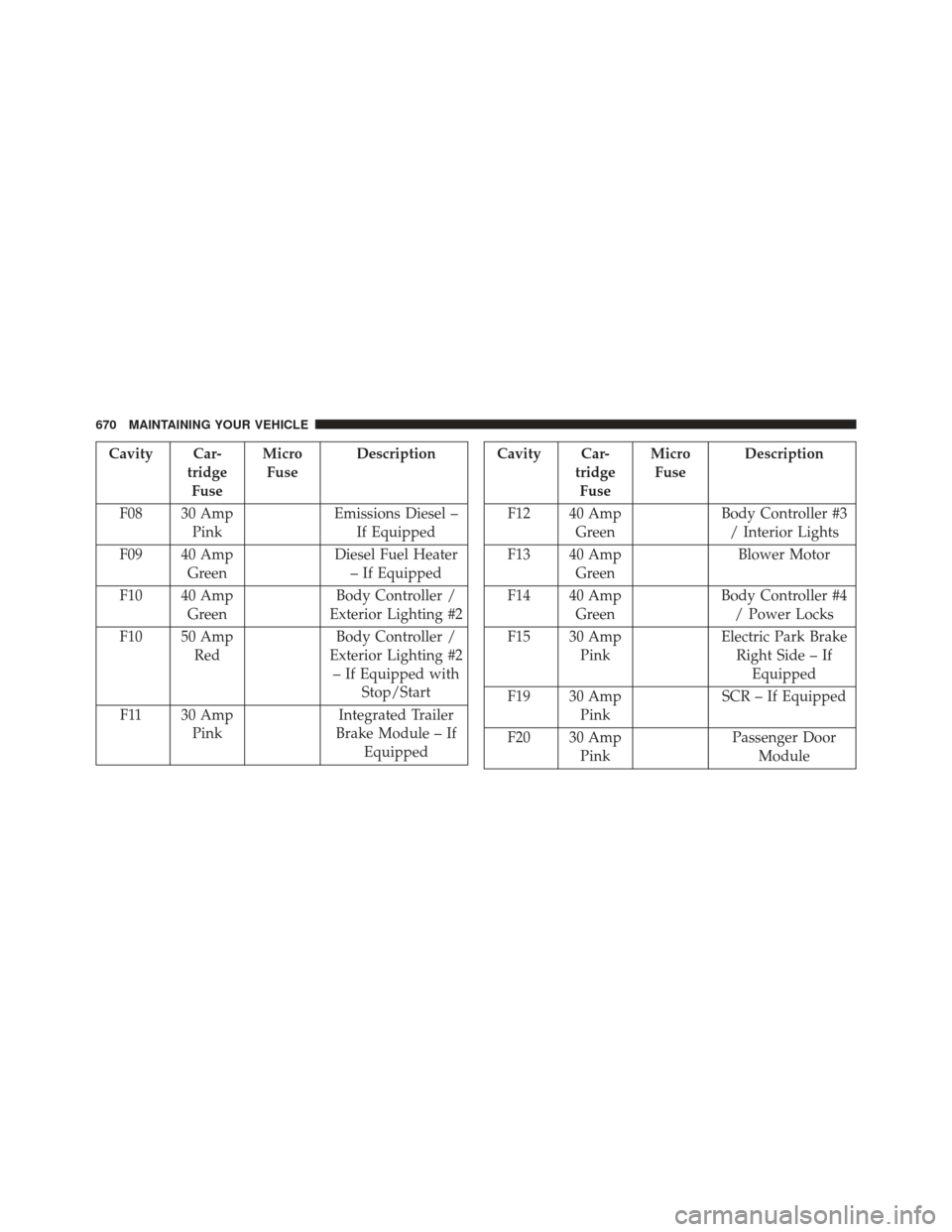
Cavity Car-tridgeFuse Micro
Fuse Description
F08 30 Amp Pink Emissions Diesel –
If Equipped
F09 40 Amp Green Diesel Fuel Heater
– If Equipped
F10 40 Amp Green Body Controller /
Exterior Lighting #2
F10 50 Amp Red Body Controller /
Exterior Lighting #2 – If Equipped with Stop/Start
F11 30 Amp Pink Integrated Trailer
Brake Module – If EquippedCavity Car- tridgeFuse Micro
Fuse Description
F12 40 Amp Green Body Controller #3
/ Interior Lights
F13 40 Amp Green Blower Motor
F14 40 Amp Green Body Controller #4
/ Power Locks
F15 30 Amp Pink Electric Park Brake
Right Side – If Equipped
F19 30 Amp Pink SCR – If Equipped
F20 30 Amp Pink Passenger Door
Module
670 MAINTAINING YOUR VEHICLE
Page 673 of 734
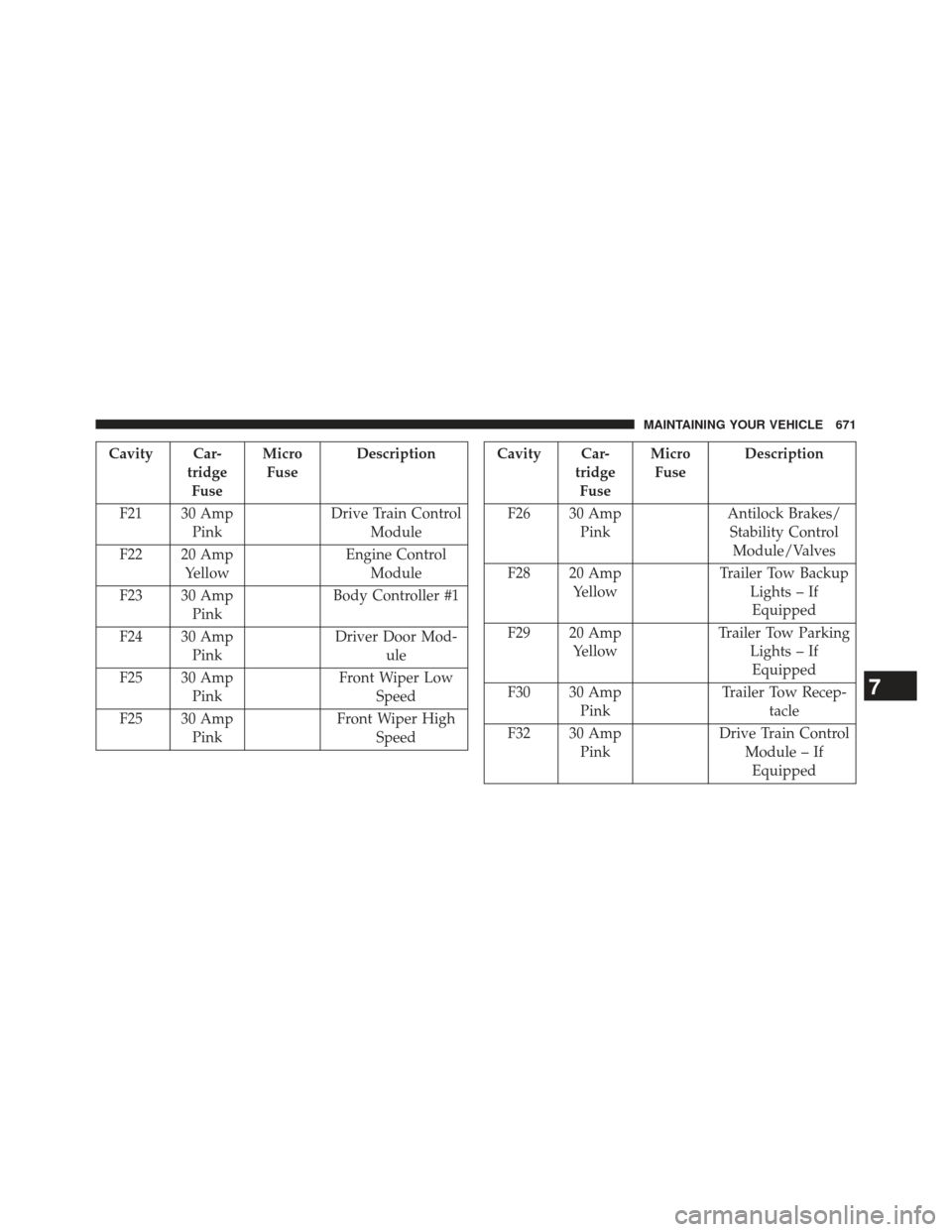
Cavity Car-tridgeFuse Micro
Fuse Description
F21 30 Amp Pink Drive Train Control
Module
F22 20 Amp Yellow Engine Control
Module
F23 30 Amp Pink Body Controller #1
F24 30 Amp Pink Driver Door Mod-
ule
F25 30 Amp Pink Front Wiper Low
Speed
F25 30 Amp Pink Front Wiper High
SpeedCavity Car- tridgeFuse Micro
Fuse Description
F26 30 Amp Pink Antilock Brakes/
Stability Control Module/Valves
F28 20 Amp Yellow Trailer Tow Backup
Lights – IfEquipped
F29 20 Amp Yellow Trailer Tow Parking
Lights – IfEquipped
F30 30 Amp Pink Trailer Tow Recep-
tacle
F32 30 Amp Pink Drive Train Control
Module – IfEquipped
7
MAINTAINING YOUR VEHICLE 671
Page 675 of 734
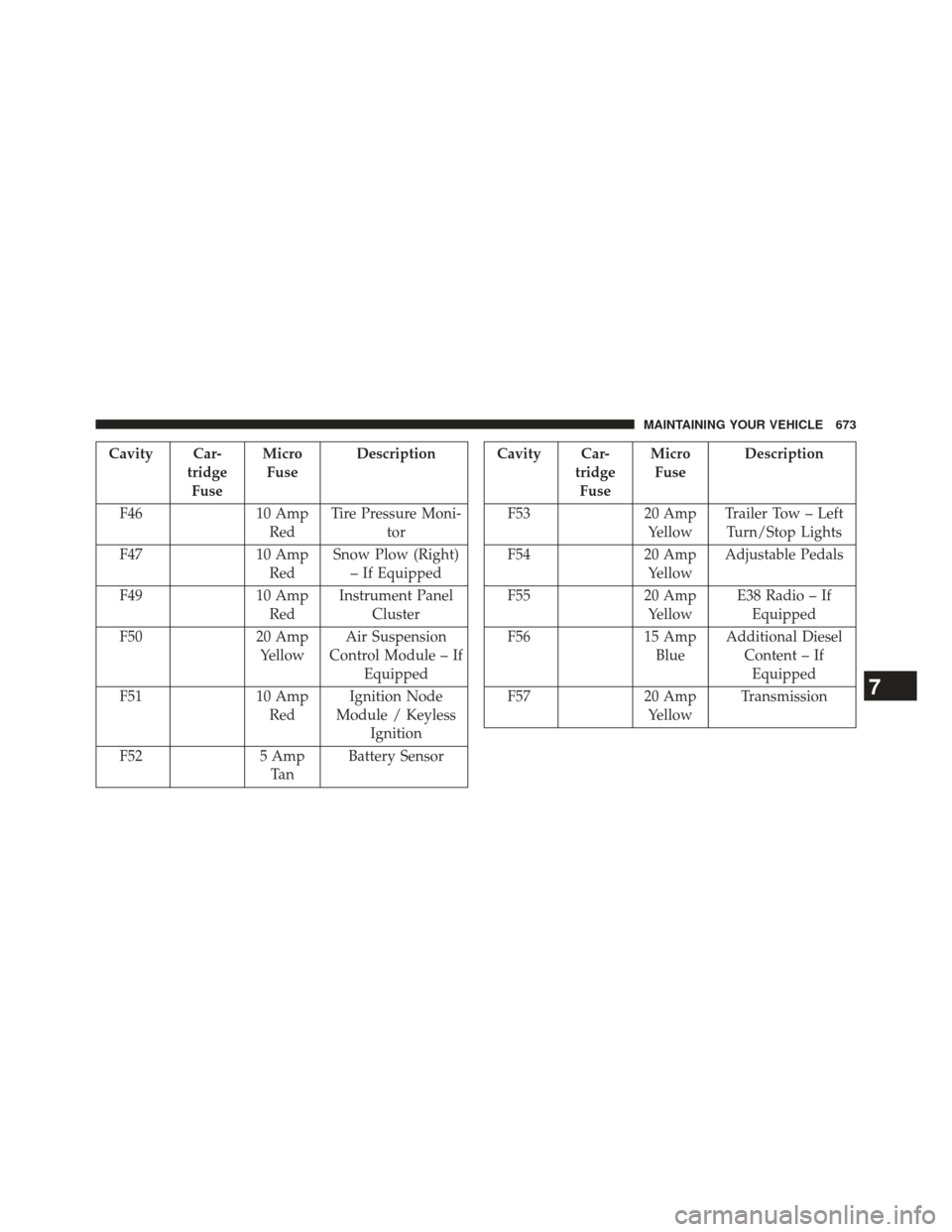
Cavity Car-tridgeFuse Micro
Fuse Description
F46 10 Amp
Red Tire Pressure Moni-
tor
F47 10 Amp
Red Snow Plow (Right)
– If Equipped
F49 10 Amp
Red Instrument Panel
Cluster
F50 20 Amp
Yellow Air Suspension
Control Module – If Equipped
F51 10 Amp
Red Ignition Node
Module / Keyless Ignition
F52 5 Amp
Ta n Battery SensorCavity Car-
tridgeFuse Micro
Fuse Description
F53 20 Amp
Yellow Trailer Tow – Left
Turn/Stop Lights
F54 20 Amp
Yellow Adjustable Pedals
F55 20 Amp
Yellow E38 Radio – If
Equipped
F56 15 Amp
Blue Additional Diesel
Content – IfEquipped
F57 20 Amp
Yellow Transmission
7
MAINTAINING YOUR VEHICLE 673