Trailer brake Ram 1500 2013 Owner's Guide
[x] Cancel search | Manufacturer: RAM, Model Year: 2013, Model line: 1500, Model: Ram 1500 2013Pages: 734, PDF Size: 5.47 MB
Page 552 of 734
The user interface consists of the following:
Manual Brake Control Lever
Slide the manual brake control lever to the right to
activate power to the trailer’s electric brakes independent
of the tow vehicle’s brakes. If the manual brake control
lever is activated while the brake is also applied, the
greater of the two inputs determines the power sent to
the trailer brakes.
The trailer and the vehicle’s brake lamps will come on
when either vehicle braking or manual trailer brakes are
applied.
Trailer Brake Status Indicator Light
This light indicates the trailer electrical connection status.
If no electrical connection is detected after the ignition is
turned on, pressing the GAIN adjustment button orsliding the manual brake control lever will display the
GAIN setting for 10 seconds and the “Trailer Brake Status
Indicator Light” will not be displayed.
If a fault is detected in the trailer wiring or the Integrated
Trailer Brake Module (ITBM), the “Trailer Brake Status
Indicator Light” will flash.
GAIN Adjustment Buttons (+/-)
Pressing these buttons will adjust the brake control
power output to the trailer brakes in 0.5 increments. The
GAIN setting can be increased to a maximum of 10 or
decreased to a minimum of 0 (no trailer braking).
GAIN
The GAIN setting is used to set the trailer brake control
for the specific towing condition and should be changed
as towing conditions change. Changes to towing condi-
tions include trailer load, vehicle load, road conditions
and weather.
550 STARTING AND OPERATING
Page 553 of 734
Adjusting GAIN
NOTE:This should only be performed in a traffic free
environment at speeds of approximately 20–25 mph
(30–40 km/h).
1. Make sure the trailer brakes are in good working condition, functioning normally, and properly ad-
justed. See your trailer dealer if necessary.
2. Hook up the trailer and make the electrical connec- tions according to the trailer manufacturer’s instruc-
tions.
3. When a trailer with electric/EOH brakes is plugged in, the trailer connected message should appear in the
EVIC (if the connection is not recognized by the ITBM,
braking functions will not be available), the GAIN
setting will illuminate and the correct type of trailer
must be selected from the EVIC options. 4. Press the UP or DOWN button on the steering wheel
until “VEHICLE SETTINGS” appears on the screen.
5. Press the RIGHT arrow on the steering wheel to enter “VEHICLE SETTINGS”.
6. Press the UP or DOWN buttons until Trailer Brake Type appears on the screen.
NOTE:1500 Models Only– Light Electric and Heavy
Electric will only be available due to the tow capacities of
the vehicle.
7. Press the RIGHT arrow and then press the UP or DOWN buttons until the proper Trailer Brake Type
appears on the screen.
8. In a traffic-free environment, tow the trailer on a dry, level surface at a speed of 20–25 mph (30–40 km/h)
and squeeze the manual brake control lever com-
pletely.
5
STARTING AND OPERATING 551
Page 554 of 734
9. If the trailer wheels lockup (indicated by squealingtires), reduce the GAIN setting; if the trailer wheels
turn freely, increase the GAIN setting.
Repeat Steps 8 and 9 until the GAIN setting is at a point
just below trailer wheel lockup. If towing a heavier trailer, trailer wheel lockup may not be attainable even
with the maximum GAIN setting of 10.
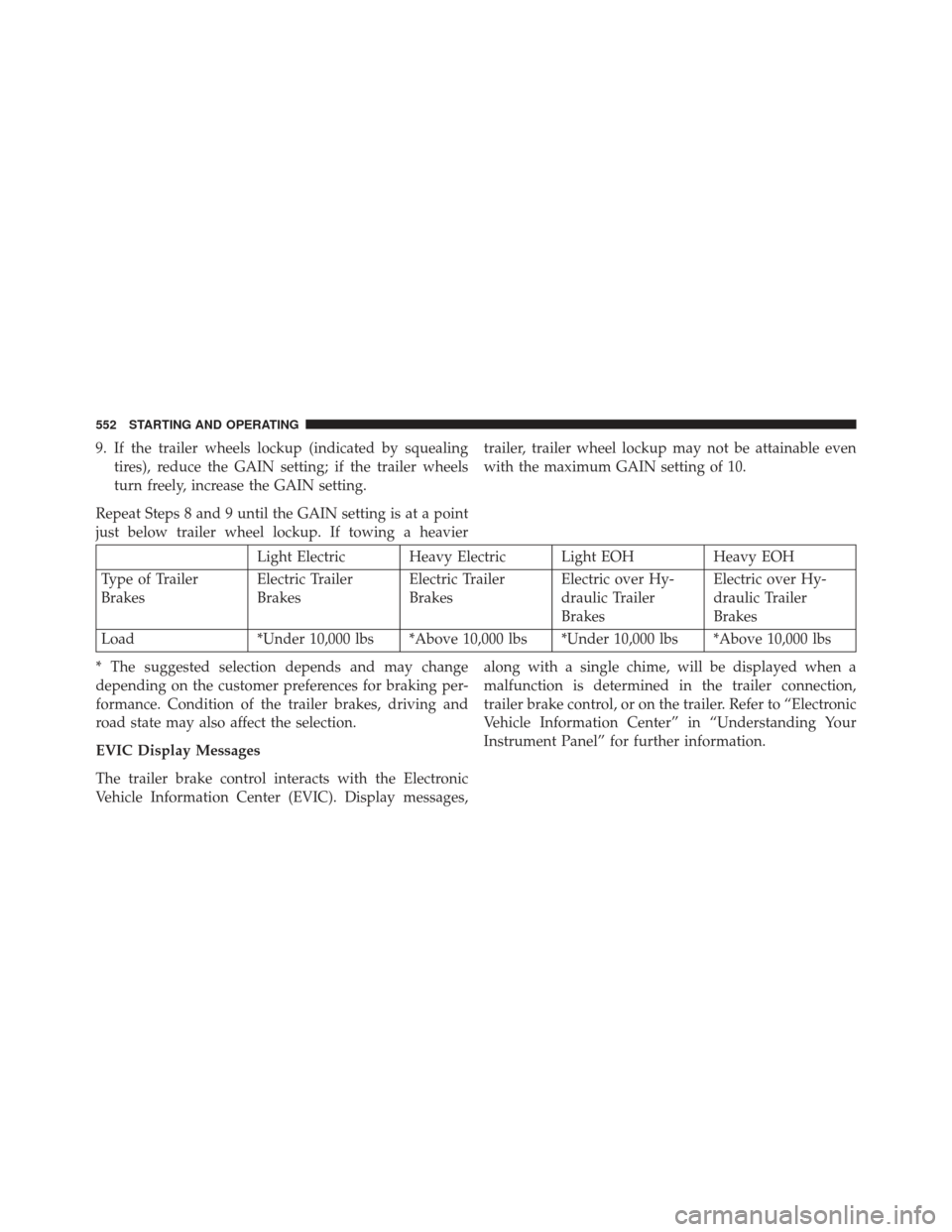
Light Electric Heavy Electric Light EOH
Heavy EOH
Type of Trailer
Brakes Electric Trailer
BrakesElectric Trailer
BrakesElectric over Hy-
draulic Trailer
BrakesElectric over Hy-
draulic Trailer
Brakes
Load *Under 10,000 lbs *Above 10,000 lbs *Under 10,000 lbs *Above 10,000 lbs
* The suggested selection depends and may change
depending on the customer preferences for braking per-
formance. Condition of the trailer brakes, driving and
road state may also affect the selection.
EVIC Display Messages
The trailer brake control interacts with the Electronic
Vehicle Information Center (EVIC). Display messages, along with a single chime, will be displayed when a
malfunction is determined in the trailer connection,
trailer brake control, or on the trailer. Refer to “Electronic
Vehicle Information Center” in “Understanding Your
Instrument Panel” for further information.
552 STARTING AND OPERATING
Page 555 of 734
CAUTION!
Connecting a trailer that is not compatible with the
ITBM system may result in reduced or complete loss
of trailer braking. There may be a increase in stop-
ping distance or trailer instability which could result
in damage to your vehicle, trailer, or other property.
WARNING!
Connecting a trailer that is not compatible with the
ITBM system may result in reduced or complete loss
of trailer braking. There may be a increase in stop-
ping distance or trailer instability which could result
in personal injury.NOTE:
•
An aftermarket controller may be available for use
with trailers with air or electric-over-hydraulic trailer
brake systems. To determine the type of brakes on
your trailer and the availability of controllers, check
with your trailer manufacturer or dealer.
• Removal of the ITBM will cause errors and it may
cause damage to the electrical system and electronic
modules of the vehicle. See your authorized dealer if
an aftermarket module is to be installed.
Towing Requirements – Trailer Lights And Wiring
Whenever you pull a trailer, regardless of the trailer size,
stoplights and turn signals on the trailer are required for
motoring safety.
5
STARTING AND OPERATING 553
Page 557 of 734
Towing Tips
Before setting out on a trip, practice turning, stopping
and backing the trailer up in an area away from heavy
traffic.
Automatic Transmission
The “DRIVE” range can be selected when towing. The
transmission controls include an adaptive drive strategy
to avoid frequent shifting when towing. However, if
frequent shiftingdoes occur while in DRIVE, select
“TOW/HAUL” mode or select a lower gear using the
Electronic Range Select (ERS) switches.
NOTE:Using “TOW/HAUL” mode or a lower gear
range while operating the vehicle under heavy loading
conditions will improve performance and extend trans-
mission life by reducing excessive shifting and heat build
up. This action will also provide better engine braking.
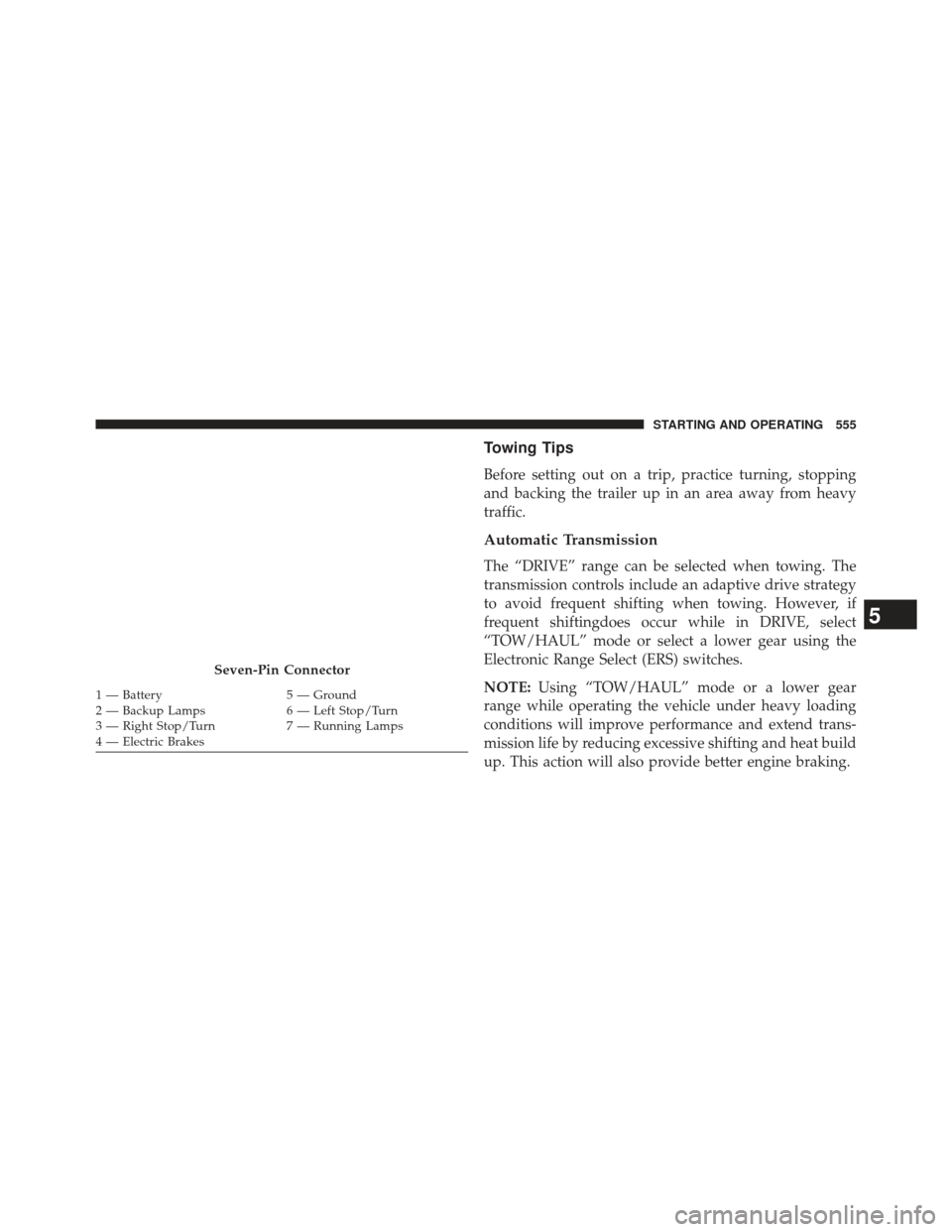
Seven-Pin Connector
1 — Battery 5 — Ground
2 — Backup Lamps 6 — Left Stop/Turn
3 — Right Stop/Turn 7 — Running Lamps
4 — Electric Brakes
5
STARTING AND OPERATING 555
Page 564 of 734
NOTE:Vehicles equipped with air suspension must be
lowered to the “Entry/Exit” (lowest) level, and have
automatic leveling disabled, before tying them down
(from the body) on a trailer or flatbed truck. Refer to “Air
Suspension – If Equipped” for more information. If the
vehicle cannot be lowered to the “Entry/Exit” level (for
example, engine will not run), tie-downs must be fas-
tened to the axles (not to the body). Failure to follow
these instructions may cause fault codes to be set and/or
cause loss of proper tie-down tension.
Recreational Towing – Two-Wheel Drive Models
DO NOT flat tow this vehicle. Damage to the drivetrain
will result.
Recreational towing (for two-wheel drive models) is
allowed ONLYif the rear wheels are OFFthe ground.
This may be accomplished using a tow dolly or vehicle
trailer. If using a tow dolly, follow this procedure: 1. Properly secure the dolly to the tow vehicle, following
the dolly manufacturer’s instructions.
2. Drive the rear wheels onto the tow dolly.
3. Firmly apply the parking brake. Place automatic trans- mission in PARK, manual transmission in gear (not in
NEUTRAL).
4. Properly secure the rear wheels to the dolly, following the dolly manufacturer’s instructions.
5. Remove the key fob from the ignition switch.
6. Install a suitable clamping device, designed for tow- ing, to secure the front wheels in the straight position.
562 STARTING AND OPERATING
Page 672 of 734
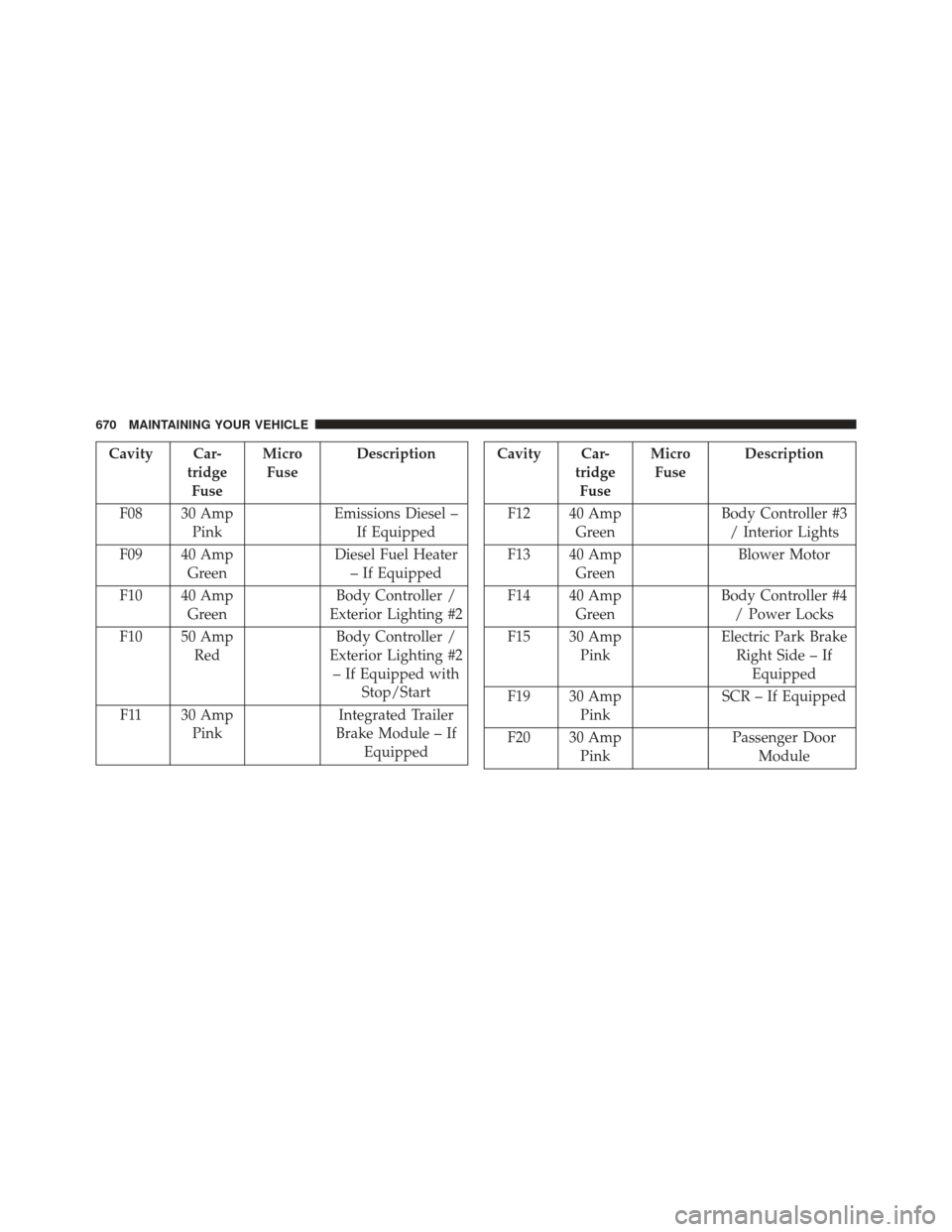
Cavity Car-tridgeFuse Micro
Fuse Description
F08 30 Amp Pink Emissions Diesel –
If Equipped
F09 40 Amp Green Diesel Fuel Heater
– If Equipped
F10 40 Amp Green Body Controller /
Exterior Lighting #2
F10 50 Amp Red Body Controller /
Exterior Lighting #2 – If Equipped with Stop/Start
F11 30 Amp Pink Integrated Trailer
Brake Module – If EquippedCavity Car- tridgeFuse Micro
Fuse Description
F12 40 Amp Green Body Controller #3
/ Interior Lights
F13 40 Amp Green Blower Motor
F14 40 Amp Green Body Controller #4
/ Power Locks
F15 30 Amp Pink Electric Park Brake
Right Side – If Equipped
F19 30 Amp Pink SCR – If Equipped
F20 30 Amp Pink Passenger Door
Module
670 MAINTAINING YOUR VEHICLE
Page 673 of 734
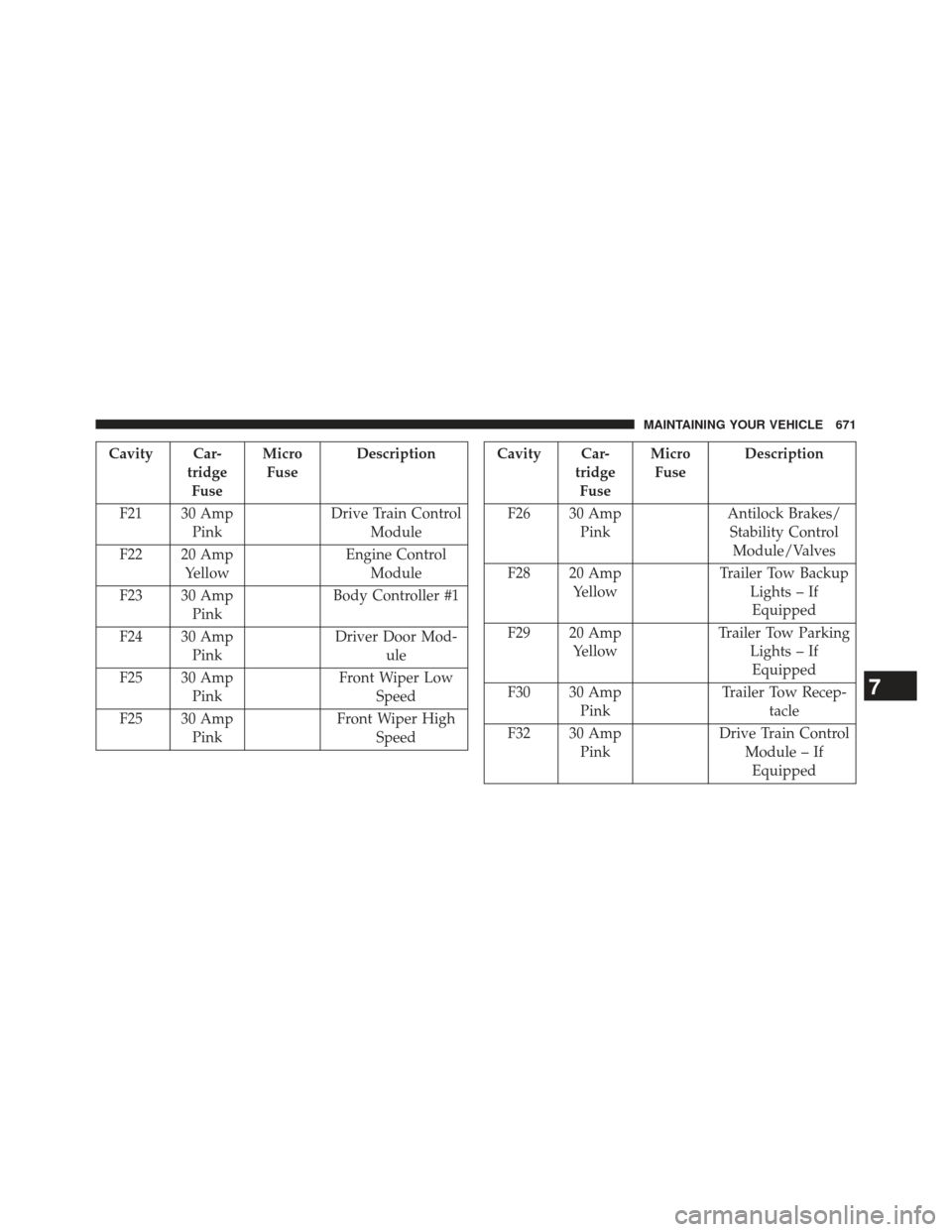
Cavity Car-tridgeFuse Micro
Fuse Description
F21 30 Amp Pink Drive Train Control
Module
F22 20 Amp Yellow Engine Control
Module
F23 30 Amp Pink Body Controller #1
F24 30 Amp Pink Driver Door Mod-
ule
F25 30 Amp Pink Front Wiper Low
Speed
F25 30 Amp Pink Front Wiper High
SpeedCavity Car- tridgeFuse Micro
Fuse Description
F26 30 Amp Pink Antilock Brakes/
Stability Control Module/Valves
F28 20 Amp Yellow Trailer Tow Backup
Lights – IfEquipped
F29 20 Amp Yellow Trailer Tow Parking
Lights – IfEquipped
F30 30 Amp Pink Trailer Tow Recep-
tacle
F32 30 Amp Pink Drive Train Control
Module – IfEquipped
7
MAINTAINING YOUR VEHICLE 671
Page 698 of 734
MAINTENANCE SCHEDULE
Your vehicle is equipped with an automatic oil change
indicator system. The oil change indicator system will
remind you that it is time to take your vehicle in for
scheduled maintenance.
Based on engine operation conditions, the oil change
indicator message will illuminate. This means that ser-
vice is required for your vehicle. Operating conditions
such as frequent short-trips, trailer tow, extremely hot or
cold ambient temperatures, and E85 fuel usage will
influence when the “Oil Change Required” message is
displayed. Severe Operating Conditions can cause the
change oil message to illuminate as early as 3,500 miles
(5,600 km) since last reset. Have your vehicle serviced as
soon as possible, within the next 500 miles (805 km).
Your authorized dealer will reset the oil change indicator
message after completing the scheduled oil change. If a
scheduled oil change is performed by someone other thanyour authorized dealer, the message can be reset by refer-
ring to the steps described under “Electronic Vehicle Infor-
mation Center (EVIC)/Oil Change Required” in “Under-
standing Your Instrument Panel” for further information.
NOTE:
Under no circumstances should oil change inter-
vals exceed 10,000 miles (16,000 km) or twelve months,
whichever comes first.
Once A Month Or Before A Long Trip:
• Check engine oil level
• Check windshield washer fluid level
• Check the tire inflation pressures and look for unusual
wear or damage
• Check the fluid levels of the coolant reservoir, brake
master cylinder, power steering (2500/3500 Models
Only) and transmission as needed
• Check function of all interior and exterior lights
8
M
A I
N T
E
N
A
N
C E
S
C
H E
D
U L
E
S696 MAINTENANCE SCHEDULES
Page 723 of 734
Inside Rearview Mirror.....................131
Instrument Cluster ....................... .257
Instrument Panel and Controls ................255
Instrument Panel Lens Cleaning ...............666
Integrated Trailer Brake Controls ..............549
Interior Appearance Care ....................665
Interior Lights .......................... .167
Intermittent Wipers (Delay Wipers) .............173
Introduction ..............................4
Inverter Outlet (115V) ..................... .213
Jack Location ........................... .572
Jump Starting ........................... .612
Key-In Reminder ..........................18
Keyless Enter-N-Go ........................39
Keyless Entry System .......................23
Key, Programming .........................20
Key, Replacement ..........................19 Keys
...................................12
Key, Sentry (Immobilizer) ....................18
Lane Change and Turn Signals ................171
Lane Change Assist ....................... .172
Lap/Shoulder Belts .........................51
Latches ............................... .124
Lead Free Gasoline ....................... .521
Leaks, Fluid ............................ .124
Life of Tires ............................ .501
Light Bulbs ............................. .124
Lights ................................ .124
Airbag ................................74
Alarm .............................. .262
Anti-Lock ............................ .257
Automatic Headlights ....................162
Brake Assist Warning ....................480
Brake Warning ........................ .259
Bulb Replacement ...................... .680
10
INDEX 721