mirror Ram 1500 2013 Owner's Guide
[x] Cancel search | Manufacturer: RAM, Model Year: 2013, Model line: 1500, Model: Ram 1500 2013Pages: 734, PDF Size: 5.47 MB
Page 196 of 734
CAUTION!
•To avoid vehicle damage, ParkView® should only
be used as a parking aid. The ParkView® camera is
unable to view every obstacle or object in your
drive path.
• To avoid vehicle damage, the vehicle must be
driven slowly when using ParkView® to be able to
stop in time when an obstacle is seen. It is recom-
mended that the driver look frequently over his/her
shoulder when using ParkView®.
NOTE: If snow, ice, mud, or any foreign substance builds
up on the camera lens, clean the lens, rinse with water,
and dry with a soft cloth. Do not cover the lens.
Turning ParkView® On Or Off — With Uconnect® 5.0
1. Press the “Settings” button.
2. Press the “Safety & Assistance” soft-key. 3. Press the check box soft key next to “Parkview®
Backup Camera” to enable/disable.
Turning ParkView® On Or Off — With Uconnect®
8.4A/8.4AN
1. Press the “Settings” soft-key.
2. Press the “Safety & Driving Assistance” soft-key.
3. Press the check box soft key next to “Parkview®Backup Camera” to enable/disable.
OVERHEAD CONSOLE — IF EQUIPPED
The overhead console is located on the headliner above
the review mirror. The overhead console contains the
following features:
•Courtesy/Reading Lights
• Power Sunroof Switch — If Equipped
• Power Sliding Rear Window Switch — If Equipped
• Universal Garage Door Opener — If Equipped
194 UNDERSTANDING THE FEATURES OF YOUR VEHICLE
Page 227 of 734
REAR WINDOW FEATURES
Rear Window Defroster
The rear window defroster button is located on
the climate control panel. Press this button to turn
on the rear window defroster and the heated outside
mirrors (if equipped). An indicator in the button will
illuminate when the rear window defroster is on. The
rear window defroster automatically turns off after ap-
proximately 10 minutes. For an additional five minutes of
operation, press the button a second time.
NOTE: To prevent excessive battery drain, use the rear
window defroster only when the engine is operating.
Grocery Bag Hooks
3
UNDERSTANDING THE FEATURES OF YOUR VEHICLE 225
Page 289 of 734
Nav–Turn By Turn – If Equipped
When this feature is selected, the navigation system
utilizes voice commands, guiding through the drive
route, mile by mile, turn-by-turn until the final destina-
tion is reached. To make your selection, press and release
the SELECT button until a check-mark appears next to
the feature showing the system has been activated or the
check-mark is removed showing the system has been
deactivated.
Park Assist System — If Equipped
The Rear Park Assist system will scan for objects behind
the vehicle when the transmission is in the REVERSE
position and the vehicle speed is less than 11 mph
(18 km/h). The system can be enabled with Sound Only
or Sound and Display. To make your selection, scroll up
or down until the preferred setting is highlighted, then
press and release the SELECT button until a check-mark
appears next to the setting, showing that the setting hasbeen selected. Refer to “Rear Park Assist System” in
“Understanding The Features Of Your Vehicle” for sys-
tem function and operating information.
Tilt Mirror In Reverse
When this feature is selected and the shift lever is placed
in reverse gear, the side mirrors tilt downward to allow
the driver to see into the previous blind spot and avoid
objects in close proximity to the rear of the vehicle. To
make your selection, press and release the SELECT
button until a check-mark appears next to the feature
showing the system has been activated or the check-mark
is removed showing the system has been deactivated.
Auto Wipers — If Equipped
When ON is selected, the system will automatically
activate the windshield wipers if it senses moisture on
the windshield. To make your selection, press and release
the SELECT button until a check-mark appears next to
the feature showing the system has been activated or the
4
UNDERSTANDING YOUR INSTRUMENT PANEL 287
Page 293 of 734
Key Fob Linked To Memory
When this feature is selected the memory seat, mirror,
and radio settings will return to the memory set position
when the RKE transmitter UNLOCK button is pressed. If
this feature is not selected then the memory seat, mirror,
and radio settings can only return to the memory set
position using the seat mounted switch. To make your
selection, press and release the SELECT button until a
check-mark appears next to the feature showing the
system has been activated or the check-mark is removed
showing the system has been deactivated.
Keyless Enter-N-Go™ (Passive Entry)
This feature allows you to lock and unlock the vehicle’s
door(s) without having to press the RKE transmitter lock
or unlock buttons. To make your selection, press and
release the SELECT button until a check-mark appears
next to the feature showing the system has been activated
or the check-mark is removed showing the system hasbeen deactivated. Refer to “Keyless Enter-N-Go™” in
“Things To Know Before Starting Your Vehicle”.
Remote Start Comfort Sys.
When this feature is selected and the remote start is
activated, the heated steering wheel and driver heated
seat features will automatically turn on in cold weather.
In warm weather, the driver vented seat feature will
automatically turn on when the remote start is activated.
These features will stay on through the duration of
remote start or until the key is turned to RUN. To make
your selection, press and release the SELECT button until
a check-mark appears next to the feature showing the
system has been activated or the check-mark is removed
showing the system has been deactivated.
Key-Off Power Delay
When this feature is selected, the power window
switches, radio, hands-free system (if equipped), DVD
video system (if equipped), power sunroof (if equipped),
4
UNDERSTANDING YOUR INSTRUMENT PANEL 291
Page 303 of 734
Safety / Assistance
After pressing the Safety / Assistance soft-key the fol-
lowing settings will be available.
•Park Assist
The Rear Park Assist system will scan for objects behind
the vehicle when the transmission shift lever is in RE-
VERSE and the vehicle speed is less than 11 mph
(18 km/h). The system can be enabled with Sound Only
or Sound and Display. To change the Park Assist status,
touch and release Sound Only or Sounds and Display
button. Then touch the arrow back soft-key. Refer to
“ParkSense® Rear Park Assist” in “Understanding The
Features Of Your Vehicle” for system function and oper-
ating information.
• Tilt Mirrors In Reverse
When this feature is selected, the outside sideview mir-
rors will tilt downward when the ignition is in the RUN position and the transmission shift lever is in the RE-
VERSE position. The mirrors will move back to their
previous position when the transmission is shifted out of
REVERSE. To make your selection, touch the Tilt Mirrors
In Reverse soft-key, until a check-mark appears next to
setting, showing that setting has been selected. Touch the
back arrow soft-key to return to the previous menu.
•
ParkView® Backup Camera
Your vehicle may be equipped with the ParkView® Rear
Back Up Camera that allows you to see an on-screen
image of the rear surroundings of your vehicle whenever
the shift lever is put into REVERSE. The image will be
displayed on the radio touchscreen display along with a
caution note to “check entire surroundings” across the
top of the screen. After five seconds, this note will
disappear. The ParkView® camera is located on the rear
of the vehicle above the rear License plate. To make your
selection, touch the ParkView® Backup Camera soft-key,
4
UNDERSTANDING YOUR INSTRUMENT PANEL 301
Page 324 of 734
increase when Defrost mode is selected. If the front
defrost mode is turned off the climate system will return
the previous setting.
4. Defrost Button
Press and release this button to turn on the rear window
defroster (if equipped) and the heated outside mirrors (if
equipped). An indicator will illuminate when the rear
window defroster is on. The rear window defroster
automatically turns off after 10 minutes.
CAUTION!
Failure to follow these cautions can cause damage to
the heating elements:
(Continued)
CAUTION!(Continued)
•Use care when washing the inside of the rear
window. Do not use abrasive window cleaners on
the interior surface of the window. Use a soft cloth
and a mild washing solution, wiping parallel to the
heating elements. Labels can be peeled off after
soaking with warm water.
• Do not use scrapers, sharp instruments, or abrasive
window cleaners on the interior surface of the
window.
• Keep all objects a safe distance from the window.
5. Modes
The airflow distribution mode can be adjusted so air
comes from the instrument panel outlets, floor outlets,
demister outlets and defrost outlets. The Mode settings
are as follows:
322 UNDERSTANDING YOUR INSTRUMENT PANEL
Page 328 of 734
Button Descriptions (Applies To Both Hard-keys And
Soft-keys)
1. A/C Button
Press and release to change the current setting, the
indicator illuminates when A/C is ON. Performing this
function again will cause the A/C operation to switch
into manual mode and the A/C indicator will turn off.
2. Recirculation Button
Press and release to change the current setting, the
indicator illuminates when ON.
3. Front Defrost Button
Press and release to change the current airflow setting to
Defrost mode. The indicator illuminates when this fea-
ture is ON. Performing this function will cause the ATC
to switch into manual mode. The blower speed mayincrease when Defrost mode is selected. If the front
defrost mode is turned off the climate system will return
the previous setting.
4. Defrost
Press and release this button to turn on the rear window
defroster and the heated outside mirrors (if equipped).
An indicator will illuminate when the rear window
defroster is on. The rear window defroster automatically
turns off after 10 minutes.
CAUTION!
Failure to follow these cautions can cause damage to
the heating elements:
(Continued)
326 UNDERSTANDING YOUR INSTRUMENT PANEL
Page 344 of 734
STARTING PROCEDURES
Before starting your vehicle, adjust your seat, adjust both
inside and outside mirrors, and fasten your seat belt.
The starter should not be operated for more than 15-
second intervals. Waiting a few seconds between such
intervals will protect the starter from overheating.
WARNING!
Never leave children alone in a vehicle, or with
access to an unlocked vehicle. Leaving children in a
vehicle unattended is dangerous for a number of
reasons. A child or others could be seriously or
fatally injured. Children should be warned not to
touch the parking brake, brake pedal or the shift
lever. Do not leave the key fob in or near the vehicle,
or in a location accessible to children, and do not
(Continued)
WARNING!(Continued)
leave a vehicle equipped with Keyless Enter-N-Go™
(if equipped) in the ACC or ON/RUN mode. A child
could operate power windows, other controls, or
move the vehicle.
Normal Starting
Normal starting of either a warm or cold engine is
obtained without pumping or pressing the accelerator
pedal. Turn the key fob to the START position and release
when the engine starts. If the engine fails to start within
10 seconds, turn the key fob to the OFF position, wait five
seconds, then repeat the “Normal Starting” procedure.
Automatic Transmission
Start the engine with the shift lever in the NEUTRAL or
PARK position. Apply the brake before shifting into any
driving range.
342 STARTING AND OPERATING
Page 668 of 734
Glass Surfaces
All glass surfaces should be cleaned on a regular basis
with MOPAR® Glass Cleaner, or any commercial
household-type glass cleaner. Never use an abrasive type
cleaner. Use caution when cleaning the inside rear win-
dow equipped with electric defrosters or the right rear
quarter window equipped with the radio antenna. Do
not use scrapers or other sharp instrument that may
scratch the elements.
When cleaning the rear view mirror, spray cleaner on the
towel or rag that you are using. Do not spray cleaner
directly on the mirror.
Cleaning Plastic Instrument Cluster Lenses
The lenses in front of the instruments in this vehicle are
molded in clear plastic. When cleaning the lenses, care
must be taken to avoid scratching the plastic.1. Clean with a wet soft rag. A mild soap solution may be
used, but do not use high alcohol content or abrasive
cleaners. If soap is used, wipe clean with a clean damp
rag.
2. Dry with a soft cloth.
Seat Belt Maintenance
Do not bleach, dye or clean the belts with chemical
solvents or abrasive cleaners. This will weaken the fabric.
Sun damage can also weaken the fabric.
If the belts need cleaning, use a mild soap solution or
lukewarm water. Do not remove the belts from the car to
wash them. Dry with a soft cloth.
Replace the belts if they appear frayed or worn or if the
buckles do not work properly.
666 MAINTAINING YOUR VEHICLE
Page 679 of 734
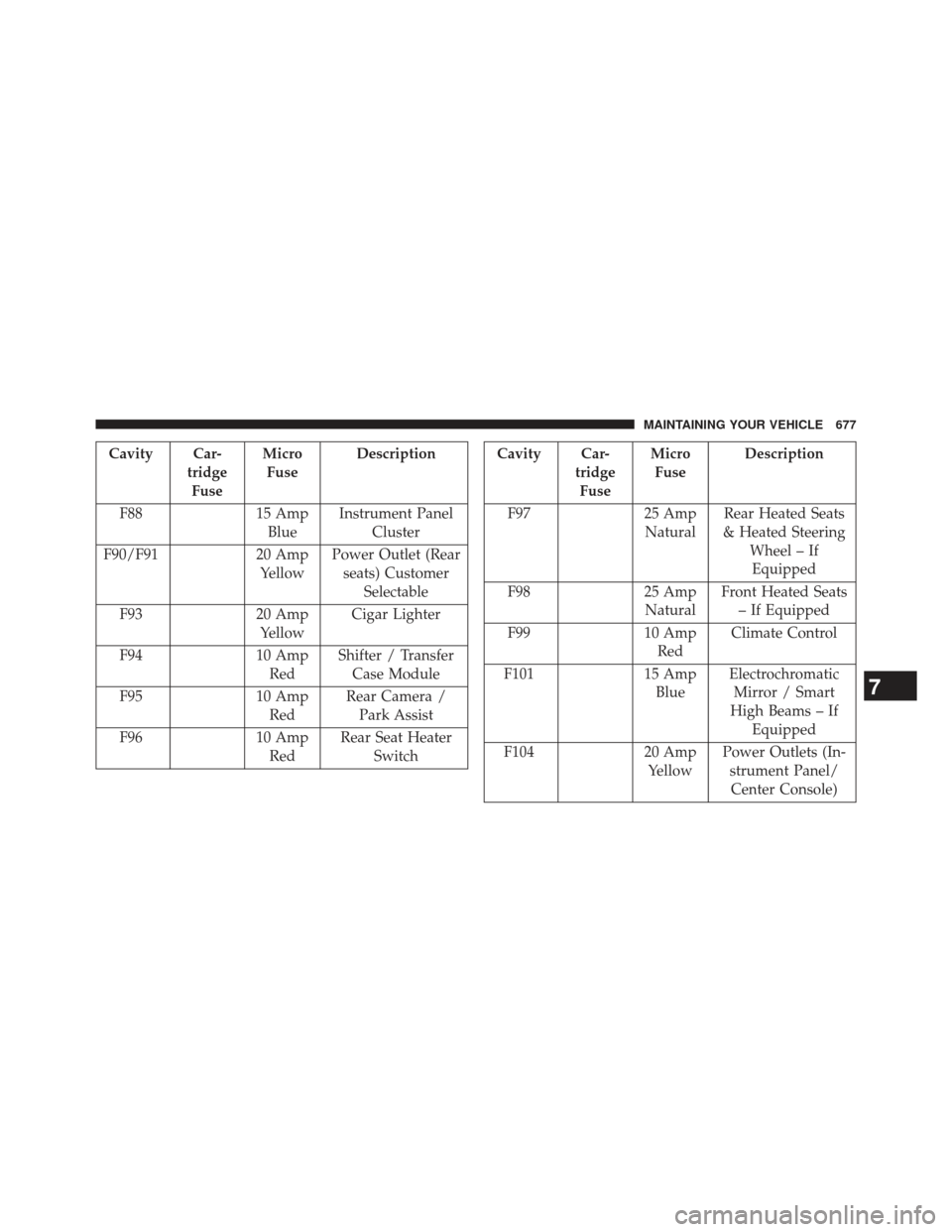
Cavity Car-tridgeFuse Micro
Fuse Description
F88 15 Amp
Blue Instrument Panel
Cluster
F90/F91 20 Amp
Yellow Power Outlet (Rear
seats) Customer Selectable
F93 20 Amp
Yellow Cigar Lighter
F94 10 Amp
Red Shifter / Transfer
Case Module
F95 10 Amp
Red Rear Camera /
Park Assist
F96 10 Amp
Red Rear Seat Heater
SwitchCavity Car- tridgeFuse Micro
Fuse Description
F97 25 Amp
Natural Rear Heated Seats
& Heated Steering Wheel – IfEquipped
F98 25 Amp
Natural Front Heated Seats
– If Equipped
F99 10 Amp
Red Climate Control
F101 15 Amp
Blue Electrochromatic
Mirror / Smart
High Beams – If Equipped
F104 20 Amp
Yellow Power Outlets (In-
strument Panel/Center Console)
7
MAINTAINING YOUR VEHICLE 677