remote start Ram 1500 2015 User Guide
[x] Cancel search | Manufacturer: RAM, Model Year: 2015, Model line: 1500, Model: Ram 1500 2015Pages: 871, PDF Size: 24.83 MB
Page 26 of 871
NOTE:
•The front courtesy overhead console and door cour-
tesy lights will not turn off if the dimmer control is in
the “Dome ON” position (rotate horizontal thumb
wheel on the bottom of the switch to the far right
detent position).
•The illuminated entry system will not operate if the
dimmer control is in the “Dome OFF” position (rotate
horizontal thumb wheel on the bottom of the switch to
the far left detent position).
REMOTE KEYLESS ENTRY (RKE)
The RKE system allows you to lock or unlock all doors,
tailgate, and the RamBox® (if equipped) as well as
activate the Panic Alarm from distances up to approxi-
mately 66 ft (20 m) using a hand-held radio transmitter
with integrated key. The transmitter does not need to be
pointed at the vehicle to activate the system. Push and
release the LOCK button on the RKE transmitter to lock
all doors, the tailgate and the RamBox® (if equipped).
The turn signal lights will flash and the horn will chirp to
acknowledge the signal.
NOTE:Inserting the Key Fob with RKE transmitter into
the ignition switch disables the system from responding
to any button pushes from that RKE transmitter. Driving
at speeds 5 mph (8 km/h) and above disables the system
from responding to all RKE transmitter buttons for all
RKE transmitters.
24 THINGS TO KNOW BEFORE STARTING YOUR VEHICLE
Page 27 of 871
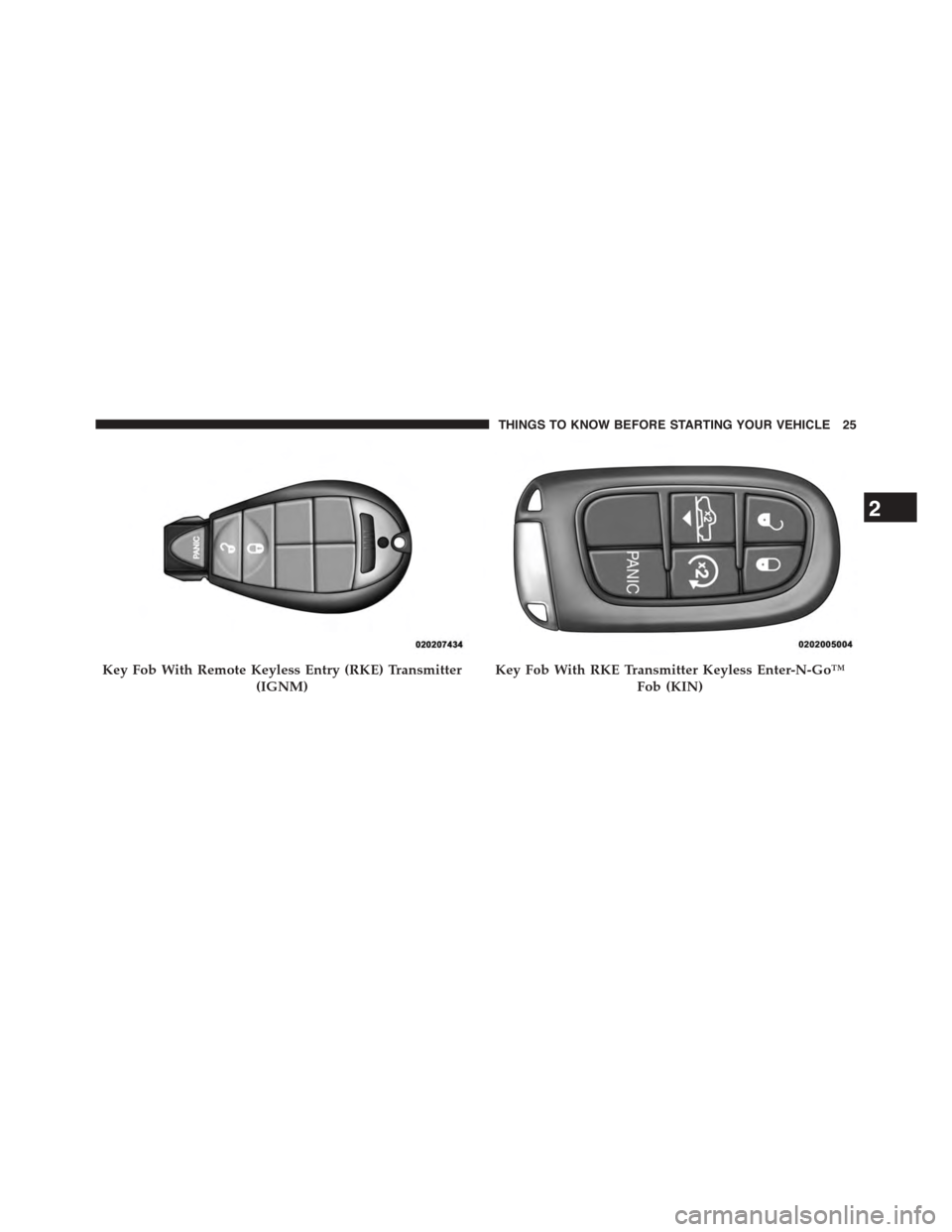
Key Fob With Remote Keyless Entry (RKE) Transmitter
(IGNM)
Key Fob With RKE Transmitter Keyless Enter-N-Go™
Fob (KIN)
2
THINGS TO KNOW BEFORE STARTING YOUR VEHICLE 25
Page 28 of 871
Remote Unlock The Doors
Push and release the UNLOCK button on the RKE
transmitter once to unlock the driver ’s door. Push the
unlock button twice within five seconds to unlock all
doors, the tailgate and the RamBox® (if equipped). The
turn signal lights will flash to acknowledge the unlock
signal. The illuminated entry system will also turn on.
NOTE:The EVIC/DID or Uconnect® Settings are setup
for driver door first, otherwise this will unlock all doors.
Remote Key Unlock, Driver Door/All Doors First
This feature lets you program the system to unlock either
the driver’s door or all doors on the first push of the
UNLOCK button on the RKE transmitter. To change the
current setting, proceed as follows:
•For vehicles not equipped with a touchscreen radio,
refer to “Electronic Vehicle Information Center (EVIC)/
Settings (Customer-Programmable Features)” in “Un-
derstanding Your Instrument Panel” for further informa-
tion.
•For vehicles equipped with a touchscreen radio, refer
to “Uconnect® Settings” in “Understanding Your In-
strument Panel” for further information.
NOTE:Pushing the LOCK button on the RKE transmitter
while you are inside the vehicle will activate the Vehicle
Security Alarm System. Opening a door with the Vehicle
Security Alarm System activated will cause the alarm to
sound. Push the UNLOCK button to deactivate the
Vehicle Security Alarm System.
26 THINGS TO KNOW BEFORE STARTING YOUR VEHICLE
Page 29 of 871
Flash Lamps With Remote Key Lock
This feature will cause the turn signal lights to flash when
the doors are locked or unlocked with the RKE transmit-
ter. This feature can be turned on or turned off. To change
the current setting, proceed as follows:
•For vehicles not equipped with a touchscreen radio,
refer to “Electronic Vehicle Information Center
(EVIC)/Settings (Customer-Programmable Features)”
in “Understanding Your Instrument Panel” for further
information.
•For vehicles equipped with a touchscreen radio, refer
to “Uconnect® Settings” in “Understanding Your In-
strument Panel” for further information.
To Lock The Doors
Push and release the LOCK button on the RKE transmit-
ter to lock all doors, the tailgate and the RamBox® (if
equipped). The turn signal lights will flash and the horn
will chirp to acknowledge the signal.
Sound Horn With Remote Key Lock
This feature will cause the horn to chirp when the doors
are locked with the RKE transmitter. This feature can be
turned on or turned off. To change the current setting,
proceed as follows:
•For vehicles not equipped with a touchscreen radio,
refer to “Electronic Vehicle Information Center
(EVIC)/Settings (Customer-Programmable Features)”
in “Understanding Your Instrument Panel” for further
information.
2
THINGS TO KNOW BEFORE STARTING YOUR VEHICLE 27
Page 31 of 871
RKE Air Suspension (Remote Lowering Of The
Vehicle) — If Equipped
For easy entry and loading, your vehicle can be
lowered by pushing the Key Fob air suspension
lowering button two times. When Remote key
FOB lowering is requested, the vehicle will
send a series of chirps and flashes to alert the customer
that the operation has begun and will continue these
alerts until it successfully lowers.
The following conditions must be met for the vehicle to
lower remotely:
•The vehicle must not already be in Entry/Exit (Park)
ride height.
•The vehicle battery must be fully charged.
•All doors must be closed.
•The ignition key must be out of the vehicle.
Cancelling Remote Lowering
Vehicle lowering can be cancelled at anytime. When
vehicle lowering is cancelled, the vehicle will raise up to
the next defined level and lock out the remote lowering
feature until the ignition has been cycled ON/OFF.
To cancel vehicle lowering, push the Key Fob air suspen-
sion lowering button one time during the lowering
process. When vehicle lowering is cancelled the horn will
chirp two times and the hazard lights will flash four
times. Once raising is completed, the horn will chirp one
time.
NOTE:For further information, refer to “Air Suspension
System” in “Starting And Operating”.
2
THINGS TO KNOW BEFORE STARTING YOUR VEHICLE 29
Page 36 of 871
REMOTE STARTING SYSTEM — IF EQUIPPED
This system uses the Remote Keyless Entry
(RKE) transmitter to start the engine conve-
niently from outside the vehicle while still
maintaining security. The system has a range of
approximately 300 ft (91 m).
NOTE:
•The vehicle must be equipped with an automatic
transmission to be equipped with Remote Start.
•Obstructions between the vehicle and the RKE trans-
mitter may reduce this range.
How To Use Remote Start
All of the following conditions must be met before the
engine will remote start:
•Shift lever in PARK
•Doors closed
•Hood closed
•HAZARD switch off
•BRAKE switch inactive (brake pedal not pushed)
•Ignition key removed from ignition switch
•Battery at an acceptable charge level
•RKE PANIC button not pushed
•Fuel meets minimum requirement
•System not disabled from previous remote start event
•Vehicle security alarm not active
34 THINGS TO KNOW BEFORE STARTING YOUR VEHICLE
Page 37 of 871
WARNING!
•Do not start or run an engine in a closed garage or
confined area. Exhaust gas contains Carbon Mon-
oxide (CO) which is odorless and colorless. Carbon
Monoxide is poisonous and can cause serious in-
jury or death when inhaled.
•Keep Remote Keyless Entry (RKE) transmitters
away from children. Operation of the Remote Start
System, windows, door locks or other controls
could cause serious injury or death.
Remote Start Abort Message
The following messages will display in the EVIC/DID if
the vehicle fails to remote start or exits remote start
prematurely:
•Remote Start Cancelled — Door Open
•Remote Start Cancelled — Hood Ajar
•Remote Start Cancelled — Fuel Low
•Remote Start Cancelled — System Fault
•Remote Start Disabled — Start Vehicle to Reset
The EVIC/DID message stays active until the ignition is
turned to the ON/RUN position.
To Enter Remote Start Mode
Push and release the REMOTE START button
on the RKE transmitter twice within five sec-
onds. The parking lights will flash, vehicle
doors will lock, and the horn will chirp twice (if
programmed). Once the vehicle has started, the engine
will run for 15 minutes.
NOTE:
•If your power door locks were unlocked, Remote Start
will automatically lock the doors.
2
THINGS TO KNOW BEFORE STARTING YOUR VEHICLE 35
Page 38 of 871
•If an engine fault is present or fuel level is low, the
vehicle will start and then shut down in 10 seconds.
•The park lamps will turn on and remain on during
Remote Start mode.
•For security, power window and power sunroof op-
eration (if equipped) are disabled when the vehicle is
in the Remote Start mode.
•The engine can be started two consecutive times (two
15-minute cycles) with the RKE transmitter. However,
the ignition switch must be cycled to the ON/RUN
position before you can repeat the start sequence for a
third cycle.
To Exit Remote Start Mode Without Driving The
Vehicle
Push and release the REMOTE START button one time or
allow the engine to run for the entire 15-minute cycle.
NOTE:To avoid unintentional shut downs, the system
will disable the one time push of the REMOTE START
button for two seconds after receiving a valid Remote
Start request.
To Exit Remote Start Mode And Drive The Vehicle
Before the end of the 15-minute cycle, push and release
the UNLOCK button on the RKE transmitter to unlock
the doors and disarm the Vehicle Security Alarm System
(if equipped). Then, prior to the end of the 15 minute
cycle, cycle the ignition to the ON/RUN position.
36 THINGS TO KNOW BEFORE STARTING YOUR VEHICLE
Page 39 of 871
Remote Start Comfort Systems — If Equipped
When remote start is activated, the heated steering wheel
and driver heated seat features will automatically turn on
in cold weather. In warm weather, the driver vented seat
feature will automatically turn on when the remote start
is activated. These features will stay on through the
duration of remote start or until the ignition switch is
turned to the ON/RUN position.
The Remote Start Comfort System can be activated and
deactivated through the Uconnect® System. For more
information on Remote Start Comfort System operation
refer to ”Customer Programmable Features” in
“Uconnect® Settings” in “Understanding Your Instru-
ment Panel”.
DOOR LOCKS
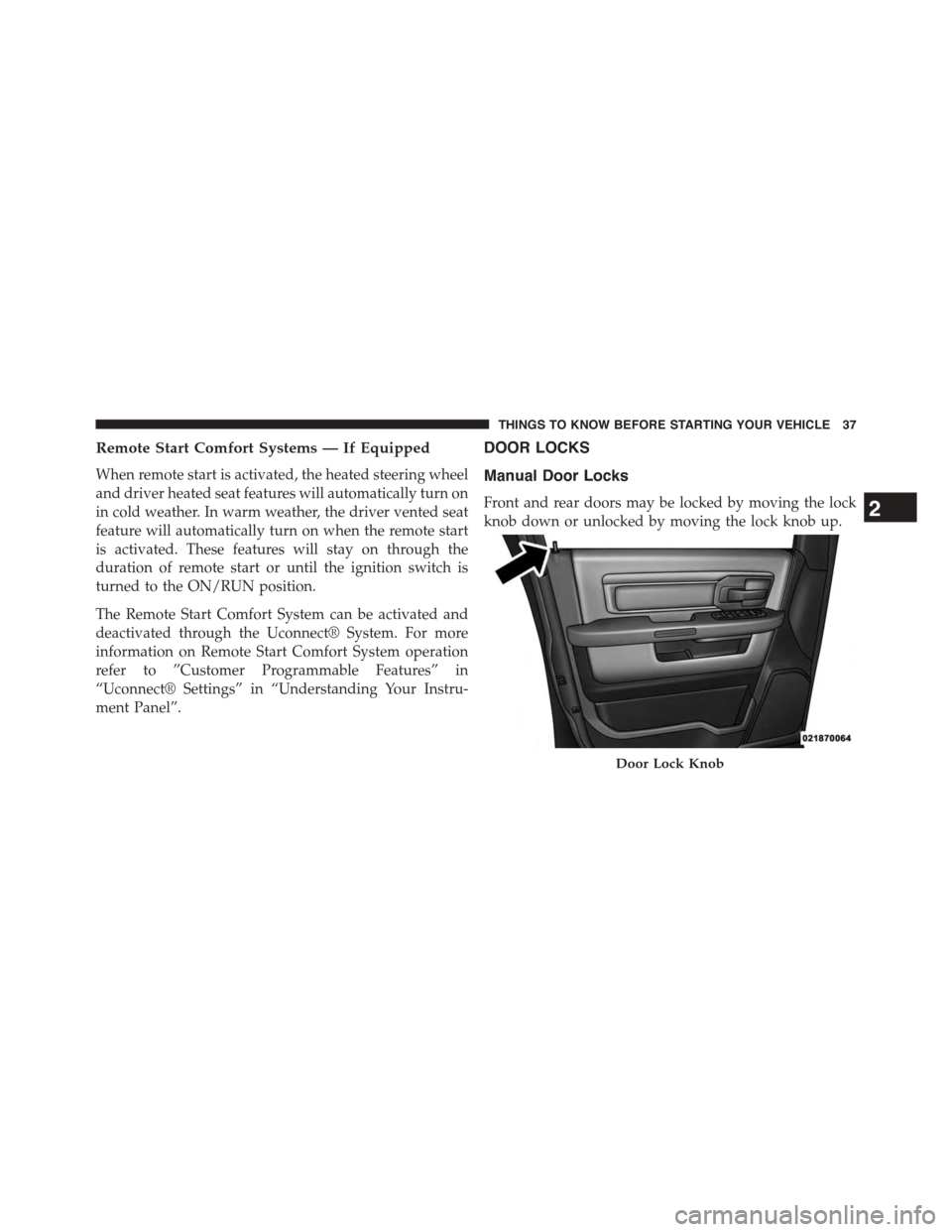
Manual Door Locks
Front and rear doors may be locked by moving the lock
knob down or unlocked by moving the lock knob up.
Door Lock Knob
2
THINGS TO KNOW BEFORE STARTING YOUR VEHICLE 37
Page 44 of 871
WARNING!
Avoid trapping anyone in a vehicle in a collision.
Remember that the rear doors can only be opened
from the outside when the Child-Protection locks are
engaged.
NOTE:
•After setting the Child-Protection Door Lock system,
always test the door from the inside to make certain it
is in the desired position.
•For emergency exit with the system engaged, move the
door lock switch to the UNLOCK position, roll down
the window and open the door with the outside door
handle.
KEYLESS ENTER-N-GO™
The Passive Entry system is an enhancement to the
vehicle’s Remote Keyless Entry (RKE) system and a
feature of Keyless Enter-N-Go™. For further information,
refer to “Keyless Enter-N-Go™” in “Starting And Oper-
ating”. This feature allows you to lock and unlock the
vehicle’s door(s) without having to push the RKE trans-
mitter lock or unlock buttons.
NOTE:
•Passive Entry may be programmed ON/OFF; refer to
“Uconnect® Settings” in “Understanding Your Instru-
ment Panel” for further information.
•If wearing gloves on your hands, or if it has been
raining on the Passive Entry door handle, the unlock
sensitivity can be affected, resulting in a slower re-
sponse time.
42 THINGS TO KNOW BEFORE STARTING YOUR VEHICLE