trip Ram 1500 2015 User Guide
[x] Cancel search | Manufacturer: RAM, Model Year: 2015, Model line: 1500, Model: Ram 1500 2015Pages: 871, PDF Size: 24.83 MB
Page 361 of 871
Display
After pressing the “Display” button on the touchscreen
the following settings will be available.
•Display Mode
When in this display you may select the Auto or Manual
display settings. To change Mode status, press and re-
lease the “Auto” or “Manual” button on the touchscreen.
Press the back arrow/Done button on the touchscreen to
return to the previous menu.
•Set Language
When in this display, you may select one of multiple
languages (English/Français/Español) for all display no-
menclature, including the trip functions and the naviga-
tion system (if equipped). Press the “Language” button
on the touchscreen and select from “English,” “Français,”
or “Español.” Press the back arrow/Done button on the
touchscreen to return to the previous menu.
•Units
When in this display, you may select to have the EVIC/
DID, odometer, and navigation system (if equipped)
changed between US and Metric units of measure. Press
“US” or “Metric” to make your selection. Press the back
arrow/Done button on the touchscreen to return to the
previous menu.
•Touchscreen Beep
When in this display, you may turn on or shut off the
sound heard when a touchscreen button is pressed. To
change the Mode status, press and release the “On” or
“Off” button on the touchscreen. Press the back arrow/
Done button on the touchscreen to return to the previous
menu
•Fuel Saver Display — If Equipped
This feature will allow you to enable fuel saver mode and
will be displayed in the EVIC/DID. Press the “Fuel Saver
4
UNDERSTANDING YOUR INSTRUMENT PANEL 359
Page 379 of 871
•Set Theme
This feature will allow you to choose a background
theme for the display screen. The theme will change the
background color, highlight color, and button color of the
display screen. Press the “Set Theme” button on the
touchscreen and select one of the pre-configured themes
available.
•Set Language
When in this display, you may select one of multiple
languages (English / Français / Español) for all display
nomenclature, including the trip functions and the navi-
gation system (if equipped). Press the Set Language
button on the touchscreen, then press the desired lan-
guage button on the touchscreen until a check-mark
appears next to the language, showing that setting has
been selected. Press the back arrow button on the touch-
screen to return to the previous menu.
•Units
When in this display, you may select to have the Driver
Information Display (DID), odometer, and navigation
system (if equipped) changed between US and Metric
units of measure. Press “US” or “Metric” until a check-
mark appears next to the setting, showing that setting has
been selected. Press the back arrow button on the touch-
screen to return to the previous menu.
•Touchscreen Beep
When in this display, you may turn on or shut off the
sound heard when a touchscreen button (button on the
touchscreen) is pressed. Press the “Touchscreen Beep”
button on the touchscreen until a check-mark appears
next to the setting, showing that setting has been se-
lected. Press the back arrow button on the touchscreen to
return to the previous menu.
4
UNDERSTANDING YOUR INSTRUMENT PANEL 377
Page 559 of 871
2. Attach the hook to a suitable anchor point.
CAUTION!
Be certain the anchor will withstand the load re-
quired to tension the wire rope.
3. Apply at least 500 lbs (227 kg) of tension to the rope
while winding the rope. Always use care to ensure the
rope does not pile up on one side of the drum and is
neatly wound onto the drum.
CAUTION!
Wire rope must spool on the winch drum in the
direction indicated on the drum rotation decal on the
winch.
Low Voltage Interrupt
Your winch is equipped with a device that will interrupt
winch function if the vehicle charging system voltage
drops to a low level. The winch will not power-in or out
for 30 seconds if this device is tripped. If the interrupt is
tripped, the vehicle should be operated at high idle for a
few minutes to allow the vehicle charging system to
recover before continuing to winch.
Winch Motor Thermal Protection
Your winch is equipped with a thermal protection device
in the motor. If the winch is operated for an excessive
duration, the device may interrupt motor function to
protect the winch motor. During this time the winch will
power-out but will not power-in. Allow the winch motor
to cool for a few minutes before continuing to winch. The
winch will resume normal function once the motor cools.
5
STARTING AND OPERATING 557
Page 592 of 871
All Four-Wheel Drive Vehicles In 4WD AUTO And
4WD LOCK Modes Can Also Choose The
Following ESC Operating Mode. This Is The Only
Selectable ESC Operating Mode in 4WD LOW:
ESC Full Off
This mode is intended for off-road use when ESC stabil-
ity features could inhibit vehicle maneuverability due to
trail conditions. This mode is entered by pressing and
holding the “ESC Off” switch for five seconds when the
vehicle is stopped and the engine is running. After five
seconds, the “ESC Off Indicator Light” will illuminate.
Press and release the trip odometer button located on the
instrument cluster to clear this message.
NOTE:The “ESC OFF” message will display and the
audible chime will sound when the shift lever is placed
into the PARK position from any other position and then
moved out of the PARK position. This will occur even if
the message was previously cleared.
In this mode, ESC and TCS except for the “limited slip”
feature described in the TCS section are turned off until
the vehicle reaches a speed of 40 mph (64 km/h). At
40 mph (64 km/h) the system returns to “ESC Partial
Off” mode, described above. When the vehicle speed
drops below 35 mph (56 km/h) the ESC system reverts
back to#ESC Full Off#. ESC is off at low vehicle speeds so
that it will not interfere with off-road driving but ESC
function returns to provide the stability feature at speeds
above 40 mph (64 km/h). The “ESC Off Indicator Light”
will always be illuminated when ESC is in#ESC Partial
Off#and#ESC Full Off#. To turn ESC on again, momen-
tarily press the “ESC Off” switch. This will restore the
normal “ESC On” mode of operation.
“ESC Full Off” is the only operating mode for ESC in
4WD LOW. Whenever the vehicle is started in 4WD LOW
or the transfer case (if equipped) is shifted from 4WD
LOCK or NEUTRAL, to 4WD LOW, the ESC system will
be in this mode.
590 STARTING AND OPERATING
Page 669 of 871
Towing Tips
Before setting out on a trip, practice turning, stopping
and backing the trailer up in an area away from heavy
traffic.
Automatic Transmission
The DRIVE range can be selected when towing. The
transmission controls include a drive strategy to avoid
frequent shifting when towing. However, if frequent
shifting does occur while in DRIVE, select TOW/HAUL
mode or select a lower gear range (using the Electronic
Range Select (ERS) shift control).
NOTE:Using TOW/HAUL mode or selecting a lower
gear range (using the ERS shift control) while operating
the vehicle under heavy loading conditions will improve
performance and extend transmission life by reducing
excessive shifting and heat build up. This action will also
provide better engine braking.
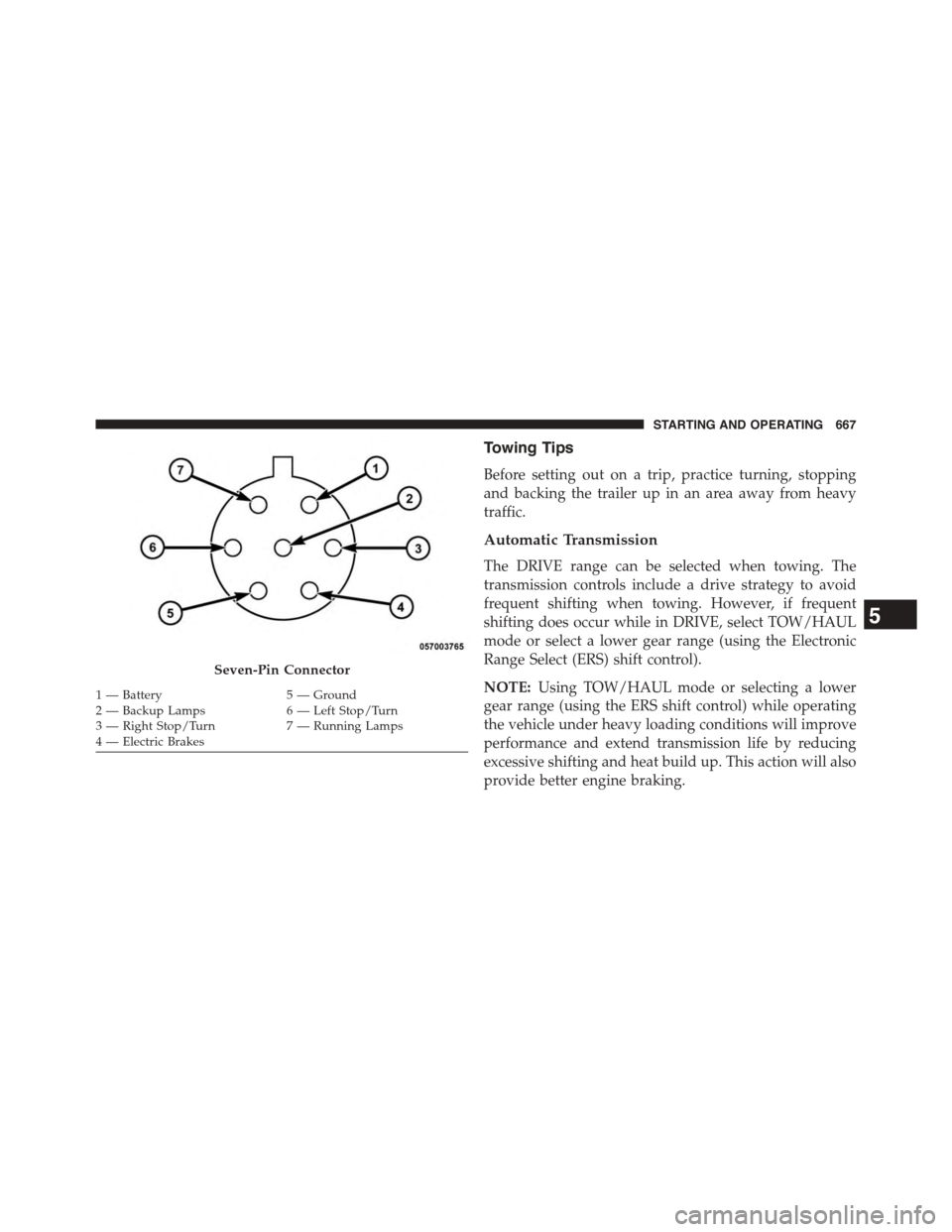
Seven-Pin Connector
1—Battery5—Ground2—BackupLamps6—LeftStop/Turn3—RightStop/Turn7—RunningLamps4 — Electric Brakes
5
STARTING AND OPERATING 667
Page 830 of 871
MAINTENANCE SCHEDULE
Your vehicle is equipped with an automatic oil change
indicator system. The oil change indicator system will
remind you that it is time to take your vehicle in for
scheduled maintenance.
Based on engine operation conditions, the oil change
indicator message will illuminate. This means that ser-
vice is required for your vehicle. Operating conditions
such as frequent short-trips, trailer tow, extremely hot or
cold ambient temperatures, and E85 fuel usage will
influence when the “Oil Change Required” message is
displayed. Severe Operating Conditions can cause the
change oil message to illuminate as early as 3,500 miles
(5,600 km) since last reset. Have your vehicle serviced as
soon as possible, within the next 500 miles (805 km).
Your authorized dealer will reset the oil change indicator
message after completing the scheduled oil change. If a
scheduled oil change is performed by someone other
than your authorized dealer, the message can be reset by
referring to the steps described under “Electronic Vehicle
Information Center (EVIC)” or “Driver Information Dis-
play (DID)” in “Understanding Your Instrument Panel”
for further information.
8
MAINTENANCE
SCHEDULES
828 MAINTENANCE SCHEDULES
Page 831 of 871
NOTE: 1500 Models Only
•Under no circumstances should oil change intervals
exceed 10,000 miles (16,000 km) or twelve months on
1500 trucks, whichever comes first.
2500 – 3500 Models
•Under no circumstances should oil change intervals
exceed 8,000 miles (13,000 km) or twelve months on
2500 – 3500 trucks, whichever comes first.
Severe Duty All Models
•Change Engine Oil at 4000 miles (6,500 km) if the vehicle
is operated in a dusty and off road environment. This
type of vehicle use is considered Severe Duty
Once A Month Or Before A Long Trip:
•Check engine oil level
•Check windshield washer fluid level
•Check tire pressure and look for unusual wear or
damage. Rotate tires at the first sign of irregular wear,
even if it occurs before the oil indicator system turns on.
•Check the fluid levels of the coolant reservoir, brake
master cylinder, power steering (2500/3500 Models
Only) and automatic transmission (six-speed only)
and fill as needed
•Check function of all interior and exterior lights
8
MAINTENANCE
SCHEDULES
MAINTENANCE SCHEDULES 829