CAN Ram 1500 2015 Owner's Manual
[x] Cancel search | Manufacturer: RAM, Model Year: 2015, Model line: 1500, Model: Ram 1500 2015Pages: 871, PDF Size: 24.83 MB
Page 665 of 871
sliding the manual brake control lever will display the
GAIN setting for 10 seconds and the “Trailer Brake Status
Indicator Light” will not be displayed.
If a fault is detected in the trailer wiring or the Integrated
Trailer Brake Module (ITBM), the “Trailer Brake Status
Indicator Light” will flash.
GAIN Adjustment Buttons (+/-)
Pressing these buttons will adjust the brake control
power output to the trailer brakes in 0.5 increments. The
GAIN setting can be increased to a maximum of 10 or
decreased to a minimum of 0 (no trailer braking).
GAIN
The GAIN setting is used to set the trailer brake control
for the specific towing condition and should be changed
as towing conditions change. Changes to towing condi-
tions include trailer load, vehicle load, road conditions
and weather.
Adjusting GAIN
NOTE:This should only be performed in a traffic free
environment at speeds of approximately 20–25 mph
(30–40 km/h).
1. Make sure the trailer brakes are in good working
condition, functioning normally and properly ad-
justed. See your trailer dealer if necessary.
2.Hook up the trailer and make the electrical connections
according to the trailer manufacturer’s instructions.
3. When a trailer with electric/EOH brakes is plugged
in, the trailer connected message should appear in the
EVIC/DID (if the connection is not recognized by the
ITBM, braking functions will not be available), the
GAIN setting will illuminate and the correct type of
trailer must be selected from the EVIC/DID options.
4. Press the UP or DOWN button on the steering wheel
until “TRAILER TOW” appears on the screen.
5
STARTING AND OPERATING 663
Page 669 of 871
Towing Tips
Before setting out on a trip, practice turning, stopping
and backing the trailer up in an area away from heavy
traffic.
Automatic Transmission
The DRIVE range can be selected when towing. The
transmission controls include a drive strategy to avoid
frequent shifting when towing. However, if frequent
shifting does occur while in DRIVE, select TOW/HAUL
mode or select a lower gear range (using the Electronic
Range Select (ERS) shift control).
NOTE:Using TOW/HAUL mode or selecting a lower
gear range (using the ERS shift control) while operating
the vehicle under heavy loading conditions will improve
performance and extend transmission life by reducing
excessive shifting and heat build up. This action will also
provide better engine braking.
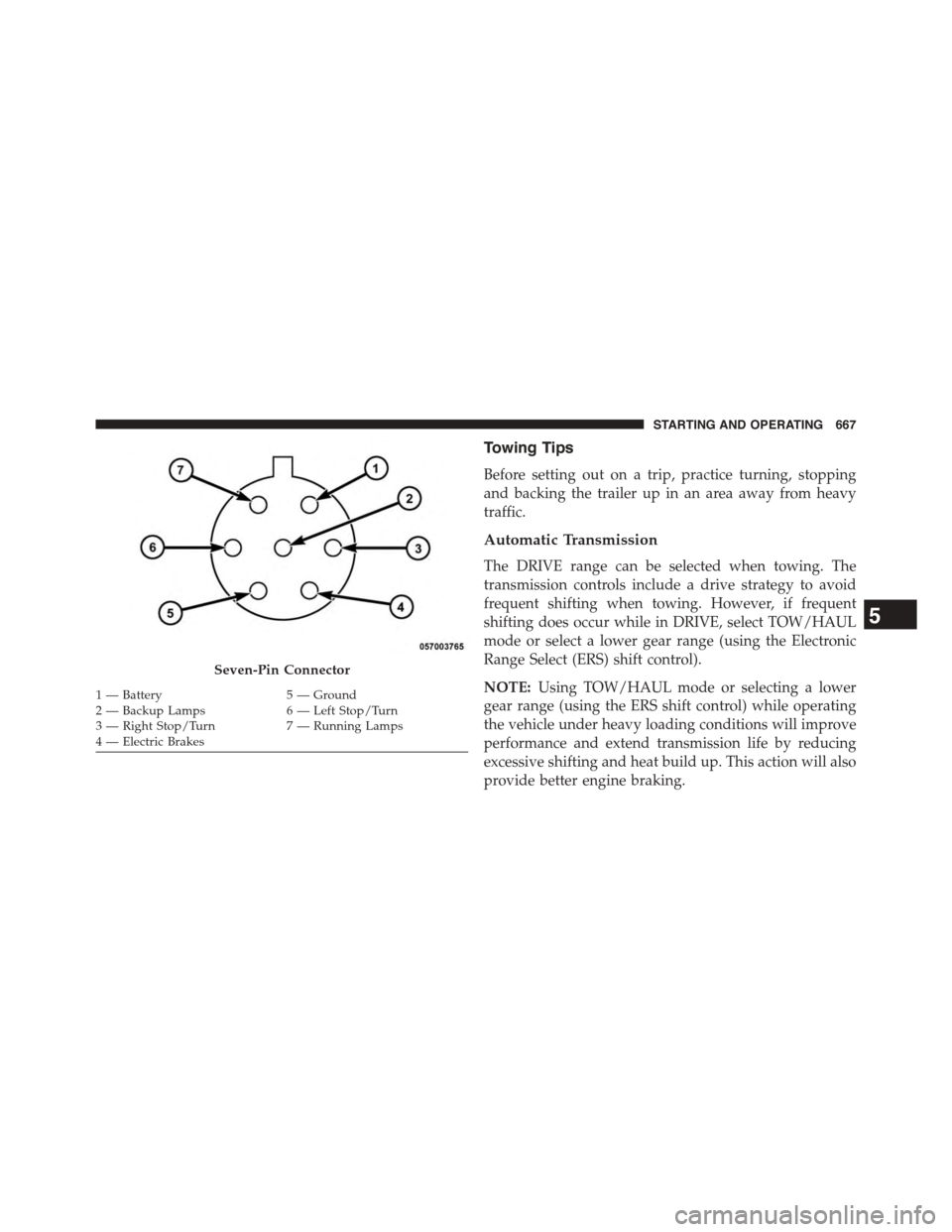
Seven-Pin Connector
1—Battery5—Ground2—BackupLamps6—LeftStop/Turn3—RightStop/Turn7—RunningLamps4 — Electric Brakes
5
STARTING AND OPERATING 667
Page 670 of 871
![Ram 1500 2015 Owners Manual When towing a loaded trailer up steep grades at low
speeds (20 mph [32 km/h] or below), holding your
vehicle in first gear (using the ERS shift control) can help
to avoid transmission overheating.
If](/img/34/12541/w960_12541-669.png "Ram 1500 2015 Owners Manual When towing a loaded trailer up steep grades at low
speeds (20 mph [32 km/h] or below), holding your
vehicle in first gear (using the ERS shift control) can help
to avoid transmission overheating.
If")
When towing a loaded trailer up steep grades at low
speeds (20 mph [32 km/h] or below), holding your
vehicle in first gear (using the ERS shift control) can help
to avoid transmission overheating.
If you regularly tow a trailer for more than 45 minutes of
continuous operation, then change the automatic trans-
mission fluid and filter(s) as specified for#police, taxi,
fleet, or frequent trailer towing.#Refer to the “Mainte-
nance Schedule” for the proper maintenance intervals.
NOTE:Check the automatic transmission fluid level
before towing (6-speed automatic only).
Tow/Haul Mode
To reduce potential for automatic transmission overheat-
ing, activate TOW/HAUL mode when driving in hilly
areas, or select a lower gear range (using the Electronic
Range Select (ERS) shift control) on more severe grades.
Electronic Speed Control — If Equipped
•Do not use in hilly terrain or with heavy loads.
•When using the speed control, if you experience speed
drops greater than 10 mph (16 km/h), disengage until
you can get back to cruising speed.
•Use speed control in flat terrain and with light loads to
maximize fuel efficiency.
Cooling System
To reduce potential for engine and transmission over-
heating, take the following actions:
City Driving
When stopped for short periods of time, shift the trans-
mission into NEUTRAL and increase engine idle speed.
Highway Driving
Reduce speed.
668 STARTING AND OPERATING
Page 671 of 871
Air Conditioning
Turn off temporarily.
Air Suspension System
To aid in attaching/detaching the trailer from the vehicle,
the air suspension system can be used. Refer to “Air
Suspension System” in “Starting And Operating” for
further information.
NOTE:The vehicle must remain in the engine running
position while attaching a trailer for proper leveling of
the air suspension system.
SNOWPLOW
1500 Models Only
NOTE:Do not use this model vehicle for snowplow
applications.
WARNING!
Snowplows and other aftermarket equipment should
not be added to the front end of your vehicle. The
airbag crash sensors may be affected by the change in
the front end structure. The airbags could deploy
unexpectedly or could fail to deploy during a colli-
sion resulting in serious injury or death.
CAUTION!
Using this vehicle for snowplow applications can
cause damage to the vehicle.
WARNING!
Attaching a snowplow to this vehicle could adversely
affect performance of the airbag system in a collision.
(Continued)
5
STARTING AND OPERATING 669
Page 676 of 871
NOTE:Vehicles equipped with air suspension must be
placed in Transport mode before tying them down (from
the body) on a trailer or flatbed truck. Refer to “Air
Suspension – If Equipped” for more information. If the
vehicle cannot be placed in Transport mode (for example,
engine will not run), tie-downs must be fastened to the
axles (not to the body). Failure to follow these instruc-
tions may cause fault codes to be set and/or cause loss of
proper tie-down tension.
Recreational Towing — Two-Wheel Drive Models
DO NOT flat tow this vehicle. Damage to the drivetrain
will result.
Recreational towing (for two-wheel drive models) is
allowedONLYif the rear wheels areOFFthe ground.
This may be accomplished using a tow dolly or vehicle
trailer. If using a tow dolly, follow this procedure:
1. Properly secure the dolly to the tow vehicle, following
the dolly manufacturer’s instructions.
NOTE:If vehicle is equipped with air suspension, ensure
the vehicle is set to Normal Ride Height.
2. Drive the rear wheels onto the tow dolly.
3. Firmly apply the parking brake. Place automatic trans-
mission in PARK, manual transmission in gear (not in
NEUTRAL).
4. Properly secure the rear wheels to the dolly, following
the dolly manufacturer’s instructions.
5. Turn the ignition switch to the OFF position and
remove the Key Fob.
6. Install a suitable clamping device, designed for tow-
ing, to secure the front wheels in the straight position.
674 STARTING AND OPERATING
Page 678 of 871
CAUTION!(Continued)
•Tow only in the forward direction. Towing this
vehicle backwards can cause severe damage to the
transfer case.
•Automatic transmissions must be placed in PARK
for recreational towing.
•Manual transmissions must be placed in gear (not
in Neutral) for recreational towing.
•Before recreational towing, perform the procedure
outlined under “Shifting Into NEUTRAL (N)” to be
certain that the transfer case is fully in NEUTRAL
(N). Otherwise, internal damage will result.
•Towing this vehicle in violation of the above re-
quirements can cause severe transmission and/or
transfer case damage. Damage from improper tow-
ing is not covered under the New Vehicle Limited
Warranty.
(Continued)
CAUTION!(Continued)
•Do not disconnect the rear driveshaft because fluid
will leak from the transfer case, causing damage to
internal parts.
•Do not use a bumper-mounted clamp-on tow bar
on your vehicle. The bumper face bar will be
damaged.
Shifting Into NEUTRAL (N)
Use the following procedure to prepare your vehicle for
recreational towing.
WARNING!
You or others could be injured or killed if you leave
the vehicle unattended with the transfer case in the
NEUTRAL (N) position without first fully engaging
(Continued)
676 STARTING AND OPERATING
Page 687 of 871
HAZARD WARNING FLASHERS
The Hazard Warning flasher switch is located on the
upper switch bank just below the radio.
Press the switch to turn on the Hazard Warning
flasher. When the switch is activated, all direc-
tional turn signals will flash on and off to warn oncoming
traffic of an emergency. Press the switch a second time to
turn off the Hazard Warning flashers.
This is an emergency warning system and it should not
be used when the vehicle is in motion. Use it when your
vehicle is disabled and it is creating a safety hazard for
other motorists.
When you must leave the vehicle to seek assistance, the
Hazard Warning flashers will continue to operate even
though the ignition is placed in the OFF position.
NOTE:With extended use the Hazard Warning flashers
may wear down your battery.
IF YOUR ENGINE OVERHEATS
In any of the following situations, you can reduce the
potential for overheating by taking the appropriate action.
•On the highways — slow down.
•In city traffic — while stopped, place the transmission
in NEUTRAL, but do not increase the engine idle
speed.
NOTE:There are steps that you can take to slow down
an impending overheat condition:
•If your air conditioner (A/C) is on, turn it off. The A/C
system adds heat to the engine cooling system and
turning the A/C off can help remove this heat.
•You can also turn the temperature control to maximum
heat, the mode control to floor and the blower control to
high. This allows the heater core to act as a supplement
to the radiator and aids in removing heat from the
engine cooling system.
6
WHAT TO DO IN EMERGENCIES 685
Page 688 of 871
CAUTION!
Driving with a hot cooling system could damage
your vehicle. If the temperature gauge reads HOT
(H), pull over and stop the vehicle. Idle the vehicle
with the air conditioner turned off until the pointer
drops back into the normal range. If the pointer
remains on HOT (H), and you hear continuous
chimes, turn the engine off immediately and call for
service.
WARNING!
You or others can be badly burned by hot engine
coolant (antifreeze) or steam from your radiator. If
you see or hear steam coming from under the hood,
do not open the hood until the radiator has had time
to cool. Never try to open a cooling system pressure
cap when the radiator or coolant bottle is hot.
WHEEL AND TIRE TORQUE SPECIFICATIONS
Proper lug nut/bolt torque is very important to ensure
that the wheel is properly mounted to the vehicle. Any
time a wheel has been removed and reinstalled on the
vehicle the lug nuts/bolts should be torqued using a
properly calibrated torque wrench.
Torque Specifications
Lug Nut/Bolt
Torque
Lug Nut/
Bolt
Type
**Lug
Nut/Bolt
Size
Lug Nut/
Bolt
Socket
Size
130 Ft-Lbs (176
N·m)
Cone M14 x
1.50
22 mm
140 Ft-Lbs (190
N·m)
Flanged
**Use only Chrysler recommended lug nuts/bolts and
clean or remove any dirt or oil before tightening.
686 WHAT TO DO IN EMERGENCIES
Page 691 of 871
WARNING!(Continued)
•Being under a jacked-up vehicle is dangerous. The
vehicle could slip off the jack and fall on you. You
could be crushed. Never put any part of your body
under a vehicle that is on a jack. If you need to get
under a raised vehicle, take it to a service center
where it can be raised on a lift.
•Never start or run the engine while the vehicle is
on a jack.
•The jack is designed to be used as a tool for
changing tires only. The jack should not be used to
lift the vehicle for service purposes. The vehicle
should be jacked on a firm level surface only.
Avoid ice or slippery areas.
NOTE:If your vehicle is equipped with an air suspen-
sion system, there is a feature which allows the automatic
leveling to be disabled to assist with changing a tire.
If your vehicle is equipped with a touchscreen, this
feature can be activated through the Uconnect® system.
Refer to “Uconnect® Settings” in “Understanding Your
Instrument Panel” for further information.
If your vehicle is not equipped with a touchscreen, this
feature can be activated through the Electronic Vehicle
Information Center (EVIC) or Driver Information Display
(DID). Refer to “Electronic Vehicle Information Center
(EVIC)” or “Driver Information Display (DID)” in “Un-
derstanding Your Instrument Panel” for further informa-
tion.
Jack Location
The jack and jack tools are stored under the front
passenger seat.
Removal Of Jack And Tools (1500 Series)
To access the jack and jack tools you must remove the
plastic access cover, located on the side of the front
6
WHAT TO DO IN EMERGENCIES 689
Page 694 of 871
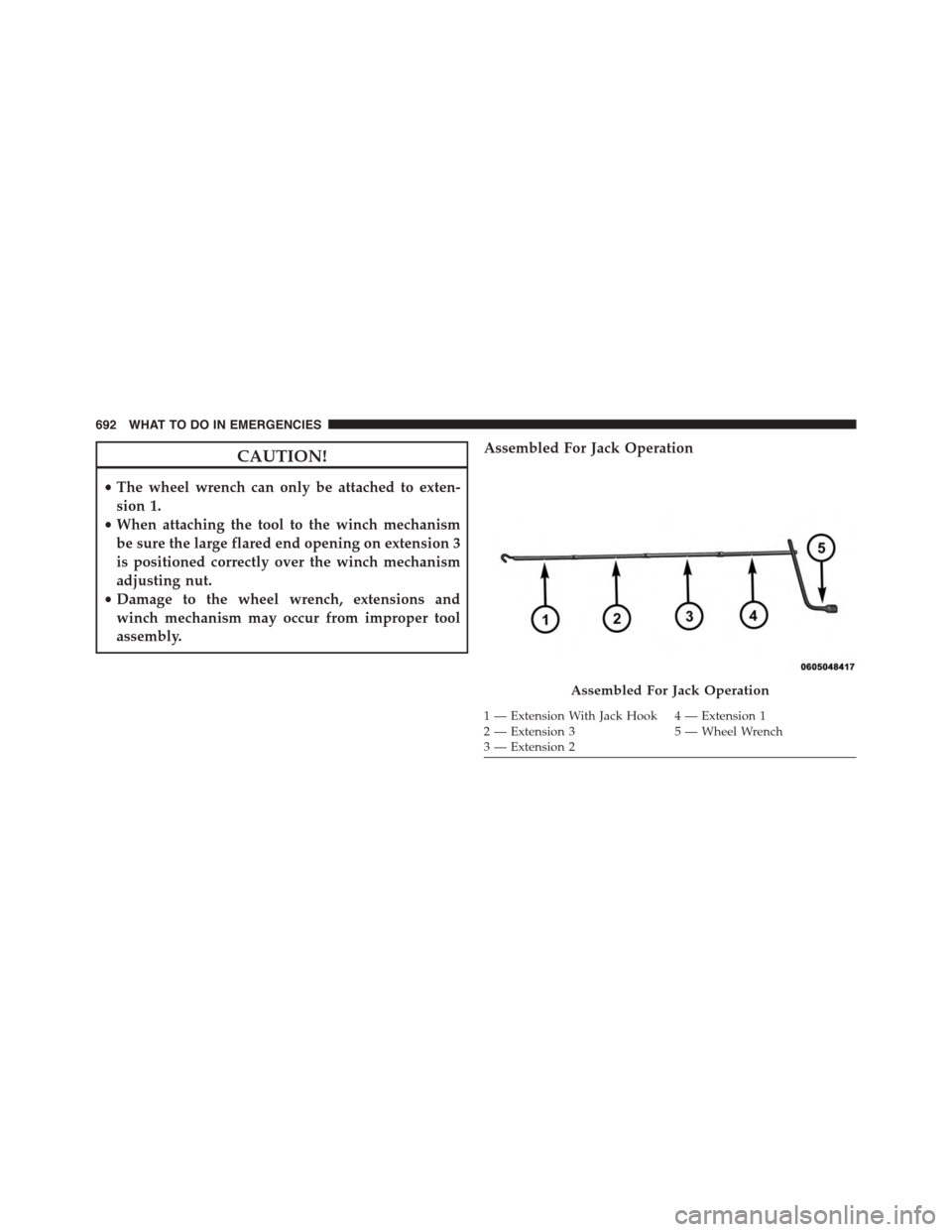
CAUTION!
•The wheel wrench can only be attached to exten-
sion 1.
•When attaching the tool to the winch mechanism
be sure the large flared end opening on extension 3
is positioned correctly over the winch mechanism
adjusting nut.
•Damage to the wheel wrench, extensions and
winch mechanism may occur from improper tool
assembly.
Assembled For Jack Operation
Assembled For Jack Operation
1 — Extension With Jack Hook 4 — Extension 12 — Extension 3 5 — Wheel Wrench3 — Extension 2
692 WHAT TO DO IN EMERGENCIES