Susp Ram 1500 2015 Owner's Guide
[x] Cancel search | Manufacturer: RAM, Model Year: 2015, Model line: 1500, Model: Ram 1500 2015Pages: 871, PDF Size: 24.83 MB
Page 525 of 871
The indicator lamps 3 through 6 will illuminate to show
the current position of the vehicle. Flashing indicator
lamps will show a position which the system is working
to achieve. When raising, if multiple indicator lamps are
flashing, the highest flashing indicator lamp is the posi-
tion the system is working to achieve. When lowering, if
multiple indicators are flashing, the lowest solid indica-
tor lamp is the position the system is working to achieve.
Pressing the “UP” button once will move the suspension
one position higher from the current position, assuming
all conditions are met (i.e. key in ON/RUN position,
engine running, speed below threshold, etc). The “UP”
button can be pressed multiple times, each press will
raise the requested level by one position up to a maxi-
mum position of OR2 or the highest position allowed
based on current conditions (i.e. vehicle speed, etc).
Pressing the “DOWN” button once will move the sus-
pension one position lower from the current level, as-
suming all conditions are met (i.e. key in ON/RUN
position, engine running, doors closed, speed below
threshold, etc). The “DOWN” button can be pressed
multiple times, each press will lower the requested level
by one position down to a minimum of Entry/Exit Mode
or the lowest position allowed based on current condi-
tions (i.e. vehicle speed, etc.)
Automatic height changes will occur based on vehicle
speed and the current vehicle height. The indicator lamps
and EVIC/DID messages will operate the same for
automatic changes and user requested changes.
•Off-Road 2 (OR2) – Indicator lamps 3, 4, 5 and 6 will be
illuminated when the vehicle is in OR2.
•Off-Road 1 (OR1) – Indicator lamps 3, 4 and 5 will be
illuminated when the vehicle is in OR1.
•Normal Ride Height (NRH)/Aero Mode – Indicator
lamps 3 and 4 will be illuminated when the vehicle is
in this position.
5
STARTING AND OPERATING 523
Page 526 of 871
•Entry/Exit Mode – Indicator lamp 3 will be illumi-
nated when the vehicle is in Entry Exit Mode. Entry/
Exit mode can be requested up to 33 mph (53 km/h).
If vehicle speed is reduced to, and kept below, 15 mph
(24 km/h) indicator lamp 4 will flash and indicator
lamp 3 will remain solid until Entry/Exit Mode is
achieved at which point indicator lamp 4 will turn off.
•Transport Mode – No indicator lamps will be illumi-
nated. Transport Mode is disabled by driving the
vehicle.
•Tire/Jack Mode – Indicator lamps 3 and 6 will be
illuminated. Tire/Jack Mode is disabled by driving the
vehicle.
•Wheel Alignment Mode – Indicator lamps 3 and 4 will
be illuminated. Wheel Alignment Mode is disabled by
driving the vehicle.
AIR SUSPENSION SYSTEM (2500/3500 MODELS) —
IF EQUIPPED
Description
The air suspension system is a rear leveling ride height
system. The main purpose of this system is to maintain
the truck’s rear ride height level.
524 STARTING AND OPERATING
Page 527 of 871
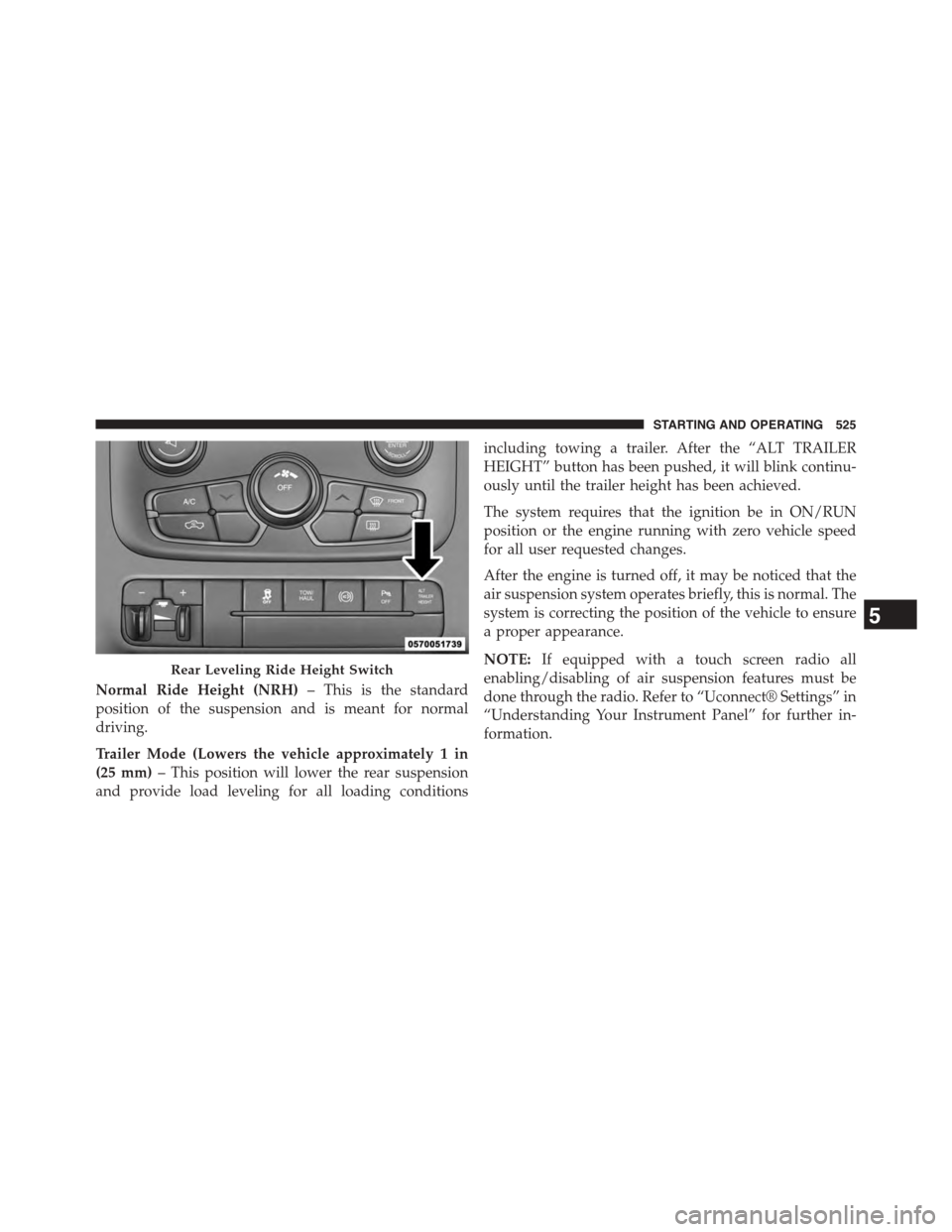
Normal Ride Height (NRH)– This is the standard
position of the suspension and is meant for normal
driving.
Trailer Mode (Lowers the vehicle approximately 1 in
(25 mm)– This position will lower the rear suspension
and provide load leveling for all loading conditions
including towing a trailer. After the “ALT TRAILER
HEIGHT” button has been pushed, it will blink continu-
ously until the trailer height has been achieved.
The system requires that the ignition be in ON/RUN
position or the engine running with zero vehicle speed
for all user requested changes.
After the engine is turned off, it may be noticed that the
air suspension system operates briefly, this is normal. The
system is correcting the position of the vehicle to ensure
a proper appearance.
NOTE:If equipped with a touch screen radio all
enabling/disabling of air suspension features must be
done through the radio. Refer to “Uconnect® Settings” in
“Understanding Your Instrument Panel” for further in-
formation.
Rear Leveling Ride Height Switch
5
STARTING AND OPERATING 525
Page 528 of 871
WARNING!
The air suspension system uses a high pressure
volume of air to operate the system. To avoid per-
sonal injury or damage to the system, see your
authorized dealer for service.
Air Suspension Modes
The Air Suspension system has multiple modes to protect
the system in unique situations:
Tire/Jack Mode
To assist with changing a spare tire, the air suspension
system has a feature which allows the automatic leveling to
be disabled. This mode is intended to be used with engine
running. Refer to “Electronic Vehicle Information Center
(EVIC) or Driver Information Display (DID)” in “Under-
standing Your Instrument Panel” or “Uconnect® Settings”
in “Understanding Your Instrument Panel” if equipped
with a touch screen radio for further information.
NOTE:This mode is intended to be enabled with engine
running.
Transport Mode
To assist with flat bed towing, the air suspension system
has a feature which will put the vehicle below Normal
Ride Height (NRH) and disable the automatic load
leveling system. This mode is intended to be used with
engine running. Refer to “Electronic Vehicle Information
Center (EVIC) or Driver Information Display (DID)” in
“Understanding Your Instrument Panel” or “Uconnect®
Settings” in “Understanding Your Instrument Panel” if
equipped with a touch screen radio for further informa-
tion.
NOTE:This mode is intended to be enabled with engine
running.
526 STARTING AND OPERATING
Page 529 of 871
Wheel Alignment Mode
Before performing a wheel alignment this mode must be
enabled. Refer to “Electronic Vehicle Information Center
(EVIC) or Driver Information Display (DID)” in “Under-
standing Your Instrument Panel” or “Uconnect® Set-
tings” in “Understanding Your Instrument Panel” if
equipped with a touch screen radio for further informa-
tion.
NOTE:This mode is intended to be enabled with engine
running.
Protection Mode
In order to “protect” the air suspension system, the
vehicle will enter Protection Mode when load leveling
cannot be achieved. Some driving may be required to
clear the protection mode telltale in the EVIC/DID. Refer
to “Electronic Vehicle Information Center (EVIC) or
Driver Information Display (DID)” in “Understanding
Your Instrument Panel” or “Uconnect® Settings” in “Un-
derstanding Your Instrument Panel” if equipped with a
touch screen radio for further information.
NOTE:If equipped with a touch screen radio all
enabling/disabling of air suspension features must be
done through the radio. Refer to “Uconnect® Settings” in
“Understanding Your Instrument Panel” for further in-
formation.
Electronic Vehicle Information Center
(EVIC)/Driver Information Display (DID) Display
Messages
When the appropriate conditions exist, a message will
appear in the EVIC/DID display. Refer to “Electronic
Vehicle Information Center (EVIC) or Driver Information
Display (DID)” in “Understanding Your Instrument
Panel” for further information.
An audible chime will be heard whenever a system error
has been detected.
5
STARTING AND OPERATING 527
Page 533 of 871
STABILIZER/SWAY BAR SYSTEM — POWER
WAGON ONLY
Your vehicle is equipped with an electronic disconnecting
stabilizer/sway bar. This system allows greater front
suspension travel in off-road situations.
Due to the use of taller springs, this vehicle has an
increased ride height of approximately 1.9 in (48.3 mm)
in the front and 1.5 in (38.1 mm) in the rear. A major
advantage to increasing ride height is the positive effect
it has on approach/departure and break over angles.
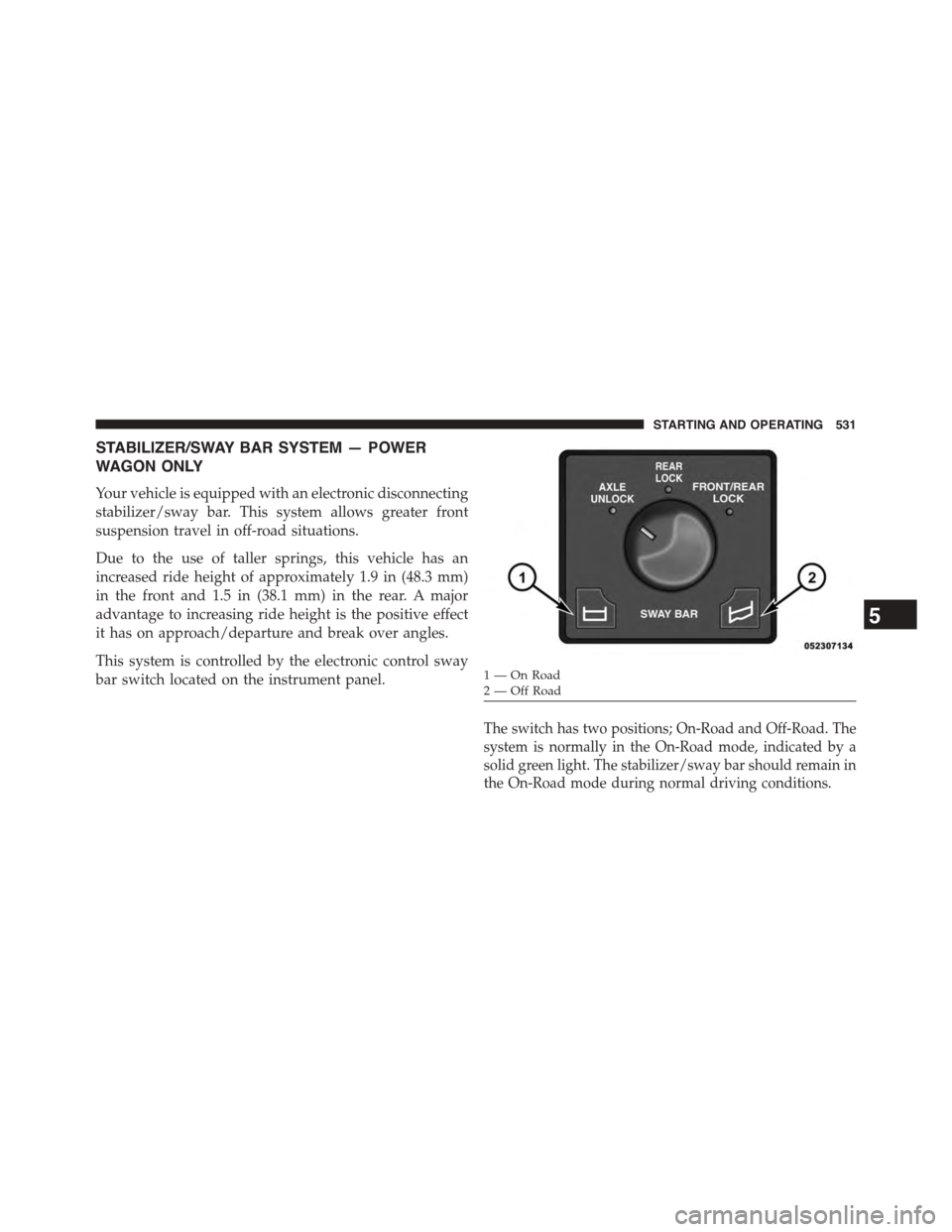
This system is controlled by the electronic control sway
bar switch located on the instrument panel.
The switch has two positions; On-Road and Off-Road. The
system is normally in the On-Road mode, indicated by a
solid green light. The stabilizer/sway bar should remain in
the On-Road mode during normal driving conditions.
1—OnRoad2—OffRoad
5
STARTING AND OPERATING 531
Page 534 of 871
WARNING!
Do not disconnect the stabilizer bar and drive on
hard surfaced roads or at speeds above 18 mph
(29 km/h), you may lose control of the vehicle, which
could result in serious injury or death. The front
stabilizer bar enhances vehicle stability and is nec-
essary for maintaining control of the vehicle. The
system monitors vehicle speed and will attempt to
reconnect the stabilizer bar at speeds over 18 mph
(29 km/h). This is indicated by a flashing off road
light and solid on road light. Once vehicle speed is
reduced below 14 mph (22 km/h), the system will
attempt to return to the Off-Road mode.
To disconnect the stabilizer/sway bar, shift to either 4HI
or 4LO as shown in “Four Wheel Drive Operation” and
press the right hand Off Road stabilizer/sway bar button
to obtain the Off-Road position. The amber indicator
light will flash until the stabilizer/sway bar has been
fully disconnected.
NOTE:The stabilizer/sway bar may be torque locked due
to left and right suspension height differences. This condi-
tion is due to driving surface differences or vehicle loading.
In order for the stabilizer/sway bar to disconnect/
reconnect, the right and left halves of the bar must be
aligned. This alignment may require that the vehicle be
driven onto level ground or rocked from side to side.
To return to the On-Road mode; press the left hand On
Road stabilizer/sway bar button .
WARNING!
If the stabilizer/sway bar will not return to On-Road
mode, vehicle stability is greatly reduced. Do not
(Continued)
532 STARTING AND OPERATING
Page 551 of 871
within reach try using your spare tire by burying it.
Once you have determined an anchor point hook up the
cable, ensuring there are a least five wraps of cable left
on the drum, and place a floor mat or something else
over the strung out cable. Placing something over the
strung out cable helps keep the cable on the ground if it
breaks. Next, place the vehicle in first gear and apply a
very light throttle as you power the winch in. Be careful
not to allow slack in the cable as you recover the vehicle.
Do not try to guide the cable into the drum. If it starts to
bunch up on one end, let it. You can re-spool the cable
afterwards. Never use a winch cable as a tow strap and
always stand back while winching.
WARNING!
Winch cables are under high tension when in use and
can become a projectile if they fail. Never stand over
(Continued)
WARNING!(Continued)
or straddle the winch cable. Never jerk or overload
the winch cable. Never stand in front of the vehicle
while winching. Failure to follow these instructions
can result in serious or fatal injury.
After Driving Off-Road
Off-road operation puts more stress on your vehicle than
does most on-road driving. After going off-road, it is
always a good idea to check for damage. That way you
can get any problems taken care of right away and have
your vehicle ready when you need it.
•Completely inspect the underbody of your vehicle.
Check tires, body structure, steering, suspension, and
exhaust system for damage.
5
STARTING AND OPERATING 549
Page 557 of 871
OFF-ROAD DRIVING TIPS
Care should be taken when attempting to climb steep
hills or driving diagonally across a hill or slope. If natural
obstacles force you to travel diagonally up or down a hill,
choose a mild angle and keep as little side tilt as possible.
Keep the vehicle moving and make turns slowly and
cautiously.
If you must back down a hill, back straight down using
REVERSE gear. Never back down in NEUTRAL or diago-
nally across the hill.
When driving over sand, mud, and other soft terrain,
shift to low gear and drive steadily. Apply the accelerator
slowly to avoid spinning the wheels.
Do not reduce the tire pressures for this type of driving.
After Driving Off-Road
Off-road operation puts more stress on your vehicle than
does most on-road driving. After going off-road, it is
always a good idea to check for damage. That way you
can get any problems taken care of right away and have
your vehicle ready when you need it.
•Completely inspect the underbody of your vehicle.
Check tires, body structure, steering, suspension, and
exhaust system for damage.
•Inspect the radiator for mud and debris and clean as
required.
•Check threaded fasteners for looseness, particularly on
the chassis, drivetrain components, steering, and sus-
pension. Retighten them, if required, and torque to the
values specified in the Service Manual.
•Check for accumulations of plants or brush. These
things could be a fire hazard. They might hide damage
to fuel lines, brake hoses, axle pinion seals, and
propeller shafts.
5
STARTING AND OPERATING 555
Page 579 of 871
If for some reason the power assist is interrupted, it will
still be possible to steer your vehicle. Under these condi-
tions, you will observe a substantial increase in steering
effort, especially at very low vehicle speeds and during
parking maneuvers.
NOTE:
•Increased noise levels at the end of the steering wheel
travel are considered normal and do not indicate that
there is a problem with the power steering system.
•Upon initial start-up in cold weather, the power steer-
ing pump may make noise for a short amount of time.
This is due to the cold, thick fluid in the steering
system. This noise should be considered normal, and it
does not in any way damage the steering system.
CAUTION!
Prolonged operation of the steering system at the end
of the steering wheel travel will increase the steering
fluid temperature and it should be avoided when
possible. Damage to the power steering pump may
occur.
Power Steering Fluid Check — 2500/3500 Models
Checking the power steering fluid level at a defined
service interval is not required. The fluid should only be
checked if a leak is suspected, abnormal noises are
apparent, and/or the system is not functioning as antici-
pated. Coordinate inspection efforts through an autho-
rized dealer.
5
STARTING AND OPERATING 577