ECO mode Ram 1500 2015 Workshop Manual
[x] Cancel search | Manufacturer: RAM, Model Year: 2015, Model line: 1500, Model: Ram 1500 2015Pages: 871, PDF Size: 24.83 MB
Page 531 of 871
CAUTION!
•Do not lock the front or rear axle on hard surfaced
roads. The ability to steer the vehicle is reduced
and damage to the drivetrain may occur when the
axles are locked on hard surfaced roads.
•Do not try to lock the rear axle if the vehicle is
stuck and the tires are spinning. You can damage
drivetrain components. Lock the rear axle before
attempting situations or navigating terrain, which
could possibly cause the vehicle to become stuck.
The locking axles are controlled by the axle locker switch.
The switch has three positions, AXLE UNLOCK, REAR
LOCK, and FRONT/REAR LOCK. Under normal driv-
ing conditions, the switch should be left in the AXLE
UNLOCK position. In the AXLE UNLOCK position, the
front and rear axles are unlocked. In the REAR LOCK
position, the rear axle is locked. In the FRONT/REAR
LOCK position, the front and rear axles are locked.
NOTE:Even when the axles are in the AXLE UNLOCK
position, the limited slip differential in the rear axle still
provides torque biasing capability for moderate low
traction environments.
During the command to lock the axle, the indicator light
will flash until the axle is locked. After the lock command
has been successfully executed, the light will remain on
solid.
To lock the rear axle, place the vehicle in 4LO. Refer to
“Four Wheel Drive Operation” in “Starting and Operat-
ing” for further information. Move the axle locker switch
position to REAR LOCK while traveling less than 3 mph
(5 km/h). The RR indicator light will remain on when the
rear axle is locked.
5
STARTING AND OPERATING 529
Page 534 of 871
WARNING!
Do not disconnect the stabilizer bar and drive on
hard surfaced roads or at speeds above 18 mph
(29 km/h), you may lose control of the vehicle, which
could result in serious injury or death. The front
stabilizer bar enhances vehicle stability and is nec-
essary for maintaining control of the vehicle. The
system monitors vehicle speed and will attempt to
reconnect the stabilizer bar at speeds over 18 mph
(29 km/h). This is indicated by a flashing off road
light and solid on road light. Once vehicle speed is
reduced below 14 mph (22 km/h), the system will
attempt to return to the Off-Road mode.
To disconnect the stabilizer/sway bar, shift to either 4HI
or 4LO as shown in “Four Wheel Drive Operation” and
press the right hand Off Road stabilizer/sway bar button
to obtain the Off-Road position. The amber indicator
light will flash until the stabilizer/sway bar has been
fully disconnected.
NOTE:The stabilizer/sway bar may be torque locked due
to left and right suspension height differences. This condi-
tion is due to driving surface differences or vehicle loading.
In order for the stabilizer/sway bar to disconnect/
reconnect, the right and left halves of the bar must be
aligned. This alignment may require that the vehicle be
driven onto level ground or rocked from side to side.
To return to the On-Road mode; press the left hand On
Road stabilizer/sway bar button .
WARNING!
If the stabilizer/sway bar will not return to On-Road
mode, vehicle stability is greatly reduced. Do not
(Continued)
532 STARTING AND OPERATING
Page 592 of 871
All Four-Wheel Drive Vehicles In 4WD AUTO And
4WD LOCK Modes Can Also Choose The
Following ESC Operating Mode. This Is The Only
Selectable ESC Operating Mode in 4WD LOW:
ESC Full Off
This mode is intended for off-road use when ESC stabil-
ity features could inhibit vehicle maneuverability due to
trail conditions. This mode is entered by pressing and
holding the “ESC Off” switch for five seconds when the
vehicle is stopped and the engine is running. After five
seconds, the “ESC Off Indicator Light” will illuminate.
Press and release the trip odometer button located on the
instrument cluster to clear this message.
NOTE:The “ESC OFF” message will display and the
audible chime will sound when the shift lever is placed
into the PARK position from any other position and then
moved out of the PARK position. This will occur even if
the message was previously cleared.
In this mode, ESC and TCS except for the “limited slip”
feature described in the TCS section are turned off until
the vehicle reaches a speed of 40 mph (64 km/h). At
40 mph (64 km/h) the system returns to “ESC Partial
Off” mode, described above. When the vehicle speed
drops below 35 mph (56 km/h) the ESC system reverts
back to#ESC Full Off#. ESC is off at low vehicle speeds so
that it will not interfere with off-road driving but ESC
function returns to provide the stability feature at speeds
above 40 mph (64 km/h). The “ESC Off Indicator Light”
will always be illuminated when ESC is in#ESC Partial
Off#and#ESC Full Off#. To turn ESC on again, momen-
tarily press the “ESC Off” switch. This will restore the
normal “ESC On” mode of operation.
“ESC Full Off” is the only operating mode for ESC in
4WD LOW. Whenever the vehicle is started in 4WD LOW
or the transfer case (if equipped) is shifted from 4WD
LOCK or NEUTRAL, to 4WD LOW, the ESC system will
be in this mode.
590 STARTING AND OPERATING
Page 593 of 871
WARNING!
In the%ESC Full Off%mode, the engine torque reduc-
tion and stability features are disabled. Therefore,
the enhanced vehicle stability offered by ESC is
unavailable. In an emergency evasive maneuver the
ESC system will not engage to assist in maintaining
stability. “ESC Full Off” mode is intended for off-
highway or off-road use only.
ESC Activation/Malfunction Indicator Light And
ESC OFF Indicator Light
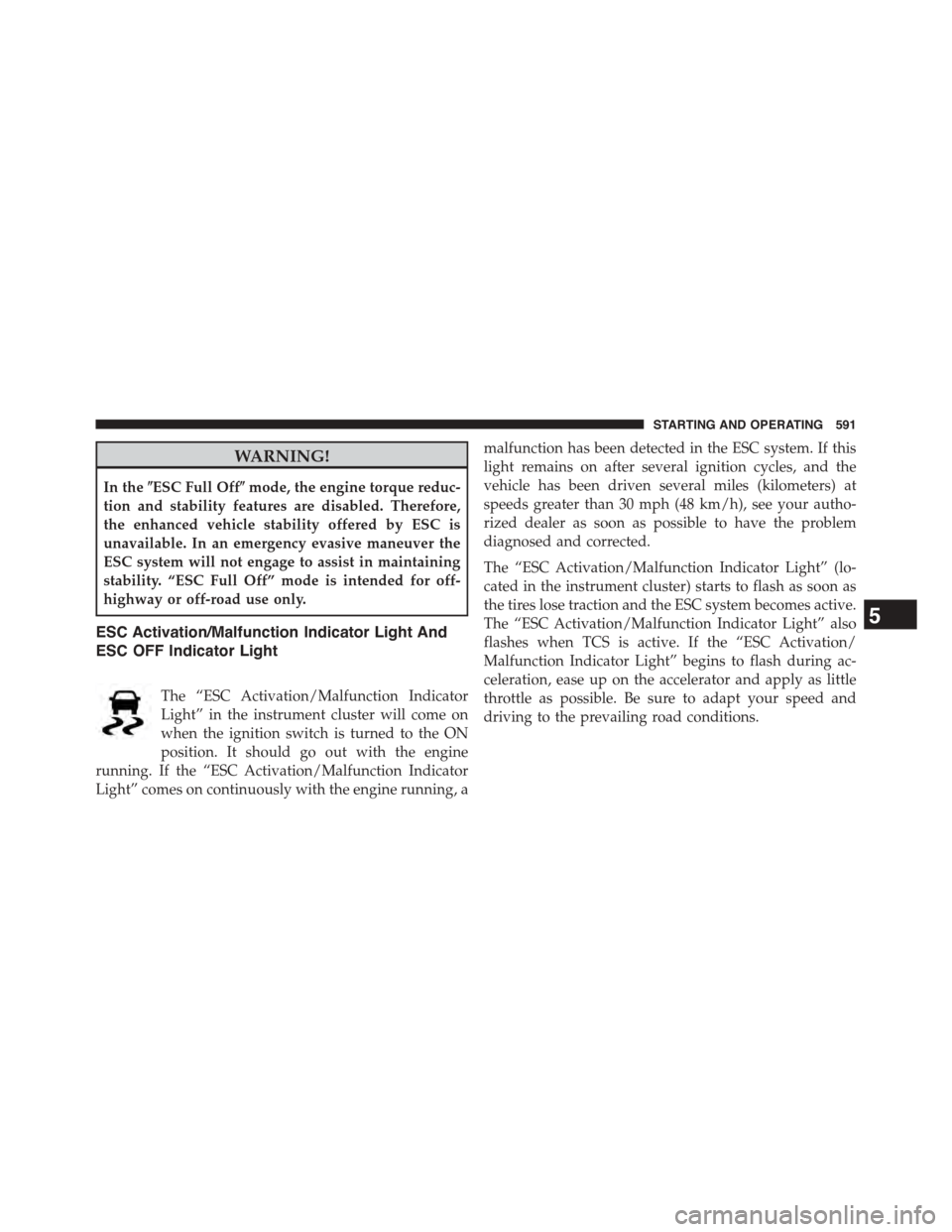
The “ESC Activation/Malfunction Indicator
Light” in the instrument cluster will come on
when the ignition switch is turned to the ON
position. It should go out with the engine
running. If the “ESC Activation/Malfunction Indicator
Light” comes on continuously with the engine running, a
malfunction has been detected in the ESC system. If this
light remains on after several ignition cycles, and the
vehicle has been driven several miles (kilometers) at
speeds greater than 30 mph (48 km/h), see your autho-
rized dealer as soon as possible to have the problem
diagnosed and corrected.
The “ESC Activation/Malfunction Indicator Light” (lo-
cated in the instrument cluster) starts to flash as soon as
the tires lose traction and the ESC system becomes active.
The “ESC Activation/Malfunction Indicator Light” also
flashes when TCS is active. If the “ESC Activation/
Malfunction Indicator Light” begins to flash during ac-
celeration, ease up on the accelerator and apply as little
throttle as possible. Be sure to adapt your speed and
driving to the prevailing road conditions.
5
STARTING AND OPERATING 591
Page 594 of 871
NOTE:
•The “ESC Activation/Malfunction Indicator Light”
and the “ESC OFF Indicator Light” come on momen-
tarily each time the ignition switch is turned ON.
•Each time the ignition is turned ON, the ESC system
will be ON even if it was turned off previously. Except
for when the vehicle is started while in 4WD Low
Range.
•The ESC system will make buzzing or clicking sounds
when it is active. This is normal; the sounds will stop
when ESC becomes inactive following the maneuver
that caused the ESC activation.
The “ESC OFF Indicator Light” indicates the
Electronic Stability Control (ESC) is in#ESC
Partial Off#or#ESC Full Off#.
Trailer Sway Control (TSC)
The TSC system uses sensors in the vehicle to recognize
an excessively swaying trailer and will take the appro-
priate actions to attempt to stop the sway. The system
may reduce engine power and apply the brake of the
appropriate wheel(s) to counteract the sway of the trailer.
TSC will become active automatically once an excessively
swaying trailer is recognized. No driver action is re-
quired to activate. Note that TSC cannot stop all trailers
from swaying. Always use caution when towing a trailer
and follow the trailer tongue weight recommendations.
Refer to “Trailer Towing” in “Starting and Operating” for
further information. When TSC is functioning, the “ESC
Activation/Malfunction Indicator Light” will flash, the
engine power may be reduced and you may feel the
brakes being applied to individual wheels to attempt to
stop the trailer from swaying. TSC is disabled when the
ESC system is in the “ESC Partial Off” or “ESC Full Off”
modes.
592 STARTING AND OPERATING
Page 598 of 871
Feedback to the driver:
The instrument cluster has a HDC icon and a HDC
switch which has an LED which offers feedback to the
driver about the state HDC is in.
•While HDC is Enabled or Active the gear position
typically associated with ERS manual mode will indi-
cate target set speed not the top gear limit which is
typical of ERS manual mode.
•The cluster icon and switch lamp will illuminate and
remain on solid when HDC is enabled or activated.
This is the normal operating condition for HDC.
•The cluster icon and switch lamp will flash for several
seconds then extinguish when the driver presses the
HDC switch but enable conditions are not met.
•The cluster icon and switch lamp will flash for several
seconds then extinguish when HDC deactivates due to
excess speed.
•The cluster icon and switch lamp will flash when HDC
deactivates due to overheated brakes. The flashing will
stop and HDC will activate again once the brakes have
cooled sufficiently.
WARNING!
HDC is only intended to assist the driver in control-
ling vehicle speed when descending hills. The driver
must remain attentive to the driving conditions and
is responsible for maintaining a safe vehicle speed.
596 STARTING AND OPERATING
Page 616 of 871
While studded tires improve performance on ice, skid
and traction capability on wet or dry surfaces may be
poorer than that of non-studded tires. Some states pro-
hibit studded tires; therefore, local laws should be
checked before using these tire types.
Run Flat Tires — If Equipped
Run Flat tires allow you the capability to drive 50 miles
(80 km) at 50 mph (80 km/h) after a rapid loss of inflation
pressure. This rapid loss of inflation is referred to as the
Run Flat mode. A Run Flat mode occurs when the tire
inflation pressure is of/or below 14 psi (96 kPa). Once a
Run Flat tire reaches the run flat mode it has limited
driving capabilities and needs to be replaced immedi-
ately. A Run Flat tire is not repairable.
It is not recommended driving a vehicle loaded at full
capacity or to tow a trailer while a tire is in the run flat
mode.
See the tire pressure monitoring section for more infor-
mation.
Spare Tires — If Equipped
NOTE:For vehicles equipped with Tire Service Kit
instead of a spare tire, please refer to “Tire Service Kit” in
“What To Do In Emergencies” for further information.
CAUTION!
Because of the reduced ground clearance, do not take
your vehicle through an automatic car wash with a
compact or limited-use temporary spare installed.
Damage to the vehicle may result.
614 STARTING AND OPERATING
Page 623 of 871
TIRE CHAINS (TRACTION DEVICES)
Use of traction devices require sufficient tire-to-body
clearance. Follow these recommendations to guard
against damage.
•Traction device must be of proper size for the tire, as
recommended by the traction device manufacturer.
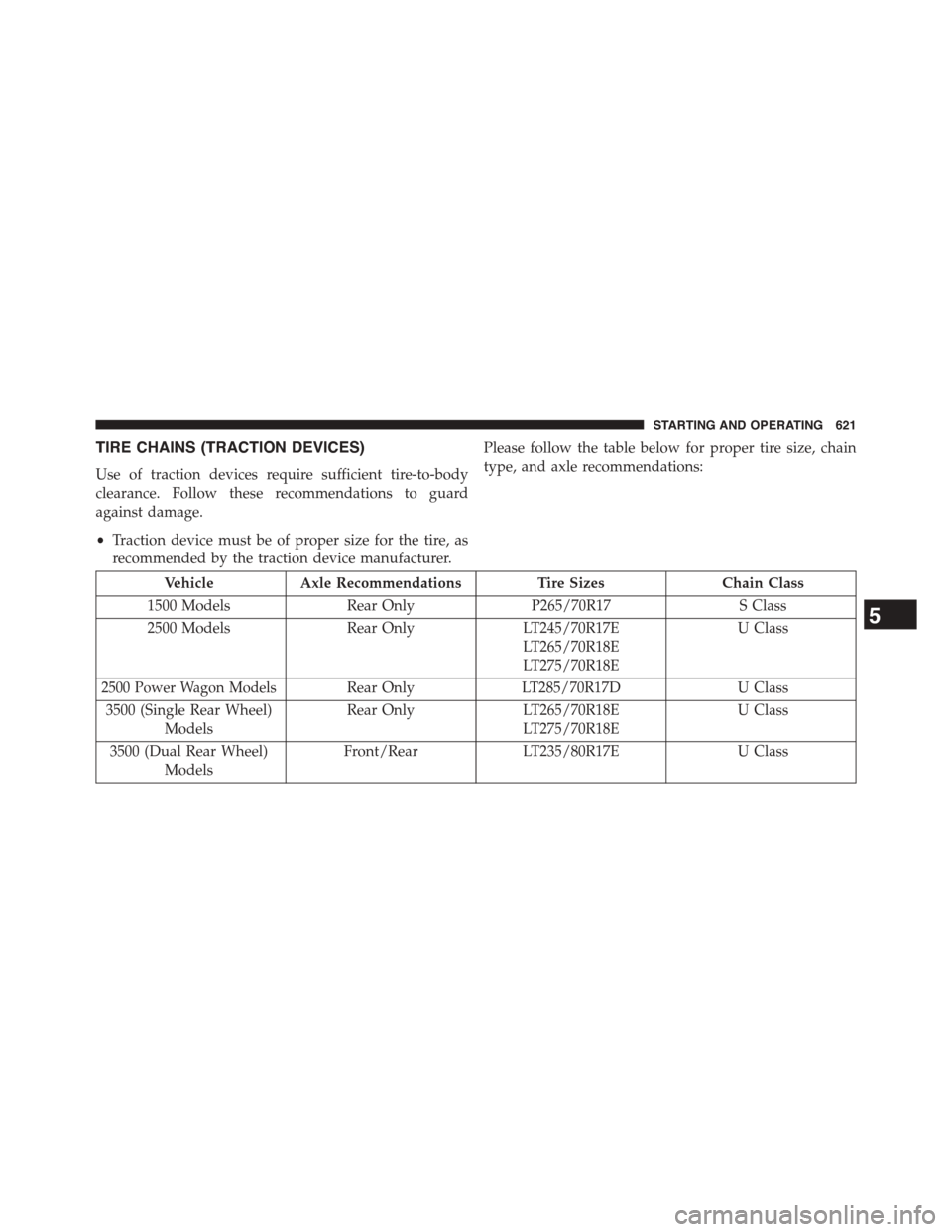
Please follow the table below for proper tire size, chain
type, and axle recommendations:
VehicleAxle RecommendationsTire SizesChain Class
1500 ModelsRear OnlyP265/70R17S Class
2500 ModelsRear OnlyLT245/70R17E
LT265/70R18E
LT275/70R18E
U Class
2500 Power Wagon ModelsRear OnlyLT285/70R17DU Class
3500 (Single Rear Wheel)
Models
Rear OnlyLT265/70R18E
LT275/70R18E
U Class
3500 (Dual Rear Wheel)
Models
Front/RearLT235/80R17EU Class
5
STARTING AND OPERATING 621
Page 655 of 871
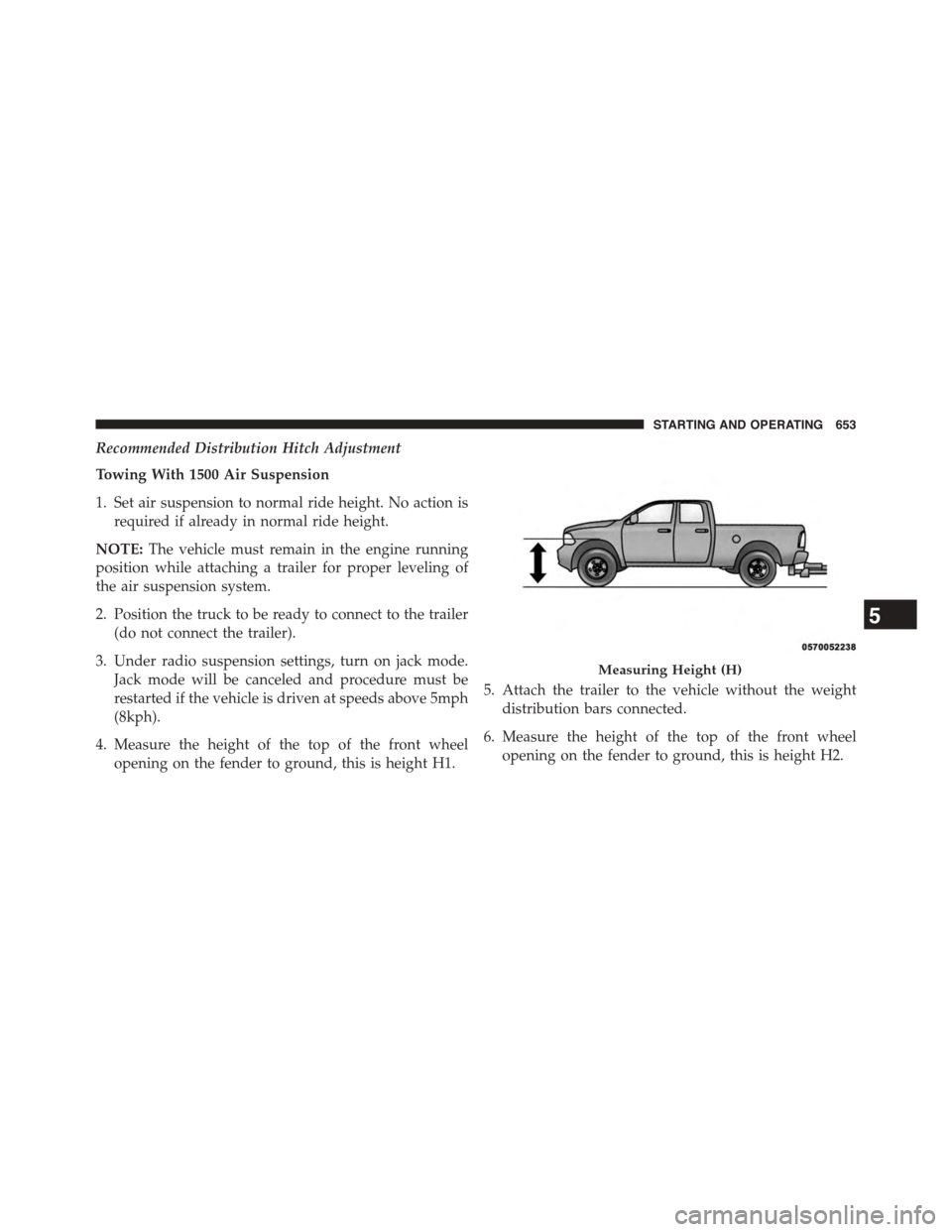
Recommended Distribution Hitch Adjustment
Towing With 1500 Air Suspension
1. Set air suspension to normal ride height. No action is
required if already in normal ride height.
NOTE:The vehicle must remain in the engine running
position while attaching a trailer for proper leveling of
the air suspension system.
2. Position the truck to be ready to connect to the trailer
(do not connect the trailer).
3. Under radio suspension settings, turn on jack mode.
Jack mode will be canceled and procedure must be
restarted if the vehicle is driven at speeds above 5mph
(8kph).
4. Measure the height of the top of the front wheel
opening on the fender to ground, this is height H1.
5. Attach the trailer to the vehicle without the weight
distribution bars connected.
6. Measure the height of the top of the front wheel
opening on the fender to ground, this is height H2.
Measuring Height (H)
5
STARTING AND OPERATING 653
Page 656 of 871
7.Install and adjust the tension in the weight distributing
bars so that the height of the front fender is approxi-
mately (H2-H1)/3+H1 (about 1/3 the difference be-
tween H2 and H1 above normal ride height [H1]).
8. The truck can now be driven. Jack mode will be
canceled and vehicle will return to normal ride height
when drive at speeds above 5mph (8kph).
Measurement ExampleExample 1500
Height (mm)
H1925
H2946
H2-H121
(H2-H1)/37
(H-H1)/3 + H1932
NOTE:For all towing conditions, we recommend towing
with tow haul mode engaged.
All Other 1500/2500/3500 Trucks
1. Position the truck to be ready to connect to the trailer
(do not connect the trailer).
NOTE:For Ram 2500/3500 trucks equipped with rear air
suspension, normal ride height or alternate ride height
can be used. The vehicle must remain in the engine
running position while attaching a trailer for proper
leveling of the air suspension system. It may not be
possible to enter alternate ride height while lightly
loaded.
2. Measure the height of the top of the front wheel
opening on the fender to ground, this is height H1.
3. Attach the trailer to the vehicle without the weight
distribution bars connected.
4. Measure the height of the top of the front wheel
opening on the fender to ground, this is height H1.
654 STARTING AND OPERATING