electronic Ram 1500 2015 Workshop Manual
[x] Cancel search | Manufacturer: RAM, Model Year: 2015, Model line: 1500, Model: Ram 1500 2015Pages: 871, PDF Size: 24.83 MB
Page 322 of 871
•Service Electronic Throttle Control
•Service Power Steering
•Cruise Off
•Cruise Ready
•Cruise Set To XXX MPH
•Tire Pressure Screen With Low Tire(s) “Inflate Tire to
XX”
•Tire Pressure Information System (TPIS)
•Service Tire Pressure System
•Parking Brake Engaged
•Brake Fluid Low
•Service Electronic Braking System
•Engine Temperature Hot
•Battery Voltage Low
•Service Electronic Throttle Control
•Lights On
•Right Turn Signal Light Out
•Left Turn Signal Light Out
•Turn Signal On
•Sound Horn with Remote Lock: Off; 1st Press; 2nd
Press
•Vehicle Not in Park
•Key in Ignition
•Key in Ignition Lights On
•Remote Start Active Key to Run
•Remote Start Active Push Start Button
320 UNDERSTANDING YOUR INSTRUMENT PANEL
Page 339 of 871
•Traction Control Off
•Washer Fluid Low
•Oil Pressure Low
•Oil Change Due
•Fuel Low
•Service Antilock Brake System
•Service Electronic Throttle Control
•Service Power Steering
•Cruise Off
•Cruise Ready
•Cruise Set To XXX MPH
•Tire Pressure Screen With Low Tire(s) “Inflate Tire to
XX”
•Tire Pressure Information System (TPIS)
•Service Tire Pressure System
•Parking Brake Engaged
•Brake Fluid Low
•Service Electronic Braking System
•Engine Temperature Hot
•Battery Voltage Low
•Service Electronic Throttle Control
•Lights On
•Right Turn Signal Light Out
•Left Turn Signal Light Out
•Turn Signal On
4
UNDERSTANDING YOUR INSTRUMENT PANEL 337
Page 344 of 871
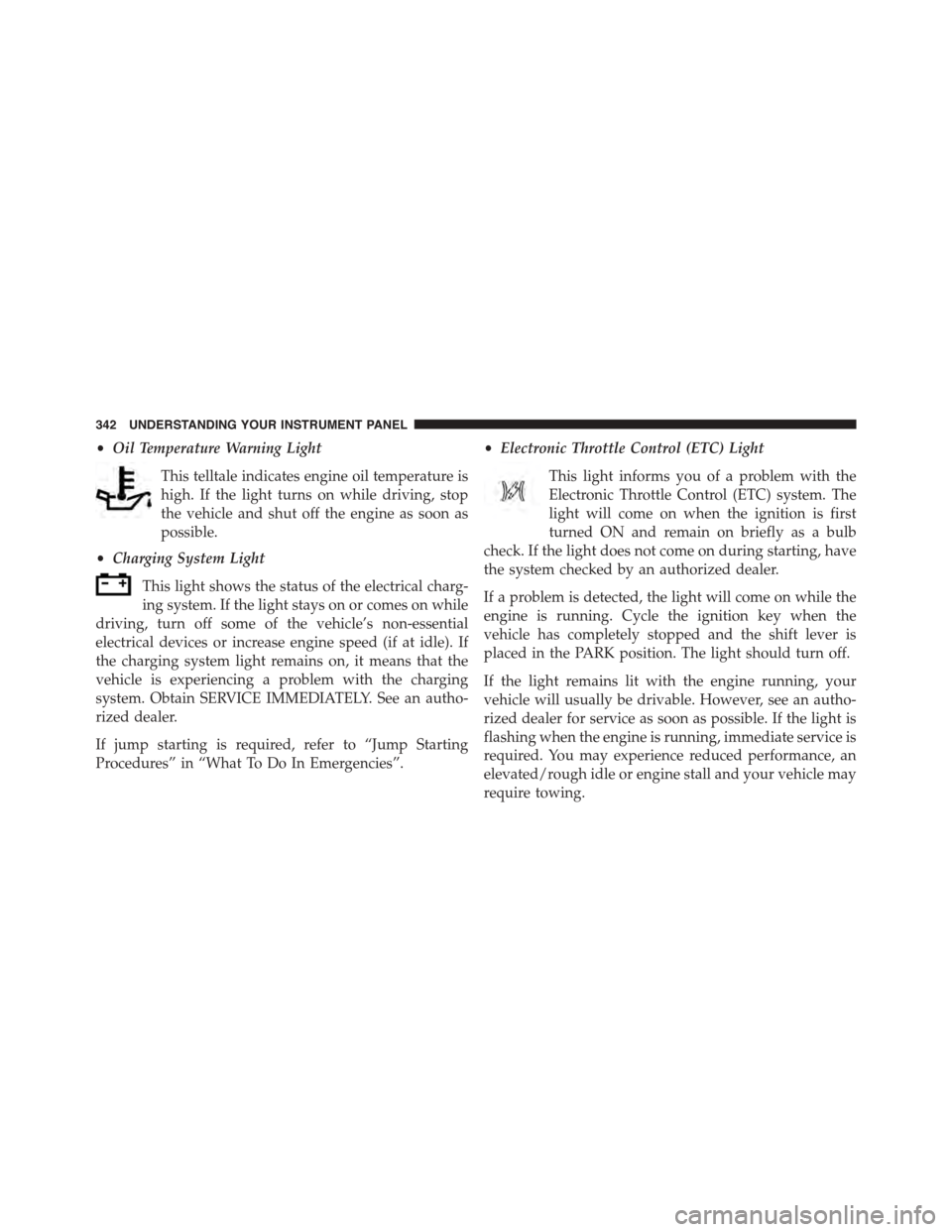
•Oil Temperature Warning Light
This telltale indicates engine oil temperature is
high. If the light turns on while driving, stop
the vehicle and shut off the engine as soon as
possible.
•Charging System Light
This light shows the status of the electrical charg-
ing system. If the light stays on or comes on while
driving, turn off some of the vehicle’s non-essential
electrical devices or increase engine speed (if at idle). If
the charging system light remains on, it means that the
vehicle is experiencing a problem with the charging
system. Obtain SERVICE IMMEDIATELY. See an autho-
rized dealer.
If jump starting is required, refer to “Jump Starting
Procedures” in “What To Do In Emergencies”.
•Electronic Throttle Control (ETC) Light
This light informs you of a problem with the
Electronic Throttle Control (ETC) system. The
light will come on when the ignition is first
turned ON and remain on briefly as a bulb
check. If the light does not come on during starting, have
the system checked by an authorized dealer.
If a problem is detected, the light will come on while the
engine is running. Cycle the ignition key when the
vehicle has completely stopped and the shift lever is
placed in the PARK position. The light should turn off.
If the light remains lit with the engine running, your
vehicle will usually be drivable. However, see an autho-
rized dealer for service as soon as possible. If the light is
flashing when the engine is running, immediate service is
required. You may experience reduced performance, an
elevated/rough idle or engine stall and your vehicle may
require towing.
342 UNDERSTANDING YOUR INSTRUMENT PANEL
Page 347 of 871
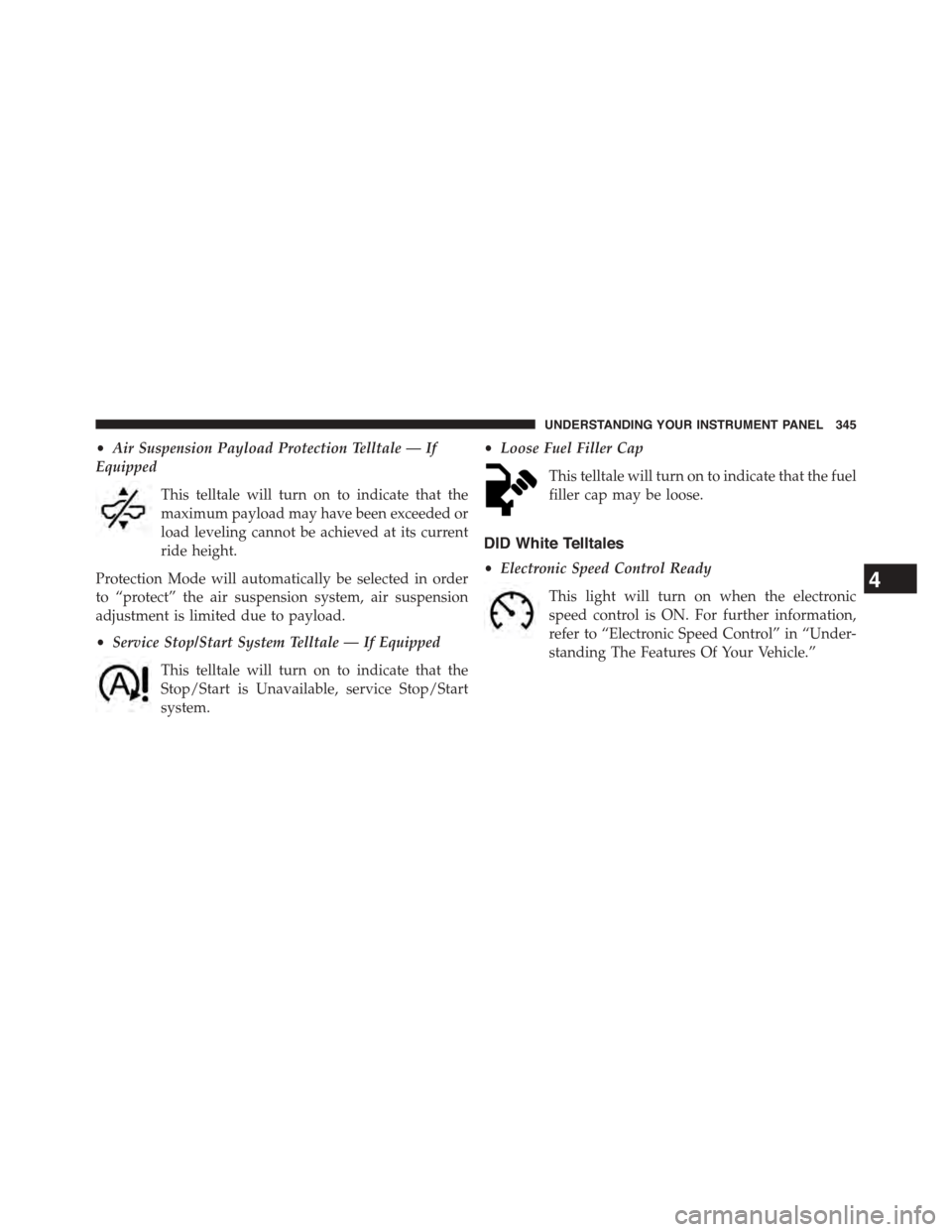
•Air Suspension Payload Protection Telltale — If
Equipped
This telltale will turn on to indicate that the
maximum payload may have been exceeded or
load leveling cannot be achieved at its current
ride height.
Protection Mode will automatically be selected in order
to “protect” the air suspension system, air suspension
adjustment is limited due to payload.
•Service Stop/Start System Telltale — If Equipped
This telltale will turn on to indicate that the
Stop/Start is Unavailable, service Stop/Start
system.
•Loose Fuel Filler Cap
This telltale will turn on to indicate that the fuel
filler cap may be loose.
DID White Telltales
•Electronic Speed Control Ready
This light will turn on when the electronic
speed control is ON. For further information,
refer to “Electronic Speed Control” in “Under-
standing The Features Of Your Vehicle.”
4
UNDERSTANDING YOUR INSTRUMENT PANEL 345
Page 364 of 871

entire surroundings” across the top of the screen. After
five seconds, this note will disappear. To make your
selection, press the “ParkView® Backup Camera Active
Guidelines” button on the touchscreen and make your
selection. Press arrow button on the touchscreen to return
to the previous menu.
•ParkView® Backup Camera Delay
When the vehicle is shifted out of REVERSE (with camera
delay turned OFF), the rear camera mode is exited and
the navigation or audio screen appears again. When the
vehicle is shifted out of REVERSE (with camera delay
turned ON), the rear view image with dynamic grid lines
will be displayed for up to 10 seconds after shifting out of
“REVERSE” unless the forward vehicle speed exceeds
8 mph (12 km/h), the transmission is shifted into PARK
or the ignition is switched to the OFF position. To set the
ParkView® Backup Camera Delay push the SETTINGS
button on the faceplate, then the “Safety & Driving
Assistance” button on the touchscreen. Press the
“Parkview Backup camera Delay” button on the touch-
screen to turn the ParkView® Delay ON or OFF.
•Rain Sensing Auto Wipers
When this feature is selected, the system will automati-
cally activate the windshield wipers if it senses moisture
on the windshield. To make your selection, press the
“Rain Sensing” button on the touchscreen and make your
selection. Press the back arrow/Done button on the
touchscreen to return to the previous menu.
•Hill Start Assist — If Equipped
When this feature is selected, the Hill Start Assist (HSA)
system is active. Refer to “Electronic Brake Control
System” in “Starting And Operating” for system function
and operating information. To make your selection, press
the “Hill Start Assist” button on the touchscreen and
make your selection. Press the back arrow/Done button
on the touchscreen to return to the previous menu.
362 UNDERSTANDING YOUR INSTRUMENT PANEL
Page 385 of 871
•Hill Start Assist — If Equipped
When this feature is selected, the Hill Start Assist (HSA)
system is active. Refer to “Electronic Brake Control
System” in “Starting And Operating” for system function
and operating information. To make your selection, press
the “Hill Start Assist” button on the touchscreen to select
from on or off. Press the back arrow button on the
touchscreen to return to the previous menu.
•Four Corner Air Suspension Modes — If Equipped
There are four air suspension modes designed to protect
the system in unique situations. Tire Jack Mode is selected
to assist in changing a spare tire. Transport Mode is
selected to assist when the vehicle is being flat bed towed.
Wheel Alignment Mode is selected before performing a
wheel alignment, refer to your authorized dealer for infor-
mation. Protection Mode will automatically be selected to
“protect” the air suspension system when the payload has
been exceeded or load leveling cannot be achieved.
Lights
After pressing the “Lights” button on the touchscreen the
following settings will be available.
•Headlight Off Delay
When this feature is selected, the driver can choose to
have the headlights remain on for 0, 30, 60, or 90 seconds
when exiting the vehicle. To make your selection, press
the “+” or “–” buttons on the touchscreen to adjust the
seconds up or down. Press the back arrow button on the
touchscreen to return to the previous menu.
•Headlight Illumination On Approach
When this feature is selected, the headlights will activate
and remain on for 0, 30, 60, or 90 seconds when the doors
are unlocked with the Remote Keyless Entry (RKE) trans-
mitter. To make your selection, To make your selection,
press the “+” or “–” buttons on the touchscreen to adjust
the seconds up or down. Press the back arrow button on
the touchscreen to return to the previous menu.
4
UNDERSTANDING YOUR INSTRUMENT PANEL 383
Page 444 of 871
▫Brake/Transmission Shift Interlock System . . .461
▫Eight-Speed Automatic Transmission —
If Equipped.........................461
▫Six-Speed Automatic Transmission —
1500 Models Only (If Equipped)...........470
▫Six-Speed Automatic Transmission —
2500/3500 Models Only................483
!FOUR-WHEEL DRIVE OPERATION —
IF EQUIPPED.........................494
▫Manually Shifted Transfer Case —
If Equipped..........................494
▫Electronically Shifted Transfer Case (Four-Position
Switch) — If Equipped.................498
▫Electronically Shifted Transfer Case (Five-Position
Switch) — If Equipped.................504
▫Electronically Shifted Transfer Case (Five-Position
Switch) — If Equipped.................509
!AIR SUSPENSION SYSTEM (1500 MODELS) —
IF EQUIPPED.........................516
▫Description..........................516
▫Air Suspension Modes..................520
▫Electronic Vehicle Information Center
(EVIC)/Driver Information Display (DID)
Display Messages.....................522
▫Operation...........................522
!AIR SUSPENSION SYSTEM (2500/3500 MODELS) —
IF EQUIPPED..........................524
▫Description..........................524
▫Air Suspension Modes..................526
442 STARTING AND OPERATING
Page 445 of 871
▫Electronic Vehicle Information Center
(EVIC)/Driver Information Display (DID)
Display Messages.....................527
▫Operation...........................528
!AXLE LOCKER SYSTEM — POWER WAGON
MODELS ONLY (IF EQUIPPED)............528
!STABILIZER/SWAY BAR SYSTEM — POWER
WAGON ONLY........................531
!SAFE OFF-ROAD DRIVING — POWER
WAGON ONLY........................533
▫Off-Road Driving Tips And Vehicle
Characteristics.......................533
▫Driving In Snow, Mud And Sand..........535
▫Crossing Obstacles (Rocks And Other High
Points).............................537
▫Hill Climbing........................540
▫Driving Through Water.................542
▫Airing Down For Off-Road Driving.........545
▫Vehicle Recovery......................545
▫After Driving Off-Road.................549
!LIMITED-SLIP DIFFERENTIAL.............551
!DRIVING ON SLIPPERY SURFACES.........551
▫Acceleration.........................551
▫Traction............................552
!DRIVING THROUGH WATER.............553
▫Flowing/Rising Water..................553
▫Shallow Standing Water.................553
!OFF-ROAD DRIVING TIPS...............555
5
STARTING AND OPERATING 443
Page 446 of 871
▫After Driving Off-Road.................555
!WINCH USAGE — POWER WAGON ONLY —
(IF EQUIPPED)........................556
▫Things To Know Before Using Your Winch . . . .556
▫Understanding The Features Of Your Winch . . .558
▫Winch Accessories....................560
▫Operating Your Winch..................561
▫Rigging Techniques....................573
!POWER STEERING — 1500 MODELS........575
▫POWER STEERING — 2500/3500 MODELS . .576
!FUEL SAVER TECHNOLOGY 5.7L/6.4L ENGINES
ONLY — IF EQUIPPED..................578
!PARKING BRAKE......................578
!BRAKE SYSTEM.......................581
▫Hydraulic Brake Assist — 2500/3500 Models Only
(Except Power Wagon)..................581
!ELECTRONIC BRAKE CONTROL SYSTEM . . . .581
▫Anti-Lock Brake System (ABS)............581
▫Traction Control System (TCS)............583
▫Brake Assist System (BAS)...............583
▫Hill Start Assist (HSA)..................584
▫Electronic Stability Control (ESC)..........587
▫ESC Activation/Malfunction Indicator Light And
ESC OFF Indicator Light................591
▫Trailer Sway Control (TSC)..............592
▫Hill Descent Control (HDC) — If Equipped . . .593
!TIRE SAFETY INFORMATION.............597
▫Tire Markings........................597
444 STARTING AND OPERATING
Page 455 of 871

STOP/START SYSTEM — IF EQUIPPED
The Stop/Start function is developed to save fuel and
reduce emissions. The system will stop the engine auto-
matically during a vehicle stop if the required conditions
are met. Releasing the brake pedal will automatically
re-start the vehicle.
Automatic Mode
The Stop/Start feature is enabled after every normal
customer engine start. It will remain in STOP/START
NOT READY until you drive forward with a vehicle
speed greater than 5 mph (8 km/h). At that time, the
system will go into STOP/START READY and if all other
conditions are met, can go into an STOP/START AUTO
STOP ACTIVE “Autostop” mode.
To Activate The Autostop Mode, The Following Must
Occur:
1.The system must be in STOP/START READY state. A
STOP/START READY message will be displayed in the
Electronic Vehicle Information Center (EVIC)/ Driver
Information Display (DID) within the Stop/Start section.
Refer to “Electronic Vehicle Information Center (EVIC) or
Driver Information Display (DID)” in “Understanding
Your Instrument Panel” for further information.
2. The vehicle must be completely stopped.
3. The transmission Gear Selector must be in Drive and
the brake pedal depressed.
The engine will shut down, the tachometer will move to
the zero position and the stop/start telltale will illuminate
indicating you are in an Autostop. While in an Autostop,
the Climate Controls system may automatically adjust
airflow to maintain cabin comfort. Customer settings will
be maintained upon return to an engine running condition.
5
STARTING AND OPERATING 453