electronic Ram 1500 2015 Owners Manual
[x] Cancel search | Manufacturer: RAM, Model Year: 2015, Model line: 1500, Model: Ram 1500 2015Pages: 871, PDF Size: 24.83 MB
Page 522 of 871
to be disabled. Refer to “Electronic Vehicle Information
Center (EVIC) or Driver Information Display (DID)” in
“Understanding Your Instrument Panel” for further in-
formation.
NOTE:If equipped with a touch screen radio all
enabling/disabling of air suspension features must be
done through the radio. Refer to “Uconnect® Settings” in
“Understanding Your Instrument Panel” for further in-
formation.
WARNING!
The air suspension system uses a high pressure
volume of air to operate the system. To avoid per-
sonal injury or damage to the system, see your
authorized dealer for service.
Air Suspension Modes
The Air Suspension system has multiple modes to protect
the system in unique situations:
Tire/Jack Mode
To assist with changing a spare tire, the air suspension
system has a feature which allows the automatic leveling
to be disabled. Refer to “Electronic Vehicle Information
Center (EVIC) or Driver Information Display (DID)” in
“Understanding Your Instrument Panel” or “Uconnect®
Settings” in “Understanding Your Instrument Panel” if
equipped with a touch screen radio for further informa-
tion.
NOTE:This mode is intended to be enabled with engine
running.
520 STARTING AND OPERATING
Page 523 of 871
Transport Mode
To assist with flat bed towing, the air suspension system
has a feature which will put the vehicle into Entry/Exit
height and disable the automatic load leveling system.
Refer to “Electronic Vehicle Information Center (EVIC) or
Driver Information Display (DID)” in “Understanding
Your Instrument Panel” or “Uconnect® Settings” in “Un-
derstanding Your Instrument Panel” if equipped with a
touch screen radio for further information.
NOTE:This mode is intended to be enabled with engine
running.
Wheel Alignment Mode
Before performing a wheel alignment this mode must be
enabled. Refer to “Electronic Vehicle Information Center
(EVIC) or Driver Information Display (DID)” in “Under-
standing Your Instrument Panel” or “Uconnect® Settings”
in “Understanding Your Instrument Panel” if equipped
with a touch screen radio for further information.
NOTE:This mode is intended to be enabled with engine
running.
Protection Mode
In order to “protect” the air suspension system, the
vehicle will enter Protection Mode when load leveling
cannot be achieved. Some driving may be required to
clear the protection mode telltale in the EVIC/DID. Refer
to “Electronic Vehicle Information Center (EVIC) or
Driver Information Display (DID)” in “Understanding
Your Instrument Panel” or “Uconnect® Settings” in “Un-
derstanding Your Instrument Panel” if equipped with a
touch screen radio for further information.
NOTE:If equipped with a touch screen radio all
enabling/disabling of air suspension features must be
done through the radio. Refer to “Uconnect® Settings” in
“Understanding Your Instrument Panel” for further in-
formation.
5
STARTING AND OPERATING 521
Page 524 of 871
Electronic Vehicle Information Center
(EVIC)/Driver Information Display (DID) Display
Messages
When the appropriate conditions exist, a message will
appear in the EVIC/DID display. Refer to “Electronic
Vehicle Information Center (EVIC) or Driver Information
Display (DID)” in “Understanding Your Instrument
Panel” for further information.
An audible chime will be heard whenever a system error
has been detected.
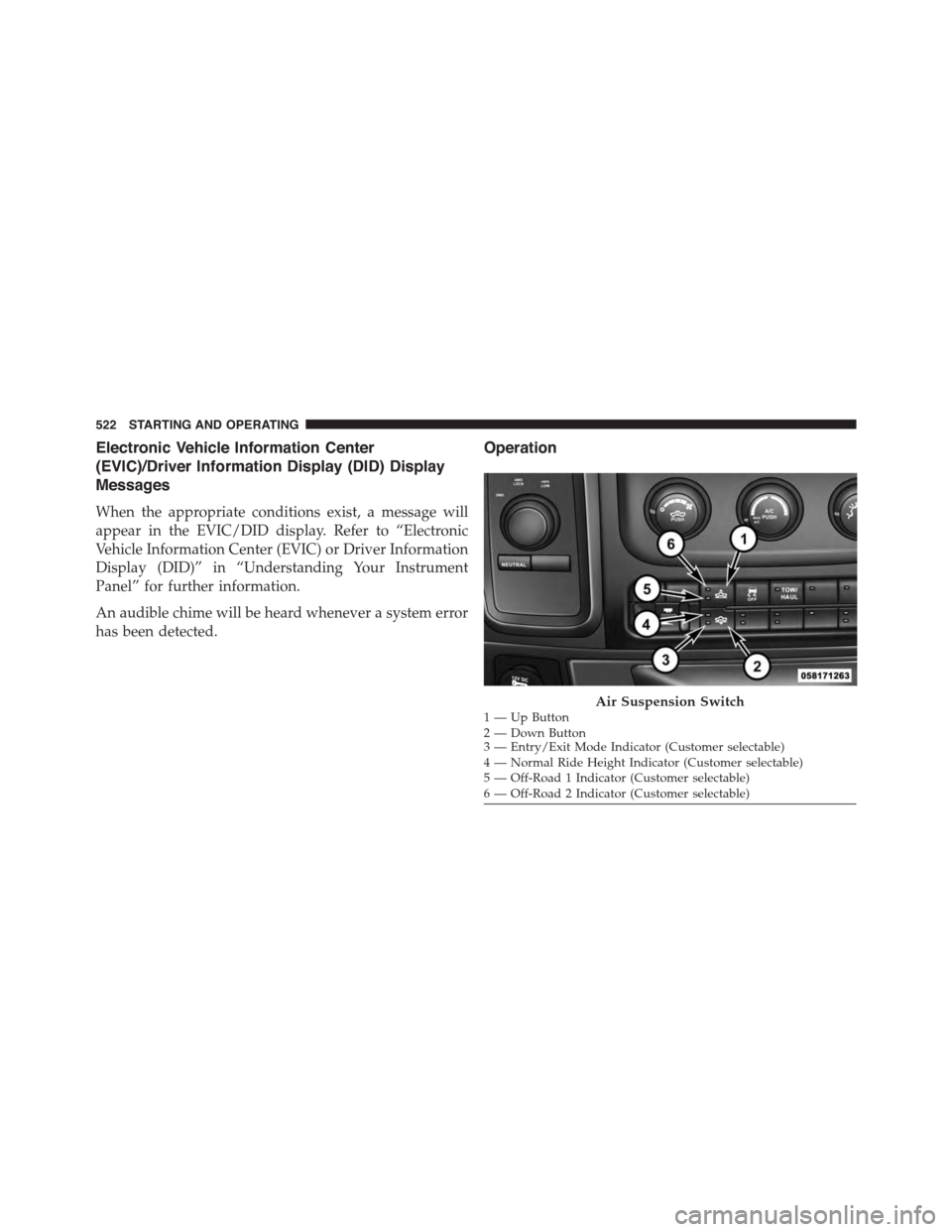
Operation
1—UpButton2—DownButton3 — Entry/Exit Mode Indicator (Customer selectable)4 — Normal Ride Height Indicator (Customer selectable)5 — Off-Road 1 Indicator (Customer selectable)6 — Off-Road 2 Indicator (Customer selectable)
Air Suspension Switch
522 STARTING AND OPERATING
Page 528 of 871
WARNING!
The air suspension system uses a high pressure
volume of air to operate the system. To avoid per-
sonal injury or damage to the system, see your
authorized dealer for service.
Air Suspension Modes
The Air Suspension system has multiple modes to protect
the system in unique situations:
Tire/Jack Mode
To assist with changing a spare tire, the air suspension
system has a feature which allows the automatic leveling to
be disabled. This mode is intended to be used with engine
running. Refer to “Electronic Vehicle Information Center
(EVIC) or Driver Information Display (DID)” in “Under-
standing Your Instrument Panel” or “Uconnect® Settings”
in “Understanding Your Instrument Panel” if equipped
with a touch screen radio for further information.
NOTE:This mode is intended to be enabled with engine
running.
Transport Mode
To assist with flat bed towing, the air suspension system
has a feature which will put the vehicle below Normal
Ride Height (NRH) and disable the automatic load
leveling system. This mode is intended to be used with
engine running. Refer to “Electronic Vehicle Information
Center (EVIC) or Driver Information Display (DID)” in
“Understanding Your Instrument Panel” or “Uconnect®
Settings” in “Understanding Your Instrument Panel” if
equipped with a touch screen radio for further informa-
tion.
NOTE:This mode is intended to be enabled with engine
running.
526 STARTING AND OPERATING
Page 529 of 871
Wheel Alignment Mode
Before performing a wheel alignment this mode must be
enabled. Refer to “Electronic Vehicle Information Center
(EVIC) or Driver Information Display (DID)” in “Under-
standing Your Instrument Panel” or “Uconnect® Set-
tings” in “Understanding Your Instrument Panel” if
equipped with a touch screen radio for further informa-
tion.
NOTE:This mode is intended to be enabled with engine
running.
Protection Mode
In order to “protect” the air suspension system, the
vehicle will enter Protection Mode when load leveling
cannot be achieved. Some driving may be required to
clear the protection mode telltale in the EVIC/DID. Refer
to “Electronic Vehicle Information Center (EVIC) or
Driver Information Display (DID)” in “Understanding
Your Instrument Panel” or “Uconnect® Settings” in “Un-
derstanding Your Instrument Panel” if equipped with a
touch screen radio for further information.
NOTE:If equipped with a touch screen radio all
enabling/disabling of air suspension features must be
done through the radio. Refer to “Uconnect® Settings” in
“Understanding Your Instrument Panel” for further in-
formation.
Electronic Vehicle Information Center
(EVIC)/Driver Information Display (DID) Display
Messages
When the appropriate conditions exist, a message will
appear in the EVIC/DID display. Refer to “Electronic
Vehicle Information Center (EVIC) or Driver Information
Display (DID)” in “Understanding Your Instrument
Panel” for further information.
An audible chime will be heard whenever a system error
has been detected.
5
STARTING AND OPERATING 527
Page 530 of 871
Operation
Pushing the Trailer Mode button once, while at Normal
Ride Height (NRH) will lower the vehicle to trailer level.
NOTE:The LED will continuously blink until vehicle
trailer level that been achieved.
Pushing the Trailer Mode again will raise the vehicle to
Normal Ride Height (NRH).
NOTE:The LED will continuously blink until Normal
Ride Height (NRH) has been achieved.
•Transport Mode – No indicator lamps will be illumi-
nated. Transport Mode is disabled by driving the
vehicle.
•Tire/Jack Mode – No indicator lamps will be illumi-
nated. Tire/Jack Mode is disabled by driving the
vehicle.
•Wheel Alignment Mode – No indicator lamps will be
illuminated. Wheel Alignment Mode is disabled by
driving the vehicle.
AXLE LOCKER SYSTEM — POWER WAGON
MODELS ONLY (IF EQUIPPED)
This vehicle is equipped with electronically locking front
and rear differentials. These differentials, when engaged,
mechanically lock together the axle shafts forcing the
wheels to spin at an equal rate. This allows the vehicle to
maintain its momentum and prevents it from becoming
stuck. The locking front and rear differentials should only
be engaged during low-speed, extreme off-road situa-
tions where one wheel is likely to not be in contact with
the ground. It is not recommended to drive the vehicle
with the differentials locked on pavement due to the
reduced ability to turn and speed limitations.
528 STARTING AND OPERATING
Page 533 of 871
STABILIZER/SWAY BAR SYSTEM — POWER
WAGON ONLY
Your vehicle is equipped with an electronic disconnecting
stabilizer/sway bar. This system allows greater front
suspension travel in off-road situations.
Due to the use of taller springs, this vehicle has an
increased ride height of approximately 1.9 in (48.3 mm)
in the front and 1.5 in (38.1 mm) in the rear. A major
advantage to increasing ride height is the positive effect
it has on approach/departure and break over angles.
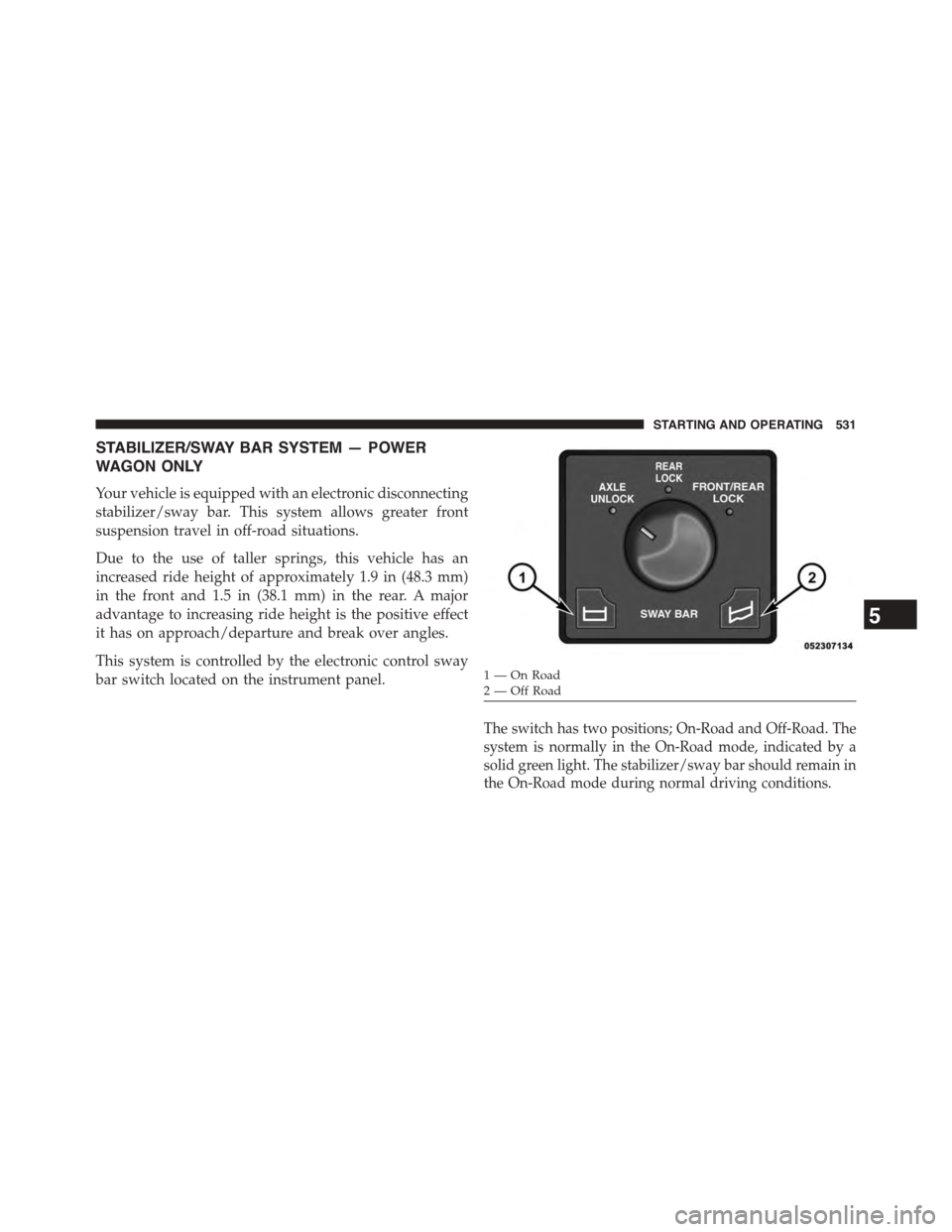
This system is controlled by the electronic control sway
bar switch located on the instrument panel.
The switch has two positions; On-Road and Off-Road. The
system is normally in the On-Road mode, indicated by a
solid green light. The stabilizer/sway bar should remain in
the On-Road mode during normal driving conditions.
1—OnRoad2—OffRoad
5
STARTING AND OPERATING 531
Page 578 of 871
If the Steering icon is flashing, it indicates that the vehicle
needs to be taken to the dealer for service. It is likely the
vehicle has lost power steering assistance.
If the Steering icon is displayed and the “POWER STEER-
ING SYSTEM OVER TEMP” message is displayed on the
EVIC/DID screen, they indicate that extreme steering
maneuvers may have occurred which caused an over
temperature condition in the power steering system.
Once driving conditions are safe, pull over and let the
vehicle idle for a few moments until the icon and
message turn off. Refer to “Electronic Vehicle Information
Center (EVIC) or Driver Information Display (DID)” in
“Understanding Your Instrument Panel” for further in-
formation.
If the Steering icon is displayed and the “SERVICE
POWER STEERING – ASSIST OFF” message is displayed
the EVIC/DID screen, they indicate the vehicle needs to
be taken to the dealer for service. Refer to “Electronic
Vehicle Information Center (EVIC) or Driver Information
Display (DID)” in “Understanding Your Instrument
Panel” for further information.
NOTE:
•Even if the power steering assistance is no longer
operational, it is still possible to steer the vehicle.
Under these conditions there will be a substantial
increase in steering effort, especially at low speeds and
during parking maneuvers.
•If the condition persists, see your authorized dealer for
service.
POWER STEERING — 2500/3500 MODELS
The standard power steering system will give you good
vehicle response and increased ease of maneuverability
in tight spaces. The system will provide mechanical
steering capability if power assist is lost.
576 STARTING AND OPERATING
Page 583 of 871
BRAKE SYSTEM
If power assist is lost for any reason (for example,
repeated brake applications with the engine off), the
brakes will still function. However, you will experience a
substantial increase in braking effort to stop the vehicle.
If either the front or rear hydraulic system loses normal
braking capability, the remaining system will still func-
tion with some loss of overall braking effectiveness. This
will be evident by increased pedal travel during applica-
tion, greater pedal force required to slow or stop, and
activation of the “Brake Warning Light” and the “ABS
Warning Light” (if equipped) during brake use.
Hydraulic Brake Assist — 2500/3500 Models Only
(Except Power Wagon)
The brake system power assist is provided by a hydro-boost
unit which shares fluid with the power steering system. You
may experience some clicking or hissing noises from the
hydro-boost system during hard braking conditions.
NOTE:Under cold temperatures, pedal effort will be
higher than normal until the power steering fluid reaches
operating temperature.
ELECTRONIC BRAKE CONTROL SYSTEM
Your vehicle is equipped with an advanced electronic
brake control system that includes Anti-Lock Brake System
(ABS), Traction Control System (TCS), Brake Assist System
(BAS), Electronic Roll Mitigation (ERM), Hill Start Assist
(HSA), Electronic Stability Control (ESC), Trailer Sway
Control (TSC) and Hill Decent Control (HDC [Power
Wagon only]). All of the systems work together to enhance
vehicle stability and control in various driving conditions,
and are commonly referred to as ESC.
Anti-Lock Brake System (ABS)
The Four-Wheel Anti-Lock Brake System (ABS) is de-
signed to aid the driver in maintaining vehicle control
under adverse braking conditions. The system operates
5
STARTING AND OPERATING 581
Page 585 of 871
WARNING!(Continued)
•The ABS cannot prevent collisions, including those
resulting from excessive speed in turns, following
another vehicle too closely, or hydroplaning.
•The capabilities of an ABS-equipped vehicle must
never be exploited in a reckless or dangerous
manner which could jeopardize the user’s safety or
the safety of others.
ABS Warning Light
The ABS includes an amber warning light. When the light
is illuminated, the ABS is not functioning. The system
reverts to standard, non-anti-lock brakes.
Traction Control System (TCS)
The TCS monitors the amount of wheel spin of each of
the driven wheels. If wheel spin is detected, brake
pressure is applied to the slipping wheel(s), and engine
power is reduced to provide enhanced acceleration and
stability. A feature of the TCS functions similarly to a
limited-slip differential and controls the wheel spin
across a driven axle. If one wheel on a driven axle is
spinning faster than the other, the system will apply the
brake of the spinning wheel. This will allow more engine
torque to be applied to the wheel that is not spinning.
This feature remains active even if TCS and ESC are in
the “Partial Off” mode. Refer to “Electronic Stability
Control (ESC)” in this section of this manual. This brake
pressure modulation transfers drive torque from slipping
to non-slipping wheels to provide optimal forward trac-
tion.
Brake Assist System (BAS)
The BAS is designed to optimize the vehicle’s braking
capability during emergency braking maneuvers. The
BAS detects an emergency braking situation by sensing
the rate and amount of brake application and then
applies optimum pressure to the brakes. The system
5
STARTING AND OPERATING 583