back Ram 1500 2015 Owner's Manual
[x] Cancel search | Manufacturer: RAM, Model Year: 2015, Model line: 1500, Model: Ram 1500 2015Pages: 871, PDF Size: 24.83 MB
Page 6 of 871
INTRODUCTION
Congratulations on selecting your new Chrysler Group
LLC vehicle. Be assured that it represents precision
workmanship, distinctive styling, and high quality - all
essentials that are traditional to our vehicles.
This Owner’s Manual has been prepared with the assis-
tance of service and engineering specialists to acquaint
you with the operation and maintenance of your vehicle.
It is supplemented by Warranty Information, and various
customer-oriented documents. Please take the time to
read these publications carefully. Following the instruc-
tions and recommendations in this manual will help
assure safe and enjoyable operation of your vehicle.
NOTE: After reviewing the owner information, it
should be stored in the vehicle for convenient referenc-
ing and remain with the vehicle when sold.
When it comes to service, remember that your authorized
dealer knows your vehicle best, has factory-trained tech-
nicians and genuine parts, and cares about your satisfac-
tion.
HOW TO USE THIS MANUAL
Consult the Table of Contents to determine which section
contains the information you desire.
Since the specification of your vehicle depends on the
items of equipment ordered, certain descriptions and
illustrations may differ from your vehicle’s equipment.
The detailed index at the back of this Owner’s Manual
contains a complete listing of all subjects.
Consult the following table for a description of the
symbols that may be used on your vehicle or throughout
this Owner’s Manual:
4INTRODUCTION
Page 15 of 871
Keyless Ignition Node (KIN) — If Equipped
This feature allows the driver to operate the ignition switch
with the push of a button, as long as the Remote Keyless
Entry (RKE) transmitter is in the passenger compartment.
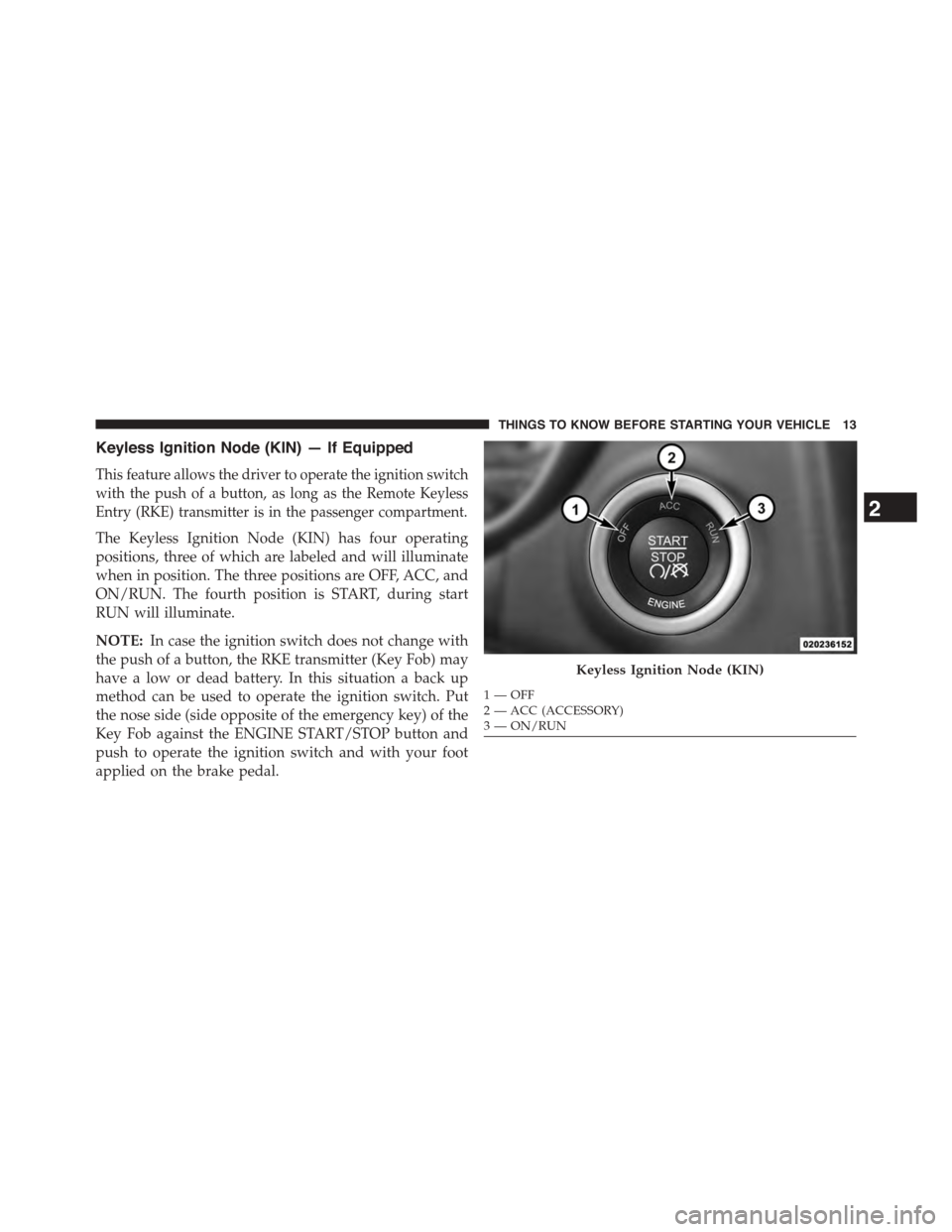
The Keyless Ignition Node (KIN) has four operating
positions, three of which are labeled and will illuminate
when in position. The three positions are OFF, ACC, and
ON/RUN. The fourth position is START, during start
RUN will illuminate.
NOTE:In case the ignition switch does not change with
the push of a button, the RKE transmitter (Key Fob) may
have a low or dead battery. In this situation a back up
method can be used to operate the ignition switch. Put
the nose side (side opposite of the emergency key) of the
Key Fob against the ENGINE START/STOP button and
push to operate the ignition switch and with your foot
applied on the brake pedal.
Keyless Ignition Node (KIN)
1—OFF2—ACC(ACCESSORY)3—ON/RUN
2
THINGS TO KNOW BEFORE STARTING YOUR VEHICLE 13
Page 17 of 871
KIN Key Fob — If equipped
This KIN Key Fob allows the driver to operate the
ignition switch with the push of a button, as long as the
Remote Keyless Entry (RKE) transmitter is in the passen-
ger compartment. The Keyless Ignition Node (KIN) has
four operating positions, three of which are labeled and
will illuminate when in position. The three positions are
OFF, ACC, and ON/RUN. The fourth position is START,
during start RUN will illuminate. It also contains the
Remote Keyless Entry (RKE) transmitter and an emer-
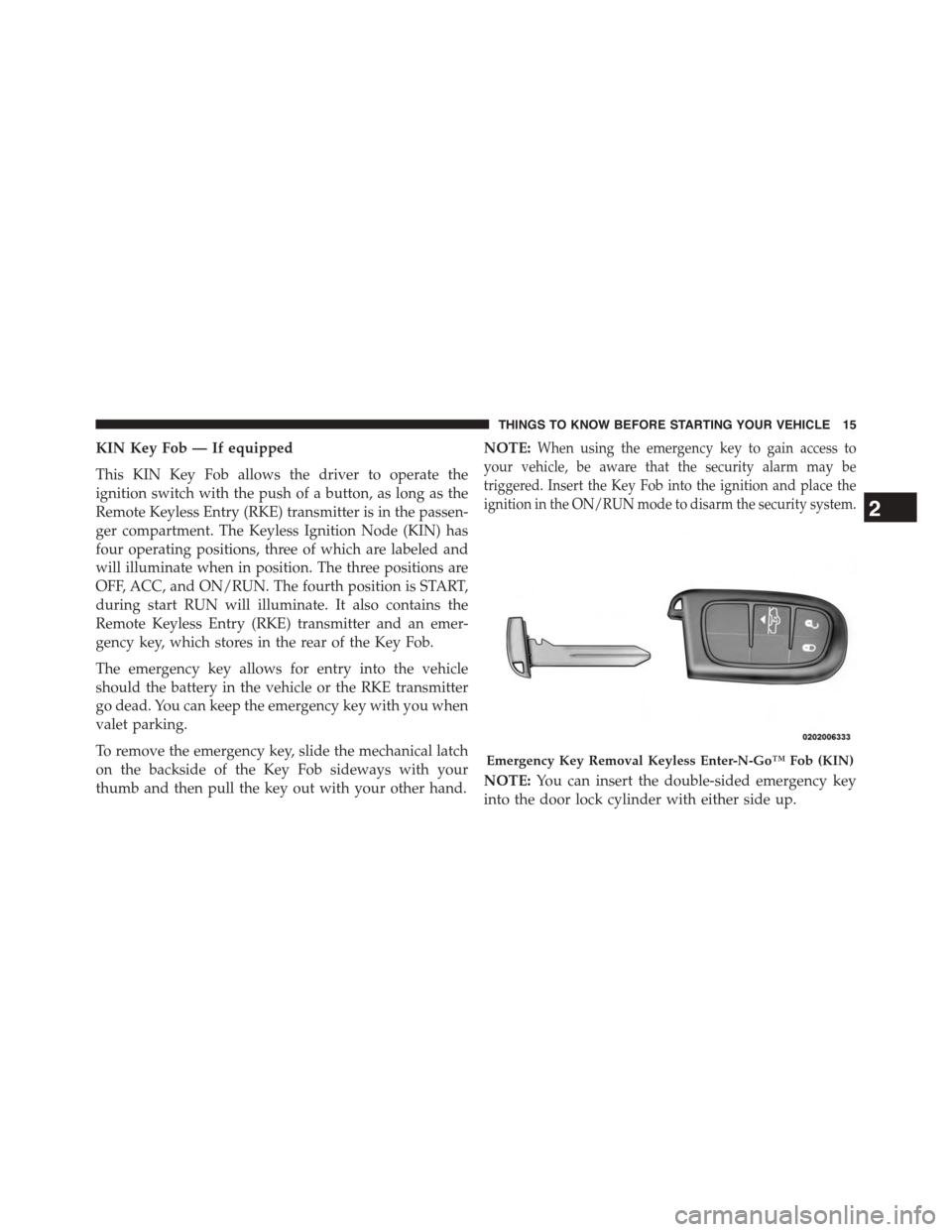
gency key, which stores in the rear of the Key Fob.
The emergency key allows for entry into the vehicle
should the battery in the vehicle or the RKE transmitter
go dead. You can keep the emergency key with you when
valet parking.
To remove the emergency key, slide the mechanical latch
on the backside of the Key Fob sideways with your
thumb and then pull the key out with your other hand.
NOTE:When using the emergency key to gain access to
your vehicle, be aware that the security alarm may be
triggered. Insert the Key Fob into the ignition and place the
ignition in the ON/RUN mode to disarm the security system.
NOTE:You can insert the double-sided emergency key
into the door lock cylinder with either side up.
Emergency Key Removal Keyless Enter-N-Go™ Fob (KIN)
2
THINGS TO KNOW BEFORE STARTING YOUR VEHICLE 15
Page 32 of 871
Programming Additional Transmitters
If you do not have a programmed RKE transmitter,
contact your authorized dealer for details.
Transmitter Battery Replacement
The recommended replacement battery is one CR2032
battery.
NOTE:
•Perchlorate Material — special handling may apply.
See www.dtsc.ca.gov/hazardouswaste/perchlorate
•Do not touch the battery terminals that are on the back
housing or the printed circuit board.
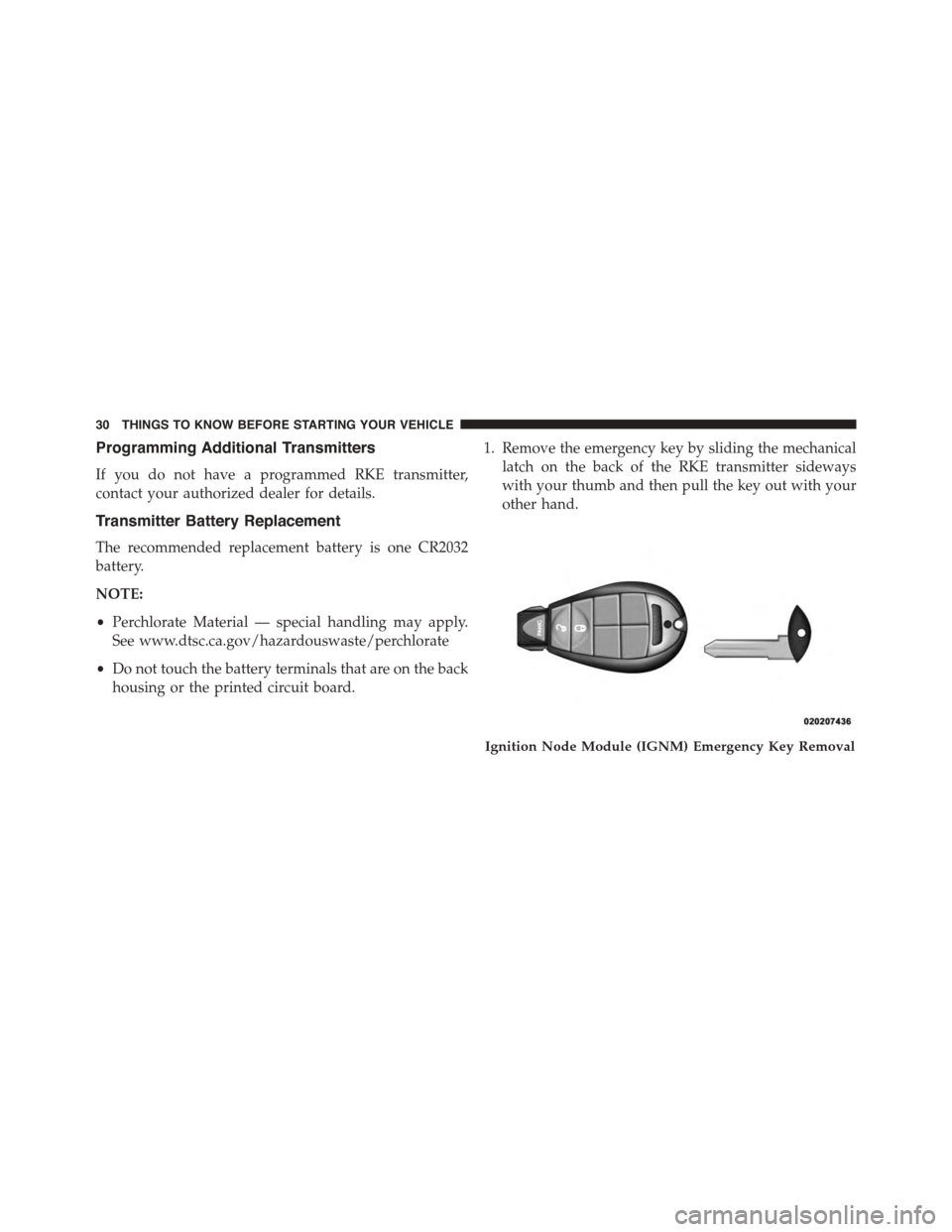
1. Remove the emergency key by sliding the mechanical
latch on the back of the RKE transmitter sideways
with your thumb and then pull the key out with your
other hand.
Ignition Node Module (IGNM) Emergency Key Removal
30 THINGS TO KNOW BEFORE STARTING YOUR VEHICLE
Page 34 of 871
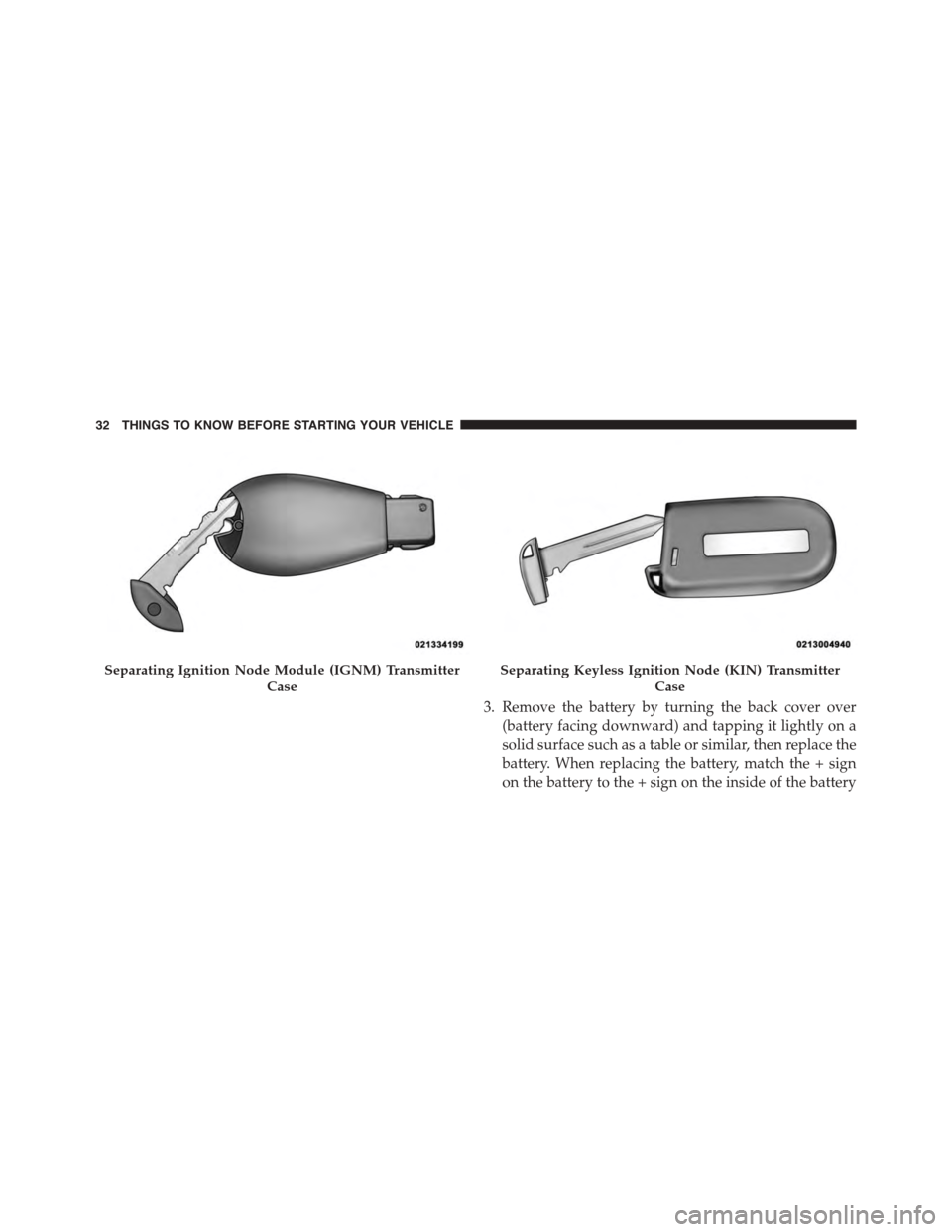
3. Remove the battery by turning the back cover over
(battery facing downward) and tapping it lightly on a
solid surface such as a table or similar, then replace the
battery. When replacing the battery, match the + sign
on the battery to the + sign on the inside of the battery
Separating Ignition Node Module (IGNM) Transmitter
Case
Separating Keyless Ignition Node (KIN) Transmitter
Case
32 THINGS TO KNOW BEFORE STARTING YOUR VEHICLE
Page 35 of 871
clip, located on the back cover. Avoid touching the
new battery with your fingers. Skin oils may cause
battery deterioration. If you touch a battery, clean it
with rubbing alcohol.
4. To assemble the RKE transmitter case, snap the two
halves together, reposition and secure the screw as
shown in step #2 for removal.
General Information
This device complies with Part 15 of the FCC rules and
RSS 210 of Industry Canada. Operation is subject to the
following conditions:
•This device may not cause harmful interference.
•This device must accept any interference received,
including interference that may cause undesired op-
eration.
NOTE:Changes or modifications not expressly approved
by the party responsible for compliance could void the
user’s authority to operate the equipment.
If your RKE transmitter fails to operate from a normal
distance, check for these two conditions:
1. A weak battery in the transmitter. The expected life of
the battery is a minimum of three years.
2. Closeness to a radio transmitter such as a radio station
tower, airport transmitter, and some mobile or CB
radios.
2
THINGS TO KNOW BEFORE STARTING YOUR VEHICLE 33
Page 50 of 871
Auto-Up Feature With Anti-Pinch Protection
(4-Door Models Driver And Front Passenger Door
Only) — If Equipped
Lift the window switch fully upward to the second
detent, release, and the window will go up automatically.
To stop the window from going all the way up during the
Auto Up operation, push down on the switch briefly.
To close the window part way, lift the window switch to the
first detent and release when you want the window to stop.
NOTE:If the window runs into any obstacle during the
auto-closure, it will reverse direction and then go back
down. Remove the obstacle and use the window switch
again to close the window. Any impact due to rough road
conditions may trigger the auto reverse function unex-
pectedly during auto closure. If this happens, pull the
switch lightly to the first detent and hold to close the
window manually.
WARNING!
There is no anti-pinch protection when the window
is almost closed. Be sure to clear all objects from the
window before closing.
Reset Auto-Up
Should the Auto Up feature stop working, the window
may need to be reset. To reset Auto Up:
1. Make sure the door is fully closed.
2. Pull the window switch up to close the window
completely and continue to hold the switch up for an
additional two seconds after the window is closed.
3. Push the window switch down firmly to the second
detent to open the window completely and continue
to hold the switch down for an additional two seconds
after the window is fully open.
48 THINGS TO KNOW BEFORE STARTING YOUR VEHICLE
Page 52 of 871

Wind Buffeting
Wind buffeting can be described as the perception of
pressure on the ears or a helicopter-type sound in the
ears. Your vehicle may exhibit wind buffeting with the
windows down, or the sunroof (if equipped) in certain
open or partially open positions. This is a normal occur-
rence and can be minimized. If the buffeting occurs with
the rear windows open, then open the front and rear
windows together to minimize the buffeting. If the
buffeting occurs with the sunroof open, adjust the sun-
roof opening to minimize the buffeting.
OCCUPANT RESTRAINT SYSTEMS
Some of the most important safety features in your
vehicle are the restraint systems:
•Seat Belt Systems
•Supplemental Restraint Systems (SRS) Air Bags
•Child Restraints
Important Safety Precautions
Please pay close attention to the information in this
section. It tells you how to use your restraint system
properly, to keep you and your passengers as safe as
possible.
Here are some simple steps you can take to minimize the
risk of harm from a deploying air bag:
1. Children 12 years old and under should always ride
buckled up in a vehicle with a rear seat.
2. If a child from 2 to 12 years old (not in a rear-facing
child restraint) must ride in the front passenger seat,
move the seat as far back as possible and use the
proper child restraint. (Refer to “Child Restraints”)
3. Children that are not big enough to wear the vehicle
seat belt properly (Refer to#Child Restraints#) should
be secured in a vehicle with a rear seat in child
50 THINGS TO KNOW BEFORE STARTING YOUR VEHICLE
Page 53 of 871

restraints or belt-positioning booster seats. Older chil-
dren who do not use child restraints or belt-
positioning booster seats should ride properly buckled
up in a vehicle with a rear seat.
4. Never allow children to slide the shoulder belt behind
them or under their arm.
5. You should read the instructions provided with your
child restraint to make sure that you are using it
properly.
6. All occupants should always wear their lap and
shoulder belts properly.
7. The driver and front passenger seats should be moved
back as far as practical to allow the Advanced Front
Air Bags room to inflate.
8. Do not lean against the door or window. If your
vehicle has side air bags, and deployment occurs, the
side air bags will inflate forcefully into the space
between you and the door and you could be injured.
9. If the air bag system in this vehicle needs to be
modified to accommodate a disabled person, contact
the Customer Center. Phone numbers are provided
under#If You Need Consumer Assistance.#
WARNING!
•Never place a rear-facing child restraint in front of
an air bag. A deploying Passenger Advanced Front
Air Bag can cause death or serious injury to a child
12 years or younger, including a child in a rear-
facing child restraint.
•Only use rear-facing child restraint in a vehicle
with a rear seat.
2
THINGS TO KNOW BEFORE STARTING YOUR VEHICLE 51
Page 58 of 871

WARNING!(Continued)
•A frayed or torn seat belt could rip apart in a
collision and leave you with no protection. Inspect
the seat belt system periodically, checking for cuts,
frays, or loose parts. Damaged parts must be re-
placed immediately. Do not disassemble or modify
the seat belt system. Seat belt assemblies must be
replaced after a collision.
Lap/Shoulder Belt Operating Instructions
1. Enter the vehicle and close the door. Sit back and
adjust the seat.
2. The seat belt latch plate is above the back of the front
seat, and next to your arm in the rear seat (for vehicles
equipped with a rear seat). Grasp the latch plate and
pull out the seat belt. Slide the latch plate up the
webbing as far as necessary to allow the seat belt to go
around your lap.
Pulling Out The Latch Plate
56 THINGS TO KNOW BEFORE STARTING YOUR VEHICLE