park assist Ram 1500 2015 Owner's Manual
[x] Cancel search | Manufacturer: RAM, Model Year: 2015, Model line: 1500, Model: Ram 1500 2015Pages: 871, PDF Size: 24.83 MB
Page 124 of 871
▫To Accelerate For Passing................191
!PARKSENSE® REAR PARK ASSIST — IF
EQUIPPED...........................191
▫ParkSense® Sensors....................192
▫ParkSense® Warning Display.............192
▫ParkSense® Display....................193
▫Enabling And Disabling ParkSense®.......197
▫Service The ParkSense® Rear Park Assist
System.............................198
▫Cleaning The ParkSense® System..........199
▫ParkSense® System Usage Precautions.......199
!PARKSENSE® FRONT AND REAR PARK
ASSIST — IF EQUIPPED.................201
▫ParkSense® Sensors....................202
▫ParkSense® Warning Display.............202
▫ParkSense® Display....................203
▫Enabling And Disabling Front And/Or Rear
ParkSense®..........................205
▫Service The ParkSense® Park Assist System . . .206
▫Cleaning The ParkSense® System..........207
▫ParkSense® System Usage Precautions.......207
!PARKVIEW® REAR BACK UP CAMERA — IF
EQUIPPED...........................210
!OVERHEAD CONSOLE — IF EQUIPPED.....212
▫Courtesy/Reading Lights...............213
!GARAGE DOOR OPENER — IF EQUIPPED . . .214
▫Before You Begin Programming HomeLink® . .215
▫Programming A Rolling Code............216
122 UNDERSTANDING THE FEATURES OF YOUR VEHICLE
Page 193 of 871
To Accelerate For Passing
Press the accelerator as you would normally. When the
pedal is released, the vehicle will return to the set speed.
Using Electronic Speed Control On Hills
The transmission may downshift on hills to maintain the
vehicle set speed.
NOTE:The Electronic Speed Control system maintains
speed up and down hills. A slight speed change on
moderate hills is normal.
On steep hills, a greater speed loss or gain may occur so
it may be preferable to drive without Electronic Speed
Control.
WARNING!
Electronic Speed Control can be dangerous where the
system cannot maintain a constant speed. Your ve-
hicle could go too fast for the conditions, and you
could lose control and have an accident. Do not use
Electronic Speed Control in heavy traffic or on roads
that are winding, icy, snow-covered or slippery.
PARKSENSE® REAR PARK ASSIST — IF
EQUIPPED
The ParkSense® Rear Park Assist system provides visual
and audible indications of the distance between the rear
fascia and a detected obstacle when backing up, e.g.
during a parking maneuver. Refer to ParkSense® System
Usage Precautions for limitations of this system and
recommendations.
3
UNDERSTANDING THE FEATURES OF YOUR VEHICLE 191
Page 200 of 871
The ParkSense® switch LED will be ON when
ParkSense® is disabled or defective. The ParkSense®
switch LED will be OFF when the system is enabled.
If the ParkSense switch is pressed, and the system is
disabled or requires service, the ParkSense switch LED
will blink momentarily, and then the LED will be ON.
Service The ParkSense® Rear Park Assist
System
During vehicle start up, when the ParkSense® Rear Park
Assist System has detected a faulted condition, the
instrument cluster will actuate a single chime, once per
ignition cycle, and it will display the#PARKSENSE
UNAVAILABLE WIPE REAR SENSORS#or the
#PARKSENSE UNAVAILABLE SERVICE REQUIRED#
message. Refer to “Electronic Vehicle Information Center
(EVIC) or Driver Information Display (DID)” in “Under-
standing Your Instrument Panel” for further information.
When the shift lever is moved to REVERSE and the
system has detected a faulted condition, the EVIC/DID
will display the#PARKSENSE UNAVAILABLE WIPE
REAR SENSORS#or the#PARKSENSE UNAVAILABLE
SERVICE REQUIRED#message for as long as the vehicle
is in REVERSE. Under this condition, ParkSense® will
not operate.
If#PARKSENSE UNAVAILABLE WIPE REAR SENSORS#
appears in the Electronic Vehicle Information Center
(EVIC) or Driver Information Display (DID) make sure
the outer surface and the underside of the rear fascia/
bumper is clean and clear of snow, ice, mud, dirt or other
obstruction, and then cycle the ignition. If the message
continues to appear, see an authorized dealer.
If#PARKSENSE UNAVAILABLE SERVICE REQUIRED#
appears in the EVIC/DID, see your authorized dealer.
198 UNDERSTANDING THE FEATURES OF YOUR VEHICLE
Page 203 of 871
WARNING!(Continued)
•Before using ParkSense®, it is strongly recom-
mended that the ball mount and hitch ball assem-
bly is disconnected from the vehicle when the
vehicle is not used for towing. Failure to do so can
result in injury or damage to vehicles or obstacles
because the hitch ball will be much closer to the
obstacle than the rear fascia when the loudspeaker
sounds the continuous tone. Also, the sensors
could detect the ball mount and hitch ball assem-
bly, depending on its size and shape, giving a false
indication that an obstacle is behind the vehicle.
PARKSENSE® FRONT AND REAR PARK ASSIST —
IF EQUIPPED
The ParkSense® Park Assist system provides visual and
audible indications of the distance between the rear
and/or front fascia and a detected obstacle when backing
up or moving forward, e.g. during a parking maneuver.
Refer to ParkSense® System Usage Precautions for limi-
tations of this system and recommendations.
ParkSense® will retain the last system state (enabled or
disabled) from the last ignition cycle when the ignition is
changed to the ON/RUN position.
ParkSense® can be active only when the shift lever is in
REVERSE or DRIVE. If ParkSense® is enabled at one of
these shift lever positions, the system will remain active
until the vehicle speed is increased to approximately
7 mph (11 km/h) or above. A display warning will
appear in the Electronic Vehicle Information Center
(EVIC) or Driver Information Display (DID) indicating
the vehicle is above ParkSense® operating speed. The
system will become active again if the vehicle speed is
decreased to speeds less than approximately 6 mph
(9 km/h).
3
UNDERSTANDING THE FEATURES OF YOUR VEHICLE 201
Page 207 of 871

Front Park Assist Audible Alerts
ParkSense® will turn off the Front Park Assist audible
alert (chime) after approximately three seconds when an
obstacle has been detected, the vehicle is stationary, and
brake pedal is applied.
Adjustable Chime Volume Settings
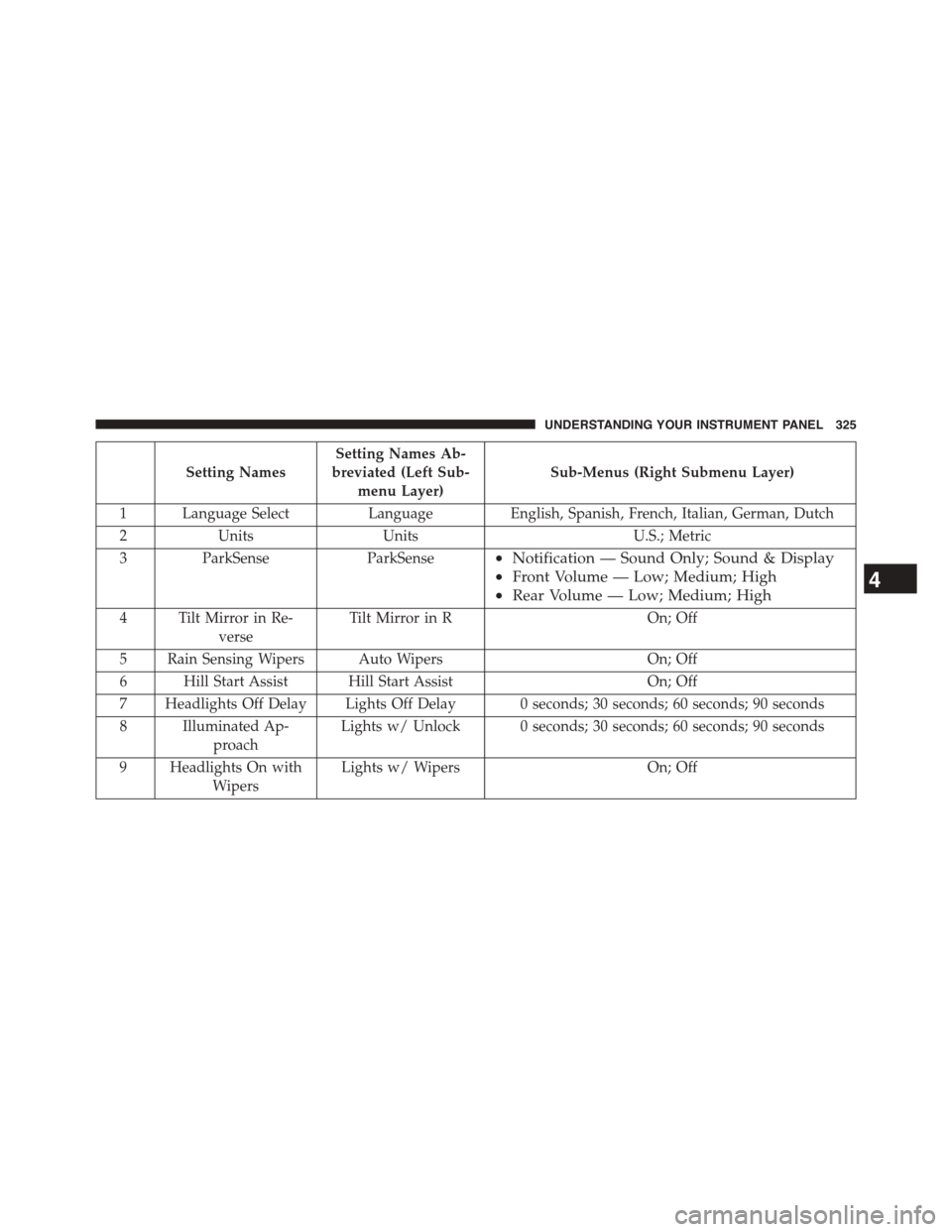
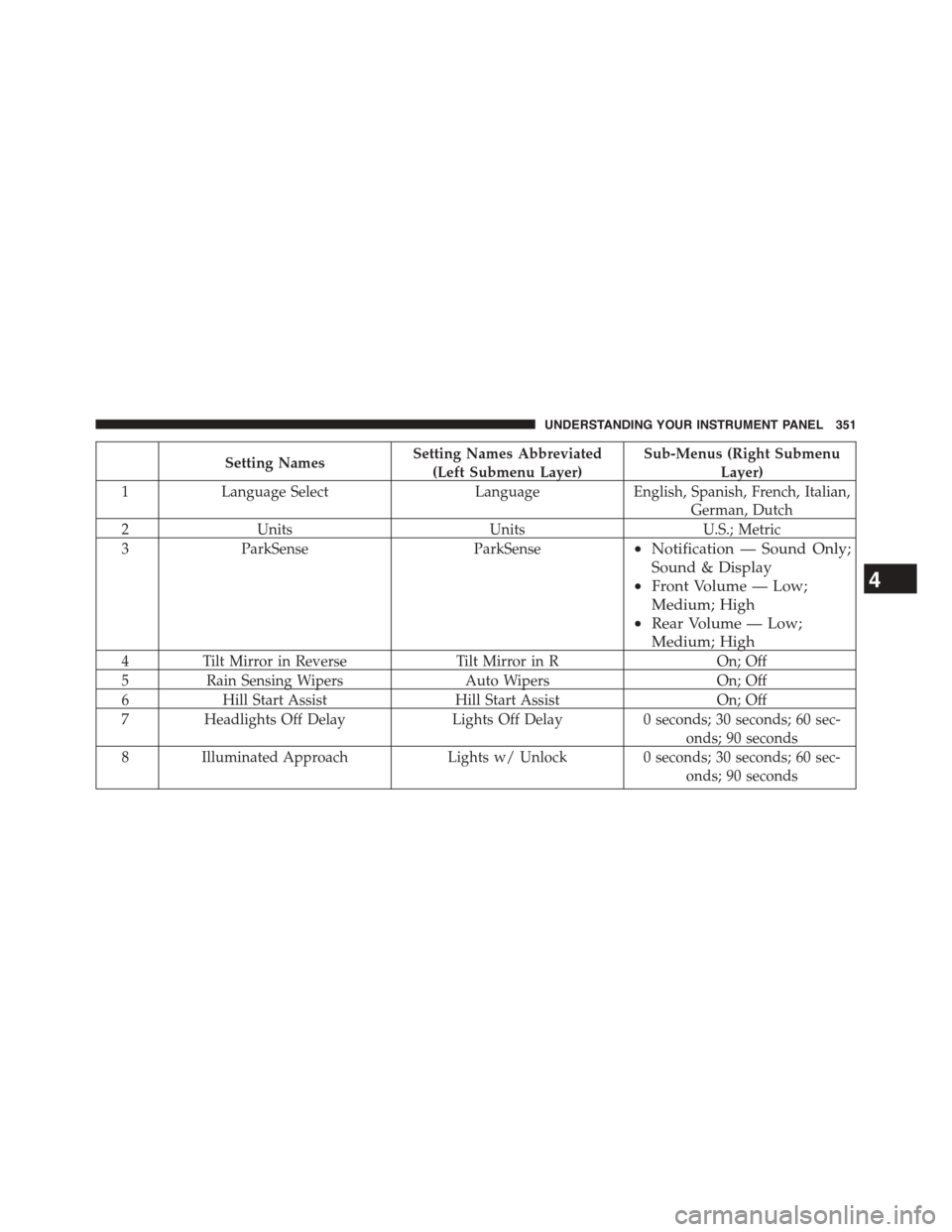
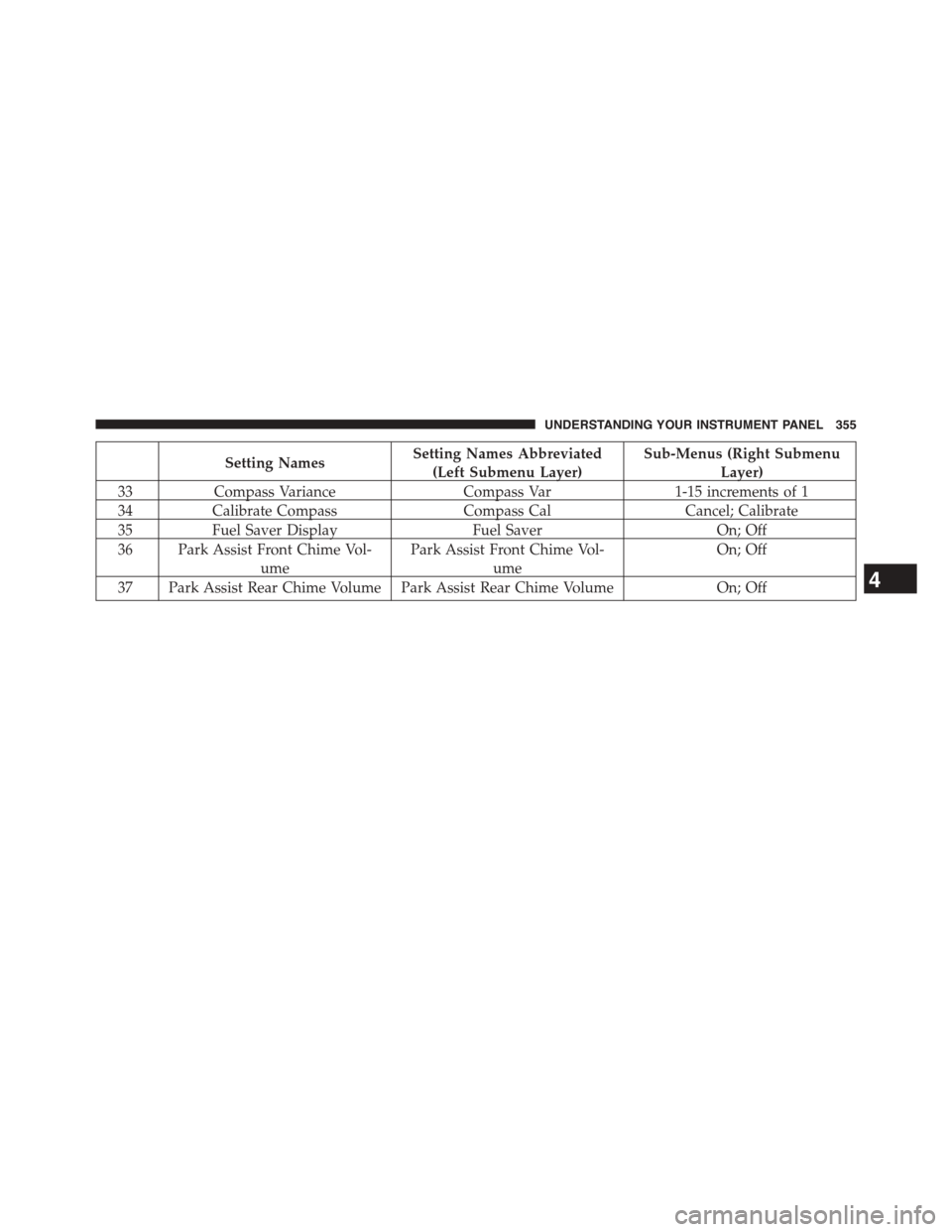
The Front and Rear chime volume settings are program-
mable.
•If your vehicle is equipped with a touchscreen, the
settings may be programmed through the Uconnect®
System. Refer to “Uconnect® Settings ” in “Understand-
ing Your Instrument Panel” for further information.
•If your vehicle is not equipped with a touchscreen, the
settings may be programmed through the Electronic
Vehicle Information Center (EVIC) or Driver Information
Display (DID). Refer to “Electronic Vehicle Information
Center (EVIC)” or “Driver Information Display (DID)” in
“Understanding Your Instrument Panel” for further infor-
mation.
Enabling And Disabling Front And/Or Rear
ParkSense®
Front ParkSense® can be enabled and disabled with the
Front ParkSense® switch.
Rear ParkSense® can be enabled and disabled with the
Rear ParkSense® switch.
When the Front or Rear ParkSense® switch is
pressed to disable the system, the Electronic
Vehicle Information Center (EVIC) or Driver
Information Display (DID) will display the
“PARKSENSE OFF” message for approximately five sec-
onds. Refer to “Electronic Vehicle Information Center
(EVIC) or Driver Information Display (DID)” in “Under-
standing Your Instrument Panel” for further information.
3
UNDERSTANDING THE FEATURES OF YOUR VEHICLE 205
Page 208 of 871
When the shift lever is moved to REVERSE and the Front
or Rear system is disabled, the EVIC/DID will display
the#FRONT PARKSENSE OFF#or#REAR PARKSENSE
OFF#message for five seconds, followed by a car graphic
with#OFF#in the corresponding side. This car graphic
will be displayed for as long as the vehicle is in RE-
VERSE.
NOTE:Arc alerts from the enabled ParkSense® system,
will interrupt the five second messages, and the EVIC/
DID will display the car graphic with the corresponding
arcs and#OFF#message.
The Front or Rear ParkSense® switch LED will be ON
when Front or Rear ParkSense® is disabled or requires
service. The Front or Rear ParkSense® switch LED will be
OFF when the Front or Rear system is enabled. If the Front
or Rear ParkSense® switch is pressed, and the system
requires service, the Front or Rear ParkSense® switch LED
will blink momentarily, and then the LED will be ON.
Service The ParkSense® Park Assist System
During vehicle start up, when the ParkSense® System
has detected a faulted condition, the instrument cluster
will actuate a single chime, once per ignition cycle, and it
will display the#PARKSENSE UNAVAILABLE WIPE
REAR SENSORS#,#PARKSENSE UNAVAILABLE WIPE
FRONT SENSORS#,orthe#PARKSENSE UNAVAIL-
ABLE SERVICE REQUIRED#message for five seconds.
When the shift lever is moved to Reverse and the system
has detected a faulted condition, the Electronic Vehicle
Information Center (EVIC) or Driver Information Display
(DID) will display a#PARKSENSE UNAVAILABLE WIPE
REAR SENSORS#,#PARKSENSE UNAVAILABLE WIPE
FRONT SENSORS#or#PARKSENSE UNAVAILABLE
SERVICE REQUIRED#pop up message for five seconds.
After five seconds, a car graphic will be displayed with
#UNAVAILABLE#at either the front or rear sensor loca-
tion depending on where the fault is detected. The
system will continue to provide arc alerts for the side that
206 UNDERSTANDING THE FEATURES OF YOUR VEHICLE
Page 327 of 871
Setting Names
Setting Names Ab-
breviated (Left Sub-
menu Layer)
Sub-Menus (Right Submenu Layer)
1 Language Select Language English, Spanish, French, Italian, German, Dutch
2 Units Units U.S.; Metric
3ParkSenseParkSense•Notification — Sound Only; Sound & Display
•Front Volume — Low; Medium; High
•Rear Volume — Low; Medium; High
4 Tilt Mirror in Re-
verse
Tilt Mirror in ROn; Off
5 Rain Sensing Wipers Auto WipersOn; Off
6 Hill Start Assist Hill Start AssistOn; Off
7 Headlights Off Delay Lights Off Delay 0 seconds; 30 seconds; 60 seconds; 90 seconds
8 Illuminated Ap-
proach
Lights w/ Unlock 0 seconds; 30 seconds; 60 seconds; 90 seconds
9 Headlights On with
Wipers
Lights w/ WipersOn; Off
4
UNDERSTANDING YOUR INSTRUMENT PANEL 325
Page 353 of 871
Setting NamesSetting Names Abbreviated
(Left Submenu Layer)
Sub-Menus (Right Submenu
Layer)
1Language SelectLanguageEnglish, Spanish, French, Italian,
German, Dutch
2UnitsUnitsU.S.; Metric
3ParkSenseParkSense•Notification — Sound Only;
Sound & Display
•Front Volume — Low;
Medium; High
•Rear Volume — Low;
Medium; High
4Tilt Mirror in ReverseTilt Mirror in ROn; Off
5Rain Sensing WipersAuto WipersOn; Off
6Hill Start AssistHill Start AssistOn; Off
7Headlights Off DelayLights Off Delay0 seconds; 30 seconds; 60 sec-
onds; 90 seconds
8 Illuminated ApproachLights w/ Unlock0 seconds; 30 seconds; 60 sec-
onds; 90 seconds
4
UNDERSTANDING YOUR INSTRUMENT PANEL 351
Page 357 of 871
Setting NamesSetting Names Abbreviated
(Left Submenu Layer)
Sub-Menus (Right Submenu
Layer)
33Compass VarianceCompass Var1-15 increments of 1
34Calibrate CompassCompass CalCancel; Calibrate
35Fuel Saver DisplayFuel SaverOn; Off
36 Park Assist Front Chime Vol-
ume
Park Assist Front Chime Vol-
ume
On; Off
37 Park Assist Rear Chime Volume Park Assist Rear Chime VolumeOn; Off4
UNDERSTANDING YOUR INSTRUMENT PANEL 355
Page 363 of 871

arrows above and below the current date to adjust. Press
the back arrow/Done button on the touchscreen to return
to the previous menu.
Safety/Assistance
After pressing the “Safety/Assistance” button on the
touchscreen the following settings will be available:
•ParkSense®
The ParkSense® system will scan for objects behind the
vehicle when the transmission shift lever/gear selector is
in REVERSE and the vehicle speed is less than 11 mph
(18 km/h). It will provide an alert (audible and/or visual)
to indicate the proximity to other objects. The system can
be enabled with Sound Only, or Sound and Display. To
change the ParkSense® status, press and release the
“Sound Only” or “Sounds and Display” button. Then press
the back arrow/Done button on the touchscreen. Refer to
“ParkSense®” in “Understanding The Features Of Your
Vehicle” for system function and operating information.
•Tilt Mirrors In Reverse — If Equipped
When this feature is selected, the exterior sideview
mirrors will tilt downward when the ignition is in the
RUN position and the transmission shift lever/gear
selector is in the REVERSE position. The mirrors will
move back to their previous position when the transmis-
sion is shifted out of REVERSE. To make your selection,
press the “Tilt Mirrors In Reverse” button on the touch-
screen and make your selection. Press the back arrow/
Done button on the touchscreen to return to the previous
menu.
•ParkView® Backup Camera Active Guidelines
Your vehicle may be equipped with the ParkView® Rear
Back Up Camera Active Guidelines that allows you to see
active guidelines over the ParkView Back up camera
display whenever the shift lever/gear selector is put into
REVERSE. The image will be displayed on the radio
touchscreen display along with a caution note to “check
4
UNDERSTANDING YOUR INSTRUMENT PANEL 361