drive mode Ram 1500 2016 Repair Manual
[x] Cancel search | Manufacturer: RAM, Model Year: 2016, Model line: 1500, Model: Ram 1500 2016Pages: 916, PDF Size: 7.55 MB
Page 527 of 916
4L
Four-Wheel Drive Low Range — This range locks the
front and rear driveshafts together forcing the front and
rear wheels to rotate at the same speed. Additional
traction and maximum pulling power for loose, slippery
road surfaces only. Do not exceed 25 mph (40 km/h).
CAUTION!
Do not use 4L (Low) range when operating the
vehicle on dry pavement. Driveline hardware dam-
age can result.
Shifting Procedure — Manually Shifted Transfer
Case
2H To 4H
Shifting between 2H and 4H can be made with the
vehicle stopped or in motion. If the vehicle is in motion,
shifts can be made up to 55 mph (88 km/h). With thevehicle in motion, the transfer case will engage/
disengage faster if you momentarily release the accelera-
tor pedal after completing the shift. Apply a constant
force when shifting the transfer case lever.
2H Or 4H To 4L
With the vehicle rolling at 2 to 3 mph (3 to 5 km/h), shift
the transmission into NEUTRAL. While the vehicle is
coasting at 2 to 3 mph (3 to 5 km/h), shift the transfer
case lever firmly to the desired position. Do not pause in
transfer case NEUTRAL.
NOTE:
•Pausing in transfer case NEUTRAL in vehicles
equipped with an automatic transmission may require
shutting the engine OFF to avoid gear clash while
completing the shift. If difficulty occurs, shift the
transmission into NEUTRAL, hold foot on brake, and
turn the engine OFF. Make shift to the desired mode.
5
STARTING AND OPERATING 525
Page 529 of 916
This electronically shifted transfer case provides four
mode positions:
•Two-wheel drive high range (2WD)
•Four-wheel drive lock range (4WD LOCK)
•Four-wheel drive low range (4WD LOW)
•Neutral (NEUTRAL)
This electronically shifted transfer case is designed to be
driven in the two-wheel drive position (2WD) for normal
street and highway conditions on dry, hard surfaced
roads.
When additional traction is required, the transfer case
4WD LOCK and 4WD LOW positions can be used to
maximize torque to the front driveshaft, forcing the front
and rear wheels to rotate at the same speed. This isaccomplished by rotating the 4WD Control Switch to the
desired position. Refer to “Shifting Procedure” in this
section for specific shifting instructions. The 4WD LOCK
and 4WD LOW positions are designed for loose, slippery
road surfaces only. Driving in the 4WD LOCK and 4WD
LOW positions on dry hard surfaced roads may cause
increased tire wear and damage to the driveline compo-
nents.
NOTE:The transfer case NEUTRAL position is selected
by pushing the button located on the lower left hand
corner of the 4WD Control Switch. The transfer case
NEUTRAL position is to be used for recreational towing
only. Refer to “Recreational Towing” in “Starting And
Operating” for further information.
5
STARTING AND OPERATING 527
Page 532 of 916
For additional information on the appropriate use of each
transfer case mode position, see the information below:
2WD
Rear Wheel Drive High Range — This range is for normal
street and highway driving on dry, hard surfaced roads.
4WD LOCK
Four-Wheel Drive Lock Range — This range maximizes
torque to the front driveshaft, forcing the front and rear
wheels to rotate at the same speed. This range provides
additional traction for loose, slippery road surfaces only.4WD LOW
Four-Wheel Drive Low Range — This range provides low
speed four-wheel drive. It maximizes torque to the front
driveshaft, forcing the front and rear wheels to rotate at
the same speed. This range provides additional traction
and maximum pulling power for loose, slippery road
surfaces only. Do not exceed 25 mph (40 km/h).
NEUTRAL (N)
Neutral — This range disengages both the front and rear
driveshafts from the powertrain. To be used for flat
towing behind another vehicle. Refer to “Recreational
Towing” in “Starting And Operating” for further infor-
mation.
530 STARTING AND OPERATING
Page 535 of 916
NOTE:
•If Steps 1 or 2 of either the Preferred or Alternate
Procedure are not satisfied prior to attempting the
shift, then the desired position indicator light will flash
continuously while the original position indicator light
is ON, until all requirements have been met.
•The ignition switch must be in the ON position for a
shift to take place and for the position indicator lights
to be operable. If the ignition switch is not in the ON
position, the shift will not take place and no position
indicator lights will be on or flashing.
Electronically Shifted Transfer Case
(Five-Position Switch) — If Equipped
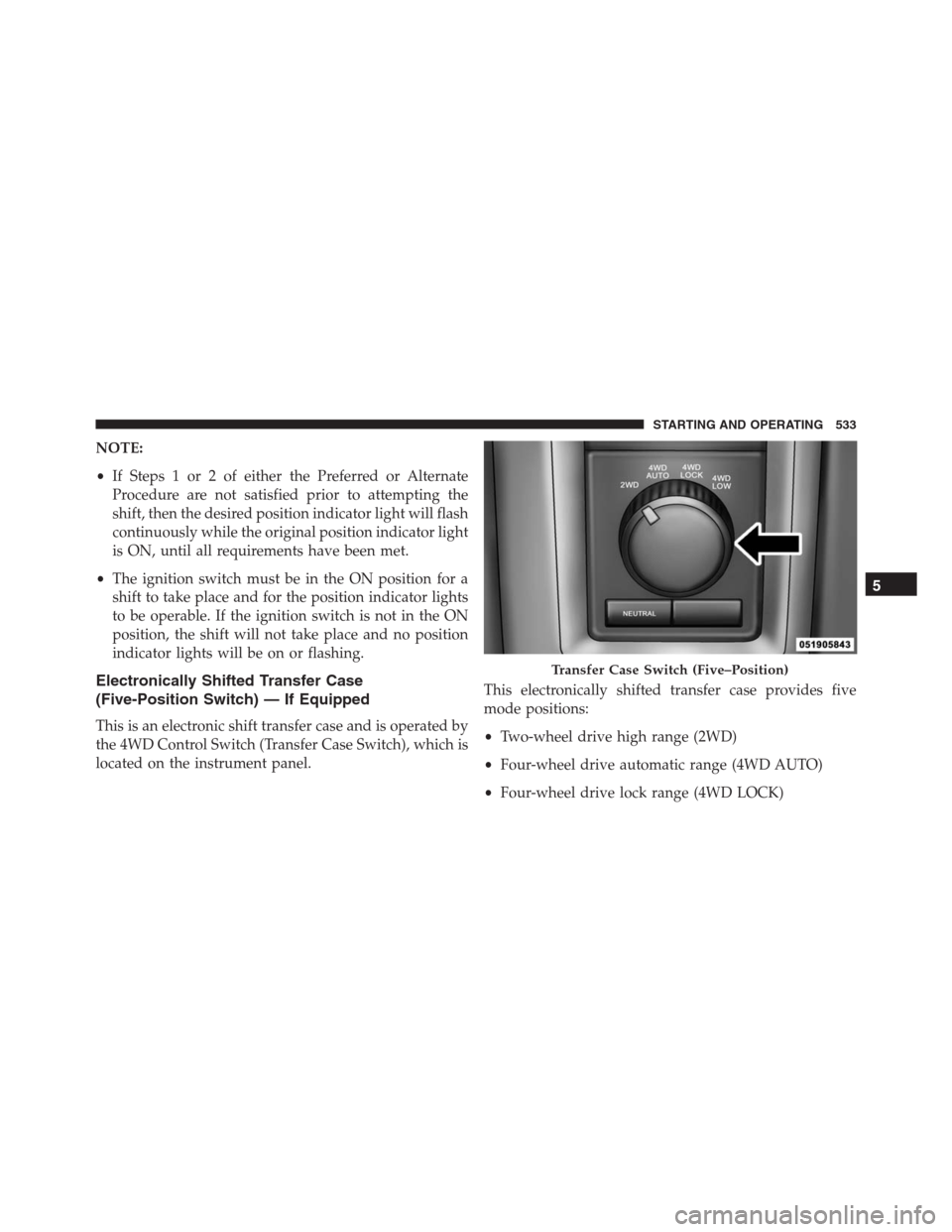
This is an electronic shift transfer case and is operated by
the 4WD Control Switch (Transfer Case Switch), which is
located on the instrument panel.This electronically shifted transfer case provides five
mode positions:
•Two-wheel drive high range (2WD)
•Four-wheel drive automatic range (4WD AUTO)
•Four-wheel drive lock range (4WD LOCK)
Transfer Case Switch (Five–Position)
5
STARTING AND OPERATING 533
Page 536 of 916
•Four-wheel drive low range (4WD LOW)
•Neutral (NEUTRAL)
This electronically shifted transfer case is designed to be
driven in the two–wheel drive position (2WD) or four -
wheel drive position (4WD AUTO) for normal street and
highway conditions on dry hard surfaced roads). Driving
the vehicle in 2WD will have greater fuel economy
benefits as the front axle is not engaged in 2WD.
For variable driving conditions, the 4WD AUTO mode
can be used. In this mode, the front axle is engaged, but
the vehicle’s power is sent to the rear wheels. Four -
wheel drive will be automatically engaged when the
vehicle senses a loss of traction. Because the front axle is
engaged, this mode will result in lower fuel economy
than the 2WD mode.
When additional traction is required, the transfer case
4WD LOCK and 4WD LOW positions can be used to
maximize torque to the front driveshaft, forcing the frontand rear wheels to rotate at the same speed. This is
accomplished by rotating the 4WD Control Switch to the
desired position. Refer to “Shifting Procedure” for spe-
cific shifting instructions. The 4WD LOCK and 4WD
LOW positions are designed for loose, slippery road
surfaces only. Driving in the 4WD LOCK and 4WD LOW
positions on dry hard surfaced roads may cause in-
creased tire wear and damage to the driveline compo-
nents.
NOTE:The transfer case NEUTRAL position is selected
by pushing the button located on the lower left hand
corner of the 4WD Control Switch. The transfer case
NEUTRAL position is to be used for recreational towing
only. Refer to “Recreational Towing” in “Starting And
Operating” for further information.
Transfer Case Position Indicator Lights
The Transfer Case Position Indicator Lights (4WD,
4LOW, and 4WD AUTO) are located in the instrument
534 STARTING AND OPERATING
Page 539 of 916
For additional information on the appropriate use of each
transfer case mode position, see the information below:
2WD
Rear-Wheel Drive High Range - This range is for normal
street and highway driving on dry hard surfaced roads.
4WD AUTO
Four-Wheel Drive Auto Range - This range sends power
to the rear wheels. The four – wheel drive system will be
automatically engaged when the vehicle senses a loss of
traction. Additional traction for varying road conditions.
4WD LOCK
Four-Wheel Drive Lock Range - This range maximizes
torque to the front driveshaft, forcing the front and rear
wheels to rotate at the same speed. Additional traction
for loose, slippery road surfaces only.4WD LOW
Four - Wheel Drive Low Range - This range provides low
speed four-wheel drive. It maximizes torque to the front
driveshaft , forcing the front and rear wheels to rotate at
the same speed. This range provides additional traction
and maximum pulling power for loose, slippery road
surfaces only. Do not exceed 25 mph (40 km/h).
NEUTRAL (N)
Neutral - This range disengages both the front and rear
driveshafts from the powertrain. To be used for flat
towing behind another vehicle. Refer to “Recreational
Towing” in “Starting And Operating” for further infor-
mation.
5
STARTING AND OPERATING 537
Page 541 of 916
This electronically shifted transfer case provides five
mode positions:
•Two-wheel drive high range (2WD)
•Four-wheel drive automatic range (4WD AUTO)
•Four-wheel drive lock range (4WD LOCK)
•Four-wheel drive low range (4WD LOW)
•Neutral (NEUTRAL)
This electronically shifted transfer case is designed to be
driven in the two–wheel drive position (2WD) or four-
wheel drive position (4WD AUTO) for normal street and
highway conditions on dry hard surfaced roads). Driving
the vehicle in 2WD will have greater fuel economy
benefits as the front axle is not engaged in 2WD.
For variable driving conditions, the 4WD AUTO mode
can be used. In this mode, the front axle is engaged, but
the vehicle’s power is sent to the rear wheels. Four-wheeldrive will be automatically engaged when the vehicle
senses a loss of traction. Because the front axle is en-
gaged, this mode will result in lower fuel economy than
the 2WD mode.
When additional traction is required, the transfer case
4WD LOCK and 4WD LOW positions can be used to
maximize torque to the front driveshaft, forcing the front
and rear wheels to rotate at the same speed. This is
accomplished by rotating the 4WD Control Switch to the
desired position. Refer to “Shifting Procedure” for spe-
cific shifting instructions. The 4WD LOCK and 4WD
LOW positions are designed for loose, slippery road
surfaces only. Driving in the 4WD LOCK and 4WD LOW
positions on dry hard surfaced roads may cause in-
creased tire wear and damage to the driveline compo-
nents.
5
STARTING AND OPERATING 539
Page 544 of 916
WARNING!(Continued)
disengages both the front and rear drive shafts from
the powertrain and will allow the vehicle to roll,
even if the transmission is in PARK. The parking
brake should always be applied when the driver is
not in the vehicle.
For additional information on the appropriate use of each
transfer case mode position, see the information below:
2WD
Rear-Wheel Drive High Range - This range is for normal
street and highway driving on dry hard surfaced roads.
4WD AUTO
Four-Wheel Drive Auto Range - This range sends power
to the rear wheels. The four–wheel drive system will be
automatically engaged when the vehicle senses a loss of
traction. Additional traction for varying road conditions.4WD LOCK
Four-Wheel Drive Lock Range - This range maximizes
torque to the front driveshaft, forcing the front and rear
wheels to rotate at the same speed. Additional traction
for loose, slippery road surfaces only.
4WD LOW
Four-Wheel Drive Low Range - This range provides low
speed four-wheel drive. It maximizes torque to the front
driveshaft, forcing the front and rear wheels to rotate at
the same speed. This range provides additional traction
and maximum pulling power for loose, slippery road
surfaces only. Do not exceed 25 mph (40 km/h).
NEUTRAL (N)
Neutral - This range disengages both the front and rear
driveshafts from the powertrain. To be used for flat
542 STARTING AND OPERATING
Page 548 of 916
NOTE:The vehicle will automatically enter Aero Mode
when the vehicle speed remains between 62 mph
(100 km/h) and 66 mph (106 km/h) for greater than 20
seconds or if the vehicle speed exceeds 66 mph
(106 km/h).
•Normal Ride Height (NRH)– This is the standard
position of the suspension and is meant for normal
driving.
•Off-Road 1 (OR1) (Raises the vehicle approximately
1 in [26 mm])– This position should be the primary
position for all off-road driving until Off Road 2 (OR2)
is needed. A smoother and more comfortable ride will
result. To enter OR1, push the “Up” button once from
the NRH position while the vehicle speed is below
35 mph (56 km/h). When in the OR1 position, if the
vehicle speed remains between 40 mph (64 km/h) and
50 mph (80 km/h) for greater than 20 seconds or if the
vehicle speed exceeds 50 mph (80 km/h), the vehiclewill be automatically lowered to NRH. Off-Road 1
may not be available due to vehicle payload, an
EVIC/DID message will be displayed when this oc-
curs. Refer to “Electronic Vehicle Information Center
(EVIC) or Driver Information Display (DID)” in “Un-
derstanding Your Instrument Panel” for further infor-
mation.
•Off-Road 2 (OR2) (Raises the vehicle approximately
2 in [51 mm])– This position is intended for off-
roading use only where maximum ground clearance is
required. To enter OR2, push the “Up” button twice
from the NRH position or once from the OR1 position
while vehicle speed is below 20 mph (32 km/h). While
in OR2, if the vehicle speed exceeds 25 mph (40 km/h)
the vehicle height will be automatically lowered to
OR1. Off-Road 2 may not be available due to vehicle
payload, an EVIC/DID message will be displayed
546 STARTING AND OPERATING
Page 549 of 916
when this occurs. Refer to “Electronic Vehicle Informa-
tion Center (EVIC) or Driver Information Display
(DID)” in “Understanding Your Instrument Panel” for
further information.
•If the vehicle is in OFFROAD1 or OFFROAD2 setting,
be aware of your surroundings, you may not have the
clearance required for certain areas and vehicle dam-
age may occur.
•Aero Mode (Lowers the vehicle approximately .6 in
[15 mm])– This position provides improved aerody-
namics by lowering the vehicle. The vehicle will
automatically enter Aero Mode when the vehicle
speed remains between 62 mph (100 km/h) and
66 mph (106 km/h) for greater than 20 seconds or if the
vehicle speed exceeds 66 mph (106 km/h). The vehicle
will return to NRH from Aero Mode if the vehiclespeed remains between 30 mph (48 km/h) and 35 mph
(56 km/h) for greater than 20 seconds or if the vehicle
speed falls below 30 mph (48 km/h).
NOTE:Automatic Aero Mode may be disabled through
vehicle settings in the Electronic Vehicle Information
Center (EVIC)/Driver Information Display (DID) when
equipped with Uconnect 3.0, or your Uconnect Radio
when equipped with UConnect 5.0, 8.4A, or 8.4AN. Refer
to “Electronic Vehicle Information Center (EVIC) or
Driver Information Display (DID)” in “Understanding
Your Instrument Panel” or “Uconnect Settings” in “Un-
derstanding Your Instrument Panel” for further informa-
tion.
•Entry/Exit Mode (Lowers the vehicle approximately 2
in [51 mm])– This position lowers the vehicle for
easier passenger entry and exit as well as lowering the
rear of the vehicle for easier loading and unloading of
cargo. To enter Entry/Exit Mode, push the “Down”
5
STARTING AND OPERATING 547