door Ram 1500 2018 Owners Manual
[x] Cancel search | Manufacturer: RAM, Model Year: 2018, Model line: 1500, Model: Ram 1500 2018Pages: 700, PDF Size: 8.86 MB
Page 578 of 700
spare by looking at the spare tire description on the Tire
and Loading Information Placard located on the driver ’s
side door opening or on the sidewall of the tire. Compact
spare tire descriptions begin with the letter “T” or “S”
preceding the size designation. Example: T145/80D18
103M.
T, S = Temporary Spare Tire
Since this tire has limited tread life, the original equipment
tire should be repaired (or replaced) and reinstalled on
your vehicle at the first opportunity.
Do not install a wheel cover or attempt to mount a
conventional tire on the compact spare wheel, since the
wheel is designed specifically for the compact spare tire.
Do not install more than one compact spare tire and wheel
on the vehicle at any given time.
WARNING!
Compact and collapsible spares are for temporary
emergency use only. With these spares, do not drive
more than 50 mph (80 km/h). Temporary use spares
have limited tread life. When the tread is worn to the
tread wear indicators, the temporary use spare tire
(Continued)
WARNING!(Continued)
needs to be replaced. Be sure to follow the warnings,
which apply to your spare. Failure to do so could result
in spare tire failure and loss of vehicle control.
Collapsible Spare Tire — If Equipped
The collapsible spare is for temporary emergency use only.
You can identify if your vehicle is equipped with a collaps-
ible spare by looking at the spare tire description on the
Tire and Loading Information Placard located on the
driver ’s side door opening or on the sidewall of the tire.
Collapsible spare tire description example: 165/80-17 101P.
Since this tire has limited tread life, the original equipment
tire should be repaired (or replaced) and reinstalled on
your vehicle at the first opportunity.
Inflate collapsible tire only after the wheel is properly
installed to the vehicle. Inflate the collapsible tire using the
electric air pump before lowering the vehicle.
Do not install a wheel cover or attempt to mount a
conventional tire on the collapsible spare wheel, since the
wheel is designed specifically for the collapsible spare tire.
576 SERVICING AND MAINTENANCE
Page 579 of 700
WARNING!
Compact and Collapsible spares are for temporary
emergency use only. With these spares, do not drive
more than 50 mph (80 km/h). Temporary use spares
have limited tread life. When the tread is worn to the
tread wear indicators, the temporary use spare tire
needs to be replaced. Be sure to follow the warnings,
which apply to your spare. Failure to do so could result
in spare tire failure and loss of vehicle control.
Full Size Spare — If Equipped
The full size spare is for temporary emergency use only.
This tire may look like the originally equipped tire on the
front or rear axle of your vehicle, but it is not. This spare
tire may have limited tread life. When the tread is worn to
the tread wear indicators, the temporary use full size spare
tire needs to be replaced. Since it is not the same as your
original equipment tire, replace (or repair) the original
equipment tire and reinstall on the vehicle at the first
opportunity.
Limited Use Spare — If Equipped
The limited use spare tire is for temporary emergency use
only. This tire is identified by a label located on the limited
use spare wheel. This label contains the driving limitations
for this spare. This tire may look like the original equipped
tire on the front or rear axle of your vehicle, but it is not.
Installation of this limited use spare tire affects vehicle
handling. Since it is not the same as your original equip-
ment tire, replace (or repair) the original equipment tire
and reinstall on the vehicle at the first opportunity.
WARNING!
Limited use spares are for emergency use only. Instal-
lation of this limited use spare tire affects vehicle
handling. With this tire, do not drive more than the
speed listed on the limited use spare wheel. Keep
inflated to the cold tire inflation pressures listed on
your Tire and Loading Information Placard located on
the driver ’s side B-Pillar or the rear edge of the driver ’s
side door. Replace (or repair) the original equipment
tire at the first opportunity and reinstall it on your
vehicle. Failure to do so could result in loss of vehicle
control.8
SERVICING AND MAINTENANCE 577
Page 585 of 700
CAUTION!(Continued)
the truck. For example, if the spare is used to replace
an outer rear tire it will have to be remounted on the
rim so that the wheel is dished inward. That way the
tread design of asymmetrical tires and the white
writing of the OWL tires will maintain proper posi-
tion.
DEPARTMENT OF TRANSPORTATION UNIFORM
TIRE QUALITY GRADES
The following tire grading categories were established
by the National Highway Traffic Safety Administration.
The specific grade rating assigned by the tire’s manu-
facturer in each category is shown on the sidewall of the
tires on your vehicle.
All passenger vehicle tires must conform to Federal
safety requirements in addition to these grades.
Treadwear
The Treadwear grade is a comparative rating, based on
the wear rate of the tire when tested under controlled
conditions on a specified government test course. For
example, a tire graded 150 would wear one and one-half
times as well on the government course as a tire graded 100. The relative performance of tires depends upon the
actual conditions of their use, however, and may depart
significantly from the norm due to variations in driving
habits, service practices, and differences in road charac-
teristics and climate.
Traction Grades
The Traction grades, from highest to lowest, are AA, A, B,
and C. These grades represent the tire’s ability to stop on
wet pavement, as measured under controlled conditions on
specified government test surfaces of asphalt and concrete.
A tire marked C may have poor traction performance.
WARNING!
The traction grade assigned to this tire is based on
straight-ahead braking traction tests, and does not
include acceleration, cornering, hydroplaning, or
peak traction characteristics.
Temperature Grades
The Temperature grades are A (the highest), B, and C,
representing the tire’s resistance to the generation of
heat and its ability to dissipate heat, when tested under
controlled conditions on a specified indoor laboratory
test wheel. 8
SERVICING AND MAINTENANCE 583
Page 588 of 700
CAUTION!
•Do not use abrasive or strong cleaning materials such
as steel wool or scouring powder that will scratch
metal and painted surfaces.
•
Use of power washers exceeding 1,200 psi (8,274 kPa)
can result in damage or removal of paint and decals.
Special Care
• If you drive on salted or dusty roads or if you drive near
the ocean, hose off the undercarriage at least once a
month.
• It is important that the drain holes in the lower edges of
the doors, rocker panels, and trunk be kept clear and
open.
• If you detect any stone chips or scratches in the paint,
touch them up immediately. The cost of such repairs is
considered the responsibility of the owner.
• If your vehicle is damaged due to a collision or similar
cause that destroys the paint and protective coating,
have your vehicle repaired as soon as possible. The cost
of such repairs is considered the responsibility of the
owner. •
If you carry special cargo such as chemicals, fertilizers,
de-icer salt, etc., be sure that such materials are well
packaged and sealed.
• If a lot of driving is done on gravel roads, consider mud
or stone shields behind each wheel.
• Use Mopar Touch Up Paint on scratches as soon as
possible. Your authorized dealer has touch up paint to
match the color of your vehicle.Spray-On Bedliner – If Equipped
During ownership, the shine and luster of the Spray-On
Bedliner can fade from oxidation, road dirt, heavy-duty
hauling and hard water stains. Weathering and UV expo-
sure will lead to fading, dulling, and loss of gloss over
time.
To help maintain the appearance of your Spray-On Bed-
liner, the manufacturer recommends you periodically rinse
all loose dirt from your truck bed and clean your truck at
least twice per year using the Mopar Spray-On Bedliner
Conditioner available at your local authorized dealer.
586 SERVICING AND MAINTENANCE
Page 602 of 700
NOTE:Intentional tampering with the emissions control
system can result in civil penalties being assessed against
you.
Carbon Monoxide Warnings
WARNING!
Carbon monoxide (CO) in exhaust gases is deadly.
Follow the precautions below to prevent carbon mon-
oxide poisoning:
• Do not inhale exhaust gases. They contain carbon
monoxide, a colorless and odorless gas, which can
kill. Never run the engine in a closed area, such as a
garage, and never sit in a parked vehicle with the
engine running for an extended period. If the vehicle
is stopped in an open area with the engine running
for more than a short period, adjust the ventilation
system to force fresh, outside air into the vehicle.
• Guard against carbon monoxide with proper main-
tenance. Have the exhaust system inspected every
time the vehicle is raised. Have any abnormal condi-
tions repaired promptly. Until repaired, drive with
all side windows fully open.
FLEXIBLE FUEL (3.6L ENGINE ONLY)
E-85 General Information
The information in this section is unique for Flexible Fuel
vehicles only. These vehicles can be identified by a unique
fuel filler door label that states Ethanol (E-85) or Unleaded
Gasoline Only and/or a yellow fuel cap. Please refer to the
other sections of this manual for information on features
that are common between Flexible Fuel and non-Flexible
Fuel powered vehicles.
CAUTION!
Only vehicles with the E-85 fuel filler door label or a
yellow gas cap can operate on E-85.
Ethanol Fuel (E-85)
E-85 is a mixture of approximately 85% ethanol and 15%
unleaded gasoline.
WARNING!
Ethanol vapors are extremely flammable and could
cause serious personal injury. Never have any smoking
(Continued)
600 TECHNICAL SPECIFICATIONS
Page 617 of 700
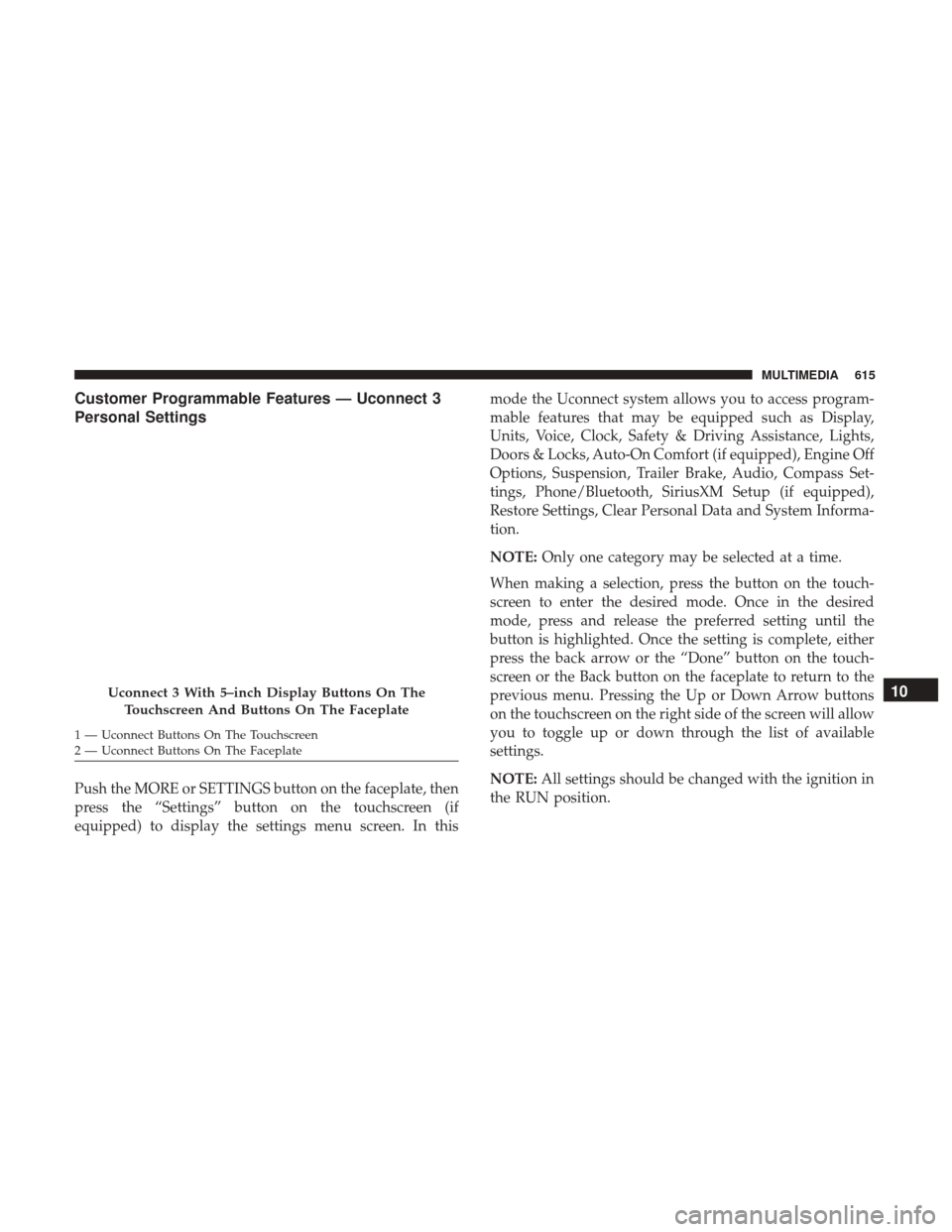
Customer Programmable Features — Uconnect 3
Personal Settings
Push the MORE or SETTINGS button on the faceplate, then
press the “Settings” button on the touchscreen (if
equipped) to display the settings menu screen. In thismode the Uconnect system allows you to access program-
mable features that may be equipped such as Display,
Units, Voice, Clock, Safety & Driving Assistance, Lights,
Doors & Locks, Auto-On Comfort (if equipped), Engine Off
Options, Suspension, Trailer Brake, Audio, Compass Set-
tings, Phone/Bluetooth, SiriusXM Setup (if equipped),
Restore Settings, Clear Personal Data and System Informa-
tion.
NOTE:
Only one category may be selected at a time.
When making a selection, press the button on the touch-
screen to enter the desired mode. Once in the desired
mode, press and release the preferred setting until the
button is highlighted. Once the setting is complete, either
press the back arrow or the “Done” button on the touch-
screen or the Back button on the faceplate to return to the
previous menu. Pressing the Up or Down Arrow buttons
on the touchscreen on the right side of the screen will allow
you to toggle up or down through the list of available
settings.
NOTE: All settings should be changed with the ignition in
the RUN position.
Uconnect 3 With 5–inch Display Buttons On The
Touchscreen And Buttons On The Faceplate
1 — Uconnect Buttons On The Touchscreen
2 — Uconnect Buttons On The Faceplate
10
MULTIMEDIA 615
Page 622 of 700
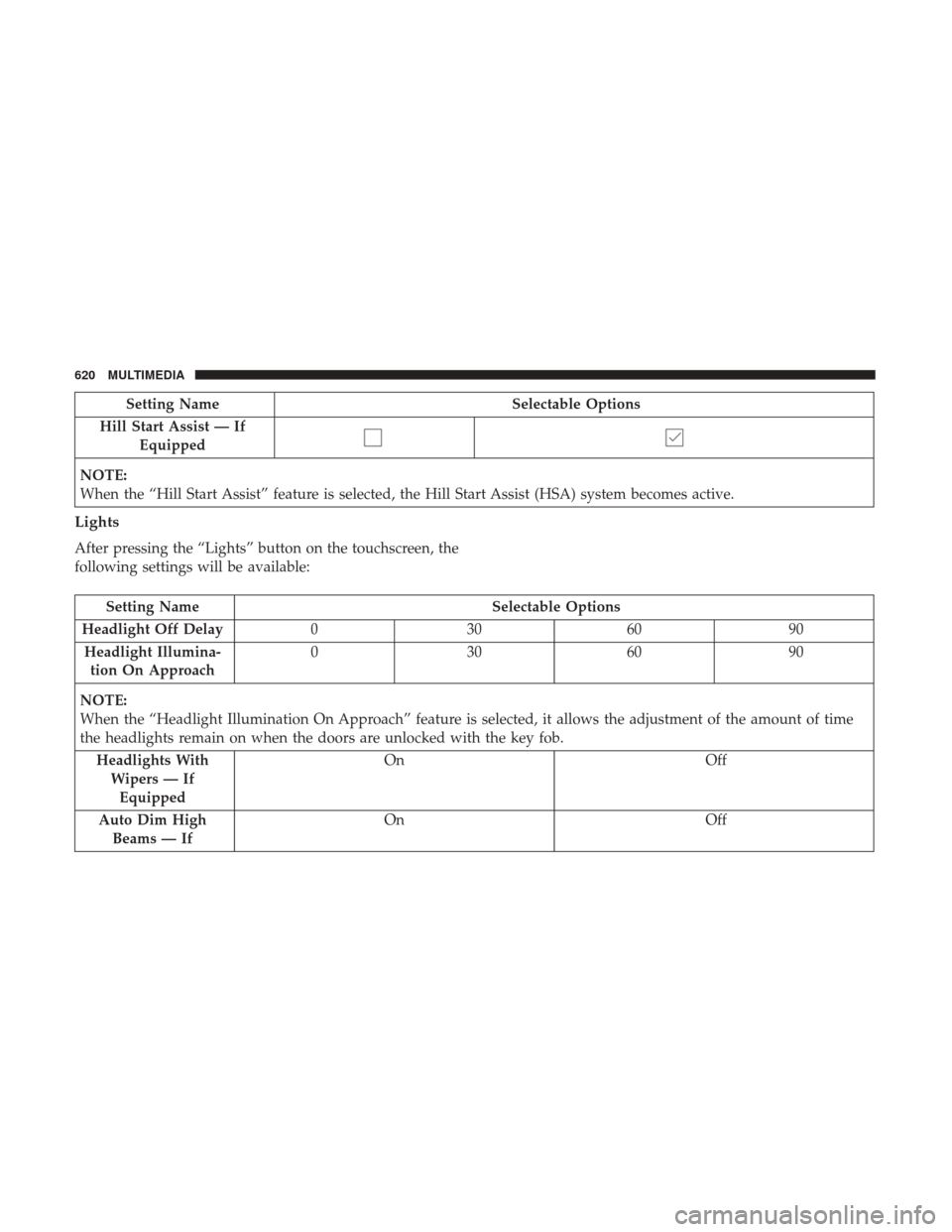
Setting NameSelectable Options
Hill Start Assist — If Equipped
NOTE:
When the “Hill Start Assist” feature is selected, the Hill Start Assist (HSA) system becomes active.
Lights
After pressing the “Lights” button on the touchscreen, the
following settings will be available:
Setting Name Selectable Options
Headlight Off Delay 030609 0
Headlight Illumina- tion On Approach 03
0609 0
NOTE:
When the “Headlight Illumination On Approach” feature is selected, it allows the adjustment of the amount of time
the headlights remain on when the doors are unlocked with the key fob. Headlights WithWipers — IfEquipped On
Off
Auto Dim High Beams — If On
Off
620 MULTIMEDIA
Page 623 of 700
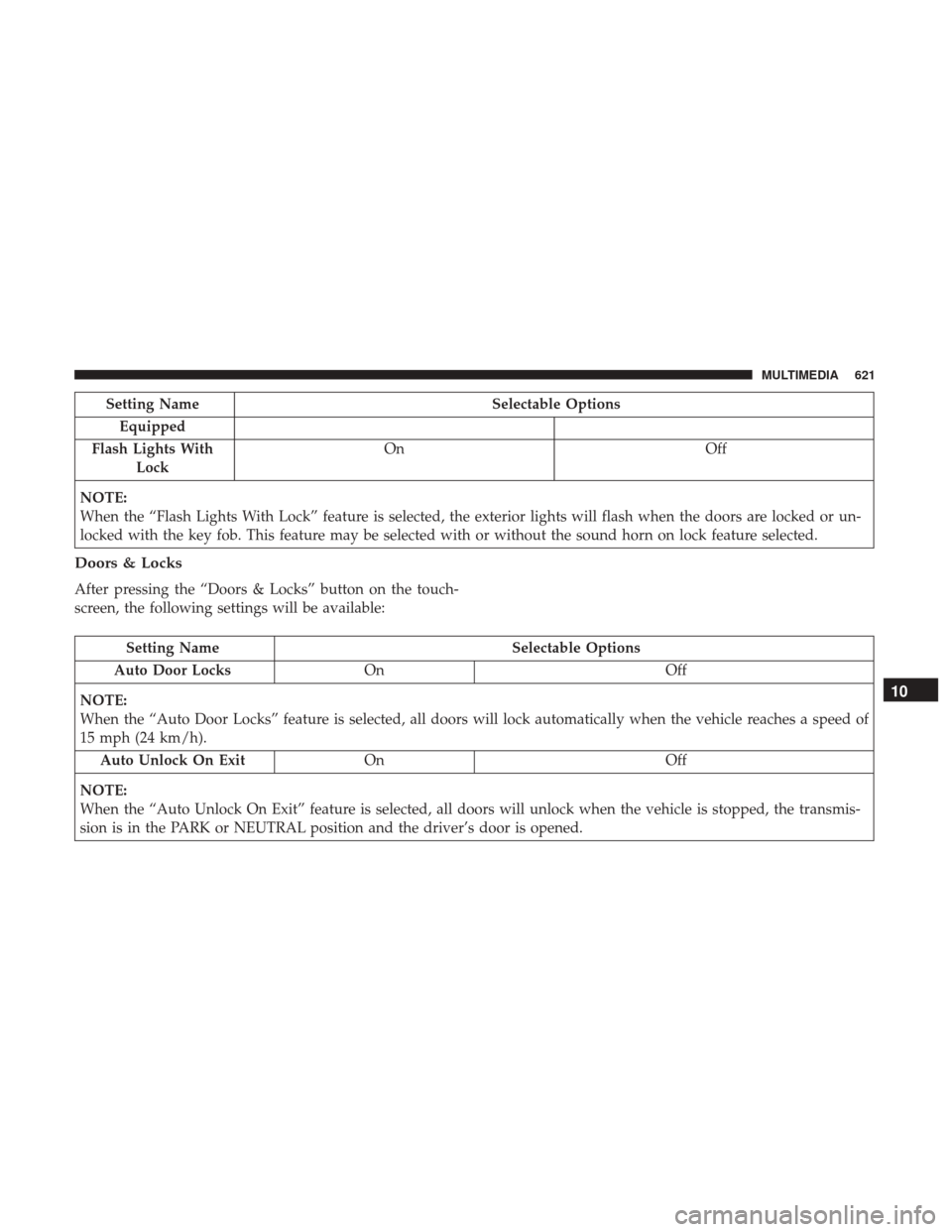
Setting NameSelectable Options
Equipped
Flash Lights With Lock On
Off
NOTE:
When the “Flash Lights With Lock” feature is selected, the exterior lights will flash when the doors are locked or un-
locked with the key fob. This feature may be selected with or without the sound horn on lock feature selected.
Doors & Locks
After pressing the “Doors & Locks” button on the touch-
screen, the following settings will be available:
Setting Name Selectable Options
Auto Door Locks On Off
NOTE:
When the “Auto Door Locks” feature is selected, all doors will lock automatically when the vehicle reaches a speed of
15 mph (24 km/h). Auto Unlock On Exit On Off
NOTE:
When the “Auto Unlock On Exit” feature is selected, all doors will unlock when the vehicle is stopped, the transmis-
sion is in the PARK or NEUTRAL position and the driver’s door is opened.
10
MULTIMEDIA 621
Page 624 of 700
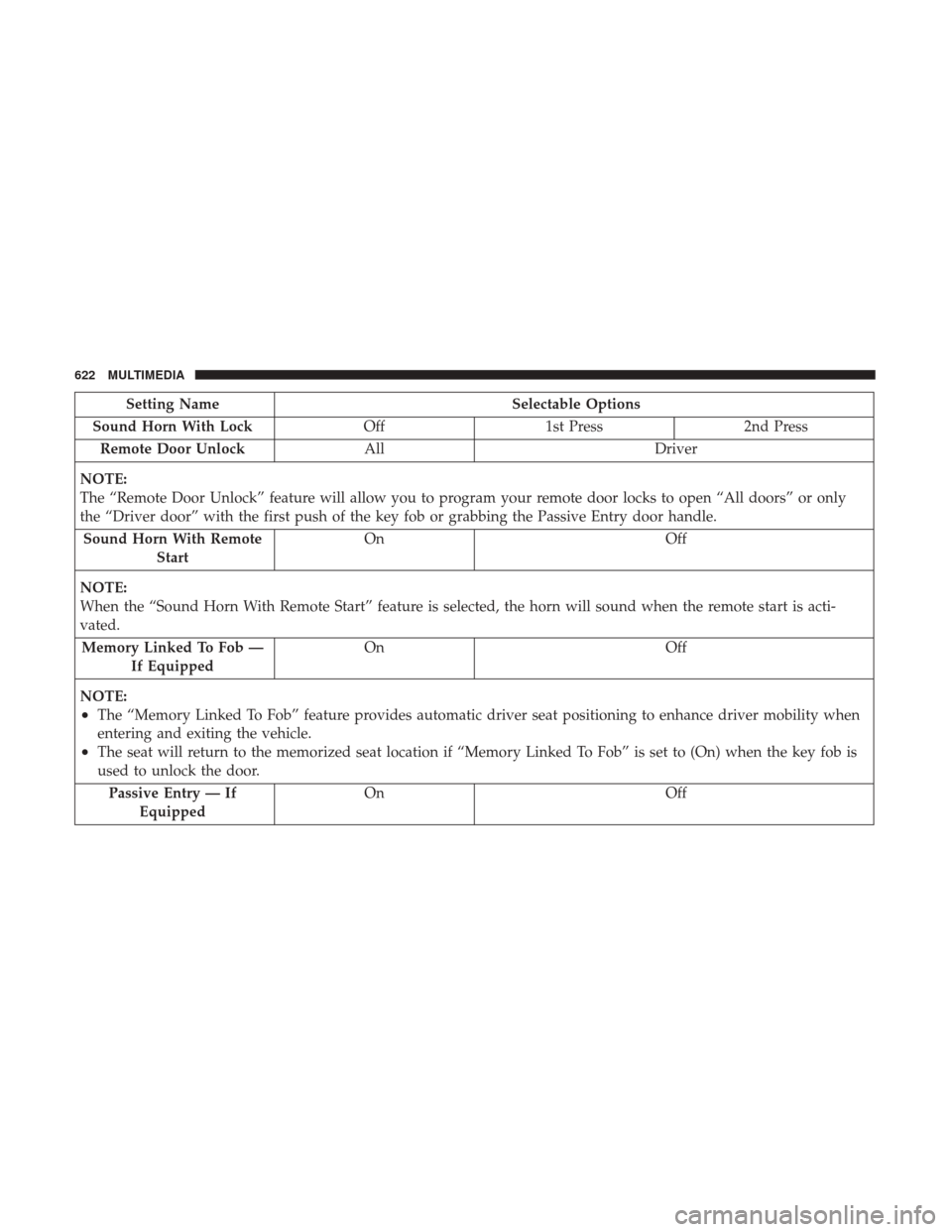
Setting NameSelectable Options
Sound Horn With Lock Off1st Press 2nd Press
Remote Door Unlock All Driver
NOTE:
The “Remote Door Unlock” feature will allow you to program your remote door locks to open “All doors” or only
the “Driver door” with the first push of the key fob or grabbing the Passive Entry door handle. Sound Horn With Remote Start On
Off
NOTE:
When the “Sound Horn With Remote Start” feature is selected, the horn will sound when the remote start is acti-
vated. Memory Linked To Fob — If Equipped On
Off
NOTE:
•The “Memory Linked To Fob” feature provides automatic driver seat positioning to enhance driver mobility when
entering and exiting the vehicle.
•The seat will return to the memorized seat location if “Memory Linked To Fob” is set to (On) when the key fob is
used to unlock the door. Passive Entry — If Equipped On Off
622 MULTIMEDIA
Page 625 of 700
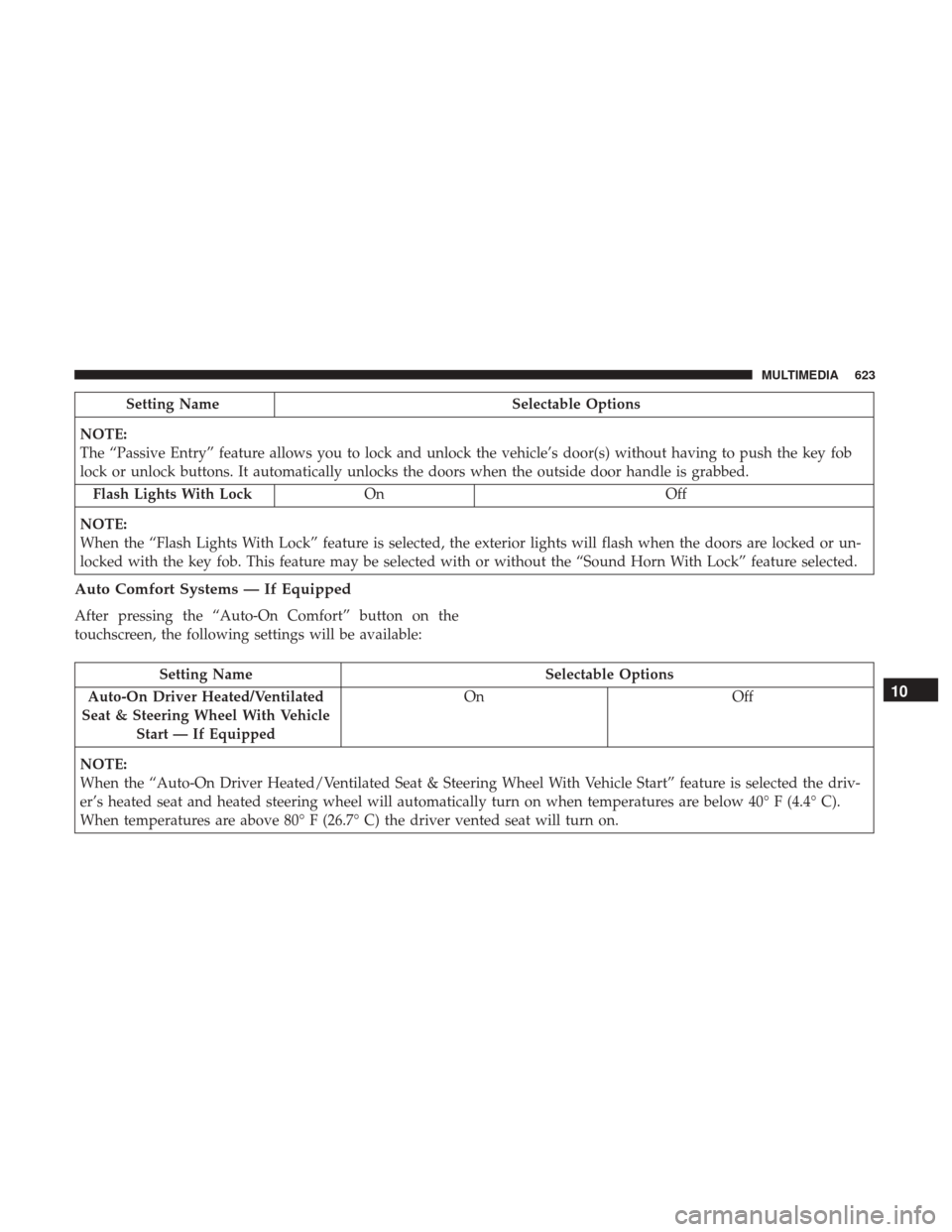
Setting NameSelectable Options
NOTE:
The “Passive Entry” feature allows you to lock and unlock the vehicle’s door(s) without having to push the key fob
lock or unlock buttons. It automatically unlocks the doors when the outside door handle is grabbed. Flash Lights With Lock On Off
NOTE:
When the “Flash Lights With Lock” feature is selected, the exterior lights will flash when the doors are locked or un-
locked with the key fob. This feature may be selected with or without the “Sound Horn With Lock” feature selected.
Auto Comfort Systems — If Equipped
After pressing the “Auto-On Comfort” button on the
touchscreen, the following settings will be available:
Setting Name Selectable Options
Auto-On Driver Heated/Ventilated
Seat & Steering Wheel With Vehicle Start — If Equipped On
Off
NOTE:
When the “Auto-On Driver Heated/Ventilated Seat & Steering Wheel With Vehicle Start” feature is selected the driv-
er’s heated seat and heated steering wheel will automatically turn on when temperatures are below 40° F (4.4° C).
When temperatures are above 80° F (26.7° C) the driver vented seat will turn on.
10
MULTIMEDIA 623