park Ram 1500 2019 Owner's Manual
[x] Cancel search | Manufacturer: RAM, Model Year: 2019, Model line: 1500, Model: Ram 1500 2019Pages: 698, PDF Size: 9.04 MB
Page 563 of 698
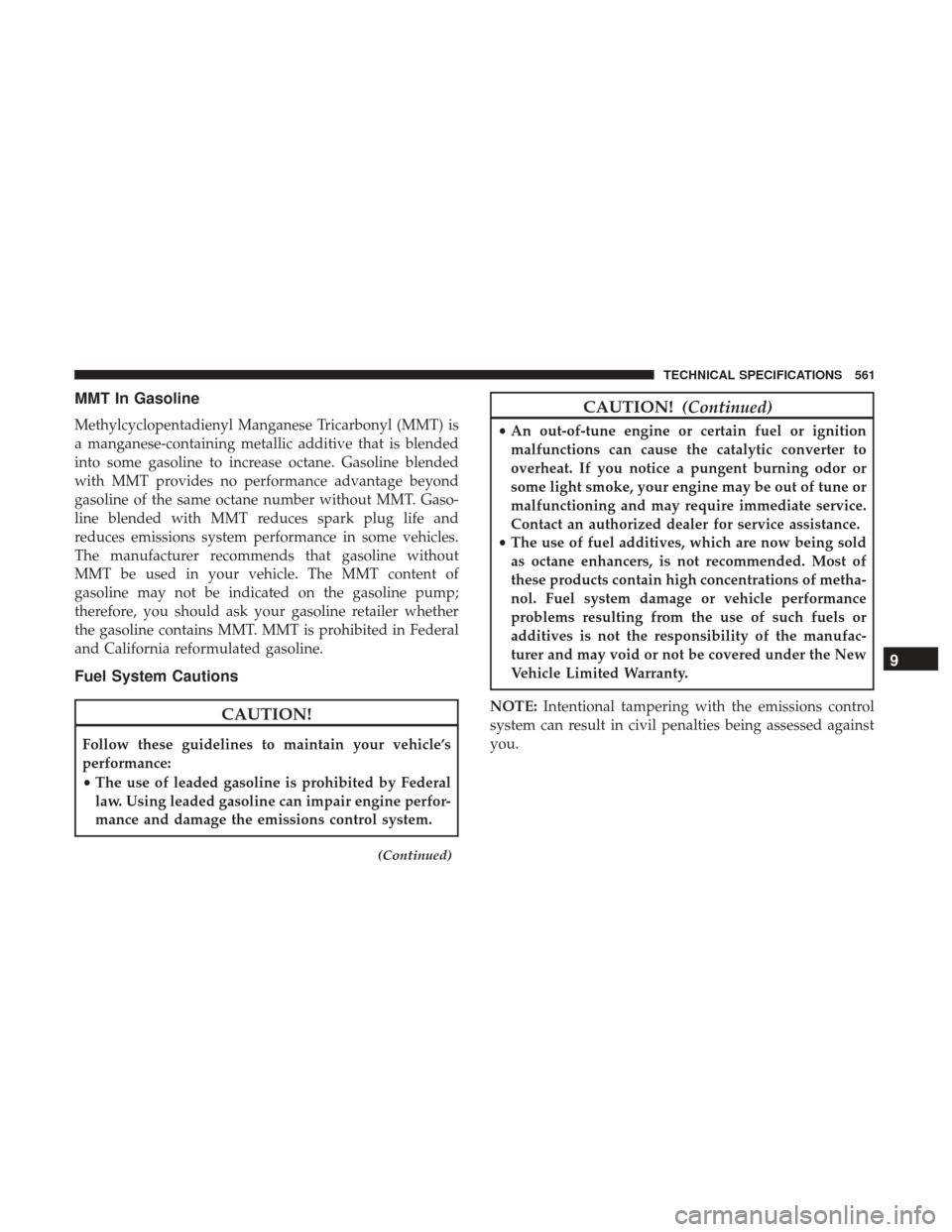
MMT In Gasoline
Methylcyclopentadienyl Manganese Tricarbonyl (MMT) is
a manganese-containing metallic additive that is blended
into some gasoline to increase octane. Gasoline blended
with MMT provides no performance advantage beyond
gasoline of the same octane number without MMT. Gaso-
line blended with MMT reduces spark plug life and
reduces emissions system performance in some vehicles.
The manufacturer recommends that gasoline without
MMT be used in your vehicle. The MMT content of
gasoline may not be indicated on the gasoline pump;
therefore, you should ask your gasoline retailer whether
the gasoline contains MMT. MMT is prohibited in Federal
and California reformulated gasoline.
Fuel System Cautions
CAUTION!
Follow these guidelines to maintain your vehicle’s
performance:
•The use of leaded gasoline is prohibited by Federal
law. Using leaded gasoline can impair engine perfor-
mance and damage the emissions control system.
(Continued)
CAUTION! (Continued)
•An out-of-tune engine or certain fuel or ignition
malfunctions can cause the catalytic converter to
overheat. If you notice a pungent burning odor or
some light smoke, your engine may be out of tune or
malfunctioning and may require immediate service.
Contact an authorized dealer for service assistance.
• The use of fuel additives, which are now being sold
as octane enhancers, is not recommended. Most of
these products contain high concentrations of metha-
nol. Fuel system damage or vehicle performance
problems resulting from the use of such fuels or
additives is not the responsibility of the manufac-
turer and may void or not be covered under the New
Vehicle Limited Warranty.
NOTE: Intentional tampering with the emissions control
system can result in civil penalties being assessed against
you.
9
TECHNICAL SPECIFICATIONS 561
Page 564 of 698
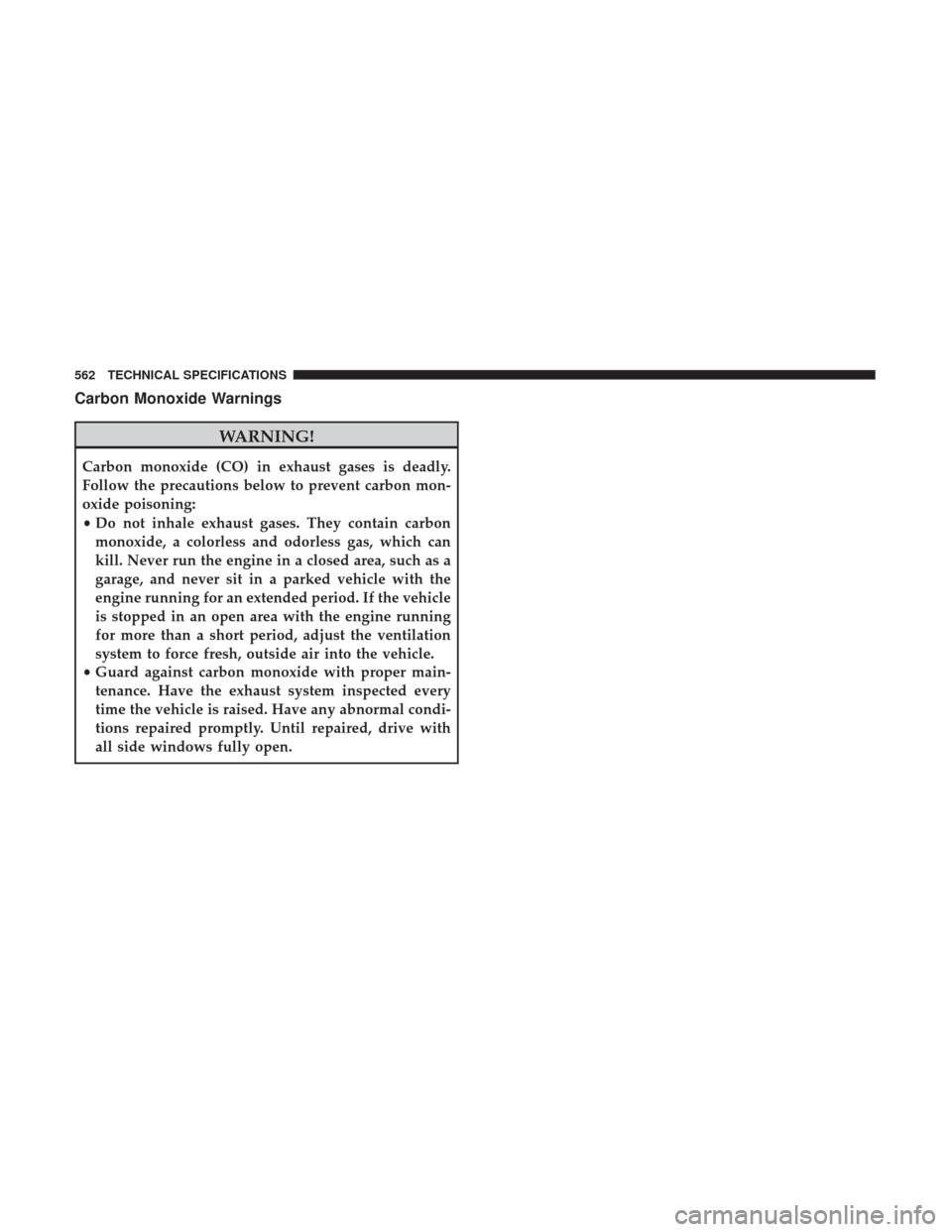
Carbon Monoxide Warnings
WARNING!
Carbon monoxide (CO) in exhaust gases is deadly.
Follow the precautions below to prevent carbon mon-
oxide poisoning:
•Do not inhale exhaust gases. They contain carbon
monoxide, a colorless and odorless gas, which can
kill. Never run the engine in a closed area, such as a
garage, and never sit in a parked vehicle with the
engine running for an extended period. If the vehicle
is stopped in an open area with the engine running
for more than a short period, adjust the ventilation
system to force fresh, outside air into the vehicle.
• Guard against carbon monoxide with proper main-
tenance. Have the exhaust system inspected every
time the vehicle is raised. Have any abnormal condi-
tions repaired promptly. Until repaired, drive with
all side windows fully open.
562 TECHNICAL SPECIFICATIONS
Page 566 of 698
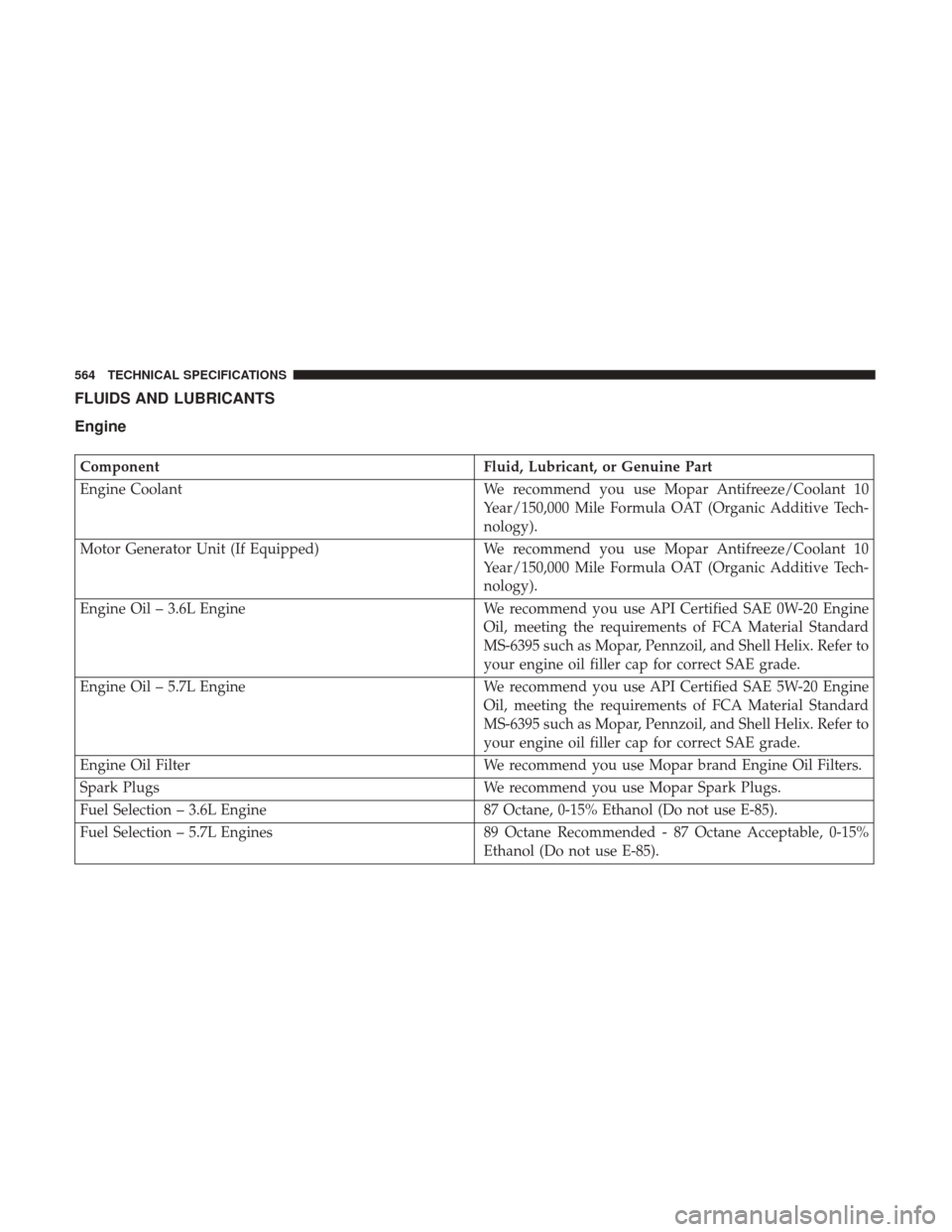
FLUIDS AND LUBRICANTS
Engine
ComponentFluid, Lubricant, or Genuine Part
Engine Coolant We recommend you use Mopar Antifreeze/Coolant 10
Year/150,000 Mile Formula OAT (Organic Additive Tech-
nology).
Motor Generator Unit (If Equipped) We recommend you use Mopar Antifreeze/Coolant 10
Year/150,000 Mile Formula OAT (Organic Additive Tech-
nology).
Engine Oil – 3.6L Engine We recommend you use API Certified SAE 0W-20 Engine
Oil, meeting the requirements of FCA Material Standard
MS-6395 such as Mopar, Pennzoil, and Shell Helix. Refer to
your engine oil filler cap for correct SAE grade.
Engine Oil – 5.7L Engine We recommend you use API Certified SAE 5W-20 Engine
Oil, meeting the requirements of FCA Material Standard
MS-6395 such as Mopar, Pennzoil, and Shell Helix. Refer to
your engine oil filler cap for correct SAE grade.
Engine Oil Filter We recommend you use Mopar brand Engine Oil Filters.
Spark Plugs We recommend you use Mopar Spark Plugs.
Fuel Selection – 3.6L Engine 87 Octane, 0-15% Ethanol (Do not use E-85).
Fuel Selection – 5.7L Engines 89 Octane Recommended - 87 Octane Acceptable, 0-15%
Ethanol (Do not use E-85).
564 TECHNICAL SPECIFICATIONS
Page 577 of 698
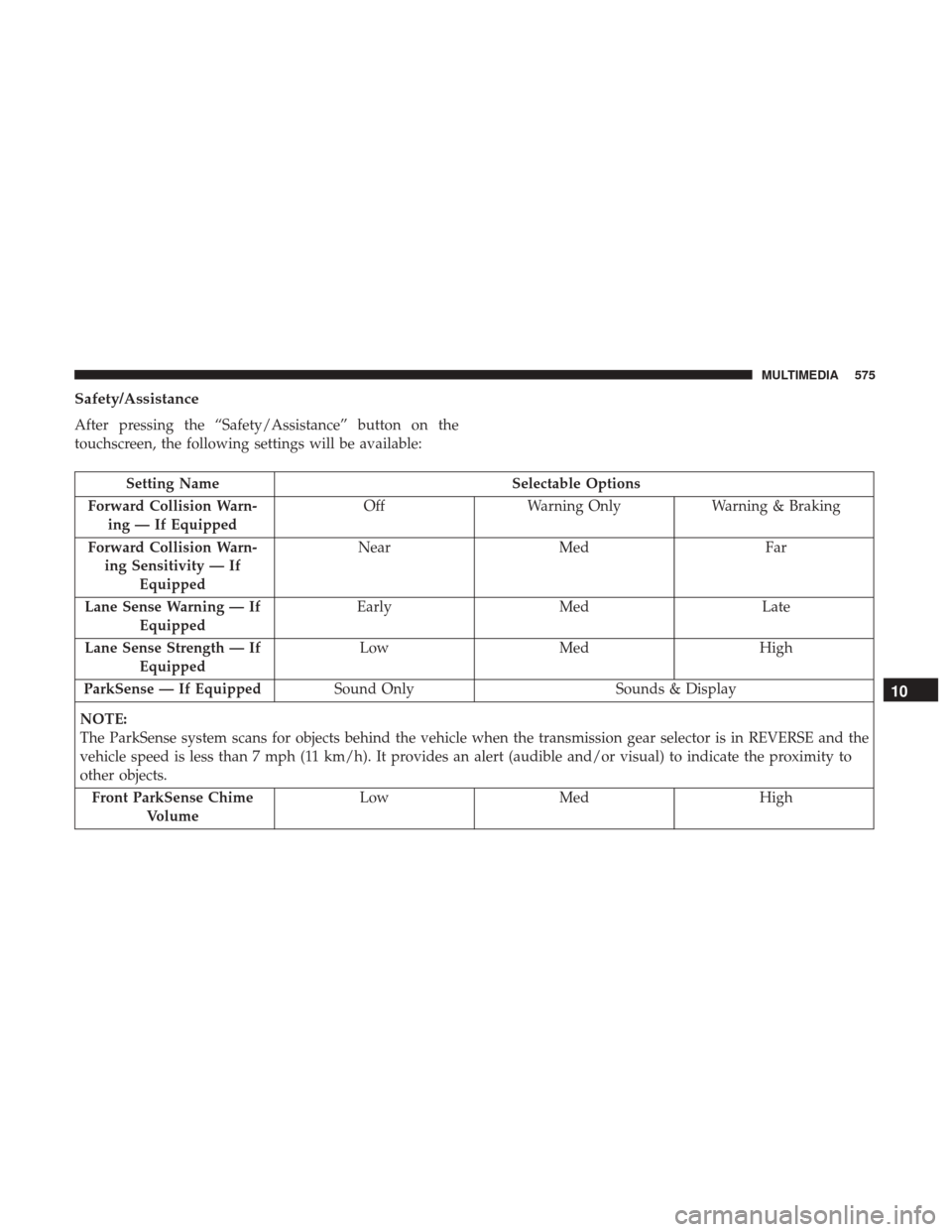
Safety/Assistance
After pressing the “Safety/Assistance” button on the
touchscreen, the following settings will be available:
Setting NameSelectable Options
Forward Collision Warn- ing — If Equipped Off
Warning Only Warning & Braking
Forward Collision Warn- ing Sensitivity — If Equipped Near
Med Far
Lane Sense Warning — If Equipped Early
Med Late
Lane Sense Strength — If Equipped Low
Med High
ParkSense — If Equipped Sound Only Sounds & Display
NOTE:
The ParkSense system scans for objects behind the vehicle when the transmission gear selector is in REVERSE and the
vehicle speed is less than 7 mph (11 km/h). It provides an alert (audible and/or visual) to indicate the proximity to
other objects. Front ParkSense Chime Volume Low
Med High
10
MULTIMEDIA 575
Page 578 of 698
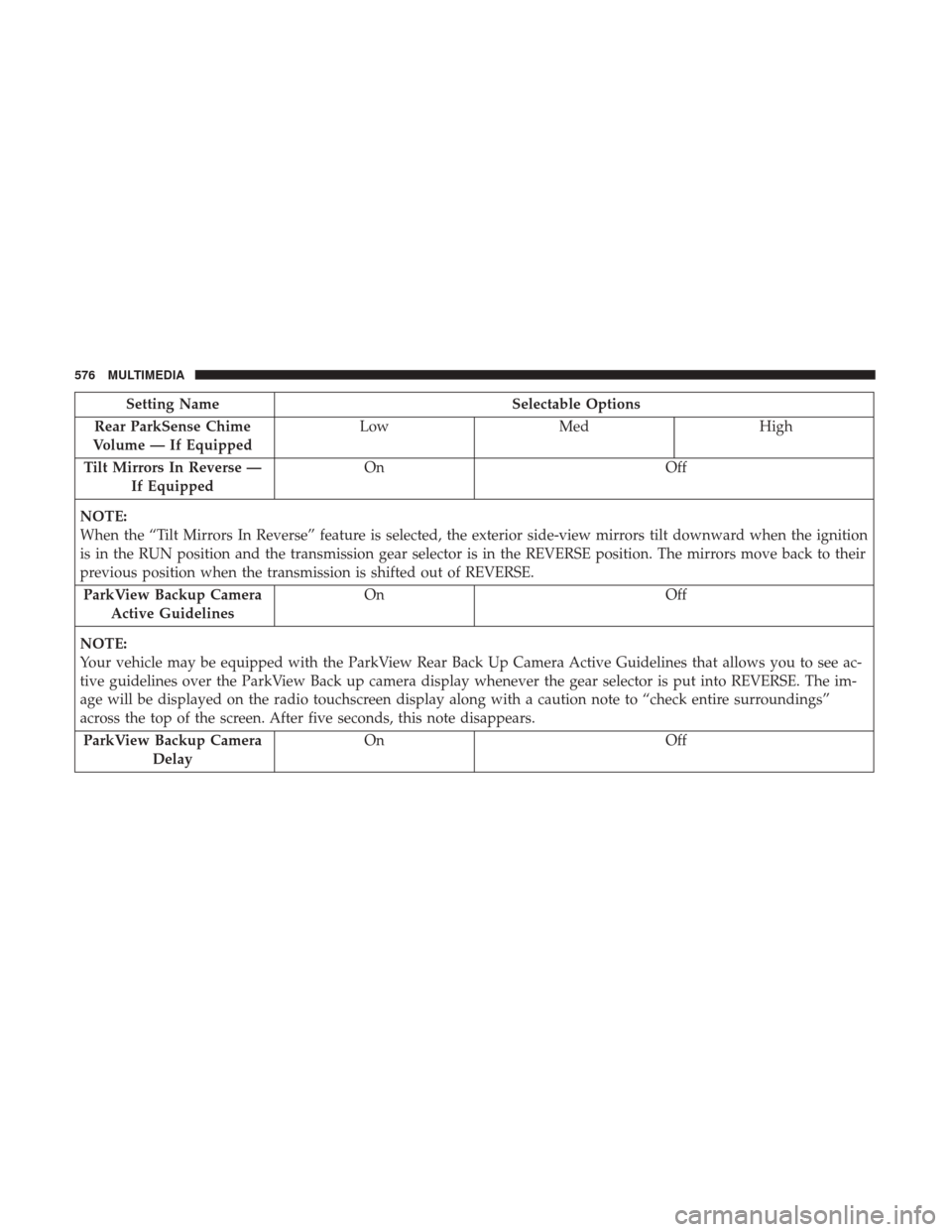
Setting NameSelectable Options
Rear ParkSense Chime
Volume — If Equipped Low
Med High
Tilt Mirrors In Reverse — If Equipped On
Off
NOTE:
When the “Tilt Mirrors In Reverse” feature is selected, the exterior side-view mirrors tilt downward when the ignition
is in the RUN position and the transmission gear selector is in the REVERSE position. The mirrors move back to their
previous position when the transmission is shifted out of REVERSE. ParkView Backup Camera Active Guidelines On
Off
NOTE:
Your vehicle may be equipped with the ParkView Rear Back Up Camera Active Guidelines that allows you to see ac-
tive guidelines over the ParkView Back up camera display whenever the gear selector is put into REVERSE. The im-
age will be displayed on the radio touchscreen display along with a caution note to “check entire surroundings”
across the top of the screen. After five seconds, this note disappears. ParkView Backup Camera Delay On
Off
576 MULTIMEDIA
Page 579 of 698
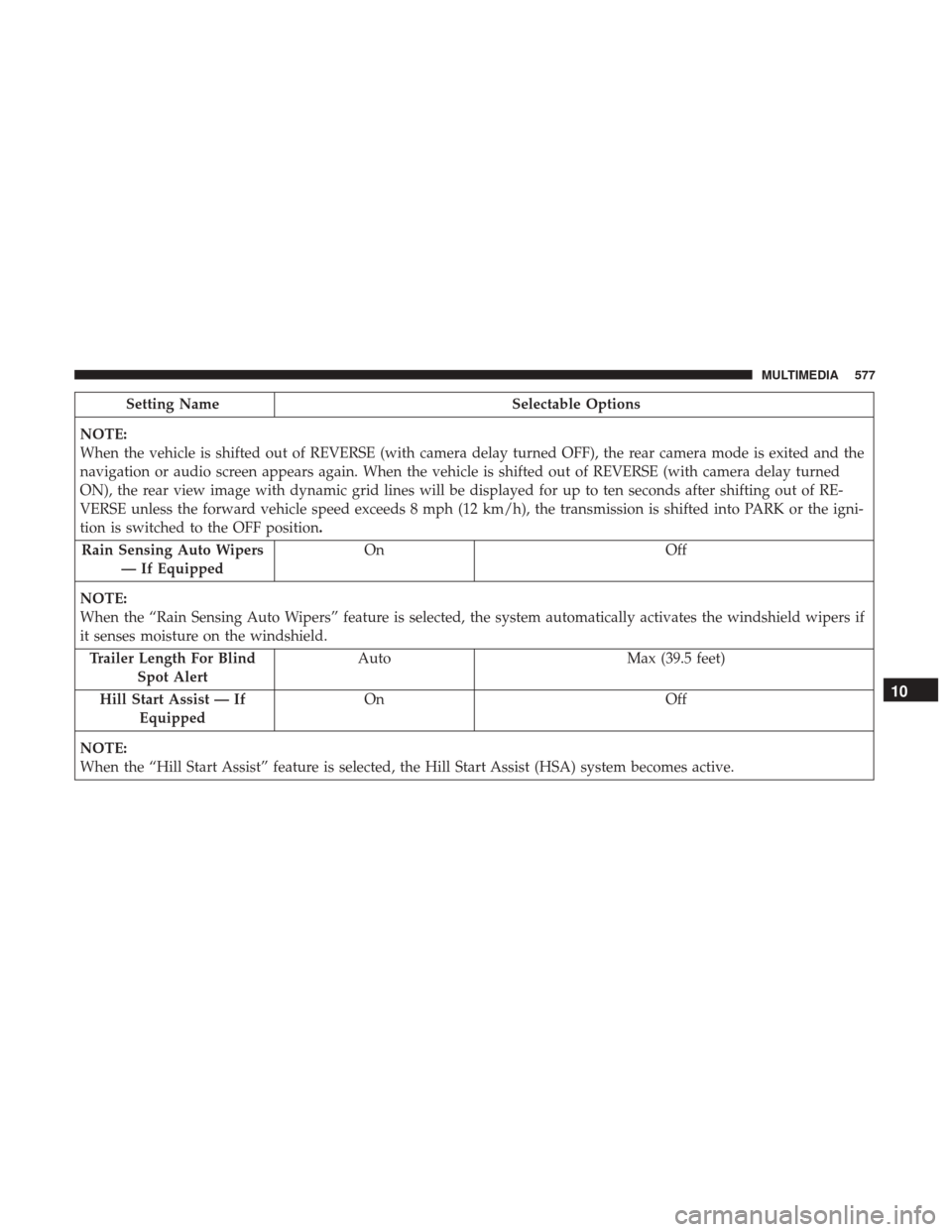
Setting NameSelectable Options
NOTE:
When the vehicle is shifted out of REVERSE (with camera delay turned OFF), the rear camera mode is exited and the
navigation or audio screen appears again. When the vehicle is shifted out of REVERSE (with camera delay turned
ON), the rear view image with dynamic grid lines will be displayed for up to ten seconds after shifting out of RE-
VERSE unless the forward vehicle speed exceeds 8 mph (12 km/h), the transmission is shifted into PARK or the igni-
tion is switched to the OFF position. Rain Sensing Auto Wipers — If Equipped On
Off
NOTE:
When the “Rain Sensing Auto Wipers” feature is selected, the system automatically activates the windshield wipers if
it senses moisture on the windshield. Trailer Length For Blind Spot Alert Auto
Max (39.5 feet)
Hill Start Assist — If Equipped On
Off
NOTE:
When the “Hill Start Assist” feature is selected, the Hill Start Assist (HSA) system becomes active.
10
MULTIMEDIA 577
Page 580 of 698
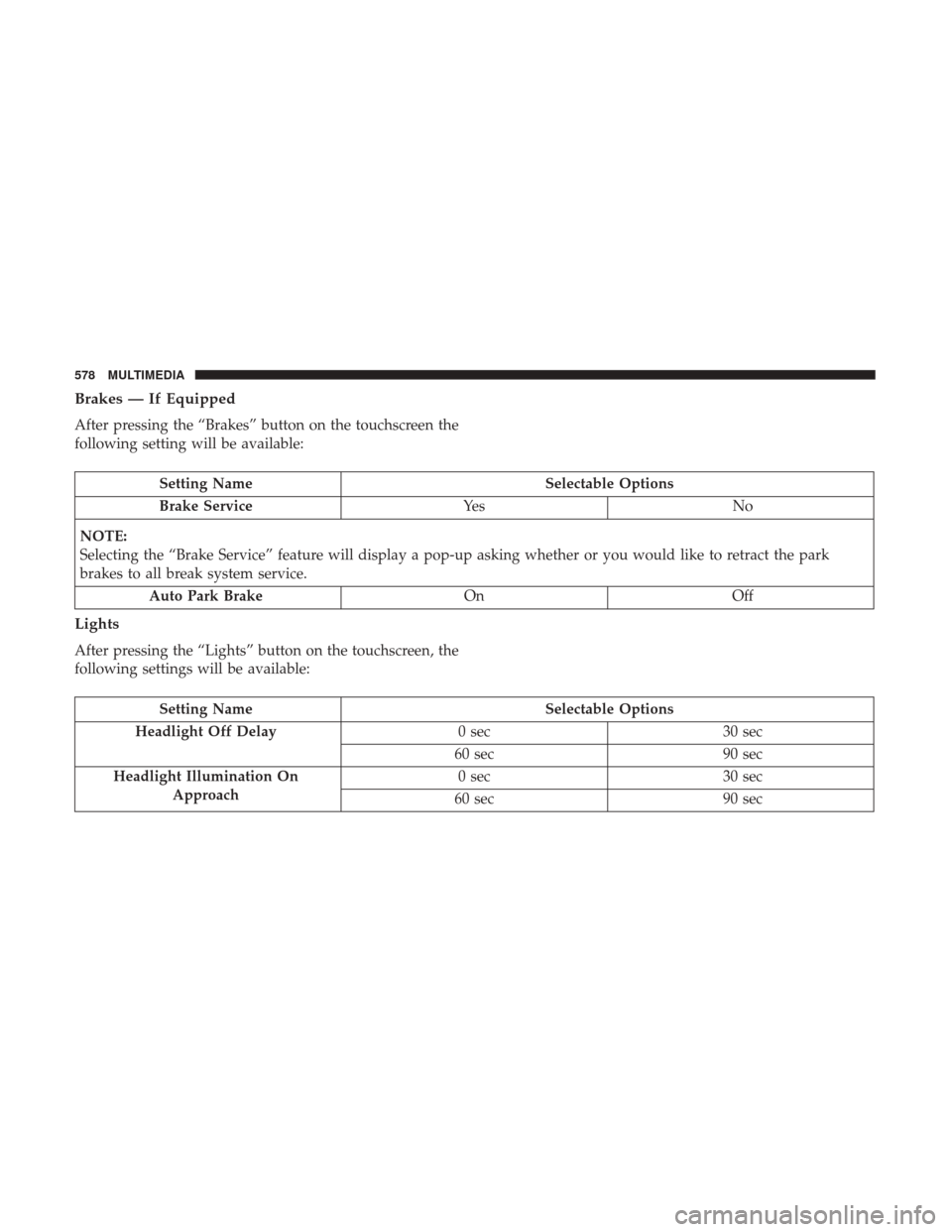
Brakes — If Equipped
After pressing the “Brakes” button on the touchscreen the
following setting will be available:
Setting NameSelectable Options
Brake Service Ye sN o
NOTE:
Selecting the “Brake Service” feature will display a pop-up asking whether or you would like to retract the park
brakes to all break system service. Auto Park Brake OnOff
Lights
After pressing the “Lights” button on the touchscreen, the
following settings will be available:
Setting Name Selectable Options
Headlight Off Delay 0 sec30 sec
60 sec 90 sec
Headlight Illumination On Approach 0 sec
30 sec
60 sec 90 sec
578 MULTIMEDIA
Page 582 of 698
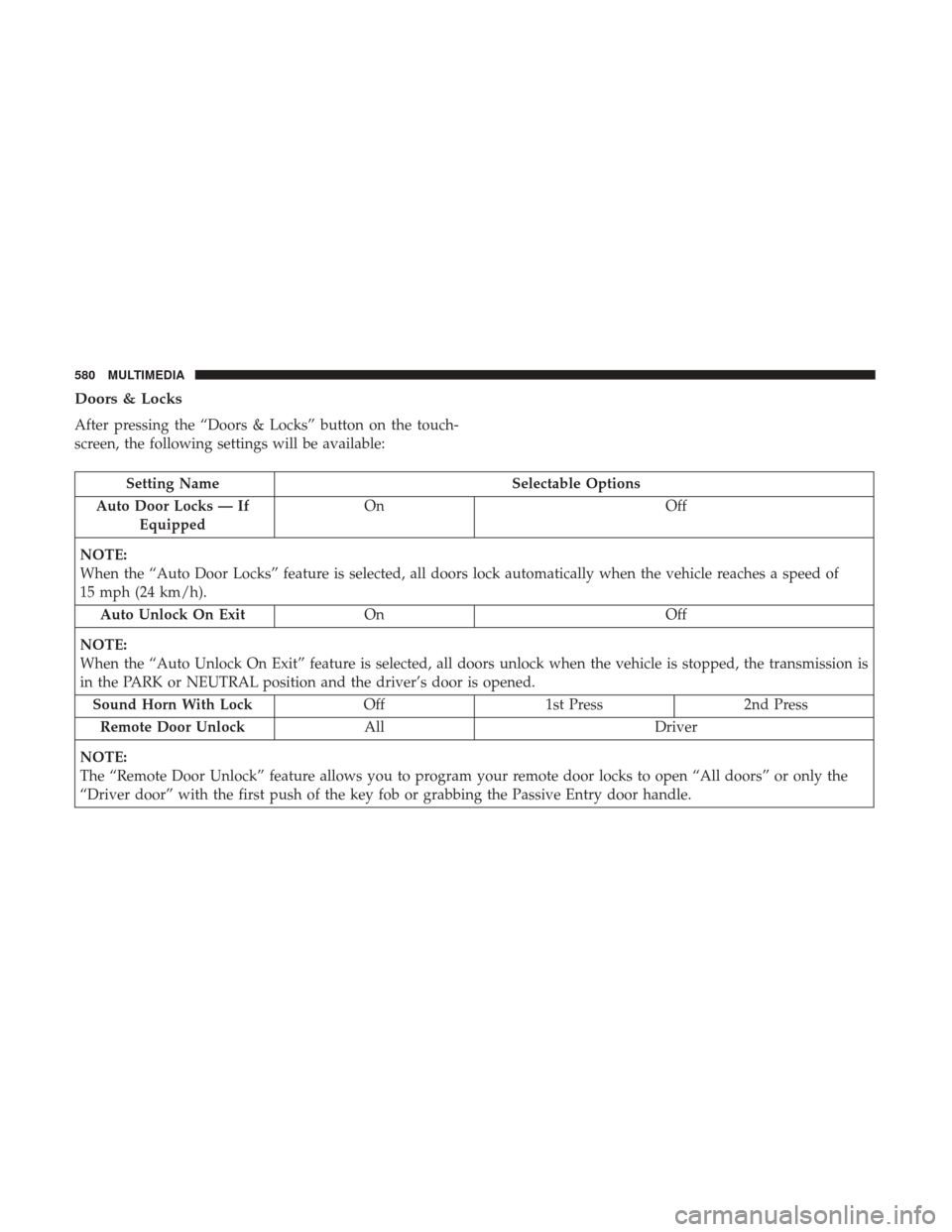
Doors & Locks
After pressing the “Doors & Locks” button on the touch-
screen, the following settings will be available:
Setting NameSelectable Options
Auto Door Locks — If Equipped On
Off
NOTE:
When the “Auto Door Locks” feature is selected, all doors lock automatically when the vehicle reaches a speed of
15 mph (24 km/h). Auto Unlock On Exit On Off
NOTE:
When the “Auto Unlock On Exit” feature is selected, all doors unlock when the vehicle is stopped, the transmission is
in the PARK or NEUTRAL position and the driver’s door is opened. Sound Horn With Lock Off1st Press 2nd Press
Remote Door Unlock All Driver
NOTE:
The “Remote Door Unlock” feature allows you to program your remote door locks to open “All doors” or only the
“Driver door” with the first push of the key fob or grabbing the Passive Entry door handle.
580 MULTIMEDIA
Page 586 of 698
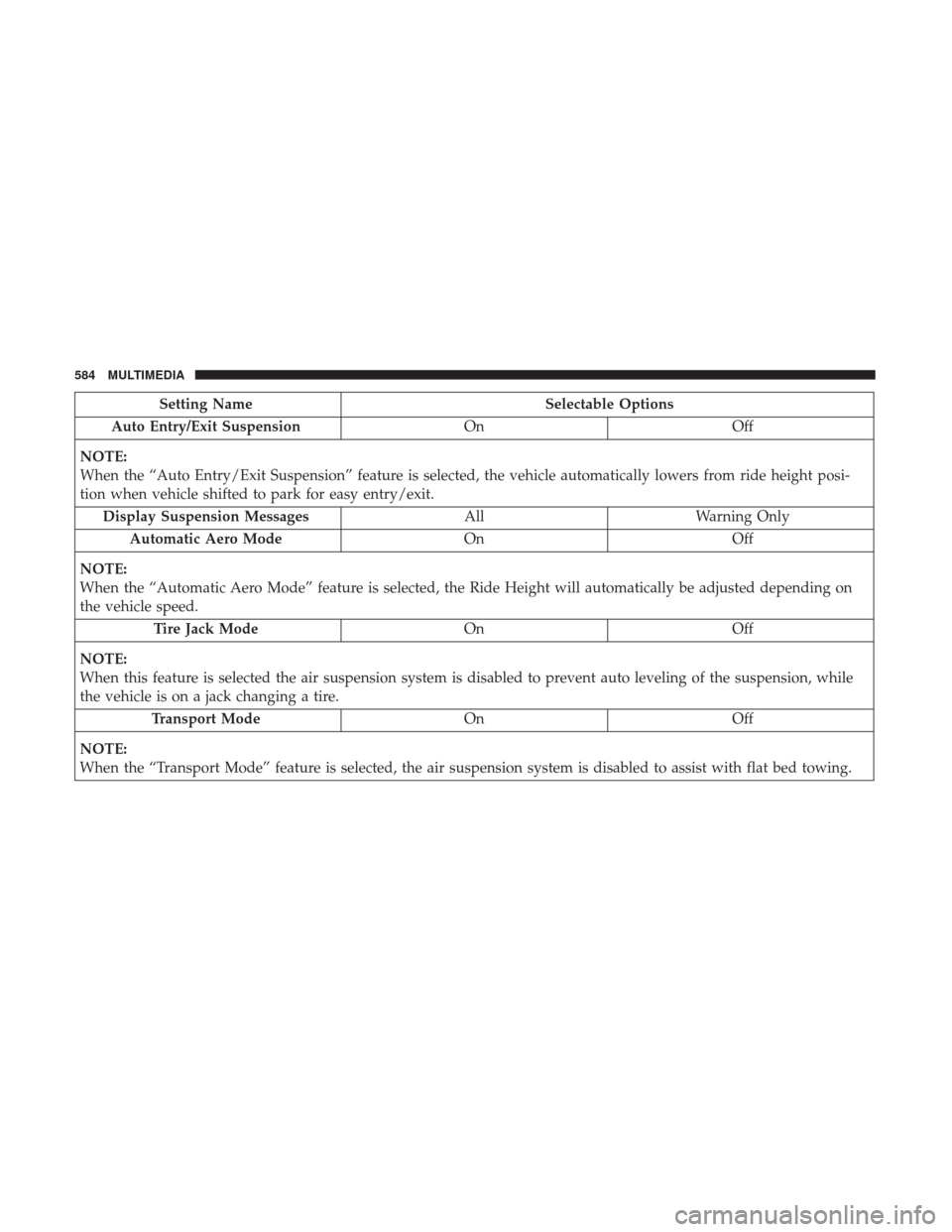
Setting NameSelectable Options
Auto Entry/Exit Suspension OnOff
NOTE:
When the “Auto Entry/Exit Suspension” feature is selected, the vehicle automatically lowers from ride height posi-
tion when vehicle shifted to park for easy entry/exit. Display Suspension Messages AllWarning Only
Automatic Aero Mode OnOff
NOTE:
When the “Automatic Aero Mode” feature is selected, the Ride Height will automatically be adjusted depending on
the vehicle speed. Tire Jack Mode OnOff
NOTE:
When this feature is selected the air suspension system is disabled to prevent auto leveling of the suspension, while
the vehicle is on a jack changing a tire. Transport Mode OnOff
NOTE:
When the “Transport Mode” feature is selected, the air suspension system is disabled to assist with flat bed towing.
584 MULTIMEDIA
Page 600 of 698
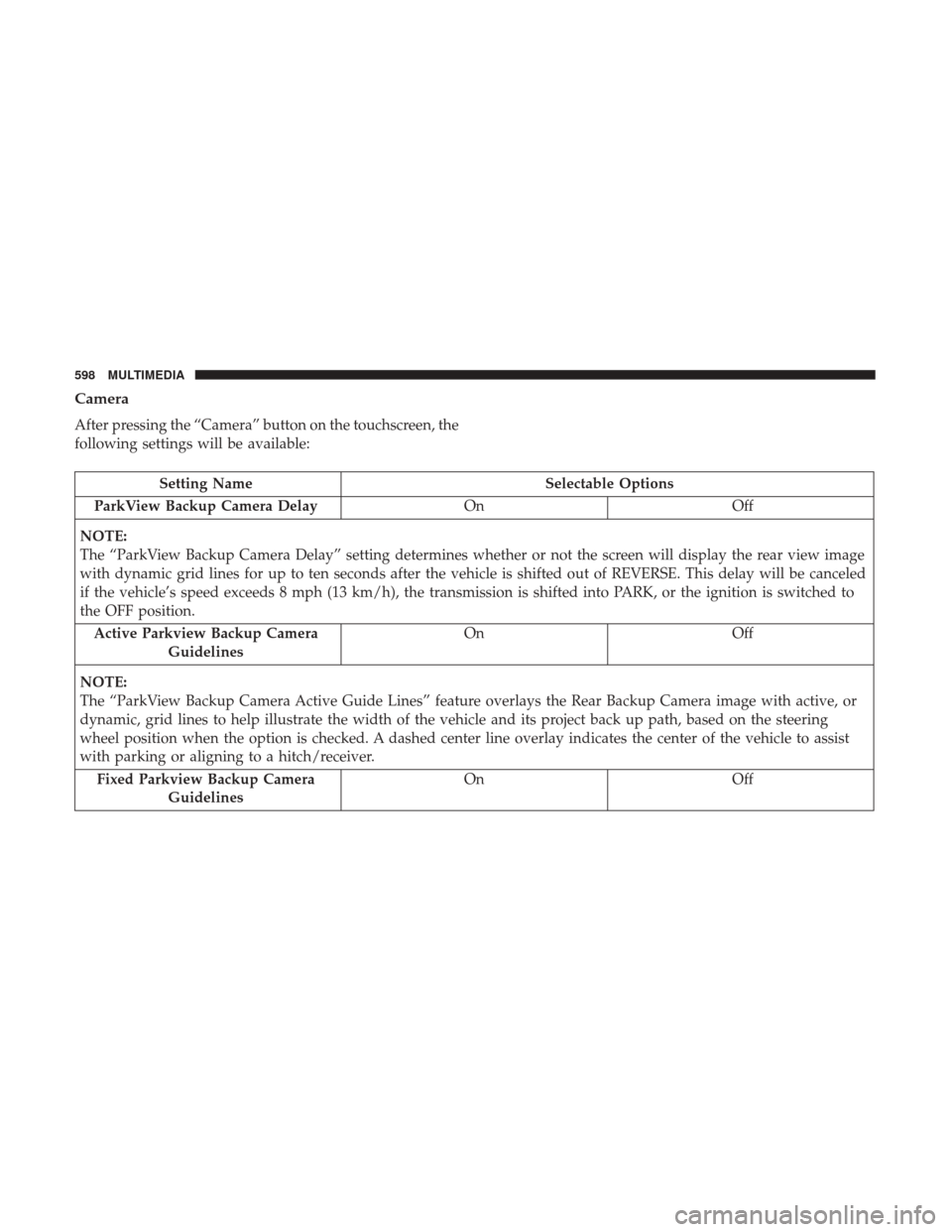
Camera
After pressing the “Camera” button on the touchscreen, the
following settings will be available:
Setting NameSelectable Options
ParkView Backup Camera Delay OnOff
NOTE:
The “ParkView Backup Camera Delay” setting determines whether or not the screen will display the rear view image
with dynamic grid lines for up to ten seconds after the vehicle is shifted out of REVERSE. This delay will be canceled
if the vehicle’s speed exceeds 8 mph (13 km/h), the transmission is shifted into PARK, or the ignition is switched to
the OFF position. Active Parkview Backup Camera Guidelines On
Off
NOTE:
The “ParkView Backup Camera Active Guide Lines” feature overlays the Rear Backup Camera image with active, or
dynamic, grid lines to help illustrate the width of the vehicle and its project back up path, based on the steering
wheel position when the option is checked. A dashed center line overlay indicates the center of the vehicle to assist
with parking or aligning to a hitch/receiver. Fixed Parkview Backup Camera Guidelines On
Off
598 MULTIMEDIA