park Ram 1500 2019 Owner's Manual
[x] Cancel search | Manufacturer: RAM, Model Year: 2019, Model line: 1500, Model: Ram 1500 2019Pages: 698, PDF Size: 9.04 MB
Page 601 of 698
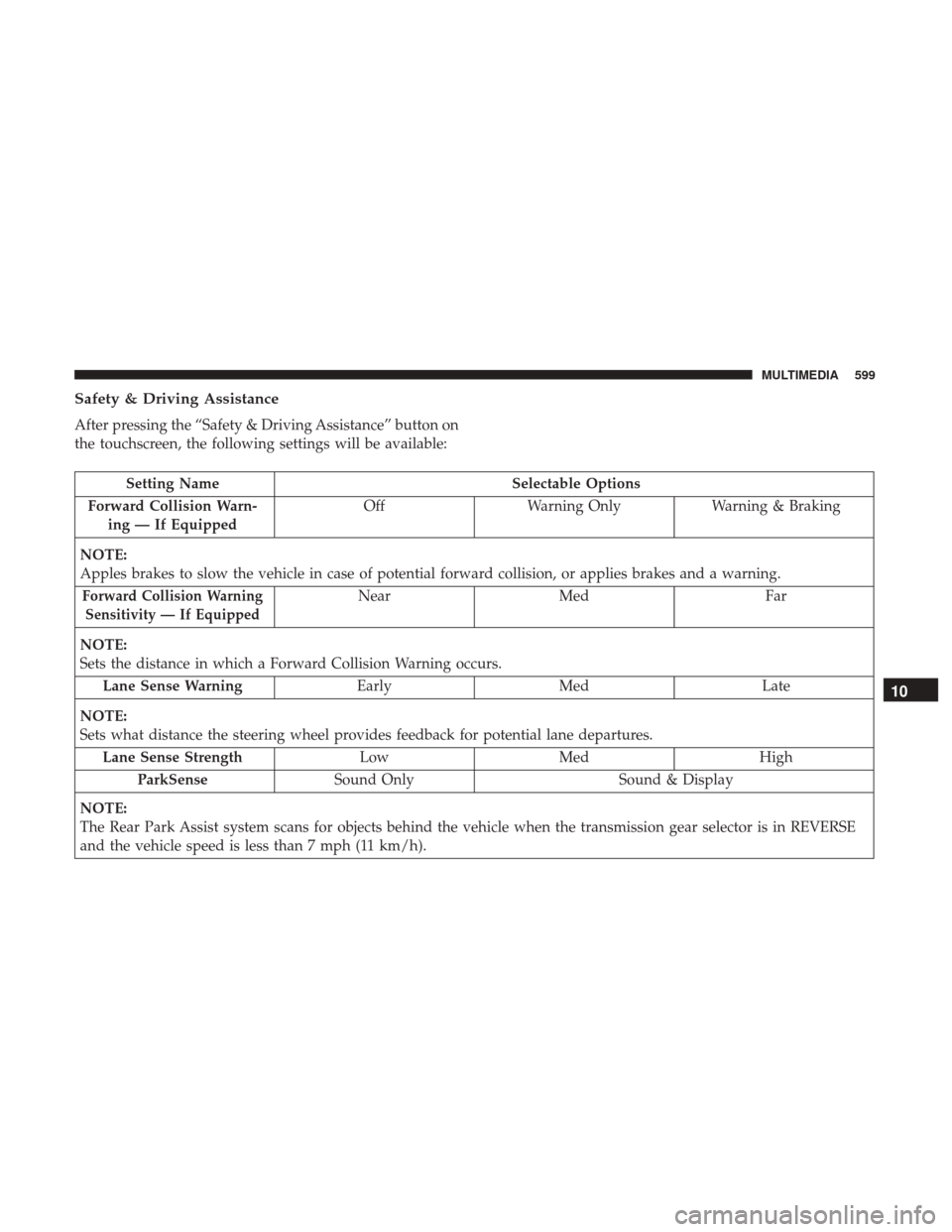
Safety & Driving Assistance
After pressing the “Safety & Driving Assistance” button on
the touchscreen, the following settings will be available:
Setting NameSelectable Options
Forward Collision Warn- ing — If Equipped Off
Warning Only Warning & Braking
NOTE:
Apples brakes to slow the vehicle in case of potential forward collision, or applies brakes and a warning.
Forward Collision Warning Sensitivity — If EquippedNear Med Far
NOTE:
Sets the distance in which a Forward Collision Warning occurs. Lane Sense Warning EarlyMed Late
NOTE:
Sets what distance the steering wheel provides feedback for potential lane departures. Lane Sense Strength LowMed High
ParkSense Sound Only Sound & Display
NOTE:
The Rear Park Assist system scans for objects behind the vehicle when the transmission gear selector is in REVERSE
and the vehicle speed is less than 7 mph (11 km/h).
10
MULTIMEDIA 599
Page 602 of 698
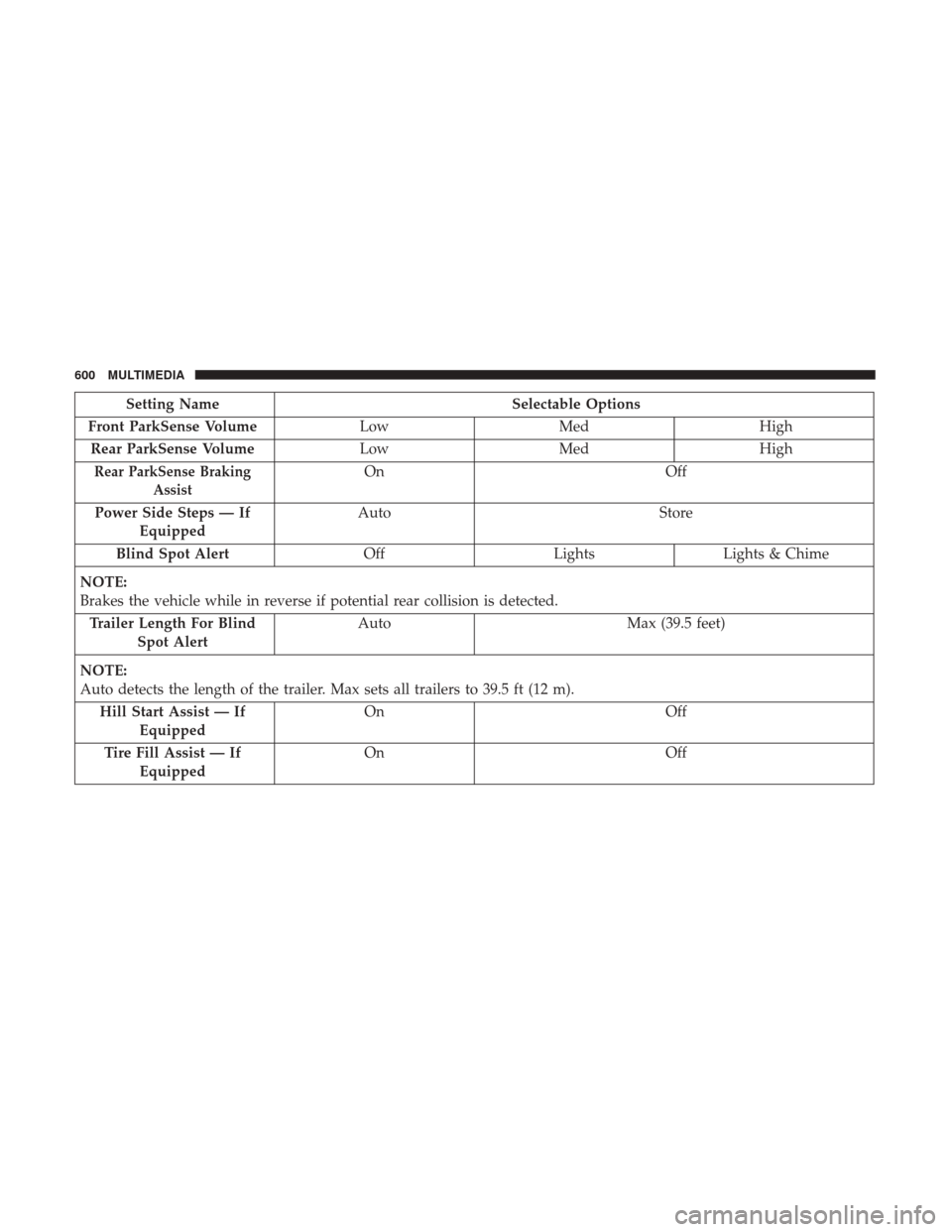
Setting NameSelectable Options
Front ParkSense Volume LowMed High
Rear ParkSense Volume LowMed High
Rear ParkSense Braking
AssistOn Off
Power Side Steps — If Equipped Auto
Store
Blind Spot Alert OffLightsLights & Chime
NOTE:
Brakes the vehicle while in reverse if potential rear collision is detected. Trailer Length For Blind Spot Alert Auto
Max (39.5 feet)
NOTE:
Auto detects the length of the trailer. Max sets all trailers to 39.5 ft (12 m). Hill Start Assist — If Equipped On
Off
Tire Fill Assist — If Equipped On
Off
600 MULTIMEDIA
Page 604 of 698
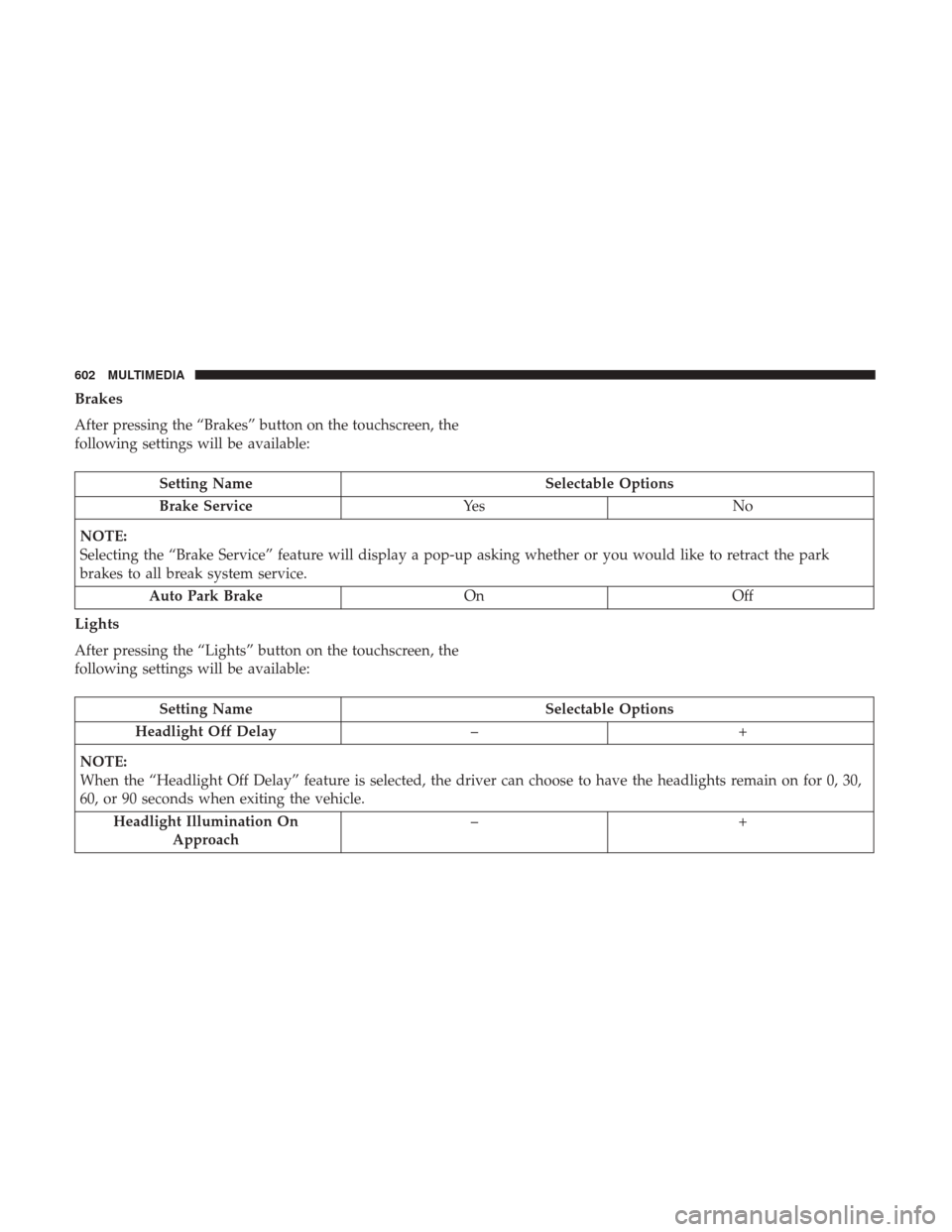
Brakes
After pressing the “Brakes” button on the touchscreen, the
following settings will be available:
Setting NameSelectable Options
Brake Service Ye sN o
NOTE:
Selecting the “Brake Service” feature will display a pop-up asking whether or you would like to retract the park
brakes to all break system service. Auto Park Brake OnOff
Lights
After pressing the “Lights” button on the touchscreen, the
following settings will be available:
Setting Name Selectable Options
Headlight Off Delay –+
NOTE:
When the “Headlight Off Delay” feature is selected, the driver can choose to have the headlights remain on for 0, 30,
60, or 90 seconds when exiting the vehicle. Headlight Illumination On Approach –+
602 MULTIMEDIA
Page 606 of 698
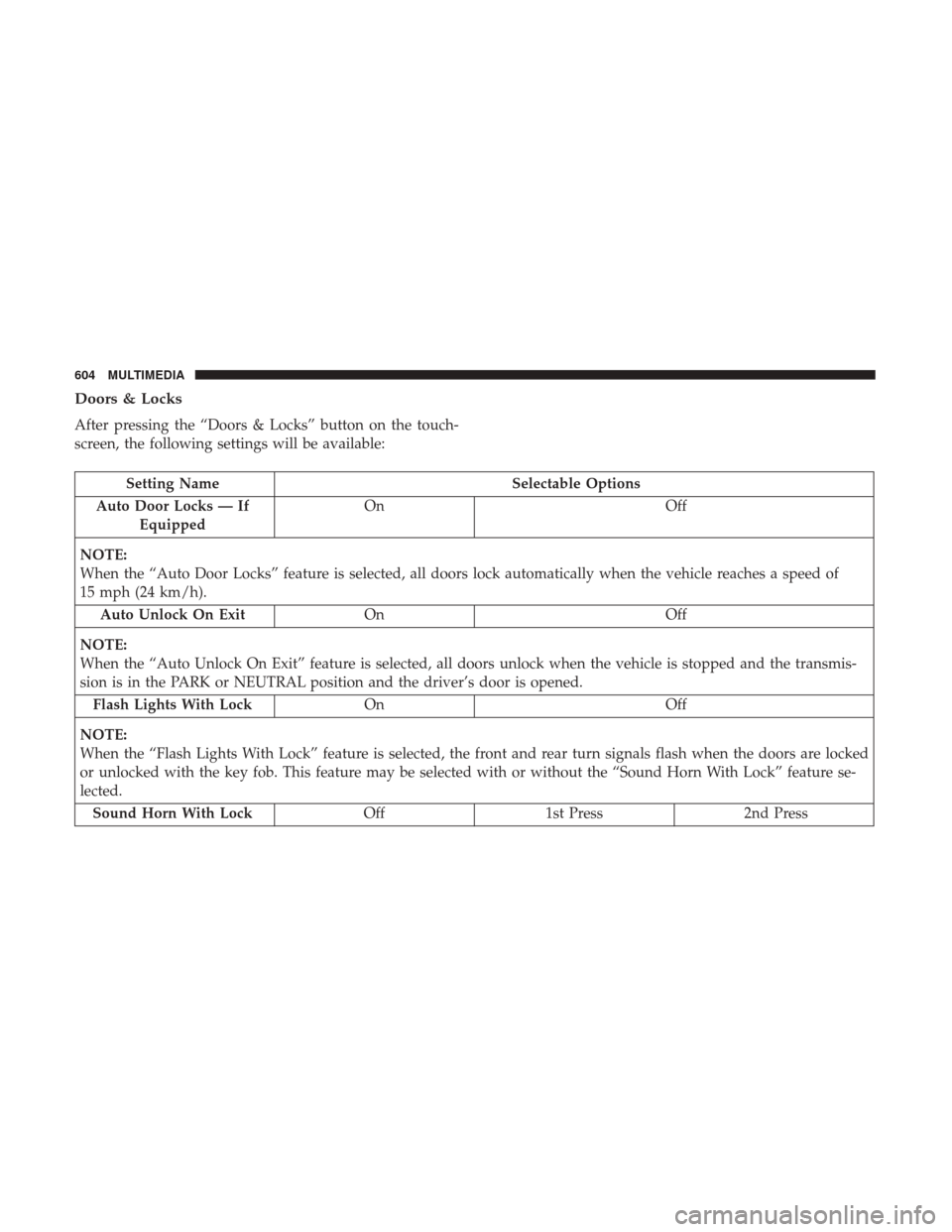
Doors & Locks
After pressing the “Doors & Locks” button on the touch-
screen, the following settings will be available:
Setting NameSelectable Options
Auto Door Locks — If Equipped On
Off
NOTE:
When the “Auto Door Locks” feature is selected, all doors lock automatically when the vehicle reaches a speed of
15 mph (24 km/h). Auto Unlock On Exit On Off
NOTE:
When the “Auto Unlock On Exit” feature is selected, all doors unlock when the vehicle is stopped and the transmis-
sion is in the PARK or NEUTRAL position and the driver’s door is opened. Flash Lights With Lock On Off
NOTE:
When the “Flash Lights With Lock” feature is selected, the front and rear turn signals flash when the doors are locked
or unlocked with the key fob. This feature may be selected with or without the “Sound Horn With Lock” feature se-
lected. Sound Horn With Lock Off1st Press 2nd Press
604 MULTIMEDIA
Page 624 of 698
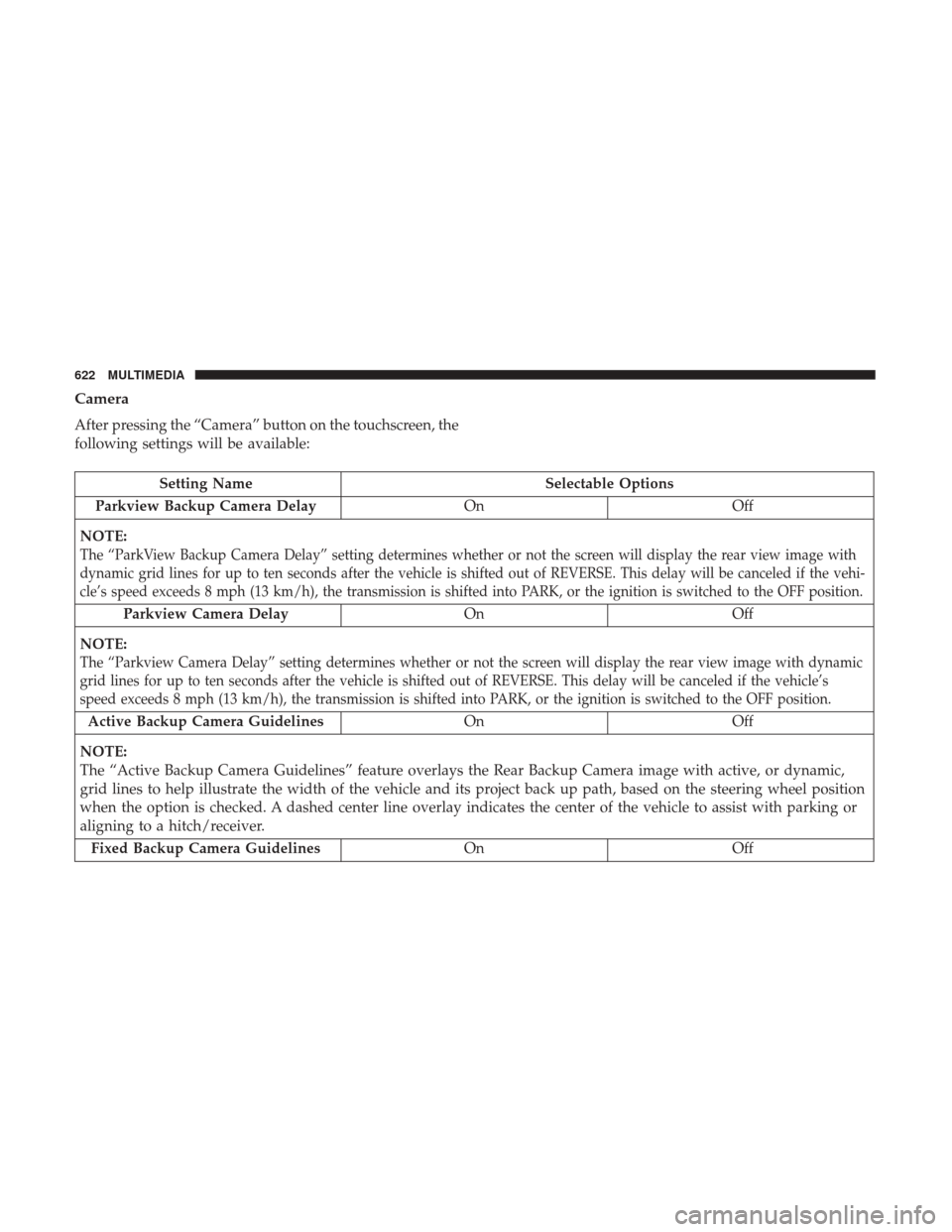
Camera
After pressing the “Camera” button on the touchscreen, the
following settings will be available:
Setting NameSelectable Options
Parkview Backup Camera Delay OnOff
NOTE:
The “ParkView Backup Camera Delay” setting determines whether or not the screen will display the rear view image with
dynamic grid lines for up to ten seconds after the vehicle is shifted out of REVERSE. This delay will be canceled if the vehi-
cle’s speed exceeds 8 mph (13 km/h), the transmission is shifted into PARK, or the ignition is switched to the OFF position.
Parkview Camera Delay On Off
NOTE:
The “Parkview Camera Delay” setting determines whether or not the screen will display the rear view image with dynamic
grid lines for up to ten seconds after the vehicle is shifted out of REVERSE. This delay will be canceled if the vehicle’s
speed exceeds 8 mph (13 km/h), the transmission is shifted into PARK, or the ignition is switched to the OFF position.
Active Backup Camera Guidelines On Off
NOTE:
The “Active Backup Camera Guidelines” feature overlays the Rear Backup Camera image with active, or dynamic,
grid lines to help illustrate the width of the vehicle and its project back up path, based on the steering wheel position
when the option is checked. A dashed center line overlay indicates the center of the vehicle to assist with parking or
aligning to a hitch/receiver. Fixed Backup Camera Guidelines OnOff
622 MULTIMEDIA
Page 625 of 698
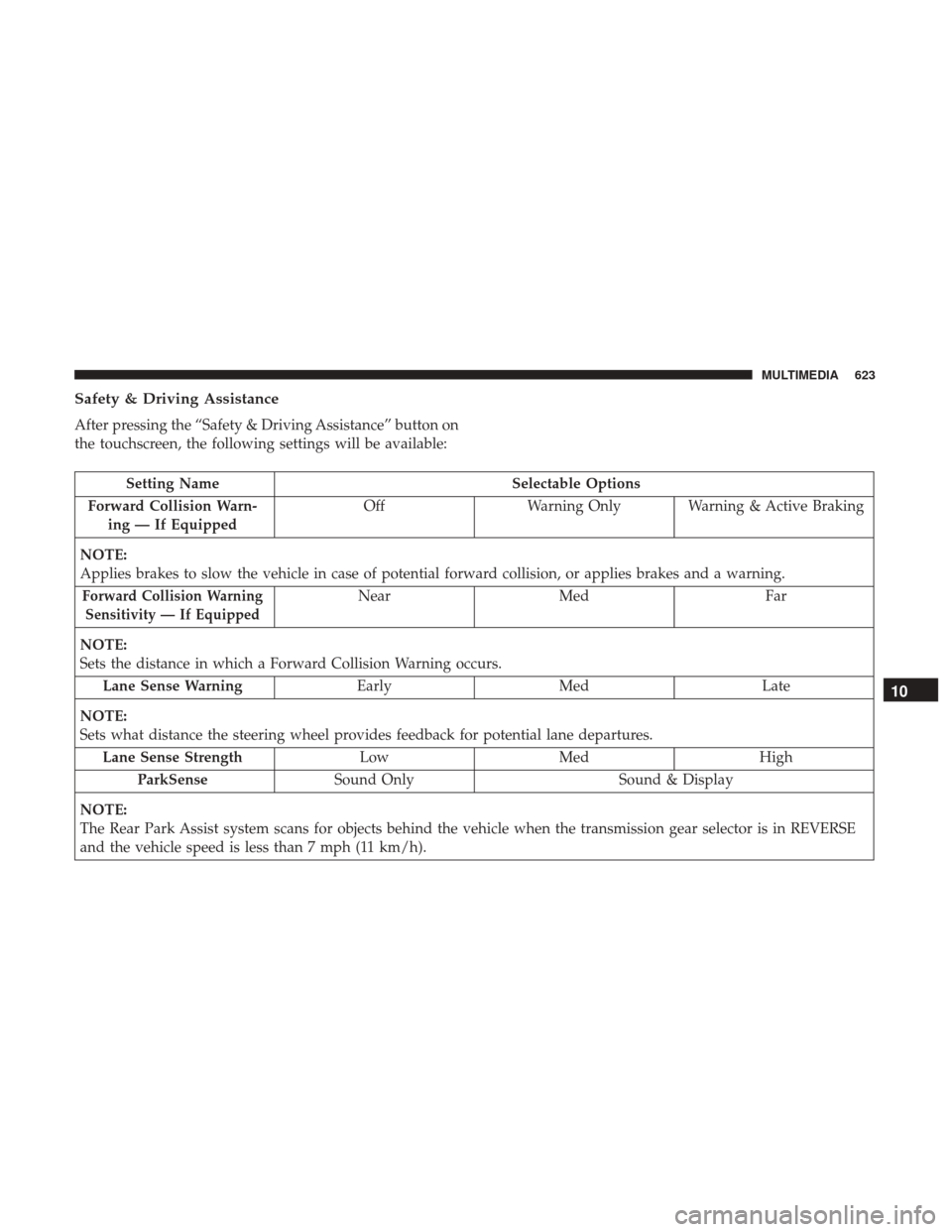
Safety & Driving Assistance
After pressing the “Safety & Driving Assistance” button on
the touchscreen, the following settings will be available:
Setting NameSelectable Options
Forward Collision Warn- ing — If Equipped Off
Warning Only Warning & Active Braking
NOTE:
Applies brakes to slow the vehicle in case of potential forward collision, or applies brakes and a warning.
Forward Collision Warning Sensitivity — If EquippedNear Med Far
NOTE:
Sets the distance in which a Forward Collision Warning occurs. Lane Sense Warning EarlyMed Late
NOTE:
Sets what distance the steering wheel provides feedback for potential lane departures. Lane Sense Strength LowMed High
ParkSense Sound Only Sound & Display
NOTE:
The Rear Park Assist system scans for objects behind the vehicle when the transmission gear selector is in REVERSE
and the vehicle speed is less than 7 mph (11 km/h).
10
MULTIMEDIA 623
Page 626 of 698
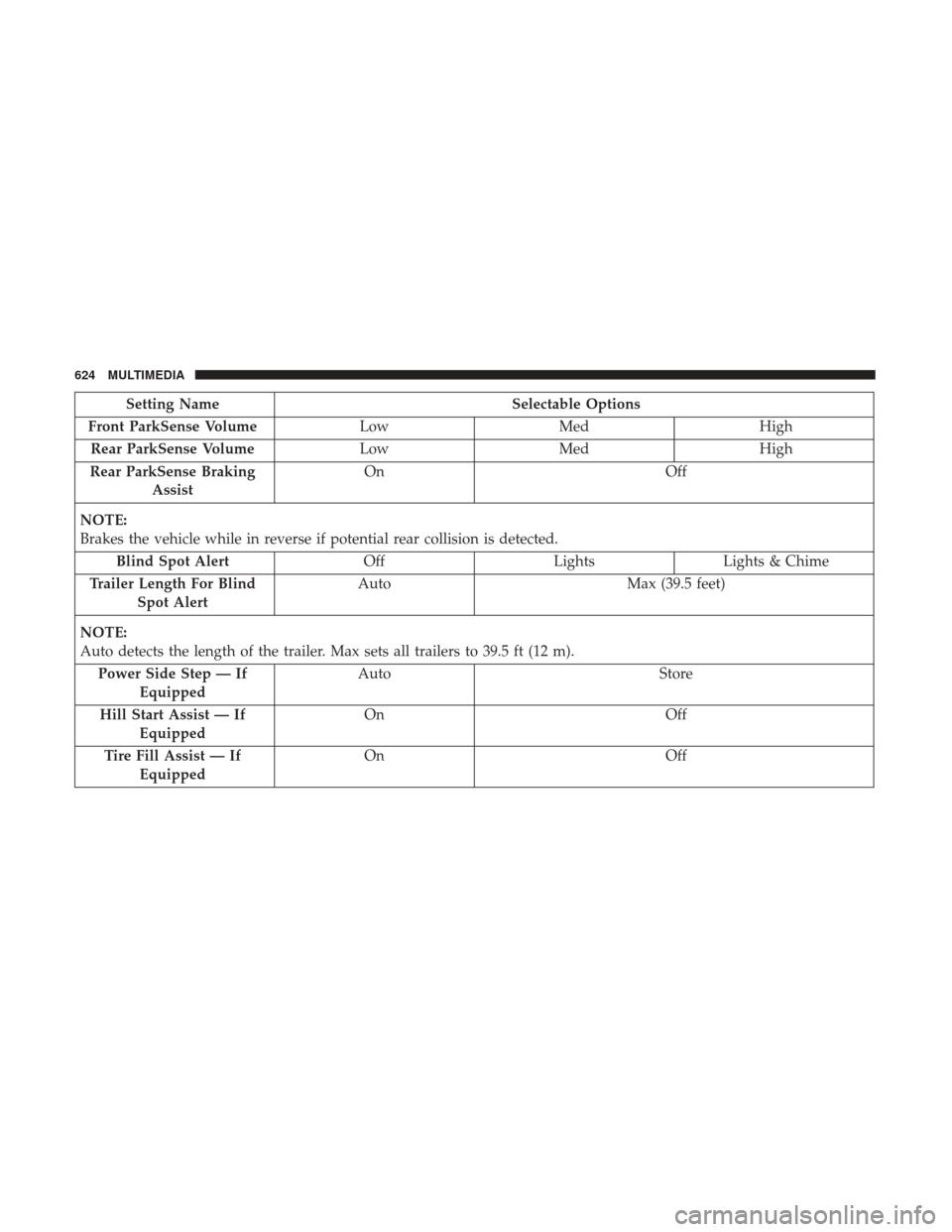
Setting NameSelectable Options
Front ParkSense Volume LowMed High
Rear ParkSense Volume LowMed High
Rear ParkSense Braking Assist On
Off
NOTE:
Brakes the vehicle while in reverse if potential rear collision is detected. Blind Spot Alert OffLightsLights & Chime
Trailer Length For Blind Spot Alert Auto
Max (39.5 feet)
NOTE:
Auto detects the length of the trailer. Max sets all trailers to 39.5 ft (12 m). Power Side Step — If Equipped Auto
Store
Hill Start Assist — If Equipped On
Off
Tire Fill Assist — If Equipped On
Off
624 MULTIMEDIA
Page 628 of 698
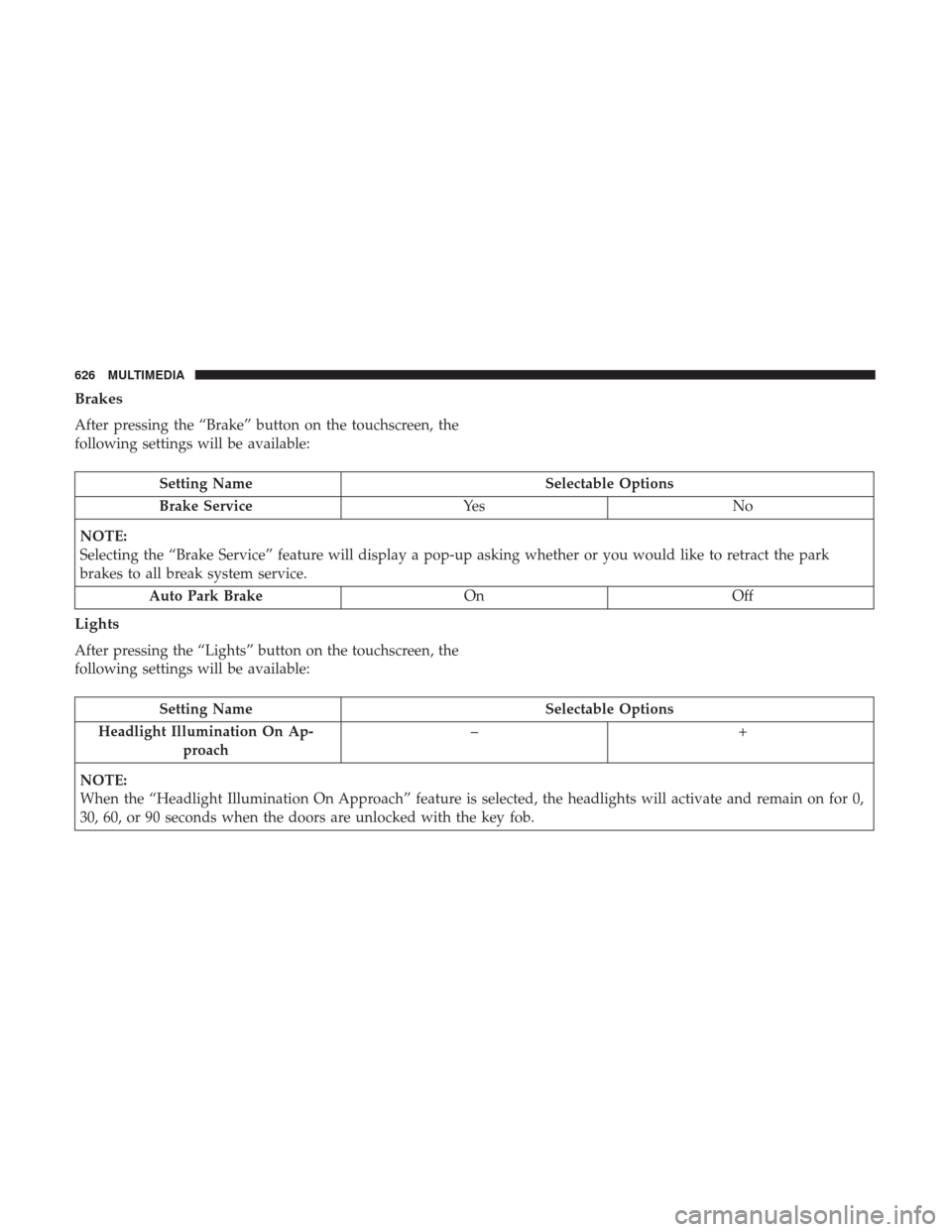
Brakes
After pressing the “Brake” button on the touchscreen, the
following settings will be available:
Setting NameSelectable Options
Brake Service Ye sN o
NOTE:
Selecting the “Brake Service” feature will display a pop-up asking whether or you would like to retract the park
brakes to all break system service. Auto Park Brake OnOff
Lights
After pressing the “Lights” button on the touchscreen, the
following settings will be available:
Setting Name Selectable Options
Headlight Illumination On Ap- proach –+
NOTE:
When the “Headlight Illumination On Approach” feature is selected, the headlights will activate and remain on for 0,
30, 60, or 90 seconds when the doors are unlocked with the key fob.
626 MULTIMEDIA
Page 630 of 698

Setting NameSelectable Options
Steering Directed Lights OnOff
NOTE:
When the “Steering Directed Lights” feature is selected, the headlights turn with the direction of the steering wheel.
Doors & Locks
After pressing the “Doors & Locks” button on the touch-
screen, the following settings will be available:
Setting Name Selectable Options
Auto Door Locks OnOff
Auto Unlock On Exit OnOff
NOTE:
When the “Auto Unlock On Exit” feature is selected, all doors unlock when the vehicle is stopped and the transmis-
sion is in the PARK or NEUTRAL position and the driver’s door is opened. Flash Lights With Lock OnOff
NOTE:
When the “Flash Lights With Lock” feature is selected, the front and rear turn signals flash when the doors are locked
or unlocked with the key fob. This feature may be selected with or without the “Sound Horn With Lock” feature se-
lected. Sound Horn With Remote Start OnOff
1st Press Of Key Fob Unlocks Driver DoorAll Doors
628 MULTIMEDIA
Page 683 of 698
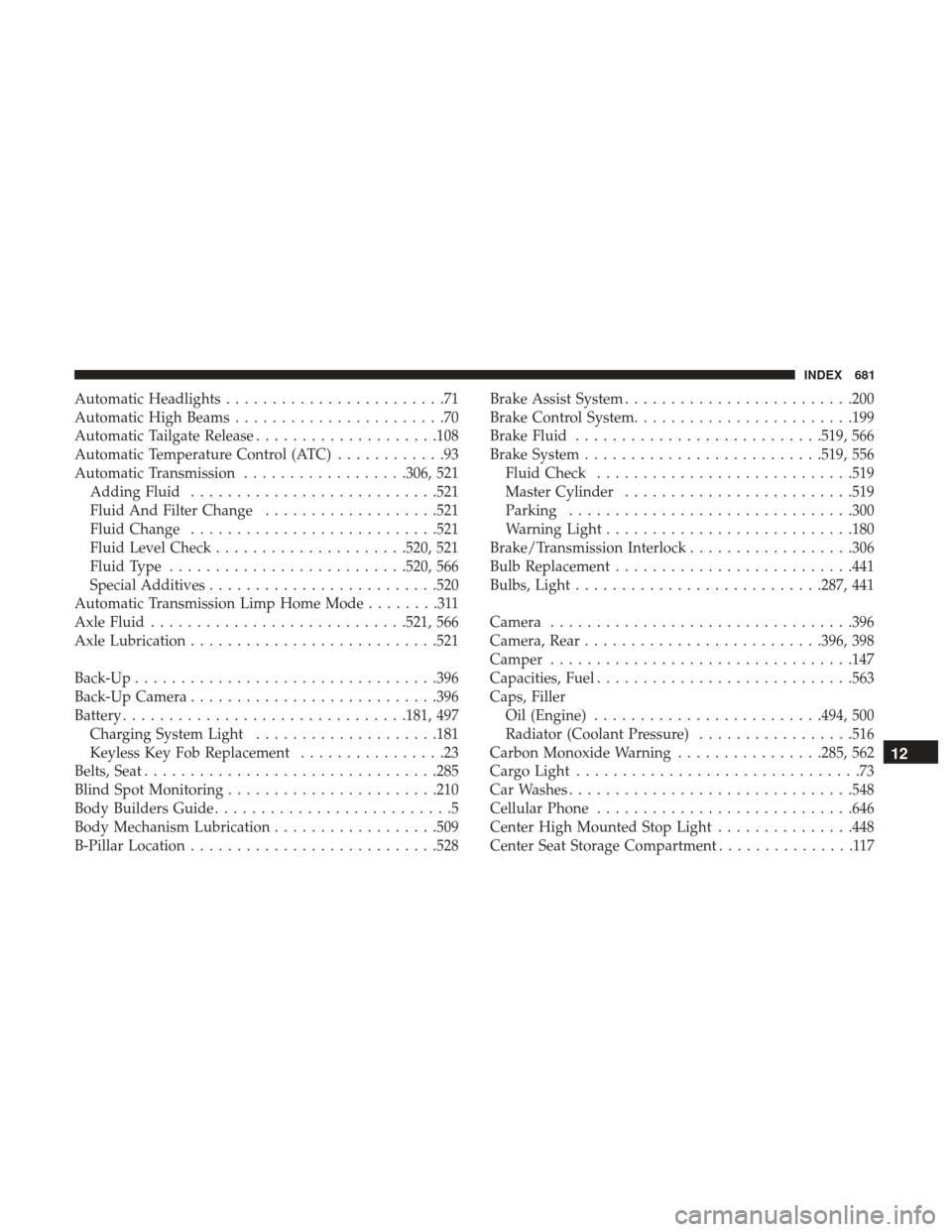
Automatic Headlights........................71
Automatic High Beams .......................70
Automatic Tailgate Release ....................108
Automatic Temperature Control (ATC) ............93
Automatic Transmission ..................306, 521
Adding Fluid .......................... .521
Fluid And Filter Change ...................521
Fluid Change .......................... .521
Fluid Level Check .....................520, 521
Fluid Type ......................... .520, 566
Special Additives ........................ .520
Automatic Transmission Limp Home Mode ........311
Axle Fluid ........................... .521, 566
Axle Lubrication .......................... .521
Back-Up ................................ .396
Back-Up Camera .......................... .396
Battery .............................. .181, 497
Charging System Light ....................181
Keyless Key Fob Replacement ................23
Belts, Seat ............................... .285
Blind Spot Monitoring ...................... .210
Body Builders Guide ..........................5
Body Mechanism Lubrication ..................509
B-Pillar Location .......................... .528Brake Assist System
........................ .200
Brake Control System ....................... .199
Brake Fluid .......................... .519, 566
Brake System ......................... .519, 556
Fluid Check ........................... .519
Master Cylinder ........................ .519
Parking .............................. .300
Warning Light .......................... .180
Brake/Transmission Interlock ..................306
Bulb Replacement ......................... .441
Bulbs, Light .......................... .287, 441
Camera ................................ .396
Camera,
Rear ......................... .396, 398
Camper ................................ .147
Capacities, Fuel ........................... .563
Caps, Filler Oil (Engine) ........................ .494, 500
Radiator (Coolant Pressure) .................516
Carbon Monoxide Warning ................285, 562
Cargo Light ...............................73
Car Washes .............................. .548
Cellular Phone ........................... .646
Center High Mounted Stop Light ...............448
Center Seat Storage Compartment ...............117
12
INDEX 681