turn signal Ram 1500 2019 Owner's Guide
[x] Cancel search | Manufacturer: RAM, Model Year: 2019, Model line: 1500, Model: Ram 1500 2019Pages: 698, PDF Size: 9.04 MB
Page 393 of 698
WARNING!(Continued)
the ParkSense Active Park Assist system. Always
check carefully behind and in front of your vehicle,
look behind and in front of you, and be sure to check
for pedestrians, animals, other vehicles, obstructions,
and blind spots before backing up and moving for-
ward. You are responsible for safety and must continue
to pay attention to your surroundings. Failure to do so
can result in serious injury or death.
CAUTION!
•The ParkSense Active Park Assist system is only a
parking aid and it is unable to recognize every
obstacle, including small obstacles. Parking curbs
might be temporarily detected or not detected at all.
Obstacles located above or below the sensors will
not be detected when they are in close proximity.
• The vehicle must be driven slowly when using the
ParkSense Active Park Assist system in order to be
able to stop in time when an obstacle is detected. It is
recommended that the driver looks over his/her
shoulder when using the ParkSense Active Park
Assist system.
LANESENSE — IF EQUIPPED
LaneSense Operation
The LaneSense system is operational at speeds above
37 mph (60 km/h) and below 112 mph (180 km/h). It uses
a forward looking camera to detect lane markings and
measure vehicle position within the lane boundaries.
When both lane markings are detected and the driver
unintentionally drifts out of the lane while no turn signal
has been applied OR the driver departs the lane on the
opposite side of the applied turn signal (if the left turn
signal is applied and the vehicle departs to the right), the
LaneSense system provides a haptic warning in the form of
torque applied to the steering wheel to prompt the driver
to remain within the lane boundaries. The LaneSense
system will also provide a visual warning through the
instrument cluster display to prompt the driver to remain
within the lane boundaries.
The driver may manually override the haptic warning by
applying torque into the steering wheel at any time.
When only a single lane marking is detected and the driver
unintentionally drifts across that lane marking (no turn
signal applied), the LaneSense system provides a visual
warning through the instrument cluster display to prompt
6
STARTING AND OPERATING 391
Page 397 of 698
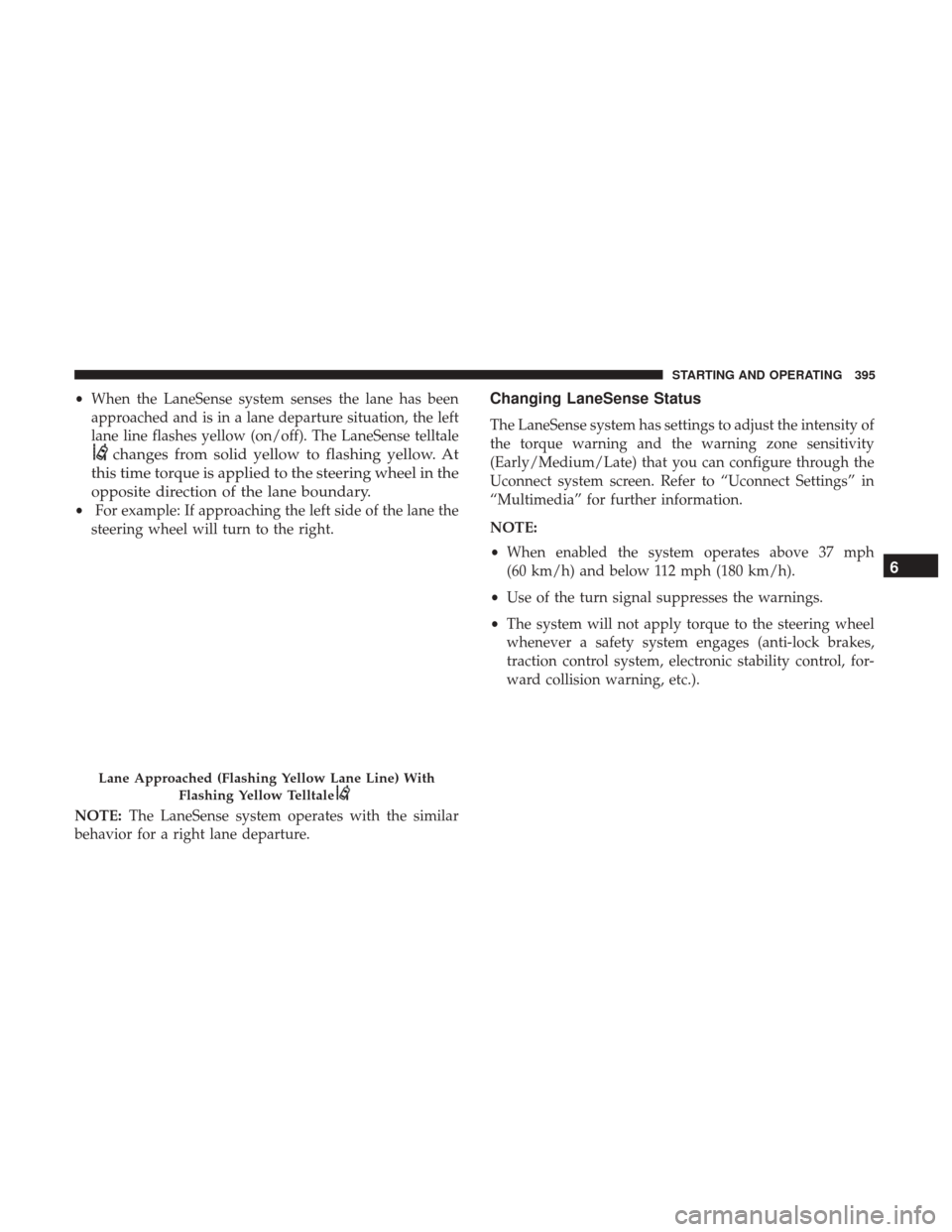
•When the LaneSense system senses the lane has been
approached and is in a lane departure situation, the left
lane line flashes yellow (on/off). The LaneSense telltale
changes from solid yellow to flashing yellow. At
this time torque is applied to the steering wheel in the
opposite direction of the lane boundary.
• For example: If approaching the left side of the lane the
steering wheel will turn to the right.
NOTE: The LaneSense system operates with the similar
behavior for a right lane departure.
Changing LaneSense Status
The LaneSense system has settings to adjust the intensity of
the torque warning and the warning zone sensitivity
(Early/Medium/Late) that you can configure through the
Uconnect system screen. Refer to “Uconnect Settings” in
“Multimedia” for further information.
NOTE:
• When enabled the system operates above 37 mph
(60 km/h) and below 112 mph (180 km/h).
• Use of the turn signal suppresses the warnings.
• The system will not apply torque to the steering wheel
whenever a safety system engages (anti-lock brakes,
traction control system, electronic stability control, for-
ward collision warning, etc.).
Lane Approached (Flashing Yellow Lane Line) With
Flashing Yellow Telltale
6
STARTING AND OPERATING 395
Page 422 of 698
Display Messages
The trailer brake control interacts with the instrument
cluster display. Display messages, along with a single
chime, will be displayed when a malfunction is determined
in the trailer connection, trailer brake control, or on the
trailer. Refer to “Instrument Cluster Display” in “Getting
To Know Your Instrument Panel” for further information.
WARNING!
Connecting a trailer that is not compatible with the
ITBM system may result in reduced or complete loss of
trailer braking. There may be a increase in stopping
distance or trailer instability which could result in
personal injury.
CAUTION!
Connecting a trailer that is not compatible with the
ITBM system may result in reduced or complete loss of
trailer braking. There may be a increase in stopping
distance or trailer instability which could result in
damage to your vehicle, trailer, or other property.NOTE:
•
An aftermarket controller may be available for use with
trailers with air or electric-over-hydraulic trailer brake
systems. To determine the type of brakes on your trailer
and the availability of controllers, check with your
trailer manufacturer or dealer.
• Removal of the ITBM will cause errors and it may cause
damage to the electrical system and electronic modules
of the vehicle. See your authorized dealer if an aftermar-
ket module is to be installed.
Towing Requirements — Trailer Lights And Wiring
Whenever you pull a trailer, regardless of the trailer size,
stoplights and turn signals on the trailer are required for
motoring safety.
The Trailer Tow Package may include a four- and seven-pin
wiring harness. Use a factory approved trailer harness and
connector.
NOTE: Do not cut or splice wiring into the vehicle’s wiring
harness.
The electrical connections are all complete to the vehicle
but you must mate the harness to a trailer connector. Refer
to the following illustrations.
420 STARTING AND OPERATING
Page 437 of 698
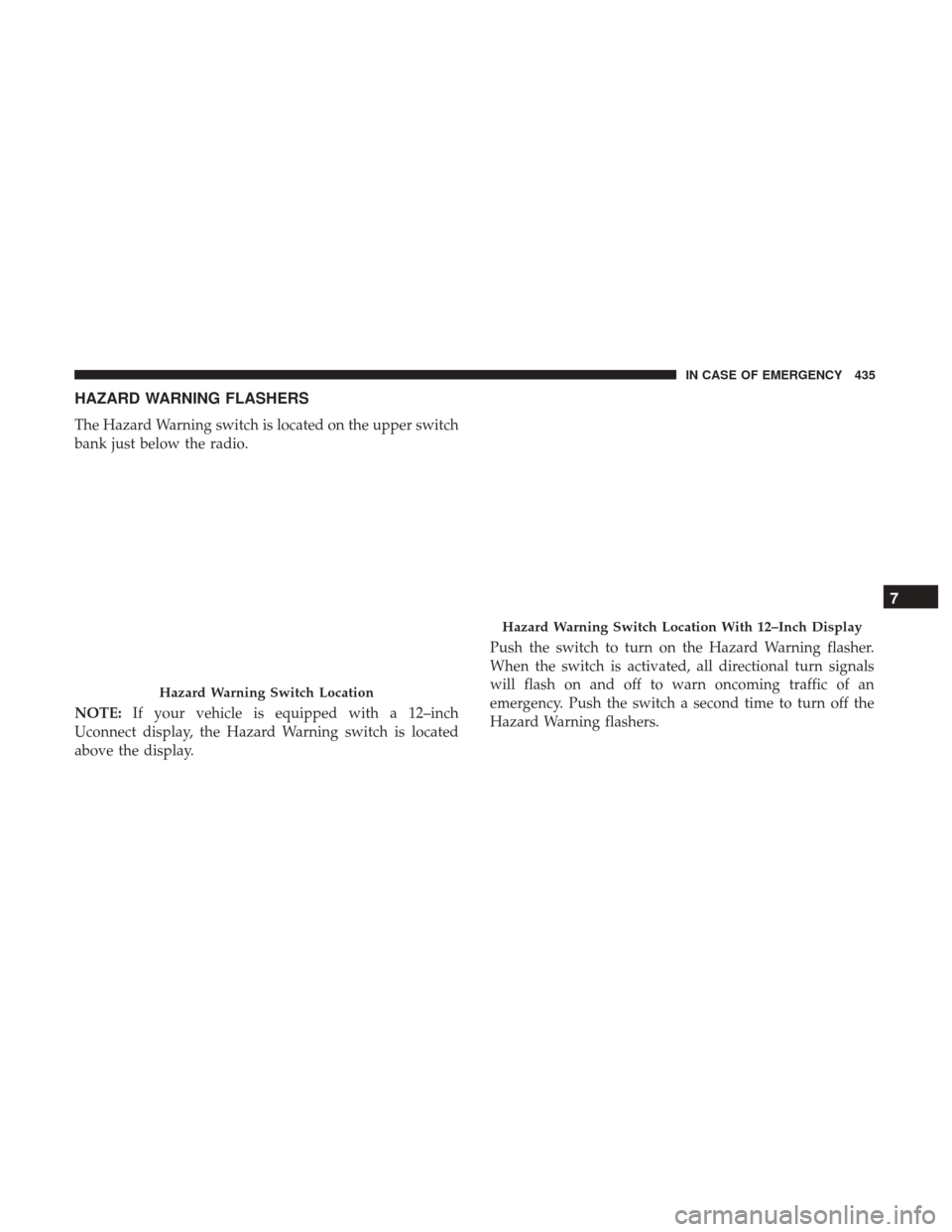
HAZARD WARNING FLASHERS
The Hazard Warning switch is located on the upper switch
bank just below the radio.
NOTE:If your vehicle is equipped with a 12–inch
Uconnect display, the Hazard Warning switch is located
above the display. Push the switch to turn on the Hazard Warning flasher.
When the switch is activated, all directional turn signals
will flash on and off to warn oncoming traffic of an
emergency. Push the switch a second time to turn off the
Hazard Warning flashers.
Hazard Warning Switch Location
Hazard Warning Switch Location With 12–Inch Display
7
IN CASE OF EMERGENCY 435
Page 442 of 698
WARNING!
•Ignoring the overhead console light could mean you
will not have SOS Call services. If the overhead
console light is illuminated, have your authorized
dealer service the SOS Call system immediately.
• The Occupant Restraint Control module turns on the
air bag Warning Light on the instrument panel if a
malfunction in any part of the system is detected. If
the Air Bag Warning Light is illuminated, have your
authorized dealer service the Occupant Restraint
Control system immediately.
Even if the SOS Call system is fully functional, factors
beyond FCA US LLC’s control may prevent or stop the SOS
Call system operation. These include, but are not limited
to, the following factors:
• Delayed accessories mode is active.
• The ignition is in the OFF position.
• The vehicle’s electrical systems are not intact.
• The SOS Call system software and/or hardware are
damaged during a crash. •
The vehicle battery loses power or becomes discon-
nected during a vehicle crash.
• LTE (voice/data) or 4G (data) network and/or Global
Positioning Satellite signals are unavailable or ob-
structed.
• Equipment malfunction at the SOS operator facility.
• Operator error by the SOS operator.
• LTE (voice/data) or 4G (data) network congestion.
• Weather.
• Buildings, structures, geographic terrain, or tunnels.
WARNING!
ALWAYS obey traffic laws and pay attention to the
road. ALWAYS drive safely with your hands on the
steering wheel. You have full responsibility and as-
sume all risks related to the use of the features and
applications in this vehicle. Only use the features and
applications when it is safe to do so. Failure to do so
may result in an accident involving serious injury or
death.
440 IN CASE OF EMERGENCY
Page 444 of 698
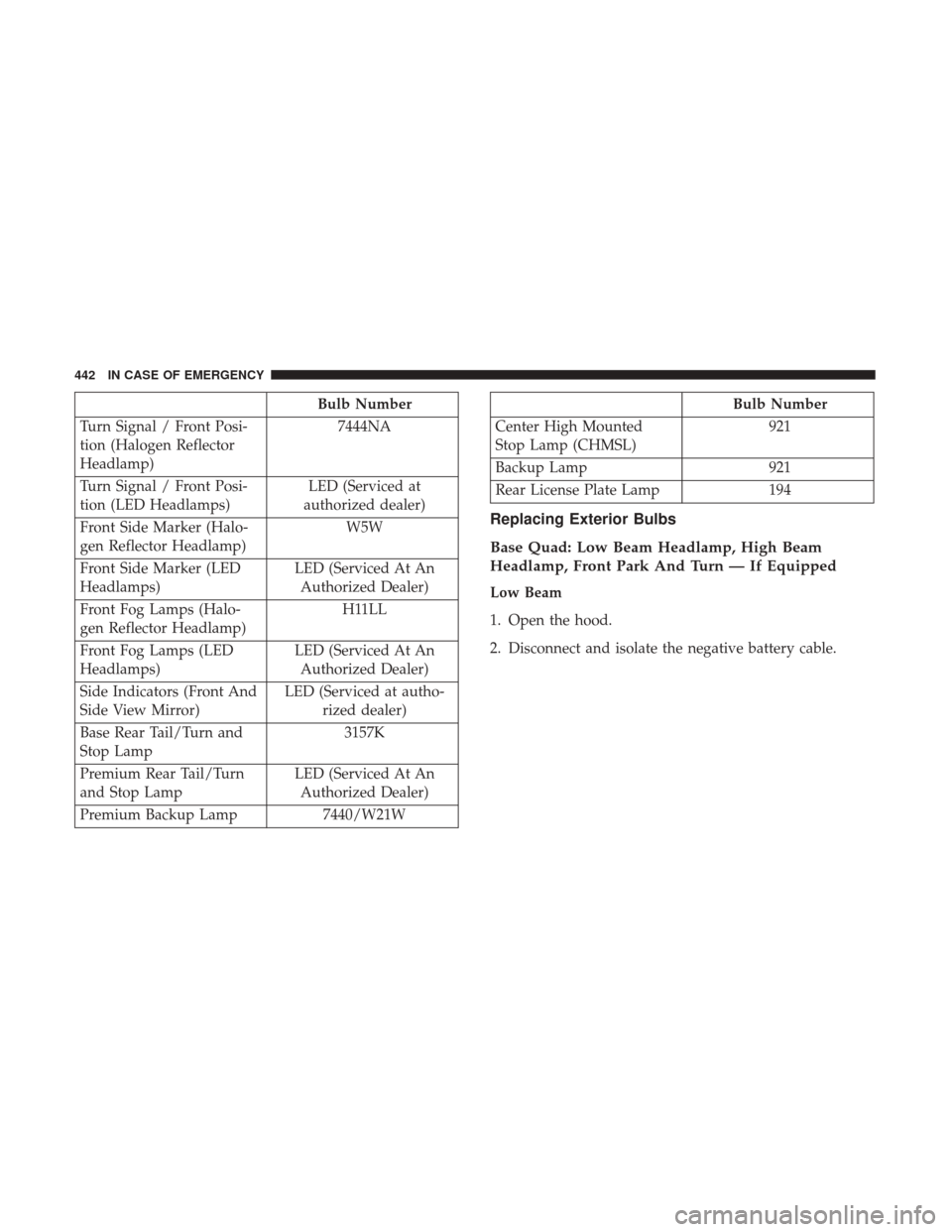
Bulb Number
Turn Signal / Front Posi-
tion (Halogen Reflector
Headlamp) 7444NA
Turn Signal / Front Posi-
tion (LED Headlamps) LED (Serviced at
authorized dealer)
Front Side Marker (Halo-
gen Reflector Headlamp) W5W
Front Side Marker (LED
Headlamps) LED (Serviced At An
Authorized Dealer)
Front Fog Lamps (Halo-
gen Reflector Headlamp) H11LL
Front Fog Lamps (LED
Headlamps) LED (Serviced At An
Authorized Dealer)
Side Indicators (Front And
Side View Mirror) LED (Serviced at autho-
rized dealer)
Base Rear Tail/Turn and
Stop Lamp 3157K
Premium Rear Tail/Turn
and Stop Lamp LED (Serviced At An
Authorized Dealer)
Premium Backup Lamp 7440/W21WBulb Number
Center High Mounted
Stop Lamp (CHMSL) 921
Backup Lamp 921
Rear License Plate Lamp 194
Replacing Exterior Bulbs
Base Quad: Low Beam Headlamp, High Beam
Headlamp, Front Park And Turn — If Equipped
Low Beam
1. Open the hood.
2. Disconnect and isolate the negative battery cable.
442 IN CASE OF EMERGENCY
Page 449 of 698
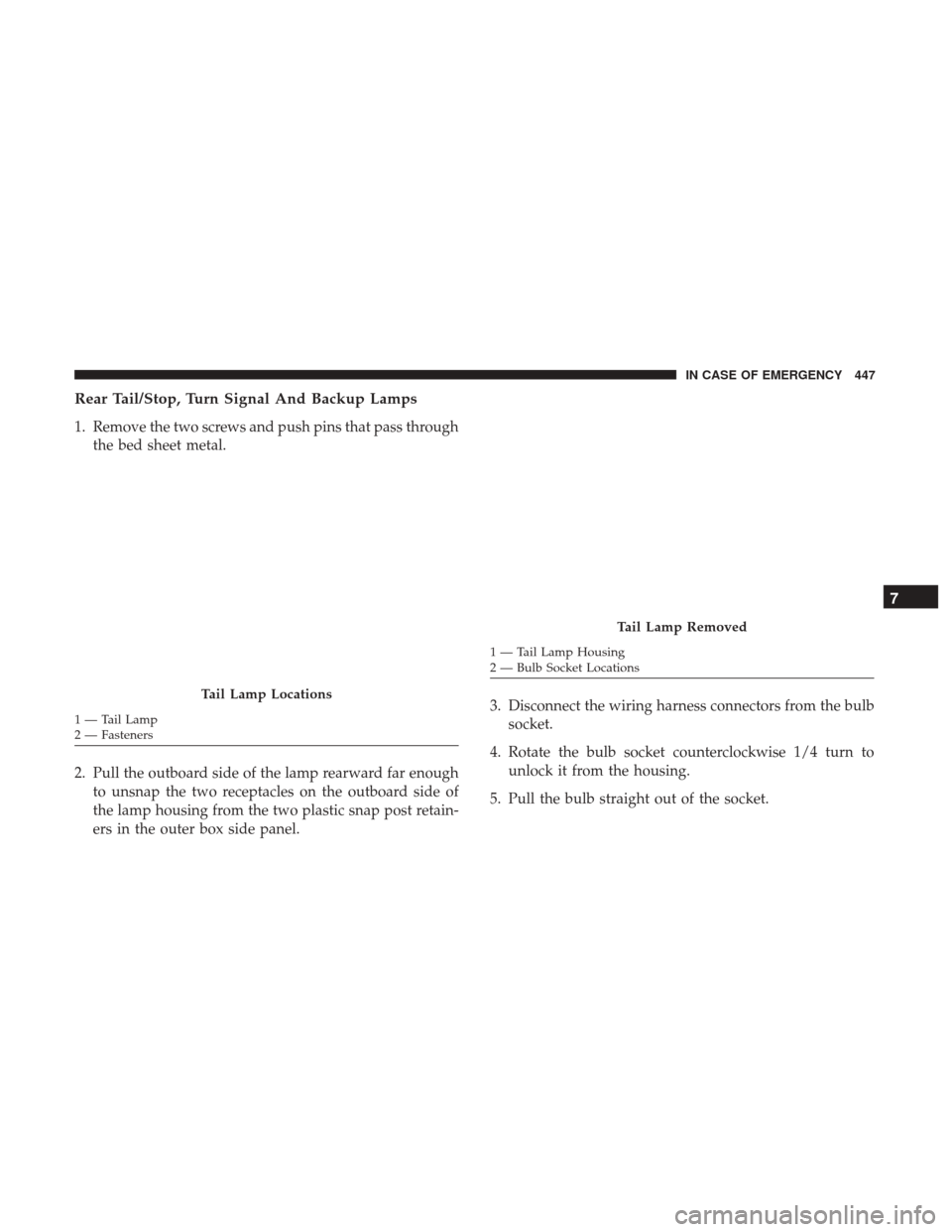
Rear Tail/Stop, Turn Signal And Backup Lamps
1. Remove the two screws and push pins that pass throughthe bed sheet metal.
2. Pull the outboard side of the lamp rearward far enough to unsnap the two receptacles on the outboard side of
the lamp housing from the two plastic snap post retain-
ers in the outer box side panel. 3. Disconnect the wiring harness connectors from the bulb
socket.
4. Rotate the bulb socket counterclockwise 1/4 turn to unlock it from the housing.
5. Pull the bulb straight out of the socket.
Tail Lamp Locations
1 — Tail Lamp
2 — Fasteners
Tail Lamp Removed
1 — Tail Lamp Housing
2 — Bulb Socket Locations
7
IN CASE OF EMERGENCY 447
Page 606 of 698
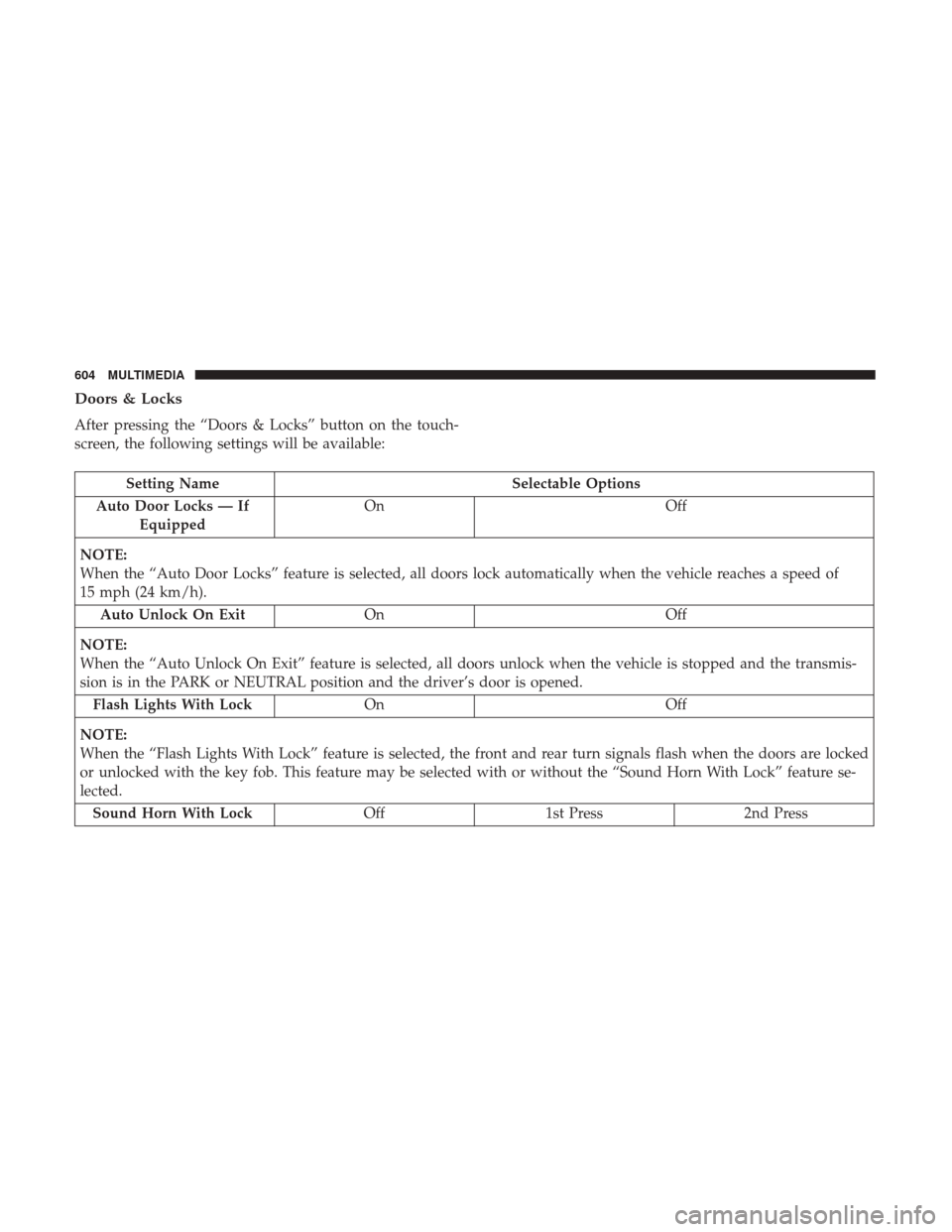
Doors & Locks
After pressing the “Doors & Locks” button on the touch-
screen, the following settings will be available:
Setting NameSelectable Options
Auto Door Locks — If Equipped On
Off
NOTE:
When the “Auto Door Locks” feature is selected, all doors lock automatically when the vehicle reaches a speed of
15 mph (24 km/h). Auto Unlock On Exit On Off
NOTE:
When the “Auto Unlock On Exit” feature is selected, all doors unlock when the vehicle is stopped and the transmis-
sion is in the PARK or NEUTRAL position and the driver’s door is opened. Flash Lights With Lock On Off
NOTE:
When the “Flash Lights With Lock” feature is selected, the front and rear turn signals flash when the doors are locked
or unlocked with the key fob. This feature may be selected with or without the “Sound Horn With Lock” feature se-
lected. Sound Horn With Lock Off1st Press 2nd Press
604 MULTIMEDIA
Page 611 of 698
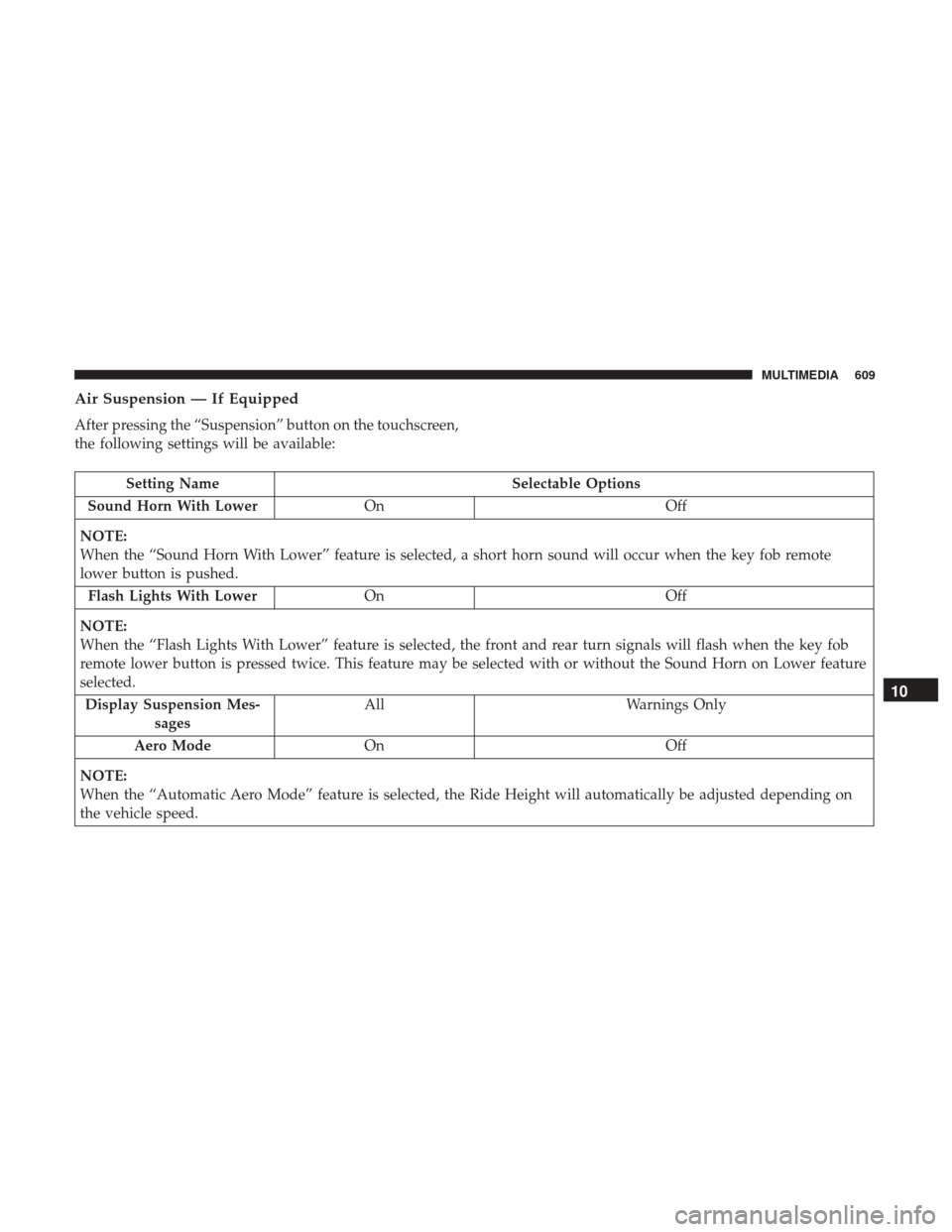
Air Suspension — If Equipped
After pressing the “Suspension” button on the touchscreen,
the following settings will be available:
Setting NameSelectable Options
Sound Horn With Lower On Off
NOTE:
When the “Sound Horn With Lower” feature is selected, a short horn sound will occur when the key fob remote
lower button is pushed. Flash Lights With Lower On Off
NOTE:
When the “Flash Lights With Lower” feature is selected, the front and rear turn signals will flash when the key fob
remote lower button is pressed twice. This feature may be selected with or without the Sound Horn on Lower feature
selected. Display Suspension Mes- sages All
Warnings Only
Aero Mode On Off
NOTE:
When the “Automatic Aero Mode” feature is selected, the Ride Height will automatically be adjusted depending on
the vehicle speed.
10
MULTIMEDIA 609
Page 630 of 698

Setting NameSelectable Options
Steering Directed Lights OnOff
NOTE:
When the “Steering Directed Lights” feature is selected, the headlights turn with the direction of the steering wheel.
Doors & Locks
After pressing the “Doors & Locks” button on the touch-
screen, the following settings will be available:
Setting Name Selectable Options
Auto Door Locks OnOff
Auto Unlock On Exit OnOff
NOTE:
When the “Auto Unlock On Exit” feature is selected, all doors unlock when the vehicle is stopped and the transmis-
sion is in the PARK or NEUTRAL position and the driver’s door is opened. Flash Lights With Lock OnOff
NOTE:
When the “Flash Lights With Lock” feature is selected, the front and rear turn signals flash when the doors are locked
or unlocked with the key fob. This feature may be selected with or without the “Sound Horn With Lock” feature se-
lected. Sound Horn With Remote Start OnOff
1st Press Of Key Fob Unlocks Driver DoorAll Doors
628 MULTIMEDIA