key fob Ram 1500 2020 Owner's Guide
[x] Cancel search | Manufacturer: RAM, Model Year: 2020, Model line: 1500, Model: Ram 1500 2020Pages: 674, PDF Size: 32.69 MB
Page 40 of 674
38 GETTING TO KNOW YOUR VEHICLE
To Unlock From The Driver's Side:
With a valid Passive Entry key fob within 5 ft (1.5 m) of the
driver door handle, grab the front driver door handle to
unlock the driver's door automatically. The interior door
panel lock knob will raise when the door is unlocked.Grab The Door Handle To Unlock
NOTE:
If “Unlock All Doors 1st Press” is programmed, all doors will
unlock when you grab hold of the front driver’s door handle. To select between “Unlock Driver Door 1st Press” and
“Unlock All Doors 1st Press,” refer to “Uconnect Settings” in
“Multimedia” for further information.
To Unlock From The Passenger Side:
With a valid Passive Entry key fob within 5 ft (1.5 m) of the
passenger door handle, grab the front passenger door handle
to unlock all doors automatically. The interior door panel
lock knob will raise when the door is unlocked.
NOTE:
All doors will unlock when the front passenger door handle
is grabbed regardless of the driver’s door unlock preference
setting (“Unlock Driver Door 1st Press” or “Unlock All
Doors 1st Press”).
Preventing Inadvertent Locking Of Passive Entry Key Fob
In Vehicle:
To minimize the possibility of unintentionally locking a
Passive Entry key fob inside your vehicle, the Passive Entry
system is equipped with an automatic door unlock feature
which will function if the ignition switch is in the OFF posi
-
tion.
2020_DT_1500_OM_US.book Page 38
Page 41 of 674
GETTING TO KNOW YOUR VEHICLE 39
If one of the vehicle doors is open and the door panel switch
is used to lock the vehicle, once all open doors have been
closed the vehicle checks the inside and outside of the vehicle
for any valid Passive Entry key fobs. If one of the vehicle's
Passive Entry key fobs is detected inside the vehicle, and no
other valid Passive Entry key fobs are detected outside the
vehicle, the Passive Entry System automatically unlocks all
vehicle doors and chirps the horn three times (on the third
attempt ALL doors will lock and the Passive Entry key fob
can be locked in the vehicle).
To Lock The Vehicle’s Doors:
With one of the vehicle’s Passive Entry key fobs within 5 ft
(1.5 m) of the driver or passenger front door handles, push
the door handle lock button to lock all doors.Push The Door Handle Button To Lock
2
2020_DT_1500_OM_US.book Page 39
Page 42 of 674
40 GETTING TO KNOW YOUR VEHICLE
Do NOT grab the door handle when pushing the door
handle lock button. This could unlock the door(s).Do NOT Grab The Door Handle When Locking
NOTE:
• After pushing the door handle lock button, you must wait two seconds before you can lock or unlock the doors, using
either Passive Entry door handle. This is done to allow you
to check if the vehicle is locked by pulling the door handle,
without the vehicle reacting and unlocking.
• The Passive Entry system depends on a key fob that is not fully discharged of its coin battery capacity. • The LED light on the key fob will not blink if the key fob
battery is low or fully depleted, but a low key fob battery
condition will still support the Passive Entry system func -
tionality. When the key fob battery is low, the instrument
cluster will display a message indicating that the key fob
battery is low. Refer to “Keys” in this chapter for further
information.
The vehicle doors can also be locked by using the key fob
lock button or the lock button located on the vehicle’s inte -
rior door panel.
General Information
The following regulatory statement applies to all Radio
Frequency (RF) devices equipped in this vehicle:
This device complies with Part 15 of the FCC Rules and with
Innovation, Science and Economic Development Canada
license-exempt RSS standard(s). Operation is subject to the
following two conditions:
1. This device may not cause harmful interference, and
2. This device must accept any interference received, including interference that may cause undesired opera -
tion.
2020_DT_1500_OM_US.book Page 40
Page 50 of 674
48 GETTING TO KNOW YOUR VEHICLE
equipped), and a set of desired radio station presets. Your
remote keyless entry key fob can also be programmed to
recall the same positions when the unlock button is pushed.
NOTE:
Your vehicle is equipped with two key fobs, one key fob can
be linked to memory position 1 and the other key fob can be
linked to memory position 2.
The driver memory seat buttons are located on the driver
door, next to the door handle.Driver Memory Seat Buttons Programming The Memory Feature
To create a new memory profile, perform the following:
1. Place the vehicle’s ignition in the ON/RUN position (do
not start the engine).
2. Adjust all memory profile settings to desired preferences (i.e., driver’s seat, outside mirrors, adjustable pedals (if
equipped), and radio station presets).
3. Push and release the set (S) button on the memory switch.
4. Within five seconds, push and release either of the memory buttons (1) or (2). The instrument cluster display
will show which memory position has been set.
NOTE:
• Memory profiles can be set without the vehicle in PARK, but the vehicle must be in PARK to recall a memory
profile.
• To set a memory profile to your key fob, refer to “Linking And Unlinking The Remote Keyless Entry Key Fob To
Memory” in this section for further information.
2020_DT_1500_OM_US.book Page 48
Page 51 of 674

GETTING TO KNOW YOUR VEHICLE 49
Linking And Unlinking The Remote Keyless Entry Key
Fob To Memory
Your key fob can be programmed to recall one of two
pre-programmed memory profiles by pushing the unlock
button on the key fob.
NOTE:
Before programming your key fob you must select the
“Personal Settings Linked to Key Fob” feature through the
Uconnect Settings. Refer to “Uconnect Settings” in “Multi-
media” for further information.
To program your key fob, perform the following:
1. Place the vehicle’s ignition in the OFF position.
2. Select a desired memory profile 1 or 2.
NOTE:
If a memory profile has not already been set, refer to
"Programming The Memory Feature" in this section for
instructions on how to set a memory profile.
3. Once the profile has been recalled, push and release the set (S) button on the memory switch. 4. Push and release button (1) or (2) accordingly. “Memory
Profile Set” (1 or 2) will display in the instrument cluster.
5. Push and release the lock button on the key fob within 10 seconds.
NOTE:
Your key fob can be unlinked to your memory settings by
pushing the set (S) button, and then within 10 seconds,
pushing the unlock button on the key fob.
Memory Position Recall
NOTE:
The vehicle speed must be lower than 5 mph (8 km/h) to
recall memory positions. If a recall is attempted when the
vehicle speed is greater than 5 mph (8 km/h), a message will
be displayed in the instrument cluster display.
Driver One Memory Position Recall
• To recall the memory settings for driver one using the memory buttons on the door panel, push memory button
(1).
• To recall the memory settings for driver one using the key fob, push the unlock button on the key fob linked to
memory position 1.
2
2020_DT_1500_OM_US.book Page 49
Page 52 of 674

50 GETTING TO KNOW YOUR VEHICLE
Driver Two Memory Position Recall
• To recall the memory setting for driver two using thememory buttons on the door panel, push memory button
(2).
• To recall the memory settings for driver two using the key fob, push the unlock button on the key fob linked to
memory position 2.
A recall can be cancelled by pushing any of the memory
buttons during a recall (S, 1, or 2). When a recall is canceled,
the driver's seat and the power pedals (if equipped) stop
moving. A delay of one second will occur before another
recall can be selected.
Easy Entry/Exit Seat
This feature provides automatic driver’s seat positioning to
enhance driver mobility when entering and exiting the
vehicle.
The distance the driver’s seat moves depends on where you
have the driver’s seat positioned when you remove the key
fob from the ignition.
• When you remove the key fob from the ignition, the driver’s seat will move about 2.4 inches (60 mm) rearward
if the driver’s seat position is greater than or equal to 2.7 inches (67.7 mm) forward of the rear stop. The seat will
return to its previously set position when you place the
ignition into the ACC or RUN position.
• When you remove the key fob from the ignition, the driver’s seat will move to a position 0.3 inches (7.7 mm)
forward of the rear stop if the driver’s seat position is
between 0.9 inches and 2.7 inches (22.7 mm and 67.7 mm)
forward of the rear stop. The seat will return to its previ -
ously set position when you place the ignition to the ACC
or RUN position.
• The Easy Entry/Easy Exit feature is disabled when the driver’s seat position is less than 0.9 inches (22.7 mm)
forward of the rear stop. At this position, there is no benefit
to the driver by moving the seat for Easy Exit or Easy
Entry.
Each stored memory setting will have an associated Easy
Entry and Easy Exit position.
NOTE:
The Easy Entry/Exit feature is not enabled when the vehicle
is delivered from the factory. The Easy Entry/Exit feature is
enabled (or later disabled) through the programmable
features in the Uconnect system. Refer to “Uconnect
Settings” in “Multimedia” for further information.
2020_DT_1500_OM_US.book Page 50
Page 61 of 674
GETTING TO KNOW YOUR VEHICLE 59
NOTE:
• Always adjust the pedals to a position that allows fullpedal travel.
• Further small adjustments may be necessary to find the best possible seat/pedal position.
• For vehicles equipped with Driver Memory Seat, you can use your key fob or the memory switch on the driver’s
door trim panel to return the adjustable pedals to
pre-programmed positions.
• Refer to “Driver Memory Seat” in this chapter for further information.MIRRORS
Inside Day/Night Mirror — If Equipped
The mirror head can be adjusted up, down, left, and right for
various drivers. The mirror should be adjusted to center on
the view through the rear window.
Headlight glare from vehicles behind you can be reduced by
moving the small control under the mirror to the night position
(toward the rear of the vehicle). The mirror should be adjusted
while set in the day position (toward the windshield).
Adjusting Rearview Mirror
WARNING!
Do not adjust the pedals while the vehicle is moving.
You could lose control and have an accident. Always
adjust the pedals while the vehicle is parked.
CAUTION!
Do not place any article under the adjustable pedals or
impede its ability to move, as it may cause damage to the
pedal controls. Pedal travel may become limited if
movement is stopped by an obstruction in the adjustable
pedal's path.
2
2020_DT_1500_OM_US.book Page 59
Page 74 of 674

72 GETTING TO KNOW YOUR VEHICLE
Cargo Light With Bed Lights — If Equipped
The cargo light and bed lights (if equipped) are turned on by
pushing the cargo lights button located on the lower half of
the headlight switch.Cargo/Bed Lights Button On Headlight Switch
If the vehicle’s speed is 0 mph (0 km/h), these lights can also
be turned on using the switch located just inside the pickup
box, on the lower part of the bed light lens. A telltale will illu-
minate in the instrument cluster display when these lights
are on. Pushing the switch a second time will turn the lights
off. NOTE:
The cargo light will automatically turn off if the vehicle is
shifted into NEUTRAL or DRIVE, and will turn back on
when the vehicle is shifted into PARK or REVERSE. The bed
lights are not affected by gear selection.
Bed Light Switch In Truck Bed
The cargo light and bed lights (if equipped) will turn on for
approximately 60 seconds when a key fob unlock button is
pushed, as part of the Illuminated Entry feature.
2020_DT_1500_OM_US.book Page 72
Page 75 of 674
GETTING TO KNOW YOUR VEHICLE 73
Battery Saver
To protect the life of your vehicle’s battery, load shedding is
provided for both the interior and exterior lights.
If the ignition is OFF and any door is left ajar for 10 minutes
or the dimmer control is rotated all the way up to the dome
on position for 10 minutes, the interior lights will automati-
cally turn off.
NOTE:
Battery saver mode is canceled if the ignition is ON.
If the headlights remain on while the ignition is placed in the
OFF position, the exterior lights will automatically turn off
after eight minutes. If the headlights are turned on and left
on for eight minutes while the ignition is OFF, the exterior
lights will automatically turn off.
INTERIOR LIGHTS
Courtesy Lights
Courtesy and dome lights are turned on when the front
doors are opened, the ambient dimmer control is rotated to
the highest detent, or the Dome ON button is pushed on the
overhead console. Also, if your vehicle is equipped with Remote Keyless Entry (RKE), and the unlock button is
pushed on the key fob, the courtesy and dome lights will
turn on.
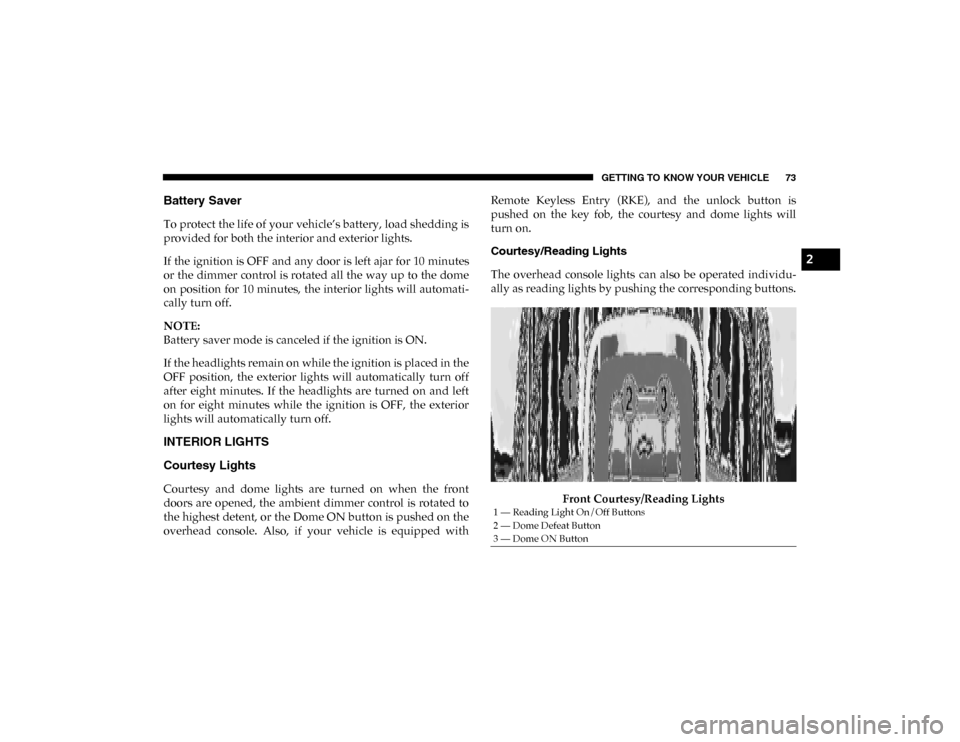
Courtesy/Reading Lights
The overhead console lights can also be operated individu-
ally as reading lights by pushing the corresponding buttons.
Front Courtesy/Reading Lights
1 — Reading Light On/Off Buttons
2 — Dome Defeat Button
3 — Dome ON Button
2
2020_DT_1500_OM_US.book Page 73
Page 77 of 674
GETTING TO KNOW YOUR VEHICLE 75
With the parking lights or headlights on, rotating the right
dimmer control upward will increase the brightness of the
instrument panel lights. Rotating the left dimmer control will
adjust the interior and ambient light levels.
NOTE:
The dimming of the touchscreen is programmable through
the Uconnect system. Refer to “Uconnect Settings” in “Multi-
media” for further details.
Illuminated Entry
The courtesy lights will turn on when you use the key fob to
unlock the doors or open any door.
This feature also turns on the puddle lamps located beneath
the outside mirrors (if equipped).
The lights will fade to off after approximately 30 seconds, or
they will immediately fade to off once the ignition switch is
placed in the ON/RUN position from the OFF position.
The front courtesy overhead console and door courtesy
lights will not turn off if the Dome ON button on the over -
head console is pushed.
The illuminated entry system will not operate if the Dome
Defeat button on the overhead console is pushed. NOTE:
If your vehicle is equipped with Illuminated Approach lights
under the outside mirrors, they can also be turned off by
pushing the Dome Defeat button.
WINDSHIELD WIPERS AND WASHERS
Windshield Wipers
The wipers and washers are operated by a switch in the
multifunction lever. Turn the end of the lever to select the
desired wiper speed.
Windshield Wiper/Washer Lever
2
2020_DT_1500_OM_US.book Page 75