headlights RAM 1500 2021 User Guide
[x] Cancel search | Manufacturer: RAM, Model Year: 2021, Model line: 1500, Model: RAM 1500 2021Pages: 496, PDF Size: 20.89 MB
Page 173 of 496

STARTING AND OPERATING171
This system uses a lifting and lowering pattern
which keeps the headlights from incorrectly
shining into oncoming traffic. When raising the
vehicle, the rear of the vehicle will move up first
and then the front. When lowering the vehicle,
the front will move down first and then the rear.
After the engine is turned off, it may be noticed
that the air suspension system operates briefly;
this is normal. The system is correcting the
position of the vehicle to ensure a proper
appearance.
To assist with changing a spare tire, the air
suspension system has a feature which allows
the automatic leveling to be disabled
Úpage 237.
NOTE:
If equipped with a touchscreen radio, all
enabling/disabling of air suspension features
must be done through the radio Ú page 237.AIR SUSPENSION MODES
The Air Suspension system has multiple modes
to protect the system in unique situations:
AERO Mode
To improve aerodynamics, the air suspension
system has a feature which will put the vehicle
into AERO height automatically Úpage 114.
Tire Jack Mode
To assist with changing a tire, the air
suspension system has a feature which allows
the automatic leveling to be disabled
Ú page 237.
Transport Mode
For towing your vehicle with four wheels off the
road, the air suspension system has a feature
which will put the vehicle into Entry/Exit height
and disable the automatic load leveling system
Ú page 237.
Wheel Alignment Mode
Before performing a wheel alignment, this
mode must be enabled Ú page 237.Protection Strategy
In order to “protect” the air suspension system,
the vehicle will disable load leveling as required
(suspension overloaded, battery charge low,
etc.). Load leveling will automatically resume as
soon as system operation requirements are
met. See an authorized dealer if system does
not resume.
NOTE:
For towing with air suspension Ú
page 214.
INSTRUMENT CLUSTER DISPLAY
M
ESSAGES
When the appropriate conditions exist, a
message will appear in the instrument cluster
display Ú page 114.
An audible chime will be heard whenever a
system error has been detected.
See an authorized dealer for system service if
normal operation does not resume.
WARNING!
The air suspension system uses a high
pressure volume of air to operate the system.
To avoid personal injury or damage to the
system, see an authorized dealer for service.
4
21_DT_OM_EN_USC_t.book Page 171
Page 240 of 496

238MULTIMEDIA
Language
When the Language button is pressed on the touchscreen, the system displays the different language options. Once an option is selected, the system
will display in the chosen language. The available setting is:
Display
When the Display button is pressed on the touchscreen, the system will display the options related to the theme (if equipped), brightness, and color of
the touchscreen. The available settings are:
Setting Name Description
Language This setting will change the language of the Uconnect system. The
available languages are English, Français, and Español.
Setting Name
Description
Display Mode This setting will allow you to set the brightness manually or have the
system set it automatically. The “Auto” setting has the system
automatically adjust the display brightness. The “Manual” setting will
allow the user to adjust the brightness of the display.
Display Brightness With Headlights ON/Brightness This setting will allow you to set the brightness when the headlights are
on. To access this setting, Display Mode must be set to Manual. The “+”
setting will increase the brightness; the “-” will decrease the brightness.
Display Brightness With Headlights OFF/Brightness This setting will allow you to set the brightness when the headlights are
off. To access this setting, Display Mode must be set to Manual. The “+”
setting will increase the brightness; the “-” will decrease the brightness.
Set Theme — If Equipped This setting will allow you to change the display theme.
21_DT_OM_EN_USC_t.book Page 238
Page 246 of 496
244MULTIMEDIA
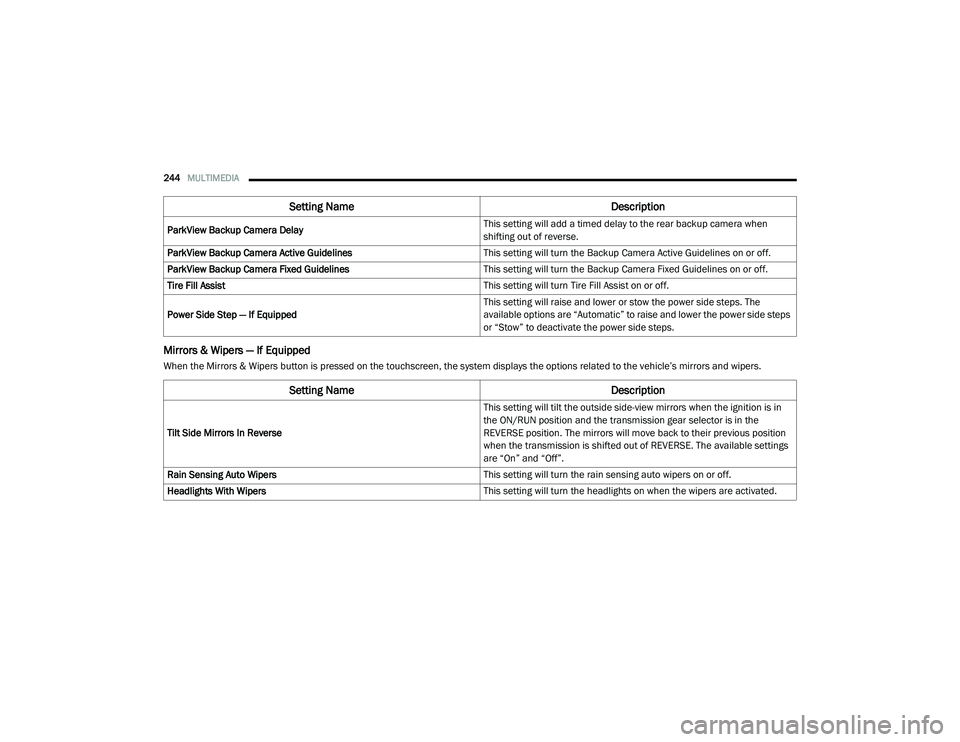
Mirrors & Wipers — If Equipped
When the Mirrors & Wipers button is pressed on the touchscreen, the system displays the options related to the vehicle’s mirrors and wipers.ParkView Backup Camera Delay
This setting will add a timed delay to the rear backup camera when
shifting out of reverse.
ParkView Backup Camera Active Guidelines This setting will turn the Backup Camera Active Guidelines on or off.
ParkView Backup Camera Fixed Guidelines This setting will turn the Backup Camera Fixed Guidelines on or off.
Tire Fill Assist This setting will turn Tire Fill Assist on or off.
Power Side Step — If Equipped This setting will raise and lower or stow the power side steps. The
available options are “Automatic” to raise and lower the power side steps
or “Stow” to deactivate the power side steps.
Setting Name
Description
Setting NameDescription
Tilt Side Mirrors In Reverse This setting will tilt the outside side-view mirrors when the ignition is in
the ON/RUN position and the transmission gear selector is in the
REVERSE position. The mirrors will move back to their previous position
when the transmission is shifted out of REVERSE. The available settings
are “On” and “Off”.
Rain Sensing Auto Wipers This setting will turn the rain sensing auto wipers on or off.
Headlights With Wipers This setting will turn the headlights on when the wipers are activated.
21_DT_OM_EN_USC_t.book Page 244
Page 247 of 496
MULTIMEDIA245
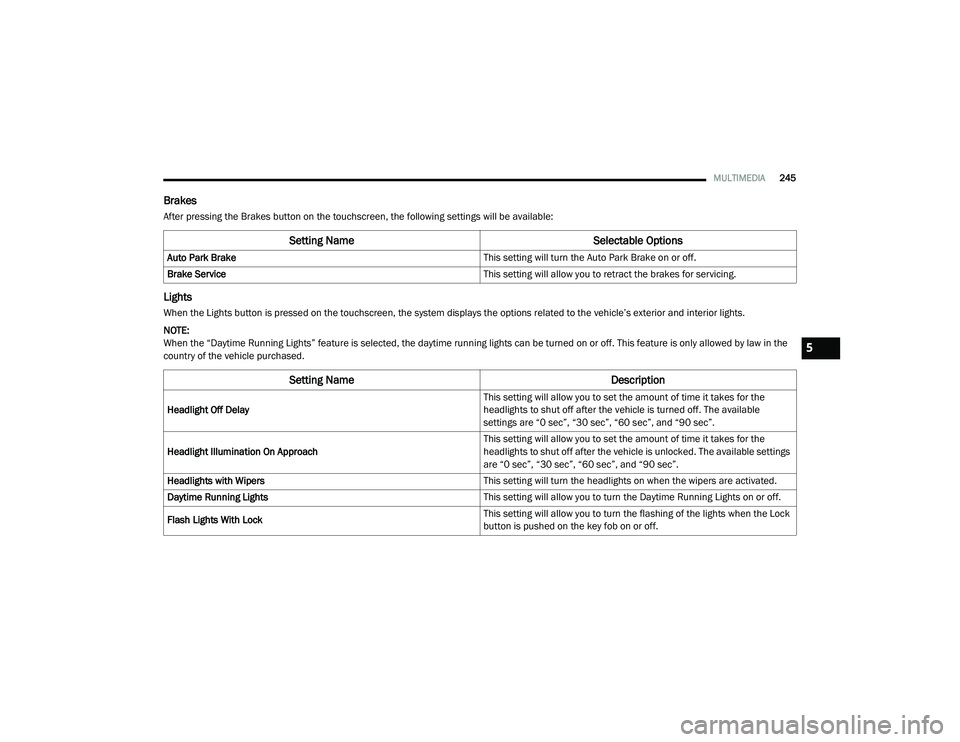
Brakes
After pressing the Brakes button on the touchscreen, the following settings will be available:
Lights
When the Lights button is pressed on the touchscreen, the system displays the options related to the vehicle’s exterior and interior lights.
NOTE:
When the “Daytime Running Lights” feature is selected, the daytime running lights can be turned on or off. This feature is only allowed by law in the
country of the vehicle purchased.
Setting Name Selectable Options
Auto Park Brake This setting will turn the Auto Park Brake on or off.
Brake Service This setting will allow you to retract the brakes for servicing.
Setting NameDescription
Headlight Off Delay This setting will allow you to set the amount of time it takes for the
headlights to shut off after the vehicle is turned off. The available
settings are “0 sec”, “30 sec”, “60 sec”, and “90 sec”.
Headlight Illumination On Approach This setting will allow you to set the amount of time it takes for the
headlights to shut off after the vehicle is unlocked. The available settings
are “0 sec”, “30 sec”, “60 sec”, and “90 sec”.
Headlights with Wipers This setting will turn the headlights on when the wipers are activated.
Daytime Running Lights This setting will allow you to turn the Daytime Running Lights on or off.
Flash Lights With Lock This setting will allow you to turn the flashing of the lights when the Lock
button is pushed on the key fob on or off.
5
21_DT_OM_EN_USC_t.book Page 245
Page 248 of 496
246MULTIMEDIA
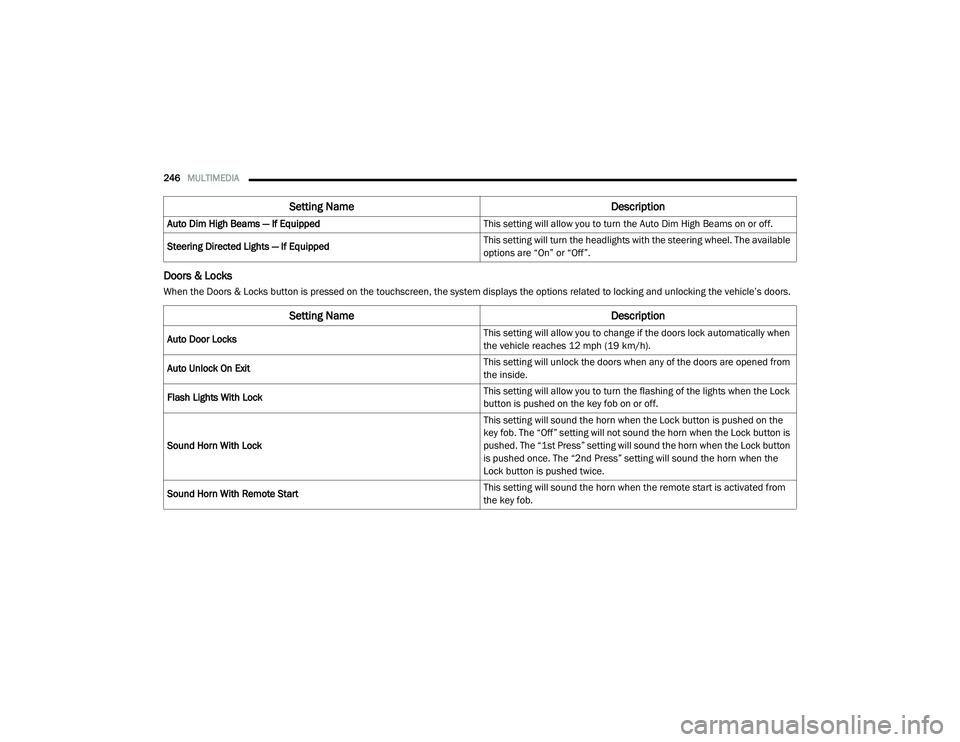
Doors & Locks
When the Doors & Locks button is pressed on the touchscreen, the system displays the options related to locking and unlocking the vehicle’s doors.Auto Dim High Beams — If Equipped
This setting will allow you to turn the Auto Dim High Beams on or off.
Steering Directed Lights — If Equipped This setting will turn the headlights with the steering wheel. The available
options are “On” or “Off”.
Setting Name
Description
Setting NameDescription
Auto Door Locks This setting will allow you to change if the doors lock automatically when
the vehicle reaches 12 mph (19 km/h).
Auto Unlock On Exit This setting will unlock the doors when any of the doors are opened from
the inside.
Flash Lights With Lock This setting will allow you to turn the flashing of the lights when the Lock
button is pushed on the key fob on or off.
Sound Horn With Lock This setting will sound the horn when the Lock button is pushed on the
key fob. The “Off” setting will not sound the horn when the Lock button is
pushed. The “1st Press” setting will sound the horn when the Lock button
is pushed once. The “2nd Press” setting will sound the horn when the
Lock button is pushed twice.
Sound Horn With Remote Start This setting will sound the horn when the remote start is activated from
the key fob.
21_DT_OM_EN_USC_t.book Page 246
Page 251 of 496
MULTIMEDIA249
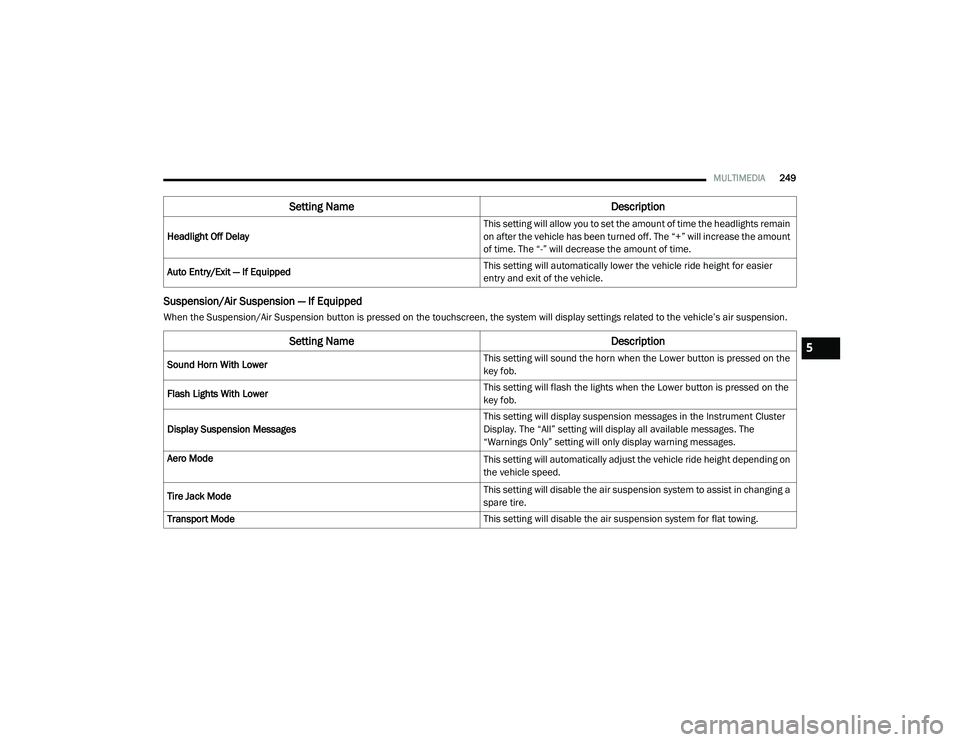
Suspension/Air Suspension — If Equipped
When the Suspension/Air Suspension button is pressed on the touchscreen, the system will display settings related to the vehicle’s air suspension.Headlight Off Delay
This setting will allow you to set the amount of time the headlights remain
on after the vehicle has been turned off. The “+” will increase the amount
of time. The “-” will decrease the amount of time.
Auto Entry/Exit — If Equipped This setting will automatically lower the vehicle ride height for easier
entry and exit of the vehicle.
Setting Name
Description
Setting NameDescription
Sound Horn With Lower This setting will sound the horn when the Lower button is pressed on the
key fob.
Flash Lights With Lower This setting will flash the lights when the Lower button is pressed on the
key fob.
Display Suspension Messages This setting will display suspension messages in the Instrument Cluster
Display. The “All” setting will display all available messages. The
“Warnings Only” setting will only display warning messages.
Aero Mode
This setting will automatically adjust the vehicle ride height depending on
the vehicle speed.
Tire Jack Mode This setting will disable the air suspension system to assist in changing a
spare tire.
Transport Mode This setting will disable the air suspension system for flat towing.
5
21_DT_OM_EN_USC_t.book Page 249
Page 355 of 496

SAFETY353
eye irritation, rinse the area with cool water.
For nose or throat irritation, move to fresh air.
If the irritation continues, see your doctor. If
these particles settle on your clothing, follow
the garment manufacturer’s instructions for
cleaning.
Do not drive your vehicle after the air bags have
deployed. If you are involved in another
collision, the air bags will not be in place to
protect you.
NOTE:
Air bag covers may not be obvious in the inte -
rior trim, but they will open during air bag
deployment.
After any collision, the vehicle should be
taken to an authorized dealer immediately.
Enhanced Accident Response System
In the event of an impact, if the communication
network remains intact, and the power remains
intact, depending on the nature of the event,
the Occupant Restraint Controller (ORC) will
determine whether to have the Enhanced
Accident Response System perform the
following functions:
Cut off fuel to the engine (if equipped)
Cut off battery power to the electric motor (if
equipped)
Flash hazard lights as long as the battery has
power
Turn on the interior lights, which remain on
as long as the battery has power or for
15 minutes from the intervention of the
Enhanced Accident Response System
Unlock the power door locks
Your vehicle may also be designed to perform
any of these other functions in response to the
Enhanced Accident Response System:
Turn off the Fuel Filter Heater, Turn off the
HVAC Blower Motor, Close the HVAC Circula -
tion Door
Cut off battery power to the:
Engine
Electric Motor (if equipped)
Electric power steering
Brake booster
Electric park brake
Automatic transmission gear selector
Horn
Front wiper
Headlamp washer pump
NOTE:
After an accident, remember to cycle the igni -
tion to the STOP (OFF/LOCK) position and
remove the key from the ignition switch to avoid
draining the battery. Carefully check the vehicle
for fuel leaks in the engine compartment and on
the ground near the engine compartment and
fuel tank before resetting the system and
starting the engine. If there are no fuel leaks or
damage to the vehicle electrical devices (e.g.
headlights) after an accident, reset the system
by following the procedure described below. If
you have any doubt, contact an authorized
dealer.
WARNING!
Deployed air bags and seat belt
pretensioners cannot protect you in another
collision. Have the air bags, seat belt
pretensioners, and the seat belt retractor
assemblies replaced by an authorized dealer
immediately. Also, have the Occupant
Restraint Controller System serviced as well.
6
21_DT_OM_EN_USC_t.book Page 353
Page 464 of 496
462SERVICING AND MAINTENANCE
contaminants, road surfaces on which the
vehicle is operated, extreme hot or cold weather
and other extreme conditions will have an
adverse effect on paint, metal trim, and
underbody protection.
The following maintenance recommendations
will enable you to obtain maximum benefit from
the corrosion resistance built into your vehicle.
What Causes Corrosion?
Corrosion is the result of deterioration or
removal of paint and protective coatings from
your vehicle.
The most common causes are:
Road salt, dirt and moisture accumulation.
Stone and gravel impact.
Insects, tree sap and tar.
Salt in the air near seacoast localities.
Atmospheric fallout/industrial pollutants.
BODY AND UNDERBODY MAINTENANCE
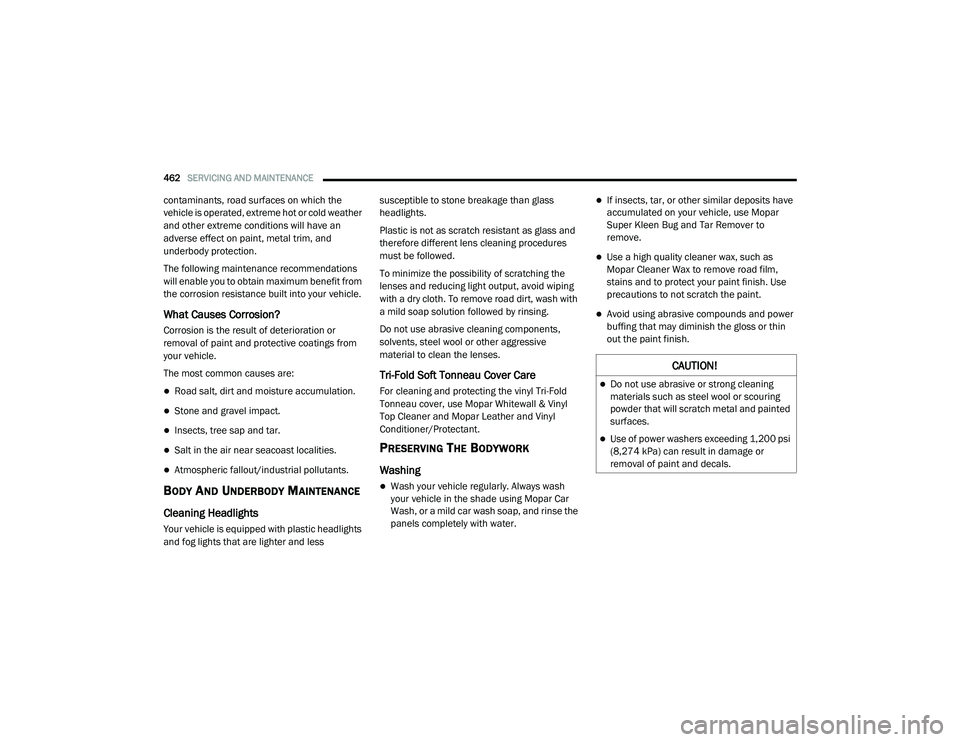
Cleaning Headlights
Your vehicle is equipped with plastic headlights
and fog lights that are lighter and less susceptible to stone breakage than glass
headlights.
Plastic is not as scratch resistant as glass and
therefore different lens cleaning procedures
must be followed.
To minimize the possibility of scratching the
lenses and reducing light output, avoid wiping
with a dry cloth. To remove road dirt, wash with
a mild soap solution followed by rinsing.
Do not use abrasive cleaning components,
solvents, steel wool or other aggressive
material to clean the lenses.
Tri-Fold Soft Tonneau Cover Care
For cleaning and protecting the vinyl Tri-Fold
Tonneau cover, use Mopar Whitewall & Vinyl
Top Cleaner and Mopar Leather and Vinyl
Conditioner/Protectant.
PRESERVING THE BODYWORK
Washing
Wash your vehicle regularly. Always wash
your vehicle in the shade using Mopar Car
Wash, or a mild car wash soap, and rinse the
panels completely with water.
If insects, tar, or other similar deposits have
accumulated on your vehicle, use Mopar
Super Kleen Bug and Tar Remover to
remove.
Use a high quality cleaner wax, such as
Mopar Cleaner Wax to remove road film,
stains and to protect your paint finish. Use
precautions to not scratch the paint.
Avoid using abrasive compounds and power
buffing that may diminish the gloss or thin
out the paint finish.
CAUTION!
Do not use abrasive or strong cleaning
materials such as steel wool or scouring
powder that will scratch metal and painted
surfaces.
Use of power washers exceeding 1,200 psi
(8,274 kPa) can result in damage or
removal of paint and decals.
21_DT_OM_EN_USC_t.book Page 462
Page 485 of 496

483
INDEX
A
Adaptive Cruise Control (ACC) (Cruise
Control)
................................................ 177, 179Adding Engine Coolant (Antifreeze)............... 422Adding Fuel.......................................... 208, 210Additives, Fuel............................................... 469AdjustDown........................................................... 36Forward....................................................... 36Rearward..................................................... 36Up................................................................ 36Adjustable Pedals............................................ 43Advance Phone Connectivity......................... 279Air BagAir Bag Operation...................................... 344Air Bag Warning Light...................... 342, 345Enhanced Accident Response......... 353, 394Event Data Recorder (EDR)....................... 394Front Air Bag............................................. 345If Deployment Occurs................................ 352Knee Impact Bolsters................................ 349Maintaining Your Air Bag System.............. 354Maintenance............................................. 354Redundant Air Bag Warning Light.............343Transporting Pets...................................... 369Air Bag Light............................... 126, 342, 369
Air Cleaner, Engine (Engine Air Cleaner
Filter)............................................................ 411Air Conditioner Maintenance........................ 415Air Conditioner Refrigerant........................... 415Air Conditioner System................................. 415Air Conditioning................................................ 63Air Conditioning Filter..............................67, 415Air Conditioning System................................... 65Air Conditioning, Operating Tips....................... 66Air Filter........................................................ 411Air PressureTires......................................................... 450Air Suspension..................................... 165, 169AlarmSecurity Alarm....................................26, 127Alterations/ModificationsVehicle......................................................... 11Antifreeze (Engine Coolant)................. 422, 474Disposal................................................... 423Anti-Lock Brake System (ABS)...................... 310Anti-Lock Warning Light................................ 132Assist, Hill Start............................................. 317Audio Settings............................................... 266Audio Systems (Radio).................................. 236Auto Down Power Windows............................. 78Automatic Door Locks...................................... 30
Automatic Headlights.......................................54Automatic High Beams.....................................53Automatic Tailgate Release.............................85Automatic Temperature Control (ATC)..............65Automatic Transmission....................... 156, 426Adding Fluid.............................................. 426Fluid And Filter Change............................. 426Fluid Change............................................. 426Fluid Level Check...................................... 426Fluid Type........................................ 426, 478Special Additives...................................... 426Automatic Transmission Limp Home Mode... 159AutoPark....................................................... 141AUX Camera......................................... 204, 208Auxiliary Driving Systems.............................. 318Axle Fluid.............................................. 426, 478Axle Lubrication............................................ 426
B
Back-Up......................................................... 202Back-Up Camera........................................... 202Battery................................................. 128, 409Charging System Light.............................. 128Keyless Key Fob Replacement....................18Battery Saver Feature......................................57Belts, Seat.................................................... 369
11
21_DT_OM_EN_USC_t.book Page 483
Page 488 of 496
486
Fluid Leaks
.................................................... 371Fluid Level Checks Brake........................................................ 425Fluid, Brake................................................... 478Fog Lights............................................... 55, 441Fold-Flat Seats................................................. 34Forward Collision Warning............................. 324Four Wheel Drive........................................... 161Four-Way Hazard Flasher............................... 373Freeing A Stuck Vehicle................................. 391Front Axle (Differential).................................. 426Fuel............................................ 210, 468, 471Adding............................................. 208, 210Additives................................................... 469Clean Air.................................................... 469Ethanol...................................................... 469Filter.......................................................... 412Gasoline.................................................... 468Light.......................................................... 131Materials Added........................................ 469Methanol................................................... 469Octane Rating........................ 468, 469, 475Requirements........................ 468, 471, 474Specifications............................................ 471Tank Capacity............................................ 474Fuses............................................................. 427
G
Garage Door Opener (HomeLink)..................... 49Gasoline, Clean Air........................................ 469Gasoline, Reformulated................................ 469GaugesVoltage..................................................... 146Glass Cleaning.............................................. 466Grocery Bag Retainer....................................... 39Gross Axle Weight Rating.............................. 215Gross Vehicle Weight Rating......................... 214GuideBody Builders.............................................. 11GVWR............................................................ 213
H
HazardDriving Through Flowing, Rising, Or Shallow Standing Water
.................................... 234Hazard Warning Flashers.............................. 373Head Restraints............................................... 40Head Rests...................................................... 40Headlights.................................................... 439Cleaning................................................... 462High Beam................................................... 53High Beam/Low Beam Select Switch.......... 53Lights On Reminder..................................... 55Passing........................................................ 54Switch.......................................................... 52
Heated Mirrors.................................................48Heated Seats...................................................38Heater, Engine Block..................................... 150High Beam/Low Beam Select (Dimmer)
Switch..............................................................53Hill Descent Control...................................... 315Hill Descent Control Indicator....................... 315Hill Start Assist.............................................. 317HitchesTrailer Towing........................................... 218HomeLink (Garage Door Opener).....................49Hood Prop........................................................84Hood Release...................................................84
I
Ignition.............................................................21Switch..........................................................21Illuminated Entry..............................................58Inside Rearview Mirror.................... 44, 45, 373Instrument Cluster............................... 110, 113Descriptions............................ 110, 113, 136Display...................................................... 114Instrument Panel Lens Cleaning................... 465Integrated Trailer Brake Control.................... 223Interior Appearance Care.............................. 464Interior Lights...................................................57Intervention Regeneration Strategy..... 121, 414Inverter Outlet (115V)......................................75
21_DT_OM_EN_USC_t.book Page 486