headlights RAM 1500 2021 Owners Manual
[x] Cancel search | Manufacturer: RAM, Model Year: 2021, Model line: 1500, Model: RAM 1500 2021Pages: 496, PDF Size: 20.89 MB
Page 5 of 496
3
UNIVERSAL GARAGE DOOR OPENER
(HOMELINK®) — IF EQUIPPED ...........................49 Before You Begin Programming
HomeLink® .................................................. 49 Erasing All The HomeLink® Channels........ 49
Identifying Whether You Have A Rolling
Code Or Non-Rolling Code Device .............. 49 Programming HomeLink® To A Garage
Door Opener ................................................. 50 Programming HomeLink® To A
Miscellaneous Device.................................. 51 Reprogramming A Single HomeLink®
Button ........................................................... 51 Canadian/Gate Operator Programming ..... 51
EXTERIOR LIGHTS.................................................52
Headlight Switch .......................................... 52
Multifunction Lever ..................................... 53
Daytime Running Lights (DRLs) ................. 53
High/Low Beam Switch ............................... 53
Automatic High Beam Headlamp
Control — If Equipped ................................. 53 Flash-To-Pass ............................................... 54
Automatic Headlights — If Equipped ......... 54
Parking Lights And Panel Lights ................. 54
Automatic Headlights With Wipers ............. 54
Headlight Delay ............................................ 55
Lights-On Reminder ..................................... 55
Fog Lights — If Equipped ............................ 55
Turn Signals ................................................ 55
Lane Change Assist — If Equipped ............. 55 Cargo Lights/Trailer Spotter Lights With
Bed Lights — If Equipped............................. 56 Battery Saver ............................................... 57
INTERIOR LIGHTS ................................................ 57
Courtesy Lights ............................................ 57
Illuminated Entry ......................................... 58
WINDSHIELD WIPERS AND WASHERS............. 58
Windshield Wiper Operation ...................... 58
Rain Sensing Wipers — If Equipped............ 59
CLIMATE CONTROLS ........................................... 60
Automatic Climate Control Descriptions
And Functions .............................................. 60 Manual Climate Control Descriptions And
Functions...................................................... 63 Automatic Temperature Control (ATC) —
If Equipped ................................................... 65 Climate Voice Recognition .......................... 66
Operating Tips ............................................. 66
INTERIOR STORAGE AND EQUIPMENT ............. 68
Storage ......................................................... 68
USB/AUX Control ......................................... 72
Electrical Power Outlets .............................. 74
Power Inverter — If Equipped ..................... 75
Wireless Charging Pad — If Equipped ........ 77
WINDOWS ............................................................ 77
Power Windows............................................ 77
Automatic Window Features ....................... 78
Reset Auto-Up ............................................. 78
Window Lockout Switch .............................. 79 Power Sliding Rear Window —
If Equipped .................................................. 79 Manual Sliding Rear Window —
If Equipped ................................................... 79 Wind Buffeting ............................................ 80
POWER SUNROOF — IF EQUIPPED ....................80
Single Pane Power Sunroof —
If Equipped ................................................... 80 Dual Pane Power Sunroof —
If Equipped ................................................... 82
HOOD .....................................................................84
To Open The Hood ....................................... 84
To Close The Hood....................................... 85
TAILGATE ...............................................................85
Opening ........................................................ 85
Closing.......................................................... 85
Locking Tailgate ........................................... 85
Multifunction Tailgate — If Equipped.......... 85
Tailgate Removal ........................................ 86
Bed Step — If Equipped ............................... 89
PICKUP BOX .........................................................90
Bed Rail Tie-Down System —
If Equipped .................................................. 91
RAMBOX — IF EQUIPPED ....................................92
Locking And Unlocking RamBox ................. 93
RamBox Cargo Storage Bins ....................... 93
RamBox Safety Warning ............................. 94
Bed Divider — If Equipped ........................... 95
21_DT_OM_EN_USC_t.book Page 3
Page 54 of 496
52GETTING TO KNOW YOUR VEHICLE
It may be helpful to unplug the device during the
cycling process to prevent possible overheating
of the garage door or gate motor.
1. Cycle the ignition to the ON/RUN position.
2. Place the hand-held transmitter 1 to
3 inches (3 to 8 cm) away from the
HomeLink button you wish to program while
keeping the HomeLink indicator light in
view.
3. Continue to press and hold the HomeLink button, while you press and release
(“cycle”) your hand-held transmitter every
two seconds until HomeLink has
successfully accepted the frequency signal.
The indicator light will flash slowly and then
rapidly when fully trained.
4. Watch for the HomeLink indicator to change flash rates. When it changes, it is
programmed. It may take up to 30 seconds
or longer in rare cases. The garage door
may open and close while you are
programming.
5. Press and hold the programmed HomeLink button and observe the indicator light. NOTE:
If the indicator light stays on constantly,
programming is complete and the garage
door/device should activate when the Home
-
Link button is pressed.
To program the two remaining HomeLink
buttons, repeat each step for each remaining
button. DO NOT erase the channels.
If you unplugged the garage door opener/
device for programming, plug it back in at this
time.
Reprogramming A Single HomeLink Button
(Canadian/Gate Operator)
To reprogram a channel that has been
previously trained, follow these steps:
1. Cycle the ignition to the ON/RUN position.
2. Press and hold the desired HomeLink button until the indicator light begins to
flash after 20 seconds. Do not release the
button.
3. Without releasing the button, proceed with “Canadian/Gate Operator Programming”
step 2 and follow all remaining steps
Úpage 482.
EXTERIOR LIGHTS
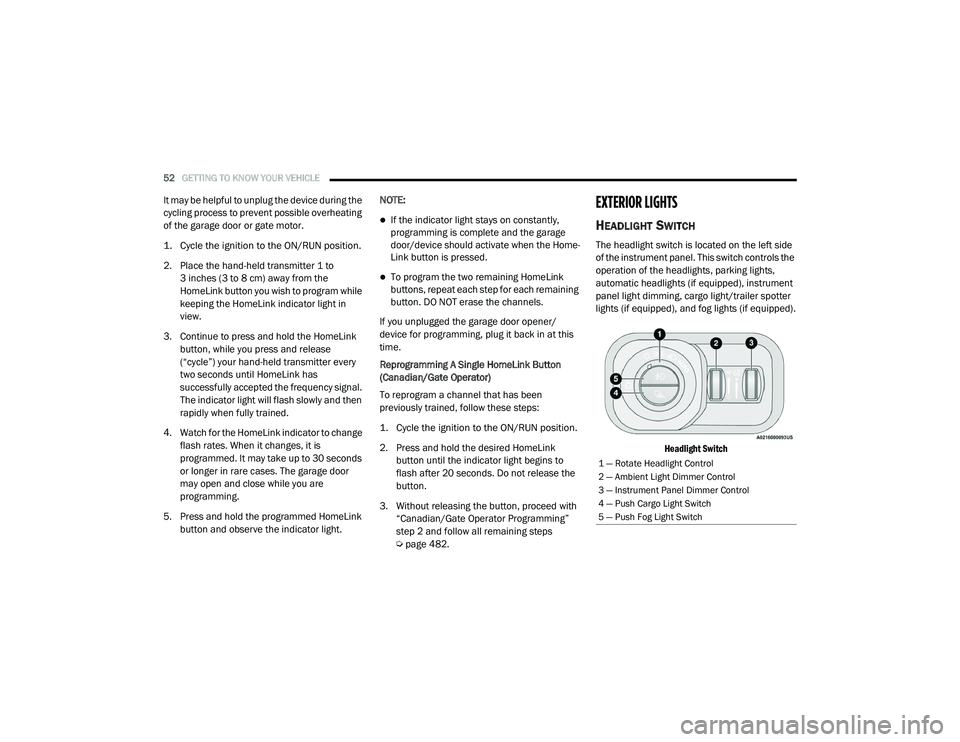
HEADLIGHT SWITCH
The headlight switch is located on the left side
of the instrument panel. This switch controls the
operation of the headlights, parking lights,
automatic headlights (if equipped), instrument
panel light dimming, cargo light/trailer spotter
lights (if equipped), and fog lights (if equipped).
Headlight Switch
1 — Rotate Headlight Control
2 — Ambient Light Dimmer Control
3 — Instrument Panel Dimmer Control
4 — Push Cargo Light Switch
5 — Push Fog Light Switch
21_DT_OM_EN_USC_t.book Page 52
Page 55 of 496

GETTING TO KNOW YOUR VEHICLE53
To turn on the headlights, rotate the headlight
switch clockwise. When the headlight switch is
on, the parking lights, taillights, license plate
light and instrument panel lights are also turned
on. To turn off the headlights, rotate the
headlight switch back to the O (off) position.
NOTE:
Your vehicle is equipped with plastic head -
light and fog light (if equipped) lenses that
are lighter and less susceptible to stone
breakage than glass lights. Plastic is not as
scratch resistant as glass and therefore
different lens cleaning procedures must be
followed.
To minimize the possibility of scratching the
lenses and reducing light output, avoid
wiping with a dry cloth. To remove road dirt,
wash with a mild soap solution followed by
rinsing.
MULTIFUNCTION LEVER
The multifunction lever is located on the left
side of the steering column.
Multifunction Lever
DAYTIME RUNNING LIGHTS (DRLS)
The Daytime Running Lights (DRLs) come on
whenever the engine is running, and the low
beams are not on. The lights will remain on until
the ignition is placed in the OFF or ACC position,
or the parking brake is engaged.
NOTE:
For vehicles sold in Canada, the Daytime
Running Lights will automatically deactivate
when the front fog lights are turned on.
If a turn signal is activated, the DRL lamp on
the same side of the vehicle will turn off for
the duration of the turn signal activation.
Once the turn signal is no longer active, the
DRL lamp will illuminate.
If allowed by law in the country in which the
vehicle was purchased, the Daytime Running
Lights can be turned on and off using the
Uconnect system Ú page 237.
HIGH/LOW BEAM SWITCH
Push the multifunction lever toward the
instrument panel to switch the headlights to
high beams. Pulling the multifunction lever
back will turn the low beams on.
AUTOMATIC HIGH BEAM HEADLAMP
C
ONTROL — IF EQUIPPED
The Automatic High Beam Headlamp Control
system provides increased forward lighting at
night by automating high beam control through
the use of a camera mounted on the inside
rearview mirror or a windshield mounted
camera. These cameras detect vehicle specific
light and automatically switch from high beams
to low beams until the approaching vehicle is
out of view.
CAUTION!
Do not use abrasive cleaning components,
solvents, steel wool or other abrasive
materials to clean the lenses.
2
21_DT_OM_EN_USC_t.book Page 53
Page 56 of 496

54GETTING TO KNOW YOUR VEHICLE
NOTE:
The Automatic High Beam Headlamp Control
can be turned on or off by selecting “ON”
under “Auto Dim High Beams” within your
Uconnect Settings Úpage 237, as well as
turning the headlight switch to the AUTO posi -
tion.
Broken, muddy, or obstructed headlights and
taillights of vehicles in the field of view will
cause headlights to remain on longer (closer
to the vehicle). Also, dirt, film, and other
obstructions on the windshield or camera
lens will cause the system to function improp -
erly.
If the windshield or Automatic High Beam
Headlamp Control mirror is replaced, the
mirror must be re-aimed to ensure proper
performance. See a local authorized dealer.
To opt out of the Advanced Auto High Beam
Sensitivity Control (default) and enter
Reduced High Beam Sensitivity Control (not
recommended), toggle the high beam lever
6 full on/off cycles within 10 seconds of
placing the ignition in the ON position. The
system will return to the default setting upon
placing the ignition in the OFF position.
FLASH-TO-PASS
You can signal another vehicle with your
headlights by lightly pulling the multifunction
lever toward you. This will cause the high beam
headlights to turn on, and remain on, until the
lever is released.
AUTOMATIC HEADLIGHTS — IF EQUIPPED
This system automatically turns the headlights
on or off according to ambient light levels. To
turn the system on, rotate the headlight switch
to the AUTO position.
When the system is on, the Headlight Delay
feature is also on. This means the headlights
will stay on for up to 90 seconds after you place
the ignition into the OFF position. To turn the
automatic headlights off, turn the headlight
switch out of the AUTO position.
NOTE:
The engine must be running before the head -
lights will turn on in the Automatic Mode.
PARKING LIGHTS AND PANEL LIGHTS
To turn on the parking lights and instrument
panel lights, rotate the headlight switch
clockwise. To turn off the parking lights, rotate
the headlight switch back to the O (off) position.
AUTOMATIC HEADLIGHTS WITH WIPERS
If your vehicle is equipped with Automatic
Headlights, it also has this
customer-programmable feature. When your
headlights are in the automatic mode and the
engine is running, they will automatically turn
on when the wiper system is on. This feature is
programmable through the Uconnect system
Ú page 237.
If your vehicle is equipped with the Rain Sensing
Wiper system Ú page 59, and it is activated,
the headlights will automatically turn on after
the wipers complete five wipe cycles within
approximately one minute, and they will turn off
approximately four minutes after the wipers
completely stop.
NOTE:
When your headlights come on during the
daytime, the instrument panel lights will auto -
matically dim to the lower nighttime intensity.
21_DT_OM_EN_USC_t.book Page 54
Page 57 of 496
GETTING TO KNOW YOUR VEHICLE55
HEADLIGHT DELAY
To assist when exiting the vehicle, the headlight
delay feature will leave the headlights on for up
to 90 seconds. This delay is initiated when the
ignition is placed in the OFF position while the
headlight switch is on, and then the headlight
switch is cycled off. Headlight delay can be
cancelled by either turning the headlight switch
on then off, or by placing the ignition in the ON
position.
NOTE:
This feature can be programmed through the
Uconnect system Úpage 237.
The headlight delay feature is automatically
activated if the headlight switch is left in the
AUTO position when the ignition is placed in
the OFF position.
LIGHTS-ON REMINDER
If the headlights, parking lights, or cargo lights
are left on after the ignition is placed in the OFF
position, the vehicle will chime when the
driver’s door is opened.
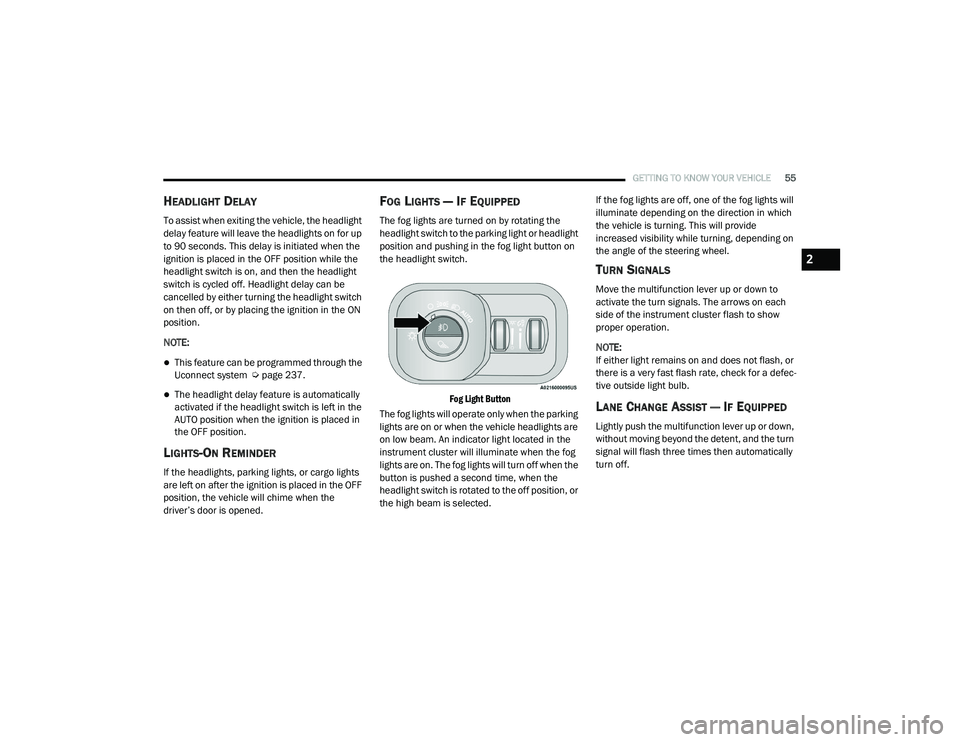
FOG LIGHTS — IF EQUIPPED
The fog lights are turned on by rotating the
headlight switch to the parking light or headlight
position and pushing in the fog light button on
the headlight switch.
Fog Light Button
The fog lights will operate only when the parking
lights are on or when the vehicle headlights are
on low beam. An indicator light located in the
instrument cluster will illuminate when the fog
lights are on. The fog lights will turn off when the
button is pushed a second time, when the
headlight switch is rotated to the off position, or
the high beam is selected. If the fog lights are off, one of the fog lights will
illuminate depending on the direction in which
the vehicle is turning. This will provide
increased visibility while turning, depending on
the angle of the steering wheel.
TURN SIGNALS
Move the multifunction lever up or down to
activate the turn signals. The arrows on each
side of the instrument cluster flash to show
proper operation.
NOTE:
If either light remains on and does not flash, or
there is a very fast flash rate, check for a defec
-
tive outside light bulb.
LANE CHANGE ASSIST — IF EQUIPPED
Lightly push the multifunction lever up or down,
without moving beyond the detent, and the turn
signal will flash three times then automatically
turn off.
2
21_DT_OM_EN_USC_t.book Page 55
Page 59 of 496
GETTING TO KNOW YOUR VEHICLE57
BATTERY SAVER
Timers are set to both the interior and exterior
lights to protect the life of your vehicle’s battery.
After 10 minutes, if the ignition is OFF and any
door is left open or the dimmer control is
rotated all the way up to the dome light on
position, the interior lights will automatically
turn off.
NOTE:
Battery saver mode is canceled if the ignition is
ON.
If the headlights remain on while the ignition is
placed in the OFF position, the exterior lights will
automatically turn off after eight minutes. If the
headlights are turned on and left on for eight
minutes while the ignition is OFF, the exterior
lights will automatically turn off.
INTERIOR LIGHTS
COURTESY LIGHTS
Courtesy and dome lights are turned on when the
doors are opened or the Dome ON button is
pushed on the overhead console. If your vehicle
is equipped with Remote Keyless Entry and the
unlock button is pushed on the key fob, the courtesy and dome lights will turn on. When a
door is open and the interior lights are on, and
the Dome Defeat button on the overhead
console is pressed, the interior lights will turn off.
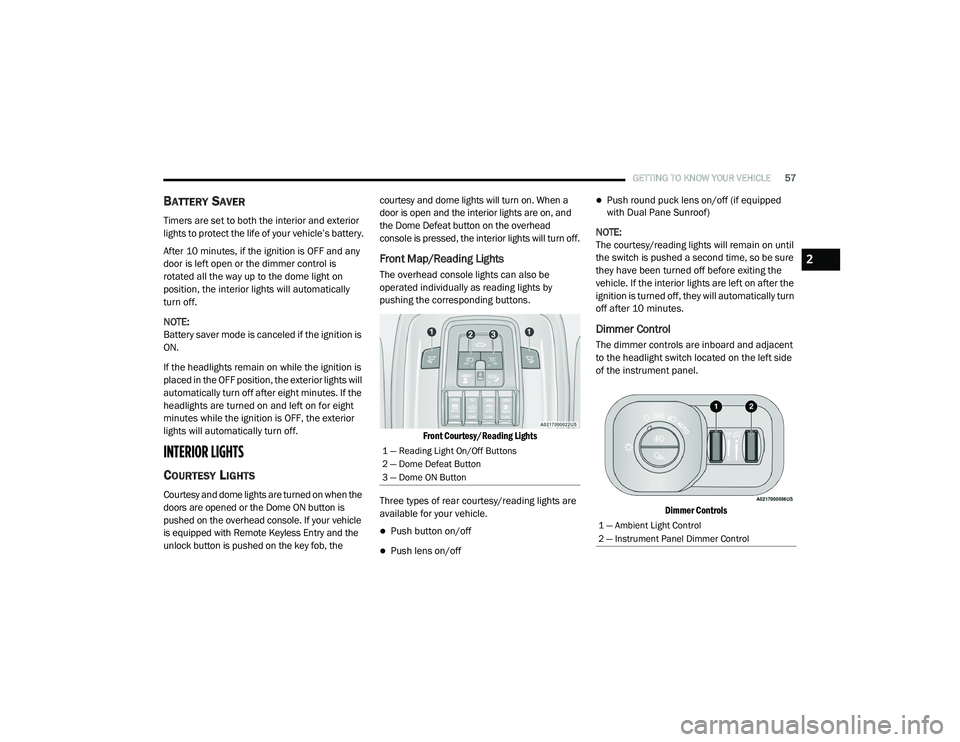
Front Map/Reading Lights
The overhead console lights can also be
operated individually as reading lights by
pushing the corresponding buttons.
Front Courtesy/Reading Lights
Three types of rear courtesy/reading lights are
available for your vehicle.
Push button on/off
Push lens on/off
Push round puck lens on/off (if equipped
with Dual Pane Sunroof)
NOTE:
The courtesy/reading lights will remain on until
the switch is pushed a second time, so be sure
they have been turned off before exiting the
vehicle. If the interior lights are left on after the
ignition is turned off, they will automatically turn
off after 10 minutes.
Dimmer Control
The dimmer controls are inboard and adjacent
to the headlight switch located on the left side
of the instrument panel.
Dimmer Controls
1 — Reading Light On/Off Buttons
2 — Dome Defeat Button
3 — Dome ON Button
1 — Ambient Light Control
2 — Instrument Panel Dimmer Control
2
21_DT_OM_EN_USC_t.book Page 57
Page 60 of 496

58GETTING TO KNOW YOUR VEHICLE
With the parking lights or headlights on, rotating
the right dimmer control upward will increase
the brightness of the instrument panel lights.
Rotating the left dimmer control will adjust the
interior and ambient light levels when the
headlights are on.
NOTE:
The dimming of the touchscreen is program -
mable through the Uconnect system
Ú page 237.
ILLUMINATED ENTRY
The courtesy lights will turn on when you use the
key fob to unlock the doors or open any door.
This feature also turns on the approach lamps
located beneath the outside mirrors (if
equipped).
The lights will fade to off after approximately
30 seconds, or they will immediately fade to off
once the ignition switch is placed in the ON/
RUN position from the OFF position.
The front courtesy overhead console and door
courtesy lights will not turn off if the Dome ON
button on the overhead console is pushed. The
overhead and door courtesy lights will turn off
after 10 minutes to protect the battery. The illuminated entry system will not operate if
the Dome Defeat button on the overhead
console is pushed.
NOTE:
If your vehicle is equipped with Illuminated
Approach lights under the outside mirrors, they
will also be turned off by pushing the Dome
Defeat button.
WINDSHIELD WIPERS AND WASHERS
The windshield wiper/washer controls are
located on the multifunction lever on the left
side of the steering column. The front wipers are
operated by rotating a switch, located on the
end of the lever.
Windshield Wiper/Washer Lever
WINDSHIELD WIPER OPERATION
Intermittent Wipers
The intermittent feature of this system was
designed for use when weather conditions
make a single wiping cycle, with a variable
pause between cycles, desirable. For maximum
delay between cycles, rotate the control knob
upward to the first detent.
The delay interval decreases as you rotate the
knob until it enters the low continual speed
position. The delay can be regulated from a
maximum of about 18 seconds between cycles,
to a cycle every one second. The delay intervals
will double in duration when the vehicle speed
is 10 mph (16 km/h) or less.Windshield Washers
To use the windshield washer, push the washer
knob, located on the end of the multifunction
lever, inward and hold. Washer fluid will be
sprayed and the wiper will operate for two to
three cycles after the washer knob is released.
If the washer knob pushed while in the delay
range, the wiper will operate for several
seconds after the washer knob is released. It
will then resume the intermittent interval
previously selected. If the washer knob is
21_DT_OM_EN_USC_t.book Page 58
Page 137 of 496

GETTING TO KNOW YOUR INSTRUMENT PANEL135
Wait To Start Light — If Equipped
This indicator light will illuminate for
approximately two seconds when the
ignition is turned to the RUN position.
Its duration may be longer based on
colder operating conditions. Vehicle will not
initiate start until telltale is no longer displayed
Ú page 146.
NOTE:
The “Wait To Start” telltale may not illuminate if
the intake manifold temperature is warm
enough.
Water In Fuel Indicator Light — If Equipped
The “Water In Fuel Indicator Light” will
illuminate when there is water
detected in the fuel filter. If this light
remains on, DO NOT start the vehicle
before you drain the water from the fuel filter to
prevent engine damage, and please see an
authorized dealer.GREEN INDICATOR LIGHTS
Adaptive Cruise Control (ACC) Set With
Target Light — If Equipped
This will display when the ACC is set
and a target vehicle is detected
Ú page 179.
Adaptive Cruise Control (ACC) Set With No
Target Detected Indicator Light — If
Equipped
This light will turn on when the ACC is
SET and there is no target vehicle
detected Ú page 179.
ECO Mode Indicator Light
This light will turn on when ECO Mode
is active.
Park/Headlight On Indicator Light
This indicator light will illuminate
when the park lights or headlights are
turned on.
LaneSense Indicator Light — If Equipped
The LaneSense indicator light
illuminates solid green when both
lane markings have been detected
and the system is “armed” and ready
to provide visual and torque warnings if an
unintentional lane departure occurs
Ú page 199.
CAUTION!
The presence of water in the fuel system
circuit may cause severe damage to the
injection system and irregular engine
operation. If the indicator light is illuminated,
contact an authorized dealer as soon as
possible to bleed the system. If the above
indications come on immediately after
refuelling, water has probably been poured
into the tank: switch the engine off
immediately and contact an authorized
dealer.
3
21_DT_OM_EN_USC_t.book Page 135
Page 139 of 496
GETTING TO KNOW YOUR INSTRUMENT PANEL137
Hill Descent Control (HDC) Indicator Light
— If Equipped
This indicator shows when the HDC
feature is turned on. The lamp will be
on solid when HDC is armed. HDC can
only be armed when the transfer case
is in the “4WD LOW” position and the vehicle
speed is less then 20 mph (32 km/h). If these
conditions are not met while attempting to use
the HDC feature, the HDC indicator light will
flash on/off.
LaneSense Indicator Light — If Equipped
When the LaneSense system is ON,
but not armed, the LaneSense
indicator light illuminates solid white.
This occurs when only left, right, or
neither lane line has been detected. If a single
lane line is detected, the system is ready to
provide only visual warnings if an unintentional
lane departure occurs on the detected lane line
Ú page 199.
BLUE INDICATOR LIGHTS
High Beam Indicator Light
This indicator light will illuminate to
indicate that the high beam
headlights are on. With the low beams
activated, push the multifunction
lever forward (toward the front of the vehicle) to
turn on the high beams. Pull the multifunction
lever rearward (toward the rear of the vehicle) to
turn off the high beams. If the high beams are
off, pull the lever toward you for a temporary
high beam on, “flash to pass” scenario.
ONBOARD DIAGNOSTIC SYSTEM — OBD II
Your vehicle is equipped with a sophisticated
Onboard Diagnostic system called OBD II. This
system monitors the performance of the
emissions, engine, and transmission control
systems. When these systems are operating
properly, your vehicle will provide excellent
performance and fuel economy, as well as
engine emissions well within current
government regulations. If any of these systems require service, the OBD
II system will turn on the Malfunction Indicator
Light (MIL). It will also store diagnostic codes
and other information to assist your service
technician in making repairs. Although your
vehicle will usually be drivable and not need
towing, see an authorized dealer for service as
soon as possible.
CAUTION!
Prolonged driving with the MIL on could
cause further damage to the emission
control system. It could also affect fuel
economy and driveability. The vehicle must
be serviced before any emissions tests can
be performed.
If the MIL is flashing while the vehicle is
running, severe catalytic converter damage
and power loss will soon occur. Immediate
service is required.
3
21_DT_OM_EN_USC_t.book Page 137
Page 169 of 496

STARTING AND OPERATING167
to Normal Height Mode, push the height
selector switch up once while in Entry/Exit or
drive the vehicle over 15 mph (24 km/h).
Entry/Exit mode may not be available due to
vehicle payload, an instrument cluster
message will be displayed when this occurs
Úpage 114.
NOTE:
Entry/Exit mode may be achieved using your
key fob for easier entry/loading Ú page 17.
The system requires that the ignition be in the
ON/RUN position or the engine running for all
user requested changes. When lowering the
vehicle, all of the doors must be closed. If a door
is opened at any time while the vehicle is
lowering, the change will not be completed until
the open door(s) is closed. This system uses a lifting and lowering pattern
which keeps the headlights from incorrectly
shining into oncoming traffic. When raising the
vehicle, the rear of the vehicle will move up first
and then the front. When lowering the vehicle,
the front will move down first and then the rear.
After the engine is turned off, it may be noticed
that the air suspension system operates briefly;
this is normal. The system is correcting the
position of the vehicle to ensure a proper
appearance.
To assist with changing a spare tire, the air
suspension system has a feature which allows
the automatic leveling to be disabled
Ú
page 114.
NOTE:
If equipped with a touchscreen radio, all
enabling/disabling of air suspension features
must be done through the radio Ú page 237.AIR SUSPENSION MODES
The air suspension system has multiple modes
to protect the system in unique situations. The
engine should be running to change between
Air Suspension Modes.
Automatic AERO Mode
To improve aerodynamics, the air suspension
system has a feature which will put the vehicle
into AERO height automatically Úpage 114.
Automatic Aero Mode may be disabled through
vehicle settings in the Uconnect Radio (if
equipped) Ú page 237.
Tire Jack Mode
To assist with changing a tire, the air
suspension system has a feature which allows
the automatic leveling to be disabled
Ú page 237.
Transport Mode
For towing your vehicle with four wheels off the
road, the air suspension system has a feature
which will put the vehicle into Entry/Exit height
and disable the automatic load leveling system
Ú page 237.
CAUTION!
When in ENTRY/EXIT setting, be aware of your
surroundings, you may not have the
clearance required for certain areas and
vehicle damage may occur.
WARNING!
The air suspension system uses a high
pressure volume of air to operate the system.
To avoid personal injury or damage to the
system, see an authorized dealer for service.
4
21_DT_OM_EN_USC_t.book Page 167