light RAM 1500 2021 User Guide
[x] Cancel search | Manufacturer: RAM, Model Year: 2021, Model line: 1500, Model: RAM 1500 2021Pages: 496, PDF Size: 20.89 MB
Page 24 of 496
22GETTING TO KNOW YOUR VEHICLE
NOTE:
The key fob may not be detected by the
vehicle Keyless Enter-N-Go system if it is
located next to a mobile phone, laptop or
other electronic device; these devices may
block the key fob’s wireless signal and prevent the Keyless Enter-N-Go system from
starting the vehicle.
Engine starting procedure Ú
page 140.
When opening the driver's door and the igni -
tion is in the ON/RUN position (engine not
running), a chime will sound to remind you to
place the ignition in the OFF position. In addi -
tion to the chime, the message “Ignition or
Accessory ON” will display in the cluster.
REMOTE START — IF EQUIPPED
(GASOLINE)
This system uses the key fob to start
the engine conveniently from outside
the vehicle while still maintaining
security. The system has a range of
approximately 300 ft (91 m).
Remote start is used to defrost windows in cold
weather and to reach a comfortable climate in
all ambient conditions before the customer
enters the vehicle. NOTE:
Obstructions between the vehicle and key fob
may reduce this range.
HOW TO USE REMOTE START
Push and release the Remote Start button on
the key fob twice within five seconds. The
vehicle doors will lock, the parking lights will
flash, and the horn will chirp twice (if
programmed). Then, the engine will start, and
the vehicle will remain in the Remote Start
mode for a 15 minute cycle.
Pushing the remote start button a third time
shuts the engine off.
Do not leave the key fob in or near the
vehicle, or in a location accessible to chil-
dren, and do not leave the ignition of a
vehicle equipped with Keyless Enter-N-Go
in the ON/RUN mode. A child could operate
power windows, other controls, or move the
vehicle.
Do not leave children or animals inside
parked vehicles in hot weather. Interior
heat build-up may cause serious injury or
death.
CAUTION!
An unlocked vehicle is an invitation for
thieves. Always remove key fob from the
vehicle and lock all doors when leaving the
vehicle unattended.
WARNING!
(Continued)
WARNING!
Do not start or run an engine in a closed
garage or confined area. Exhaust gas
contains Carbon Monoxide (CO) which is
odorless and colorless. Carbon Monoxide is
poisonous and can cause serious injury or
death when inhaled.
Keep key fobs away from children. Opera -
tion of the Remote Start System, windows,
door locks or other controls could cause
serious injury or death.
21_DT_OM_EN_USC_t.book Page 22
Page 25 of 496

GETTING TO KNOW YOUR VEHICLE23
To drive the vehicle, push the unlock button,
insert the key into the ignition, and turn to the
ON/RUN position.
NOTE:
With Remote Start, the engine will only run
for 15 minutes.
Remote Start can only be used twice.
If an engine fault is present or fuel level is
low, the vehicle will start and then shut down
in 10 seconds.
The parking lights will turn on and remain on
during Remote Start mode.
For security, power window and power
sunroof operation (if equipped) are disabled
when the vehicle is in the Remote Start
mode.
The ignition must be placed in the ON/RUN
position before the Remote Start sequence
can be repeated for a third cycle. All of the following conditions must be met
before the engine will remote start:
Gear selector in PARK
Doors closed
Hood closed
Hazard switch off
Brake switch inactive (brake pedal not
pushed)
Battery at an acceptable charge level
PANIC button not pushed
Fuel meets minimum requirement
System not disabled from previous remote
start event
Vehicle Security system not active
Malfunction Indicator Light is not illuminated
TO EXIT REMOTE START MODE
To drive the vehicle after starting the Remote
Start system, either push and release the
unlock button on the key fob to unlock the
doors, or unlock the vehicle using Keyless
Enter-N-Go — Passive Entry via the door
handles, and disarm the vehicle security system
(if equipped). Then, prior to the end of the
15 minute cycle, press the brake pedal and
push and release the START/STOP ignition
button.
WARNING!
Do not start or run an engine in a closed
garage or confined area. Exhaust gas
contains Carbon Monoxide (CO) which is
odorless and colorless. Carbon Monoxide is
poisonous and can cause serious injury or
death when inhaled.
Keep key fobs away from children. Opera
-
tion of the Remote Start System, windows,
door locks or other controls could cause
serious injury or death.
2
21_DT_OM_EN_USC_t.book Page 23
Page 27 of 496

GETTING TO KNOW YOUR VEHICLE25
REMOTE START WINDSHIELD WIPER
D
E-ICER ACTIVATION — IF EQUIPPED
When the Remote Start system is active and the
outside ambient temperature is less than 33°F
(0.6°C), the Windshield Wiper De-Icer will
activate. Exiting remote start will its resume
previous operation. If the Windshield Wiper
De-Icer was active, the timer and operation will
continue.
REMOTE START ABORT MESSAGE
The following messages will display in the
instrument cluster display if the vehicle fails to
remote start, or exits remote start prematurely:
Remote Start Cancelled — Door Open
Remote Start Cancelled — Hood Open
Remote Start Cancelled — Fuel Low
Remote Start Cancelled — Too Cold
Remote Start Cancelled — Time Expired
Remote Start Disabled — Start Vehicle to
Reset
The message will stay active until the ignition is
placed in the ON/RUN position Ú page 482.
REMOTE START — IF EQUIPPED (DIESEL)
This system uses the key fob to start
the engine conveniently from outside
the vehicle while still maintaining
security. The system has a range of
approximately 300 ft (91 m).
NOTE:
Obstructions between the vehicle and the
key fob may reduce this range.
The Remote Start system will wait for the
Wait To Start indicator light Ú page 135 to
extinguish before cranking the engine. This
allows time for the engine pre-heat cycle to
pre-heat the cylinder air, and is normal in
cold weather. For further information on the
Wait To Start indicator light and the pre-heat
cycle see .
HOW TO USE REMOTE START
All of the following conditions must be met
before the engine will remote start:
Gear selector in PARK
Doors closed
Hood closed
Hazard switch off
Brake switch inactive (brake pedal not
pressed)
Battery at an acceptable charge level
PANIC button not pushed
Fuel meets minimum requirement
System not disabled from previous remote
start event
Vehicle Security system not active
Water In Fuel indicator light is not illuminated
Wait To Start indicator light is not illuminated
Malfunction Indicator Light (MIL) is not illumi -
nated
2
21_DT_OM_EN_USC_t.book Page 25
Page 28 of 496
26GETTING TO KNOW YOUR VEHICLE
VEHICLE SECURITY SYSTEM — IF EQUIPPED
The Vehicle Security system monitors the vehicle
doors, hood, tailgate, and the Keyless Enter-N-Go
— Ignition for unauthorized operation. While the
Vehicle Security system is armed, interior
switches for door locks and tailgate release are
disabled. If something triggers the alarm, the
Vehicle Security system will provide the following
audible and visible signals:
The horn will pulse
The turn signals will flash
The vehicle security light in the instrument
cluster will flash
TO ARM THE SYSTEM
Follow these steps to arm the Vehicle Security
system:
1. Make sure the vehicle’s ignition is placed
in the OFF position.
For vehicles equipped with Keyless Entry,
make sure the vehicle’s keyless ignition
system is OFF.
2. Perform one of the following methods to lock the vehicle:
Push the lock button on the interior
power door lock switch with the driver
and/or passenger door open.
Push the lock button on the exterior
Passive Entry door handle with a valid key
fob available in the same exterior zone
Úpage 28.
Push the lock button on the key fob.
3. If any doors are open, close them.
TO DISARM THE SYSTEM
The Vehicle Security system can be disarmed
using any of the following methods:
Push the unlock button on the key fob.
Grab the Passive Entry door handle to unlock
the door Ú page 28.
Cycle the ignition out of the OFF position to
disarm the system.
NOTE:
The driver's door key cylinder cannot arm or
disarm the Vehicle Security system. Use of
the door key cylinder when the system is
armed will sound the alarm when the door is
opened.
The Vehicle Security system remains armed
when the power tailgate (if equipped) is
opened using the tailgate button on the key
fob.
If Passive Entry (if equipped) is used to
unlock the tailgate, the Vehicle Security
system is disarmed and the rest of the
vehicle doors will remain locked unless
“Unlock All Doors 1st Press” is selected in the
Passive Entry settings.
When the Vehicle Security system is armed,
the interior power door lock switches will not
unlock the doors.
WARNING!
Do not start or run an engine in a closed
garage or confined area. Exhaust gas
contains Carbon Monoxide (CO) which is
odorless and colorless. Carbon Monoxide is
poisonous and can cause serious injury or
death when inhaled.
Keep key fobs away from children. Opera -
tion of the Remote Start System, windows,
door locks or other controls could cause
serious injury or death.
21_DT_OM_EN_USC_t.book Page 26
Page 29 of 496
GETTING TO KNOW YOUR VEHICLE27
The Vehicle Security system is designed to
protect your vehicle. However, you can create
conditions where the system will give you a false
alarm. If one of the previously described arming
sequences has occurred, the Vehicle Security
system will arm regardless of whether you are in
the vehicle or not. If you remain in the vehicle
and open a door, the alarm will sound. If this
occurs, disarm the Vehicle Security system.
If the Vehicle Security system is armed and the
battery becomes disconnected, the Vehicle
Security system will remain armed when the
battery is reconnected; the exterior lights will
flash, and the horn will sound. If this occurs,
disarm the Vehicle Security system.
REARMING OF THE SYSTEM
If something triggers the alarm, and no action is
taken to disarm it, the Vehicle Security system
will turn the horn off after 29 seconds, five
seconds between cycles, and up to eight cycles
if the trigger remains active. The Vehicle
Security system will then rearm itself.
SECURITY SYSTEM MANUAL OVERRIDE
The Vehicle Security system will not arm if you
lock the doors using the manual door lock.
DOORS
MANUAL DOOR LOCKS
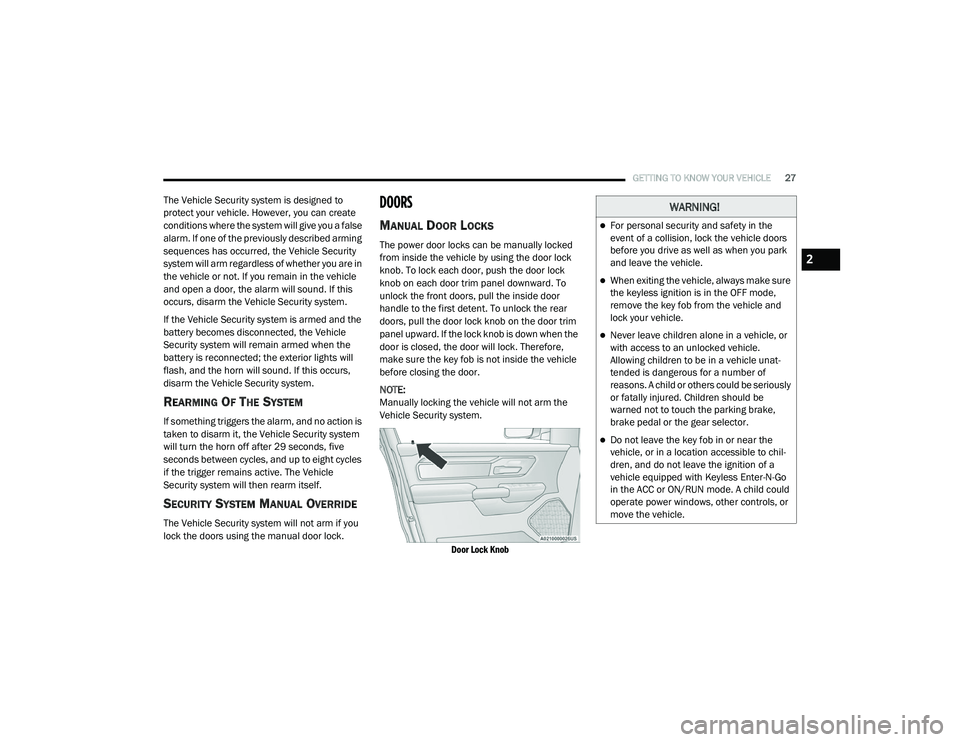
The power door locks can be manually locked
from inside the vehicle by using the door lock
knob. To lock each door, push the door lock
knob on each door trim panel downward. To
unlock the front doors, pull the inside door
handle to the first detent. To unlock the rear
doors, pull the door lock knob on the door trim
panel upward. If the lock knob is down when the
door is closed, the door will lock. Therefore,
make sure the key fob is not inside the vehicle
before closing the door.
NOTE:
Manually locking the vehicle will not arm the
Vehicle Security system.
Door Lock Knob
WARNING!
For personal security and safety in the
event of a collision, lock the vehicle doors
before you drive as well as when you park
and leave the vehicle.
When exiting the vehicle, always make sure
the keyless ignition is in the OFF mode,
remove the key fob from the vehicle and
lock your vehicle.
Never leave children alone in a vehicle, or
with access to an unlocked vehicle.
Allowing children to be in a vehicle unat -
tended is dangerous for a number of
reasons. A child or others could be seriously
or fatally injured. Children should be
warned not to touch the parking brake,
brake pedal or the gear selector.
Do not leave the key fob in or near the
vehicle, or in a location accessible to chil -
dren, and do not leave the ignition of a
vehicle equipped with Keyless Enter-N-Go
in the ACC or ON/RUN mode. A child could
operate power windows, other controls, or
move the vehicle.
2
21_DT_OM_EN_USC_t.book Page 27
Page 32 of 496

30GETTING TO KNOW YOUR VEHICLE
Push The Door Handle Button To Lock
NOTE:
DO NOT grab the door handle when pushing the
door handle lock button. This could unlock the
door(s).
Do NOT Grab The Door Handle When Locking
NOTE:
After pushing the door handle button, you
must wait two seconds before you can lock or
unlock the doors, using either Passive Entry
door handle. This is done to allow you to
check if the vehicle is locked by pulling the
door handle without the vehicle unlocking.
If Passive Entry is disabled using the
Uconnect settings, the key protection
described in "Frequency Operated Button
Integrated Key (FOBIK-Safe)" remains active/
functional.
The Passive Entry system will not operate if
the key fob battery is depleted.
The LED light on the key fob will not blink
if the key fob battery is low or fully
depleted, but a low key fob battery condi
-
tion will still support the Passive Entry
system functionality. When the key fob
battery is low, the instrument cluster will
display a message indicating that the key
fob battery is low Ú page 17
Ú page 482.
AUTOMATIC UNLOCK DOORS ON EXIT —
I
F EQUIPPED
The doors will unlock automatically on vehicles
with power door locks after the following
sequence of actions:
1. The Automatic Unlock Doors On Exit
feature is enabled.
2. All doors are closed.
3. The transmission gear selector was not in PARK, then is placed in PARK.
4. Any door is opened.
AUTOMATIC DOOR LOCKS — IF
E
QUIPPED
The auto door lock feature default condition is
enabled. When enabled, the door locks will lock
automatically when the vehicle's speed exceeds
15 mph (24 km/h). The auto door lock feature
is enabled/disabled in the Uconnect Settings
Ú page 237.
21_DT_OM_EN_USC_t.book Page 30
Page 37 of 496

GETTING TO KNOW YOUR VEHICLE35
Manual Front Seat Recline Adjustment
The recline lever is located on the outboard side
of the seat. To recline the seat, lean forward
slightly, lift the lever, lean back to the desired
position and release the lever. To return the
seatback to its normal upright position, lean
forward and lift the lever. Release the lever
once the seat back is in the upright position.
Manual Recline Lever
Front Bench Seat — If Equipped
The seat is divided into three segments. The
outboard seat portions are each 40% of the
total width of the seat. If equipped, the back of
the center portion (20%) easily folds down to
provide an armrest/center storage
compartment.
Center Portion Of Front Bench Seat
Center Portion Folded Forward
WARNING!
Adjusting a seat while driving may be
dangerous. Moving a seat while driving
could result in loss of control which could
cause a collision and serious injury or
death.
Seats should be adjusted before fastening
the seat belts and while the vehicle is
parked. Serious injury or death could result
from a poorly adjusted seat belt.
WARNING!
Do not stand or lean in front of the seat
while actuating the handle. The seatback
may swing forward and hit you causing
injury.
To avoid injury, place your hand on the seat -
back and actuate the handle, then position
the seatback in the desired position.
2
21_DT_OM_EN_USC_t.book Page 35
Page 41 of 496
GETTING TO KNOW YOUR VEHICLE39
Rear Heated Seats — If Equipped
On some models, the two rear outboard seats
may be equipped with heated seats. There are
two heated seat switches that allow the rear
passengers to operate the seats independently.
The heated seat switches for each heater are
located on the rear of the center console.
There are two heated seat switches that allow
the rear passengers to operate the seats
independently. You can choose from HI, MED,
LO, or OFF heat settings. Amber indicator lights
in each switch indicate the level of heat in use.
Push the heated seat button once to turn
the HI setting on.
Push the heated seat button a second
time to turn the MED setting on.
Push the heated seat button a third time
to turn the LO setting on.
Push the heated seat button a fourth time
to turn the heating elements off.
NOTE:
The level of heat selected will stay on until the
operator changes it.
VENTILATED SEATS — IF EQUIPPED
Front Ventilated Seats
The ventilated seats are equipped with fans
that can be controlled through the climate and
control screen in the Uconnect system. The fans
operate at three speeds, HI, MED and LO.
Press the ventilated seat button once to
choose HI.
Press the ventilated seat button a second
time to choose MED.
Press the ventilated seat button a third
time to choose LO.
Press the ventilated seat button a fourth
time to turn the ventilation off.
NOTE:
The engine must be running for the ventilated
seats to operate.
Rear Ventilated Seats — If Equipped
If equipped, the two outboard rear seats will
have ventilated seats. The rear ventilated seat
control switches are located on the rear of the
center console.
There are two ventilated seat switches that
allow the rear passengers to operate the seats
independently. The fans operate at three
speeds: HI, MED, and LO. Push the ventilated
seat buttons to toggle through the speeds, or to
turn the feature off.
NOTE:
The engine must be running for the ventilated
seats to operate.
PLASTIC GROCERY BAG RETAINERS
Retainer hooks which will hold plastic grocery
bag handles are attached to the underside of
the rear seat cushion. To access these hooks,
lift the rear seat cushion upward.
2
21_DT_OM_EN_USC_t.book Page 39
Page 45 of 496
GETTING TO KNOW YOUR VEHICLE43
GET STARTED
The VR button is used to activate /deactivate
your Voice Recognition system.
Helpful hints for using Voice Recognition:
Reduce background noise. Wind noise and
passenger conversations are examples of
noise that may impact recognition.
Speak clearly at a normal pace and volume
while facing straight ahead.
Each time you give a Voice Command, first
push the VR button, wait until after the beep,
then say your Voice Command.
You can interrupt the help message or
system prompts by pushing the VR button
and saying a Voice Command from the
current category.
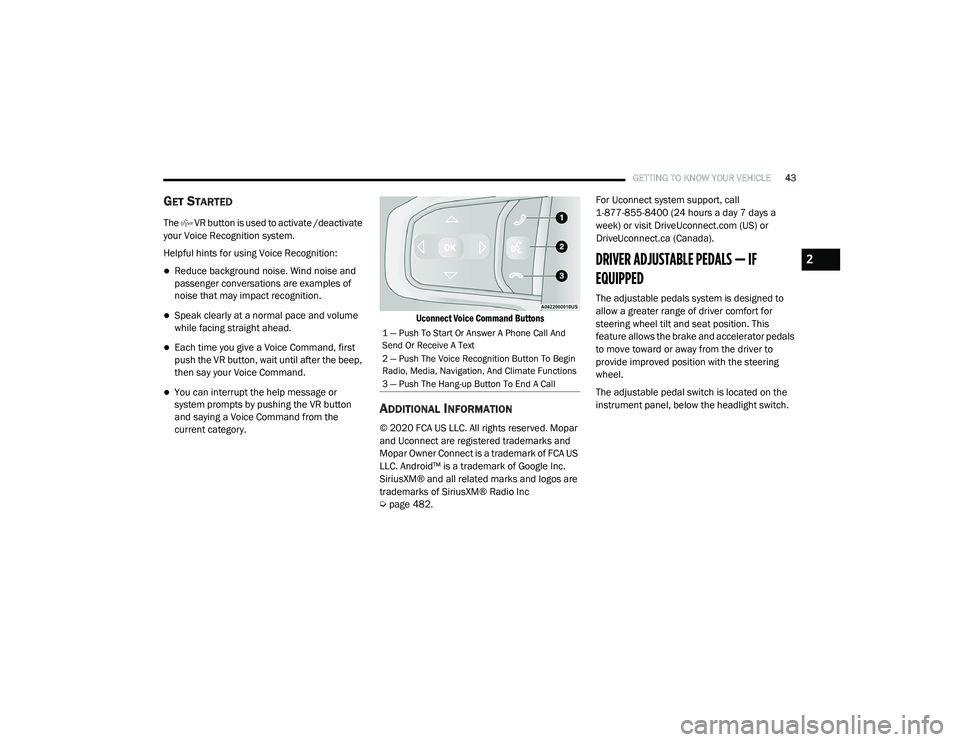
Uconnect Voice Command Buttons
ADDITIONAL INFORMATION
© 2020 FCA US LLC. All rights reserved. Mopar
and Uconnect are registered trademarks and
Mopar Owner Connect is a trademark of FCA US
LLC. Android™ is a trademark of Google Inc.
SiriusXM® and all related marks and logos are
trademarks of SiriusXM® Radio Inc
Ú
page 482. For Uconnect system support, call
1-877-855-8400 (24 hours a day 7 days a
week) or visit DriveUconnect.com (US) or
DriveUconnect.ca (Canada).
DRIVER ADJUSTABLE PEDALS — IF
EQUIPPED
The adjustable pedals system is designed to
allow a greater range of driver comfort for
steering wheel tilt and seat position. This
feature allows the brake and accelerator pedals
to move toward or away from the driver to
provide improved position with the steering
wheel.
The adjustable pedal switch is located on the
instrument panel, below the headlight switch.
1 — Push To Start Or Answer A Phone Call And
Send Or Receive A Text
2 — Push The Voice Recognition Button To Begin
Radio, Media, Navigation, And Climate Functions
3 — Push The Hang-up Button To End A Call
2
21_DT_OM_EN_USC_t.book Page 43
Page 46 of 496

44GETTING TO KNOW YOUR VEHICLE
Adjustable Pedals Switch
The pedals can be adjusted with the ignition
placed in the OFF position.
The pedals cannot be adjusted when the
vehicle is in REVERSE or when the Cruise
Control system or Adaptive Cruise Control
system is on. The following messages will
appear in the instrument cluster display if the
pedals are attempted to be adjusted when
the system is locked out: “Adjustable Pedal
Disabled — Cruise Control Engaged” or
“Adjustable Pedal Disabled — Vehicle In
Reverse”.
NOTE:
Always adjust the pedals to a position that
allows full movement of the pedal.
Further small adjustments may be necessary
to find the best possible seat/pedal position.
For vehicles equipped with Driver Memory
Settings Úpage 32, you can use your key fob
or the memory switch on the driver’s door
trim panel to return the adjustable pedals to
pre-programmed positions.
MIRRORS
INSIDE REARVIEW MIRROR
Manual Mirror — If Equipped
The mirror head can be adjusted up, down, left,
and right. The mirror should be adjusted to
center on the view through the rear window.
Headlight glare from vehicles behind you can be
reduced by moving the small control under the
mirror to the night position (toward the rear of
the vehicle). The mirror should be adjusted
while set in the day position (toward the
windshield).
Adjusting Rearview Mirror
WARNING!
Do not adjust the pedals while the vehicle is
moving. You could lose control and have an
accident. Always adjust the pedals while the
vehicle is parked.
CAUTION!
Do not place any article under the adjustable
pedals or impede its ability to move, as it may
cause damage to the pedal controls. Pedal
travel may become limited if movement is
stopped by an obstruction in the adjustable
pedal's path.
21_DT_OM_EN_USC_t.book Page 44