maintenance RAM 1500 2021 User Guide
[x] Cancel search | Manufacturer: RAM, Model Year: 2021, Model line: 1500, Model: RAM 1500 2021Pages: 496, PDF Size: 20.89 MB
Page 133 of 496

GETTING TO KNOW YOUR INSTRUMENT PANEL131
Electronic Stability Control (ESC) OFF
Warning Light — If Equipped
This warning light indicates the ESC is
off.
Each time the ignition is turned to ON/RUN or
ACC/ON/RUN, the ESC system will be on, even
if it was turned off previously.
Service LaneSense Warning Light — If
Equipped
This warning light will illuminate when
the LaneSense system is not
operating and requires service.
Please contact an authorized dealer.
Low Washer Fluid Warning Light — If
Equipped
This warning light will illuminate when
the windshield washer fluid is low.
Low Fuel Warning Light
When the fuel level is less than a ¼
tank, and the Distance to Empty is
less than 50 miles, this light will turn
on and remain on until fuel is added. A single warning chime will sound with Low Fuel
Warning.
Tire Pressure Monitoring System (TPMS)
Warning Light
The warning light switches on and a
message is displayed to indicate that
the tire pressure is lower than the
recommended value and/or that slow
pressure loss is occurring. In these cases,
optimal tire duration and fuel consumption may
not be guaranteed.
Should one or more tires be in the condition
mentioned above, the display will show the
indications corresponding to each tire.
Each tire, including the spare (if provided),
should be checked monthly when cold and
inflated to the inflation pressure recommended by the vehicle manufacturer on the vehicle
placard or tire inflation pressure label. If your
vehicle has tires of a different size than the size
indicated on the vehicle placard or tire inflation
pressure label, you should determine the
proper tire inflation pressure for those tires.
As an added safety feature, your vehicle has
been equipped with a Tire Pressure Monitoring
System (TPMS) that illuminates a low tire
pressure telltale when one or more of your tires
is significantly under-inflated. Accordingly, when
the low tire pressure telltale illuminates, you
should stop and check your tires as soon as
possible, and inflate them to the proper
pressure. Driving on a significantly
under-inflated tire causes the tire to overheat
and can lead to tire failure. Under-inflation also
reduces fuel efficiency and tire tread life, and
may affect the vehicle’s handling and stopping
ability.
Please note that the TPMS is not a substitute for
proper tire maintenance, and it is the driver’s
responsibility to maintain correct tire pressure,
even if under-inflation has not reached the level
to trigger illumination of the TPMS low tire
pressure telltale.
CAUTION!
Do not continue driving with one or more flat
tires as handling may be compromised. Stop
the vehicle, avoiding sharp braking and
steering. If a tire puncture occurs, repair
immediately using the dedicated tire repair
kit and contact an authorized dealer as soon
as possible.
3
21_DT_OM_EN_USC_t.book Page 131
Page 140 of 496

138GETTING TO KNOW YOUR INSTRUMENT PANEL
ONBOARD DIAGNOSTIC SYSTEM
(OBD II) C
YBERSECURITY
Your vehicle is required to have OBD II and a
connection port to allow access to information
related to the performance of your emissions
controls. Authorized service technicians may
need to access this information to assist with
the diagnosis and service of your vehicle and
emissions system Ú page 236.
EMISSIONS INSPECTION AND
MAINTENANCE PROGRAMS
In some localities, it may be a legal requirement
to pass an inspection of your vehicle's
emissions control system. Failure to pass could
prevent vehicle registration.
For states that require an Inspection
and Maintenance (I/M), this check
verifies the Malfunction Indicator
Light (MIL) is functioning and is not on
when the engine is running, and that the OBD II
system is ready for testing.
Normally, the OBD II system will be ready. The
OBD II system may not be ready if your vehicle
was recently serviced, recently had a depleted
battery or a battery replacement. If the OBD II
system should be determined not ready for the
I/M test, your vehicle may fail the test.
Your vehicle has a simple ignition actuated test,
which you can use prior to going to the test
station. To check if your vehicle's OBD II system
is ready, you must do the following:
1. Cycle the ignition switch to the ON position,
but do not crank or start the engine.
NOTE:
If you crank or start the engine, you will have to
start this test over.
2. As soon as you cycle the ignition switch to the ON position, you will see the
Malfunction Indicator Light (MIL) symbol
come on as part of a normal bulb check.
3. Approximately 15 seconds later, one of two things will happen:
The MIL will flash for about 10 seconds
and then return to being fully illuminated
until you turn OFF the ignition or start the
engine. This means that your vehicle's
OBD II system is not ready and you
should not proceed to the I/M station.
The MIL will not flash at all and will
remain fully illuminated until you place
the ignition in the off position or start the
engine. This means that your vehicle's
OBD II system is ready and you can
proceed to the I/M station.
WARNING!
ONLY an authorized service technician
should connect equipment to the OBD II
connection port in order to read the VIN,
diagnose, or service your vehicle.
If unauthorized equipment is connected to
the OBD II connection port, such as a
driver-behavior tracking device, it may:
Be possible that vehicle systems,
including safety related systems, could
be impaired or a loss of vehicle control
could occur that may result in an acci -
dent involving serious injury or death.
Access, or allow others to access, infor -
mation stored in your vehicle systems,
including personal information.
21_DT_OM_EN_USC_t.book Page 138
Page 187 of 496
STARTING AND OPERATING185
The maximum braking applied by ACC is limited;
however, the driver can always apply the brakes
manually, if necessary.
NOTE:
The brake lights will illuminate whenever the
ACC system applies the brakes.
A Proximity Warning will alert the driver if ACC
predicts that its maximum braking level is not
sufficient to maintain the set distance. If this
occurs, a visual alert “BRAKE” will flash in the
instrument cluster display and a chime will
sound while ACC continues to apply its
maximum braking capacity.
NOTE:
The “BRAKE!” Screen in the instrument cluster
display is a warning for the driver to take action
and does not necessarily mean that the
Forward Collision Warning system is applying
the brakes autonomously.
Overtake Aid
When driving with Adaptive Cruise Control (ACC)
engaged, and following a vehicle, the system
will provide an additional acceleration up to the
ACC set speed to assist in passing the vehicle. This additional acceleration is triggered when
the driver utilizes the left turn signal and will
only be active when passing on the left hand
side.
ACC Operation At Stop
If the ACC system brings your vehicle to a
standstill while following the vehicle in front,
your vehicle will resume motion without any
diver intervention if the vehicle in front starts
moving within two seconds.
If the vehicle in front does not start moving
within two seconds of your vehicle coming to a
standstill, the driver will either have to push the
RES (resume) button, or apply the accelerator
pedal to reengage the ACC to the existing set
speed.
NOTE:
After the ACC system holds your vehicle at a
standstill for approximately three consecutive
minutes, the parking brake will be activated,
and the ACC system will be cancelled.
While ACC is holding your vehicle at a standstill,
if the driver seat belt is unbuckled or the driver
door is opened, the parking brake will be
activated, and the ACC system will be cancelled.
Display Warnings And Maintenance
“Wipe Front Radar Sensor In Front Of Vehicle”
Warning
The “ACC/FCW Unavailable Wipe Front Radar
Sensor” warning will display and also a chime
will indicate when conditions temporarily limit
system performance.
This most often occurs at times of poor visibility,
such as in snow or heavy rain. The ACC system
may also become temporarily blinded due to
obstructions, such as mud, dirt or ice. In these
cases, the instrument cluster display will display
“ACC/FCW Unavailable Wipe Front Radar
Sensor” and the system will deactivate.
The “ACC/FCW Unavailable Wipe Front Radar
Sensor” message can sometimes be displayed
while driving in highly reflective areas (i.e. ice
WARNING!
When the ACC system is resumed, the driver
must ensure that there are no pedestrians,
vehicles or objects in the path of the vehicle.
Failure to follow these warnings can result in
a collision and death or serious personal
injury.
4
21_DT_OM_EN_USC_t.book Page 185
Page 188 of 496

186STARTING AND OPERATING
and snow, or tunnels with reflective tiles). The
ACC system will recover after the vehicle has left
these areas. Under rare conditions, when the
radar is not tracking any vehicles or objects in
its path this warning may temporarily occur.
NOTE:
If the “ACC/FCW Unavailable Wipe Front Radar
Sensor” warning is active, Fixed Speed Cruise
Control is still available.
If weather conditions are not a factor, the driver
should examine the sensor. It may require
cleaning or removal of an obstruction. The
sensor is located in the camera in the center of
the windshield, on the forward side of the
rearview mirror.
To keep the ACC system operating properly, it is
important to note the following maintenance
items:
Always keep the sensor clean. Carefully clear
the windshield.
Do not remove any screws from the sensor.
Doing so could cause an ACC system
malfunction or failure and require a sensor
realignment.
Do not attach or install any accessories near
the sensor, including transparent material.
Doing so could cause an ACC system failure
or malfunction.
When the condition that deactivated the system
is no longer present, the system will return to
the “Adaptive Cruise Control Off” state and will
resume function by simply reactivating it.
NOTE:
If the “ACC/FCW Unavailable Wipe Front
Radar Sensor” message occurs frequently
(e.g. more than once on every trip) without
any snow, rain, mud, or other obstruction,
have the radar sensor realigned at an autho -
rized dealer.
Installing a snow plow, front-end protector,
an aftermarket grille or modifying the grille is
not recommended. Doing so may block the
sensor and inhibit ACC/FCW operation. “Clean Front Windshield” Warning
The “ACC/FCW Limited Functionality Clean
Front Windshield” warning will display and also
a chime will indicate when conditions
temporarily limit system performance. This
most often occurs at times of poor visibility,
such as in snow or heavy rain and fog. The ACC
system may also become temporarily blinded
due to obstructions, such as mud, dirt, or ice on
windshield, driving directly into the sun and fog
on the inside of glass. In these cases, the
instrument cluster display will show “ACC/FCW
Limited Functionality Clean Front Windshield”
and the system will have degraded
performance.
This message can sometimes be displayed
while driving in adverse weather conditions. The
ACC/FCW system will recover after the vehicle
has left these areas. Under rare conditions,
when the camera is not tracking any vehicles or
objects in its path this warning may temporarily
occur.
21_DT_OM_EN_USC_t.book Page 186
Page 212 of 496
210STARTING AND OPERATING
REFUELING THE VEHICLE — DIESEL ENGINE
The capless fuel filler is located on the left side
of the vehicle.
The capless system is sealed by two flapper
doors.
1. Put the vehicle in PARK and switch the
ignition off.
2. Open the fuel filler door.
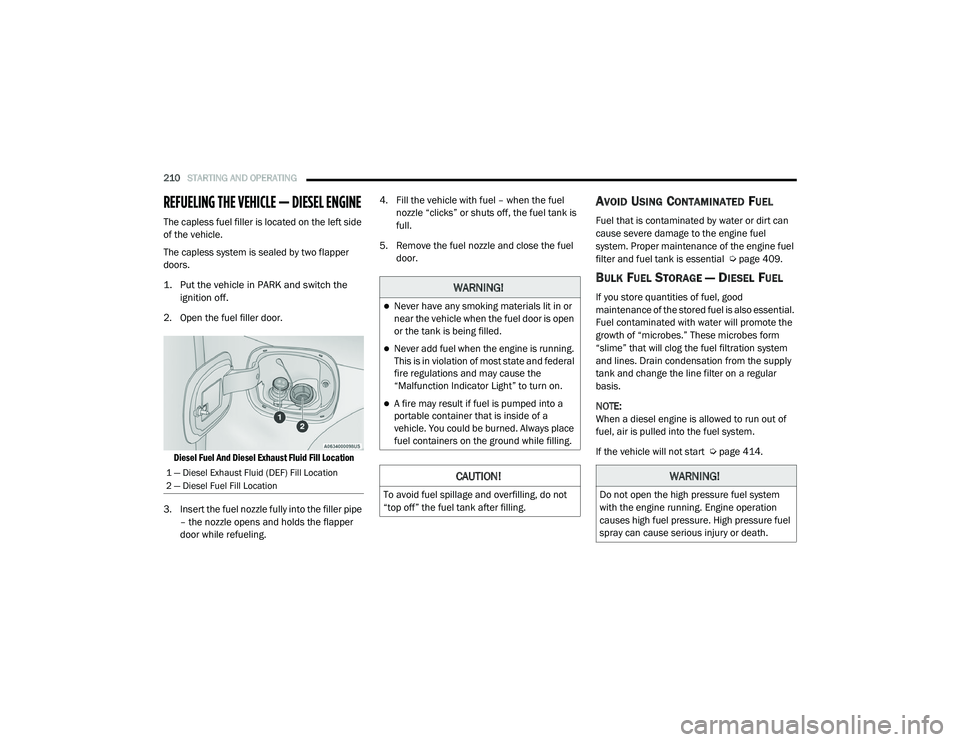
Diesel Fuel And Diesel Exhaust Fluid Fill Location
3. Insert the fuel nozzle fully into the filler pipe – the nozzle opens and holds the flapper
door while refueling. 4. Fill the vehicle with fuel – when the fuel
nozzle “clicks” or shuts off, the fuel tank is
full.
5. Remove the fuel nozzle and close the fuel door.
AVOID USING CONTAMINATED FUEL
Fuel that is contaminated by water or dirt can
cause severe damage to the engine fuel
system. Proper maintenance of the engine fuel
filter and fuel tank is essential Ú page 409.
BULK FUEL STORAGE — DIESEL FUEL
If you store quantities of fuel, good
maintenance of the stored fuel is also essential.
Fuel contaminated with water will promote the
growth of “microbes.” These microbes form
“slime” that will clog the fuel filtration system
and lines. Drain condensation from the supply
tank and change the line filter on a regular
basis.
NOTE:
When a diesel engine is allowed to run out of
fuel, air is pulled into the fuel system.
If the vehicle will not start Úpage 414.
1 — Diesel Exhaust Fluid (DEF) Fill Location
2 — Diesel Fuel Fill Location
WARNING!
Never have any smoking materials lit in or
near the vehicle when the fuel door is open
or the tank is being filled.
Never add fuel when the engine is running.
This is in violation of most state and federal
fire regulations and may cause the
“Malfunction Indicator Light” to turn on.
A fire may result if fuel is pumped into a
portable container that is inside of a
vehicle. You could be burned. Always place
fuel containers on the ground while filling.
CAUTION!
To avoid fuel spillage and overfilling, do not
“top off” the fuel tank after filling.
WARNING!
Do not open the high pressure fuel system
with the engine running. Engine operation
causes high fuel pressure. High pressure fuel
spray can cause serious injury or death.
21_DT_OM_EN_USC_t.book Page 210
Page 223 of 496
STARTING AND OPERATING221
(Continued)
NOTE:
Trailers may look different during day and night
conditions. In such cases, the trailer may need
to recalibrate.
Some trailers (such as boat trailers) will need to
recalibrate while loaded and unloaded.
NOTE:
The system may not detect a trailer in low
light conditions. In sunny conditions, the
performance may be degraded as shadows
pass over the trailer.
The driver is always responsible for safe oper -
ation of truck and trailer.
The driver is always in control of the truck as
well as the trailer and is responsible for
controlling the throttle and brakes.
The system may not function when the
camera lens is blocked, blurred (covered with
water, snow, ice, dirt, etc) and will not work
unless the tailgate is upright and fully
latched.
TOWING REQUIREMENTS
To promote proper break-in of your new vehicle
drivetrain components, the following guidelines
are recommended.
Perform the maintenance listed in the
Scheduled Servicing section for the proper
maintenance intervals Ú page 395. When
towing a trailer, never exceed the GAWR or
GCWR ratings.
CAUTION!
Do not tow a trailer at all during the first
500 miles (805 km) the new vehicle is driven. The engine, axle or other parts could
be damaged.
Then, during the first 500 miles (805 km) that a trailer is towed, do not drive over
50 mph (80 km/h) and do not make starts
at full throttle. This helps the engine and
other parts of the vehicle wear in at the
heavier loads.
WARNING!
Make certain that the load is secured in the
trailer and will not shift during travel. When
trailering cargo that is not fully secured,
dynamic load shifts can occur that may be
difficult for the driver to control. You could
lose control of your vehicle and have a colli -
sion.
When hauling cargo or towing a trailer, do
not overload your vehicle or trailer. Over -
loading can cause a loss of control, poor
performance or damage to brakes, axle,
engine, transmission, steering, suspension,
chassis structure or tires.
Safety chains must always be used
between your vehicle and trailer. Always
connect the chains to the hook retainers of
the vehicle hitch. Cross the chains under
the trailer tongue and allow enough slack
for turning corners.
4
21_DT_OM_EN_USC_t.book Page 221
Page 231 of 496

STARTING AND OPERATING229
OVER THE ROAD OPERATION WITH
S
NOWPLOW ATTACHED
The blade restricts air flow to the radiator and
causes the engine to operate at higher than
normal temperatures. Therefore, when
transporting the plow, angle the blade
completely and position it as low as road or
surface conditions permit. Do not exceed
40 mph (64 km/h). The operator should always
maintain a safe stopping distance and allow
adequate passing clearance.
OPERATING TIPS
Under ideal snow plowing conditions, 20 mph
(32 km/h) should be maximum operating
speed. The operator should be familiar with the
area and surface to be cleaned. Reduce speed
and use extreme caution when plowing
unfamiliar areas or under poor visibility.
GENERAL MAINTENANCE
Snowplows should be maintained in
accordance with the plow manufacturer's
instructions.
Keep all snowplow electrical connections and
battery terminals clean and free of corrosion.
When plowing snow, to avoid transmission and
drivetrain damage, the following precautions
should be observed:
Operate with transfer case in 4WD Low when
plowing small or congested areas where
speeds are not likely to exceed 15 mph
(24 km/h). At higher speeds operate in 4WD
High.
Vehicles with automatic transmissions
should use 4WD Low when plowing deep or
heavy snow for extended periods of time to
avoid transmission overheating.
Do not shift the transmission unless the
engine has returned to idle and wheels have
stopped. Make a practice of stepping on the
brake pedal while shifting the transmission.
4
21_DT_OM_EN_USC_t.book Page 229
Page 260 of 496
258MULTIMEDIA
SAFETY AND GENERAL INFORMATION
Safety Guidelines
Please read this manual carefully before using
the system. It contains instructions on how to
use the system in a safe and effective manner.
Do NOT attach any object to the touchscreen.
Doing so can result in damage to the
touchscreen.
Please read and follow these safety
precautions. Failure to do so may result in injury
or property damage.
Glance at the screen only when safe to do so.
If prolonged viewing of the screen is required,
park in a safe location and set the parking
brake.
Stop use immediately if a problem occurs.
Failure to do so may cause injury or damage
to the product. See an authorized dealer for
repair.
Ensure the volume level of the system is set
to a level that still allows you to hear outside
traffic and emergency vehicles.
Safe Usage Of The Uconnect System
The Uconnect system is a sophisticated elec -
tronic device. Do not let young children use
the system.
Permanent hearing loss may occur if you play
your music or sound system at loud volumes.
Exercise caution when setting the volume on
the system.
Keep drinks, rain and other sources of mois -
ture away from the system. Besides damage
to the system, moisture can cause electric
shocks as with any electronic device. NOTE:
Many features of this system are speed depen
-
dent. For your own safety, it is not possible to
use some of the touchscreen features while the
vehicle is in motion.
Care And Maintenance
Do not press the touchscreen with any hard
or sharp objects (pen, USB stick, jewelry,
etc.), which could scratch the surface.
Do not spray any liquid or chemicals directly
on the screen! Use a clean and dry microfiber
lens cleaning cloth in order to clean the
touchscreen.
If necessary, use a lint-free cloth dampened
with a cleaning solution, such as isopropyl
alcohol or an isopropyl alcohol and water
solution ratio of 50:50. Be sure to follow the
solvent manufacturer's precautions and
directions Ú page 482.
WARNING!
ALWAYS drive safely with your hands on the
steering wheel. You have full responsibility
and assume all risks related to the use of the
Uconnect features and applications in this
vehicle. Only use Uconnect when it is safe to
do so. Failure to do so may result in an
accident involving serious injury or death.
21_DT_OM_EN_USC_t.book Page 258
Page 290 of 496
288MULTIMEDIA
(Continued)
(Continued)
Requirements
This feature is available only on vehicles sold
in the US or Canada.
Vehicle must be properly equipped with the
SiriusXM Guardian™ system. Vehicle must be
registered with SiriusXM Guardian™ and
have an active subscription that includes the
applicable feature.
Vehicle must have an operable LTE (voice/
data) or 3G or 4G (data) network connection
compatible with your device.
Vehicle must be powered in the ON/RUN or
ACC (Accessory) position with a properly func -
tioning electrical system.
WARNING!
Never place anything on or near the
vehicle’s LTE (voice/data) or 3G or 4G
(data) and GPS antennas. You could
prevent LTE (voice/data) or 4G (data) and
GPS signal reception, which can prevent
your vehicle from placing an emergency
call.
Do not add any aftermarket electrical equip -
ment to the vehicle’s electrical system. This
may prevent your vehicle from sending a
signal to initiate an emergency call. To avoid
interference that can cause the SOS Call
system to fail, never add aftermarket equip -
ment (e.g., two-way mobile radio, CB radio,
data recorder, etc.) to your vehicle’s elec -
trical system or modify the antennas on your
vehicle. IF YOUR VEHICLE LOSES POWER
FOR ANY REASON (INCLUDING DURING OR
AFTER AN ACCIDENT), NEITHER THE UCON-
NECT APPS NOR THE SIRIUSXM
GUARDIAN™ SERVICES WILL OPERATE.
The Occupant Restraint Controller (ORC)
turns on the Air Bag Warning Light on the
instrument panel if a malfunction in any part
of the air bag system is detected. If the Air Bag
Warning Light is illuminated, the air bag
system may not be working properly and the
SOS Call system may not be able to send a
signal to the SiriusXM Guardian™ Customer
Care center. If the Air Bag Warning Light is illu -
minated, have an authorized dealer service
your vehicle immediately.
WARNING! (Continued)
Ignoring the Rearview Mirror Light could
mean you will not have SOS Call services if
needed. If the Rearview Mirror Light is illu -
minated, have an authorized dealer service
the SOS Call system immediately.
If anyone in the vehicle could be in danger
(e.g., fire or smoke is visible, dangerous
road conditions or location), do not wait for
voice contact from a SiriusXM Guardian™
Customer Care agent. All occupants should
exit the vehicle immediately and move to a
safe location.
Failure to perform scheduled maintenance
and regular inspection of your vehicle may
result in vehicle damage, accident or injury.
WARNING! (Continued)
21_DT_OM_EN_USC_t.book Page 288
Page 299 of 496
MULTIMEDIA297
Stolen Vehicle Assistance
Description
If your vehicle is stolen, the SiriusXM Guardian™
Customer Care agent may be able to locate the
stolen vehicle and work with law enforcement to
help recover it.
How It Works
1. If your vehicle is stolen, contact local law enforcement as soon as possible. They will
work with you to file a stolen vehicle report.
2. Next, inform SiriusXM Guardian™ Customer Care that your vehicle has been stolen. The SiriusXM Guardian™ Customer Care
Agent will ask for the stolen vehicle report
number (as issued by your local law enforce
-
ment). If you have downloaded the
Uconnect App, you can push the “Settings”
menu button on your device, select “Help”,
and then select “SiriusXM Guardian™ Cus -
tomer Care” to make the call.
3. SiriusXM Guardian™ Customer Care will authenticate that you are the owner of the
vehicle and contact the law enforcement
with whom you filed the stolen vehicle
report.
4. SiriusXM Guardian™ Customer Care will work with your local law enforcement to
locate the vehicle. You will be contacted by
law enforcement if your vehicle is
recovered. While the investigation is
ongoing, you should also contact your
insurance company to inform it of the
situation. Requirements
Vehicle must be properly equipped with the
Uconnect system.
Vehicle must have an operable LTE (voice/
data) or 3G or 4G (data) network connection
compatible with your device.
Vehicle must be registered with SiriusXM
Guardian™ and have an active subscription
that includes the applicable feature.
NOTE:
Not all features of SiriusXM Guardian™ are
available everywhere at all times, particularly in
remote or enclosed areas.
Monthly Vehicle Health Report
Description
Monthly Vehicle Health Report is a Uconnect
service through which a summary of the
performance of your vehicle’s key systems will
be sent to you every month so you can stay on
top of your vehicle’s maintenance needs. This is
provided as a convenience to you and does not
substitute for regular maintenance to your
vehicle.
WARNING!
Always drive safely with your hands on the
steering wheel and obey all applicable laws.
You have full responsibility and assume all
risks related to the use of the features and
applications in this vehicle. Only use the
features and applications in this vehicle when
it is safe to do so. Failure to comply may result
in an accident involving in serious injury or
death.
5
21_DT_OM_EN_USC_t.book Page 297