radio RAM 1500 2021 User Guide
[x] Cancel search | Manufacturer: RAM, Model Year: 2021, Model line: 1500, Model: RAM 1500 2021Pages: 496, PDF Size: 20.89 MB
Page 127 of 496

GETTING TO KNOW YOUR INSTRUMENT PANEL125
BATTERY SAVER ON/BATTERY SAVER
M
ODE MESSAGE — ELECTRICAL LOAD
R
EDUCTION ACTIONS — IF EQUIPPED
This vehicle is equipped with an Intelligent
Battery Sensor (IBS) to perform additional
monitoring of the electrical system and status
of the vehicle battery.
In cases when the IBS detects charging system
failure, or the vehicle battery conditions are
deteriorating, electrical load reduction actions
will take place to extend the driving time and
distance of the vehicle. This is done by reducing
power to or turning off non-essential electrical
loads.
Load reduction is only active when the engine is
running. It will display a message if there is a
risk of battery depletion to the point where the
vehicle may stall due to lack of electrical supply,
or will not restart after the current drive cycle.
When load reduction is activated, the message
“Battery Saver On Some Systems May Have
Reduced Power” will appear in the instrument
cluster.
These messages indicate the vehicle battery
has a low state of charge and continues to lose electrical charge at a rate that the charging
system cannot sustain.
NOTE:The charging system is independent from
load reduction. The charging system
performs a diagnostic on the charging
system continuously.
If the Battery Charge Warning Light is on it
may indicate a problem with the charging
system Ú
page 128.
The electrical loads that may be switched off (if
equipped), and vehicle functions which can be
affected by load reduction:
Heated Seats / Vented Seats / Heated Wheel
Rear Defroster And Heated Mirrors
HVAC System
115 Volts AC Power Inverter System
Audio and Telematics System
Loss of the battery charge may indicate one or
more of the following conditions:
The charging system cannot deliver enough
electrical power to the vehicle system
because the electrical loads are larger than the capability of charging system. The
charging system is still functioning properly.
Turning on all possible vehicle electrical
loads (e.g. HVAC to max settings, exterior and
interior lights, overloaded power outlets
+12 Volts, 115 Volts AC, USB ports) during
certain driving conditions (city driving,
towing, frequent stopping).
Installing options like additional lights,
upfitter electrical accessories, audio
systems, alarms and similar devices.
Unusual driving cycles (short trips separated
by long parking periods).
The vehicle was parked for an extended
period of time (weeks, months).
The battery was recently replaced and was
not charged completely.
The battery was discharged by an electrical
load left on when the vehicle was parked.
The battery was used for an extended period
with the engine not running to supply radio,
lights, chargers, +12 Volt portable appli
-
ances like vacuum cleaners, game consoles
and similar devices.
3
21_DT_OM_EN_USC_t.book Page 125
Page 168 of 496

166STARTING AND OPERATING
height selector switch up once from the NRH
position while the vehicle speed is below
35 mph (56 km/h). When in the OR1 posi -
tion, if the vehicle speed remains between
40 mph (64 km/h) and 50 mph (80 km/h) for greater than 20 seconds or if the vehicle
speed exceeds 50 mph (80 km/h), the
vehicle will be automatically lowered to
NRH. Off-Road 1 may not be available due to
vehicle payload, an instrument cluster
message will be displayed when this occurs
Ú
page 114.
Off-Road 2 (OR2) (Raises the vehicle approx -
imately 2 inches (51 mm)) – This position is
intended for off-roading use only where
maximum ground clearance is required. To
enter OR2, push the height selector switch up
twice from the NRH position or once from the
OR1 position while vehicle speed is below
20 mph (32 km/h). While in OR2, if the
vehicle speed exceeds 25 mph (40 km/h)
the vehicle height will be automatically
lowered to OR1. Off-Road 2 may not be avail -
able due to vehicle payload, an instrument
cluster message will be displayed when this
occurs Ú page 114.
Aero Mode (Lowers the vehicle approximately
0.6 inch [15 mm]) – This position provides
improved aerodynamics by lowering the
vehicle. The vehicle will automatically enter
Aero Mode when the vehicle speed remains
between 62 mph (100 km/h) and 66 mph
(106 km/h) for greater than 20 seconds or if
the vehicle speed exceeds 66 mph (106 km/h).
The vehicle will return to NRH from Aero Mode
if the vehicle speed remains between 30 mph
(48 km/h) and 35 mph (56 km/h) for greater
than 20 seconds or if the vehicle speed falls
below 30 mph (48 km/h).
NOTE:
The vehicle will automatically enter Aero
Mode when the vehicle speed remains
between 62 mph (100 km/h) and 66 mph
(106 km/h) for greater than 20 seconds or
if the vehicle speed exceeds 66 mph
(106 km/h).
Speed thresholds for raising the vehicle only
apply if Automatic Aero Mode is enabled.
To enter Aero Mode manually push the height
selector switch down once from NRH at any
vehicle speed. To return to NRH push the
height selector switch up once while vehicle
speed is less than 56 mph (90 km/h).
NOTE:
Automatic Aero Mode may be disabled through
vehicle settings in the instrument cluster
display Ú page 114 or through your Uconnect
Radio if equipped Ú page 237.
Entry/Exit Mode (Lowers the vehicle approxi -
mately 2 inches (51 mm)) – This position
lowers the vehicle for easier passenger entry
and exit as well as lowering the rear of the
vehicle for easier loading and unloading of
cargo. To enter Entry/Exit Mode, push the
height selector switch down once from the
NRH while the vehicle speed is below 33 mph
(53 km/h). Once the vehicle speed goes below
15 mph (24 km/h) the vehicle height will
begin to lower. If the vehicle speed remains
between 15 mph (24 km/h) and 25 mph
(40 km/h) for greater than 60 seconds, or the
vehicle speed exceeds 25 mph (40 km/h) the
Entry/Exit change will be canceled. To return
CAUTION!
If the vehicle is in OFFROAD1 or OFFROAD2
setting, be aware of your surroundings, you
may not have the clearance required for
certain areas and vehicle damage may occur.
21_DT_OM_EN_USC_t.book Page 166
Page 169 of 496

STARTING AND OPERATING167
to Normal Height Mode, push the height
selector switch up once while in Entry/Exit or
drive the vehicle over 15 mph (24 km/h).
Entry/Exit mode may not be available due to
vehicle payload, an instrument cluster
message will be displayed when this occurs
Úpage 114.
NOTE:
Entry/Exit mode may be achieved using your
key fob for easier entry/loading Ú page 17.
The system requires that the ignition be in the
ON/RUN position or the engine running for all
user requested changes. When lowering the
vehicle, all of the doors must be closed. If a door
is opened at any time while the vehicle is
lowering, the change will not be completed until
the open door(s) is closed. This system uses a lifting and lowering pattern
which keeps the headlights from incorrectly
shining into oncoming traffic. When raising the
vehicle, the rear of the vehicle will move up first
and then the front. When lowering the vehicle,
the front will move down first and then the rear.
After the engine is turned off, it may be noticed
that the air suspension system operates briefly;
this is normal. The system is correcting the
position of the vehicle to ensure a proper
appearance.
To assist with changing a spare tire, the air
suspension system has a feature which allows
the automatic leveling to be disabled
Ú
page 114.
NOTE:
If equipped with a touchscreen radio, all
enabling/disabling of air suspension features
must be done through the radio Ú page 237.AIR SUSPENSION MODES
The air suspension system has multiple modes
to protect the system in unique situations. The
engine should be running to change between
Air Suspension Modes.
Automatic AERO Mode
To improve aerodynamics, the air suspension
system has a feature which will put the vehicle
into AERO height automatically Úpage 114.
Automatic Aero Mode may be disabled through
vehicle settings in the Uconnect Radio (if
equipped) Ú page 237.
Tire Jack Mode
To assist with changing a tire, the air
suspension system has a feature which allows
the automatic leveling to be disabled
Ú page 237.
Transport Mode
For towing your vehicle with four wheels off the
road, the air suspension system has a feature
which will put the vehicle into Entry/Exit height
and disable the automatic load leveling system
Ú page 237.
CAUTION!
When in ENTRY/EXIT setting, be aware of your
surroundings, you may not have the
clearance required for certain areas and
vehicle damage may occur.
WARNING!
The air suspension system uses a high
pressure volume of air to operate the system.
To avoid personal injury or damage to the
system, see an authorized dealer for service.
4
21_DT_OM_EN_USC_t.book Page 167
Page 172 of 496

170STARTING AND OPERATING
OR, if the vehicle speed exceeds 25 mph
(40 km/h) the vehicle height will be automat -
ically lowered to NRH. Off-Road may not be
available due to vehicle payload, an instru -
ment cluster display message will be shown
when this occurs Ú page 114.
Aero Mode (Lowers the vehicle approxi -
mately 0.6 inches (15 mm)) – This position
provides improved aerodynamics by
lowering the vehicle. The vehicle will auto -
matically enter Aero Mode when the vehicle
speed remains between 62 mph (100 km/h)
and 66 mph (106 km/h) for greater than 20 seconds or if the vehicle speed exceeds
66 mph (106 km/h). The vehicle will return to NRH from Aero Mode if the vehicle speed
remains between 30 mph (48 km/h) and
35 mph (56 km/h) for greater than 20 seconds or if the vehicle speed falls
below 30 mph (48 km/h).
NOTE:
The vehicle will automatically enter Aero
Mode when the vehicle speed remains
between 62 mph (100 km/h) and 66 mph
(106 km/h) for greater than
20 seconds or if the vehicle speed exceeds
66 mph (106 km/h).
Speed thresholds for raising the vehicle only
apply if Automatic Aero Mode is enabled.
To enter Aero Mode manually push the height
selector switch down once from NRH at any
vehicle speed. To return to NRH push the
height selector switch up once while vehicle
speed is less than 56 mph (90 km/h).
Automatic Aero Mode may be disabled
through vehicle settings on your Uconnect
Radio.
Entry/Exit Mode (Lowers the vehicle approxi-
mately 3 inches (73 mm))
– This position
lowers the vehicle for easier passenger entry
and exit as well as lowering the rear of the
vehicle for easier loading and unloading of
cargo. To enter Entry/Exit Mode, push the
height selector switch down twice from the
NRH while the vehicle speed is below 33 mph
(53 km/h). Once the vehicle speed goes below 15 mph (24 km/h) the vehicle height
will begin to lower. If the vehicle speed
remains between 15 mph (24 km/h) and
25 mph (40 km/h) for greater than
60 seconds, or the vehicle speed exceeds
25 mph (40 km/h) the Entry/Exit change will
be canceled. To return to Normal Height
Mode, push the height selector switch up
twice while in Entry/Exit or drive the vehicle
over 15 mph (24 km/h). Entry/Exit mode
may not be available due to vehicle payload,
an instrument cluster display message will
be shown when this occurs Ú
page 114.
The system requires that the ignition be in the
ON/RUN position or the engine running for all
user requested changes. When lowering the
vehicle, all of the doors must be closed. If a door
is opened at any time while the vehicle is
lowering, the change will not be completed until
the open door(s) is closed.
CAUTION!
If the vehicle is in Off-Road setting, be aware
of your surroundings, you may not have the
clearance required for certain areas and
vehicle damage may occur.
CAUTION!
When in ENTRY/EXIT setting, be aware of your
surroundings, you may not have the
clearance required for certain areas and
vehicle damage may occur.
21_DT_OM_EN_USC_t.book Page 170
Page 173 of 496

STARTING AND OPERATING171
This system uses a lifting and lowering pattern
which keeps the headlights from incorrectly
shining into oncoming traffic. When raising the
vehicle, the rear of the vehicle will move up first
and then the front. When lowering the vehicle,
the front will move down first and then the rear.
After the engine is turned off, it may be noticed
that the air suspension system operates briefly;
this is normal. The system is correcting the
position of the vehicle to ensure a proper
appearance.
To assist with changing a spare tire, the air
suspension system has a feature which allows
the automatic leveling to be disabled
Úpage 237.
NOTE:
If equipped with a touchscreen radio, all
enabling/disabling of air suspension features
must be done through the radio Ú page 237.AIR SUSPENSION MODES
The Air Suspension system has multiple modes
to protect the system in unique situations:
AERO Mode
To improve aerodynamics, the air suspension
system has a feature which will put the vehicle
into AERO height automatically Úpage 114.
Tire Jack Mode
To assist with changing a tire, the air
suspension system has a feature which allows
the automatic leveling to be disabled
Ú page 237.
Transport Mode
For towing your vehicle with four wheels off the
road, the air suspension system has a feature
which will put the vehicle into Entry/Exit height
and disable the automatic load leveling system
Ú page 237.
Wheel Alignment Mode
Before performing a wheel alignment, this
mode must be enabled Ú page 237.Protection Strategy
In order to “protect” the air suspension system,
the vehicle will disable load leveling as required
(suspension overloaded, battery charge low,
etc.). Load leveling will automatically resume as
soon as system operation requirements are
met. See an authorized dealer if system does
not resume.
NOTE:
For towing with air suspension Ú
page 214.
INSTRUMENT CLUSTER DISPLAY
M
ESSAGES
When the appropriate conditions exist, a
message will appear in the instrument cluster
display Ú page 114.
An audible chime will be heard whenever a
system error has been detected.
See an authorized dealer for system service if
normal operation does not resume.
WARNING!
The air suspension system uses a high
pressure volume of air to operate the system.
To avoid personal injury or damage to the
system, see an authorized dealer for service.
4
21_DT_OM_EN_USC_t.book Page 171
Page 194 of 496

192STARTING AND OPERATING
NOTE:
ParkSense will reduce the volume of the radio, if on, when the system is sounding an audio tone.
WARNING ALERTS FOR REAR
Rear Distance
(inches/cm) Greater than
79 inches (200 cm) 79-59 inches
(200-150 cm) 59-47 inches
(150-120 cm) 47-39 inches
(120-100 cm) 39-25 inches
(100-65 cm) 25-12 inches
(65-30 cm) Less than
12 inches (30cm)
Audible Alert (Chime) NoneSingle 1/2
Second Tone Slow
Medium FastFast Continuous
Arcs-Left None NoneNoneNoneNone 6th Flashing 5th Solid
Arcs-Center None 10th Solid 9th Solid 8th Solid 7th Flashing 6th Flashing 5th Solid Arcs-Right None NoneNoneNoneNone 6th Flashing 5th Solid
Radio Volume Reduced No
Yes YesYesYesYesYes
WARNING ALERTS FOR FRONT
Front Distance
(inches/cm) Greater than 47 inches
(120 cm) 47-39 inches
(120-100 cm) 39-25 inches
(100-65 cm) 25-12 inches
(65-30 cm) Less than 12 inches
(30 cm)
Audible Alert (Chime) None NoneNone FastContinuous
Arcs-Left NoneNoneNone3rd Flashing 4th Solid
Arcs-Center None1st Solid2nd Flashing 3rd Flashing 4th Solid
Arcs-Right NoneNoneNone3rd Flashing 4th Solid
Radio Volume Reduced No YesYesYesYes
21_DT_OM_EN_USC_t.book Page 192
Page 196 of 496

194STARTING AND OPERATING
NOTE:
Water from a car wash or road slush in freezing
weather may also cause sensors to become
blocked.
If the "PARKSENSE UNAVAILABLE SERVICE
REQUIRED" message appears in the instrument
cluster display, see your authorized dealer.
CLEANING THE PARKSENSE SYSTEM
Clean the ParkSense sensors with water, car
wash soap and a soft cloth. Do not use rough or
hard cloths. Do not scratch or poke the sensors.
PARKSENSE SYSTEM USAGE
P
RECAUTIONS
NOTE:
Ensure that the front and rear fascias/
bumpers are free of snow, ice, mud, dirt and
debris to keep the ParkSense system oper -
ating properly.
Jackhammers, large trucks, and other vibra -
tions could affect the performance of Park -
Sense.
When you turn Front or Rear ParkSense off,
the instrument cluster display will show a
vehicle graphic of the Front or Rear Park -
Sense on/off state for two seconds. Further -
more, once you turn Front or Rear ParkSense
off, it remains off until you turn it on again,
even if you cycle the ignition.
When you move the gear selector to the
REVERSE position and Front or Rear Park -
Sense is turned off, the instrument cluster
display will show a vehicle graphic with "OFF"
in the corresponding side. This vehicle
graphic will be displayed for as long as the
vehicle is in REVERSE.
ParkSense, when on, will reduce the volume
of the radio when it is sounding a tone.
Clean the ParkSense sensors regularly,
taking care not to scratch or damage them.
The sensors must not be covered with ice,
snow, slush, mud, dirt or debris. Failure to do
so can result in the system not working prop -
erly. The ParkSense system might not detect
an obstacle behind or in front of the fascia/
bumper, or it could provide a false indication
that an obstacle is behind or in front of the
fascia/bumper.
Use the ParkSense switch to turn the Park -
Sense system off if obstacles such as bicycle
carriers, trailer hitches, etc. are placed near
the rear fascia/bumper. Failure to do so can
result in the system misinterpreting a close
obstacle as a sensor problem, causing the
“PARKSENSE UNAVAILABLE SERVICE
REQUIRED” message to be appear in the
instrument cluster display.
ParkSense should be disabled when the tail -
gate is in the lowered or open position. A
lowered tailgate could provide a false indica -
tion that an obstacle is behind the vehicle
and could also cause a false braking event.
The Rear ParkSense system will automati -
cally disable when the system detects that a
trailer with trailer brakes has been connected
to the Integrated Trailer Brake Module.
The Front ParkSense system will automati -
cally disable if a snow plow has been
connected to the vehicle.
21_DT_OM_EN_USC_t.book Page 194
Page 204 of 496
202STARTING AND OPERATING
CHANGING LANESENSE STATUS
The LaneSense system has settings to adjust
the intensity of the torque warning and the
warning zone sensitivity (Early/Medium/Late)
that you can configure through the Uconnect
system Úpage 237.
NOTE:
When enabled the system operates above
37 mph (60 km/h) and below 112 mph (180 km/h).
The warnings are disabled with use of the
turn signal.
The system will not apply torque to the
steering wheel whenever a safety system
engages (Anti-Lock Brakes, Traction Control
System, Electronic Stability Control, Forward
Collision Warning, etc.).
PARKVIEW REAR BACK UP CAMERA
The ParkView Rear Back Up Camera allows you
to see an on-screen image of the rear
surroundings of your vehicle whenever the gear
selector is put into REVERSE. The image will be
displayed on the Navigation/Multimedia radio
display screen along with a caution note to “Check Entire Surroundings” across the top of
the screen. After five seconds this note will
disappear. The ParkView Camera is located in
the center of the tailgate handle.
Manual Activation Of The Rear View
Camera:
1. Press the "Controls" button located on the bottom of the Uconnect display.
2. Press the "Back Up Camera" icon to turn the Rear View Camera system on.
NOTE:
The ParkView Rear Back Up Camera has
programmable modes of operation that may be
selected through the Uconnect system
Ú page 237.
When the vehicle is shifted out of REVERSE
(with camera delay turned off), the rear camera
mode is exited and the previous screen
appears. When the vehicle is shifted out of
REVERSE (with camera delay turned on), the
camera image will continue to be displayed for
up to 10 seconds after shifting out of REVERSE
unless the following conditions occur: The
vehicle speed exceeds 8 mph (13 km/h), the vehicle is shifted into PARK, the vehicle’s
ignition is placed in the OFF position, or the user
presses image defeat “X” to exit out of the
camera video display.
Whenever the Rear View Camera image is
activated through the "Back Up Camera" button
in the Controls menu, and the vehicle speed is
greater than, or equal to, 8 mph (13 km/h), a
display timer for the image is initiated. The
image will continue to be displayed until the
display timer exceeds 10 seconds.
NOTE:
If the vehicle speed remains below 8 mph
(13 km/h), the Rear View Camera image will
be displayed continuously until deactivated
via the touchscreen button "X", the transmis -
sion is shifted into PARK, or the ignition is
placed in the OFF position.
The touchscreen button "X" to disable display
of the camera image is made available ONLY
when the vehicle is not in REVERSE.
When enabled, active guidelines are overlaid on
the image to illustrate the width of the vehicle
and its projected back up path based on the
steering wheel position. A dashed center line
overlay indicates the center of the vehicle to
21_DT_OM_EN_USC_t.book Page 202
Page 218 of 496
216STARTING AND OPERATING
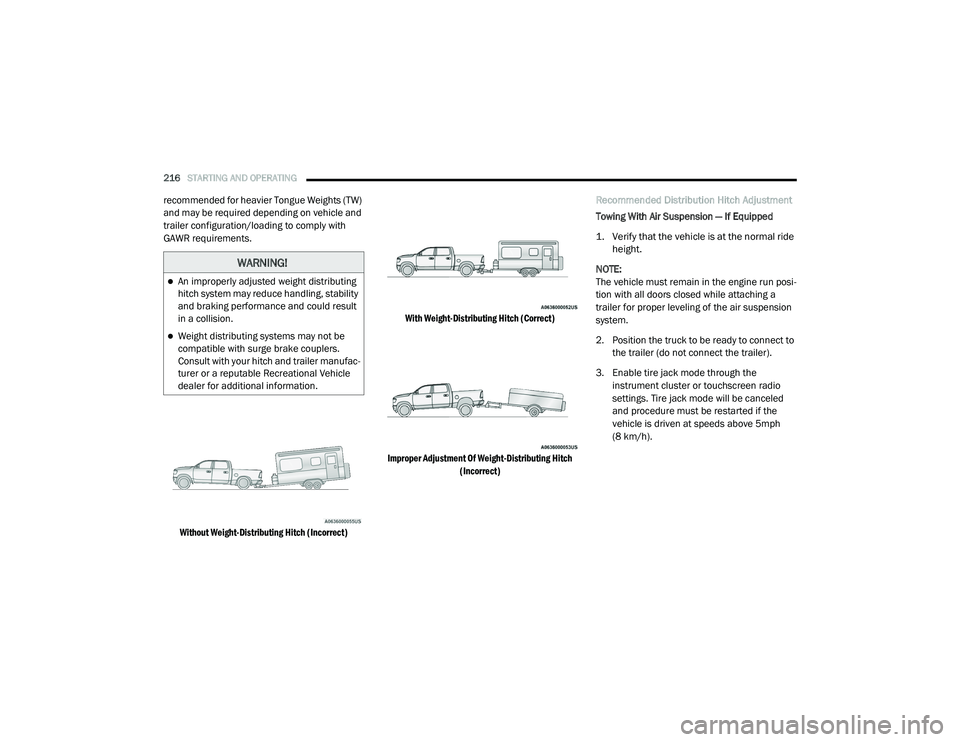
recommended for heavier Tongue Weights (TW)
and may be required depending on vehicle and
trailer configuration/loading to comply with
GAWR requirements.
Without Weight-Distributing Hitch (Incorrect) With Weight-Distributing Hitch (Correct)
Improper Adjustment Of Weight-Distributing Hitch (Incorrect)
Recommended Distribution Hitch Adjustment
Towing With Air Suspension — If Equipped
1. Verify that the vehicle is at the normal ride
height.
NOTE:
The vehicle must remain in the engine run posi -
tion with all doors closed while attaching a
trailer for proper leveling of the air suspension
system.
2. Position the truck to be ready to connect to the trailer (do not connect the trailer).
3. Enable tire jack mode through the instrument cluster or touchscreen radio
settings. Tire jack mode will be canceled
and procedure must be restarted if the
vehicle is driven at speeds above 5mph
(8 km/h).
WARNING!
An improperly adjusted weight distributing
hitch system may reduce handling, stability
and braking performance and could result
in a collision.
Weight distributing systems may not be
compatible with surge brake couplers.
Consult with your hitch and trailer manufac -
turer or a reputable Recreational Vehicle
dealer for additional information.
21_DT_OM_EN_USC_t.book Page 216
Page 219 of 496

STARTING AND OPERATING217
4. Measure the height of the top of the front
wheel opening on the fender to ground; this
is height H1.
Measuring Height (H)
5. Attach the trailer to the vehicle without the weight distribution bars connected. 6. Measure the height of the top of the front
wheel opening on the fender to ground; this
is height H2.
7. Install and adjust the tension in the weight distributing bars per FCA recommendations
so that the height of the front fender is
approximately (H2-H1)/3+H1 (about 1/3
the difference between H2 and H1 above
normal ride height [H1]).
8. Use the instrument cluster or touchscreen radio settings and switch off tire jack mode.
Make sure the truck returns to normal ride
height. Perform a visual inspection of the
trailer and weight distributing hitch to
confirm FCA recommendations have been
met. 9. The truck can now be driven.
NOTE:
For all towing conditions, we recommend towing
with tow haul mode engaged.
Measurement
Example Example Height
(mm)
H1 925
H2 946
H2-H1 21
(H2-H1)/3 7
(H2-H1)/3 + H1 932
4
21_DT_OM_EN_USC_t.book Page 217