tow RAM 1500 2021 Owner's Manual
[x] Cancel search | Manufacturer: RAM, Model Year: 2021, Model line: 1500, Model: RAM 1500 2021Pages: 496, PDF Size: 20.89 MB
Page 101 of 496
GETTING TO KNOW YOUR VEHICLE99
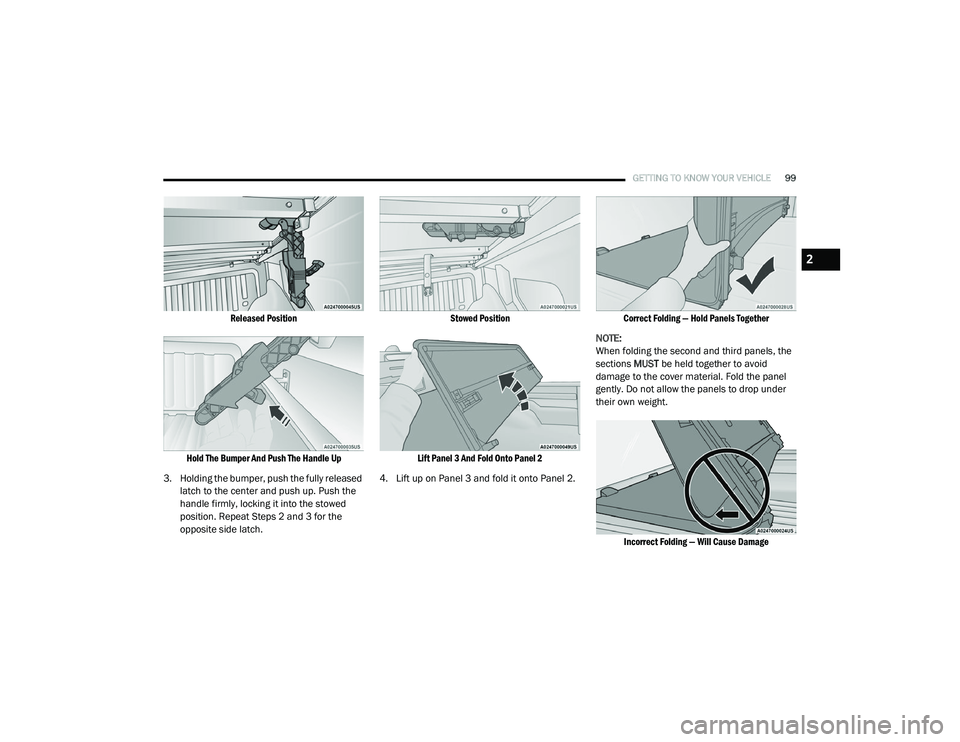
Released Position
Hold The Bumper And Push The Handle Up
3. Holding the bumper, push the fully released latch to the center and push up. Push the
handle firmly, locking it into the stowed
position. Repeat Steps 2 and 3 for the
opposite side latch.
Stowed Position
Lift Panel 3 And Fold Onto Panel 2
4. Lift up on Panel 3 and fold it onto Panel 2.
Correct Folding — Hold Panels Together
NOTE:
When folding the second and third panels, the
sections MUST be held together to avoid
damage to the cover material. Fold the panel
gently. Do not allow the panels to drop under
their own weight.
Incorrect Folding — Will Cause Damage
2
21_DT_OM_EN_USC_t.book Page 99
Page 102 of 496
100GETTING TO KNOW YOUR VEHICLE
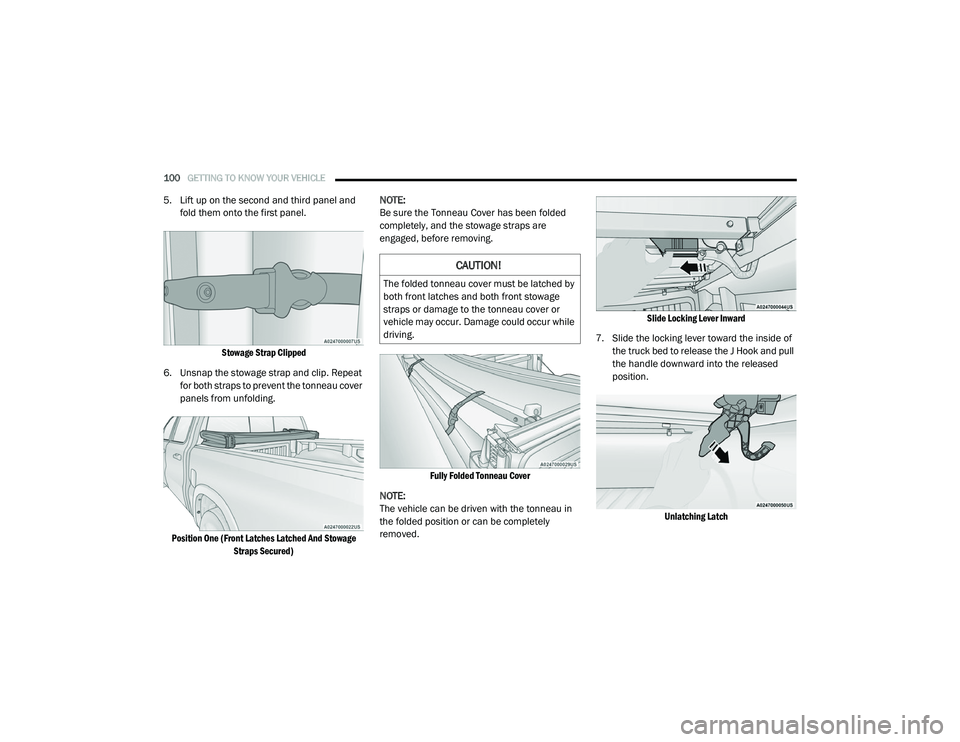
5. Lift up on the second and third panel and
fold them onto the first panel.
Stowage Strap Clipped
6. Unsnap the stowage strap and clip. Repeat for both straps to prevent the tonneau cover
panels from unfolding.
Position One (Front Latches Latched And Stowage Straps Secured)
NOTE:
Be sure the Tonneau Cover has been folded
completely, and the stowage straps are
engaged, before removing.
Fully Folded Tonneau Cover
NOTE:
The vehicle can be driven with the tonneau in
the folded position or can be completely
removed.
Slide Locking Lever Inward
7. Slide the locking lever toward the inside of the truck bed to release the J Hook and pull
the handle downward into the released
position.
Unlatching Latch
CAUTION!
The folded tonneau cover must be latched by
both front latches and both front stowage
straps or damage to the tonneau cover or
vehicle may occur. Damage could occur while
driving.
21_DT_OM_EN_USC_t.book Page 100
Page 103 of 496
GETTING TO KNOW YOUR VEHICLE101
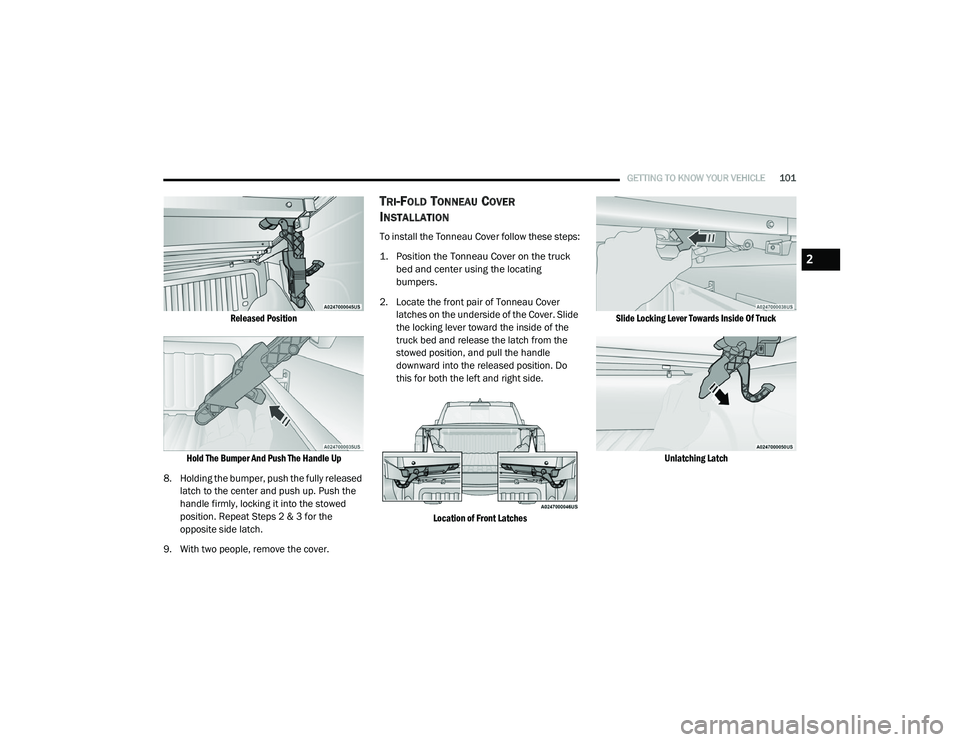
Released Position
Hold The Bumper And Push The Handle Up
8. Holding the bumper, push the fully released latch to the center and push up. Push the
handle firmly, locking it into the stowed
position. Repeat Steps 2 & 3 for the
opposite side latch.
9. With two people, remove the cover.
TRI-FOLD TONNEAU COVER
I
NSTALLATION
To install the Tonneau Cover follow these steps:
1. Position the Tonneau Cover on the truck
bed and center using the locating
bumpers.
2. Locate the front pair of Tonneau Cover latches on the underside of the Cover. Slide
the locking lever toward the inside of the
truck bed and release the latch from the
stowed position, and pull the handle
downward into the released position. Do
this for both the left and right side.
Location of Front Latches Slide Locking Lever Towards Inside Of Truck
Unlatching Latch
2
21_DT_OM_EN_USC_t.book Page 101
Page 104 of 496
102GETTING TO KNOW YOUR VEHICLE
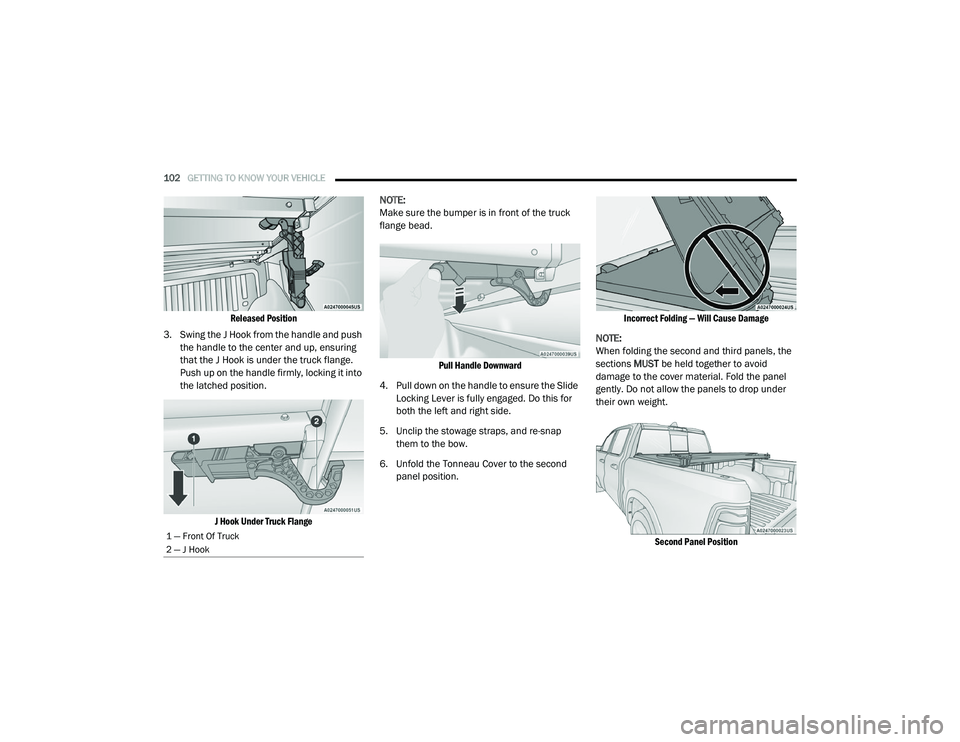
Released Position
3. Swing the J Hook from the handle and push the handle to the center and up, ensuring
that the J Hook is under the truck flange.
Push up on the handle firmly, locking it into
the latched position.
J Hook Under Truck Flange
NOTE:
Make sure the bumper is in front of the truck
flange bead.
Pull Handle Downward
4. Pull down on the handle to ensure the Slide Locking Lever is fully engaged. Do this for
both the left and right side.
5. Unclip the stowage straps, and re-snap them to the bow.
6. Unfold the Tonneau Cover to the second panel position.
Incorrect Folding — Will Cause Damage
NOTE:
When folding the second and third panels, the
sections MUST be held together to avoid
damage to the cover material. Fold the panel
gently. Do not allow the panels to drop under
their own weight.
Second Panel Position
1 — Front Of Truck
2 — J Hook
21_DT_OM_EN_USC_t.book Page 102
Page 107 of 496

GETTING TO KNOW YOUR INSTRUMENT PANEL105
BASE / MIDLINE INSTRUMENT CLUSTER
D
ESCRIPTIONS — GASOLINE
1. Tachometer
Indicates the engine speed in revolutions
per minute (RPM x 1000).
2. Voltmeter
When the vehicle is in the RUN state, the
gauge indicates the electrical system
voltage. The pointer should stay within
the normal range if the battery is
charged. If the pointer moves to either
extreme left or right and remains there
during normal driving, the electrical
system should be serviced.
NOTE:
In vehicles equipped with Stop/Start, a reduced
voltage may be present during an Autostop.
3. Instrument Cluster Display
When the appropriate conditions exist,
this display shows the instrument cluster
display messages Ú page 114.
Instrument Cluster Display/Controls Location
The display always show one of the main
menu item after ignition on.
4. Oil Pressure Gauge
The pointer should always indicate the oil
pressure when the engine is running. A
continuous high or low reading under
normal driving conditions may indicate a
lubrication system malfunction. Imme -
diate service should be obtained from an
authorized dealer.
NOTE:
In vehicles equipped with Stop/Start, an oil
pressure indication of zero is normal during an
Autostop. 5. Speedometer
Indicates vehicle speed.
6. Fuel Gauge
The pointer shows the level of fuel in the
fuel tank when the ignition is in the ON/
RUN position.
The fuel pump symbol points to the
side of the vehicle where the fuel door
is located.
7. Temperature Gauge
The pointer shows engine coolant
temperature. The pointer positioned
within the normal range indicates that
the engine cooling system is operating
satisfactorily.
The pointer will likely indicate a higher
temperature when driving in hot weather,
up mountain grades, or when towing a
trailer. It should not be allowed to exceed
the upper limits of the normal operating
range.
1 – Instrument Cluster Display Controls
2 – Instrument Cluster Display Screen
3
21_DT_OM_EN_USC_t.book Page 105
Page 110 of 496

108GETTING TO KNOW YOUR INSTRUMENT PANEL
PREMIUM INSTRUMENT CLUSTER
D
ESCRIPTIONS — GASOLINE
1. Tachometer
Indicates the engine speed in revolutions
per minute (RPM x 1000).
2. Instrument Cluster Display
When the appropriate conditions exist,
this display shows the instrument cluster
display messages Ú page 114.
Instrument Cluster Display/Controls Location
The display always show one of the main
menu item after ignition on. 3. Speedometer
Indicates vehicle speed.
4. Fuel Gauge
The pointer shows the level of fuel in the
fuel tank when the ignition is in the ON/
RUN position.
The fuel pump symbol points to the
side of the vehicle where the fuel door
is located.
5. Temperature Gauge
The pointer shows engine coolant
temperature. The pointer positioned
within the normal range indicates that
the engine cooling system is operating
satisfactorily.
The pointer will likely indicate a higher
temperature when driving in hot weather,
up mountain grades, or when towing a
trailer. It should not be allowed to exceed
the upper limits of the normal operating
range.
1 – Instrument Cluster Display Controls
2 – Instrument Cluster Display Screen
WARNING!
A hot engine cooling system is dangerous.
You or others could be badly burned by steam
or boiling coolant. You may want to call an
authorized dealer for service if your vehicle
overheats Ú page 423.
CAUTION!
Driving with a hot engine cooling system
could damage your vehicle. If the
temperature gauge reads “H,” pull over and
stop the vehicle. Idle the vehicle with the air
conditioner turned off until the pointer drops
back into the normal range. If the pointer
remains on the “H,” turn the engine off
immediately and call an authorized dealer for
service.
21_DT_OM_EN_USC_t.book Page 108
Page 116 of 496

114GETTING TO KNOW YOUR INSTRUMENT PANEL
INSTRUMENT CLUSTER DISPLAY
Your vehicle will be equipped with an
instrument cluster display, which offers useful
information to the driver. With the ignition in the
OFF mode, opening/closing of a door will
activate the display for viewing, and display the
total miles, or kilometers, in the odometer. Your
instrument cluster display is designed to display
important information about your vehicle’s
systems and features. Using a driver interactive
display located on the instrument panel, your
instrument cluster display can show you how
systems are working and give you warnings
when they are not. The steering wheel mounted
controls allow you to scroll through the main
menus and submenus. You can access the
specific information you want and make
selections and adjustments.
INSTRUMENT CLUSTER DISPLAY
C
ONTROLS
The instrument cluster display features a driver
interactive display that is located in the
instrument cluster.
Instrument Cluster Display/Controls Location
The instrument cluster display menu items may
consist of the following:
Speedometer
Vehicle Info
Off-Road — If Equipped
Driver Assist (show/hide) — If Equipped
Fuel Economy (show/hide)
Stop/Start — If Equipped
Trip Info (show/hide)
Trailer Tow (show/hide) — If Equipped
Audio (show/hide)
Messages
Screen Set Up
The system allows the driver to select
information by pushing the following instrument
cluster display control buttons located on the
left side of the steering wheel.
Instrument Cluster Display Control Buttons
1 – Instrument Cluster Display Controls
2 – Instrument Cluster Display Screen
21_DT_OM_EN_USC_t.book Page 114
Page 120 of 496

118GETTING TO KNOW YOUR INSTRUMENT PANEL
Trailer Tow
Push and release the up or down arrow
button until the Trailer Tow menu item is
highlighted in the instrument cluster display.
Push and release the right or left arrow
button to cycle through the following trailer tow
information:
Trip (trailer specific) Distance: Push and hold
the OK button to reset the distance.
Integrated Trailer Brake Module (ITBM):
Braking Output
Trailer Type
ITBM Gain
Trailer Light Check: Push and hold the OK
button to begin the Trailer Light Test
sequence Ú page 225.
Trailer Tire Pressure Monitoring: The Instru-
ment Cluster Display will display the Trailer
Tire Pressure for a connected trailer with
sensors that match the active trailer profile.
When a low tire is present, the low tire value
will be displayed in red, and the affected low
tire will have a red glow. “Trailer Tire Low“ will
be displayed on the center bottom of the
Instrument Cluster Display screen.
Audio
Push and release the up or down arrow
button until the Audio Menu icon/title is
highlighted in the instrument cluster display.
This menu will display the audio source
information, including the Song name, Artist
name, and audio source with an accompanying
graphic.
Phone Call Status
When a call is incoming, a Phone Call Status
pop-up will display on the screen. The pop-up
will remain until the phone is answered or
ignored.
NOTE:
The call status will temporarily replace the
previous media source information displayed
on the screen. When the pop-up is no longer
displayed, the display will return to the last used
screen.
Stored Messages
Push and release the up or down arrow
button until the Messages Menu item is
highlighted. This feature shows the number of
stored warning messages. Push and release the
right or left arrow button to cycle through
stored messages.
Settings
Head-Up Display (HUD)
NOTE:
The HUD feature Settings are available at any
vehicle speed.
Push and release the up or down arrow
button until the Settings Menu icon/title is
highlighted in the instrument cluster display.
Push and release the left or right arrow
button until the HUD Menu icon/title is
highlighted in the instrument cluster
display.Push and release the OK button to enter
HUD. Use the up or down arrow button to
select a setting, then push and release the OK
button to adjust the setting.
ON/OFF
Content and Layout
Simple : Speed, Speed Limit
Standard : Speed, Speed Limit, Naviga-
tion
Advanced : Speed, Speed Limit, Naviga-
tion, Driver Assist (ACC/Cruise, Lane -
Sense, Highway Assist/Highway Assist+),
Gear
21_DT_OM_EN_USC_t.book Page 118
Page 123 of 496

GETTING TO KNOW YOUR INSTRUMENT PANEL121
Lower Right – If Equipped
None
Compass
Outside Temp
Time
Range To Empty
Average Econ
Current Econ
Trip A Distance
Trip B Distance
Trailer Trip
Trailer Brake
Oil Pressure
Coolant Temperature
Oil Temperature
Battery Voltage
Transmission Temperature
Oil LifeFavorite Menus
Speedometer
Vehicle Info
Driver Assist (show/hide) – If Equipped
Fuel Economy (show/hide)
Trip Info (show/hide)
Stop/Start
Trailer Tow (show/hide)
Audio (show/hide)
(Stored) Messages
Screen Setup
Current Gear
Off
On
Odometer
No Decimal Point
Decimal Point Defaults (Restores All Settings To Default
Settings)
Cancel
Restore
DIESEL PARTICULATE FILTER (DPF)
M
ESSAGES
This engine meets all required diesel engine
emissions standards. To achieve these
emissions standards, your vehicle is equipped
with a state-of-the-art engine and exhaust
system. These systems are seamlessly
integrated into your vehicle and managed by
the Powertrain Control Module (PCM). The PCM
manages engine combustion to allow the
exhaust system’s catalyst to trap and burn
Particulate Matter (PM) pollutants, with no input
or interaction on your part.
WARNING!
A hot exhaust system can start a fire if you
park over materials that can burn, such as
grass or leaves, and those items that come
into contact with your exhaust system. Do not
park or operate your vehicle in areas where
your exhaust system can contact anything
that can burn.
3
21_DT_OM_EN_USC_t.book Page 121
Page 126 of 496

124GETTING TO KNOW YOUR INSTRUMENT PANEL
DIESEL EXHAUST FLUID (DEF) FAULT
W
ARNING MESSAGES
There are different messages which are
displayed if the vehicle detects that the DEF
system has been filled with a fluid other than
DEF, has experienced component failures, or
when tampering has been detected.
When the DEF system needs to be serviced the
following warnings will display:
Service DEF System See Dealer — This
message will display when the fault is initially
detected and each time the vehicle is
started. The message will be accompanied by
a single chime and the Malfunction Indicator
Light. We recommend you drive to the
nearest authorized dealer and have your
vehicle serviced immediately. If not corrected
in 50 miles, vehicle will enter the “Engine Will
not restart in XXX mi Service DEF See dealer”
warning stage and message.
Incorrect DEF Detected See Dealer — This
message will display if the DEF system has
detected the incorrect fluid has been intro -
duced to the DEF tank. The message will be
accompanied by a single chime. We recom -
mend you drive to your nearest authorized dealer and have your vehicle serviced imme
-
diately. If not corrected in 30 miles, vehicle
will enter the “Engine Will not restart in XXX
mi Service DEF See dealer” warning stage
and message.
Engine Will Not Restart in XXX mi Service DEF
See Dealer — This message is first displayed
if the fault detected is not serviced after
50 miles of operation. It is also displayed at
150 miles, 125 miles and 100 miles. System
service is required within the displayed
mileage. The message will be displayed
during vehicle start up with an updated
distance mileage, and it will be accompanied
by a single chime. Starting at 100 miles,
remaining range will be continuously
displayed while operating the vehicle.
Chimes will also accompany the 75, 50 and
25 mile remaining distances. We recom -
mend you drive to the nearest authorized
dealer and have your vehicle serviced imme -
diately.
Engine Will Not Restart Service DEF System
See Dealer — This message will display if DEF
system issue detected is not serviced during
the allowed period. Your engine will not
restart unless your vehicle is serviced by an
authorized dealer. This message will be displayed when under 1 mile until engine will
not start and each time the vehicle is started,
and will be continuously displayed. The
message will be accompanied by a single
chime. Your Malfunction Indicator Light will
be continuously illumined. We highly recom-
mend you drive to the nearest authorized
dealer if the message appears while engine
is running.
Engine Will Not Start Service DEF System See
Dealer — This message will display when the
fault detected is not serviced after the Engine
will not restart Service DEF System See
Dealer message is displayed on the next
subsequent restart. Your engine will not start
unless your vehicle is serviced by an autho-
rized dealer. The message will be accompa
-
nied by a single chime. Your Malfunction
Indicator Light will be continuously illumi -
nated. If the message appears and you can
not start the engine, we recommend having
your vehicle towed to the nearest authorized
dealer immediately.
21_DT_OM_EN_USC_t.book Page 124