wheel RAM 1500 2021 Owner's Manual
[x] Cancel search | Manufacturer: RAM, Model Year: 2021, Model line: 1500, Model: RAM 1500 2021Pages: 496, PDF Size: 20.89 MB
Page 118 of 496

116GETTING TO KNOW YOUR INSTRUMENT PANEL
DISPLAY MENU ITEMS
Push and release the up or down arrow
button until the desired selectable menu icon is
highlighted in the instrument cluster display.
Speedometer
Push and release the up or down arrow
button until the speedometer menu item is
highlighted in the instrument cluster display.
Push and release the OK button to cycle the
display between mph and km/h.
Vehicle Info
Push and release the up or down arrow
button until the Vehicle Info menu icon is
displayed in the instrument cluster display.
Push and release the left or right arrow
button to scroll through the information
submenus and push and release the OK button
to select or reset the resettable submenus.
Tire Pressure Monitor System
Air Suspension — If Equipped
Coolant Temperature — If Equipped
Trans Temperature (Automatic only)
Oil Temperature
Oil Pressure — If Equipped
Oil Life
Battery Voltage — If Equipped
Gauge Summary — If Equipped
Coolant Temp
Trans Temp
Oil Temp
Oil Pressure
Engine Hours
Off-Road
Push and release the up or down arrow
button until the Off-Road menu icon is displayed
in the instrument cluster display. Push and
release the left or right arrow button to
scroll through the information submenus.
Drivetrain
Front Wheel Angle: displays the graphical
and numerical value of calculated
average front wheel angle from the
steering wheel orientation.
Transfer Case Lock Status: displays
“Lock” graphic only during 4WD High,
4WD High Part Time, 4WD Low status.
Axle Lock And Sway Bar Status (If
Equipped): displays front and rear or rear
only axle locker graphic, and sway bar
connection graphic with text message
(connected or disconnected).
Pitch And Roll
Displays the pitch and roll of the vehicle
in the graphic with the angle number on
the screen.
NOTE:
When vehicle speed becomes too high to
display the pitch and roll, “- -” will display in
place of the numbers, and the graphic will be
greyed out. A message indicating the necessary
speed for the feature to become available will
also display.
Driver Assist — If Equipped
The Driver Assist menu displays the status of
the ACC and LaneSense systems.
Push and release the up or down arrow
button until the Driver Assist menu is displayed
in the instrument cluster display.
21_DT_OM_EN_USC_t.book Page 116
Page 119 of 496

GETTING TO KNOW YOUR INSTRUMENT PANEL117
Adaptive Cruise Control (ACC) Feature
The instrument cluster display displays the
current Adaptive Cruise Control (ACC) system
settings. The information displayed depends on
ACC system status.
Push the Adaptive Cruise Control (ACC) on/off
button (located on the steering wheel) until one
of the following displays in the instrument
cluster display:
Adaptive Cruise Control Off
When ACC is deactivated, the display will read
“Adaptive Cruise Control Off.”
Adaptive Cruise Control Ready
When ACC is activated but the vehicle speed
setting has not been selected, the display will
read “Adaptive Cruise Control Ready.”
Push the SET + or the SET- button (located on
the steering wheel) and the following will display
in the instrument cluster display:
ACC SET
When ACC is set, the set speed will display in
the instrument cluster Úpage 179.The ACC screen may display once again if any
ACC activity occurs, which may include any of
the following:
Distance Setting Change
System Cancel
Driver Override
System Off
ACC Proximity Warning
ACC Unavailable Warning
LaneSense — If Equipped
The instrument cluster display displays the
current LaneSense system settings. The
information displayed depends on LaneSense
system status and the conditions that need to
be met Ú page 137.
Fuel Economy
Push and release the up or down arrow
button until the Fuel Economy menu item is
highlighted in the instrument cluster display.
Push and hold the OK button to reset Average
Fuel Economy.
Current Fuel Economy
Average Fuel Economy
Range To Empty
Trip Info
Push and release the up or down arrow
button until the Trip menu item is highlighted in
the instrument cluster display. Push and
release the right or left arrow button to
enter the submenus of Trip A and Trip B. The
Trip A or Trip B information will display the
following:
Distance
Average Fuel Economy
Elapsed Time
Push and hold OK button to reset all
information.
Stop/Start — If Equipped
Push and release the up or down arrow
button until the Stop/Start icon/title is
highlighted in the instrument cluster display.
The screen will display the Stop/Start status.
3
21_DT_OM_EN_USC_t.book Page 117
Page 127 of 496

GETTING TO KNOW YOUR INSTRUMENT PANEL125
BATTERY SAVER ON/BATTERY SAVER
M
ODE MESSAGE — ELECTRICAL LOAD
R
EDUCTION ACTIONS — IF EQUIPPED
This vehicle is equipped with an Intelligent
Battery Sensor (IBS) to perform additional
monitoring of the electrical system and status
of the vehicle battery.
In cases when the IBS detects charging system
failure, or the vehicle battery conditions are
deteriorating, electrical load reduction actions
will take place to extend the driving time and
distance of the vehicle. This is done by reducing
power to or turning off non-essential electrical
loads.
Load reduction is only active when the engine is
running. It will display a message if there is a
risk of battery depletion to the point where the
vehicle may stall due to lack of electrical supply,
or will not restart after the current drive cycle.
When load reduction is activated, the message
“Battery Saver On Some Systems May Have
Reduced Power” will appear in the instrument
cluster.
These messages indicate the vehicle battery
has a low state of charge and continues to lose electrical charge at a rate that the charging
system cannot sustain.
NOTE:The charging system is independent from
load reduction. The charging system
performs a diagnostic on the charging
system continuously.
If the Battery Charge Warning Light is on it
may indicate a problem with the charging
system Ú
page 128.
The electrical loads that may be switched off (if
equipped), and vehicle functions which can be
affected by load reduction:
Heated Seats / Vented Seats / Heated Wheel
Rear Defroster And Heated Mirrors
HVAC System
115 Volts AC Power Inverter System
Audio and Telematics System
Loss of the battery charge may indicate one or
more of the following conditions:
The charging system cannot deliver enough
electrical power to the vehicle system
because the electrical loads are larger than the capability of charging system. The
charging system is still functioning properly.
Turning on all possible vehicle electrical
loads (e.g. HVAC to max settings, exterior and
interior lights, overloaded power outlets
+12 Volts, 115 Volts AC, USB ports) during
certain driving conditions (city driving,
towing, frequent stopping).
Installing options like additional lights,
upfitter electrical accessories, audio
systems, alarms and similar devices.
Unusual driving cycles (short trips separated
by long parking periods).
The vehicle was parked for an extended
period of time (weeks, months).
The battery was recently replaced and was
not charged completely.
The battery was discharged by an electrical
load left on when the vehicle was parked.
The battery was used for an extended period
with the engine not running to supply radio,
lights, chargers, +12 Volt portable appli
-
ances like vacuum cleaners, game consoles
and similar devices.
3
21_DT_OM_EN_USC_t.book Page 125
Page 134 of 496
132GETTING TO KNOW YOUR INSTRUMENT PANEL
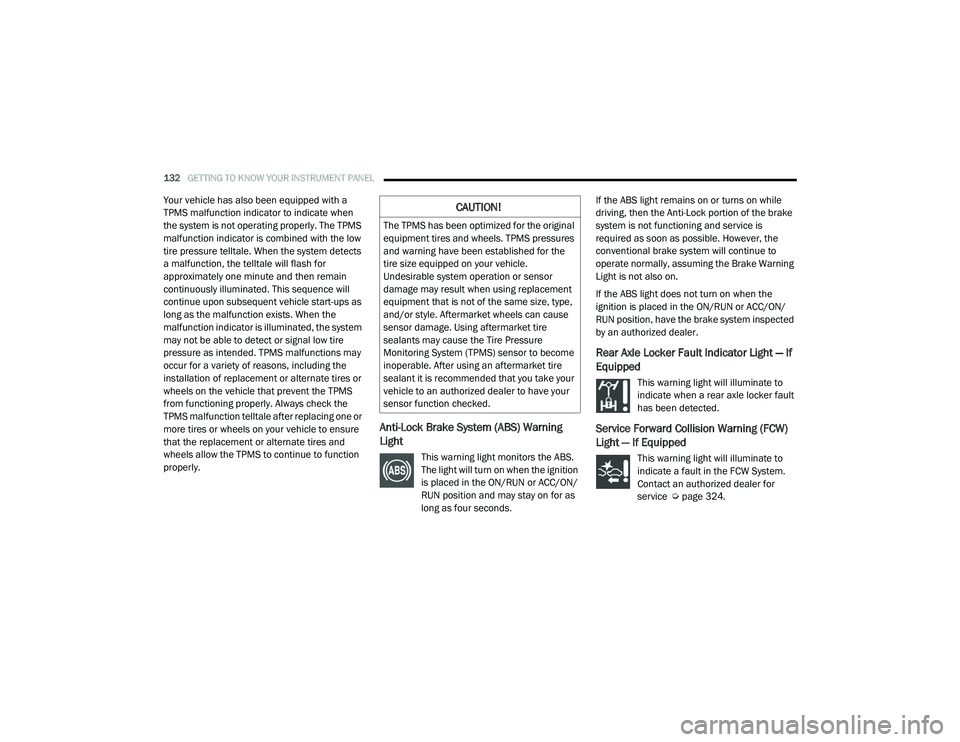
Your vehicle has also been equipped with a
TPMS malfunction indicator to indicate when
the system is not operating properly. The TPMS
malfunction indicator is combined with the low
tire pressure telltale. When the system detects
a malfunction, the telltale will flash for
approximately one minute and then remain
continuously illuminated. This sequence will
continue upon subsequent vehicle start-ups as
long as the malfunction exists. When the
malfunction indicator is illuminated, the system
may not be able to detect or signal low tire
pressure as intended. TPMS malfunctions may
occur for a variety of reasons, including the
installation of replacement or alternate tires or
wheels on the vehicle that prevent the TPMS
from functioning properly. Always check the
TPMS malfunction telltale after replacing one or
more tires or wheels on your vehicle to ensure
that the replacement or alternate tires and
wheels allow the TPMS to continue to function
properly.
Anti-Lock Brake System (ABS) Warning
Light
This warning light monitors the ABS.
The light will turn on when the ignition
is placed in the ON/RUN or ACC/ON/
RUN position and may stay on for as
long as four seconds.If the ABS light remains on or turns on while
driving, then the Anti-Lock portion of the brake
system is not functioning and service is
required as soon as possible. However, the
conventional brake system will continue to
operate normally, assuming the Brake Warning
Light is not also on.
If the ABS light does not turn on when the
ignition is placed in the ON/RUN or ACC/ON/
RUN position, have the brake system inspected
by an authorized dealer.
Rear Axle Locker Fault Indicator Light — If
Equipped
This warning light will illuminate to
indicate when a rear axle locker fault
has been detected.
Service Forward Collision Warning (FCW)
Light — If Equipped
This warning light will illuminate to
indicate a fault in the FCW System.
Contact an authorized dealer for
service Ú
page 324.
CAUTION!
The TPMS has been optimized for the original
equipment tires and wheels. TPMS pressures
and warning have been established for the
tire size equipped on your vehicle.
Undesirable system operation or sensor
damage may result when using replacement
equipment that is not of the same size, type,
and/or style. Aftermarket wheels can cause
sensor damage. Using aftermarket tire
sealants may cause the Tire Pressure
Monitoring System (TPMS) sensor to become
inoperable. After using an aftermarket tire
sealant it is recommended that you take your
vehicle to an authorized dealer to have your
sensor function checked.
21_DT_OM_EN_USC_t.book Page 132
Page 136 of 496
134GETTING TO KNOW YOUR INSTRUMENT PANEL
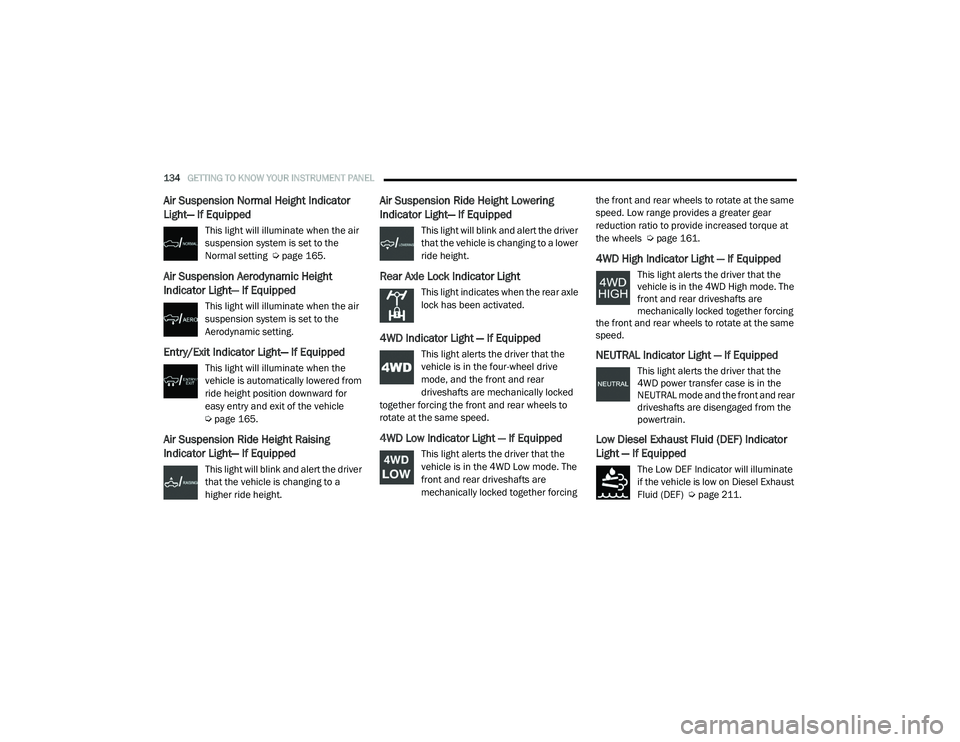
Air Suspension Normal Height Indicator
Light— If Equipped
This light will illuminate when the air
suspension system is set to the
Normal setting Úpage 165.
Air Suspension Aerodynamic Height
Indicator Light— If Equipped
This light will illuminate when the air
suspension system is set to the
Aerodynamic setting.
Entry/Exit Indicator Light— If Equipped
This light will illuminate when the
vehicle is automatically lowered from
ride height position downward for
easy entry and exit of the vehicle
Úpage 165.
Air Suspension Ride Height Raising
Indicator Light— If Equipped
This light will blink and alert the driver
that the vehicle is changing to a
higher ride height.
Air Suspension Ride Height Lowering
Indicator Light— If Equipped
This light will blink and alert the driver
that the vehicle is changing to a lower
ride height.
Rear Axle Lock Indicator Light
This light indicates when the rear axle
lock has been activated.
4WD Indicator Light — If Equipped
This light alerts the driver that the
vehicle is in the four-wheel drive
mode, and the front and rear
driveshafts are mechanically locked
together forcing the front and rear wheels to
rotate at the same speed.
4WD Low Indicator Light — If Equipped
This light alerts the driver that the
vehicle is in the 4WD Low mode. The
front and rear driveshafts are
mechanically locked together forcing the front and rear wheels to rotate at the same
speed. Low range provides a greater gear
reduction ratio to provide increased torque at
the wheels Ú
page 161.
4WD High Indicator Light — If Equipped
This light alerts the driver that the
vehicle is in the 4WD High mode. The
front and rear driveshafts are
mechanically locked together forcing
the front and rear wheels to rotate at the same
speed.
NEUTRAL Indicator Light — If Equipped
This light alerts the driver that the
4WD power transfer case is in the
NEUTRAL mode and the front and rear
driveshafts are disengaged from the
powertrain.
Low Diesel Exhaust Fluid (DEF) Indicator
Light — If Equipped
The Low DEF Indicator will illuminate
if the vehicle is low on Diesel Exhaust
Fluid (DEF) Ú page 211.
21_DT_OM_EN_USC_t.book Page 134
Page 138 of 496
136GETTING TO KNOW YOUR INSTRUMENT PANEL
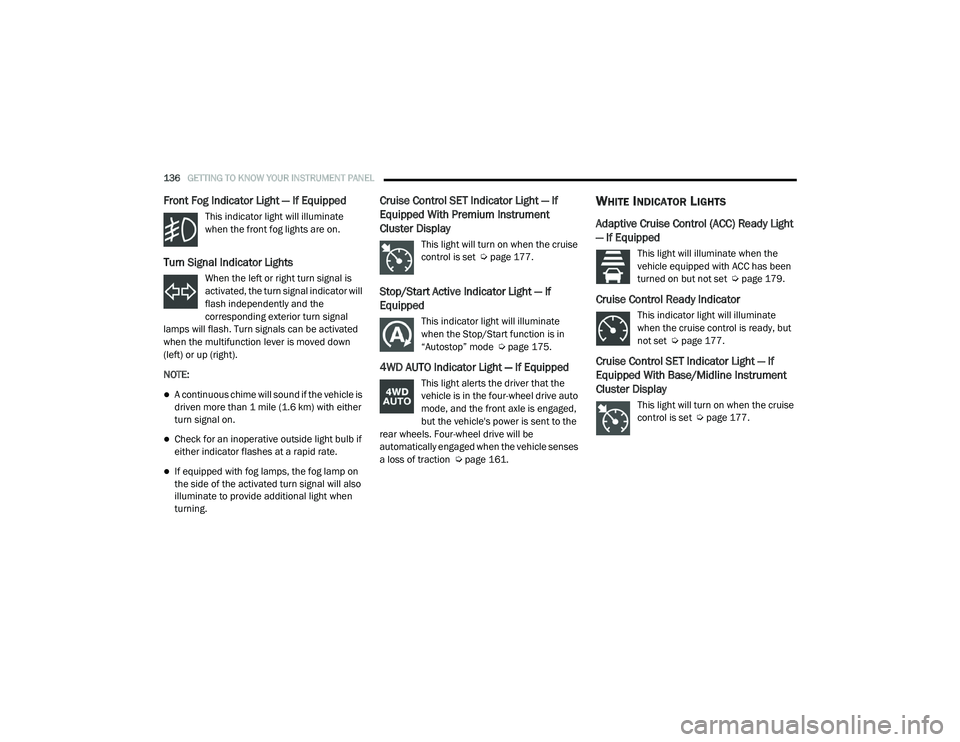
Front Fog Indicator Light — If Equipped
This indicator light will illuminate
when the front fog lights are on.
Turn Signal Indicator Lights
When the left or right turn signal is
activated, the turn signal indicator will
flash independently and the
corresponding exterior turn signal
lamps will flash. Turn signals can be activated
when the multifunction lever is moved down
(left) or up (right).
NOTE:
A continuous chime will sound if the vehicle is
driven more than 1 mile (1.6 km) with either
turn signal on.
Check for an inoperative outside light bulb if
either indicator flashes at a rapid rate.
If equipped with fog lamps, the fog lamp on
the side of the activated turn signal will also
illuminate to provide additional light when
turning.
Cruise Control SET Indicator Light — If
Equipped With Premium Instrument
Cluster Display
This light will turn on when the cruise
control is set Ú page 177.
Stop/Start Active Indicator Light — If
Equipped
This indicator light will illuminate
when the Stop/Start function is in
“Autostop” mode Ú page 175.
4WD AUTO Indicator Light — If Equipped
This light alerts the driver that the
vehicle is in the four-wheel drive auto
mode, and the front axle is engaged,
but the vehicle's power is sent to the
rear wheels. Four-wheel drive will be
automatically engaged when the vehicle senses
a loss of traction Ú page 161.
WHITE INDICATOR LIGHTS
Adaptive Cruise Control (ACC) Ready Light
— If Equipped
This light will illuminate when the
vehicle equipped with ACC has been
turned on but not set Ú page 179.
Cruise Control Ready Indicator
This indicator light will illuminate
when the cruise control is ready, but
not set Úpage 177.
Cruise Control SET Indicator Light — If
Equipped With Base/Midline Instrument
Cluster Display
This light will turn on when the cruise
control is set Ú page 177.
21_DT_OM_EN_USC_t.book Page 136
Page 153 of 496

STARTING AND OPERATING151
ENGINE BREAK-IN RECOMMENDATIONS —
DIESEL ENGINE
The diesel engine does not require a break-in
period due to its construction. Normal operation
is allowed, providing the following
recommendations are followed:
Warm up the engine before placing it under
load.
Do not operate the engine at idle for
prolonged periods.
Observe vehicle oil pressure and tempera -
ture indicators.
Check the coolant and oil levels frequently.
Vary throttle position at highway speeds
when carrying or towing significant weight.
NOTE:
Light duty operation such as light trailer towing
or no load operation will extend the time before
the engine is at full efficiency. Reduced fuel
economy and power may be seen at this time.
The engine oil installed in the engine at the
factory is a high-quality energy conserving type
lubricant. Oil changes should be consistent with anticipated climate conditions under which
vehicle operations will occur. For the
recommended viscosity and quality grades
Ú
page 475.
NOTE:
NON-DETERGENT OR STRAIGHT MINERAL OILS
MUST NEVER BE USED.
PARKING BRAKE
ELECTRIC PARK BRAKE (EPB)
Your vehicle is equipped with an EPB that offers
simple operation, and some additional features
that make the parking brake more convenient
and useful.
The parking brake is primarily intended to
prevent the vehicle from rolling while parked.
Before leaving the vehicle, make sure that the
parking brake is applied. Also, be certain to
leave the transmission in PARK.
You can engage the parking brake in two ways:
Manually, by applying the parking brake
switch.
Automatically, by enabling the Auto Park
Brake feature in the customer programmable
features section of the Uconnect settings. The parking brake switch is located on the
instrument panel to the left of the steering
wheel (below the headlamp switch).
Electric Park Brake Switch
To apply the parking brake manually, pull up on
the switch momentarily. You may hear a slight
sound from the back of the vehicle while the
parking brake engages. Once the park brake is
fully engaged, the BRAKE telltale light in the
instrument cluster and an indicator on the
switch will illuminate. If your foot is on the brake
pedal while you apply the parking brake, you
may notice a small amount of brake pedal
movement. The parking brake can be applied
even when the ignition switch is OFF but the
BRAKE telltale light will not illuminate, however,
it can only be released when the ignition is in
the ON/RUN mode.
4
21_DT_OM_EN_USC_t.book Page 151
Page 154 of 496
152STARTING AND OPERATING
(Continued)
NOTE:
The EPB fault light will illuminate if the EPB
switch is held for longer than 20 seconds in
either the released or applied position. The light
will extinguish upon releasing the switch.
If the Auto Park Brake feature is enabled, the
parking brake will automatically engage
whenever the transmission is placed into PARK.
If your foot is on the brake pedal, you may notice
a small amount of brake pedal movement while
the parking brake is engaging.
The parking brake will release automatically
when the ignition is ON, the transmission is in
DRIVE or REVERSE, the driver seat belt is
buckled, and an attempt is made to drive away.
To release the parking brake manually, the
ignition switch must be in the ON/RUN mode.
Put your foot on the brake pedal, then push the
parking brake switch down momentarily. You
may hear a slight whirring sound from the back
of the vehicle while the parking brake
disengages. You may also notice a small
amount of movement in the brake pedal. Once
the parking brake is fully disengaged, The
BRAKE telltale light in the instrument cluster
and the LED indicator on the switch will
extinguish.NOTE:
When parking on a hill, it is important to turn the
front wheels toward the curb on a downhill
grade and away from the curb on an uphill
grade. Apply the parking brake before placing
the gear selector in PARK, otherwise the load on
the transmission locking mechanism may make
it difficult to move the gear selector out of PARK.
WARNING!
Never use the PARK position as a substi
-
tute for the parking brake. Always apply the
parking brake fully when parked to guard
against vehicle movement and possible
injury or damage.
When exiting the vehicle, always remove
the key fob from the ignition and lock your
vehicle.
Never leave children alone in a vehicle, or
with access to an unlocked vehicle.
Allowing children to be in a vehicle unat -
tended is dangerous for a number of
reasons. A child or others could be seriously
or fatally injured. Children should be
warned not to touch the parking brake,
brake pedal or the gear selector.
Do not leave the key fob in or near the
vehicle, or in a location accessible to chil -
dren, and do not leave a vehicle equipped
with Keyless Enter-N-Go in the ACC or ON/
RUN mode. A child could operate power
windows, other controls, or move the
vehicle.
Be sure the parking brake is fully disen -
gaged before driving; failure to do so can
lead to brake failure and a collision.
Always fully apply the parking brake when
leaving your vehicle, or it may roll and
cause damage or injury. Also be certain to
leave the transmission in PARK. Failure to
do so may allow the vehicle to roll and
cause damage or injury.
CAUTION!
If the Brake System Warning Light remains on
with the parking brake released, a brake
system malfunction is indicated. Have the
brake system serviced by an authorized
dealer immediately.
WARNING! (Continued)
21_DT_OM_EN_USC_t.book Page 152
Page 158 of 496

156STARTING AND OPERATING
EIGHT-SPEED AUTOMATIC
T
RANSMISSION
The transmission is controlled using a rotary
electronic gear selector located on the
instrument panel. The transmission gear range
(PRND) is displayed both above the gear
selector and in the instrument cluster. To select
a gear range, simply rotate the gear selector.
You must press the brake pedal to shift the
transmission out of PARK (or NEUTRAL, when
the vehicle is stopped or moving at low speeds).
To shift past multiple gear ranges at once (such
as PARK to DRIVE), simply rotate the gear
selector to the appropriate detent. Select the
DRIVE range for normal driving.
NOTE:
In the event of a mismatch between the gear
selector position and the actual transmission
gear (for example, driver selects PARK while
driving), the position indicator will blink continu -
ously until the selector is returned to the proper
position, or the requested shift can be
completed. The electronically-controlled transmission
adapts its shift schedule based on driver inputs,
along with environmental and road conditions.
The transmission electronics are
self-calibrating; therefore, the first few shifts on
a new vehicle may be somewhat abrupt. This is
a normal condition, and precision shifts will
develop within a few hundred miles
(kilometers).
Only shift from DRIVE to PARK or REVERSE
when the accelerator pedal is released and the
vehicle is stopped. Be sure to keep your foot on
the brake pedal when shifting between these
gears.
The transmission gear selector has only PARK,
REVERSE, NEUTRAL, and DRIVE positions.
Manual downshifts can be made using the
Electronic Range Select (ERS) shift control.
Pressing the GEAR-/GEAR+ switches (on the
steering wheel) while in the DRIVE position will
select the highest available transmission gear,
and will display that gear limit in the instrument
cluster as 1, 2, 3, etc Ú
page 159. Some
models will display both the selected gear limit,
and the actual current gear, while in ERS mode.
Electronic Transmission Gear Selector
Gear Ranges
Do not press the accelerator pedal when
shifting from PARK or NEUTRAL into another
gear range.
NOTE:
After selecting any gear range, wait a moment
to allow the selected gear to engage before
accelerating. This is especially important when
the engine is cold.
PARK (P)
This range supplements the parking brake by
locking the transmission. The engine can be
started in this range. Never attempt to use PARK
while the vehicle is in motion. Apply the parking
brake when exiting the vehicle in this range.
21_DT_OM_EN_USC_t.book Page 156
Page 159 of 496
STARTING AND OPERATING157
(Continued)
(Continued)
(Continued)
When parking on a hill, apply the parking brake
before shifting the transmission to PARK. As an
added precaution, turn the front wheels toward
the curb on a downhill grade and away from the
curb on an uphill grade.
NOTE:
On four-wheel drive vehicles be sure that the
transfer case is in a drive position.
When exiting the vehicle, always:
Apply the parking brake.
Shift the transmission into PARK.
Turn the engine off.
Remove the key fob from the vehicle.
WARNING!
Never use the PARK position as a substi
-
tute for the parking brake. Always apply the
parking brake fully when exiting the vehicle
to guard against vehicle movement and
possible injury or damage.
Your vehicle could move and injure you and
others if it is not in PARK. Check by trying to
move the transmission gear selector out of
PARK with the brake pedal released. Make
sure the transmission is in PARK before
exiting the vehicle.
The transmission may not engage PARK if
the vehicle is moving. Always bring the
vehicle to a complete stop before shifting to
PARK, and verify that the transmission gear
position indicator solidly indicates PARK (P)
without blinking. Ensure that the vehicle is
completely stopped, and the PARK position
is properly indicated, before exiting the
vehicle.
It is dangerous to shift out of PARK or
NEUTRAL if the engine speed is higher than
idle speed. If your foot is not firmly pressing
the brake pedal, the vehicle could accel -
erate quickly forward or in reverse. You
could lose control of the vehicle and hit
someone or something. Only shift into gear
when the engine is idling normally and your
foot is firmly pressing the brake pedal.
WARNING! (Continued)
Unintended movement of a vehicle could
injure those in or near the vehicle. As with
all vehicles, you should never exit a vehicle
while the engine is running. Before exiting a
vehicle, always come to a complete stop,
then apply the parking brake, shift the
transmission into PARK, and turn the igni -
tion OFF. When the ignition is in the OFF
mode, the transmission is locked in PARK,
securing the vehicle against unwanted
movement.
When exiting the vehicle, always make sure
the ignition is in the OFF mode, remove the
key fob from the vehicle, and lock the
vehicle.
Never leave children alone in a vehicle, or
with access to an unlocked vehicle.
Allowing children to be in a vehicle unat -
tended is dangerous for a number of
reasons. A child or others could be seriously
or fatally injured. Children should be
warned not to touch the parking brake,
brake pedal or the transmission gear
selector.
WARNING! (Continued)
4
21_DT_OM_EN_USC_t.book Page 157