AUX RAM 1500 2021 Owners Manual
[x] Cancel search | Manufacturer: RAM, Model Year: 2021, Model line: 1500, Model: RAM 1500 2021Pages: 496, PDF Size: 20.89 MB
Page 5 of 496
3
UNIVERSAL GARAGE DOOR OPENER
(HOMELINK®) — IF EQUIPPED ...........................49 Before You Begin Programming
HomeLink® .................................................. 49 Erasing All The HomeLink® Channels........ 49
Identifying Whether You Have A Rolling
Code Or Non-Rolling Code Device .............. 49 Programming HomeLink® To A Garage
Door Opener ................................................. 50 Programming HomeLink® To A
Miscellaneous Device.................................. 51 Reprogramming A Single HomeLink®
Button ........................................................... 51 Canadian/Gate Operator Programming ..... 51
EXTERIOR LIGHTS.................................................52
Headlight Switch .......................................... 52
Multifunction Lever ..................................... 53
Daytime Running Lights (DRLs) ................. 53
High/Low Beam Switch ............................... 53
Automatic High Beam Headlamp
Control — If Equipped ................................. 53 Flash-To-Pass ............................................... 54
Automatic Headlights — If Equipped ......... 54
Parking Lights And Panel Lights ................. 54
Automatic Headlights With Wipers ............. 54
Headlight Delay ............................................ 55
Lights-On Reminder ..................................... 55
Fog Lights — If Equipped ............................ 55
Turn Signals ................................................ 55
Lane Change Assist — If Equipped ............. 55 Cargo Lights/Trailer Spotter Lights With
Bed Lights — If Equipped............................. 56 Battery Saver ............................................... 57
INTERIOR LIGHTS ................................................ 57
Courtesy Lights ............................................ 57
Illuminated Entry ......................................... 58
WINDSHIELD WIPERS AND WASHERS............. 58
Windshield Wiper Operation ...................... 58
Rain Sensing Wipers — If Equipped............ 59
CLIMATE CONTROLS ........................................... 60
Automatic Climate Control Descriptions
And Functions .............................................. 60 Manual Climate Control Descriptions And
Functions...................................................... 63 Automatic Temperature Control (ATC) —
If Equipped ................................................... 65 Climate Voice Recognition .......................... 66
Operating Tips ............................................. 66
INTERIOR STORAGE AND EQUIPMENT ............. 68
Storage ......................................................... 68
USB/AUX Control ......................................... 72
Electrical Power Outlets .............................. 74
Power Inverter — If Equipped ..................... 75
Wireless Charging Pad — If Equipped ........ 77
WINDOWS ............................................................ 77
Power Windows............................................ 77
Automatic Window Features ....................... 78
Reset Auto-Up ............................................. 78
Window Lockout Switch .............................. 79 Power Sliding Rear Window —
If Equipped .................................................. 79 Manual Sliding Rear Window —
If Equipped ................................................... 79 Wind Buffeting ............................................ 80
POWER SUNROOF — IF EQUIPPED ....................80
Single Pane Power Sunroof —
If Equipped ................................................... 80 Dual Pane Power Sunroof —
If Equipped ................................................... 82
HOOD .....................................................................84
To Open The Hood ....................................... 84
To Close The Hood....................................... 85
TAILGATE ...............................................................85
Opening ........................................................ 85
Closing.......................................................... 85
Locking Tailgate ........................................... 85
Multifunction Tailgate — If Equipped.......... 85
Tailgate Removal ........................................ 86
Bed Step — If Equipped ............................... 89
PICKUP BOX .........................................................90
Bed Rail Tie-Down System —
If Equipped .................................................. 91
RAMBOX — IF EQUIPPED ....................................92
Locking And Unlocking RamBox ................. 93
RamBox Cargo Storage Bins ....................... 93
RamBox Safety Warning ............................. 94
Bed Divider — If Equipped ........................... 95
21_DT_OM_EN_USC_t.book Page 3
Page 7 of 496
5
AUTOMATIC TRANSMISSION .......................... 154 Ignition Park Interlock ...............................155
Brake/Transmission Shift Interlock
System .......................................................155 Eight-Speed Automatic Transmission.......156
FOUR-WHEEL DRIVE OPERATION —
IF EQUIPPED ...................................................... 161
Four-Position Electronically Shifted
Transfer Case — If Equipped ....................161 Five-Position Electronically Shifted
Transfer Case — If Equipped ....................163
ACTIVE-LEVEL FOUR CORNER AIR
SUSPENSION SYSTEM — IF EQUIPPED ........... 165 Description .................................................165
Air Suspension Modes...............................167
Instrument Cluster Display Messages......168Operation....................................................168
ACTIVE-LEVEL FOUR CORNER AIR
SUSPENSION SYSTEM (REBEL MODELS
ONLY) — IF EQUIPPED ....................................... 169 Description .................................................169
Air Suspension Modes...............................171
Instrument Cluster Display Messages......171Operation....................................................172
AXLE LOCK SYSTEM — IF EQUIPPED .............. 173
LIMITED-SLIP DIFFERENTIAL —
IF EQUIPPED ....................................................... 174
POWER STEERING ............................................. 174 Electric Power Steering ............................174 FUEL SAVER TECHNOLOGY 5.7L ENGINES
ONLY — IF EQUIPPED......................................... 175
STOP/START SYSTEM — IF EQUIPPED ............ 175 Autostop Mode........................................... 175
Possible Reasons The Engine Does Not
Autostop ..................................................... 175 To Start The Engine While In Autostop
Mode........................................................... 176 To Manually Turn Off The Stop Start
System ........................................................ 176 To Manually Turn On The Stop Start
System ........................................................ 177 System Malfunction................................... 177
CRUISE CONTROL SYSTEMS —
IF EQUIPPED ...................................................... 177
Cruise Control — If Equipped..................... 177Adaptive Cruise Control (ACC) —
If Equipped ................................................. 179
PARKSENSE FRONT/REAR PARK ASSIST
SYSTEM — IF EQUIPPED ....................................189
ParkSense Sensors ................................... 190
ParkSense Warning Display ...................... 190
ParkSense Display ..................................... 190
Enabling And Disabling Front And/Or
Rear ParkSense ......................................... 193 Service The ParkSense Park Assist
System ........................................................ 193 Cleaning The ParkSense System.............. 194
ParkSense System Usage Precautions .... 194 PARKSENSE ACTIVE PARK ASSIST
SYSTEM — IF EQUIPPED ................................... 195
Enabling And Disabling The ParkSense
Active Park Assist System ......................... 196 Parallel/Perpendicular Parking Space
Assistance Operation ................................ 197
LANESENSE — IF EQUIPPED ........................... 199
LaneSense Operation................................ 199
Turning LaneSense On Or Off ................... 200
LaneSense Warning Message .................. 200Changing LaneSense Status..................... 202
PARKVIEW REAR BACK UP CAMERA ............. 202
AUX Camera — If Equipped ...................... 204
SURROUND VIEW CAMERA SYSTEM — IF
EQUIPPED ........................................................... 204
AUX Camera — If Equipped ...................... 208
REFUELING THE VEHICLE — GASOLINE
ENGINE ................................................................ 208
REFUELING THE VEHICLE — DIESEL
ENGINE ............................................................... 210
Avoid Using Contaminated Fuel ............... 210Bulk Fuel Storage — Diesel Fuel ............... 210Diesel Exhaust Fluid .................................. 211
Diesel Exhaust Fluid Storage .................... 211Adding Diesel Exhaust Fluid ..................... 211
21_DT_OM_EN_USC_t.book Page 5
Page 9 of 496
7
OFF-ROAD PAGES — IF EQUIPPED .................. 307 Off-Road Pages Status Bar .......................307
Vehicle Dynamics.......................................308
Accessory Gauge........................................308
Pitch & Roll .................................................308
Suspension ................................................309
RADIO OPERATION AND MOBILE PHONES.... 309
Regulatory And Safety Information........... 309
SAFETY
SAFETY FEATURES ............................................ 310 Anti-Lock Brake System (ABS) ................. 310
Electronic Brake Control (EBC) System ...311
AUXILIARY DRIVING SYSTEMS ........................ 318
Blind Spot Monitoring (BSM) —
If Equipped ................................................318 Forward Collision Warning (FCW) With
Mitigation — If Equipped............................324 Tire Pressure Monitoring System
(TPMS) ........................................................ 327
OCCUPANT RESTRAINT SYSTEMS .................. 334
Occupant Restraint Systems Features ....334
Important Safety Precautions ...................334Seat Belt Systems ..................................... 335Supplemental Restraint Systems (SRS) ...342Child Restraints..........................................355 SAFETY TIPS ....................................................... 369
Transporting Passengers .......................... 369Transporting Pets ...................................... 369
Safety Checks You Should Make Inside
The Vehicle ................................................ 369 Periodic Safety Checks You Should
Make Outside The Vehicle ........................ 371 Exhaust Gas .............................................. 371
Carbon Monoxide Warnings ...................... 372IN CASE OF EMERGENCY
HAZARD WARNING FLASHERS........................373
ASSIST AND SOS SYSTEM — IF EQUIPPED .... 373
JACKING AND TIRE CHANGING .......................377 Preparations For Jacking........................... 377
Jack Location ............................................. 378
Removal Of Jack And Tools ....................... 378
Removing The Spare Tire .......................... 380Jacking Instructions ................................... 381
To Stow The Flat Or Spare ........................ 384
Reinstalling The Jack And Tools ............... 385
JUMP STARTING ................................................ 386
Preparations For Jump Start ..................... 386Jump Starting Procedure .......................... 387
REFUELING IN EMERGENCY –
IF EQUIPPED ...................................................... 389
IF YOUR ENGINE OVERHEATS .........................389
MANUAL PARK RELEASE .................................. 390
FREEING A STUCK VEHICLE .............................391 TOWING A DISABLED VEHICLE ........................ 392
Two-Wheel Drive Models ........................... 393
Four-Wheel Drive Models .......................... 393
Emergency Tow Hooks — If Equipped ...... 394
ENHANCED ACCIDENT RESPONSE SYSTEM
(EARS) ................................................................ 394
EVENT DATA RECORDER (EDR) ....................... 394
SERVICING AND MAINTENANCE
SCHEDULED SERVICING — GASOLINE
ENGINE ............................................................... 395
Maintenance Plan ..................................... 395
SCHEDULED SERVICING — DIESEL ENGINE .. 399
Maintenance Plan — Diesel Fuel Up To
B5 Biodiesel .............................................. 400 Additional Maintenance — B6 To B20
Biodiesel..................................................... 403
ENGINE COMPARTMENT .................................. 404
3.6L Engine With Stop/Start .................... 404
5.7L Engine Without Stop/Start ............... 4055.7L Engine With Stop/Start..................... 406
3.0L Diesel Engine .................................... 407Checking Oil Level ..................................... 408
Adding Washer Fluid ................................. 408Maintenance-Free Battery ....................... 409Pressure Washing...................................... 409
21_DT_OM_EN_USC_t.book Page 7
Page 74 of 496

72GETTING TO KNOW YOUR VEHICLE
NOTE:
The front seat may have to be moved forward to
fully open the lid.
Opened Storage Bin
Each storage bin also contains two hooks for
securing cargo. These hooks should be used to
secure loads safely when the vehicle is moving.
In-Floor Storage Bin Hooks
NOTE:
The maximum load limit for each hook is 250 lbs
(113 kg).
Storage Under Rear Seat — If Equipped
To access the storage under the rear seats,
unlatch the lock mechanism in the center of the
seat base by rotating it to either side, and fold
the front of the seat base forward.
Folding Down Front Of Seat Base
Flip the inside of the base upward into the
upright position, locking into place, creating and
extended storage area.
Fully Extended Storage Area
NOTE:
The rear seats do not need to be folded up to
access this feature.
USB/AUX CONTROL
Located on the center stack, just below the
instrument panel, is the main media hub. There
are four total USB ports: Two Mini-USBs (Type C)
and two Standard USBs (Type A). There is also
an AUX port located in the middle of the USB
Ports.
Plugging in a smartphone device to a USB Port
may activate Android Auto™ or Apple CarPlay®
features, if equipped. For further information,
refer to “Android Auto™” or “Apple CarPlay®” in
the Owner’s Manual Supplement.
1 — Lock Mechanism
2 — Front Of Seat Base
21_DT_OM_EN_USC_t.book Page 72
Page 75 of 496

GETTING TO KNOW YOUR VEHICLE73
NOTE:
Two devices can be plugged in at the same
time, and both ports will provide charging capa-
bilities. Only one port can transfer data to the
system at a time. A pop-up will appear and allow
you to select the device transferring data.
For example, if a device is plugged into the Type
A USB port and another device is plugged into
the Type C USB port, a message will appear and
allow you to select which device to use.
Center Stack USB/AUX Media Hub Rear USB Ports
The third and fourth USB ports are located
behind the center console, above the power
inverter. One of these USBs ports are charge
only.
Applicable to only Uconnect 4C/4C NAV With
8.4-inch Display, and Uconnect 4C NAV With
12-inch Display radios, different scenarios are
listed below when a non-phone device is
plugged into the smaller and larger USB ports, and when a phone device is plugged into the
smaller and larger USB ports:
“A new device is now connected. Previous
connection was lost”.
“(Phone Name) now connected. Previous
connection was lost”.
“Another device is in use through the same
USB port. Please disconnect the first device
to use the second device”.
Plugging in a phone or another USB device may
cause the connection to a previous device to be
lost.
If equipped, your vehicle may also contain a
USB port located on the top tray of the vehicles
center console.
If equipped, two Mini-USB ports (Type C), two
Standard USB ports (Type A), and one AUX port
may be located to the left of the center stack,
just below the climate controls.
1 — USB Port #1
2 — AUX Port
3 — USB Port #2
1 — Rear Media USB Ports
2 — Rear Charge Only USB Ports
2
21_DT_OM_EN_USC_t.book Page 73
Page 76 of 496

74GETTING TO KNOW YOUR VEHICLE
(Continued)
Center Console USB/AUX Media Hub
Some USB ports support media and charging.
You can use features, such as Apple CarPlay®,
Android Auto™, Pandora®, and others while
charging your phone.
NOTE:
Plugging in a phone or another USB device may
cause the connection to a previous device to be
lost.
For further information, refer to the Uconnect
Owner’s Manual Supplement or visit
UconnectPhone.com.
ELECTRICAL POWER OUTLETS
The auxiliary 12 Volt (13 Amp) power outlet can
provide power for in-cab accessories designed
for use with the standard “cigarette lighter”
style plug. The 12 Volt power outlets and 5 Volt
(2.5 Amp) USB Port (Charge Only) have a cap
attached to the outlet indicating “12V DC”,
together with either a key symbol, battery
symbol, or USB symbol.
A key symbol indicates that the ignition must be
in the ON/RUN or ACC positions for the outlet to
provide power. The battery symbol indicates
that the outlet is connected to the battery, and
can provide power at all times. An auxiliary power outlet can be found in the
tray on top of the center stack. This power outlet
only works when the ignition is in the ON/RUN
or ACC position.
Power Outlet — Top Of Center Stack
1 — Standard USB Type A Ports
2 — Mini-USB Type C Ports
3 — AUX Port
CAUTION!
Do not exceed the maximum power of 160
Watts (13 Amps) at 12 Volts. If the 160
Watts (13 Amps) power rating is exceeded,
the fuse protecting the system will need to
be replaced.
Power outlets are designed for accessory
plugs only. Do not insert any other object in
the power outlets as this will damage the
outlet and blow the fuse. Improper use of
the power outlet can cause damage not
covered by your New Vehicle Limited
Warranty.
CAUTION! (Continued)
21_DT_OM_EN_USC_t.book Page 74
Page 206 of 496

204STARTING AND OPERATING
AUX CAMERA — IF EQUIPPED
Your vehicle may be equipped with one or two
AUX Cameras, which display rearview and side
view images from the trailer on the
touchscreen.
Activation
The AUX Camera is activated by first pressing
the Backup Camera or Surround View Camera
(if equipped) button on the touchscreen,
followed by the AUX button located in the upper
left corner of the rearview display. The AUX
camera can also be activated when the vehicle
is in REVERSE by pressing the AUX button.
If equipped with two AUX Cameras, you can
switch between each camera by pressing the
AUX1 or AUX2 buttons on the Trailer Camera
display.
AUX1 Camera Button
AUX2 Camera Button Deactivation
The AUX Camera is deactivated by pressing the
“X” in the upper right corner of the touchscreen.
This will return the display back to the
previously displayed screen.
NOTE:
If the AUX button is pressed and no AUX
Camera is connected, the touchscreen will
display a blue screen along with the message
“Camera System Unavailable.” The screen
can be exited out by pressing the “X” in the
upper right hand corner. This will return the
display back to the previously displayed
screen.
Zoom View is not available with the AUX
Camera feature.
The display will always default to the Trailer
Camera display (AUX 1).
SURROUND VIEW CAMERA SYSTEM — IF
EQUIPPED
The Surround View Camera system allows you
to see an on-screen image of the surroundings
and the Top View of your vehicle. This occurs
whenever the gear selector is in REVERSE or when enabled through the Uconnect system.
The Top View of the vehicle will also show if any
doors are open. The image will be displayed on
the touchscreen along with a caution note
“Check Entire Surroundings”. After five
seconds, this note will disappear. The Surround
View Camera system is comprised of four
cameras located in the front grille, rear tailgate
and side mirrors.
NOTE:
The Surround View Camera system has
programmable settings that may be selected
through the Uconnect system Ú
page 237.
Press this button on the touchscreen
to enter the Surround View Camera
menu in the Uconnect system.
When the vehicle is shifted into REVERSE, the
Rear View and Top View is the default view of
the system.
If the camera delay is turned on, the camera
image will display for up to 10 seconds after
shifting out of REVERSE. The camera image will
not display for 10 seconds if the vehicle speed
exceeds 8 mph (13 km/h), the vehicle is shifted
into PARK, or the ignition is placed in the OFF
position. The “X” button on the touchscreen
disables the display of the camera image.
21_DT_OM_EN_USC_t.book Page 204
Page 209 of 496
STARTING AND OPERATING207
NOTE:
If the Surround View Camera is activated manu -
ally, and the vehicle is shifted into REVERSE,
deactivation methods for automatic activation
are assumed.
The camera delay system is turned off manually
through the Uconnect settings menu
Ú page 237.
NOTE:
If snow, ice, mud, or any foreign substance
builds up on the camera lenses, clean the
lenses, rinse with water, and dry with a soft
cloth. Do not cover the lenses.
If a malfunction with the system has
occurred, see an authorized dealer.
Forward Facing Camera With Tire Lines — If
Equipped
The Forward Facing Camera displays a front
view image of the road ahead, along with tire
lines to guide the driver when driving on narrow
roads. Tire lines can be activated/deactivated
through the Uconnect settings. Activation
The Forward Facing Camera can be activated in
the following ways:
Pressing the Forward Facing Camera button
in the Controls screen or Apps menu
Pressing the Backup Camera or Surround
View Camera button (if equipped) on the
touchscreen, followed by the AUX button
located in the upper left corner of the rear
-
view display
Pressing the Forward Facing Camera button
while the vehicle is in REVERSE
Once activated, the camera image will remain
on as long as the vehicle speed is below 8 mph
(13 km/h) and the vehicle is not in 4WD Low.
Deactivation
The Forward Facing Camera is deactivated in
the following conditions:
The vehicle is not in 4WD Low and the vehicle
speed exceeds 8 mph (13 km/h) for 10
seconds.
The “X” button on the display is pressed.
The vehicle is shifted into PARK.
The ignition is placed in the OFF position.
NOTE:
If the vehicle is in 4WD Low, the Forward Facing
Camera image will be displayed until the “X”
button is pressed or the ignition is placed in the
OFF position.
WARNING!
Drivers must be careful when backing up
even when using the Surround View Camera.
Always check carefully behind your vehicle,
and be sure to check for pedestrians,
animals, other vehicles, obstructions, or blind
spots before backing up. You are responsible
for the safety of your surroundings and must
continue to pay attention while backing up.
Failure to do so can result in serious injury or
death.
4
21_DT_OM_EN_USC_t.book Page 207
Page 210 of 496
208STARTING AND OPERATING
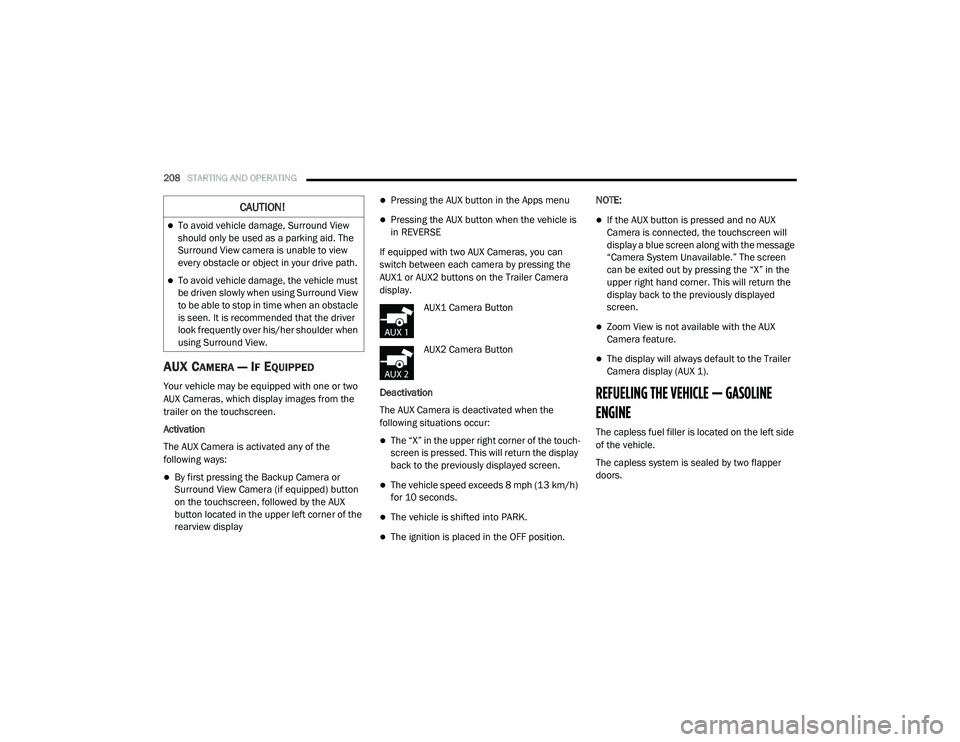
AUX CAMERA — IF EQUIPPED
Your vehicle may be equipped with one or two
AUX Cameras, which display images from the
trailer on the touchscreen.
Activation
The AUX Camera is activated any of the
following ways:
By first pressing the Backup Camera or
Surround View Camera (if equipped) button
on the touchscreen, followed by the AUX
button located in the upper left corner of the
rearview display
Pressing the AUX button in the Apps menu
Pressing the AUX button when the vehicle is
in REVERSE
If equipped with two AUX Cameras, you can
switch between each camera by pressing the
AUX1 or AUX2 buttons on the Trailer Camera
display. AUX1 Camera Button
AUX2 Camera Button
Deactivation
The AUX Camera is deactivated when the
following situations occur:
The “X” in the upper right corner of the touch -
screen is pressed. This will return the display
back to the previously displayed screen.
The vehicle speed exceeds 8 mph (13 km/h)
for 10 seconds.
The vehicle is shifted into PARK.
The ignition is placed in the OFF position. NOTE:
If the AUX button is pressed and no AUX
Camera is connected, the touchscreen will
display a blue screen along with the message
“Camera System Unavailable.” The screen
can be exited out by pressing the “X” in the
upper right hand corner. This will return the
display back to the previously displayed
screen.
Zoom View is not available with the AUX
Camera feature.
The display will always default to the Trailer
Camera display (AUX 1).
REFUELING THE VEHICLE — GASOLINE
ENGINE
The capless fuel filler is located on the left side
of the vehicle.
The capless system is sealed by two flapper
doors.
CAUTION!
To avoid vehicle damage, Surround View
should only be used as a parking aid. The
Surround View camera is unable to view
every obstacle or object in your drive path.
To avoid vehicle damage, the vehicle must
be driven slowly when using Surround View
to be able to stop in time when an obstacle
is seen. It is recommended that the driver
look frequently over his/her shoulder when
using Surround View.
21_DT_OM_EN_USC_t.book Page 208
Page 252 of 496
250MULTIMEDIA
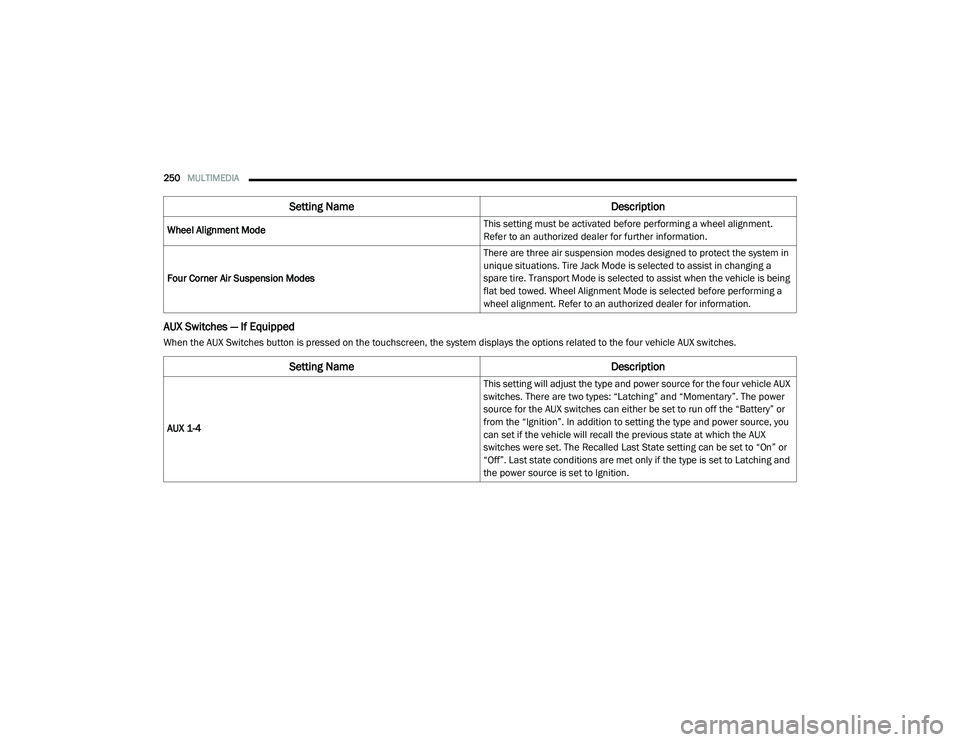
AUX Switches — If Equipped
When the AUX Switches button is pressed on the touchscreen, the system displays the options related to the four vehicle AUX switches.Wheel Alignment Mode
This setting must be activated before performing a wheel alignment.
Refer to an authorized dealer for further information.
Four Corner Air Suspension Modes There are three air suspension modes designed to protect the system in
unique situations. Tire Jack Mode is selected to assist in changing a
spare tire. Transport Mode is selected to assist when the vehicle is being
flat bed towed. Wheel Alignment Mode is selected before performing a
wheel alignment. Refer to an authorized dealer for information.
Setting Name
Description
Setting NameDescription
AUX 1-4 This setting will adjust the type and power source for the four vehicle AUX
switches. There are two types: “Latching” and “Momentary”. The power
source for the AUX switches can either be set to run off the “Battery” or
from the “Ignition”. In addition to setting the type and power source, you
can set if the vehicle will recall the previous state at which the AUX
switches were set. The Recalled Last State setting can be set to “On” or
“Off”. Last state conditions are met only if the type is set to Latching and
the power source is set to Ignition.
21_DT_OM_EN_USC_t.book Page 250