length RAM 1500 2021 Owners Manual
[x] Cancel search | Manufacturer: RAM, Model Year: 2021, Model line: 1500, Model: RAM 1500 2021Pages: 496, PDF Size: 20.89 MB
Page 33 of 496
GETTING TO KNOW YOUR VEHICLE31
CHILD-PROTECTION DOOR LOCK
S
YSTEM — REAR DOORS
To provide a safer environment for small
children riding in the rear seats, the rear doors
are equipped with a Child-Protection Door Lock
system.
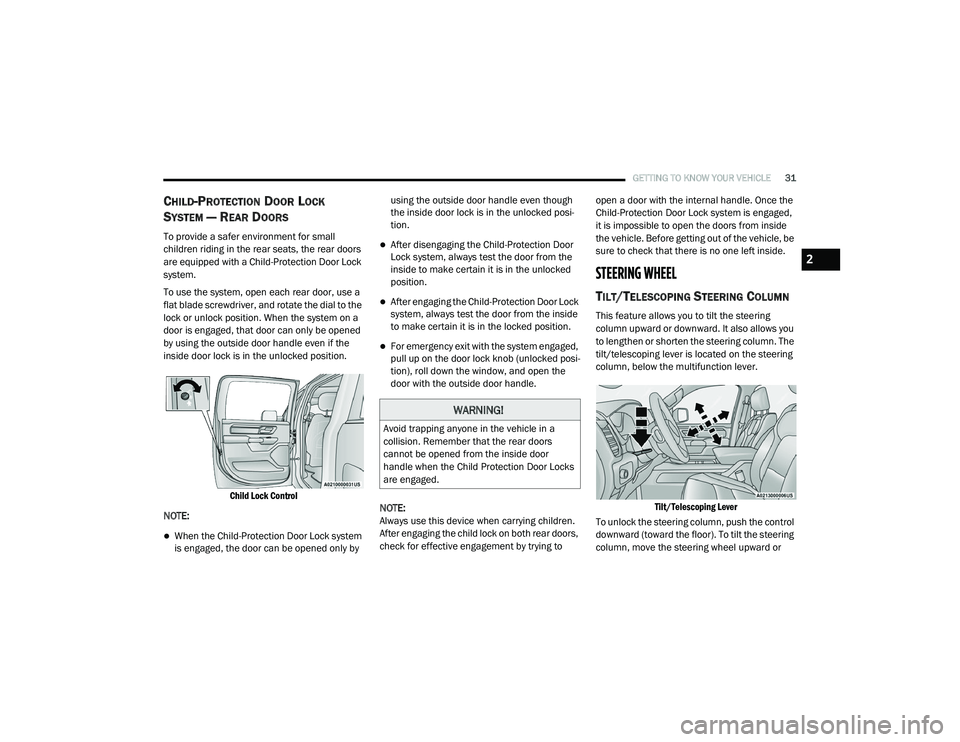
To use the system, open each rear door, use a
flat blade screwdriver, and rotate the dial to the
lock or unlock position. When the system on a
door is engaged, that door can only be opened
by using the outside door handle even if the
inside door lock is in the unlocked position.
Child Lock Control
NOTE:
When the Child-Protection Door Lock system
is engaged, the door can be opened only by using the outside door handle even though
the inside door lock is in the unlocked posi
-
tion.
After disengaging the Child-Protection Door
Lock system, always test the door from the
inside to make certain it is in the unlocked
position.
After engaging the Child-Protection Door Lock
system, always test the door from the inside
to make certain it is in the locked position.
For emergency exit with the system engaged,
pull up on the door lock knob (unlocked posi -
tion), roll down the window, and open the
door with the outside door handle.
NOTE:
Always use this device when carrying children.
After engaging the child lock on both rear doors,
check for effective engagement by trying to open a door with the internal handle. Once the
Child-Protection Door Lock system is engaged,
it is impossible to open the doors from inside
the vehicle. Before getting out of the vehicle, be
sure to check that there is no one left inside.
STEERING WHEEL
TILT/TELESCOPING STEERING COLUMN
This feature allows you to tilt the steering
column upward or downward. It also allows you
to lengthen or shorten the steering column. The
tilt/telescoping lever is located on the steering
column, below the multifunction lever.
Tilt/Telescoping Lever
To unlock the steering column, push the control
downward (toward the floor). To tilt the steering
column, move the steering wheel upward or
WARNING!
Avoid trapping anyone in the vehicle in a
collision. Remember that the rear doors
cannot be opened from the inside door
handle when the Child Protection Door Locks
are engaged.
2
21_DT_OM_EN_USC_t.book Page 31
Page 34 of 496

32GETTING TO KNOW YOUR VEHICLE
(Continued)
downward as desired. To lengthen or shorten
the steering column, pull the steering wheel
outward or push it inward as desired. To lock
the steering column in position, push the
control upward until fully engaged.
HEATED STEERING WHEEL — IF
E
QUIPPED
The steering wheel contains a heating element
that helps warm your hands in cold weather.
The heated steering wheel has only one
temperature setting. Once the heated steering
wheel has been turned on, it will stay on until the operator turns it off. The heated steering
wheel may not turn on when it is already warm.
The heated steering wheel control button is
located within the climate or controls screen of
the touchscreen.
Press the heated steering wheel button
once to turn the heating element on.
Press the heated steering wheel button a
second time to turn the heating element off.
NOTE:
The engine must be running for the heated
steering wheel to operate.
For information on use with the Remote Start
system, see Ú page 24.DRIVER MEMORY SETTINGS — IF EQUIPPED
This feature allows the driver to save up to two
different memory profiles for easy recall
through a memory switch. Each memory profile
saves desired position settings for the following
features:
Driver’s seat
Easy Entry/Exit seat operation (on/off) (if
equipped)
Adjustable pedals (if equipped)
Side mirrors
NOTE:
Your vehicle is equipped with two key fobs, each
can be linked to either memory position 1 or 2.
WARNING!
Do not adjust the steering column while
driving. Adjusting the steering column while
driving or driving with the steering column
unlocked, could cause the driver to lose
control of the vehicle. Failure to follow this
warning may result in serious injury or death.
WARNING!
Persons who are unable to feel pain to the
skin because of advanced age, chronic
illness, diabetes, spinal cord injury, medica -
tion, alcohol use, exhaustion, or other phys -
ical conditions must exercise care when
using the steering wheel heater. It may
cause burns even at low temperatures,
especially if used for long periods.
Do not place anything on the steering wheel
that insulates against heat, such as a
blanket or steering wheel covers of any type
and material. This may cause the steering
wheel heater to overheat.
WARNING! (Continued)
21_DT_OM_EN_USC_t.book Page 32
Page 77 of 496
GETTING TO KNOW YOUR VEHICLE75
(Continued)
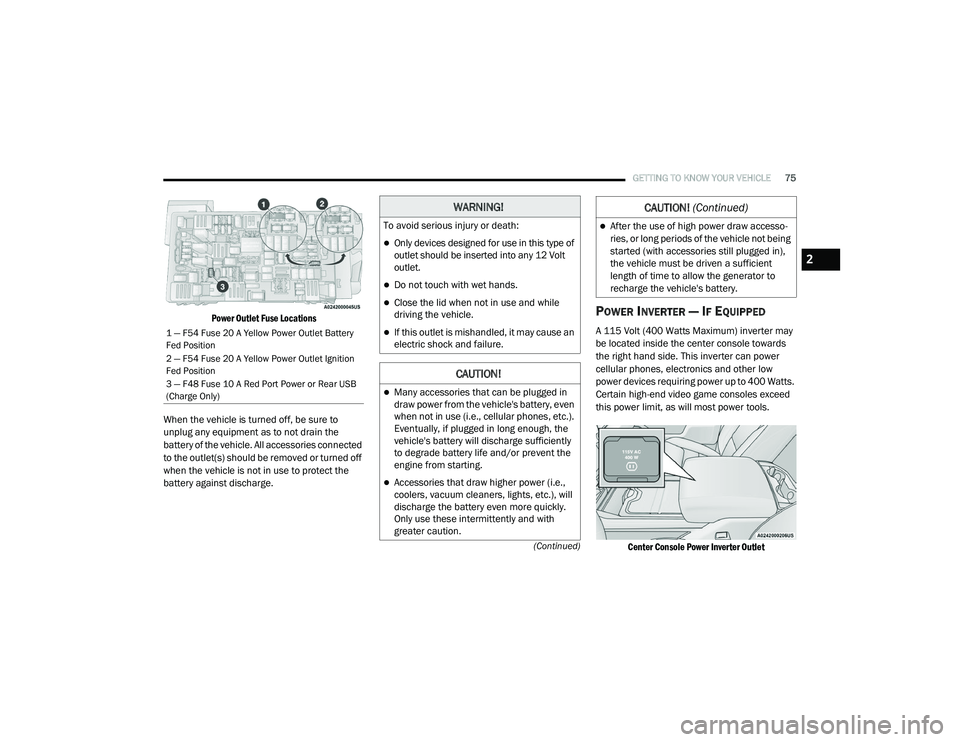
Power Outlet Fuse Locations
When the vehicle is turned off, be sure to
unplug any equipment as to not drain the
battery of the vehicle. All accessories connected
to the outlet(s) should be removed or turned off
when the vehicle is not in use to protect the
battery against discharge.POWER INVERTER — IF EQUIPPED
A 115 Volt (400 Watts Maximum) inverter may
be located inside the center console towards
the right hand side. This inverter can power
cellular phones, electronics and other low
power devices requiring power up to 400 Watts.
Certain high-end video game consoles exceed
this power limit, as will most power tools.
Center Console Power Inverter Outlet
1 — F54 Fuse 20 A Yellow Power Outlet Battery
Fed Position
2 — F54 Fuse 20 A Yellow Power Outlet Ignition
Fed Position
3 — F48 Fuse 10 A Red Port Power or Rear USB
(Charge Only)
WARNING!
To avoid serious injury or death:
Only devices designed for use in this type of
outlet should be inserted into any 12 Volt
outlet.
Do not touch with wet hands.
Close the lid when not in use and while
driving the vehicle.
If this outlet is mishandled, it may cause an
electric shock and failure.
CAUTION!
Many accessories that can be plugged in
draw power from the vehicle's battery, even
when not in use (i.e., cellular phones, etc.).
Eventually, if plugged in long enough, the
vehicle's battery will discharge sufficiently
to degrade battery life and/or prevent the
engine from starting.
Accessories that draw higher power (i.e.,
coolers, vacuum cleaners, lights, etc.), will
discharge the battery even more quickly.
Only use these intermittently and with
greater caution.
After the use of high power draw accesso -
ries, or long periods of the vehicle not being
started (with accessories still plugged in),
the vehicle must be driven a sufficient
length of time to allow the generator to
recharge the vehicle's battery.
CAUTION! (Continued)
2
21_DT_OM_EN_USC_t.book Page 75
Page 148 of 496
146STARTING AND OPERATING
(Continued)
COLD WEATHER OPERATION (BELOW
–22°F O
R −30°C)
To ensure reliable starting at these
temperatures, use of an externally powered
electric engine block heater (available from an
authorized dealer) is recommended.
AFTER STARTING
The idle speed is controlled automatically, and
it will decrease as the engine warms up.
STARTING FLUIDS — DIESEL ENGINE
O
NLY
The engine is equipped with a glow plug
preheating system. If the instructions in this
manual are followed, the engine should start in
all conditions and no type of starting fluid
should be used.
NORMAL OPERATION — DIESEL ENGINE
Observe the following when the diesel engine is
operating.
All message center lights are off.
Malfunction Indicator Light (MIL) is off.
Engine Oil Pressure telltale is not illuminated.
Voltmeter operation:
The voltmeter may show a gauge fluctuation at
various engine temperatures. This is caused by
the glow plug heating system. The number of
cycles and the length of the cycling operation is
controlled by the engine control module. Glow
plug heater operation can run for several
minutes, once the heater operation is complete
the voltmeter needle will stabilize.
COLD WEATHER PRECAUTIONS
Operation in ambient temperature below 32°F
(0°C) may require special considerations. The
following charts suggest these options:
WARNING!
Do not leave children or animals inside
parked vehicles in hot weather. Interior
heat build up may cause serious injury or
death.
When leaving the vehicle, always make
sure the wireless ignition node is in the
“OFF” mode, remove the key fob from the
vehicle and lock the vehicle.
Never leave children alone in a vehicle, or
with access to an unlocked vehicle.
Allowing children to be in a vehicle unat -
tended is dangerous for a number of
reasons. A child or others could be seriously
or fatally injured. Children should be
warned not to touch the parking brake,
brake pedal or the gear selector.
Do not leave the key fob in or near the
vehicle, or in a location accessible to chil-
dren, and do not leave the ignition of a
vehicle equipped with Keyless Enter-N-Go
in the ACC or ON/RUN mode. A child could
operate power windows, other controls, or
move the vehicle.
WARNING! (Continued)
21_DT_OM_EN_USC_t.book Page 146
Page 242 of 496
240MULTIMEDIA
Units
When the Units button is pressed on the touchscreen, the system displays the different measurement options. The selected unit of measurement will
display in the instrument cluster display and Navigation system (if equipped). The available settings are:
Voice
When the Voice button is pressed on the touchscreen, the system displays the options related to the vehicle’s Voice Recognition feature.
Setting Name Description
US This setting will change the unit of measurement on the display to US.
Metric This setting will change the unit of measurement on the display to Metric.
Custom This setting changes the “Speed” (MPH or km/h), “Distance” (mi or km),
“Fuel Consumption” (MPG [US], MPG [UK], L/100 km, or km/L),
“Pressure” (psi, kPa, or bar), “Temperature” (°C or °F), and “Capacity”
(Gal [US], Gal [UK], or L) units of measurement independently.
Setting Name
Description
Voice Response Length This setting will change the response length for the Voice Recognition
system. The “Brief” setting provides a shortened audio description from
the system. The “Detailed” setting provides the full audio description
from the system.
Show Command List This setting will allow you to turn the command list on or off. The “Always”
setting will always show the command list. The “With Help” setting will
show the command list and provide a brief description of what the
command does. The “Never” setting will turn the command list off.
21_DT_OM_EN_USC_t.book Page 240
Page 245 of 496
MULTIMEDIA243
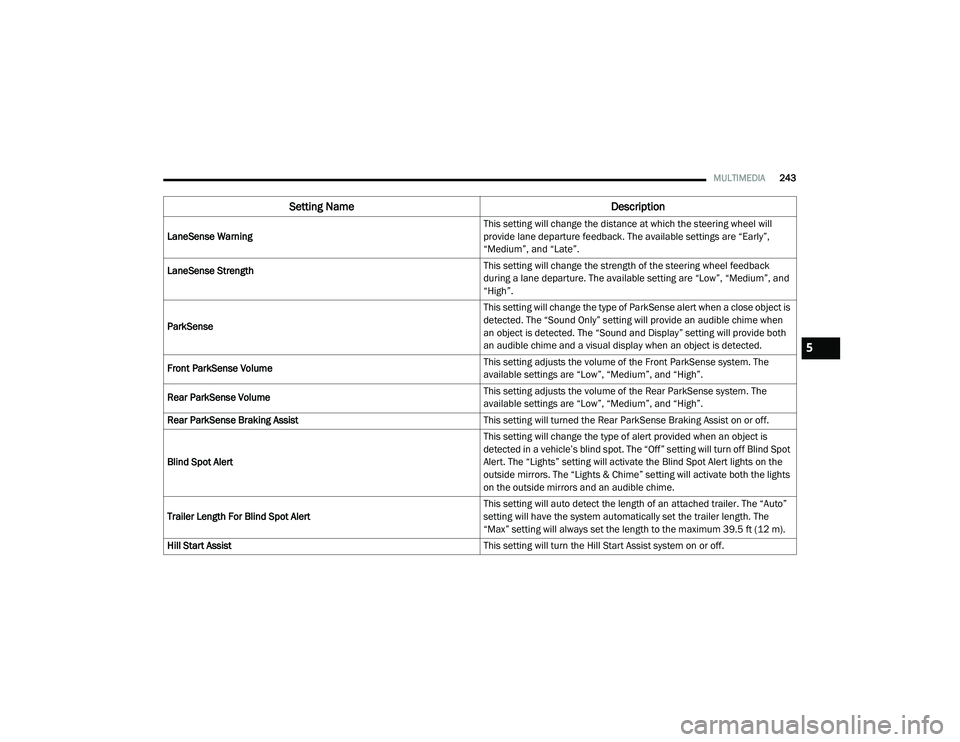
LaneSense Warning This setting will change the distance at which the steering wheel will
provide lane departure feedback. The available settings are “Early”,
“Medium”, and “Late”.
LaneSense Strength
This setting will change the strength of the steering wheel feedback
during a lane departure. The available setting are “Low”, “Medium”, and
“High”.
ParkSense This setting will change the type of ParkSense alert when a close object is
detected. The “Sound Only” setting will provide an audible chime when
an object is detected. The “Sound and Display” setting will provide both
an audible chime and a visual display when an object is detected.
Front ParkSense Volume This setting adjusts the volume of the Front ParkSense system. The
available settings are “Low”, “Medium”, and “High”.
Rear ParkSense Volume This setting adjusts the volume of the Rear ParkSense system. The
available settings are “Low”, “Medium”, and “High”.
Rear ParkSense Braking Assist This setting will turned the Rear ParkSense Braking Assist on or off.
Blind Spot Alert This setting will change the type of alert provided when an object is
detected in a vehicle’s blind spot. The “Off” setting will turn off Blind Spot
Alert. The “Lights” setting will activate the Blind Spot Alert lights on the
outside mirrors. The “Lights & Chime” setting will activate both the lights
on the outside mirrors and an audible chime.
Trailer Length For Blind Spot Alert This setting will auto detect the length of an attached trailer. The “Auto”
setting will have the system automatically set the trailer length. The
“Max” setting will always set the length to the maximum 39.5 ft (12 m).
Hill Start Assist This setting will turn the Hill Start Assist system on or off.
Setting NameDescription
5
21_DT_OM_EN_USC_t.book Page 243
Page 307 of 496
MULTIMEDIA305
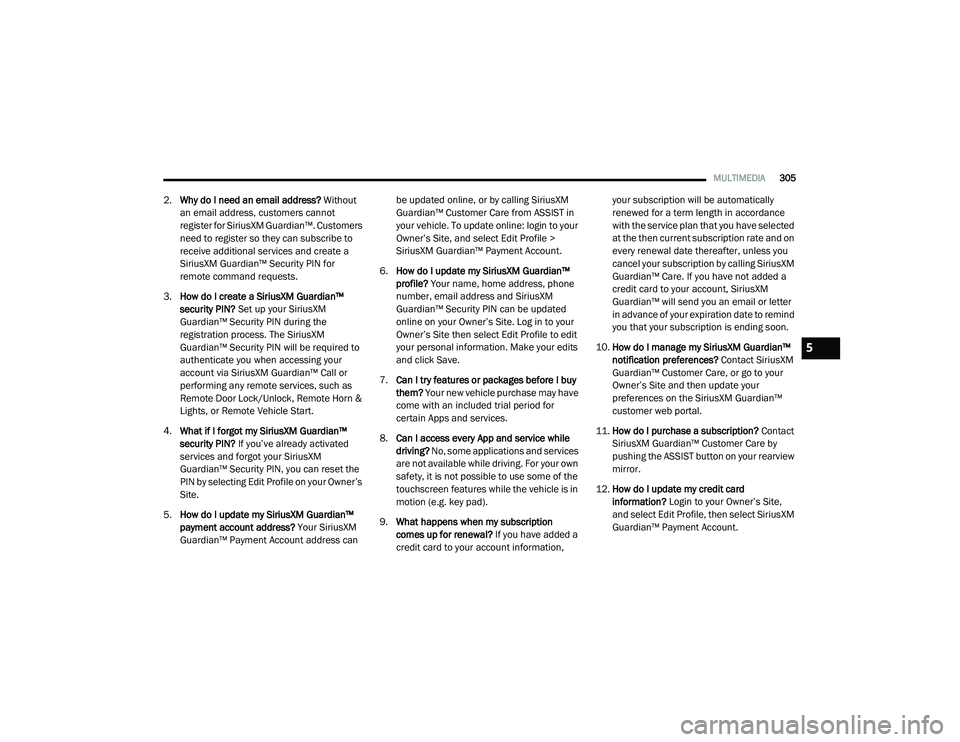
2.Why do I need an email address? Without
an email address, customers cannot
register for SiriusXM Guardian™. Customers
need to register so they can subscribe to
receive additional services and create a
SiriusXM Guardian™ Security PIN for
remote command requests.
3. How do I create a SiriusXM Guardian™
security PIN? Set up your SiriusXM
Guardian™ Security PIN during the
registration process. The SiriusXM
Guardian™ Security PIN will be required to
authenticate you when accessing your
account via SiriusXM Guardian™ Call or
performing any remote services, such as
Remote Door Lock/Unlock, Remote Horn &
Lights, or Remote Vehicle Start.
4. What if I forgot my SiriusXM Guardian™
security PIN? If you’ve already activated
services and forgot your SiriusXM
Guardian™ Security PIN, you can reset the
PIN by selecting Edit Profile on your Owner’s
Site.
5. How do I update my SiriusXM Guardian™
payment account address? Your SiriusXM
Guardian™ Payment Account address can be updated online, or by calling SiriusXM
Guardian™ Customer Care from ASSIST in
your vehicle. To update online: login to your
Owner’s Site, and select Edit Profile >
SiriusXM Guardian™ Payment Account.
6. How do I update my SiriusXM Guardian™
profile? Your name, home address, phone
number, email address and SiriusXM
Guardian™ Security PIN can be updated
online on your Owner’s Site. Log in to your
Owner’s Site then select Edit Profile to edit
your personal information. Make your edits
and click Save.
7. Can I try features or packages before I buy
them? Your new vehicle purchase may have
come with an included trial period for
certain Apps and services.
8. Can I access every App and service while
driving? No, some applications and services
are not available while driving. For your own
safety, it is not possible to use some of the
touchscreen features while the vehicle is in
motion (e.g. key pad).
9. What happens when my subscription
comes up for renewal? If you have added a
credit card to your account information, your subscription will be automatically
renewed for a term length in accordance
with the service plan that you have selected
at the then current subscription rate and on
every renewal date thereafter, unless you
cancel your subscription by calling SiriusXM
Guardian™ Care. If you have not added a
credit card to your account, SiriusXM
Guardian™ will send you an email or letter
in advance of your expiration date to remind
you that your subscription is ending soon.
10. How do I manage my SiriusXM Guardian™
notification preferences? Contact SiriusXM
Guardian™ Customer Care, or go to your
Owner’s Site and then update your
preferences on the SiriusXM Guardian™
customer web portal.
11. How do I purchase a subscription? Contact
SiriusXM Guardian™ Customer Care by
pushing the ASSIST button on your rearview
mirror.
12. How do I update my credit card
information? Login to your Owner’s Site,
and select Edit Profile, then select SiriusXM
Guardian™ Payment Account.
5
21_DT_OM_EN_USC_t.book Page 305
Page 308 of 496
306MULTIMEDIA
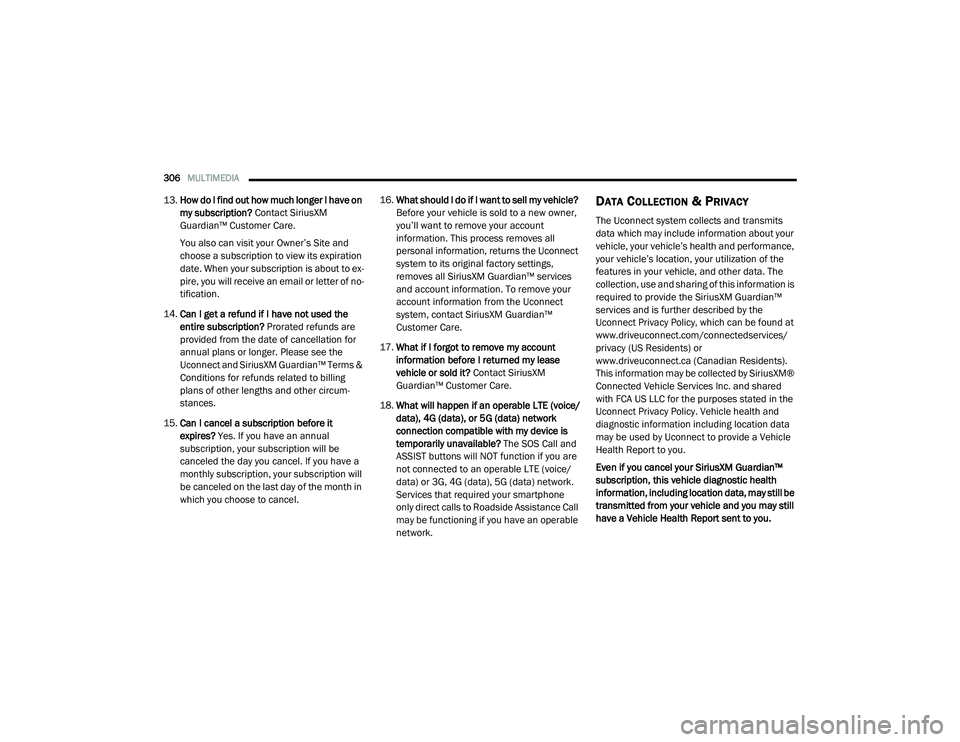
13.How do I find out how much longer I have on
my subscription? Contact SiriusXM
Guardian™ Customer Care.
You also can visit your Owner’s Site and
choose a subscription to view its expiration
date. When your subscription is about to ex -
pire, you will receive an email or letter of no -
tification.
14. Can I get a refund if I have not used the
entire subscription? Prorated refunds are
provided from the date of cancellation for
annual plans or longer. Please see the
Uconnect and SiriusXM Guardian™ Terms &
Conditions for refunds related to billing
plans of other lengths and other circum -
stances.
15. Can I cancel a subscription before it
expires? Yes. If you have an annual
subscription, your subscription will be
canceled the day you cancel. If you have a
monthly subscription, your subscription will
be canceled on the last day of the month in
which you choose to cancel. 16.
What should I do if I want to sell my vehicle?
Before your vehicle is sold to a new owner,
you’ll want to remove your account
information. This process removes all
personal information, returns the Uconnect
system to its original factory settings,
removes all SiriusXM Guardian™ services
and account information. To remove your
account information from the Uconnect
system, contact SiriusXM Guardian™
Customer Care.
17. What if I forgot to remove my account
information before I returned my lease
vehicle or sold it? Contact SiriusXM
Guardian™ Customer Care.
18. What will happen if an operable LTE (voice/
data), 4G (data), or 5G (data) network
connection compatible with my device is
temporarily unavailable? The SOS Call and
ASSIST buttons will NOT function if you are
not connected to an operable LTE (voice/
data) or 3G, 4G (data), 5G (data) network.
Services that required your smartphone
only direct calls to Roadside Assistance Call
may be functioning if you have an operable
network.DATA COLLECTION & PRIVACY
The Uconnect system collects and transmits
data which may include information about your
vehicle, your vehicle’s health and performance,
your vehicle’s location, your utilization of the
features in your vehicle, and other data. The
collection, use and sharing of this information is
required to provide the SiriusXM Guardian™
services and is further described by the
Uconnect Privacy Policy, which can be found at
www.driveuconnect.com/connectedservices/
privacy (US Residents) or
www.driveuconnect.ca (Canadian Residents).
This information may be collected by SiriusXM®
Connected Vehicle Services Inc. and shared
with FCA US LLC for the purposes stated in the
Uconnect Privacy Policy. Vehicle health and
diagnostic information including location data
may be used by Uconnect to provide a Vehicle
Health Report to you.
Even if you cancel your SiriusXM Guardian™
subscription, this vehicle diagnostic health
information, including location data, may still be
transmitted from your vehicle and you may still
have a Vehicle Health Report sent to you.
21_DT_OM_EN_USC_t.book Page 306
Page 321 of 496

SAFETY319
The BSM detection zone covers approximately
one lane width on both sides of the vehicle 12 ft
(3.8 m). The zone length starts at the outside
rear view mirror and extends approximately
10 ft (3 m) beyond the rear fascia/bumper of
the vehicle. The BSM system monitors the
detection zones on both sides of the vehicle
when the vehicle speed reaches approximately
6 mph (10 km/h) or higher and will alert the
driver of vehicles in these areas.
NOTE:
The BSM system DOES NOT alert the driver
about rapidly approaching vehicles that are
outside the detection zones.
BSM may experience dropouts (blinking on
and off) of the side mirror warning indicator
lamps when a motorcycle or any small object
remains at the side of the vehicle for
extended periods of time (more than a couple
of seconds).
The vehicle’s taillights, where the radar sensors
are located, must remain free of snow, ice, and
dirt/road contamination so that the BSM
system can function properly. Do not block the
taillights with foreign objects (bumper stickers,
bicycle racks, etc.).
Radar Sensor Locations
If the system detects degraded performance
due to contamination or foreign objects, a
message will warn you of a blocked sensor and
the warning indicators in side view mirrors will
be on. The warning indicators will remain
illuminated until blockage clearing conditions
are met. First clear the taillights around the
sensors of the blockage. After removing the
blockage, the following procedure can be used
to reset the system:
Cycle the ignition from ON to OFF and then back
ON.
If the blockage message is still present after
cycling the ignition and driving in traffic, check
again for a blockage. The system may also detect a blockage if the
vehicle is operated in areas with extremely low
radar returns such as a desert or parallel to a
large elevation drop.
The BSM system notifies the driver of objects in
the detection zones by illuminating the BSM
warning light located in the outside mirrors, in
addition to sounding an audible (chime) alert
and reducing the radio volume Ú
page 322.
Warning Light Location
The BSM system monitors the detection zone
from three different entry points (side, rear,
front) while driving to see if an alert is
necessary. The BSM system will issue an alert
during these types of zone entries.
6
21_DT_OM_EN_USC_t.book Page 319
Page 324 of 496
322SAFETY
Blind Spot Modes
Blind Spot has three selectable modes of
operation that are available in the Uconnect
system.
Blind Spot Alert Lights Only
When operating in Blind Spot Alert mode, the
BSM system will provide a visual alert in the
appropriate side view mirror based on a
detected object. However, when the system is
operating in Rear Cross Path (RCP) mode, the
system will respond with both visual and
audible alerts when a detected object is
present. Whenever an audible alert is
requested, the radio is muted.
Blind Spot Alert Lights/Chime
When operating in Blind Spot Alert Lights/
Chime mode, the BSM system will provide a
visual alert in the appropriate side view mirror
based on a detected object. If the turn signal is
then activated, and it corresponds to an alert
present on that side of the vehicle, an audible
chime will also be sounded. Whenever a turn
signal and detected object are present on the
same side at the same time, both the visual and
audible alerts will be issued. In addition to the
audible alert the radio (if on) will also be muted. NOTE:
Whenever an audible alert is requested by the
BSM system, the radio is also muted.
When the system is in RCP, the system shall
respond with both visual and audible alerts
when a detected object is present. Whenever
an audible alert is requested, the radio is also
muted. Turn/hazard signal status is ignored;
the RCP state always requests the chime.
Blind Spot Alert Off
When the BSM system is turned off there will be
no visual or audible alerts from either the BSM,
RCP, or Trailer Merge Assist systems.
NOTE:
The BSM system will store the current operating
mode when the vehicle is shut off. Each time
the vehicle is started the previously stored
mode will be recalled and used.
Trailer Merge Assist – If Equipped
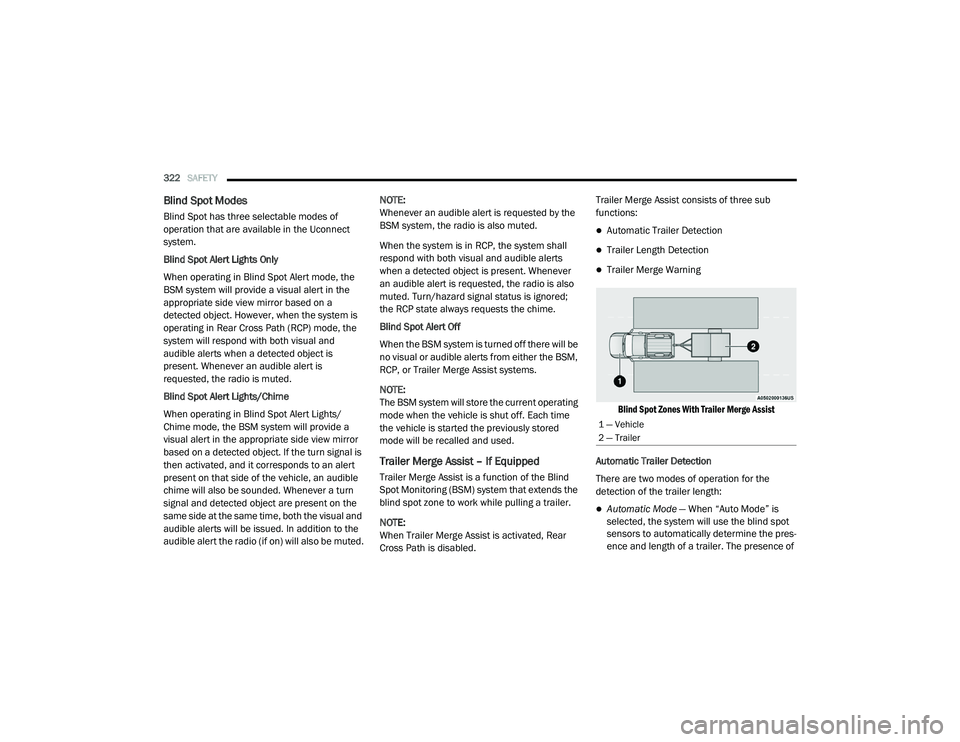
Trailer Merge Assist is a function of the Blind
Spot Monitoring (BSM) system that extends the
blind spot zone to work while pulling a trailer.
NOTE:
When Trailer Merge Assist is activated, Rear
Cross Path is disabled.Trailer Merge Assist consists of three sub
functions:
Automatic Trailer Detection
Trailer Length Detection
Trailer Merge Warning
Blind Spot Zones With Trailer Merge Assist
Automatic Trailer Detection
There are two modes of operation for the
detection of the trailer length:
Automatic Mode — When “Auto Mode” is
selected, the system will use the blind spot
sensors to automatically determine the pres -
ence and length of a trailer. The presence of
1 — Vehicle
2 — Trailer
21_DT_OM_EN_USC_t.book Page 322