low oil pressure RAM 1500 2021 Owners Manual
[x] Cancel search | Manufacturer: RAM, Model Year: 2021, Model line: 1500, Model: RAM 1500 2021Pages: 496, PDF Size: 20.89 MB
Page 14 of 496
12
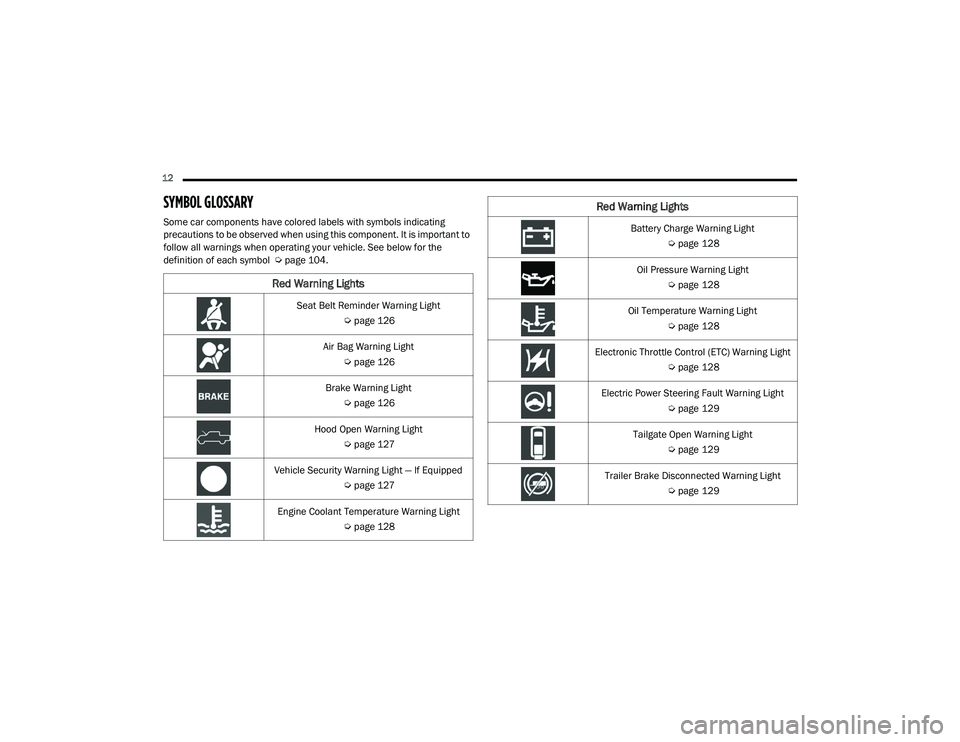
SYMBOL GLOSSARY
Some car components have colored labels with symbols indicating
precautions to be observed when using this component. It is important to
follow all warnings when operating your vehicle. See below for the
definition of each symbol Úpage 104.
Red Warning Lights
Seat Belt Reminder Warning Light
Úpage 126
Air Bag Warning Light Úpage 126
Brake Warning Light Úpage 126
Hood Open Warning Light Úpage 127
Vehicle Security Warning Light — If Equipped Úpage 127
Engine Coolant Temperature Warning Light Úpage 128
Battery Charge Warning Light
Úpage 128
Oil Pressure Warning Light Úpage 128
Oil Temperature Warning Light Úpage 128
Electronic Throttle Control (ETC) Warning Light Úpage 128
Electric Power Steering Fault Warning Light Úpage 129
Tailgate Open Warning Light Úpage 129
Trailer Brake Disconnected Warning Light Úpage 129
Red Warning Lights
21_DT_OM_EN_USC_t.book Page 12
Page 107 of 496

GETTING TO KNOW YOUR INSTRUMENT PANEL105
BASE / MIDLINE INSTRUMENT CLUSTER
D
ESCRIPTIONS — GASOLINE
1. Tachometer
Indicates the engine speed in revolutions
per minute (RPM x 1000).
2. Voltmeter
When the vehicle is in the RUN state, the
gauge indicates the electrical system
voltage. The pointer should stay within
the normal range if the battery is
charged. If the pointer moves to either
extreme left or right and remains there
during normal driving, the electrical
system should be serviced.
NOTE:
In vehicles equipped with Stop/Start, a reduced
voltage may be present during an Autostop.
3. Instrument Cluster Display
When the appropriate conditions exist,
this display shows the instrument cluster
display messages Ú page 114.
Instrument Cluster Display/Controls Location
The display always show one of the main
menu item after ignition on.
4. Oil Pressure Gauge
The pointer should always indicate the oil
pressure when the engine is running. A
continuous high or low reading under
normal driving conditions may indicate a
lubrication system malfunction. Imme -
diate service should be obtained from an
authorized dealer.
NOTE:
In vehicles equipped with Stop/Start, an oil
pressure indication of zero is normal during an
Autostop. 5. Speedometer
Indicates vehicle speed.
6. Fuel Gauge
The pointer shows the level of fuel in the
fuel tank when the ignition is in the ON/
RUN position.
The fuel pump symbol points to the
side of the vehicle where the fuel door
is located.
7. Temperature Gauge
The pointer shows engine coolant
temperature. The pointer positioned
within the normal range indicates that
the engine cooling system is operating
satisfactorily.
The pointer will likely indicate a higher
temperature when driving in hot weather,
up mountain grades, or when towing a
trailer. It should not be allowed to exceed
the upper limits of the normal operating
range.
1 – Instrument Cluster Display Controls
2 – Instrument Cluster Display Screen
3
21_DT_OM_EN_USC_t.book Page 105
Page 112 of 496

110GETTING TO KNOW YOUR INSTRUMENT PANEL
BASE / MIDLINE INSTRUMENT CLUSTER
D
ESCRIPTIONS — DIESEL
1. Tachometer
Indicates the engine speed in revolutions
per minute (RPM x 1000).
2. Engine Coolant Temperature
This gauge shows the engine coolant
temperature. The gauge pointer will likely
show higher temperatures when driving
in hot weather, up mountain grades, or in
heavy stop and go traffic. If the red
Warning Light turns on while driving,
safely bring the vehicle to a stop, and
turn off the engine. DO NOT operate the
vehicle until the cause is corrected.
3. Instrument Cluster Display
When the appropriate conditions exist,
this display shows the instrument cluster
display messages Úpage 114.
Instrument Cluster Display/Controls Location
The display always show one of the main
menu item after ignition on.
4. Oil Pressure Gauge
The pointer should always indicate some
oil pressure when the engine is running.
A continuous high or low reading under
normal driving conditions may indicate a
lubrication system malfunction. Imme -
diate service should be obtained from an
authorized dealer.
WARNING!
A hot engine cooling system is dangerous.
You or others could be badly burned by steam
or boiling coolant. You may want to call an
authorized dealer for service if your vehicle
overheats Ú page 423.
WARNING!
Driving with a hot engine cooling system
could damage your vehicle. If the
temperature gauge reads “H” pull over and
stop the vehicle. Idle the vehicle with the air
conditioner turned off until the pointer drops
back into the normal range. If the pointer
remains on the “H”, turn the engine off
immediately and call an authorized dealer for
service.1 – Instrument Cluster Display Controls
2 – Instrument Cluster Display Screen
21_DT_OM_EN_USC_t.book Page 110
Page 118 of 496

116GETTING TO KNOW YOUR INSTRUMENT PANEL
DISPLAY MENU ITEMS
Push and release the up or down arrow
button until the desired selectable menu icon is
highlighted in the instrument cluster display.
Speedometer
Push and release the up or down arrow
button until the speedometer menu item is
highlighted in the instrument cluster display.
Push and release the OK button to cycle the
display between mph and km/h.
Vehicle Info
Push and release the up or down arrow
button until the Vehicle Info menu icon is
displayed in the instrument cluster display.
Push and release the left or right arrow
button to scroll through the information
submenus and push and release the OK button
to select or reset the resettable submenus.
Tire Pressure Monitor System
Air Suspension — If Equipped
Coolant Temperature — If Equipped
Trans Temperature (Automatic only)
Oil Temperature
Oil Pressure — If Equipped
Oil Life
Battery Voltage — If Equipped
Gauge Summary — If Equipped
Coolant Temp
Trans Temp
Oil Temp
Oil Pressure
Engine Hours
Off-Road
Push and release the up or down arrow
button until the Off-Road menu icon is displayed
in the instrument cluster display. Push and
release the left or right arrow button to
scroll through the information submenus.
Drivetrain
Front Wheel Angle: displays the graphical
and numerical value of calculated
average front wheel angle from the
steering wheel orientation.
Transfer Case Lock Status: displays
“Lock” graphic only during 4WD High,
4WD High Part Time, 4WD Low status.
Axle Lock And Sway Bar Status (If
Equipped): displays front and rear or rear
only axle locker graphic, and sway bar
connection graphic with text message
(connected or disconnected).
Pitch And Roll
Displays the pitch and roll of the vehicle
in the graphic with the angle number on
the screen.
NOTE:
When vehicle speed becomes too high to
display the pitch and roll, “- -” will display in
place of the numbers, and the graphic will be
greyed out. A message indicating the necessary
speed for the feature to become available will
also display.
Driver Assist — If Equipped
The Driver Assist menu displays the status of
the ACC and LaneSense systems.
Push and release the up or down arrow
button until the Driver Assist menu is displayed
in the instrument cluster display.
21_DT_OM_EN_USC_t.book Page 116
Page 121 of 496

GETTING TO KNOW YOUR INSTRUMENT PANEL119
Custom 1: Speed, Speed Limit
Custom 2: Speed, Speed Limit, Naviga-
tion
Custom 3 : Speed, Speed Limit, Naviga-
tion, Driver Assist (ACC/Cruise, Lane -
Sense, Highway Assist/Highway Assist+)
Custom 4 : Speed, Speed Limit, Naviga-
tion, Driver Assist (ACC/Cruise, Lane -
Sense, Highway Assist/Highway Assist+),
Gear
Display Height
Brightness
NOTE:
The HUD basic settings (Brightness, Display
Height and Non Custom layouts), are controlled
through the Settings Screen in the Instrument
Cluster Ú page 114. Screen Setup Driver Selectable Items
Push and release the
up or down arrow
button until the Settings Menu Icon/Title is
highlighted in the instrument cluster display.
Push and release the OK button to enter the
sub-menus and follow the prompts on the
screen as needed. The Settings feature allows
you to change what information is displayed in
the instrument cluster as well as the location
that information is displayed.
NOTE:
The Settings feature is only available when the
vehicle speed is less than 5 mph.
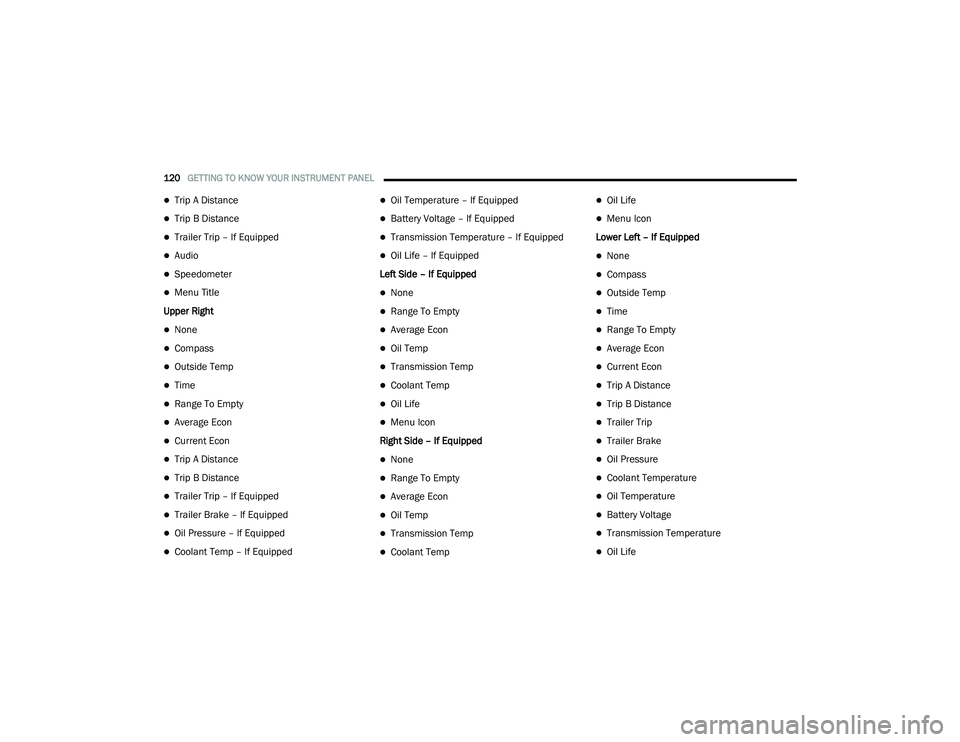
Upper Left
None
Compass
Outside Temp
Time
Range To Empty
Average Econ
Current Econ
Trip A Distance
Trip B Distance
Trailer Trip – If Equipped
Trailer Brake – If Equipped
Oil Pressure – If Equipped
Coolant Temp – If Equipped
Oil Temperature – If Equipped
Battery Voltage – If Equipped
Transmission Temperature – If Equipped
Oil Life – If Equipped
Upper Center
None
Compass
Outside Temp
Time
Range To Empty
Average Econ
Current Econ
3
21_DT_OM_EN_USC_t.book Page 119
Page 122 of 496
120GETTING TO KNOW YOUR INSTRUMENT PANEL
Trip A Distance
Trip B Distance
Trailer Trip – If Equipped
Audio
Speedometer
Menu Title
Upper Right
None
Compass
Outside Temp
Time
Range To Empty
Average Econ
Current Econ
Trip A Distance
Trip B Distance
Trailer Trip – If Equipped
Trailer Brake – If Equipped
Oil Pressure – If Equipped
Coolant Temp – If Equipped
Oil Temperature – If Equipped
Battery Voltage – If Equipped
Transmission Temperature – If Equipped
Oil Life – If Equipped
Left Side – If Equipped
None
Range To Empty
Average Econ
Oil Temp
Transmission Temp
Coolant Temp
Oil Life
Menu Icon
Right Side – If Equipped
None
Range To Empty
Average Econ
Oil Temp
Transmission Temp
Coolant Temp
Oil Life
Menu Icon
Lower Left – If Equipped
None
Compass
Outside Temp
Time
Range To Empty
Average Econ
Current Econ
Trip A Distance
Trip B Distance
Trailer Trip
Trailer Brake
Oil Pressure
Coolant Temperature
Oil Temperature
Battery Voltage
Transmission Temperature
Oil Life
21_DT_OM_EN_USC_t.book Page 120
Page 123 of 496

GETTING TO KNOW YOUR INSTRUMENT PANEL121
Lower Right – If Equipped
None
Compass
Outside Temp
Time
Range To Empty
Average Econ
Current Econ
Trip A Distance
Trip B Distance
Trailer Trip
Trailer Brake
Oil Pressure
Coolant Temperature
Oil Temperature
Battery Voltage
Transmission Temperature
Oil LifeFavorite Menus
Speedometer
Vehicle Info
Driver Assist (show/hide) – If Equipped
Fuel Economy (show/hide)
Trip Info (show/hide)
Stop/Start
Trailer Tow (show/hide)
Audio (show/hide)
(Stored) Messages
Screen Setup
Current Gear
Off
On
Odometer
No Decimal Point
Decimal Point Defaults (Restores All Settings To Default
Settings)
Cancel
Restore
DIESEL PARTICULATE FILTER (DPF)
M
ESSAGES
This engine meets all required diesel engine
emissions standards. To achieve these
emissions standards, your vehicle is equipped
with a state-of-the-art engine and exhaust
system. These systems are seamlessly
integrated into your vehicle and managed by
the Powertrain Control Module (PCM). The PCM
manages engine combustion to allow the
exhaust system’s catalyst to trap and burn
Particulate Matter (PM) pollutants, with no input
or interaction on your part.
WARNING!
A hot exhaust system can start a fire if you
park over materials that can burn, such as
grass or leaves, and those items that come
into contact with your exhaust system. Do not
park or operate your vehicle in areas where
your exhaust system can contact anything
that can burn.
3
21_DT_OM_EN_USC_t.book Page 121
Page 130 of 496

128GETTING TO KNOW YOUR INSTRUMENT PANEL
Engine Coolant Temperature Warning
Light
This warning light warns of an
overheated engine condition. If the
engine coolant temperature is too
high, this indicator will illuminate and
a single chime will sound. If the temperature
reaches the upper limit, a continuous chime will
sound for four minutes or until the engine is
able to cool, whichever comes first.
If the light turns on while driving, safely pull over
and stop the vehicle. If the Air Conditioning (A/
C) system is on, turn it off. Also, shift the
transmission into NEUTRAL (N) and idle the
vehicle. If the temperature reading does not
return to normal, turn the engine off
immediately and call for service Ú page 389.
Battery Charge Warning Light
This warning light will illuminate when
the battery is not charging properly. If
it stays on while the engine is running,
there may be a malfunction with the
charging system. Contact an authorized dealer
as soon as possible.
This indicates a possible problem with the
electrical system or a related component.
Oil Pressure Warning Light
This warning light will illuminate to
indicate low engine oil pressure. If the
light turns on while driving, stop the
vehicle, shut off the engine as soon as
possible, and contact an authorized dealer. A
chime will sound when this light turns on.
Do not operate the vehicle until the cause is
corrected. This light does not indicate how
much oil is in the engine. The engine oil level
must be checked under the hood.
Oil Temperature Warning Light
This warning light will illuminate to
indicate the engine oil temperature is
high. If the light turns on while driving,
stop the vehicle and shut off the
engine as soon as possible. Wait for oil
temperature to return to normal levels.
Electronic Throttle Control (ETC) Warning
Light
This warning light will illuminate to
indicate a problem with the ETC
system. If a problem is detected while
the vehicle is running, the light will
either stay on or flash depending on the nature
of the problem. Cycle the ignition when the vehicle is safely and completely stopped and
the transmission is placed in the PARK position.
The light should turn off. If the light remains on
with the vehicle running, your vehicle will
usually be drivable; however, see an authorized
dealer for service as soon as possible.
NOTE:
This light may turn on if the accelerator and
brake pedals are pressed at the same time.
If the light continues to flash when the vehicle is
running, immediate service is required and you
may experience reduced performance, an
elevated/rough idle, or engine stall and your
vehicle may require towing. The light will come
on when the ignition is placed in the ON/RUN or
ACC/ON/RUN position and remain on briefly as
a bulb check. If the light does not come on
during starting, have the system checked by an
authorized dealer.
21_DT_OM_EN_USC_t.book Page 128
Page 148 of 496
146STARTING AND OPERATING
(Continued)
COLD WEATHER OPERATION (BELOW
–22°F O
R −30°C)
To ensure reliable starting at these
temperatures, use of an externally powered
electric engine block heater (available from an
authorized dealer) is recommended.
AFTER STARTING
The idle speed is controlled automatically, and
it will decrease as the engine warms up.
STARTING FLUIDS — DIESEL ENGINE
O
NLY
The engine is equipped with a glow plug
preheating system. If the instructions in this
manual are followed, the engine should start in
all conditions and no type of starting fluid
should be used.
NORMAL OPERATION — DIESEL ENGINE
Observe the following when the diesel engine is
operating.
All message center lights are off.
Malfunction Indicator Light (MIL) is off.
Engine Oil Pressure telltale is not illuminated.
Voltmeter operation:
The voltmeter may show a gauge fluctuation at
various engine temperatures. This is caused by
the glow plug heating system. The number of
cycles and the length of the cycling operation is
controlled by the engine control module. Glow
plug heater operation can run for several
minutes, once the heater operation is complete
the voltmeter needle will stabilize.
COLD WEATHER PRECAUTIONS
Operation in ambient temperature below 32°F
(0°C) may require special considerations. The
following charts suggest these options:
WARNING!
Do not leave children or animals inside
parked vehicles in hot weather. Interior
heat build up may cause serious injury or
death.
When leaving the vehicle, always make
sure the wireless ignition node is in the
“OFF” mode, remove the key fob from the
vehicle and lock the vehicle.
Never leave children alone in a vehicle, or
with access to an unlocked vehicle.
Allowing children to be in a vehicle unat -
tended is dangerous for a number of
reasons. A child or others could be seriously
or fatally injured. Children should be
warned not to touch the parking brake,
brake pedal or the gear selector.
Do not leave the key fob in or near the
vehicle, or in a location accessible to chil-
dren, and do not leave the ignition of a
vehicle equipped with Keyless Enter-N-Go
in the ACC or ON/RUN mode. A child could
operate power windows, other controls, or
move the vehicle.
WARNING! (Continued)
21_DT_OM_EN_USC_t.book Page 146
Page 150 of 496

148STARTING AND OPERATING
NOTE:
Use of Climatized ULSD Fuel or Number
1 ULSD Fuel results in a noticeable decrease
in fuel economy.
Climatized ULSD Fuel is a blend of Number
2 ULSD and Number 1 ULSD Fuels which
reduces the temperature at which wax crys -
tals form in fuel.
The fuel grade should be clearly marked on
the pump at the fuel station.
The engine requires the use of ULSD Fuel.
Use of incorrect fuel could result in engine
and exhaust system damage Ú page 471.
If Climatized or diesel Number 1 ULSD Fuel is
not available, and you are operating below
(20°F/-6°C), in sustained arctic conditions,
Mopar Premium Diesel Fuel Treatment (or
equivalent) is recommended to avoid gelling
(see Fuel Operating Range Chart).
Engine Oil Usage
For the correct engine oil viscosity Úpage 475.
Winter Front Cover
Winter Front Cover
A Winter front or cold weather cover can be
used in ambient temperatures below 32°F
(0°C), especially during extended idle
conditions. This cover is equipped with four
flaps for managing total grille opening in varying
ambient temperatures. If a Winter front or cold
weather cover is to be used the flaps should be
in the full open position to allow air flow to the
cooling module and automatic transmission oil
cooler. When ambient temperatures drop below
0°F (-17°C) the four flaps need to be closed. A
suitable cold weather cover is available from a
Mopar dealer.
Engine Warm-Up
Avoid full throttle operation when the engine is
cold. When starting a cold engine, bring the
engine up to operating speed slowly to allow the
oil pressure to stabilize as the engine warms up.
If temperatures are below 32°F (0°C), operate
the engine at moderate speeds for five minutes
before full loads are applied.
ENGINE IDLING
Avoid prolonged idling, long periods of idling
may be harmful to your engine because
combustion chamber temperatures can drop so
low that the fuel may not burn completely.
Incomplete combustion allows carbon and
varnish to form on piston rings, cylinder head
valves, and injector nozzles. Also, the unburned
fuel can enter the crankcase, diluting the oil
and causing rapid wear to the engine.
STOPPING THE ENGINE
After full load operation, idle the engine for a
few minutes before shutting it down. This idle
period will allow the lubricating oil and coolant
to carry excess heat away from the
turbocharger. Refer to the following chart for
proper engine shutdown.
21_DT_OM_EN_USC_t.book Page 148