tires RAM 1500 2021 Owners Manual
[x] Cancel search | Manufacturer: RAM, Model Year: 2021, Model line: 1500, Model: RAM 1500 2021Pages: 496, PDF Size: 20.89 MB
Page 10 of 496
8
VEHICLE MAINTENANCE .................................. 409 Engine Oil — Gas Engine ...........................410
Engine Oil Filter ..........................................410Engine Air Cleaner Filter ............................411
Draining Fuel/Water Separator Filter —
Diesel Engine ............................................412 Underbody Mounted Fuel Filter
Replacement — Diesel Engine ..................413 Priming If The Engine Has Run Out Of
Fuel — Diesel Engine .................................414 Intervention Regeneration Strategy —
Message Process Flow (Diesel Engine) ....414 Diesel Exhaust Fluid ..................................415Air Conditioner Maintenance ....................415
Accessory Drive Belt Inspection................417Body Lubrication ........................................418
Windshield Wiper Blades ..........................418
Exhaust System ........................................420
Cooling System .........................................421
Charge Air Cooler — Inter-Cooler (Diesel
Engine)........................................................ 424 Brake System ............................................425
Automatic Transmission ...........................426
Rear Axle And 4x4 Front Driving Axle
Fluid Level .................................................426 Transfer Case ............................................427
FUSES .........................................................427
BULB REPLACEMENT ................................437 TIRES....................................................................443
Tire Safety Information .............................. 443
Tires — General Information ..................... 449Tire Types ................................................... 454
Spare Tires — If Equipped ......................... 455
Wheel And Wheel Trim Care ..................... 456Snow Traction Devices .............................. 458
Tire Rotation Recommendations ............. 460
DEPARTMENT OF TRANSPORTATION
UNIFORM TIRE QUALITY GRADES .................. 460
Treadwear .................................................. 460
Traction Grades ......................................... 461
Temperature Grades ................................. 461
STORING THE VEHICLE ......................................461
BODYWORK ........................................................ 461
Protection From Atmospheric Agents....... 461
Body And Underbody Maintenance .......... 462Preserving The Bodywork .......................... 462
INTERIORS ......................................................... 464
Seats And Fabric Parts .............................. 464
Plastic And Coated Parts ........................... 465
Leather Surfaces ....................................... 465Glass Surfaces .......................................... 466
TECHNICAL SPECIFICATIONS
VEHICLE IDENTIFICATION NUMBER ................ 467
BRAKE SYSTEM ................................................ 467
WHEEL AND TIRE TORQUE
SPECIFICATIONS ................................................ 467
Torque Specifications ............................... 467
FUEL REQUIREMENTS — GASOLINE
ENGINE ............................................................... 468
3.6L Engine ............................................... 468
5.7L Engine ................................................ 469
Reformulated Gasoline ............................. 469
Materials Added To Fuel ........................... 469
Gasoline/Oxygenate Blends ..................... 469
Do Not Use E-85 In Non-Flex Fuel
Vehicles ...................................................... 470 CNG And LP Fuel System Modifications .. 470Methylcyclopentadienyl Manganese
Tricarbonyl (MMT) In Gasoline .................. 470 Fuel System Cautions................................ 470
FUEL REQUIREMENTS – DIESEL ENGINE ....... 471
Diesel Fuel Specifications......................... 471
Biodiesel Fuel Requirements.................... 472
FLUID CAPACITIES ............................................ 474
ENGINE FLUIDS AND LUBRICANTS ................ 475
CHASSIS FLUIDS AND LUBRICANTS ............... 478
21_DT_OM_EN_USC_t.book Page 8
Page 133 of 496

GETTING TO KNOW YOUR INSTRUMENT PANEL131
Electronic Stability Control (ESC) OFF
Warning Light — If Equipped
This warning light indicates the ESC is
off.
Each time the ignition is turned to ON/RUN or
ACC/ON/RUN, the ESC system will be on, even
if it was turned off previously.
Service LaneSense Warning Light — If
Equipped
This warning light will illuminate when
the LaneSense system is not
operating and requires service.
Please contact an authorized dealer.
Low Washer Fluid Warning Light — If
Equipped
This warning light will illuminate when
the windshield washer fluid is low.
Low Fuel Warning Light
When the fuel level is less than a ¼
tank, and the Distance to Empty is
less than 50 miles, this light will turn
on and remain on until fuel is added. A single warning chime will sound with Low Fuel
Warning.
Tire Pressure Monitoring System (TPMS)
Warning Light
The warning light switches on and a
message is displayed to indicate that
the tire pressure is lower than the
recommended value and/or that slow
pressure loss is occurring. In these cases,
optimal tire duration and fuel consumption may
not be guaranteed.
Should one or more tires be in the condition
mentioned above, the display will show the
indications corresponding to each tire.
Each tire, including the spare (if provided),
should be checked monthly when cold and
inflated to the inflation pressure recommended by the vehicle manufacturer on the vehicle
placard or tire inflation pressure label. If your
vehicle has tires of a different size than the size
indicated on the vehicle placard or tire inflation
pressure label, you should determine the
proper tire inflation pressure for those tires.
As an added safety feature, your vehicle has
been equipped with a Tire Pressure Monitoring
System (TPMS) that illuminates a low tire
pressure telltale when one or more of your tires
is significantly under-inflated. Accordingly, when
the low tire pressure telltale illuminates, you
should stop and check your tires as soon as
possible, and inflate them to the proper
pressure. Driving on a significantly
under-inflated tire causes the tire to overheat
and can lead to tire failure. Under-inflation also
reduces fuel efficiency and tire tread life, and
may affect the vehicle’s handling and stopping
ability.
Please note that the TPMS is not a substitute for
proper tire maintenance, and it is the driver’s
responsibility to maintain correct tire pressure,
even if under-inflation has not reached the level
to trigger illumination of the TPMS low tire
pressure telltale.
CAUTION!
Do not continue driving with one or more flat
tires as handling may be compromised. Stop
the vehicle, avoiding sharp braking and
steering. If a tire puncture occurs, repair
immediately using the dedicated tire repair
kit and contact an authorized dealer as soon
as possible.
3
21_DT_OM_EN_USC_t.book Page 131
Page 134 of 496
132GETTING TO KNOW YOUR INSTRUMENT PANEL
Your vehicle has also been equipped with a
TPMS malfunction indicator to indicate when
the system is not operating properly. The TPMS
malfunction indicator is combined with the low
tire pressure telltale. When the system detects
a malfunction, the telltale will flash for
approximately one minute and then remain
continuously illuminated. This sequence will
continue upon subsequent vehicle start-ups as
long as the malfunction exists. When the
malfunction indicator is illuminated, the system
may not be able to detect or signal low tire
pressure as intended. TPMS malfunctions may
occur for a variety of reasons, including the
installation of replacement or alternate tires or
wheels on the vehicle that prevent the TPMS
from functioning properly. Always check the
TPMS malfunction telltale after replacing one or
more tires or wheels on your vehicle to ensure
that the replacement or alternate tires and
wheels allow the TPMS to continue to function
properly.
Anti-Lock Brake System (ABS) Warning
Light
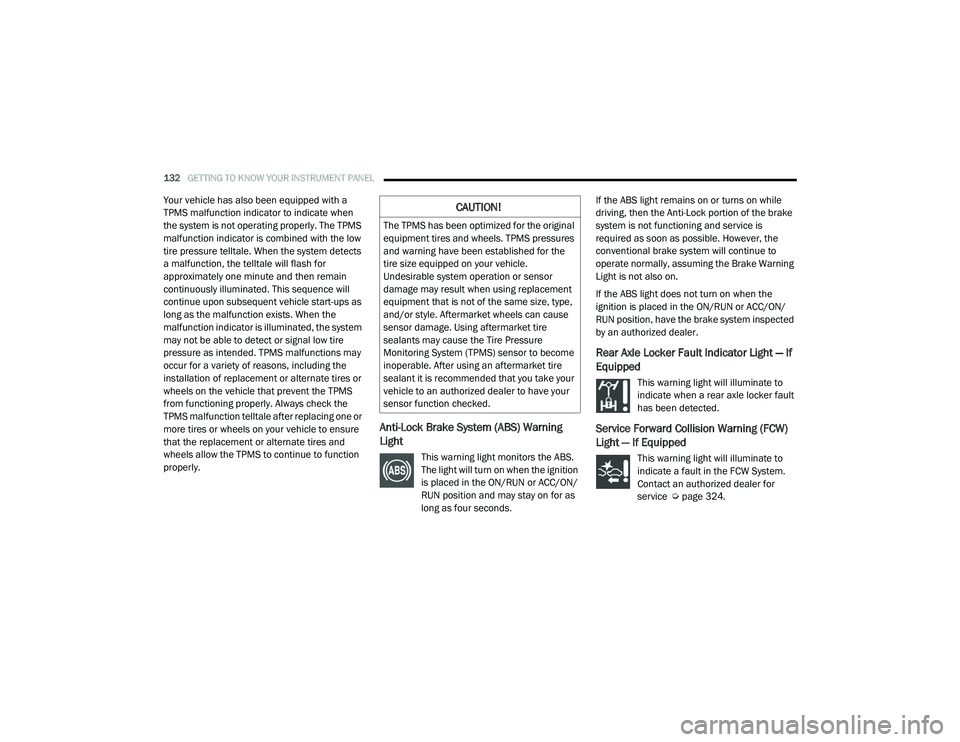
This warning light monitors the ABS.
The light will turn on when the ignition
is placed in the ON/RUN or ACC/ON/
RUN position and may stay on for as
long as four seconds.If the ABS light remains on or turns on while
driving, then the Anti-Lock portion of the brake
system is not functioning and service is
required as soon as possible. However, the
conventional brake system will continue to
operate normally, assuming the Brake Warning
Light is not also on.
If the ABS light does not turn on when the
ignition is placed in the ON/RUN or ACC/ON/
RUN position, have the brake system inspected
by an authorized dealer.
Rear Axle Locker Fault Indicator Light — If
Equipped
This warning light will illuminate to
indicate when a rear axle locker fault
has been detected.
Service Forward Collision Warning (FCW)
Light — If Equipped
This warning light will illuminate to
indicate a fault in the FCW System.
Contact an authorized dealer for
service Ú
page 324.
CAUTION!
The TPMS has been optimized for the original
equipment tires and wheels. TPMS pressures
and warning have been established for the
tire size equipped on your vehicle.
Undesirable system operation or sensor
damage may result when using replacement
equipment that is not of the same size, type,
and/or style. Aftermarket wheels can cause
sensor damage. Using aftermarket tire
sealants may cause the Tire Pressure
Monitoring System (TPMS) sensor to become
inoperable. After using an aftermarket tire
sealant it is recommended that you take your
vehicle to an authorized dealer to have your
sensor function checked.
21_DT_OM_EN_USC_t.book Page 132
Page 164 of 496

162STARTING AND OPERATING
NOTE:
The 4WD High and 4WD Low positions are
designed for loose, slippery road surfaces
only. Driving in the 4WD High and 4WD Low
positions on dry, hard surfaced roads may
cause increased tire wear and damage to the
driveline components.
The transfer case N (Neutral) button is located
in the center of the 4WD Control Switch and is
pushed by using a ballpoint pen or similar
object. The transfer case N (Neutral) position
is to be used for recreational towing only
Úpage 231.
Transfer Case Position Indicator Lights
The Transfer Case Position Indicator Lights
(4WD High and 4WD Low) are located in the
instrument cluster and indicate the current and
desired transfer case selection. When you
select a different transfer case position, the
indicator lights will do the following:
1. The current position indicator light will turn off.
2. The selected position indicator light will flash until the transfer case completes the
shift. 3. When the shift is complete, the indicator
light for the selected position will stop
flashing and remain on.
If the transfer case does not shift into the
desired position, one or more of the following
events may occur:
1. The indicator light for the current position will remain on.
2. The newly selected position indicator light will continue to flash.
3. If the transfer case will not shift, a message
will appear on the cluster stating the 4WD
shift has canceled.
NOTE:
Before retrying a selection, make certain that all
the necessary requirements for selecting a new
transfer case position have been met. To retry
the selection, push the current position, wait
five seconds, and retry selection.
The “SVC 4WD Warning Light” monitors the
electronic shift four-wheel drive system. If this
light remains on after engine start up or
illuminates during driving, it means that the
four-wheel drive system is not functioning
properly and that service is required. NOTE:
Do not attempt to make a shift while only the
front or rear wheels are spinning. This could
cause damage to driveline components.
When operating your vehicle in 4WD Low, the
engine speed is approximately three times that
of the 2WD or 4WD High positions at a given
road speed. Take care not to overspeed the
engine and do not exceed 25 mph (40 km/h).
Proper operation of four-wheel drive vehicles
depends on tires of equal size, type and
circumference on each wheel. Any difference in
tire size can cause damage to the drivetrain.
Because four-wheel drive provides improved
traction, there is a tendency to exceed safe
turning and stopping speeds. Do not go faster
than road conditions permit.
WARNING!
Always engage the parking brake when
powering down the vehicle if the “SVC 4WD
Warning Light” is illuminated. Not engaging
the parking brake may allow the vehicle to roll
which may cause personal injury or death.
21_DT_OM_EN_USC_t.book Page 162
Page 167 of 496
STARTING AND OPERATING165
NOTE:
Do not attempt to make a shift while only the
front or rear wheels are spinning. This could
cause damage to driveline components.
When operating your vehicle in 4WD Low, the
engine speed is approximately three times that
of the 2WD, 4WD Auto or 4WD High positions
at a given road speed. Take care not to
overspeed the engine and do not exceed
25 mph (40 km/h).
Proper operation of four-wheel drive vehicles
depends on tires of equal size, type and
circumference on each wheel. Any difference in
tire size can cause damage to the drivetrain.
Because four-wheel drive provides improved
traction, there is a tendency to exceed safe
turning and stopping speeds. Do not go faster
than road conditions permit.
Shifting Procedure
If any of the requirements to select a new
transfer case position have not been met,
then the transfer case will not shift. The posi -
tion indicator light for the previous position
will remain on and the newly selected posi -
tion indicator light will continue to flash until
all the requirements for the selected position
have been met.
If all the requirements to select a new
transfer case position have been met, then
the current position indicator light will turn off
and the selected position indicator light will
flash until the transfer case completes the
shift. When the shift is complete, the position
indicator light for the selected position will
stop flashing and remain on.
ACTIVE-LEVEL FOUR CORNER AIR
SUSPENSION SYSTEM — IF EQUIPPED
DESCRIPTION
The air suspension system provides full time
load leveling capability along with the benefit of
being able to adjust vehicle height by using the
toggle switch.
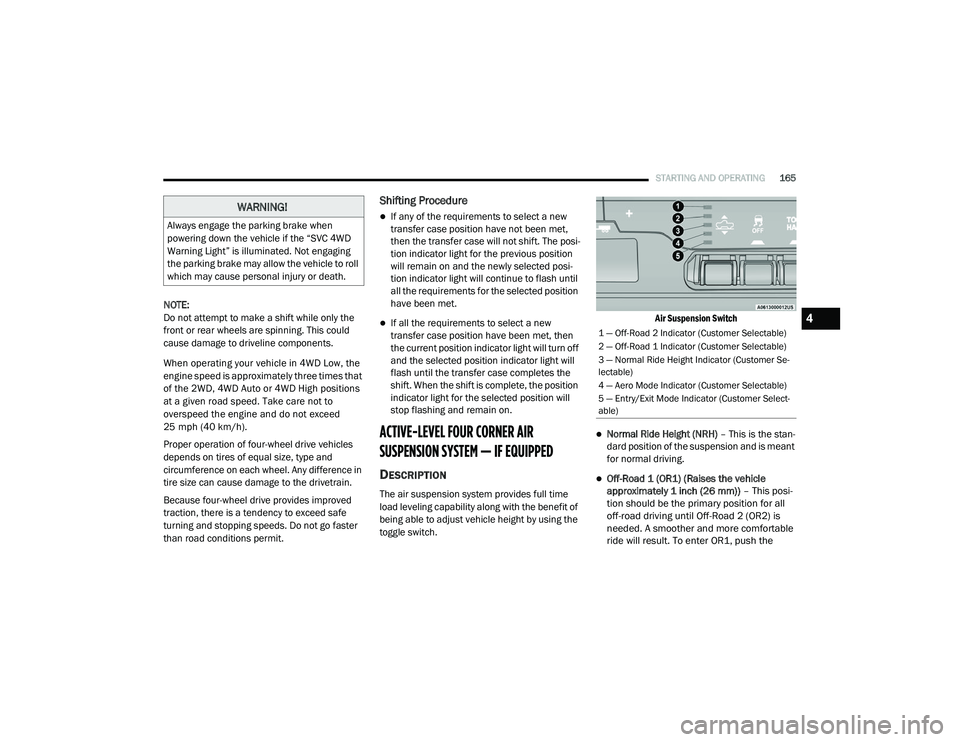
Air Suspension Switch
Normal Ride Height (NRH)
– This is the stan-
dard position of the suspension and is meant
for normal driving.
Off-Road 1 (OR1) (Raises the vehicle
approximately 1 inch (26 mm)) – This posi-
tion should be the primary position for all
off-road driving until Off-Road 2 (OR2) is
needed. A smoother and more comfortable
ride will result. To enter OR1, push the
WARNING!
Always engage the parking brake when
powering down the vehicle if the “SVC 4WD
Warning Light” is illuminated. Not engaging
the parking brake may allow the vehicle to roll
which may cause personal injury or death.
1 — Off-Road 2 Indicator (Customer Selectable)
2 — Off-Road 1 Indicator (Customer Selectable)
3 — Normal Ride Height Indicator (Customer Se -
lectable)
4 — Aero Mode Indicator (Customer Selectable)
5 — Entry/Exit Mode Indicator (Customer Select -
able)
4
21_DT_OM_EN_USC_t.book Page 165
Page 175 of 496

STARTING AND OPERATING173
AXLE LOCK SYSTEM — IF EQUIPPED
This vehicle is equipped with an electronically
locking rear differential. When engaged, this
differential locks the axle shafts forcing the
wheels to spin at an equal rate. The locking of
the rear differential should only be engaged
during low-speed, extreme off-road situations
where one wheel is likely to not be in contact
with the ground. It is not recommended to drive
the vehicle with the differentials locked on
pavement due to the reduced ability to turn and
speed limitations.
Axle Lock Button
The locking rear axle is controlled by the AXLE
LOCK button.
Under normal driving conditions, the rear axle
should be unlocked.
During the command to lock the rear axle, the
indicator light will flash until the axle is locked.
After the lock command has been successfully
executed, the light will remain on solid.
Operating in 4WD LOW the locker can be
engaged up to 40 mph (64 km/h) and will
remain engaged throughout the 4WD LOW
speed range. Operating the locker in 2WD, 4WD AUTO, and
4WD LOCK/HIGH, the locker can be engaged up
to 20 mph (32 km/h). While driving with the
locker engaged, if speed exceeds 25 mph
(40 km/h), the locker will automatically
disengage, but will automatically reengage at
20 mph (32 km/h).
NOTE:
Left to right wheel speed difference may be
necessary to allow the rear axle to fully lock. If
the indicator light is flashing after selecting the
rear axle lock mode, drive the vehicle in a turn
or on loose gravel to expedite the locking action.
The axle locker could become torque locked
due to side to side loads on the rear axle.
Driving slowly while turning the steering wheel
from a left hand turn to a right hand turn or
driving in REVERSE for a short distance may be
required to release the torque lock and unlock
the axles.
To unlock the rear axle; push the AXLE LOCK
button. The AXLE LOCK indicator light will go out
when the rear axle is unlocked.
CAUTION!
Do not lock the rear axle on hard surfaced
roads. The ability to steer the vehicle is
reduced and damage to the drivetrain may
occur when the axle is locked on hard
surfaced roads.
Do not try to lock the rear axle if the vehicle
is stuck and the tires are spinning. You can
damage drivetrain components. Lock the
rear axle before attempting situations or
navigating terrain, which could possibly
cause the vehicle to become stuck.
4
21_DT_OM_EN_USC_t.book Page 173
Page 207 of 496

STARTING AND OPERATING205
If the camera delay is turned off, the camera
image will close and display the previous screen
after shifting out of REVERSE.
If active guidelines are enabled, the lines are
overlaid on the image in the Rear View to
illustrate the width of the vehicle. The view will
also include the side view mirrors and its
projected back up path based on the steering
wheel position.
There are different colored zones to indicate the
distance to the rear of the vehicle. Refer to the
chart below:
Modes Of Operation
Standard Rear View can be manually activated
by selecting “Back Up Camera” through the
Controls menu within the Uconnect system. Top View
The Top View will show in the Uconnect system
with Rear View and Front View in a split screen
display. There are integrated ParkSense arcs in
the image at the front and rear of the vehicle.
The arcs will change color from yellow to red
corresponding the distance zones to the
oncoming object.
Surround View Camera View
NOTE:
Front tires will be seen in the image when the
tires are turned.
Due to wide angle cameras in the mirrors, the
image will appear distorted.
The Top View will show which doors are open.
Open front doors will block the outside
image.
Rear View This is the default view of the system
in REVERSE and is always paired with
the Top View of the vehicle with
optional active guidelines for the
projected path when enabled.
Rear Cross Path View Pressing the Rear Cross Path soft key
will give the driver a wider angle view
of the rear camera system. The Top
View will be disabled when this is
selected.
Front View The Front View will show you what is
immediately in front of the vehicle
and is always paired with the Top View
of the vehicle.
Zone
Distance To The Rear
Of The Vehicle
Red 0 - 1 ft (0 - 30 cm)
Yellow 1 ft - 6.5 ft
(30 cm - 2 m)
Green 6.5 ft or greater
(2 m or greater)
4
21_DT_OM_EN_USC_t.book Page 205
Page 215 of 496

STARTING AND OPERATING213
3. Stop filling the DEF tank immediately when
any of the following happen: DEF stops
flowing from the fill bottle into the DEF tank,
DEF splashes out the filler neck, or a DEF
pump nozzle automatically shuts off.
4. Reinstall cap onto DEF tank.
Filling The Def Tank In Cold Climates
Your vehicle is equipped with an automatic DEF
heating system. This allows the DEF injection
system to operate properly at temperatures below 12°F (-11°C). If your vehicle is not in
operation for an extended period of time with
temperatures below 12°F (-11°C), the DEF in
the tank may freeze. Do not overfill the DEF
tank. If the tank is overfilled and freezes, it
could be damaged.
Extra care should be taken when filling with
portable containers to avoid overfilling. Keep an
eye on the DEF gauge in your instrument
cluster. You may safely add a maximum of
2 gallons (7.6 Liters) when your DEF gauge is
reading at the half mark.
VEHICLE LOADING
GROSS VEHICLE WEIGHT RATING
(GVWR)
The GVWR is the total permissible weight of your
vehicle including driver, passengers, vehicle,
options and cargo. The label also specifies
maximum capacities of front and rear Gross
Axle Weight Rating (GAWR). Total load must be
limited so GVWR and front and rear GAWR are
not exceeded.
PAYLOAD
The payload of a vehicle is defined as the
allowable load weight a truck can carry,
including the weight of the driver, all
passengers, options and cargo.
GROSS AXLE WEIGHT RATING (GAWR)
The GAWR is the maximum permissible load on
the front and rear axles. The load must be
distributed in the cargo area so that the GAWR
of each axle is not exceeded.
Each axle GAWR is determined by the
components in the system with the lowest load
carrying capacity (axle, springs, tires or wheels).
Heavier axles or suspension components
sometimes specified by purchasers for
increased durability does not necessarily
increase the vehicle's GVWR.
TIRE SIZE
The tire size on the Vehicle Certification Label
represents the actual tire size on your vehicle.
Replacement tires must be equal to the load
capacity of this tire size.
Never add anything other than DEF to the
tank – especially any form of hydrocarbon
such as diesel fuel, fuel system additives,
gasoline, or any other petroleum-based
product. Even a very small amount of these,
less than 100 parts per million or less than
1 oz. per 78 gallons (295 liters) will contam -
inate the entire DEF system and will require
replacement. If owners use a container,
funnel or nozzle when refilling the tank, it
should either be new or one that is has only
been used for adding DEF. Mopar provides
an attachable nozzle with its DEF for this
purpose.
CAUTION! (Continued)
4
21_DT_OM_EN_USC_t.book Page 213
Page 223 of 496
STARTING AND OPERATING221
(Continued)
NOTE:
Trailers may look different during day and night
conditions. In such cases, the trailer may need
to recalibrate.
Some trailers (such as boat trailers) will need to
recalibrate while loaded and unloaded.
NOTE:
The system may not detect a trailer in low
light conditions. In sunny conditions, the
performance may be degraded as shadows
pass over the trailer.
The driver is always responsible for safe oper -
ation of truck and trailer.
The driver is always in control of the truck as
well as the trailer and is responsible for
controlling the throttle and brakes.
The system may not function when the
camera lens is blocked, blurred (covered with
water, snow, ice, dirt, etc) and will not work
unless the tailgate is upright and fully
latched.
TOWING REQUIREMENTS
To promote proper break-in of your new vehicle
drivetrain components, the following guidelines
are recommended.
Perform the maintenance listed in the
Scheduled Servicing section for the proper
maintenance intervals Ú page 395. When
towing a trailer, never exceed the GAWR or
GCWR ratings.
CAUTION!
Do not tow a trailer at all during the first
500 miles (805 km) the new vehicle is driven. The engine, axle or other parts could
be damaged.
Then, during the first 500 miles (805 km) that a trailer is towed, do not drive over
50 mph (80 km/h) and do not make starts
at full throttle. This helps the engine and
other parts of the vehicle wear in at the
heavier loads.
WARNING!
Make certain that the load is secured in the
trailer and will not shift during travel. When
trailering cargo that is not fully secured,
dynamic load shifts can occur that may be
difficult for the driver to control. You could
lose control of your vehicle and have a colli -
sion.
When hauling cargo or towing a trailer, do
not overload your vehicle or trailer. Over -
loading can cause a loss of control, poor
performance or damage to brakes, axle,
engine, transmission, steering, suspension,
chassis structure or tires.
Safety chains must always be used
between your vehicle and trailer. Always
connect the chains to the hook retainers of
the vehicle hitch. Cross the chains under
the trailer tongue and allow enough slack
for turning corners.
4
21_DT_OM_EN_USC_t.book Page 221
Page 224 of 496

222STARTING AND OPERATING
Towing Requirements — Tires
Do not attempt to tow a trailer while using a
compact spare tire.
Do not drive more than 50 mph (80 km/h)
when towing while using a full size spare tire.
Proper tire inflation pressures are essential
to the safe and satisfactory operation of your
vehicle.
Check the trailer tires for proper tire inflation
pressures before trailer usage.
Check for signs of tire wear or visible tire
damage before towing a trailer.
Replacing tires with a higher load carrying
capacity will not increase the vehicle's GVWR
and GAWR limits.
For further information Ú page 443.
Towing Requirements — Trailer Brakes
Do not interconnect the hydraulic brake
system or vacuum system of your vehicle
with that of the trailer.
An electronically actuated trailer brake
controller is required when towing a trailer
with electronically actuated brakes. When
towing a trailer equipped with a hydraulic
surge actuated brake system, an electronic
brake controller is not required.
Trailer brakes are recommended for trailers
over 1,000 lbs (453 kg) and required for
trailers in excess of 2,000 lbs (907 kg).
Vehicles with trailers should not be parked
on a grade. When parking, apply the
parking brake on the tow vehicle. Put the
tow vehicle transmission in PARK. For
four-wheel drive vehicles, make sure the
transfer case is not in NEUTRAL. Always,
block or "chock" the trailer wheels.
GCWR must not be exceeded.
Total weight must be distributed between
the tow vehicle and the trailer such that the
following four ratings are not exceeded :
GVWR
GTW
GAWR
Tongue weight rating for the trailer
hitch utilized.
WARNING! (Continued)WARNING!
Do not connect trailer brakes to your
vehicle's hydraulic brake lines. It can over -
load your brake system and cause it to fail.
You might not have brakes when you need
them and could have an accident.
Towing any trailer will increase your stop -
ping distance. When towing, you should
allow for additional space between your
vehicle and the vehicle in front of you.
Failure to do so could result in an accident.
CAUTION!
If the trailer weighs more than 1,000 lbs
(453 kg) loaded, it should have its own
brakes and they should be of adequate
capacity. Failure to do this could lead to
accelerated brake lining wear, higher brake
pedal effort, and longer stopping distances.
21_DT_OM_EN_USC_t.book Page 222