warning light RAM 1500 2021 Owners Manual
[x] Cancel search | Manufacturer: RAM, Model Year: 2021, Model line: 1500, Model: RAM 1500 2021Pages: 496, PDF Size: 20.89 MB
Page 5 of 496
3
UNIVERSAL GARAGE DOOR OPENER
(HOMELINK®) — IF EQUIPPED ...........................49 Before You Begin Programming
HomeLink® .................................................. 49 Erasing All The HomeLink® Channels........ 49
Identifying Whether You Have A Rolling
Code Or Non-Rolling Code Device .............. 49 Programming HomeLink® To A Garage
Door Opener ................................................. 50 Programming HomeLink® To A
Miscellaneous Device.................................. 51 Reprogramming A Single HomeLink®
Button ........................................................... 51 Canadian/Gate Operator Programming ..... 51
EXTERIOR LIGHTS.................................................52
Headlight Switch .......................................... 52
Multifunction Lever ..................................... 53
Daytime Running Lights (DRLs) ................. 53
High/Low Beam Switch ............................... 53
Automatic High Beam Headlamp
Control — If Equipped ................................. 53 Flash-To-Pass ............................................... 54
Automatic Headlights — If Equipped ......... 54
Parking Lights And Panel Lights ................. 54
Automatic Headlights With Wipers ............. 54
Headlight Delay ............................................ 55
Lights-On Reminder ..................................... 55
Fog Lights — If Equipped ............................ 55
Turn Signals ................................................ 55
Lane Change Assist — If Equipped ............. 55 Cargo Lights/Trailer Spotter Lights With
Bed Lights — If Equipped............................. 56 Battery Saver ............................................... 57
INTERIOR LIGHTS ................................................ 57
Courtesy Lights ............................................ 57
Illuminated Entry ......................................... 58
WINDSHIELD WIPERS AND WASHERS............. 58
Windshield Wiper Operation ...................... 58
Rain Sensing Wipers — If Equipped............ 59
CLIMATE CONTROLS ........................................... 60
Automatic Climate Control Descriptions
And Functions .............................................. 60 Manual Climate Control Descriptions And
Functions...................................................... 63 Automatic Temperature Control (ATC) —
If Equipped ................................................... 65 Climate Voice Recognition .......................... 66
Operating Tips ............................................. 66
INTERIOR STORAGE AND EQUIPMENT ............. 68
Storage ......................................................... 68
USB/AUX Control ......................................... 72
Electrical Power Outlets .............................. 74
Power Inverter — If Equipped ..................... 75
Wireless Charging Pad — If Equipped ........ 77
WINDOWS ............................................................ 77
Power Windows............................................ 77
Automatic Window Features ....................... 78
Reset Auto-Up ............................................. 78
Window Lockout Switch .............................. 79 Power Sliding Rear Window —
If Equipped .................................................. 79 Manual Sliding Rear Window —
If Equipped ................................................... 79 Wind Buffeting ............................................ 80
POWER SUNROOF — IF EQUIPPED ....................80
Single Pane Power Sunroof —
If Equipped ................................................... 80 Dual Pane Power Sunroof —
If Equipped ................................................... 82
HOOD .....................................................................84
To Open The Hood ....................................... 84
To Close The Hood....................................... 85
TAILGATE ...............................................................85
Opening ........................................................ 85
Closing.......................................................... 85
Locking Tailgate ........................................... 85
Multifunction Tailgate — If Equipped.......... 85
Tailgate Removal ........................................ 86
Bed Step — If Equipped ............................... 89
PICKUP BOX .........................................................90
Bed Rail Tie-Down System —
If Equipped .................................................. 91
RAMBOX — IF EQUIPPED ....................................92
Locking And Unlocking RamBox ................. 93
RamBox Cargo Storage Bins ....................... 93
RamBox Safety Warning ............................. 94
Bed Divider — If Equipped ........................... 95
21_DT_OM_EN_USC_t.book Page 3
Page 6 of 496
4
SLIDE-IN CAMPERS .............................................97 Camper Applications ................................... 97
TRI-FOLD TONNEAU COVER — IF EQUIPPED .....97
Tonneau Cover Components....................... 97
Tri-Fold Tonneau Cover Folding For
Driving Or Removal ...................................... 98 Tri-Fold Tonneau Cover Installation ..........101
Tri-Fold Tonneau Cover Cleaning ..............103
GETTING TO KNOW YOUR
INSTRUMENT PANEL
BASE / MIDLINE INSTRUMENT CLUSTER —
GASOLINE ........................................................... 104
Base / Midline Instrument Cluster
Descriptions — Gasoline ............................105
PREMIUM INSTRUMENT CLUSTER —
GASOLINE ........................................................... 107
Premium Instrument Cluster
Descriptions — Gasoline ............................108
BASE / MIDLINE INSTRUMENT CLUSTER —
DIESEL ................................................................. 109
Base / Midline Instrument Cluster
Descriptions — Diesel ................................110
PREMIUM INSTRUMENT CLUSTER —
DIESEL ................................................................. 112
Premium Instrument Cluster
Descriptions — Diesel ...............................113 INSTRUMENT CLUSTER DISPLAY..................... 114
Instrument Cluster Display Controls......... 114
Oil Life Reset .............................................. 115
Display Menu Items ................................... 116
Diesel Particulate Filter (DPF)
Messages .................................................. 121 Displays ...................................................... 123
Diesel Exhaust Fluid (DEF) Warning
Messages ................................................... 123 Diesel Exhaust Fluid (DEF) Fault
Warning Messages .................................... 124 Battery Saver On/Battery Saver Mode
Message — Electrical Load Reduction
Actions — If Equipped ................................ 125
WARNING LIGHTS AND MESSAGES ................126
Red Warning Lights ................................... 126
Yellow Warning Lights ............................... 129Yellow Indicator Lights .............................. 133
Green Indicator Lights ............................... 135White Indicator Lights ............................... 136Blue Indicator Lights.................................. 137
ONBOARD DIAGNOSTIC SYSTEM — OBD II..... 137
Onboard Diagnostic System (OBD II)
Cybersecurity ............................................. 138
EMISSIONS INSPECTION AND
MAINTENANCE PROGRAMS .............................138
STARTING AND OPERATING
STARTING THE ENGINE ..................................... 140
Automatic Transmission............................ 141AutoPark ..................................................... 141
Tip Start Feature ....................................... 143
Keyless Enter-N-Go — Ignition................... 143
Normal Starting Using ENGINE START/
STOP Button — Gasoline Engine .............. 143 Normal Starting Using ENGINE START/
STOP Button — Diesel Engine .................. 144 Cold Weather Operation (Below –22°F
Or −30°C) ................................................. 146 After Starting .............................................. 146Starting Fluids — Diesel Engine Only ........ 146
NORMAL OPERATION — DIESEL ENGINE ....... 146
Cold Weather Precautions ........................ 146
Engine Idling .............................................. 148Stopping The Engine ................................. 148
ENGINE BLOCK HEATER — IF EQUIPPED ....... 150
ENGINE BREAK-IN RECOMMENDATIONS —
GASOLINE ENGINE ........................................... 150
ENGINE BREAK-IN RECOMMENDATIONS —
DIESEL ENGINE .................................................. 151
PARKING BRAKE ............................................... 151 Electric Park Brake (EPB) .......................... 151
21_DT_OM_EN_USC_t.book Page 4
Page 14 of 496
12
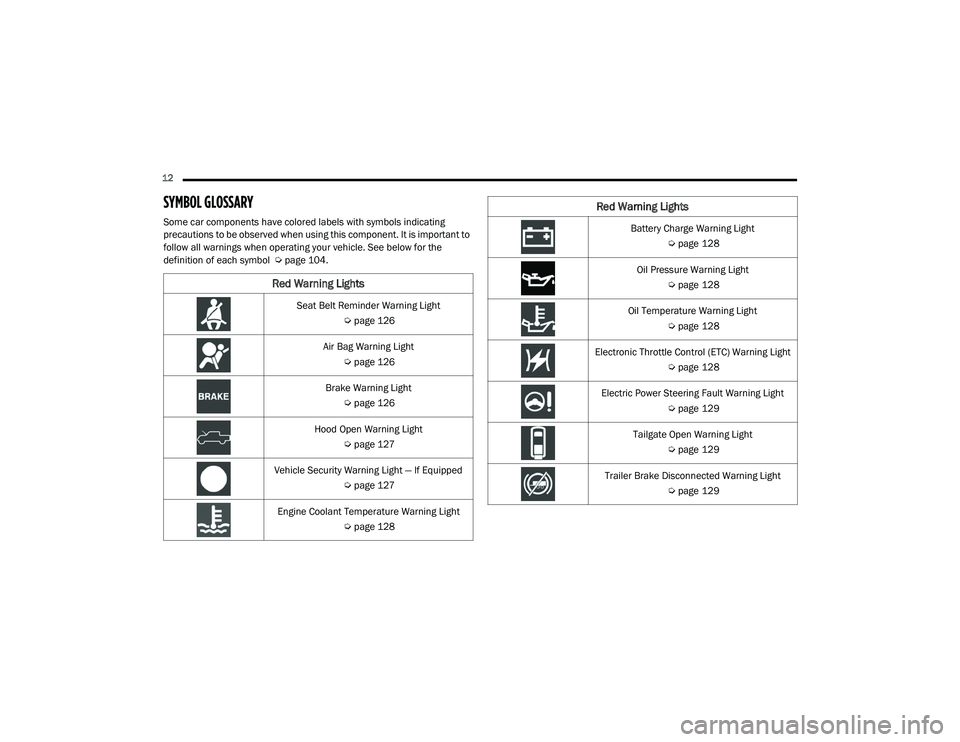
SYMBOL GLOSSARY
Some car components have colored labels with symbols indicating
precautions to be observed when using this component. It is important to
follow all warnings when operating your vehicle. See below for the
definition of each symbol Úpage 104.
Red Warning Lights
Seat Belt Reminder Warning Light
Úpage 126
Air Bag Warning Light Úpage 126
Brake Warning Light Úpage 126
Hood Open Warning Light Úpage 127
Vehicle Security Warning Light — If Equipped Úpage 127
Engine Coolant Temperature Warning Light Úpage 128
Battery Charge Warning Light
Úpage 128
Oil Pressure Warning Light Úpage 128
Oil Temperature Warning Light Úpage 128
Electronic Throttle Control (ETC) Warning Light Úpage 128
Electric Power Steering Fault Warning Light Úpage 129
Tailgate Open Warning Light Úpage 129
Trailer Brake Disconnected Warning Light Úpage 129
Red Warning Lights
21_DT_OM_EN_USC_t.book Page 12
Page 15 of 496

13
Transmission Temperature Warning Light — If Equipped
Ú page 129
Door Open Warning Light Úpage 129
Yellow Warning Lights
Adaptive Cruise Control (ACC) Fault Warning
Light — If Equipped
Úpage 129
Air Suspension Fault Warning Light — If Equipped
Ú page 129
Engine Check/Malfunction Indicator Warning Light (MIL)
Ú page 130
Electronic Park Brake Warning Light Úpage 130
Electronic Stability Control (ESC) Active Warning Light — If Equipped
Úpage 130
Red Warning Lights
Electronic Stability Control (ESC) OFF Warning
Light — If Equipped
Úpage 131
Service LaneSense Warning Light — If Equipped Úpage 131
Low Washer Fluid Warning Light — If Equipped Úpage 131
Low Fuel Warning Light Úpage 131
Tire Pressure Monitoring System (TPMS) Warning Light
Ú page 131
Anti-Lock Brake System (ABS) Warning Light Úpage 132
Rear Axle Locker Fault Indicator Light — If Equipped
Ú page 132
Service Forward Collision Warning (FCW) Light — If Equipped
Ú page 132
Yellow Warning Lights
1
21_DT_OM_EN_USC_t.book Page 13
Page 16 of 496

14
Service Stop/Start System Warning Light Úpage 133
Service 4WD Warning Light — If Equipped Úpage 133
Cruise Control Fault Warning Light Úpage 133
Yellow Indicator Lights
Forward Collision Warning Off Indicator Light —
If Equipped
Ú page 133
Air Suspension Payload Protection Indicator Light — If Equipped
Úpage 133
Trailer Merge Assist Indicator Light — If Equipped
Ú page 133
TOW/HAUL Indicator Light Úpage 133
Yellow Warning Lights
Cargo Light On Indicator Light
Úpage 133
Air Suspension Off-Road 1 Indicator Light — If Equipped
Ú page 133
Air Suspension Off-Road 2 Indicator Light — If Equipped
Ú page 133
Air Suspension Normal Height Indicator Light — If Equipped
Ú page 134
Air Suspension Aerodynamic Height Indicator Light — If Equipped
Úpage 134
Entry/Exit Indicator Light — If Equipped Úpage 134
Air Suspension Ride Height Raising Indicator Light — If Equipped
Úpage 134
Yellow Indicator Lights
21_DT_OM_EN_USC_t.book Page 14
Page 22 of 496

20GETTING TO KNOW YOUR VEHICLE
Programming And Requesting Additional
Key Fobs
Programming the key fob may be performed by
an authorized dealer.
NOTE:
Once a key fob is programmed to a vehicle, it
cannot be re-purposed and reprogrammed to
another vehicle.
Only key fobs that are programmed to the
vehicle electronics can be used to start and
operate the vehicle. Once a key fob is
programmed to a vehicle, it cannot be
programmed to any other vehicle.
Duplication of key fobs may be performed at an
authorized dealer. This procedure consists of
programming a blank key fob to the vehicle electronics. A blank key fob is one that has
never been programmed.
NOTE:
When having the Sentry Key Immobilizer system
serviced, bring all vehicle keys with you to an
authorized dealer Ú
page 482.
SENTRY KEY
The Sentry Key Immobilizer system prevents
unauthorized vehicle operation by disabling the
engine. The system does not need to be armed
or activated. Operation is automatic, regardless
of whether the vehicle is locked or unlocked.
The system uses a key fob, keyless push button
ignition and a Radio Frequency (RF) receiver to
prevent unauthorized vehicle operation.
Therefore, only key fobs that are programmed
to the vehicle can be used to start and operate
the vehicle. The system cannot reprogram a key
fob obtained from another vehicle.
After placing the ignition switch in the ON/RUN
position, the vehicle security light will turn on for
three seconds for a bulb check. If the light
remains on after the bulb check, it indicates
that there is a problem with the electronics. In
addition, if the light begins to flash after the
bulb check, it indicates that someone attempted to start the engine with an invalid key
fob. In the event that a valid key fob is used to
start the engine but there is an issue with the
vehicle electronics, the engine will start and
shut off after two seconds.
If the vehicle security light turns on during
normal vehicle operation (vehicle running for
longer than 10 seconds), it indicates that there
is a fault in the electronics. Should this occur,
have the vehicle serviced as soon as possible by
an authorized dealer.
All of the key fobs provided with your new
vehicle have been programmed to the vehicle
electronics Ú
page 482.
WARNING!
Always remove the key fobs from the
vehicle and lock all doors when leaving the
vehicle unattended.
For vehicles equipped with Keyless
Enter-N-Go — Ignition, always remember to
place the ignition in the OFF mode.
CAUTION!
The Sentry Key Immobilizer system is not
compatible with some aftermarket remote
starting systems. Use of these systems may
result in vehicle starting problems and loss of
security protection.
21_DT_OM_EN_USC_t.book Page 20
Page 24 of 496
22GETTING TO KNOW YOUR VEHICLE
NOTE:
The key fob may not be detected by the
vehicle Keyless Enter-N-Go system if it is
located next to a mobile phone, laptop or
other electronic device; these devices may
block the key fob’s wireless signal and prevent the Keyless Enter-N-Go system from
starting the vehicle.
Engine starting procedure Ú
page 140.
When opening the driver's door and the igni -
tion is in the ON/RUN position (engine not
running), a chime will sound to remind you to
place the ignition in the OFF position. In addi -
tion to the chime, the message “Ignition or
Accessory ON” will display in the cluster.
REMOTE START — IF EQUIPPED
(GASOLINE)
This system uses the key fob to start
the engine conveniently from outside
the vehicle while still maintaining
security. The system has a range of
approximately 300 ft (91 m).
Remote start is used to defrost windows in cold
weather and to reach a comfortable climate in
all ambient conditions before the customer
enters the vehicle. NOTE:
Obstructions between the vehicle and key fob
may reduce this range.
HOW TO USE REMOTE START
Push and release the Remote Start button on
the key fob twice within five seconds. The
vehicle doors will lock, the parking lights will
flash, and the horn will chirp twice (if
programmed). Then, the engine will start, and
the vehicle will remain in the Remote Start
mode for a 15 minute cycle.
Pushing the remote start button a third time
shuts the engine off.
Do not leave the key fob in or near the
vehicle, or in a location accessible to chil-
dren, and do not leave the ignition of a
vehicle equipped with Keyless Enter-N-Go
in the ON/RUN mode. A child could operate
power windows, other controls, or move the
vehicle.
Do not leave children or animals inside
parked vehicles in hot weather. Interior
heat build-up may cause serious injury or
death.
CAUTION!
An unlocked vehicle is an invitation for
thieves. Always remove key fob from the
vehicle and lock all doors when leaving the
vehicle unattended.
WARNING!
(Continued)
WARNING!
Do not start or run an engine in a closed
garage or confined area. Exhaust gas
contains Carbon Monoxide (CO) which is
odorless and colorless. Carbon Monoxide is
poisonous and can cause serious injury or
death when inhaled.
Keep key fobs away from children. Opera -
tion of the Remote Start System, windows,
door locks or other controls could cause
serious injury or death.
21_DT_OM_EN_USC_t.book Page 22
Page 25 of 496

GETTING TO KNOW YOUR VEHICLE23
To drive the vehicle, push the unlock button,
insert the key into the ignition, and turn to the
ON/RUN position.
NOTE:
With Remote Start, the engine will only run
for 15 minutes.
Remote Start can only be used twice.
If an engine fault is present or fuel level is
low, the vehicle will start and then shut down
in 10 seconds.
The parking lights will turn on and remain on
during Remote Start mode.
For security, power window and power
sunroof operation (if equipped) are disabled
when the vehicle is in the Remote Start
mode.
The ignition must be placed in the ON/RUN
position before the Remote Start sequence
can be repeated for a third cycle. All of the following conditions must be met
before the engine will remote start:
Gear selector in PARK
Doors closed
Hood closed
Hazard switch off
Brake switch inactive (brake pedal not
pushed)
Battery at an acceptable charge level
PANIC button not pushed
Fuel meets minimum requirement
System not disabled from previous remote
start event
Vehicle Security system not active
Malfunction Indicator Light is not illuminated
TO EXIT REMOTE START MODE
To drive the vehicle after starting the Remote
Start system, either push and release the
unlock button on the key fob to unlock the
doors, or unlock the vehicle using Keyless
Enter-N-Go — Passive Entry via the door
handles, and disarm the vehicle security system
(if equipped). Then, prior to the end of the
15 minute cycle, press the brake pedal and
push and release the START/STOP ignition
button.
WARNING!
Do not start or run an engine in a closed
garage or confined area. Exhaust gas
contains Carbon Monoxide (CO) which is
odorless and colorless. Carbon Monoxide is
poisonous and can cause serious injury or
death when inhaled.
Keep key fobs away from children. Opera
-
tion of the Remote Start System, windows,
door locks or other controls could cause
serious injury or death.
2
21_DT_OM_EN_USC_t.book Page 23
Page 28 of 496
26GETTING TO KNOW YOUR VEHICLE
VEHICLE SECURITY SYSTEM — IF EQUIPPED
The Vehicle Security system monitors the vehicle
doors, hood, tailgate, and the Keyless Enter-N-Go
— Ignition for unauthorized operation. While the
Vehicle Security system is armed, interior
switches for door locks and tailgate release are
disabled. If something triggers the alarm, the
Vehicle Security system will provide the following
audible and visible signals:
The horn will pulse
The turn signals will flash
The vehicle security light in the instrument
cluster will flash
TO ARM THE SYSTEM
Follow these steps to arm the Vehicle Security
system:
1. Make sure the vehicle’s ignition is placed
in the OFF position.
For vehicles equipped with Keyless Entry,
make sure the vehicle’s keyless ignition
system is OFF.
2. Perform one of the following methods to lock the vehicle:
Push the lock button on the interior
power door lock switch with the driver
and/or passenger door open.
Push the lock button on the exterior
Passive Entry door handle with a valid key
fob available in the same exterior zone
Úpage 28.
Push the lock button on the key fob.
3. If any doors are open, close them.
TO DISARM THE SYSTEM
The Vehicle Security system can be disarmed
using any of the following methods:
Push the unlock button on the key fob.
Grab the Passive Entry door handle to unlock
the door Ú page 28.
Cycle the ignition out of the OFF position to
disarm the system.
NOTE:
The driver's door key cylinder cannot arm or
disarm the Vehicle Security system. Use of
the door key cylinder when the system is
armed will sound the alarm when the door is
opened.
The Vehicle Security system remains armed
when the power tailgate (if equipped) is
opened using the tailgate button on the key
fob.
If Passive Entry (if equipped) is used to
unlock the tailgate, the Vehicle Security
system is disarmed and the rest of the
vehicle doors will remain locked unless
“Unlock All Doors 1st Press” is selected in the
Passive Entry settings.
When the Vehicle Security system is armed,
the interior power door lock switches will not
unlock the doors.
WARNING!
Do not start or run an engine in a closed
garage or confined area. Exhaust gas
contains Carbon Monoxide (CO) which is
odorless and colorless. Carbon Monoxide is
poisonous and can cause serious injury or
death when inhaled.
Keep key fobs away from children. Opera -
tion of the Remote Start System, windows,
door locks or other controls could cause
serious injury or death.
21_DT_OM_EN_USC_t.book Page 26
Page 29 of 496
GETTING TO KNOW YOUR VEHICLE27
The Vehicle Security system is designed to
protect your vehicle. However, you can create
conditions where the system will give you a false
alarm. If one of the previously described arming
sequences has occurred, the Vehicle Security
system will arm regardless of whether you are in
the vehicle or not. If you remain in the vehicle
and open a door, the alarm will sound. If this
occurs, disarm the Vehicle Security system.
If the Vehicle Security system is armed and the
battery becomes disconnected, the Vehicle
Security system will remain armed when the
battery is reconnected; the exterior lights will
flash, and the horn will sound. If this occurs,
disarm the Vehicle Security system.
REARMING OF THE SYSTEM
If something triggers the alarm, and no action is
taken to disarm it, the Vehicle Security system
will turn the horn off after 29 seconds, five
seconds between cycles, and up to eight cycles
if the trigger remains active. The Vehicle
Security system will then rearm itself.
SECURITY SYSTEM MANUAL OVERRIDE
The Vehicle Security system will not arm if you
lock the doors using the manual door lock.
DOORS
MANUAL DOOR LOCKS
The power door locks can be manually locked
from inside the vehicle by using the door lock
knob. To lock each door, push the door lock
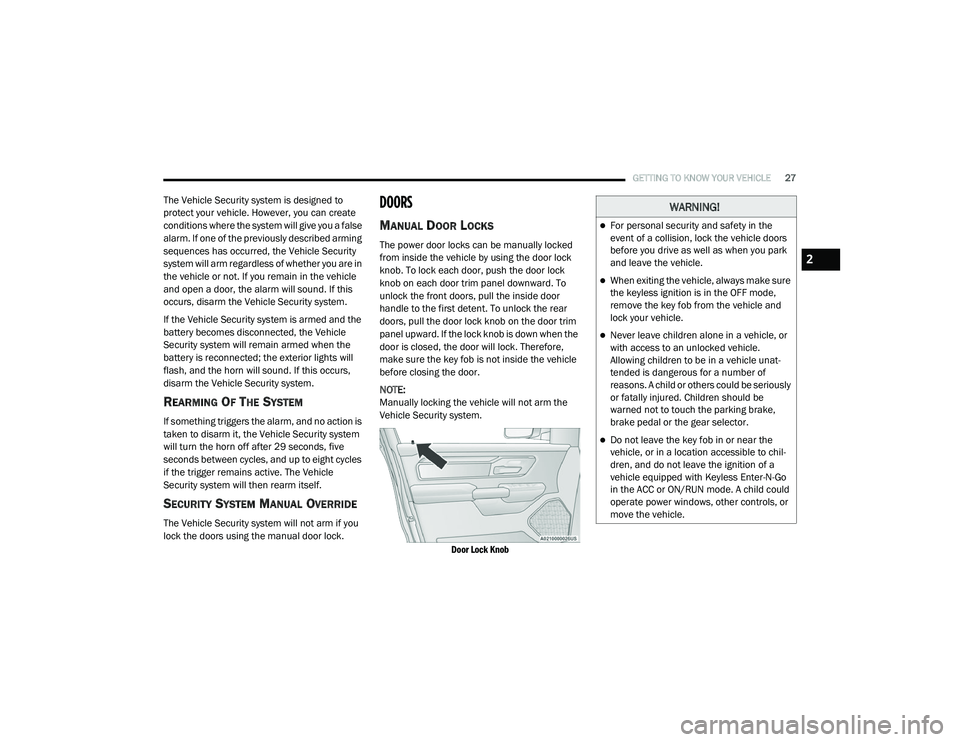
knob on each door trim panel downward. To
unlock the front doors, pull the inside door
handle to the first detent. To unlock the rear
doors, pull the door lock knob on the door trim
panel upward. If the lock knob is down when the
door is closed, the door will lock. Therefore,
make sure the key fob is not inside the vehicle
before closing the door.
NOTE:
Manually locking the vehicle will not arm the
Vehicle Security system.
Door Lock Knob
WARNING!
For personal security and safety in the
event of a collision, lock the vehicle doors
before you drive as well as when you park
and leave the vehicle.
When exiting the vehicle, always make sure
the keyless ignition is in the OFF mode,
remove the key fob from the vehicle and
lock your vehicle.
Never leave children alone in a vehicle, or
with access to an unlocked vehicle.
Allowing children to be in a vehicle unat -
tended is dangerous for a number of
reasons. A child or others could be seriously
or fatally injured. Children should be
warned not to touch the parking brake,
brake pedal or the gear selector.
Do not leave the key fob in or near the
vehicle, or in a location accessible to chil -
dren, and do not leave the ignition of a
vehicle equipped with Keyless Enter-N-Go
in the ACC or ON/RUN mode. A child could
operate power windows, other controls, or
move the vehicle.
2
21_DT_OM_EN_USC_t.book Page 27