warning RAM 1500 2022 Owners Manual
[x] Cancel search | Manufacturer: RAM, Model Year: 2022, Model line: 1500, Model: RAM 1500 2022Pages: 496, PDF Size: 18.03 MB
Page 197 of 496

STARTING AND OPERATING195
The system may then instruct the driver to wait for
steering to complete before then instructing to
check surroundings and move backward.
Move Backward Into Parallel Parking Space
Move Backward Into Perpendicular Parking Space
The system may instruct several more gear shifts
(DRIVE and REVERSE), with hands off of the
steering wheel, before instructing the driver to
check surroundings and complete the parking
maneuver.
When the vehicle is in the parking position, the
maneuver is complete and the driver will be
instructed to check the vehicle's parking position,
then shift the vehicle into PARK. The message
"Active ParkSense Complete - Check Parking
Position" will be displayed momentarily.
NOTE:
It is the driver's responsibility to use the brake
and accelerator during the semi-automatic
parking maneuver.
It is the driver's responsibility to use the brake
and stop the vehicle. The driver should check
their surroundings and be prepared to stop the
vehicle either when instructed to, or when driver
intervention is required.
When the system instructs the driver to remove
their hands from the steering wheel, the driver
should check their surroundings and begin to
back up slowly.
The ParkSense Active Park Assist system will
allow a maximum of eight shifts between DRIVE
and REVERSE. If the maneuver cannot be
completed within eight shifts, the system will
cancel and the instrument cluster display will
instruct the driver to complete the maneuver
manually.
The system will cancel the maneuver if the
vehicle speed exceeds 5 mph (7 km/h) during
active steering guidance into the parking space.
The system will provide a warning to the driver
at 3 mph (5 km/h) that tells them to slow down.
The driver is then responsible for completing the
maneuver if the system is canceled.
If the system is canceled during the maneuver
for any reason, the driver must take control of
the vehicle.
4
22_DT_OM_EN_USC_t.book Page 195
Page 198 of 496
196STARTING AND OPERATING
LANESENSE — IF EQUIPPED
LANESENSE OPERATION
The LaneSense system is operational at speeds
above 37 mph (60 km/h) and below 112 mph
(180 km/h). The LaneSense system uses a
forward looking camera to detect lane markings
and measure vehicle position within the lane
boundaries.
When both lane markings are detected and the
driver drifts out of the lane (no turn signal applied),
the LaneSense system provides a haptic warning
in the form of torque applied to the steering wheel,
as well as a visual warning in the instrument
cluster display, to prompt the driver to remain
within the lane boundaries.
The driver may manually override the haptic
warning by applying force into the steering wheel at
any time.
When only a single lane marking is detected and
the driver drifts across the lane marking (no turn
signal applied), the LaneSense system provides a
visual warning through the instrument cluster
display to prompt the driver to remain within the
lane.
When only a single lane marking is detected, a
haptic or a torque warning will not be provided.
NOTE:
When operating conditions have been met, the
LaneSense system will monitor if the driver’s
hands are on the steering wheel and provide an
audible and visual warning to the driver if
removed. The system will cancel if the driver
does not return their hands to the wheel.
LaneSense will disable when a snow plow is
connected to the vehicle.
TURNING LANESENSE ON OR OFF
The LaneSense button is located on the
switch panel below the Uconnect display.
NOTE:If your vehicle is equipped with a 12-inch Uconnect
Display screen, the LaneSense button is located
above the display.
To turn the LaneSense system on, push the
LaneSense button (LED turns off). A “LaneSense
On” message is shown in the instrument cluster
display.
To turn the LaneSense system off, push the
LaneSense button again (LED turns on).
NOTE:The LaneSense system will retain the last system
state on or off from the last ignition cycle when the
ignition is placed in the ON/RUN position.
WARNING!
Drivers must be careful when performing
parallel or perpendicular parking maneuvers
even when using the ParkSense Active Park
Assist system. Always check carefully behind
and in front of your vehicle, look behind and in
front of you, and be sure to check for
pedestrians, animals, other vehicles,
obstructions, and blind spots before backing up
and moving forward. You are responsible for
safety and must continue to pay attention to
your surroundings. Failure to do so can result in
serious injury or death.
CAUTION!
The ParkSense Active Park Assist system is
only a parking aid and it is unable to recognize
every obstacle, including small obstacles.
Parking curbs might be temporarily detected
or not detected at all. Obstacles located above
or below the sensors’ field of view will not be
detected when they are in close proximity.
The vehicle must be driven slowly when using
the ParkSense Active Park Assist system in
order to be able to stop in time when an
obstacle is detected. It is recommended that
the driver looks over his/her shoulders when
using the ParkSense Active Park Assist system.
22_DT_OM_EN_USC_t.book Page 196
Page 199 of 496
STARTING AND OPERATING197
LANESENSE WARNING MESSAGE
The LaneSense system will indicate the current
lane drift condition through the instrument cluster
display.
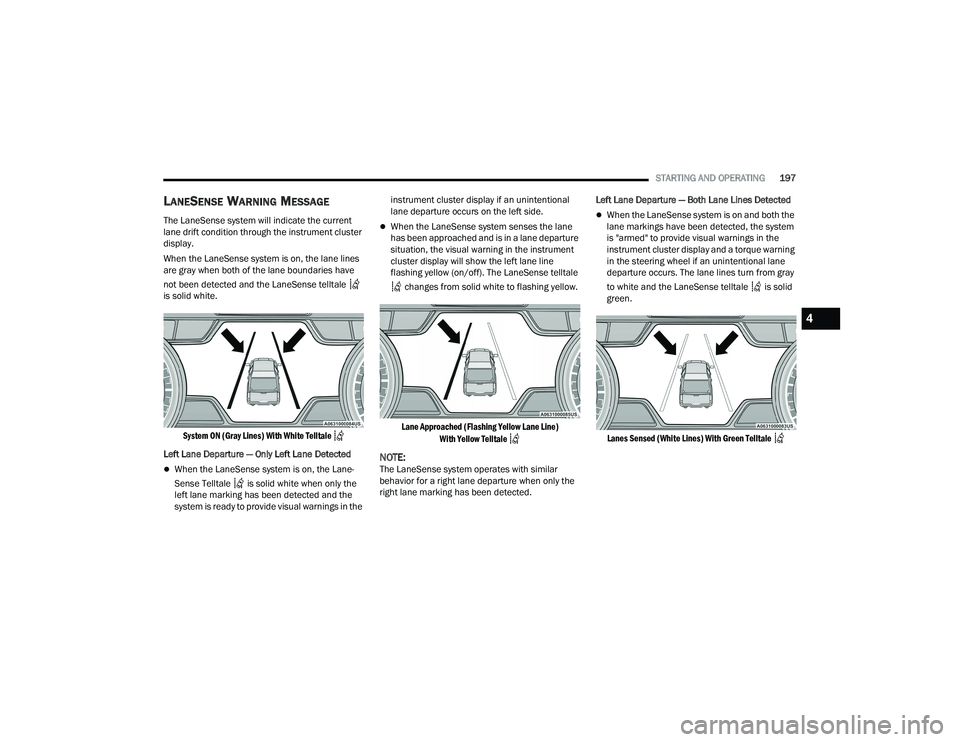
When the LaneSense system is on, the lane lines
are gray when both of the lane boundaries have
not been detected and the LaneSense telltale
is solid white.
System ON (Gray Lines) With White Telltale
Left Lane Departure — Only Left Lane Detected
When the LaneSense system is on, the Lane-
Sense Telltale is solid white when only the
left lane marking has been detected and the
system is ready to provide visual warnings in the instrument cluster display if an unintentional
lane departure occurs on the left side.
When the LaneSense system senses the lane
has been approached and is in a lane departure
situation, the visual warning in the instrument
cluster display will show the left lane line
flashing yellow (on/off). The LaneSense telltale
changes from solid white to flashing yellow.
Lane Approached (Flashing Yellow Lane Line) With Yellow Telltale
NOTE:The LaneSense system operates with similar
behavior for a right lane departure when only the
right lane marking has been detected. Left Lane Departure — Both Lane Lines Detected
When the LaneSense system is on and both the
lane markings have been detected, the system
is "armed" to provide visual warnings in the
instrument cluster display and a torque warning
in the steering wheel if an unintentional lane
departure occurs. The lane lines turn from gray
to white and the LaneSense telltale is solid
green.
Lanes Sensed (White Lines) With Green Telltale
4
22_DT_OM_EN_USC_t.book Page 197
Page 200 of 496
198STARTING AND OPERATING
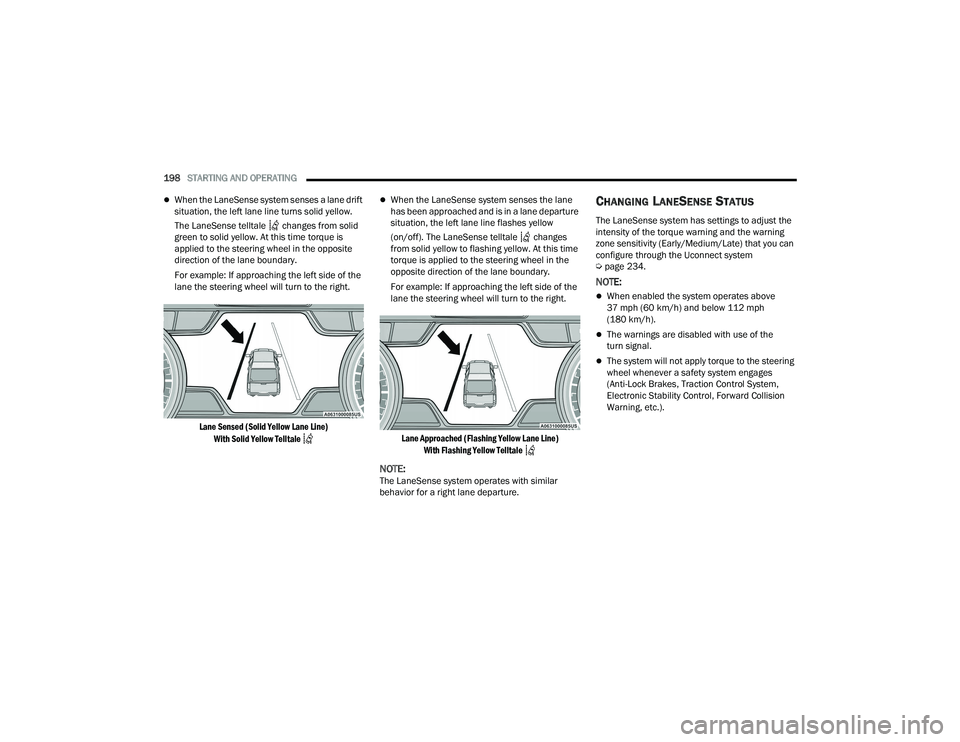
When the LaneSense system senses a lane drift
situation, the left lane line turns solid yellow.
The LaneSense telltale changes from solid
green to solid yellow. At this time torque is
applied to the steering wheel in the opposite
direction of the lane boundary.
For example: If approaching the left side of the
lane the steering wheel will turn to the right.
Lane Sensed (Solid Yellow Lane Line) With Solid Yellow Telltale
When the LaneSense system senses the lane
has been approached and is in a lane departure
situation, the left lane line flashes yellow
(on/off). The LaneSense telltale changes
from solid yellow to flashing yellow. At this time
torque is applied to the steering wheel in the
opposite direction of the lane boundary.
For example: If approaching the left side of the
lane the steering wheel will turn to the right.
Lane Approached (Flashing Yellow Lane Line) With Flashing Yellow Telltale
NOTE:The LaneSense system operates with similar
behavior for a right lane departure.
CHANGING LANESENSE STATUS
The LaneSense system has settings to adjust the
intensity of the torque warning and the warning
zone sensitivity (Early/Medium/Late) that you can
configure through the Uconnect system
Úpage 234.
NOTE:
When enabled the system operates above
37 mph (60 km/h) and below 112 mph
(180 km/h).
The warnings are disabled with use of the
turn signal.
The system will not apply torque to the steering
wheel whenever a safety system engages
(Anti-Lock Brakes, Traction Control System,
Electronic Stability Control, Forward Collision
Warning, etc.).
22_DT_OM_EN_USC_t.book Page 198
Page 201 of 496
STARTING AND OPERATING199
PARKVIEW REAR BACK UP CAMERA
The ParkView Rear Back Up Camera allows you to
see an on-screen image of the rear surroundings of
your vehicle whenever the gear selector is put into
REVERSE. The image will be displayed on the
Navigation/Multimedia radio display screen along
with a caution note to “Check Entire Surroundings”
across the top of the screen. After five seconds this
note will disappear. The ParkView Camera is
located in the center of the tailgate handle.
NOTE:Removing the tailgate will disable the rearview
camera function.
Manual Activation Of The Rear View
Camera:
1. Press the Controls button located on the bottom of the Uconnect display.
2. Press the Back Up Camera icon to turn the Rear View Camera system on.
NOTE:The ParkView Rear Back Up Camera has program -
mable modes of operation that may be selected
through the Uconnect system Ú page 234.When the vehicle is shifted out of REVERSE with
camera delay turned off, the rear camera mode is
exited and the previous screen appears. When the
vehicle is shifted out of REVERSE with camera
delay turned on, the camera image will continue to
be displayed for up to 10 seconds after shifting out
of REVERSE unless the following conditions occur:
The vehicle speed exceeds 8 mph (13 km/h), the
vehicle is shifted into PARK, the vehicle’s ignition is
placed in the OFF position, or the user presses
image defeat X to exit out of the camera video
display.
Whenever the Rear View Camera image is
activated through the Back Up Camera button in
the Controls menu, and the vehicle speed is
greater than, or equal to, 8 mph (13 km/h), a
display timer for the image is initiated. The image
will continue to be displayed until the display timer
exceeds 10 seconds.
NOTE:
If the vehicle speed remains below 8 mph
(13 km/h), the Rear View Camera image will be
displayed continuously until deactivated via the
touchscreen button X, the transmission is
shifted into PARK, or the ignition is placed in the
OFF position.
The touchscreen button X to disable display of
the camera image is made available ONLY when
the vehicle is not in REVERSE. When enabled, active guidelines are overlaid on
the image to illustrate the width of the vehicle and
its projected back up path based on the steering
wheel position. A dashed centerline overlay
indicates the center of the vehicle to assist with
parking or aligning to a hitch/receiver. Different
colored zones indicate the distance to the rear of
the vehicle. The following table shows the
approximate distances for each zone:
Zones
Distance To The Rear
Of The Vehicle
Red 0 - 1 ft (0 - 30 cm)
Yellow 1 ft - 6.5 ft
(30 cm - 2 m)
Green 6.5 ft or greater
(2 m or greater)
WARNING!
Drivers must be careful when backing up even
when using the ParkView Rear Back Up Camera.
Always check carefully behind your vehicle, and
be sure to check for pedestrians, animals, other
vehicles, obstructions, or blind spots before
backing up. You are responsible for the safety of
your surroundings and must continue to pay
attention while backing up. Failure to do so can
result in serious injury or death.
4
22_DT_OM_EN_USC_t.book Page 199
Page 205 of 496
STARTING AND OPERATING203
For information on Auxiliary Cameras (if equipped),
see Ú page 206.
FORWARD FACING CAMERA WITH TIRE
L
INES — IF EQUIPPED
The Forward Facing Camera displays a front view
image of the road ahead, along with tire lines to
guide the driver when driving on narrow roads. Tire
lines can be activated/deactivated through the
Uconnect Settings.
Activation
The Forward Facing Camera can be activated in
the following ways:
Pressing the Forward Facing Camera button in
the Controls screen or Apps menu
Pressing the Forward Facing Camera button
located in the upper left corner of the Back Up
camera display
Once activated, the camera image will remain on
as long as the vehicle speed is below 8 mph
(13 km/h).
Deactivation
The Forward Facing Camera is deactivated in the
following conditions:
The vehicle exceeds 8 mph (13 km/h), except
when vehicle is in 4WD Low.
The X button on the display is pressed.
The vehicle is shifted into PARK.
The ignition is placed in the OFF position.
NOTE:If the vehicle is in 4WD Low, the Forward Facing
Camera image will be displayed until the X button
is pressed or the ignition is placed in the OFF
position.
TRAILER CAMERAS — IF EQUIPPED
TRAILER SURROUND VIEW CAMERA
S
YSTEM — IF EQUIPPED
The Trailer Surround View Camera system allows
you to see an on-screen image of the surroundings
and the Top View of a trailer using four mountable
cameras. This occurs whenever the More Cams
soft button is selected, or when enabled through
the Uconnect system. The image will be displayed
on the Uconnect display along with a caution note
“Check Entire Surroundings”. After five seconds,
this note will disappear.
NOTE:
Trailer Surround View Camera kit is only avail -
able for vehicles equipped with the Surround
View Camera system.
The Trailer Surround View Camera system has
programmable settings that may be selected
through the Uconnect system Ú page 234.
WARNING!
Drivers must be careful when backing up even
when using the Surround View Camera. Always
check carefully behind your vehicle, and be sure
to check for pedestrians, animals, other
vehicles, obstructions, or blind spots before
backing up. You are responsible for the safety of
your surroundings and must continue to pay
attention while backing up. Failure to do so can
result in serious injury or death.
CAUTION!
To avoid vehicle damage, Surround View
should only be used as a parking aid. The
Surround View camera is unable to view every
obstacle or object in your drive path.
To avoid vehicle damage, the vehicle must be
driven slowly when using Surround View to be
able to stop in time when an obstacle is seen.
It is recommended that the driver look
frequently over his/her shoulder when using
Surround View.
4
22_DT_OM_EN_USC_t.book Page 203
Page 208 of 496
206STARTING AND OPERATING
NOTE:
If the Trailer Surround Camera is activated
manually, and the vehicle is shifted into REVERSE,
deactivation methods for automatic activation are
assumed.
The camera delay system is turned off manually
through the Uconnect system Ú page 234.
NOTE:
If snow, ice, mud, or any foreign substance
builds up on the camera lenses, clean the
lenses, rinse with water, and dry with a soft
cloth. Do not cover the lenses.
If a malfunction with the system has occurred,
see an authorized dealer.
AUX CAMERA — IF EQUIPPED
Your vehicle may be equipped with one or two AUX
Cameras, which display rearview and side view
images from the trailer on the touchscreen.
NOTE:Two Aux Cameras are only available on vehicles
with NAV equipped radios if the vehicle is not
equipped with a Center High Mounted Stop Lamp
(CHMSL) and Surround View Camera system. Activation
The AUX Camera is activated by first pressing the
Backup Camera or Cargo Camera (if equipped)
button on the touchscreen, followed by the AUX
button located in the upper left corner of the
rearview display. On vehicles with Surround View
Camera (if equipped), the AUX Camera can be
activated when the vehicle is in REVERSE by first
pressing the More Cams button in the Surround
view screen, followed by the AUX tab. The AUX
camera can also be activated when the vehicle is
in REVERSE by pressing the AUX button.
If equipped with two AUX Cameras, you can switch
between each camera by pressing the AUX 1 or
AUX 2 buttons on the Trailer Camera display.
AUX 1 Camera Button
AUX 2 Camera Button
Deactivation
The AUX Camera is deactivated by pressing the X in
the upper right corner of the touchscreen. This will
return the display back to the previously displayed
screen.
WARNING!
Drivers must be careful when backing up even
when using the Trailer Surround View Camera.
Always check carefully behind your vehicle, and
be sure to check for pedestrians, animals, other
vehicles, obstructions, or blind spots before
backing up. You are responsible for the safety of
your surroundings and must continue to pay
attention while backing up. Failure to do so can
result in serious injury or death.
CAUTION!
To avoid vehicle damage, Trailer Surround
View should only be used as a parking aid.
The Trailer Surround View Camera is unable to
view every obstacle or object in your drive
path.
To avoid vehicle damage, the vehicle must be
driven slowly when using Trailer Surround
View to be able to stop in time when an
obstacle is seen. It is recommended that the
driver look frequently over his/her shoulder
when using Trailer Surround View.
22_DT_OM_EN_USC_t.book Page 206
Page 209 of 496

STARTING AND OPERATING207
(Continued)
NOTE:
If the AUX button is pressed and no AUX Camera
is connected, the touchscreen will display a blue
screen along with the message “Camera
System Unavailable.” The screen can be exited
out by pressing the X in the upper right hand
corner. This will return the display back to the
previously displayed screen.
Zoom View is not available with the AUX Camera
feature.
The display will always default to the Trailer
Camera display AUX 1.
REFUELING THE VEHICLE — GASOLINE
ENGINE
The capless fuel filler is located on the left side of
the vehicle.
The capless system is sealed by two flapper doors.
1. Put the vehicle in PARK and switch the
ignition off.
2. Push the center-rear edge of the fuel filler door (3 o'clock position) and release to open.
Fuel Filler Door
3. Insert the fuel nozzle fully into the filler pipe,
the nozzle opens and holds both flapper doors
while refueling.
Fuel Filler
4. When the fuel nozzle “clicks” or shuts off, the fuel tank is full.
5. Keep the nozzle in the filler for five seconds after nozzle clicks to allow fuel to drain from
the nozzle.
6. Remove the fuel filler nozzle.
7. To close the fuel filler door, push the center-rear edge (3 o’clock position) of the fuel
filler door and then release. The fuel filler door
will latch closed.
WARNING!
Never have any smoking materials lit in or
near the vehicle when the fuel door is open or
the tank is being filled.
Never add fuel when the engine is running.
This is in violation of most state and federal
fire regulations and may cause the MIL to
turn on.
A fire may result if gasoline is pumped into a
portable container that is inside of a vehicle.
You could be burned. Always place gas
containers on the ground while filling.
CAUTION!
To avoid fuel spillage and overfilling, do not
“top off” the fuel tank after filling.
WARNING!
4
22_DT_OM_EN_USC_t.book Page 207
Page 210 of 496
208STARTING AND OPERATING
NOTE:In certain cold conditions, ice may prevent the fuel
filler door from opening. If this occurs, lightly push
on the fuel filler door around the perimeter to
break the ice build up.
REFUELING THE VEHICLE — DIESEL ENGINE
The capless fuel filler is located on the left side of
the vehicle.
The capless system is sealed by two flapper doors.
1. Put the vehicle in PARK and switch the
ignition off.
2. Open the fuel filler door.
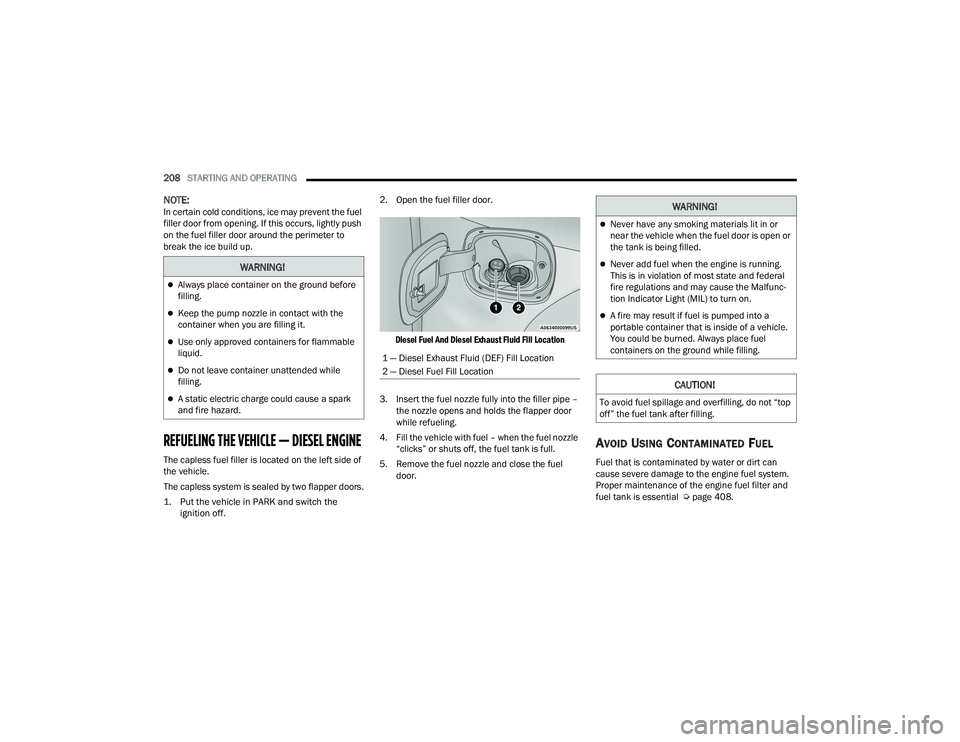
Diesel Fuel And Diesel Exhaust Fluid Fill Location
3. Insert the fuel nozzle fully into the filler pipe – the nozzle opens and holds the flapper door
while refueling.
4. Fill the vehicle with fuel – when the fuel nozzle “clicks” or shuts off, the fuel tank is full.
5. Remove the fuel nozzle and close the fuel door.
AVOID USING CONTAMINATED FUEL
Fuel that is contaminated by water or dirt can
cause severe damage to the engine fuel system.
Proper maintenance of the engine fuel filter and
fuel tank is essential Ú page 408.
WARNING!
Always place container on the ground before
filling.
Keep the pump nozzle in contact with the
container when you are filling it.
Use only approved containers for flammable
liquid.
Do not leave container unattended while
filling.
A static electric charge could cause a spark
and fire hazard.
1 — Diesel Exhaust Fluid (DEF) Fill Location
2 — Diesel Fuel Fill Location
WARNING!
Never have any smoking materials lit in or
near the vehicle when the fuel door is open or
the tank is being filled.
Never add fuel when the engine is running.
This is in violation of most state and federal
fire regulations and may cause the Malfunc -
tion Indicator Light (MIL) to turn on.
A fire may result if fuel is pumped into a
portable container that is inside of a vehicle.
You could be burned. Always place fuel
containers on the ground while filling.
CAUTION!
To avoid fuel spillage and overfilling, do not “top
off” the fuel tank after filling.
22_DT_OM_EN_USC_t.book Page 208
Page 211 of 496

STARTING AND OPERATING209
BULK FUEL STORAGE — DIESEL FUEL
If you store quantities of fuel, good maintenance of
the stored fuel is also essential. Fuel contaminated
with water will promote the growth of “microbes.”
These microbes form “slime” that will clog the fuel
filtration system and lines. Drain condensation
from the supply tank and change the line filter on
a regular basis.
NOTE:When a diesel engine is allowed to run out of fuel,
air is pulled into the fuel system.
If the vehicle will not start Úpage 414.
DIESEL EXHAUST FLUID
Your vehicle is equipped with a Selective Catalytic
Reduction (SCR) system to meet diesel emissions
standards required by the Environmental
Protection Agency. The purpose of the SCR system is to reduce levels
of oxides of nitrogen (NO
x) emitted from engines
that are harmful to our health and the environment
to a near-zero level. A small quantity of Diesel
Exhaust Fluid (DEF) is injected into the exhaust
upstream of a catalyst where, when vaporized,
converts smog-forming NO
x into harmless
nitrogen (N
2) and water vapor (H2O), two natural
components of the air we breathe.
DIESEL EXHAUST FLUID STORAGE
Diesel Exhaust Fluid (DEF) is considered a very
stable product with a long shelf life. If DEF is kept
in temperatures between 10° and 90°F (-12° and
32°C), it will last a minimum of one year.
DEF may freeze at temperatures at or below 12°F
(-11°C). The system has been designed to operate
in this environment.
NOTE:When working with DEF, it is important to know
that:
Any containers or parts that come into contact
with DEF must be DEF compatible (plastic or
stainless steel). Copper, brass, aluminum, iron
or non-stainless steel should be avoided as they
are subject to corrosion by DEF.
If DEF is spilled, it should be wiped up
completely.
ADDING DIESEL EXHAUST FLUID
The Diesel Exhaust Fluid (DEF) gauge (located on
the instrument cluster) will display the level of DEF
remaining in the tank Ú page 110.
NOTE:
Driving conditions (altitude, vehicle speed, load,
etc.) will effect the amount of DEF that is used in
your vehicle.
Outside temperature can affect DEF consump -
tion. In cold conditions, 12°F (-11°C) and
below, the DEF gauge may take longer to
operate as intended. This is a normal function of
the system.
There is an electric heater inside the DEF tank
that automatically works when necessary. If the
DEF supply does freeze, the truck will operate
normally until it thaws.WARNING!
Do not open the high pressure fuel system with
the engine running. Engine operation causes
high fuel pressure. High pressure fuel spray can
cause serious injury or death.
4
22_DT_OM_EN_USC_t.book Page 209