4WD AUTO RAM 1500 2022 User Guide
[x] Cancel search | Manufacturer: RAM, Model Year: 2022, Model line: 1500, Model: RAM 1500 2022Pages: 496, PDF Size: 18.03 MB
Page 175 of 496

STARTING AND OPERATING173
Operating the locker in 2WD, 4WD AUTO, and
4WD LOCK/HIGH, the locker can be engaged up to
20 mph (32 km/h). While driving with the locker
engaged, if speed exceeds 25 mph (40 km/h), the
locker will automatically disengage, but will
automatically re-engage at 20 mph (32 km/h).
NOTE:Left to right wheel speed difference may be
necessary to allow the rear axle to fully lock. If the
indicator light is flashing after selecting the rear
axle lock mode, drive the vehicle in a turn or on
loose gravel to expedite the locking action.
The axle locker could become torque locked due to
side to side loads on the rear axle. Driving slowly
while turning the steering wheel from a left hand
turn to a right hand turn or driving in REVERSE for
a short distance may be required to release the
torque lock and unlock the axles.
To unlock the rear axle, push the AXLE LOCK
button. The AXLE LOCK indicator light will go out
when the rear axle is unlocked.
LIMITED-SLIP DIFFERENTIAL —
IF EQUIPPED
The limited-slip differential provides additional
traction on snow, ice, mud, sand and gravel,
particularly when there is a difference between the
traction characteristics of the surface under the
right and left rear wheels. During normal driving and cornering, the limited-slip unit performs
similarly to a conventional differential. On slippery
surfaces, however, the differential delivers more of
the driving effort to the rear wheel having the
better traction.
The limited-slip differential is especially helpful
during slippery driving conditions. With both rear
wheels on a slippery surface, a slight application of
the accelerator will supply maximum traction.
When starting with only one rear wheel on an
excessively slippery surface, slight momentary
application of the parking brake may be necessary
to gain maximum traction.
Care should be taken to avoid sudden
accelerations when both rear wheels are on a
slippery surface. This could cause both rear wheels
to spin, and allow the vehicle to slide sideways on
the crowned surface of a road or in a turn.
POWER STEERING
ELECTRIC POWER STEERING
The electric power steering system will provide
increased vehicle response and ease of
maneuverability. The power steering system
adapts to different driving conditions.
If the steering icon is flashing, it indicates that the
vehicle needs to be taken to the dealer for service.
It is likely the vehicle has lost power steering
assistance.
If the steering icon is displayed and the “POWER
STEERING SYSTEM OVER TEMP” message is
displayed on the instrument cluster screen, this
indicates an over temperature condition in the
power steering system. Once driving conditions are
safe, pull over and let the vehicle idle for a few
moments until the icon and message turn off
Ú
page 114.
If the steering icon is displayed and the “SERVICE
POWER STEERING – ASSIST OFF” message is
displayed on the instrument cluster screen, this
indicates the vehicle needs to be taken to the
dealer for service Ú page 114.
WARNING!
When servicing vehicles equipped with a
limited-slip or locking differential, never run the
engine with one rear wheel off the ground as the
vehicle may drive through the rear wheel
remaining on the ground and result in
unintended movement.
4
22_DT_OM_EN_USC_t.book Page 173
Page 177 of 496

STARTING AND OPERATING175
The transmission is not in DRIVE
Hood is open
Transfer case is in 4WD LOW
TOW/HAUL mode is selected
Accelerator pedal input
Excessive 12 Volt loads
Brake application is adequate to obtain and
maintain a stop
It may be possible to operate the vehicle several
consecutive times in extreme conditions and not
meet all criteria to enable an Autostop state.
TO START THE ENGINE WHILE IN
A
UTOSTOP MODE
While in DRIVE, the engine will start when the
brake pedal is released or the throttle pedal is
pressed and the transmission will automatically
reengage upon engine restart.
Conditions That Will Cause The Engine To Start
Automatically While In Autostop Mode
The engine will start automatically when:
The transmission selector is moved from DRIVE
to REVERSE, NEUTRAL, or PARK
To maintain cabin temperature near the HVAC
settings
HVAC is set to full defrost mode
12 Volt demand requires engine restart
Stop/Start OFF switch is pushed
Transfer case is in 4WD LOW
The emissions system override is present
A Stop/Start system error is present
Conditions That Force An Automatic Shift To Park
While In Autostop Mode
The engine will not start automatically and the
transmission will be placed in PARK if:
The driver door is open and brake pedal
released
The driver door is open and the driver seat belt
is unbuckled
The engine hood has been opened
A Stop/Start system error is present
The engine may then be restarted by moving the
transmission shift selector out of PARK (e.g., to
DRIVE) or, in some cases, only by a key start. The
instrument cluster will display a “SHIFT OUT OF
PARK” message, or a “STOP/START KEY START
REQUIRED” message, to indicate which action is
required Ú page 114.
TO MANUALLY TURN OFF THE STOP/
S
TART SYSTEM
Stop/Start OFF Switch
Push the Stop/Start OFF switch (located on the
switch bank). The light on the switch will illuminate.
The “STOP/START OFF” message will appear in the
instrument cluster display and the Autostop mode
will be disabled Ú page 114.
NOTE:The Stop/Start system will reset itself back to the
ON position every time the ignition is turned OFF
and back ON.
TO MANUALLY TURN ON THE STOP/
S
TART SYSTEM
Push the Stop/Start OFF switch (located on the
switch bank). The light on the switch will turn off.
4
22_DT_OM_EN_USC_t.book Page 175
Page 181 of 496

STARTING AND OPERATING179
Adaptive Cruise Control (ACC) Operation
The buttons on the right side of the steering wheel
operate the Adaptive Cruise Control system.
Adaptive Cruise Control Buttons
Adaptive Cruise Control (ACC) Menu
The instrument cluster display will show the
current ACC system settings. The information it
displays depends on ACC system status.
Push the Adaptive Cruise Control (ACC) on/off
button until one of the following appears in the
instrument cluster display: Adaptive Cruise Control Off
When ACC is deactivated, the display will read
“Adaptive Cruise Control Off.”
Adaptive Cruise Control Ready
When ACC is activated, but the vehicle speed
setting has not been selected, the display will read
“Adaptive Cruise Control Ready.”
Adaptive Cruise Control Set
When the SET (+) or the SET (-) button is pushed,
the display will read “ACC SET.”
When ACC is set, the set speed will show in the
instrument cluster display.
The ACC screen may display once again if any of
the following ACC activity occurs:
System Cancel
Driver Override
System Off
ACC Proximity Warning
ACC Unavailable Warning
The instrument cluster display will return to the last
display selected after five seconds of no ACC
display activity.
Activating Adaptive Cruise Control (ACC)
The minimum set speed for the ACC system is
20 mph (32 km/h).
When the system is turned on and in the ready
state, the instrument cluster display will read
“ACC Ready.”
When the system is off, the instrument cluster
display will read “Adaptive Cruise Control (ACC)
Off.”
NOTE:You cannot engage ACC under the following condi -
tions:
When in 4WD Low
When the brakes are applied
When the parking brake is applied
When the automatic transmission is in PARK,
REVERSE or NEUTRAL
When the vehicle speed is below the minimum
speed range
When the brakes are overheated
When the driver’s door is open at low speeds
When the driver’s seat belt is unbuckled at low
speeds
When there is a stationary vehicle in front of
your vehicle in close proximity
When Electronic Stability Control (ESC) Full Off
mode is active
1 — Distance Setting Increase
2 — Adaptive Cruise Control (ACC) On/Off
3 — Distance Setting Decrease
4
22_DT_OM_EN_USC_t.book Page 179
Page 188 of 496

186STARTING AND OPERATING
NARROW VEHICLES
Some narrow vehicles traveling near the outer
edges of the lane or edging into the lane are not
detected until they have moved fully into the lane.
There may not be sufficient distance to the vehicle
ahead.
Narrow Vehicle Example
STATIONARY OBJECTS AND VEHICLES
ACC does not react to stationary objects or
vehicles. For example, ACC will not react in
situations where the vehicle you are following exits
your lane and the vehicle ahead is stopped in your
lane. It will consider this stopped vehicle a stationary object as it did not previously detect
movement from it. Always be attentive and ready
to apply the brakes if necessary.
Stationary Object And Stationary Vehicle Example
PARKSENSE FRONT/REAR PARK ASSIST
SYSTEM — IF EQUIPPED
The ParkSense Park Assist system provides visual
and audible indications of the distance between
the rear and/or front fascia/bumper and a
detected obstacle when backing up or moving
forward (e.g. during a parking maneuver). If your
vehicle is equipped with the automatic braking
function, the vehicle brakes may be automatically
applied and released when the vehicle is in
REVERSE if the system detects a possible collision
with an obstacle.
NOTE:
The driver can disable the automatic braking
function by turning ParkSense off via the Park -
Sense switch. The driver can also override auto -
matic braking by changing the gear or by
pressing the gas pedal over 90% of its capacity
during the braking event.
Automatic brakes will not be available if the
vehicle is in 4WD Low.
Automatic brakes will not be available if there is
a fault in the brake module.
Automatic brakes will not be available if there is
a faulted condition detected with the ParkSense
Park Assist system or the Braking System.
The automatic braking function may only be
applied if the vehicle deceleration is not enough
to avoid colliding with a detected obstacle.
The automatic braking function may not be
applied fast enough for obstacles that move
toward the rear of the vehicle from the left and/
or right sides.
The automatic braking function can be
enabled/disabled from the Customer Program -
mable Features section of the Uconnect system.
22_DT_OM_EN_USC_t.book Page 186
Page 195 of 496
STARTING AND OPERATING193
The ParkSense Active Park Assist system will turn
off automatically for any of the following
conditions:
Parking maneuver is completed.
Vehicle speed is greater than 18 mph (30 km/h)
when searching for a parking space.
Vehicle speed is greater than 5 mph (7 km/h) during active steering guidance into the parking
space.
Steering wheel is touched during active steering
guidance into the parking space.
ParkSense Front/Rear Park Assist switch is
pushed.
Driver's door is opened.
Tailgate is opened.
Electronic Stability Control/Anti-Lock Braking
System intervention.
Vehicle is in 4WD Low.
Axle Locker is active.
Trailer is connected.
Trailer Reverse Steering Control (TRSC) is
active.
Snow plow is connected.
NOTE:The ParkSense Active Park Assist system will allow
a maximum of eight shifts between DRIVE and
REVERSE. If the maneuver cannot be completed within eight shifts, the system will cancel and the
instrument cluster display will instruct the driver to
complete the maneuver manually.
The ParkSense Active Park Assist system will only
operate and search for a parking space when the
following conditions are present:
Gear selector is in DRIVE.
The ignition is in the ON/RUN position.
The ParkSense Active Park Assist switch is acti
-
vated.
Driver's door is closed.
Tailgate is closed.
Vehicle speed is less than 15 mph (25 km/h).
The outer surface and the underside of the front
and rear fascias/bumpers are clean and clear
of snow, ice, mud, dirt or other obstruction.
NOTE:If the vehicle is driven above approximately
15 mph (25 km/h), the instrument cluster display
will instruct the driver to slow down. If the vehicle
is driven above approximately 18 mph (30 km/h),
the system will cancel. The driver must then reac -
tivate the system by pushing the ParkSense Active
Park Assist switch.
When pushed, the LED on the ParkSense Active
Park Assist switch will blink momentarily, and then
the LED will turn off if any of the above conditions
are not present.
PARALLEL/PERPENDICULAR PARKING
S
PACE ASSISTANCE OPERATION
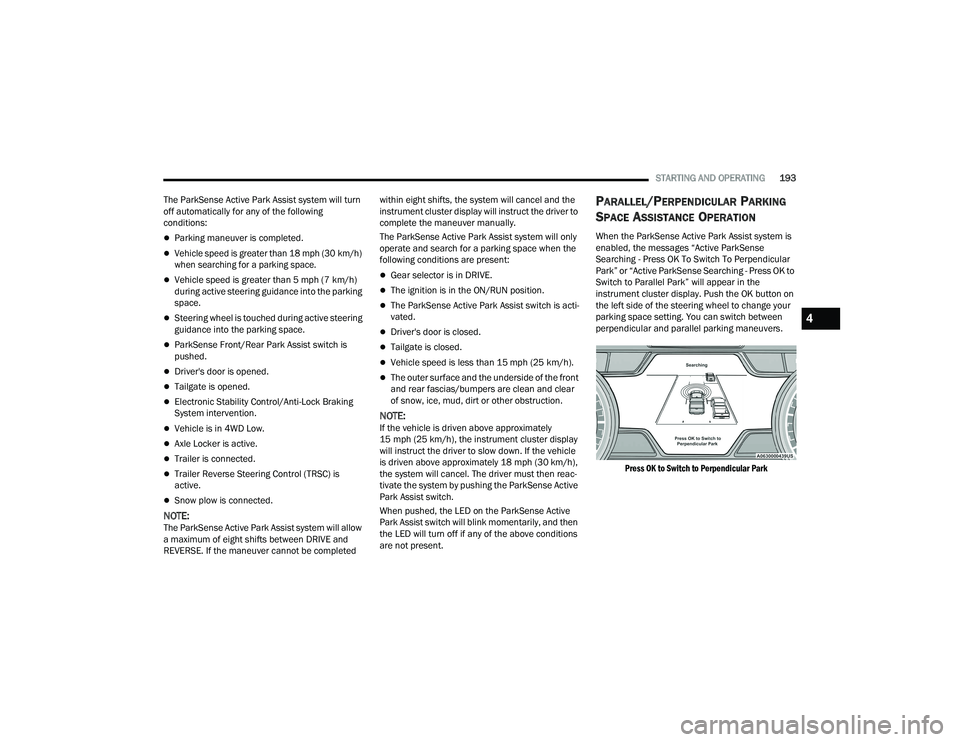
When the ParkSense Active Park Assist system is
enabled, the messages “Active ParkSense
Searching - Press OK To Switch To Perpendicular
Park” or “Active ParkSense Searching - Press OK to
Switch to Parallel Park” will appear in the
instrument cluster display. Push the OK button on
the left side of the steering wheel to change your
parking space setting. You can switch between
perpendicular and parallel parking maneuvers.
Press OK to Switch to Perpendicular Park
4
22_DT_OM_EN_USC_t.book Page 193
Page 228 of 496
226STARTING AND OPERATING
BEFORE PLOWING
Check the hydraulic system for leaks and proper
fluid level.
Check the mounting bolts and nuts for proper
tightness.
Check the runners and cutting edge for exces -
sive wear. The cutting edge should be ¼ to
½ inches (6 cm to 1.2 cm) above ground in
snow plowing position.
Check that snowplow lighting is connected and
functioning properly.
SNOWPLOW PREP PACKAGE MODEL
A
VAILABILITY
For Information about snowplow applications visit
www.ramtrucks.com or refer to the current Body
Builder’s Guide.
1. The maximum number of occupants in the
truck should not exceed two.
2. The total GVWR, Front GAWR or the Rear GAWR should never be exceeded.
3. Cargo capacity will be reduced by the addition of options or passengers, etc.
The loaded vehicle weight, including the snowplow
system, all aftermarket accessories, driver,
passengers, options, and cargo, must not exceed
either the Gross Vehicle Weight (GVWR) or Gross Axle Weight (GAWR) ratings. These weights
are specified on the Safety Compliance
Certification Label on the driver's side door
opening.
NOTE:Detach the snowplow when transporting
passengers.
Vehicle front end wheel alignment was set to
specifications at the factory without consideration
for the weight of the plow. Front end toe-in should
be checked and reset if necessary at the beginning
and end of the snowplow season. This will help
prevent uneven tire wear.
The blade should be lowered whenever the vehicle
is parked.
Maintain and operate your vehicle and snowplow
equipment following the recommendations
provided by the specific snowplow manufacturer.
OVER THE ROAD OPERATION WITH
S
NOWPLOW ATTACHED
The blade restricts air flow to the radiator and
causes the engine to operate at higher than
normal temperatures. Therefore, when
transporting the plow, angle the blade completely
and position it as low as road or surface conditions
permit. Do not exceed 40 mph (64 km/h). The
operator should always maintain a safe stopping
distance and allow adequate passing clearance.
OPERATING TIPS
Under ideal snow plowing conditions, 20 mph
(32 km/h) should be maximum operating speed.
The operator should be familiar with the area and
surface to be cleaned. Reduce speed and use
extreme caution when plowing unfamiliar areas or
under poor visibility.
GENERAL MAINTENANCE
Snowplows should be maintained in accordance
with the plow manufacturer's instructions.
Keep all snowplow electrical connections and
battery terminals clean and free of corrosion.
When plowing snow, to avoid transmission and
drivetrain damage, the following precautions
should be observed:
Operate with transfer case in 4WD LOW when
plowing small or congested areas where speeds
are not likely to exceed 15 mph (24 km/h).
At higher speeds operate in 4WD HIGH.
Vehicles with automatic transmissions should
use 4WD LOW when plowing deep or heavy
snow for extended periods of time to avoid
transmission overheating.
Do not shift the transmission unless the engine
has returned to idle and wheels have stopped.
Make a practice of stepping on the brake pedal
while shifting the transmission.
22_DT_OM_EN_USC_t.book Page 226
Page 308 of 496

306MULTIMEDIA
Engine
Press the Left and Right Arrow buttons on the
bottom of the touchscreen to cycle between the
Dyno and Engine pages.
When selected, this screen displays the following
values:
Vehicle Speed: Shows the actual vehicle speed.
Engine Power: Shows the instantaneous power.
Engine Torque : Shows the instantaneous
torque.
Boost Pressure : Shows the actual engine boost
pressure.
Gear : Shows the current (or pending) operating
gear of the vehicle.
VEHICLE DYNAMICS
The Vehicle Dynamics page displays information
concerning the vehicle’s drivetrain.
Steering Angle — If Equipped
Steering Angle utilizes the steering angle sensor to
calculate the degree of the steering relative to zero
(straight ahead) reference angle. The zero degree
reference angle measurement indicates the actual
front tire steering angle. Transfer Case
This feature will be active when the vehicle is in
4WD HIGH, 4WD AUTO, Neutral, or 4WD LOW.
NOTE:A lock symbol will only be present on the Transfer
Case button when the vehicle is in 4WD LOW.
Rear Axle Locker
This feature will allow you to lock and unlock the
rear axle. To change the status, push the AXLE
LOCK button.
OFF-ROAD PAGES — IF EQUIPPED
Your vehicle may be equipped with Off-Road Pages
which display vehicle information related to the
drivetrain, transfer case, and coolant/oil gauges.
To access Off-Road Pages, press the Vehicle
button on the touchscreen, select the Off-Road
Pages tab, and then select the Off-Road button on
the main screen. Off-Road Pages can also be
accessed through the app drawer.
Off-Road Button
22_DT_OM_EN_USC_t.book Page 306
Page 319 of 496
SAFETY317
Enabling HDC
HDC is enabled by pushing the HDC switch, but the
following conditions must also be met to enable
HDC:
The driveline is in 4WD Low.
The vehicle speed is below 5 mph (8 km/h).
The parking brake is released.
The driver door is closed.
Activating HDC
Once HDC is enabled it will activate automatically
if driven down a grade of sufficient magnitude. The
set speed for HDC is selectable by the driver, and
can be adjusted by using the gear shift +/-. The
following summarizes the HDC set speeds:
HDC Target Set Speeds
P = No set speed. HDC may be enabled but will
not activate.
R = 0.6 mph (1 km/h)
N = 1.2 mph (2 km/h)
D = 0.6 mph (1 km/h)
1st = 0.6 mph (1 km/h)
2nd = 1.2 mph (2 km/h)
3rd = 1.8 mph (3 km/h)
4th = 2.5 mph (4 km/h)
5th = 3.1 mph (5 km/h)
6th = 3.7 mph (6 km/h)
7th = 4.3 mph (7 km/h)
8th = 5.0 mph (8 km/h)
9th = 5.6 mph (9 km/h) – If Equipped
NOTE:During HDC the +/- shifter input is used for HDC
target speed selection, but will not affect the gear
chosen by the transmission. When actively
controlling HDC the transmission will shift appro -
priately for the driver-selected set speed and corre -
sponding driving conditions.
Driver Override
The driver may override HDC activation with
throttle or brake application at any time.
Deactivating HDC
HDC will be deactivated but remain available if any
of the following conditions occur:
The driver overrides HDC set speed with throttle
or brake application.
The vehicle speed exceeds 20 mph (32 km/h)
but remains below 40 mph (64 km/h).
The vehicle is on a downhill grade of insufficient
magnitude, is on level ground, or is on an uphill
grade.
The vehicle is shifted to PARK. Disabling HDC
HDC will be deactivated and disabled if any of the
following conditions occur:
The driver pushes the HDC switch.
The driveline is shifted out of the 4WD Low.
The parking brake is applied.
The driver door opens.
The vehicle is driven greater than 20 mph
(32 km/h) for greater than 70 seconds.
The vehicle is driven greater than 40 mph
(64 km/h) (HDC exits immediately).
HDC detects excessive brake temperature.
Feedback To The Driver
The instrument cluster has an HDC icon and the
HDC switch has an LED icon, which offers feedback
to the driver about the state HDC is in.
The cluster icon and switch lamp will illuminate
and remain on solid when HDC is enabled or
activated. This is the normal operating condition
for HDC.
The cluster icon and switch lamp will flash for
several seconds, then extinguish when the
driver pushes the HDC switch but enable condi -
tions are not met.
6
22_DT_OM_EN_USC_t.book Page 317
Page 393 of 496

IN CASE OF EMERGENCY391
Proper towing or lifting equipment is required to
prevent damage to your vehicle. Use only tow bars
and other equipment designed for this purpose,
following equipment per FCA US LLC instructions.
Use of safety chains is mandatory. Attach a tow bar
or other towing device to main structural members
of the vehicle, not to fascia/bumpers or associated
brackets. State and local laws regarding vehicles
under tow must be observed.
If you must use the accessories (wipers,
defrosters, etc.) while being towed, the ignition
must be in the ON/RUN mode, not the ACC mode.
If the key fob is unavailable or the vehicle's battery
is discharged, find Instructions on shifting the
transmission out of PARK in order to move the
vehicle Ú page 388.
TWO-WHEEL DRIVE MODELS
FCA US LLC recommends towing your vehicle with
all four wheels OFF the ground using a flatbed.
If flatbed equipment is not available, and the
transmission is operable, the vehicle may be towed
(with front wheels on the ground) under the
following conditions:
The transmission must be in NEUTRAL (N).
Instructions on shifting the transmission to
NEUTRAL (N) when the engine is OFF
Ú page 388.
The towing speed must not exceed 30 mph
(48 km/h).
The towing distance must not exceed 30 miles
(48 km).
If the transmission is not operable, or the vehicle
must be towed faster than 30 mph (48 km/h) and farther than 30 miles (48 km), tow with the rear
wheels OFF the ground. An acceptable method to
tow the vehicle on a flatbed are as follows:
Using a suitable steering wheel stabilizer to hold
the front wheels in the straight position with the
rear wheels raised and the front wheels ON the
ground.
Towing Condition
Wheels OFF The
Ground 2WD Models
4WD Models
Flat Tow NONENOT ALLOWED
Ú page 227
• Automatic Transmission in PARK
• Transfer Case in NEUTRAL (N)
• Tow in forward direction
Wheel Lift Or Dolly Tow Front
NOT ALLOWED NOT ALLOWED
Rear OK NOT ALLOWED
Flatbed ALL BEST METHOD BEST METHOD
CAUTION!
Do not use sling type equipment when towing.
Vehicle damage may occur.
When securing the vehicle to a flatbed truck,
do not attach to front or rear suspension
components. Damage to your vehicle may
result from improper towing.
7
22_DT_OM_EN_USC_t.book Page 391
Page 461 of 496
SERVICING AND MAINTENANCE459
(Continued)
(Continued)
4x4 (4WD) Trim Level Axle
Tire/Wheel SizeSnow Traction Device (maximum
projection beyond tire profile or equivalent)
Tradesman
Bighorn Lonestar
Laramie Rear
275/65R18
275/55/R20 S Class
Longhorn
Sport
Limited Rear
275/55R20 S Class
REBEL Not Chainable
WARNING!
Using tires of different size and type (M+S,
Snow) between front and rear axles can cause
unpredictable handling. You could lose control
and have a collision.
CAUTION!
To avoid damage to your vehicle or tires, observe
the following precautions:
Because of restricted traction device clear-
ance between tires and other suspension
components, it is important that only traction
devices in good condition are used. Broken
devices can cause serious damage. Stop the
vehicle immediately if noise occurs that could
indicate device breakage. Remove the
damaged parts of the device before further
use.
Install device as tightly as possible and then
retighten after driving about ½ mile (0.8 km).
Autosock traction devices do not require
retightening.
Do not exceed 30 mph (48 km/h).
Drive cautiously and avoid severe turns and
large bumps, especially with a loaded vehicle.
Do not drive for a prolonged period on dry
pavement.
CAUTION!
8
22_DT_OM_EN_USC_t.book Page 459