center console RAM 1500 2022 User Guide
[x] Cancel search | Manufacturer: RAM, Model Year: 2022, Model line: 1500, Model: RAM 1500 2022Pages: 496, PDF Size: 18.03 MB
Page 80 of 496
78GETTING TO KNOW YOUR VEHICLE
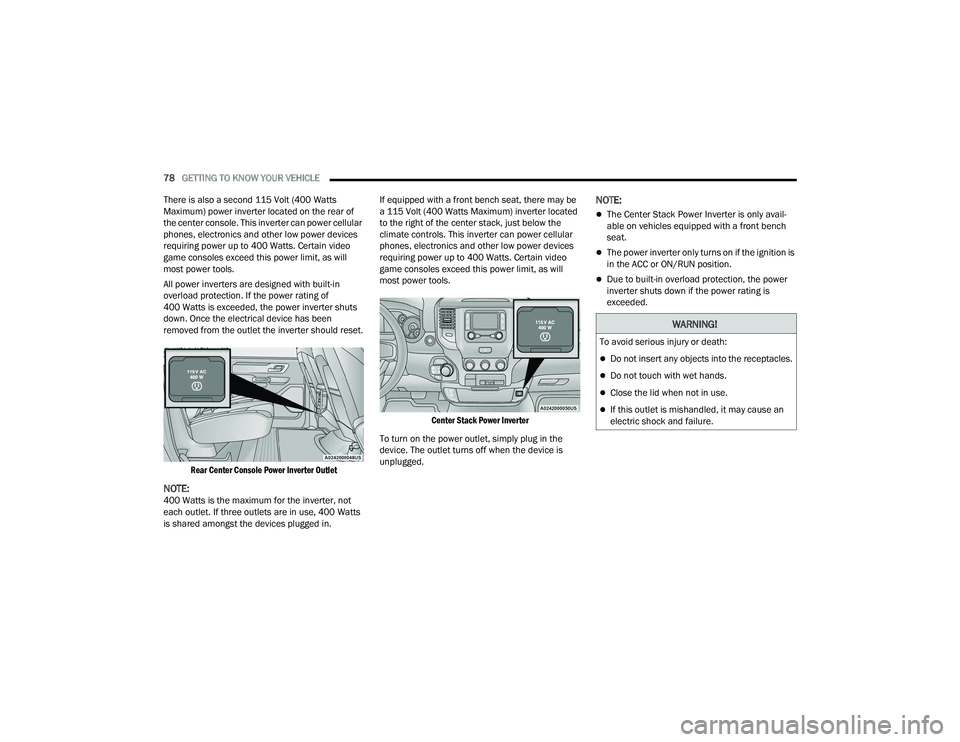
There is also a second 115 Volt (400 Watts
Maximum) power inverter located on the rear of
the center console. This inverter can power cellular
phones, electronics and other low power devices
requiring power up to 400 Watts. Certain video
game consoles exceed this power limit, as will
most power tools.
All power inverters are designed with built-in
overload protection. If the power rating of
400 Watts is exceeded, the power inverter shuts
down. Once the electrical device has been
removed from the outlet the inverter should reset.
Rear Center Console Power Inverter Outlet
NOTE:400 Watts is the maximum for the inverter, not
each outlet. If three outlets are in use, 400 Watts
is shared amongst the devices plugged in. If equipped with a front bench seat, there may be
a 115 Volt (400 Watts Maximum) inverter located
to the right of the center stack, just below the
climate controls. This inverter can power cellular
phones, electronics and other low power devices
requiring power up to 400 Watts. Certain video
game consoles exceed this power limit, as will
most power tools.
Center Stack Power Inverter
To turn on the power outlet, simply plug in the
device. The outlet turns off when the device is
unplugged.
NOTE:
The Center Stack Power Inverter is only avail -
able on vehicles equipped with a front bench
seat.
The power inverter only turns on if the ignition is
in the ACC or ON/RUN position.
Due to built-in overload protection, the power
inverter shuts down if the power rating is
exceeded.
WARNING!
To avoid serious injury or death:
Do not insert any objects into the receptacles.
Do not touch with wet hands.
Close the lid when not in use.
If this outlet is mishandled, it may cause an
electric shock and failure.
22_DT_OM_EN_USC_t.book Page 78
Page 81 of 496
GETTING TO KNOW YOUR VEHICLE79
WIRELESS CHARGING PAD —
I
F EQUIPPED
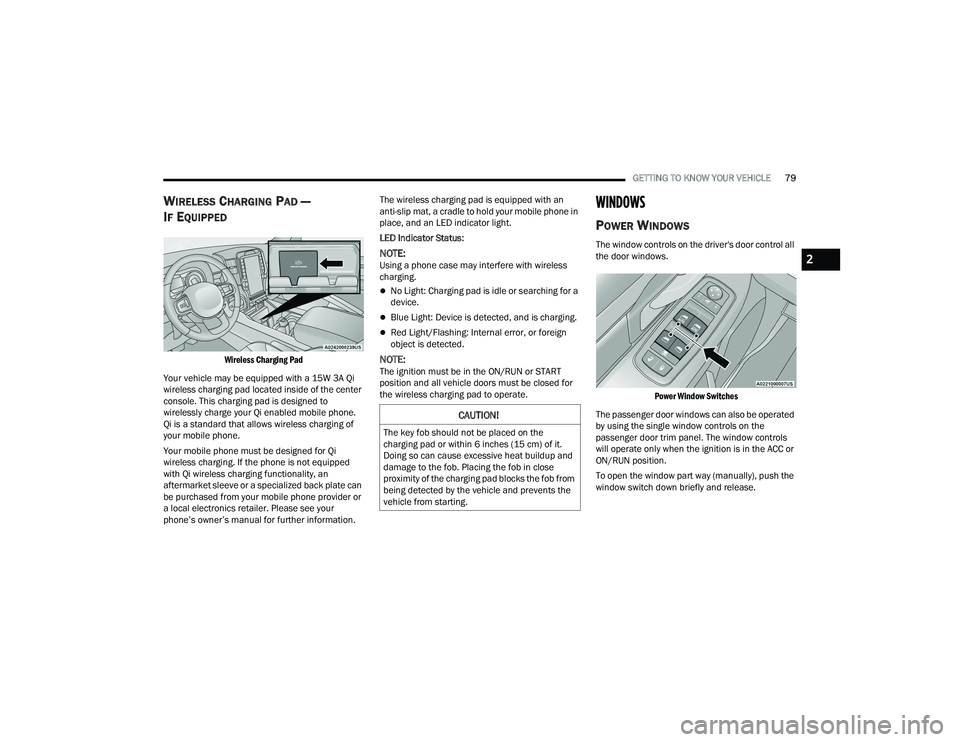
Wireless Charging Pad
Your vehicle may be equipped with a 15W 3A Qi
wireless charging pad located inside of the center
console. This charging pad is designed to
wirelessly charge your Qi enabled mobile phone.
Qi is a standard that allows wireless charging of
your mobile phone.
Your mobile phone must be designed for Qi
wireless charging. If the phone is not equipped
with Qi wireless charging functionality, an
aftermarket sleeve or a specialized back plate can
be purchased from your mobile phone provider or
a local electronics retailer. Please see your
phone’s owner’s manual for further information. The wireless charging pad is equipped with an
anti-slip mat, a cradle to hold your mobile phone in
place, and an LED indicator light.
LED Indicator Status:
NOTE:Using a phone case may interfere with wireless
charging.
No Light: Charging pad is idle or searching for a
device.
Blue Light: Device is detected, and is charging.
Red Light/Flashing: Internal error, or foreign
object is detected.
NOTE:The ignition must be in the ON/RUN or START
position and all vehicle doors must be closed for
the wireless charging pad to operate.
WINDOWS
POWER WINDOWS
The window controls on the driver's door control all
the door windows.
Power Window Switches
The passenger door windows can also be operated
by using the single window controls on the
passenger door trim panel. The window controls
will operate only when the ignition is in the ACC or
ON/RUN position.
To open the window part way (manually), push the
window switch down briefly and release.
CAUTION!
The key fob should not be placed on the
charging pad or within 6 inches (15 cm) of it.
Doing so can cause excessive heat buildup and
damage to the fob. Placing the fob in close
proximity of the charging pad blocks the fob from
being detected by the vehicle and prevents the
vehicle from starting.
2
22_DT_OM_EN_USC_t.book Page 79
Page 83 of 496
GETTING TO KNOW YOUR VEHICLE81
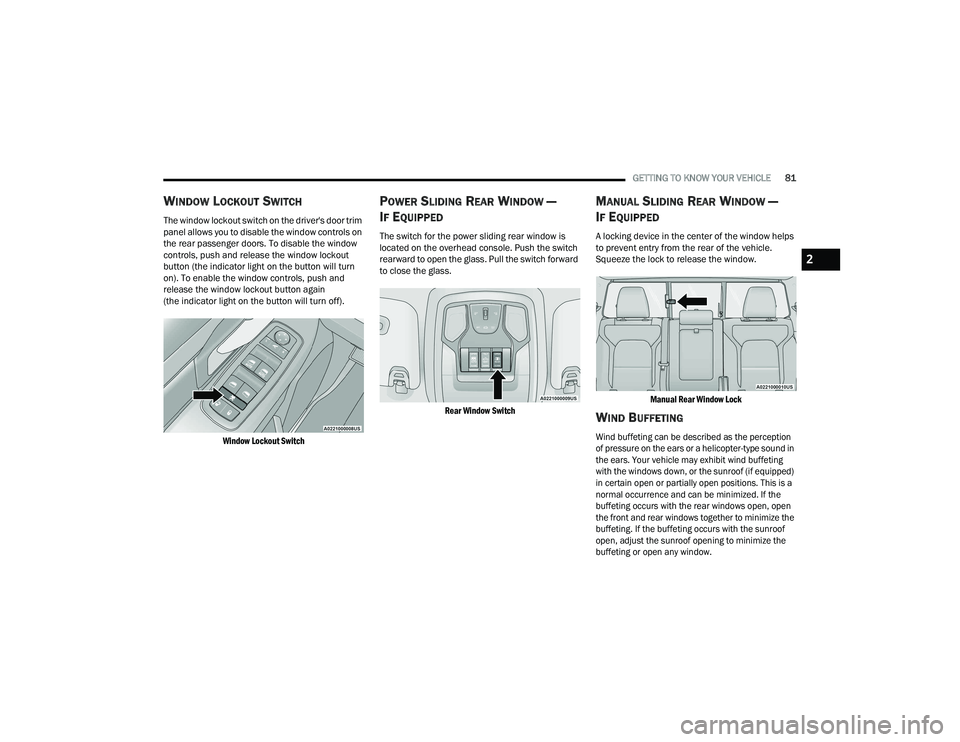
WINDOW LOCKOUT SWITCH
The window lockout switch on the driver's door trim
panel allows you to disable the window controls on
the rear passenger doors. To disable the window
controls, push and release the window lockout
button (the indicator light on the button will turn
on). To enable the window controls, push and
release the window lockout button again
(the indicator light on the button will turn off).
Window Lockout Switch
POWER SLIDING REAR WINDOW —
I
F EQUIPPED
The switch for the power sliding rear window is
located on the overhead console. Push the switch
rearward to open the glass. Pull the switch forward
to close the glass.
Rear Window Switch
MANUAL SLIDING REAR WINDOW —
I
F EQUIPPED
A locking device in the center of the window helps
to prevent entry from the rear of the vehicle.
Squeeze the lock to release the window.
Manual Rear Window Lock
WIND BUFFETING
Wind buffeting can be described as the perception
of pressure on the ears or a helicopter-type sound in
the ears. Your vehicle may exhibit wind buffeting
with the windows down, or the sunroof (if equipped)
in certain open or partially open positions. This is a
normal occurrence and can be minimized. If the
buffeting occurs with the rear windows open, open
the front and rear windows together to minimize the
buffeting. If the buffeting occurs with the sunroof
open, adjust the sunroof opening to minimize the
buffeting or open any window.
2
22_DT_OM_EN_USC_t.book Page 81
Page 88 of 496
86GETTING TO KNOW YOUR VEHICLE
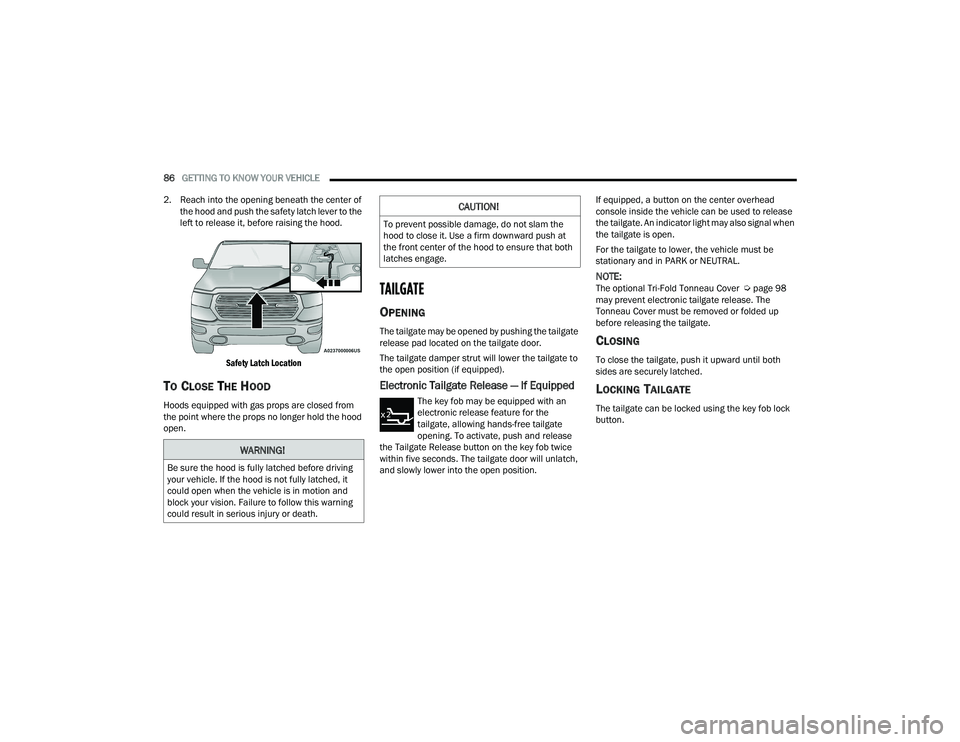
2. Reach into the opening beneath the center of the hood and push the safety latch lever to the
left to release it, before raising the hood.
Safety Latch Location
TO CLOSE THE HOOD
Hoods equipped with gas props are closed from
the point where the props no longer hold the hood
open.
TAILGATE
OPENING
The tailgate may be opened by pushing the tailgate
release pad located on the tailgate door.
The tailgate damper strut will lower the tailgate to
the open position (if equipped).
Electronic Tailgate Release — If Equipped
The key fob may be equipped with an
electronic release feature for the
tailgate, allowing hands-free tailgate
opening. To activate, push and release
the Tailgate Release button on the key fob twice
within five seconds. The tailgate door will unlatch,
and slowly lower into the open position. If equipped, a button on the center overhead
console inside the vehicle can be used to release
the tailgate. An indicator light may also signal when
the tailgate is open.
For the tailgate to lower, the vehicle must be
stationary and in PARK or NEUTRAL.
NOTE:The optional Tri-Fold Tonneau Cover Ú
page 98
may prevent electronic tailgate release. The
Tonneau Cover must be removed or folded up
before releasing the tailgate.
CLOSING
To close the tailgate, push it upward until both
sides are securely latched.
LOCKING TAILGATE
The tailgate can be locked using the key fob lock
button.
WARNING!
Be sure the hood is fully latched before driving
your vehicle. If the hood is not fully latched, it
could open when the vehicle is in motion and
block your vision. Failure to follow this warning
could result in serious injury or death.
CAUTION!
To prevent possible damage, do not slam the
hood to close it. Use a firm downward push at
the front center of the hood to ensure that both
latches engage.
22_DT_OM_EN_USC_t.book Page 86
Page 288 of 496
286MULTIMEDIA
Editing Your Notifications
Notifications are an important element of your
SiriusXM Guardian™ account. For example, any
time you use your remote services (such as
Remote Door Unlock), you can elect to receive a
text message, push notification, and/or E-mail to
notify you of the event. To set up the notifications,
please follow these instructions.
1. Log on to your Owner’s Account at
https://
www.mopar.com/en-us.html (US Residents)
and select “Dashboard”, or www.mopar.ca
(Canadian Residents), select “My Vehicle”
and then “Dashboard”.
2. Click the Edit/Edit Profile button.
3. Once there, select “SiriusXM Guardian™” where you can edit Notification Preferences.
4. You can enter a mobile phone and/or email address to notify you, and you can customize
the types of messages.
USING SIRIUSXM GUARDIAN™
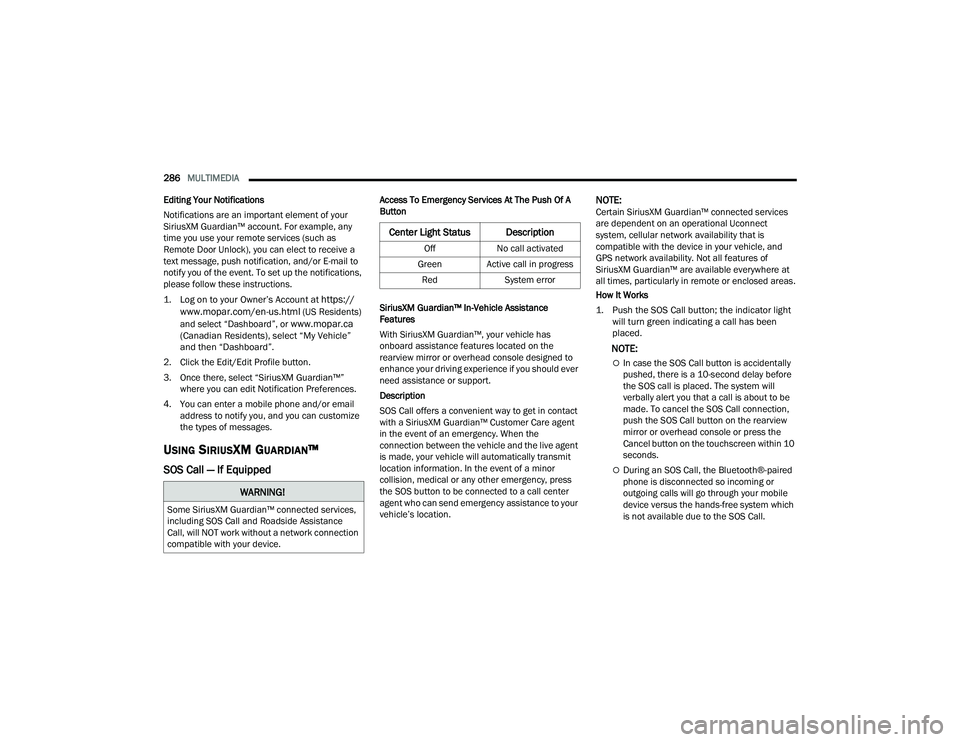
SOS Call — If Equipped
Access To Emergency Services At The Push Of A
Button
SiriusXM Guardian™ In-Vehicle Assistance
Features
With SiriusXM Guardian™, your vehicle has
onboard assistance features located on the
rearview mirror or overhead console designed to
enhance your driving experience if you should ever
need assistance or support.
Description
SOS Call offers a convenient way to get in contact
with a SiriusXM Guardian™ Customer Care agent
in the event of an emergency. When the
connection between the vehicle and the live agent
is made, your vehicle will automatically transmit
location information. In the event of a minor
collision, medical or any other emergency, press
the SOS button to be connected to a call center
agent who can send emergency assistance to your
vehicle’s location.NOTE:Certain SiriusXM Guardian™ connected services
are dependent on an operational Uconnect
system, cellular network availability that is
compatible with the device in your vehicle, and
GPS network availability. Not all features of
SiriusXM Guardian™ are available everywhere at
all times, particularly in remote or enclosed areas.
How It Works
1. Push the SOS Call button; the indicator light will turn green indicating a call has been
placed.
NOTE:
In case the SOS Call button is accidentally
pushed, there is a 10-second delay before
the SOS call is placed. The system will
verbally alert you that a call is about to be
made. To cancel the SOS Call connection,
push the SOS Call button on the rearview
mirror or overhead console or press the
Cancel button on the touchscreen within 10
seconds.
During an SOS Call, the Bluetooth®-paired
phone is disconnected so incoming or
outgoing calls will go through your mobile
device versus the hands-free system which
is not available due to the SOS Call.
WARNING!
Some SiriusXM Guardian™ connected services,
including SOS Call and Roadside Assistance
Call, will NOT work without a network connection
compatible with your device.
Center Light Status Description
Off No call activated
Green Active call in progress Red System error
22_DT_OM_EN_USC_t.book Page 286
Page 349 of 496

SAFETY347
Examples of improper front passenger seating
include:
The front passenger’s weight is transferred to
another part of the vehicle (like the door, arm
rest or instrument panel).
The front passenger leans forward, sideways, or
turns to face the rear of the vehicle.
The front passenger’s seatback is not in the full
upright position.
The front passenger carries or holds an object
while seated (e.g., backpack, box, etc.).
Objects are lodged under the front passenger
seat.
Objects are lodged between the front passenger
seat and center console.
Accessories that may change the seated weight
on the front passenger seat are attached to the
front passenger seat.
Anything that may decrease or increase the
front passenger’s seated weight.
The OCS determines the front passenger’s most
probable classification. If an occupant in the front
passenger seat is seated improperly, the occupant
may provide an output signal to the OCS that is
different from the occupant’s properly seated
weight input, for example:
Not Seated Properly
Not Seated Properly
Not Seated Properly
Not Seated Properly
6
22_DT_OM_EN_USC_t.book Page 347
Page 374 of 496

372IN CASE OF EMERGENCY
ASSIST AND SOS SYSTEM — IF EQUIPPED
Assist And SOS Buttons
If equipped, the overhead console contains an
ASSIST and a SOS button.
NOTE:
Your vehicle may be transmitting data as autho -
rized by the subscriber Ú page 480.
The ASSIST and SOS buttons will only function if
you are connected to an operable LTE (voice/
data) or 4G (data) network, which comes as a
built in function. Other Uconnect services will
only be operable if your SiriusXM Guardian™
service is active and connected to an operable
LTE (voice/data) or 4G (data) network.
ASSIST Call
The ASSIST Button is used to automatically
connect you to any one of the following support
centers:
Roadside Assistance – If you get a flat tire, or
need a tow, just push the ASSIST button and
you’ll be connected to someone who can help.
Roadside Assistance will know what vehicle
you’re driving and its location. Additional fees
may apply for roadside assistance.
SiriusXM Guardian™ Customer Care – In-vehicle
support for SiriusXM Guardian™.
Vehicle Customer Care – Total support for all
other vehicle issues.
Uconnect Customer Care - Total support for
Radio, Phone and NAV issues. SOS Call
1. Push the SOS Call button on the overhead
console.
NOTE:In case the SOS Call button is pushed in error,
there will be a ten second delay before the SOS
Call system initiates a call to a SOS operator. To
cancel the SOS Call connection, push the SOS call
button on the overhead console or press the
cancellation button on the Device Screen. Termi -
nation of the SOS Call will turn off the green LED
light on the overhead console.
2. The LED lights located within the ASSIST and SOS buttons on the overhead console will turn
green once a connection to a SOS operator has
been made.
3. Once a connection between the vehicle and a SOS operator is made, the SOS Call system
may transmit the following important vehicle
information to a SOS operator:
Indication that the occupant placed a SOS
Call
The vehicle brand
The last known GPS coordinates of the
vehicle
4. You should be able to speak with the SOS operator through the vehicle audio system to
determine if additional help is needed.
1 — ASSIST Button
2 — SOS Button
WARNING!
ALWAYS obey traffic laws and pay attention to
the road. ALWAYS drive safely with your hands on
the steering wheel. You have full responsibility
and assume all risks related to the use of the
features and applications in this vehicle. Only
use the features and applications when it is safe
to do so. Failure to do so may result in an
accident involving serious injury or death.
22_DT_OM_EN_USC_t.book Page 372
Page 491 of 496

489
Operating Instructions
............................... 338Pregnant Women...................................... 340Pretensioners............................................ 340Rear Seat.................................................. 336Reminder.................................................. 335Seat Belt Extender.................................... 339Seat Belt Pretensioner.............................. 340Seat Belt Reminder................................... 335Untwisting Procedure................................ 338Seat Belts Maintenance................................ 464Seats................................................. 35, 37, 38Adjustment........................................... 35, 38Easy Entry................................................... 39Head Restraints.......................................... 41Memory....................................................... 34Power.......................................................... 38Rear Folding................................................ 35Reclining Rear............................................. 37Tilting.......................................................... 35Second Row USB............................................. 75Security System...................................... 27, 131Selection Of Coolant (Antifreeze)...................473Send & Go........................................... 292, 298Sentry Key (Immobilizer).................................. 22Service Assistance......................................... 477Service Contract............................................ 478
Service Manuals........................................... 480Settings, Audio.............................................. 268Shifting......................................................... 153Automatic Transmission........................... 154Transfer Case, Shifting Into Transfer Case Neutral (N).......................... 135, 229Transfer Case, Shifting Out Of Transfer Case Neutral (N)................................... 230Shoulder Belts.............................................. 336Side Steps, Power............................................ 30Signals, Turn................................. 57, 137, 370Sirius Satellite Radio..................................... 264Favorites................................................... 267Replay...................................................... 266SiriusXM Satellite RadioBrowse in SXM......................................... 267Favorites................................................... 267Replay...................................................... 266Sliding Rear Window, Power............................ 81Smart Watch................................................. 296Snow Chains (Tire Chains)............................ 458Snow Plow.................................................... 225Snow Tires.................................................... 455SOS Call............................................... 286, 298Spare Tires................................. 455, 456, 457Speed Control (Cruise Control)..................... 178
Starting....................................... 140, 141, 144Automatic Transmission........................... 141Button..........................................................23Cold Weather............................................ 145Engine Fails To Start................................. 143Starting And Operating................ 135, 141, 144Starting Procedures............................. 141, 144SteeringPower........................................................ 173Tilt Column...................................................33Wheel, Heated...................................... 33, 34Wheel, Tilt....................................................33Wheel, Voice Recognition............................43Steering Wheel Audio Controls...................... 262Steering Wheel Mounted Sound System....... 262Steps, Power Side............................................30Stolen Vehicle Assistance.................... 294, 299Stop/Start............................................ 133, 174Storage............................................................69Below Seat...................................................74Door.............................................................69Front Bench Seat.........................................72Glove Compartment.....................................69In Floor........................................................73Rear Console...............................................73Storage Compartment, Center Seat.................70
11
22_DT_OM_EN_USC_t.book Page 489