trailer RAM 1500 2022 Owners Manual
[x] Cancel search | Manufacturer: RAM, Model Year: 2022, Model line: 1500, Model: RAM 1500 2022Pages: 496, PDF Size: 18.03 MB
Page 5 of 496
3
Power Folding Outside Mirrors For
Standard And Trailer Tow — If Equipped.........48
Trailer Towing Mirrors — If Equipped...............49
Heated Mirrors — If Equipped..........................49
Tilt Side Mirrors In Reverse — If Equipped......49
UNIVERSAL GARAGE DOOR OPENER
(HOMELINK®) — IF EQUIPPED ............................ 49
Before You Begin Programming
HomeLink®.......................................................50
Erasing All The HomeLink® Channels ............50
Identifying Whether You Have A Rolling
Code Or Non-Rolling Code Device ...................50
Programming HomeLink® To A Garage
Door Opener .....................................................51
Programming HomeLink® To A
Miscellaneous Device ......................................52
Reprogramming A Single HomeLink®
Button ...............................................................52
Canadian/Gate Operator Programming .........52
Security .............................................................53
Troubleshooting Tips ........................................53
EXTERIOR LIGHTS.................................................. 54
Headlight Switch...............................................54
Multifunction Lever .........................................55
Daytime Running Lights (DRLs) ......................55
High/Low Beam Switch ...................................55 Automatic High Beam Headlamp
Control — If Equipped ......................................55
Flash-To-Pass ...................................................55
Automatic Headlights — If Equipped ..............56
Parking Lights And Panel Lights ......................56
Automatic Headlights With Wipers .................56
Headlight Delay ................................................56
Lights-On Reminder .........................................56
Fog Lights — If Equipped .................................57
Turn Signals ......................................................57
Lane Change Assist — If Equipped ..................57
Cargo Lights/Trailer Spotter Lights/
Trailer Hitch Light With Bed Lights —
If Equipped........................................................57
Battery Saver ....................................................59
INTERIOR LIGHTS ..................................................59
Courtesy Lights .................................................59
Illuminated Entry .............................................60
WINDSHIELD WIPERS AND WASHERS............... 61
Windshield Wiper Operation ............................61
Rain Sensing Wipers — If Equipped ................62
CLIMATE CONTROLS .............................................62
Automatic Climate Control
Descriptions And Functions ............................62
Manual Climate Control Descriptions And
Functions .........................................................65 Automatic Temperature Control (ATC) —
If Equipped .......................................................67
Climate Voice Recognition — If Equipped ....... 68
Operating Tips .................................................68
INTERIOR STORAGE AND EQUIPMENT ............... 69
Storage ............................................................. 69
USB/AUX Control .............................................. 75
Electrical Power Outlets................................... 76
Power Inverter — If Equipped .......................... 77
Wireless Charging Pad — If Equipped ............. 79
WINDOWS ............................................................. 79
Power Windows ................................................ 79
Automatic Window Features ........................... 80
Reset Auto-Up .................................................. 80
Window Lockout Switch ................................... 81
Power Sliding Rear Window — If Equipped ..... 81
Manual Sliding Rear Window —
If Equipped .......................................................81
Wind Buffeting .................................................81
POWER SUNROOF — IF EQUIPPED ..................... 82
Single Pane Power Sunroof — If Equipped ..... 82
Dual Pane Power Sunroof — If Equipped........ 83
HOOD....................................................................... 85
To Open The Hood............................................ 85
To Close The Hood ........................................... 86
22_DT_OM_EN_USC_t.book Page 3
Page 8 of 496
6
TRAILER CAMERAS — IF EQUIPPED ................. 203 Trailer Surround View Camera System —
If Equipped..................................................... 203
AUX Camera — If Equipped ........................... 206
REFUELING THE VEHICLE — GASOLINE
ENGINE ................................................................. 207
REFUELING THE VEHICLE — DIESEL
ENGINE ................................................................. 208
Avoid Using Contaminated Fuel ................... 208
Bulk Fuel Storage — Diesel Fuel................... 209
Diesel Exhaust Fluid ...................................... 209Diesel Exhaust Fluid Storage........................ 209
Adding Diesel Exhaust Fluid ......................... 209
VEHICLE LOADING ............................................... 211
Gross Vehicle Weight Rating (GVWR) .......... 211
Payload .......................................................... 211
Gross Axle Weight Rating (GAWR) ................ 211
Tire Size.......................................................... 212
Rim Size ......................................................... 212
Inflation Pressure .......................................... 212
Curb Weight ................................................... 212Loading .......................................................... 212
TRAILER TOWING ................................................ 212
Common Towing Definitions ......................... 213Trailer Hitch Type and Maximum Trailer
Weight ............................................................ 216
Trailer Towing Weights
(Maximum Trailer Weight Ratings) ............... 217 Trailer And Tongue Weight............................ 217
Trailer Reverse Steering Control .................. 217
Towing Requirements .................................. 219
Towing Tips ................................................... 225
SNOWPLOW......................................................... 225
Before Plowing............................................... 226
Snowplow Prep Package Model
Availability ...................................................... 226
Over The Road Operation With Snowplow
Attached......................................................... 226
Operating Tips ............................................... 226
General Maintenance ................................... 226
RECREATIONAL TOWING
(BEHIND MOTORHOME) .................................... 227
Towing This Vehicle Behind Another
Vehicle ........................................................... 227
Recreational Towing — Two-Wheel
Drive Models.................................................. 228
Recreational Towing — Four-Wheel
Drive Models.................................................. 228
DRIVING TIPS ....................................................... 230
Driving On Slippery Surfaces ....................... 230
Driving Through Water ................................. 231
Off-Road Driving Tips .................................... 232
MULTIMEDIA
UCONNECT SYSTEMS .......................................... 233
CYBERSECURITY .................................................. 233
UCONNECT SETTINGS ........................................ 234Customer Programmable Features ............ 235
UCONNECT INTRODUCTION................................ 259
System Overview .......................................... 259Safety And General Information .................. 261
UCONNECT MODES ............................................. 262
Steering Wheel Audio Controls..................... 262Radio Mode .................................................. 262Media Mode ................................................. 270
Phone Mode ................................................. 272
CONNECTED VEHICLE SERVICES —
IF EQUIPPED ........................................................ 282
Is My Vehicle Connected? ............................ 282
Introduction To Connected Vehicle
Services ........................................................ 283
Getting Started With Connected Vehicle
Services ........................................................ 284
Using SiriusXM Guardian™ .......................... 286
Manage My SiriusXM Guardian™
Account .......................................................... 297
22_DT_OM_EN_USC_t.book Page 6
Page 16 of 496

14 Electronic Throttle Control (ETC) Warning Light Úpage 129
Electric Power Steering (EPS) Fault Warning Light Úpage 130
Engine Coolant Temperature Warning Light Úpage 130
Hood Open Warning Light Úpage 130
Oil Pressure Warning Light Úpage 130
Oil Temperature Warning Light Úpage 130
Seat Belt Reminder Warning Light Úpage 130
Tailgate Open Warning Light Úpage 130
Red Warning Lights
Trailer Brake Disconnected Warning Light
Úpage 131
Transmission Temperature Warning Light Úpage 131
Vehicle Security Warning Light Úpage 131
Yellow Warning Lights
Adaptive Cruise Control (ACC) Fault Warning Light
Úpage 131
Air Suspension Fault Warning Light Úpage 131
Anti-Lock Brake System (ABS) Warning Light Úpage 131
Cruise Control Fault Warning Light Úpage 133
Red Warning Lights
22_DT_OM_EN_USC_t.book Page 14
Page 18 of 496
16 Air Suspension Normal Height Indicator Light Úpage 134
Air Suspension Aerodynamic Height Indicator Light Úpage 134
Air Suspension Ride Height Raising Indicator Light Úpage 134
Air Suspension Ride Height Lowering Indicator Light Úpage 135
Cargo Light
Ú page 135
Entry/Exit Indicator Light Úpage 135
Forward Collision Warning Off Indicator Light Úpage 135
Yellow Indicator Lights
Low Diesel Exhaust Fluid (DEF) Indicator Light
Úpage 135
NEUTRAL Indicator Light Úpage 135
Trailer Merge Assist Indicator Light Úpage 135
TOW/HAUL Indicator Light Úpage 135
Rear Axle Lock Indicator Light Úpage 135
4WD Indicator Light Úpage 135
4WD Low Indicator Light Úpage 135
Yellow Indicator Lights
22_DT_OM_EN_USC_t.book Page 16
Page 50 of 496
48GETTING TO KNOW YOUR VEHICLE
POWER MIRRORS
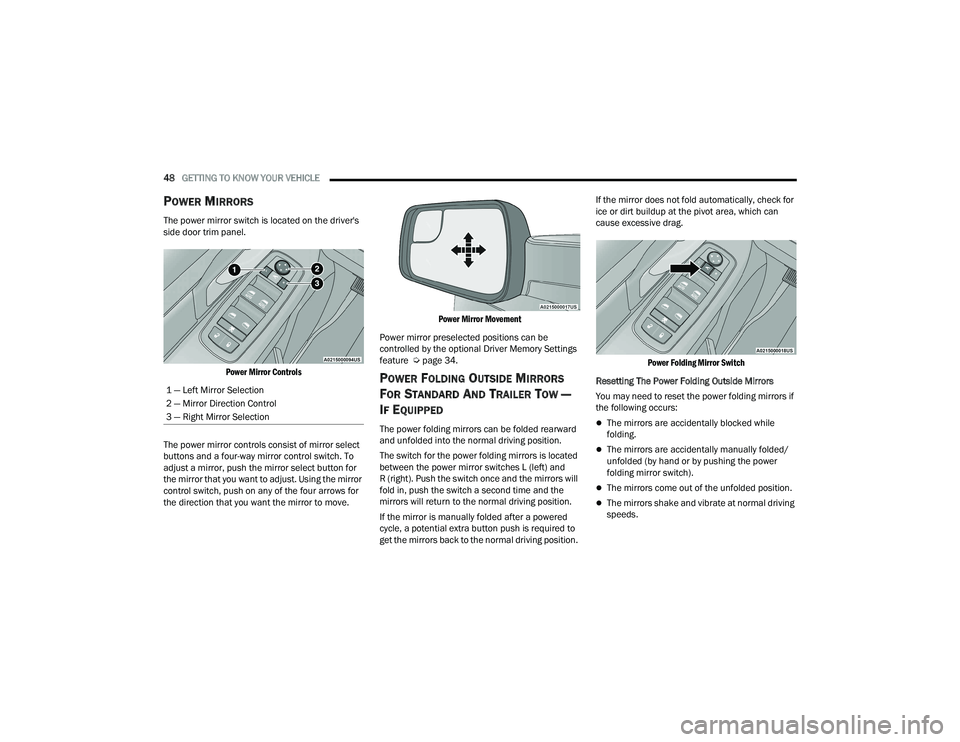
The power mirror switch is located on the driver's
side door trim panel.
Power Mirror Controls
The power mirror controls consist of mirror select
buttons and a four-way mirror control switch. To
adjust a mirror, push the mirror select button for
the mirror that you want to adjust. Using the mirror
control switch, push on any of the four arrows for
the direction that you want the mirror to move.
Power Mirror Movement
Power mirror preselected positions can be
controlled by the optional Driver Memory Settings
feature Ú page 34.
POWER FOLDING OUTSIDE MIRRORS
F
OR STANDARD AND TRAILER TOW —
I
F EQUIPPED
The power folding mirrors can be folded rearward
and unfolded into the normal driving position.
The switch for the power folding mirrors is located
between the power mirror switches L (left) and
R (right). Push the switch once and the mirrors will
fold in, push the switch a second time and the
mirrors will return to the normal driving position.
If the mirror is manually folded after a powered
cycle, a potential extra button push is required to
get the mirrors back to the normal driving position. If the mirror does not fold automatically, check for
ice or dirt buildup at the pivot area, which can
cause excessive drag.
Power Folding Mirror Switch
Resetting The Power Folding Outside Mirrors
You may need to reset the power folding mirrors if
the following occurs:The mirrors are accidentally blocked while
folding.
The mirrors are accidentally manually folded/
unfolded (by hand or by pushing the power
folding mirror switch).
The mirrors come out of the unfolded position.
The mirrors shake and vibrate at normal driving
speeds.
1 — Left Mirror Selection
2 — Mirror Direction Control
3 — Right Mirror Selection
22_DT_OM_EN_USC_t.book Page 48
Page 51 of 496

GETTING TO KNOW YOUR VEHICLE49
To reset the power folding mirrors: Fold and unfold
them by pushing the button (this may require
multiple attempts). This resets them to their
normal driving position.
TRAILER TOWING MIRRORS —
I
F EQUIPPED
These mirrors are designed with an adjustable
mirror head to provide a greater vision range when
towing extra-wide loads. To change position
inboard or outboard, the mirror head should be
rotated (flipped in or out).
Trailer Towing Position
NOTE:Fold the trailer towing mirrors prior to entering an
automated car wash. A small blindspot mirror is located next to the main
mirror and can be adjusted manually.
Blindspot Mirror
HEATED MIRRORS — IF EQUIPPED
These mirrors are heated to melt frost or
ice. This feature will be activated
whenever you turn on the rear window
defroster (if equipped) Ú page 62.
TILT SIDE MIRRORS IN REVERSE —
I
F EQUIPPED
This feature provides automatic outside mirror
positioning which will assist with the driver’s
ground visibility. The outside mirrors will move
slightly downward from the present position
when the vehicle is shifted into REVERSE. The outside mirrors will then return to the original
position when the vehicle is shifted out of
REVERSE. If the vehicle is equipped with Driver
Memory Settings, this feature will be linked to the
programmable settings.
NOTE:The Tilt Side Mirrors In Reverse feature can be
turned on and off using the Uconnect system
Ú
page 234.
UNIVERSAL GARAGE DOOR OPENER
(HOMELINK®) — IF EQUIPPED
HomeLink® Buttons
2
22_DT_OM_EN_USC_t.book Page 49
Page 56 of 496

54GETTING TO KNOW YOUR VEHICLE
EXTERIOR LIGHTS
HEADLIGHT SWITCH
The headlight switch is located on the left side of
the instrument panel. This switch controls the
operation of the headlights, parking lights,
automatic headlights (if equipped), instrument
panel light dimming, cargo light/trailer spotter
lights (if equipped), and fog lights (if equipped).
Headlight Switch Headlight Switch (Vehicles Sold In Canada)
NOTE:Vehicles sold in Canada are equipped with a head
-
light switch without the OFF position. In order to
turn the exterior lights off, the headlight switch
must be rotated to AUTO position.
To turn on the headlights, rotate the headlight
switch clockwise. When the headlight switch is on,
the parking lights, taillights, license plate light and
instrument panel lights are also turned on. To turn
off the headlights, rotate the headlight switch back
to the O (off) position.
NOTE:For vehicles sold in Canada, rotate the headlight
switch clockwise from the parking lights and
instrument panel lights position to the first detent
to turn on headlights, parking lights, and
instrument panel lights. Rotate the headlight
switch to the second detent for the AUTO position.
NOTE:
Your vehicle is equipped with plastic headlight
and fog light (if equipped) lenses that are lighter
and less susceptible to stone breakage than
glass lights. Plastic is not as scratch resistant as
glass and therefore different lens cleaning
procedures must be followed.
To minimize the possibility of scratching the
lenses and reducing light output, avoid wiping
with a dry cloth. To remove road dirt, wash with
a mild soap solution followed by rinsing.
1 — Rotate Headlight Control
2 — Push Fog Light Switch
3 — Ambient Light Dimmer Control
4 — Instrument Panel Dimmer Control
5 — Push Cargo Light Switch
1 — Rotate Headlight Control
2 — Push Fog Switch
3 — Ambient Light Dimmer Control
4 — Instrument Panel Dimmer Control
5 — Push Cargo Light Switch
CAUTION!
Do not use abrasive cleaning components,
solvents, steel wool or other abrasive materials
to clean the lenses.
22_DT_OM_EN_USC_t.book Page 54
Page 59 of 496

GETTING TO KNOW YOUR VEHICLE57
FOG LIGHTS — IF EQUIPPED
To activate the front fog lights, turn on the parking
lights or low beam headlights and push the fog
light switch located within the headlight switch.
Pushing the fog light switch a second time will turn
the front fog lights off.
Fog Light Button
Fog Light Switch (Vehicles Sold In Canada Only)
The fog lights will operate only when the parking
lights are on or when the vehicle headlights are on
low beam. An indicator light located in the
instrument cluster will illuminate when the fog
lights are on. The fog lights will turn off when the
button is pushed a second time, when the
headlight switch is rotated to the O (off) position, or
the high beam is selected.
If the fog lights are off, one of the fog lights will
illuminate depending on the direction in which the
vehicle is turning. This will provide increased
visibility while turning, depending on the angle of
the steering wheel.
TURN SIGNALS
Move the multifunction lever up or down to
activate the turn signals. The arrows on each side
of the instrument cluster flash to show proper
operation.
NOTE:If either light remains on and does not flash, or
there is a very fast flash rate, check for a defective
outside light bulb.
LANE CHANGE ASSIST — IF EQUIPPED
Lightly push the multifunction lever up or down,
without moving beyond the detent, and the turn
signal will flash three times then automatically
turn off.
CARGO LIGHTS/TRAILER SPOTTER
L
IGHTS/TRAILER HITCH LIGHT WITH
B
ED LIGHTS — IF EQUIPPED
The cargo light, bed lights, trailer spotter lights, and
trailer hitch light are turned on by pushing the
cargo light button located on the lower half of the
headlight switch.
Cargo/Bed Lights Button On Headlight Switch
2
22_DT_OM_EN_USC_t.book Page 57
Page 60 of 496

58GETTING TO KNOW YOUR VEHICLE
Cargo/Bed Lights Button On Headlight Switch (Vehicles Sold In Canada)
Cargo Lights
When the vehicle is stationary, these lights can
also be turned on using the switch located just
inside the pickup box, on the lower part of the bed
light lens. A telltale will illuminate in the instrument
cluster display when these lights are on. Pushing
the switch a second time will turn the lights off.
Bed Light Switch (Without RamBox)
The cargo light and bed lights (if equipped) will turn
on for approximately 30 seconds when a key fob
unlock button is pushed, as part of the Illuminated
Entry feature. When these lights are activated using the button
on the headlight switch the cargo lights, trailer
spotter lights, and trailer hitch light will remain
illuminated when the vehicle transmission is in
PARK, NEUTRAL, or REVERSE. The lights will turn
off when the vehicle transmission is placed in
DRIVE.
When the vehicle is placed in the REVERSE
position, the trailer hitch light will turn on
automatically. The trailer hitch light will turn off
when the vehicle is placed in the DRIVE position.
NOTE:The bed lights are not affected by gear selection.
NOTE:For vehicles shipped to or sold in the states of
California or Mississippi, the cargo, bed, and mirror
spotter lights will not work while the vehicle is in
motion. In every other state, the cargo and mirror
spotter lights will turn off when the vehicle is in
motion, but the bed light will remain on.
22_DT_OM_EN_USC_t.book Page 58
Page 109 of 496

GETTING TO KNOW YOUR INSTRUMENT PANEL107
BASE / MIDLINE INSTRUMENT CLUSTER
D
ESCRIPTIONS — GASOLINE
1. Tachometer
Indicates the engine speed in revolutions
per minute (RPM x 1000).
2. Voltmeter
When the vehicle is in the RUN state, the
gauge indicates the electrical system
voltage. The pointer should stay within the
normal range if the battery is charged. If the
pointer moves to either extreme left or right
and remains there during normal driving,
the electrical system should be serviced.
NOTE:In vehicles equipped with Stop/Start, a reduced
voltage may be present during an Autostop.
3. Instrument Cluster Display
When the appropriate conditions exist, this
display shows the instrument cluster
display messages Ú page 114.
The display always shows one of the main
menu items after ignition on. 4. Oil Pressure Gauge
The pointer should always indicate the oil
pressure when the engine is running. A
continuous high or low reading under
normal driving conditions may indicate a
lubrication system malfunction. Immediate
service should be obtained from an autho
-
rized dealer.
NOTE:In vehicles equipped with Stop/Start, an oil
pressure indication of zero is normal during an
Autostop.
5. Speedometer
Indicates vehicle speed.
6. Temperature Gauge
The pointer shows engine coolant tempera -
ture. The pointer positioned within the
normal range indicates that the engine
cooling system is operating satisfactorily.
The pointer will likely indicate a higher
temperature when driving in hot weather,
up mountain grades, or when towing a
trailer. It should not be allowed to exceed
the upper limits of the normal operating
range. 7. Fuel GaugeThe pointer shows the level of fuel in the
fuel tank when the ignition is in the ON/RUN
position.
The fuel pump symbol points to
the side of the vehicle where the
fuel door is located.
WARNING!
A hot engine cooling system is dangerous. You or
others could be badly burned by steam or boiling
coolant. You may want to call an authorized
dealer for service if your vehicle overheats
Ú page 423.
CAUTION!
Driving with a hot engine cooling system could
damage your vehicle. If the temperature gauge
reads “H,” pull over and stop the vehicle. Idle the
vehicle with the air conditioner turned off until
the pointer drops back into the normal range. If
the pointer remains on the “H,” turn the engine
off immediately and call an authorized dealer for
service.
3
22_DT_OM_EN_USC_t.book Page 107