key battery RAM 1500 2022 User Guide
[x] Cancel search | Manufacturer: RAM, Model Year: 2022, Model line: 1500, Model: RAM 1500 2022Pages: 496, PDF Size: 18.03 MB
Page 62 of 496
60GETTING TO KNOW YOUR VEHICLE
NOTE:The courtesy/reading lights will remain on until the
switch is pushed a second time, so be sure they
have been turned off before exiting the vehicle. If
the interior lights are left on after the ignition is
turned off, they will automatically turn off after
10 minutes.
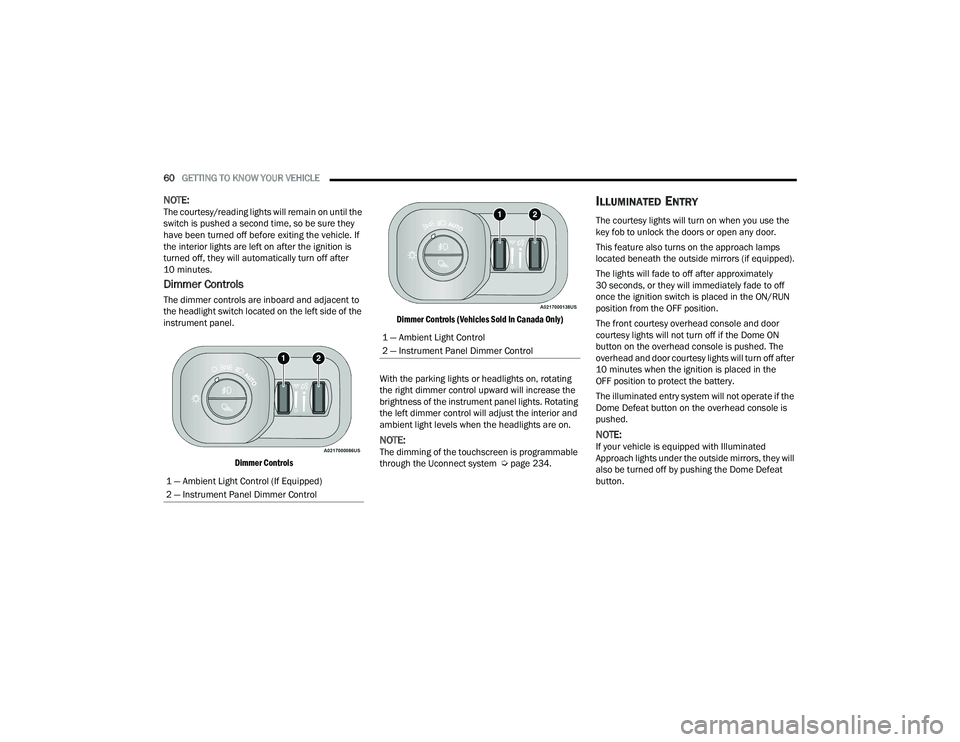
Dimmer Controls
The dimmer controls are inboard and adjacent to
the headlight switch located on the left side of the
instrument panel.
Dimmer Controls Dimmer Controls (Vehicles Sold In Canada Only)
With the parking lights or headlights on, rotating
the right dimmer control upward will increase the
brightness of the instrument panel lights. Rotating
the left dimmer control will adjust the interior and
ambient light levels when the headlights are on.
NOTE:The dimming of the touchscreen is programmable
through the Uconnect system Ú page 234.
ILLUMINATED ENTRY
The courtesy lights will turn on when you use the
key fob to unlock the doors or open any door.
This feature also turns on the approach lamps
located beneath the outside mirrors (if equipped).
The lights will fade to off after approximately
30 seconds, or they will immediately fade to off
once the ignition switch is placed in the ON/RUN
position from the OFF position.
The front courtesy overhead console and door
courtesy lights will not turn off if the Dome ON
button on the overhead console is pushed. The
overhead and door courtesy lights will turn off after
10 minutes when the ignition is placed in the
OFF position to protect the battery.
The illuminated entry system will not operate if the
Dome Defeat button on the overhead console is
pushed.
NOTE:If your vehicle is equipped with Illuminated
Approach lights under the outside mirrors, they will
also be turned off by pushing the Dome Defeat
button.
1 — Ambient Light Control (If Equipped)
2 — Instrument Panel Dimmer Control
1 — Ambient Light Control
2 — Instrument Panel Dimmer Control
22_DT_OM_EN_USC_t.book Page 60
Page 78 of 496
76GETTING TO KNOW YOUR VEHICLE
(Continued)
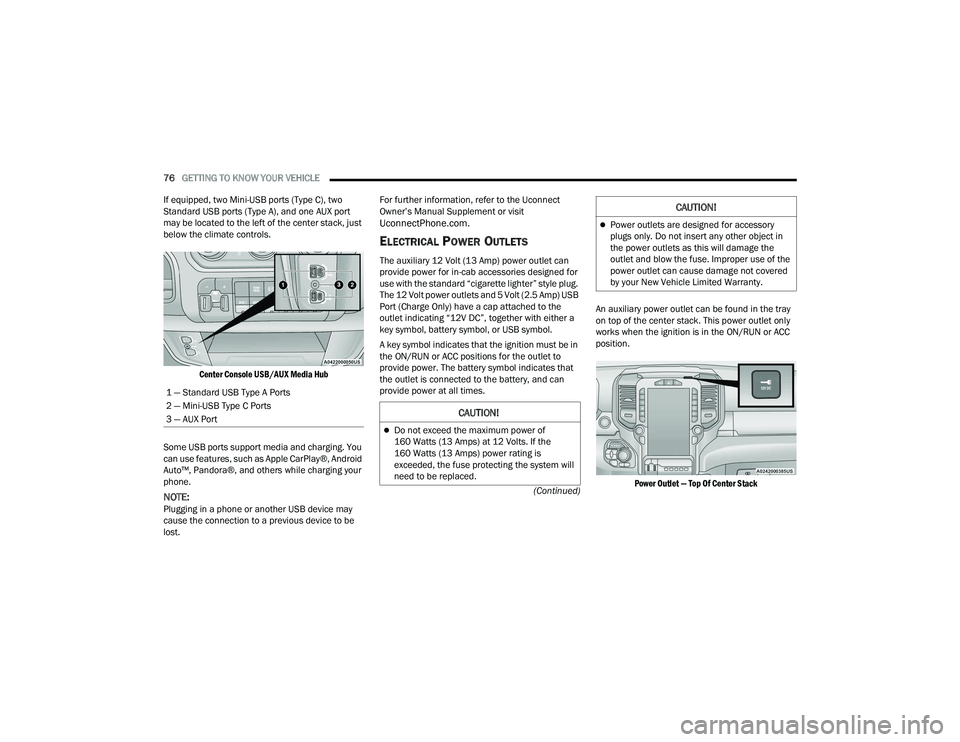
If equipped, two Mini-USB ports (Type C), two
Standard USB ports (Type A), and one AUX port
may be located to the left of the center stack, just
below the climate controls.
Center Console USB/AUX Media Hub
Some USB ports support media and charging. You
can use features, such as Apple CarPlay®, Android
Auto™, Pandora®, and others while charging your
phone.
NOTE:Plugging in a phone or another USB device may
cause the connection to a previous device to be
lost. For further information, refer to the Uconnect
Owner’s Manual Supplement or visit
UconnectPhone.com.
ELECTRICAL POWER OUTLETS
The auxiliary 12 Volt (13 Amp) power outlet can
provide power for in-cab accessories designed for
use with the standard “cigarette lighter” style plug.
The 12 Volt power outlets and 5 Volt (2.5 Amp) USB
Port (Charge Only) have a cap attached to the
outlet indicating “12V DC”, together with either a
key symbol, battery symbol, or USB symbol.
A key symbol indicates that the ignition must be in
the ON/RUN or ACC positions for the outlet to
provide power. The battery symbol indicates that
the outlet is connected to the battery, and can
provide power at all times.
An auxiliary power outlet can be found in the tray
on top of the center stack. This power outlet only
works when the ignition is in the ON/RUN or ACC
position.
Power Outlet — Top Of Center Stack
1 — Standard USB Type A Ports
2 — Mini-USB Type C Ports
3 — AUX Port
CAUTION!
Do not exceed the maximum power of
160 Watts (13 Amps) at 12 Volts. If the
160 Watts (13 Amps) power rating is
exceeded, the fuse protecting the system will
need to be replaced.
Power outlets are designed for accessory
plugs only. Do not insert any other object in
the power outlets as this will damage the
outlet and blow the fuse. Improper use of the
power outlet can cause damage not covered
by your New Vehicle Limited Warranty.
CAUTION!
22_DT_OM_EN_USC_t.book Page 76
Page 97 of 496
GETTING TO KNOW YOUR VEHICLE95
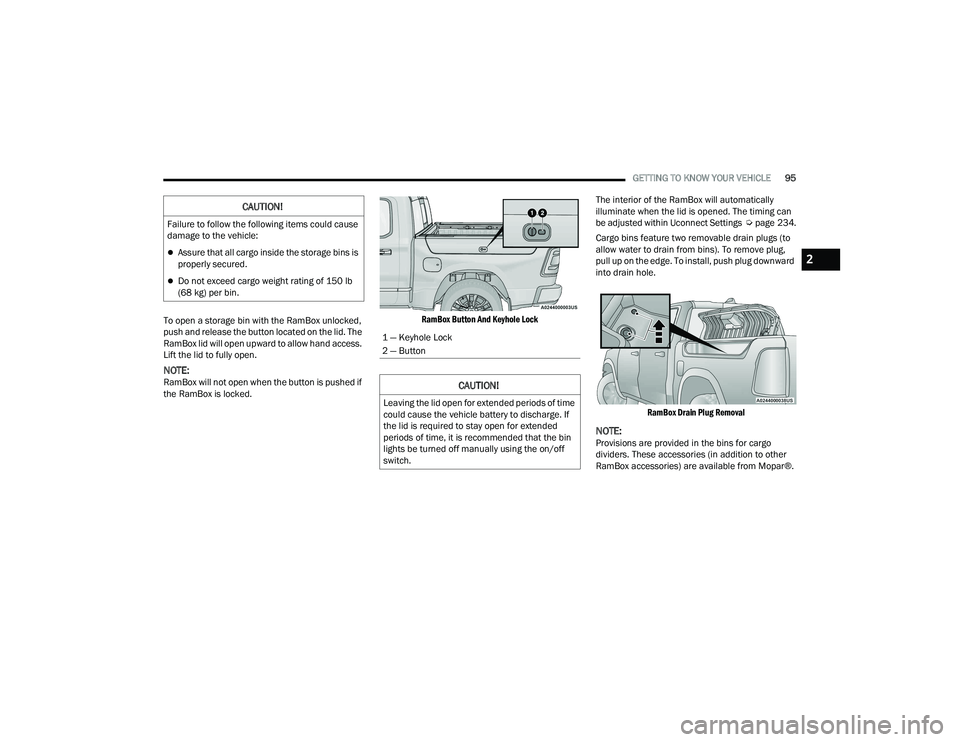
To open a storage bin with the RamBox unlocked,
push and release the button located on the lid. The
RamBox lid will open upward to allow hand access.
Lift the lid to fully open.
NOTE:RamBox will not open when the button is pushed if
the RamBox is locked.
RamBox Button And Keyhole Lock
The interior of the RamBox will automatically
illuminate when the lid is opened. The timing can
be adjusted within Uconnect Settings
Úpage 234.
Cargo bins feature two removable drain plugs (to
allow water to drain from bins). To remove plug,
pull up on the edge. To install, push plug downward
into drain hole.
RamBox Drain Plug Removal
NOTE:Provisions are provided in the bins for cargo
dividers. These accessories (in addition to other
RamBox accessories) are available from Mopar®.
CAUTION!
Failure to follow the following items could cause
damage to the vehicle:
Assure that all cargo inside the storage bins is
properly secured.
Do not exceed cargo weight rating of 150 lb
(68 kg) per bin.
1 — Keyhole Lock
2 — Button
CAUTION!
Leaving the lid open for extended periods of time
could cause the vehicle battery to discharge. If
the lid is required to stay open for extended
periods of time, it is recommended that the bin
lights be turned off manually using the on/off
switch.
2
22_DT_OM_EN_USC_t.book Page 95
Page 145 of 496

STARTING AND OPERATING143
(Continued)
If the driver shifts into PARK while moving, the
vehicle may AutoPark.
AutoPark will engage
ONLY when vehicle speed is
1.2 mph (1.9 km/h) or less.
The message “ Vehicle Speed is Too High to Shift to
P” will be displayed in the instrument cluster if
vehicle speed is above 1.2 mph (1.9 km/h).
4WD LOW — If Equipped
AutoPark will be disabled when operating the
vehicle in 4WD LOW.
The message “ AutoPark Disabled ” will be
displayed in the instrument cluster.
Additional customer warnings will be given when
all of these conditions are met:
Vehicle is not in PARK
Driver’s door is ajar
Vehicle is in 4WD LOW The message “
AutoPark Not Engaged” will be
displayed in the instrument cluster. A warning
chime will continue until you shift the vehicle into
PARK or the driver’s door is closed.
ALWAYS DO A VISUAL CHECK
that your vehicle is in
PARK by looking for the "P" in the instrument
cluster display and near the gear selector. As an
added precaution, always apply the parking brake
when exiting the vehicle.
IF ENGINE FAILS TO START
If the engine fails to start after you have followed
the “Normal Starting” procedure, it may be
flooded. Push the accelerator pedal all the way to
the floor and hold it there while the engine is
cranking. This should clear any excess fuel in case
the engine is flooded.
The starter motor will engage automatically, run for
10 seconds, and then disengage. Once this occurs,
release the accelerator pedal and the brake pedal,
wait 10 to 15 seconds, then repeat the “Normal
Starting” procedure. If the engine has been flooded, it may start to run,
but not have enough power to continue running
when the ignition button/key is released. If this
occurs, continue cranking with the accelerator
pedal pushed all the way to the floor. Release the
accelerator pedal and the ignition button/key once
the engine is running smoothly.
WARNING!
If vehicle speed is above 1.2 mph (1.9 km/h), the
transmission will default to NEUTRAL until the
vehicle speed drops below 1.2 mph (1.9 km/h).
A vehicle left in the NEUTRAL position can roll. As
an added precaution, always apply the parking
brake when exiting the vehicle.
WARNING!
Never pour fuel or other flammable liquid into
the throttle body air inlet opening in an
attempt to start the vehicle. This could result
in flash fire causing serious personal injury.
Do not attempt to push or tow your vehicle to
get it started. Vehicles equipped with an auto -
matic transmission cannot be started this
way. Unburned fuel could enter the catalytic
converter and once the engine has started,
ignite and damage the converter and vehicle.
If the vehicle has a discharged battery,
booster cables may be used to obtain a start
from a booster battery or the battery in
another vehicle. This type of start can be
dangerous if done improperly Ú page 384.
CAUTION!
To prevent damage to the starter, do not crank
the engine for more than 10 seconds at a time.
Wait 10 to 15 seconds before trying again.
WARNING!
4
22_DT_OM_EN_USC_t.book Page 143
Page 173 of 496

STARTING AND OPERATING171
AIR SUSPENSION MODES
The air suspension system has multiple modes to
protect the system in unique situations:
Automatic Aero Mode
To improve aerodynamics, the air suspension
system has a feature which will put the vehicle into
Aero height automatically at higher speeds
Úpage 114.
Tire Jack Mode
To assist with changing a tire, the air suspension
system has a feature which allows the automatic
leveling to be disabled Ú page 234.
Transport Mode
For towing your vehicle with four wheels off the
road, the air suspension system has a feature
which will put the vehicle into Entry/Exit height and
disable the automatic load leveling system
Ú page 234.
Wheel Alignment Mode
Before performing a wheel alignment, this mode
must be enabled which moves the vehicle to
normal ride height and disables the automatic
leveling Ú page 234.
Protection Strategy
In order to protect the air suspension system, the
vehicle will disable load leveling as required
(suspension overloaded, battery charge low, etc.). Load leveling will automatically resume as soon as
system operation requirements are met. See an
authorized dealer if system does not resume.
NOTE:For towing with air suspension Ú
page 212.
INSTRUMENT CLUSTER DISPLAY
M
ESSAGES
When the appropriate conditions exist, a message
will appear in the instrument cluster display
Ú page 114.
An audible chime will be heard whenever a system
error has been detected.
See an authorized dealer for system service if
normal operation does not resume.
OPERATION
Air Suspension Switch
The indicator lamps 1 through 4 will illuminate to
show the current position of the vehicle. Flashing
indicator lamps will show a position which the
system is working to achieve. When raising or
lowering, the flashing indicator lamp is the position
the system is working to achieve.
Pushing the height selector switch up once will
move the suspension one position higher from the
current position, assuming all conditions are met
(i.e., key in ON/RUN position, engine running,
speed below threshold, etc.). The height selector
switch can be pushed up multiple times, each push
will raise the requested level by one position up to
a maximum position of OR or the highest position
allowed based on current conditions (i.e., vehicle
speed, etc.).
Pushing the height selector switch down once will
move the suspension one position lower from the
current level, assuming all conditions are met (i.e.,
key in ON/RUN position, engine running, doors
closed, speed below threshold, etc.). The height
selector switch can be pushed down multiple
times, each push will lower the requested level by
one position down to a minimum of Entry/Exit
Mode or the lowest position allowed based on
current conditions (i.e., vehicle speed, etc.).
4
22_DT_OM_EN_USC_t.book Page 171
Page 226 of 496

224STARTING AND OPERATING
Seven-Pin Connector
Trailer Light Check
This feature will run the trailer lights through a
sequence to check the trailer light function. It is
available in the Instrument Cluster under the
Trailer Tow menu Ú page 121. When activated the feature will enable all of the
exterior lights sequentially for up to five minutes
for time to walk around and verify functionality. The
following exterior lights will remain on for the
entirety of the sequence:
Park/Running Lamps
Side Marker Lamps (if equipped)
License Lamp
Signature Lamp (if equipped)
Low Beams
Fog Lamps (if equipped)
Daytime Running Lamps
During this time the following lights will sequence,
each activating for three seconds:
1. Brake and CHMSL (third brake light)
2. Left turn signal
3. Right turn signal
4. Reverse Lamps
5. High Beam
This light check sequence will continue for a total
of five minutes. The sequence will only activate if the following
conditions are met:
Vehicle is equipped with the Trailer Tow
Package
Vehicle is in PARK
Vehicle is not in motion
Ignition is in ACC or ON/RUN
Remote start is inactive
Brakes are not applied
Left turn signal is not applied
Right turn signal is not applied
Hazard switch is not applied
The sequence will cancel if any of the following
conditions occur:
Brakes are applied
Vehicle is shifted from PARK
Vehicle is no longer stationary
Left turn signal activated from stalk
Right turn signal is activated from stalk
Hazard switch is activated
Any button on the key fob is pushed
Ignition button is pushed
High Beam stalk position is changed
Sequence is canceled in the instrument cluster
1 — Backup Lamps
2 — Running Lamps
3 — Left Stop/Turn
4 — Ground
5 — Battery
6 — Right Stop/Turn
7 — Electric Brakes
22_DT_OM_EN_USC_t.book Page 224
Page 289 of 496
MULTIMEDIA287
(Continued)
2. Once a connection between the vehicle and a
SiriusXM Guardian™ Customer Care agent is
made, the agent will stay on the line with you.
NOTE:Calls between the vehicle occupants and the
SiriusXM Guardian™ Customer Care center may be
recorded or monitored for quality assurance
purposes. Through your enrollment in and use of
the SiriusXM Guardian™ connected services, you
consent to being recorded.
SOS Call System Limitations
Vehicles that have been purchased in the US and
that travel into Mexico and Canada may have
limited services. In particular, responses to SOS
calls or other emergency services may be
unavailable or very limited. Vehicles purchased
outside the United States and Canada are unable
to receive SiriusXM Guardian™ connected
services.
If the SOS Call system detects a malfunction, any
of the following may occur at the time the
malfunction is detected:
The light will continuously be illuminated red.
The screen will display the following message
“Vehicle phone requires service. Please contact
your dealer.”
An in-vehicle audio message will state “Vehicle
phone requires service. Please contact your
dealer.”
Even if the SOS Call system is fully functional,
factors beyond FCA US LLC’s control may prevent
or stop SOS Call system operation. These include,
but are not limited to, the following factors:
The ignition key is in OFF position.
The vehicle’s electrical systems are not intact.
The vehicle battery loses power or becomes
disconnected during a vehicle crash.
The SOS Call system software and/or hardware
is damaged during a vehicle crash.
LTE (voice/data) or 3G or 4G (data) coverage
and/or GPS signals are unavailable or
obstructed.
Network congestion.
Weather conditions.
Buildings, structures, geographic terrain, or
tunnels.
If your vehicle loses battery power for any reason
(including during or after an accident), the SOS Call
system, among other vehicle systems, will not
operate. Requirements
This feature is available only on vehicles sold in
the US or Canada.
Vehicle must be properly equipped with the Siri
-
usXM Guardian™ system. Vehicle must be regis -
tered with SiriusXM Guardian™ and have an
active subscription that includes the applicable
feature.
Vehicle must have an operable LTE (voice/data)
or 3G or 4G (data) network connection compat -
ible with your device.
Vehicle must be powered in the ON/RUN or ACC
(Accessory) position with a properly functioning
electrical system.
WARNING!
Never place anything on or near the vehicle’s
LTE (voice/data) or 3G or 4G (data) and GPS
antennas. You could prevent LTE (voice/data)
or 4G (data) and GPS signal reception, which
can prevent your vehicle from placing an
emergency call.
5
22_DT_OM_EN_USC_t.book Page 287
Page 293 of 496
MULTIMEDIA291
Working Vehicle Conditions
The vehicle must be off or in ACC mode.
The vehicle has been started with the key fob
within the last 14 days.
The vehicle must be in PARK or at a standstill.
The vehicle’s security system has been armed
and not triggered since the last vehicle start.
The doors, hood, and trunk/liftgate are closed.
The vehicle’s check engine light must be off.
The vehicle must have at least a quarter tank of
fuel, along with oil and battery power.
The vehicle’s hazard lights must be off.
If equipped, the vehicle must have an automatic
transmission.
The vehicle must be in an open area with cell
tower reception.
Your mobile device must have a cellular or Wi-Fi
connection.
If the Panic button has been pressed, the
vehicle must be started at least once after
alarming the system.
NOTE:The SiriusXM Guardian™ Customer Care agents
are not authorized for Remote Vehicle Start
services. Contact the Uconnect Care Team for
assistance.
Remote Horn & Lights
Description
It is easy to locate a vehicle in a dark, crowded or
noisy parking area by activating the horn and
lights. It may also help if you need to draw attention
to your vehicle for any reason.
If you want, you can set up push notifications every
time a command is sent to turn on the horn and
lights.
Working Vehicle Conditions
The vehicle must in PARK or at a standstill.
The vehicle must be in an open area with cell
tower reception.
Your mobile device must have a cellular or Wi-Fi
connection.
NOTE:The Remote Horn & Lights feature is designed to
be loud and get noticed. Please keep in mind the
surroundings when using this feature. You are
responsible for compliance with local laws, rules
and ordinances in the location of your vehicle
when using Remote Horn & Lights.
Assist — If Equipped
Description
Vehicles equipped with the SiriusXM Guardian™
connected services feature may contain an ASSIST
button in the vehicle. Once your SiriusXM
Guardian™ connected services have been
activated, the ASSIST button can connect you
directly to a Customer Care call center (if
equipped). You will be directed to one of the four
services below:
Roadside Assistance — If you get a flat tire or
need a tow, you’ll be connected to someone
who can help anytime.
Connected Services — Contact the SiriusXM
Guardian™ Customer Care call center to acti -
vate your services, renew after your trial has
expired, for in-vehicle support for your SiriusXM
Guardian™ connected services, or help
answering any general questions surrounding
your connected services.
Uconnect Care — In-vehicle support for all
non-connected Uconnect system features, such
as radio and Bluetooth® connections.
Vehicle Care — Total support for your vehicle.
5
22_DT_OM_EN_USC_t.book Page 291
Page 355 of 496

SAFETY353
(Continued)
NOTE:After an accident, remember to cycle the ignition to
the STOP (OFF/LOCK) position and remove the key
from the ignition switch to avoid draining the
battery. Carefully check the vehicle for fuel leaks in
the engine compartment and on the ground near
the engine compartment and fuel tank before
resetting the system and starting the engine. If
there are no fuel leaks or damage to the vehicle
electrical devices (e.g. headlights) after an
accident, reset the system by following the
procedure described below. If you have any doubt,
contact an authorized dealer.
Enhanced Accident Response System
Reset Procedure
In order to reset the Enhanced Accident Response
System functions after an event, the ignition switch
must be changed from ignition START or ON/RUN
to ignition OFF. Carefully check the vehicle for fuel
leaks in the engine compartment and on the
ground near the engine compartment and fuel
tank before resetting the system and starting the
engine. After an accident, if the vehicle will not
start after performing the reset procedure, the
vehicle must be towed to an authorized dealer to
be inspected and to have the Enhanced Accident
Response System reset.
Maintaining Your Air Bag System Event Data Recorder (EDR)
This vehicle is equipped with an event data
recorder (EDR). The main purpose of an EDR is to
record, in certain crash or near crash-like
situations, such as an air bag deployment or hitting
a road obstacle, data that will assist in
understanding how a vehicle’s systems performed.
The EDR is designed to record data related to
vehicle dynamics and safety systems for a short
period of time, typically 30 seconds or less.
WARNING!
Modifications to any part of the air bag system
could cause it to fail when you need it. You
could be injured if the air bag system is not
there to protect you. Do not modify the compo-
nents or wiring, including adding any kind of
badges or stickers to the steering wheel hub
trim cover or the upper passenger side of the
instrument panel. Do not modify the front
fascia/bumper, vehicle body structure, or add
aftermarket side steps or running boards.
It is dangerous to try to repair any part of the
air bag system yourself. Be sure to tell anyone
who works on your vehicle that it has an air
bag system.
Do not attempt to modify any part of your air
bag system. The air bag may inflate acciden -
tally or may not function properly if modifica -
tions are made. Take your vehicle to an
authorized dealer for any air bag system
service. If your seat, including your trim cover
and cushion, needs to be serviced in any way
(including removal or loosening/tightening of
seat attachment bolts), take the vehicle to an
authorized dealer. Only manufacturer
approved seat accessories may be used. If it is
necessary to modify the air bag system for
persons with disabilities, contact an autho -
rized dealer.
WARNING!
6
22_DT_OM_EN_USC_t.book Page 353
Page 393 of 496

IN CASE OF EMERGENCY391
Proper towing or lifting equipment is required to
prevent damage to your vehicle. Use only tow bars
and other equipment designed for this purpose,
following equipment per FCA US LLC instructions.
Use of safety chains is mandatory. Attach a tow bar
or other towing device to main structural members
of the vehicle, not to fascia/bumpers or associated
brackets. State and local laws regarding vehicles
under tow must be observed.
If you must use the accessories (wipers,
defrosters, etc.) while being towed, the ignition
must be in the ON/RUN mode, not the ACC mode.
If the key fob is unavailable or the vehicle's battery
is discharged, find Instructions on shifting the
transmission out of PARK in order to move the
vehicle Ú page 388.
TWO-WHEEL DRIVE MODELS
FCA US LLC recommends towing your vehicle with
all four wheels OFF the ground using a flatbed.
If flatbed equipment is not available, and the
transmission is operable, the vehicle may be towed
(with front wheels on the ground) under the
following conditions:
The transmission must be in NEUTRAL (N).
Instructions on shifting the transmission to
NEUTRAL (N) when the engine is OFF
Ú page 388.
The towing speed must not exceed 30 mph
(48 km/h).
The towing distance must not exceed 30 miles
(48 km).
If the transmission is not operable, or the vehicle
must be towed faster than 30 mph (48 km/h) and farther than 30 miles (48 km), tow with the rear
wheels OFF the ground. An acceptable method to
tow the vehicle on a flatbed are as follows:
Using a suitable steering wheel stabilizer to hold
the front wheels in the straight position with the
rear wheels raised and the front wheels ON the
ground.
Towing Condition
Wheels OFF The
Ground 2WD Models
4WD Models
Flat Tow NONENOT ALLOWED
Ú page 227
• Automatic Transmission in PARK
• Transfer Case in NEUTRAL (N)
• Tow in forward direction
Wheel Lift Or Dolly Tow Front
NOT ALLOWED NOT ALLOWED
Rear OK NOT ALLOWED
Flatbed ALL BEST METHOD BEST METHOD
CAUTION!
Do not use sling type equipment when towing.
Vehicle damage may occur.
When securing the vehicle to a flatbed truck,
do not attach to front or rear suspension
components. Damage to your vehicle may
result from improper towing.
7
22_DT_OM_EN_USC_t.book Page 391