oil pressure RAM 1500 2022 User Guide
[x] Cancel search | Manufacturer: RAM, Model Year: 2022, Model line: 1500, Model: RAM 1500 2022Pages: 496, PDF Size: 18.03 MB
Page 151 of 496

STARTING AND OPERATING149
Do Not Operate The Engine With Low Oil
Pressure
If the Low Oil Pressure Warning Light turns on while
driving, stop the vehicle and shut down the engine
as soon as possible. After the vehicle is safely
stopped, restart the engine and monitor the lamp.
If the lamp is still illuminated, shut the engine off,
contact an authorized dealer, and do not operate
the vehicle until the cause is corrected. If the lamp
is no longer illuminated, the engine can be
operated, but should be taken to an authorized
dealer as soon as possible for further inspection.
NOTE:Do not operate the vehicle until the cause is
corrected. This light does not show how much oil is
in the engine. The engine oil level must be checked
under the hood.
Do Not Operate The Engine With Failed
Parts
All engine failures give some warning before the
parts fail. Some important observations are:
Engine misfiring or vibrating severely
Sudden loss of power
Unusual engine noises
Fuel, oil or coolant leaks
Sudden change, outside the normal operating
range, in the engine operating temperature
Excessive smoke
Oil pressure drop
ENGINE BLOCK HEATER — IF EQUIPPED
Engine Block Heater Cord Location
The engine block heater warms engine coolant and
permits quicker starts in cold weather. Connect the
heater cord to a ground-fault interrupter protected
110–115 Volt AC electrical outlet with a grounded,
three-wire extension cord.
For diesel engines, its use is recommended for
environments that routinely fall below -10°F
(-23°C). It should be used when the vehicle has not
been running for long periods of time and should
be plugged in two hours prior to start. Its use is
required for cold starts with temperatures under
-20°F (-28°C).
To ensure reliable starting at these temperatures,
use of an externally powered electric engine block
heater (available from an authorized dealer) is
recommended.
The engine block heater cord is routed under the
hood on the passenger side of the vehicle next to
the engine coolant reservoir.
CAUTION!
If oil pressure falls to less than normal readings,
shut the engine off immediately. Failure to do so
could result in immediate and severe engine
damage.WARNING!
Remember to disconnect the engine block
heater cord before driving. Damage to the
110-115 Volt electrical cord could cause
electrocution.
4
22_DT_OM_EN_USC_t.book Page 149
Page 152 of 496

150STARTING AND OPERATING
ENGINE BREAK-IN RECOMMENDATIONS —
GASOLINE ENGINE
A long break-in period is not required for the engine
and drivetrain (transmission and axle) in your
vehicle.
Drive moderately during the first 300 miles
(500 km). After the initial 60 miles (100 km),
speeds up to 50 or 55 mph (80 or 90 km/h) are
desirable.
While cruising, brief full-throttle acceleration within
the limits of local traffic laws contributes to a good
break-in. Wide-open throttle acceleration in low
gear can be detrimental and should be avoided.
The engine oil installed in the engine at the factory
is a high-quality energy conserving type lubricant.
Oil changes should be consistent with anticipated
climate conditions under which vehicle operations
will occur. For the recommended viscosity and
quality grades Ú page 473.
NOTE:A new engine may consume some oil during its first
few thousand miles (kilometers) of operation. This
should be considered a normal part of the break-in
and not interpreted as a problem. Please check
your oil level with the engine oil indicator often
during the break-in period. Add oil as required.
ENGINE BREAK-IN RECOMMENDATIONS —
DIESEL ENGINE
The diesel engine does not require a break-in
period due to its construction. Normal operation is
allowed, providing the following recommendations
are followed:
Warm up the engine before placing it under
load.
Do not operate the engine at idle for prolonged
periods.
Observe vehicle oil pressure and temperature
indicators.
Check the coolant and oil levels frequently.
Vary throttle position at highway speeds when
carrying or towing significant weight.
NOTE:Light duty operation such as light trailer towing or
no load operation will extend the time before the
engine is at full efficiency. Reduced fuel economy
and power may be seen at this time. The engine oil installed in the engine at the factory
is a high-quality energy conserving type lubricant.
Oil changes should be consistent with anticipated
climate conditions under which vehicle operations
will occur. For the recommended viscosity and
quality grades Ú
page 473.
NOTE:NON-DETERGENT OR STRAIGHT MINERAL OILS
MUST NEVER BE USED.
PARKING BRAKE
ELECTRIC PARK BRAKE (EPB)
Your vehicle is equipped with an EPB that offers
simple operation, and some additional features
that make the parking brake more convenient and
useful.
The parking brake is primarily intended to prevent
the vehicle from rolling while parked. Before
leaving the vehicle, make sure that the parking
brake is applied. Also, be certain to leave the
transmission in PARK.
You can engage the parking brake in two ways:
Manually, by applying the parking brake switch.
Automatically, by enabling the Auto Park Brake
feature in the Customer Programmable
Features section of the Uconnect settings.
CAUTION!
Never use Non-Detergent Oil or Straight Mineral
Oil in the engine or damage may result.
22_DT_OM_EN_USC_t.book Page 150
Page 298 of 496
296MULTIMEDIA
Google Assistant — If Equipped
With the Google Assistant, you can get help and
keep tabs on your car. Google Assistant is available
across your devices, including Android™ phones,
iPhone® devices, or voice-activated speakers, like
Google Home. If you need assistance, ask Google
for help, or for a complete list of commands by
saying: “Hey Google, ask
with my car.”
Here are a few examples of commands:
“Hey Google, ask
“Hey Google, ask
“Hey Google, ask
Chrysler Drive, Auburn Hills, Michigan to my
“Hey Google, ask
fuel level of my
To link your Uconnect account with Google
Assistant, follow these steps:
1. Download and install the Google Assistant app on your smart phone from the App
Store® or Google Play.
2. After installation, log in to the Google Assistant app with your Gmail ID. Verify your account by
pressing the icon in the upper right-hand
corner. 3. Press the Discover button in the bottom left
corner of the screen. Enter the vehicle brand
name.
4. A prompt will appear to link your Uconnect account. Press “Link Uconnect to Google”.
5. Press “Sign In” and enter the email address and password you created when you activated
SiriusXM Guardian™. There will be additional
settings to confirm on the following screen.
6. Lastly, press “Authorize” to complete the linking process.
Now, you can ask Google Assistant to help you:
Remotely start the engine, or cancel a remote
start
Send a destination to your vehicle’s built-in
Uconnect Navigation system
Monitor vehicle vitals, such as tire pressure, fuel
level and oil life
And more!
Family Drive Alerts — If Equipped
Description
Family Drive Alerts help promote safer driving and
give you peace of mind when your loved ones are
out on the road. You can set boundary limits,
monitor driving speed, and pinpoint your vehicle’s
location any time, any place. Use the Mobile App to
set alerts:
Boundary Alert
Receive a notification the moment your vehicle
is driven either out of or into a geographic
boundary that you set.
Curfew Alert
Receive a notification when your car is being
driven outside of the curfew time.
Speed Alert
Receive a notification whenever your car
exceeds a speed limit you set.
Valet Alert
Receive a notification if and when your vehicle is
driven outside a quarter-mile radius of a valet
drop-off zone.
SmartWatch Integration — If Equipped
Description
SmartWatch Integration puts the Mobile App right
on your Apple® Watch or Android™ Wear. To get
started, follow these steps:
1. Download the Mobile App from the App Store® or Google Play.
2. Log onto the app from your smartphone using the username and password you created when
you first set up your account.
3. Make sure your watch and smartphone are connected through Bluetooth®.
22_DT_OM_EN_USC_t.book Page 296
Page 306 of 496
304MULTIMEDIA
The following describes each feature and its
operation:
TIMERS
When the Timers page is selected, you will be able
to view the Drag and Accel & Braking timers.
Recent
A real-time summary of performance timers for
the most recent valid run, or the status of a test
in progress.
Last
The last recorded run of performance timers.
Best
The best recorded run of performance timers,
except for braking data.
Save
Pressing the SAVE button will let you save the timer
data for Recent, Last, and Best recorded times to
an inserted USB flash drive.
The Timers pages contain the timers listed below:
Reaction Time: Measures the driver's reaction
time for launching the vehicle against a simu -
lated drag strip timing light (behavior modeled
after 500 Sportsman Tree) displayed in the
instrument cluster display.
NOTE:Drag timers (RT, 60 ft [20 m], 330 ft [100 m],
1/8 mile [200 m], 1000 ft [300 m], and 1/4 mile
[400 m]) and Acceleration Timers (0-60 mph
[0-96 km/h] and 0-100 mph [0-160 km/h]) will be
ready to acquire new recent data measurements
when the vehicle is at 0 mph (0 km/h) and vehicle
is in drive.
The timer listed below shows the measured time
required to travel at the cited distance is met.
Some timers will also display speeds present at the
time the distance was met.
0-60 mph (0-100 km/h)
0-100 mph (0-160 km/h)
60 ft (20 m) ET
330 ft (100 m) ET
⅛ Mile (200 m) + ET
⅛ Mile (200) + mph
1000 ft (300 m) ET
¼ Mile (400 m) + ET
¼ Mile (400 m) + mph
Brake Distance ft (meters)
NOTE:The distance measurement will be aborted if the
brake pedal is released or the parking brake is
engaged, before the vehicle comes to a complete
stop.
Brake from mph (km/h)
NOTE:Brake Distance and Speed timers only display
“ready” when vehicle is traveling at a speed
greater than 30 mph (48 km/h).
GAUGES
When selected, this screen displays the following
values:
Coolant Temperature
Shows the actual coolant temperature.
Oil Temperature
Shows the actual oil temperature.
Oil Pressure
Shows the actual oil pressure.
Trans Temp
Shows actual transmission oil temperature.
22_DT_OM_EN_USC_t.book Page 304
Page 308 of 496

306MULTIMEDIA
Engine
Press the Left and Right Arrow buttons on the
bottom of the touchscreen to cycle between the
Dyno and Engine pages.
When selected, this screen displays the following
values:
Vehicle Speed: Shows the actual vehicle speed.
Engine Power: Shows the instantaneous power.
Engine Torque : Shows the instantaneous
torque.
Boost Pressure : Shows the actual engine boost
pressure.
Gear : Shows the current (or pending) operating
gear of the vehicle.
VEHICLE DYNAMICS
The Vehicle Dynamics page displays information
concerning the vehicle’s drivetrain.
Steering Angle — If Equipped
Steering Angle utilizes the steering angle sensor to
calculate the degree of the steering relative to zero
(straight ahead) reference angle. The zero degree
reference angle measurement indicates the actual
front tire steering angle. Transfer Case
This feature will be active when the vehicle is in
4WD HIGH, 4WD AUTO, Neutral, or 4WD LOW.
NOTE:A lock symbol will only be present on the Transfer
Case button when the vehicle is in 4WD LOW.
Rear Axle Locker
This feature will allow you to lock and unlock the
rear axle. To change the status, push the AXLE
LOCK button.
OFF-ROAD PAGES — IF EQUIPPED
Your vehicle may be equipped with Off-Road Pages
which display vehicle information related to the
drivetrain, transfer case, and coolant/oil gauges.
To access Off-Road Pages, press the Vehicle
button on the touchscreen, select the Off-Road
Pages tab, and then select the Off-Road button on
the main screen. Off-Road Pages can also be
accessed through the app drawer.
Off-Road Button
22_DT_OM_EN_USC_t.book Page 306
Page 311 of 496
MULTIMEDIA309
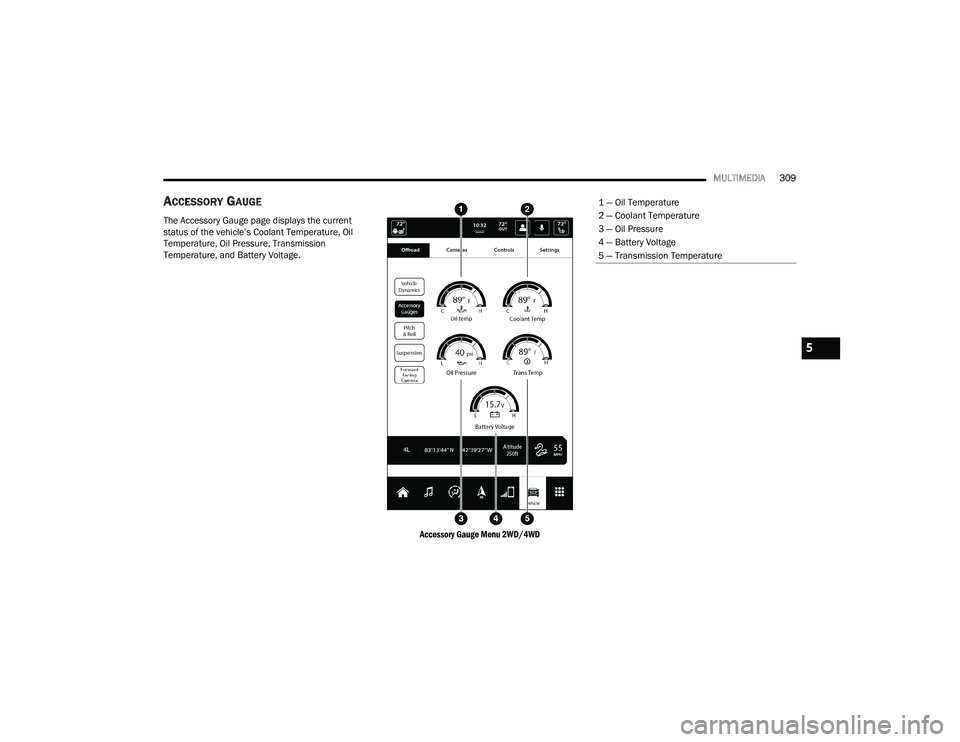
ACCESSORY GAUGE
The Accessory Gauge page displays the current
status of the vehicle’s Coolant Temperature, Oil
Temperature, Oil Pressure, Transmission
Temperature, and Battery Voltage.
Accessory Gauge Menu 2WD/4WD
1 — Oil Temperature
2 — Coolant Temperature
3 — Oil Pressure
4 — Battery Voltage
5 — Transmission Temperature
5
22_DT_OM_EN_USC_t.book Page 309
Page 395 of 496

393
SERVICING AND MAINTENANCE
SCHEDULED SERVICING — GASOLINE
ENGINE
Your vehicle is equipped with an automatic oil
change indicator system. The oil change indicator
system will remind you that it is time to take your
vehicle in for scheduled maintenance.
Based on engine operation conditions, the oil
change indicator message will illuminate. This
means that service is required for your vehicle.
Operating conditions such as frequent short-trips,
trailer tow, and extremely hot or cold ambient
temperatures will influence when the “Oil Change
Required” message is displayed. Have your vehicle
serviced as soon as possible, within the next
500 miles (805 km).An authorized dealer will reset the oil change
indicator message after completing the scheduled
oil change. If a scheduled oil change is performed
by someone other than an authorized dealer, the
message can be reset by referring to the steps
described under Instrument Cluster Display
Ú
page 114.
NOTE:Under no circumstances should oil change
intervals exceed 10,000 miles (16,000 km),
12 months or 350 hours of engine run time,
whichever comes first. The 350 hours of engine
run or idle time is generally only a concern for fleet
customers. Once A Month Or Before A Long Trip:
Check engine oil level.
Check windshield washer fluid level.
Check tire pressure and look for unusual wear
or damage. Rotate tires at the first sign of irreg
-
ular wear, even if it occurs before the oil indi -
cator system turns on.
Check the fluid levels of the coolant reservoir,
brake master cylinder, and fill as needed.
Check function of all interior and exterior lights.
8
22_DT_OM_EN_USC_t.book Page 393
Page 400 of 496

398SERVICING AND MAINTENANCE
SCHEDULED SERVICING — DIESEL ENGINE
Your vehicle is equipped with an automatic oil
change indicator system. The oil change indicator
system will remind you that it is time to take your
vehicle in for scheduled maintenance.
Based on engine operation conditions, the oil
change indicator message will illuminate. This
means that service is required for your vehicle.
Operating conditions such as frequent short-trips,
trailer tow, extremely hot or cold ambient
temperatures will influence when the “Oil Change
Required” message is displayed. Have your vehicle
serviced as soon as possible, within the next
500 miles (805 km). An authorized dealer will reset the oil change
indicator message after completing the scheduled
oil change. If a scheduled oil change is performed
by someone other than an authorized dealer, the
message can be reset by referring to the steps
described under Instrument Cluster Display
Ú
page 114.
NOTE:Under no circumstances should oil change
intervals exceed 10,000 miles (16,000 km) or
12 months, whichever comes first. Once A Month Or Before A Long Trip:
Check engine oil level.
Check windshield washer fluid level.
Check the tire inflation pressures and look for
unusual wear or damage.
Check the fluid levels of the coolant reservoir,
brake master cylinder, and power steering, and
fill as needed.
Check function of all interior and exterior lights.
22_DT_OM_EN_USC_t.book Page 398
Page 405 of 496

SERVICING AND MAINTENANCE403
ENGINE COMPARTMENT
3.6L ENGINE WITH STOP/START
1 — Motor Generator Unit Coolant Reservoir Pressure Cap 6 — Battery
2 — Engine Coolant Reservoir Pressure Cap 7 — Engine Air Cleaner Filter
3 — Engine Oil Dipstick 8 — Washer Fluid Reservoir Cap
4 — Engine Oil Fill 9 — Power Distribution Center (Fuses)
5 — Brake Fluid Reservoir
8
22_DT_OM_EN_USC_t.book Page 403
Page 406 of 496

404SERVICING AND MAINTENANCE
5.7L ENGINE WITHOUT STOP/START
1 — Engine Air Cleaner Filter 6 — Battery
2 — Engine Coolant Pressure Cap 7 — Engine Coolant Reservoir Cap
3 — Engine Oil Fill 8 — Washer Fluid Reservoir Cap
4 — Engine Oil Dipstick 9 — Power Distribution Center (Fuses)
5 — Brake Fluid Reservoir Cap
22_DT_OM_EN_USC_t.book Page 404