suspension RAM 1500 2022 User Guide
[x] Cancel search | Manufacturer: RAM, Model Year: 2022, Model line: 1500, Model: RAM 1500 2022Pages: 496, PDF Size: 18.03 MB
Page 137 of 496
GETTING TO KNOW YOUR INSTRUMENT PANEL135
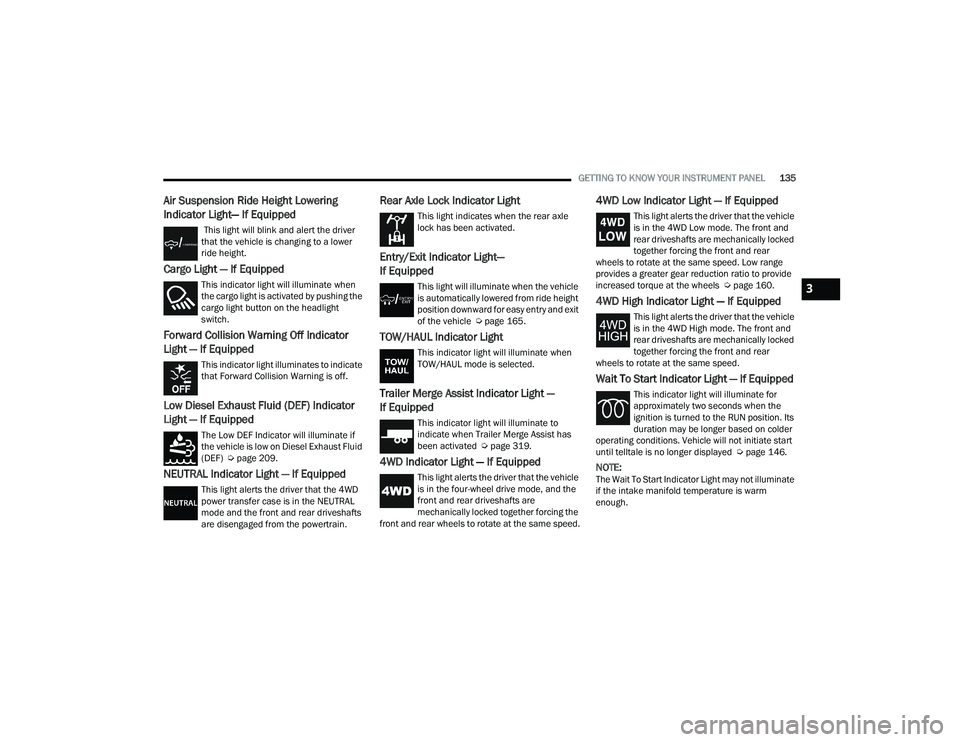
Air Suspension Ride Height Lowering
Indicator Light— If Equipped
This light will blink and alert the driver
that the vehicle is changing to a lower
ride height.
Cargo Light — If Equipped
This indicator light will illuminate when
the cargo light is activated by pushing the
cargo light button on the headlight
switch.
Forward Collision Warning Off Indicator
Light — If Equipped
This indicator light illuminates to indicate
that Forward Collision Warning is off.
Low Diesel Exhaust Fluid (DEF) Indicator
Light — If Equipped
The Low DEF Indicator will illuminate if
the vehicle is low on Diesel Exhaust Fluid
(DEF) Úpage 209.
NEUTRAL Indicator Light — If Equipped
This light alerts the driver that the 4WD
power transfer case is in the NEUTRAL
mode and the front and rear driveshafts
are disengaged from the powertrain.
Rear Axle Lock Indicator Light
This light indicates when the rear axle
lock has been activated.
Entry/Exit Indicator Light—
If Equipped
This light will illuminate when the vehicle
is automatically lowered from ride height
position downward for easy entry and exit
of the vehicle Ú page 165.
TOW/HAUL Indicator Light
This indicator light will illuminate when
TOW/HAUL mode is selected.
Trailer Merge Assist Indicator Light —
If Equipped
This indicator light will illuminate to
indicate when Trailer Merge Assist has
been activated Ú page 319.
4WD Indicator Light — If Equipped
This light alerts the driver that the vehicle
is in the four-wheel drive mode, and the
front and rear driveshafts are
mechanically locked together forcing the
front and rear wheels to rotate at the same speed.
4WD Low Indicator Light — If Equipped
This light alerts the driver that the vehicle
is in the 4WD Low mode. The front and
rear driveshafts are mechanically locked
together forcing the front and rear
wheels to rotate at the same speed. Low range
provides a greater gear reduction ratio to provide
increased torque at the wheels Ú page 160.
4WD High Indicator Light — If Equipped
This light alerts the driver that the vehicle
is in the 4WD High mode. The front and
rear driveshafts are mechanically locked
together forcing the front and rear
wheels to rotate at the same speed.
Wait To Start Indicator Light — If Equipped
This indicator light will illuminate for
approximately two seconds when the
ignition is turned to the RUN position. Its
duration may be longer based on colder
operating conditions. Vehicle will not initiate start
until telltale is no longer displayed Ú page 146.
NOTE:The Wait To Start Indicator Light may not illuminate
if the intake manifold temperature is warm
enough.
3
22_DT_OM_EN_USC_t.book Page 135
Page 167 of 496
STARTING AND OPERATING165
ACTIVE-LEVEL FOUR CORNER AIR
SUSPENSION SYSTEM — IF EQUIPPED
DESCRIPTION
The air suspension system provides full-time
load-leveling capability along with the benefit of
being able to adjust vehicle height by using the
toggle switch.
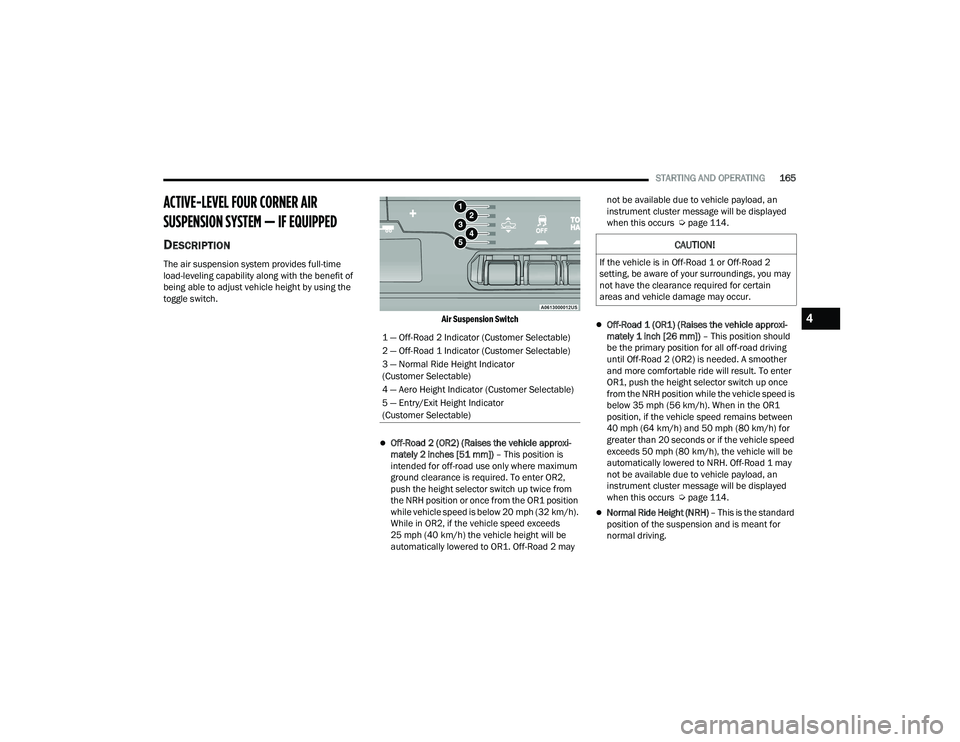
Air Suspension Switch
Off-Road 2 (OR2) (Raises the vehicle approxi-
mately 2 inches [51 mm]) – This position is
intended for off-road use only where maximum
ground clearance is required. To enter OR2,
push the height selector switch up twice from
the NRH position or once from the OR1 position
while vehicle speed is below 20 mph (32 km/h).
While in OR2, if the vehicle speed exceeds
25 mph (40 km/h) the vehicle height will be
automatically lowered to OR1. Off-Road 2 may not be available due to vehicle payload, an
instrument cluster message will be displayed
when this occurs Ú
page 114.
Off-Road 1 (OR1) (Raises the vehicle approxi -
mately 1 inch [26 mm]) – This position should
be the primary position for all off-road driving
until Off-Road 2 (OR2) is needed. A smoother
and more comfortable ride will result. To enter
OR1, push the height selector switch up once
from the NRH position while the vehicle speed is
below 35 mph (56 km/h). When in the OR1
position, if the vehicle speed remains between
40 mph (64 km/h) and 50 mph (80 km/h) for
greater than 20 seconds or if the vehicle speed
exceeds 50 mph (80 km/h), the vehicle will be
automatically lowered to NRH. Off-Road 1 may
not be available due to vehicle payload, an
instrument cluster message will be displayed
when this occurs Ú page 114.
Normal Ride Height (NRH) – This is the standard
position of the suspension and is meant for
normal driving.
1 — Off-Road 2 Indicator (Customer Selectable)
2 — Off-Road 1 Indicator (Customer Selectable)
3 — Normal Ride Height Indicator
(Customer Selectable)
4 — Aero Height Indicator (Customer Selectable)
5 — Entry/Exit Height Indicator
(Customer Selectable)
CAUTION!
If the vehicle is in Off-Road 1 or Off-Road 2
setting, be aware of your surroundings, you may
not have the clearance required for certain
areas and vehicle damage may occur.
4
22_DT_OM_EN_USC_t.book Page 165
Page 168 of 496
![RAM 1500 2022 User Guide
166STARTING AND OPERATING
Aero Height (Lowers the vehicle approximately
0.6 inch [15 mm]) – This position provides
improved aerodynamics by lowering the vehicle.
The vehicle will automatica](/img/34/59196/w960_59196-167.png "RAM 1500 2022 User Guide
166STARTING AND OPERATING
Aero Height (Lowers the vehicle approximately
0.6 inch [15 mm]) – This position provides
improved aerodynamics by lowering the vehicle.
The vehicle will automatica")
166STARTING AND OPERATING
Aero Height (Lowers the vehicle approximately
0.6 inch [15 mm]) – This position provides
improved aerodynamics by lowering the vehicle.
The vehicle will automatically enter Automatic
Aero Mode when the vehicle speed remains
between 62 mph (100 km/h) and 66 mph
(106 km/h) for greater than 20 seconds or if the
vehicle speed exceeds 66 mph (106 km/h). The
vehicle will return to NRH from Aero Mode if the
vehicle speed remains between 30 mph
(48 km/h) and 35 mph (56 km/h) for greater
than 20 seconds or if the vehicle speed falls
below 30 mph (48 km/h).
NOTE:
Automatic Aero mode will be disabled if a
trailer is detected to prevent shifting loads.
Speed thresholds for raising/lowering the
vehicle automatically at higher speeds only
apply if Automatic Aero Mode is enabled in
your Uconnect Radio settings.
To enter Aero Height manually push the height
selector switch down once from NRH at any
vehicle speed. To return to NRH push the height
selector switch up once while vehicle speed is
less than 56 mph (90 km/h).
NOTE:Automatic Aero Mode may be disabled through
vehicle settings in the instrument cluster display
Ú page 114 or through your Uconnect Radio (if
equipped) Ú page 234.
Entry/Exit Height (Lowers the vehicle approxi -
mately 2 inches [51 mm]) – This position lowers
the vehicle for easier passenger entry and exit
as well as lowering the vehicle for easier loading
and unloading of cargo. To enter Entry/Exit
Mode, push the height selector switch down
once from the NRH while the vehicle speed is
below 33 mph (53 km/h). Once the vehicle
speed goes below 15 mph (24 km/h) the
vehicle height will begin to lower. If the vehicle
speed remains between 15 mph (24 km/h) and
25 mph (40 km/h) for greater than 60 seconds,
or the vehicle speed exceeds 25 mph (40 km/h)
the Entry/Exit change will be canceled. To return
to Normal Height Mode, push the height
selector switch up once while in Entry/Exit or
drive the vehicle over 15 mph (24 km/h).
NOTE:Entry/Exit Height may be achieved using the
Remote Lowering feature on your key fob for easier
entry/loading Ú page 19. The system requires that the ignition be in the ON/
RUN position or the engine running for all user
requested changes. When lowering the vehicle, all
of the doors must be closed. If a door is opened at
any time while the vehicle is lowering, the change
will not be completed until the open door(s) is
closed.
This system uses a lifting and lowering pattern
which keeps the headlights from incorrectly
shining into oncoming traffic. When raising the
vehicle, the rear of the vehicle will move up first
and then the front. When lowering the vehicle, the
front will move down first and then the rear.
After the engine is turned off, it may be noticed that
the air suspension system operates briefly; this is
normal. The system is correcting the position of the
vehicle to ensure a proper appearance.
To assist with changing a spare tire, the air
suspension system has a feature which allows the
automatic leveling to be disabled Ú
page 114.
CAUTION!
When in ENTRY/EXIT Height, be aware of your
surroundings, you may not have the clearance
required for certain areas and vehicle damage
may occur.
22_DT_OM_EN_USC_t.book Page 166
Page 169 of 496
STARTING AND OPERATING167
NOTE:Default Ride Height:
Select Aero Height or Normal Ride Height as the
default for all vehicle speeds and operation.
This is the selected height that the suspension
will level for speed changes (e.g. raising from
Entry/Exit Height at speed, lowering from Off
Road Height at speed, etc.).
Default ride height can be changed by manually
adjusting the Air Suspension switch to Normal
Ride Height or Aero Ride Height and staying in
the selected height for 2.5 seconds. It will be
stored as the default ride height and the height
will be maintained until a new default ride
height is selected.
If equipped with a touchscreen radio, all enabling/
disabling of air suspension features must be done
through the radio Ú page 234.
AIR SUSPENSION MODES
The air suspension system has multiple modes to
protect the system in unique situations. The engine
should be running to change between Air
Suspension Modes.
Automatic Areo Mode
To improve aerodynamics, the air suspension
system has a feature which will put the vehicle into
Aeroheight automatically at higher speeds
Úpage 114.
Automatic Aero Mode may be disabled through
vehicle settings in the Uconnect Radio (if
equipped) Ú page 234.
Tire Jack Mode
To assist with changing a tire, the air suspension
system has a feature which allows the automatic
leveling to be disabled Ú page 234.
Transport Mode
For towing your vehicle with four wheels off the
road, the air suspension system has a feature
which will put the vehicle into Entry/Exit height and
disable the automatic load leveling system
Ú page 234. Wheel Alignment Mode
Before performing a wheel alignment, this mode
must be enabled which will put the vehicle into
NRH and disable automatic leveling Ú
page 234.
Protection Strategy
In order to protect the air suspension system, the
vehicle will disable load leveling as required
(suspension overloaded, battery charge low, etc.).
Load leveling will automatically resume as soon as
system operation requirements are met. See an
authorized dealer if system does not resume.
NOTE:For towing with air suspension Ú page 212.
INSTRUMENT CLUSTER DISPLAY
M
ESSAGES
When the appropriate conditions exist, a message
will appear in the instrument cluster display
Ú page 114.
An audible chime will be heard whenever a system
error has been detected.
See an authorized dealer for system service if
normal operation does not resume.
WARNING!
The air suspension system uses a high pressure
volume of air to operate the system. To avoid
personal injury or damage to the system, see an
authorized dealer for service.
4
22_DT_OM_EN_USC_t.book Page 167
Page 170 of 496
168STARTING AND OPERATING
OPERATION
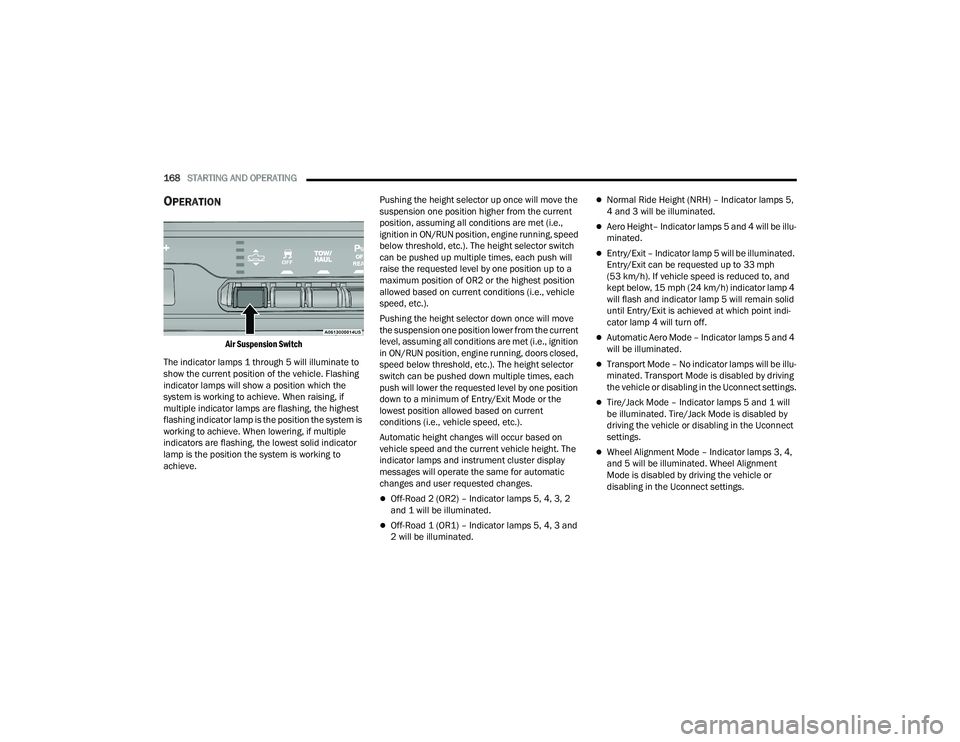
Air Suspension Switch
The indicator lamps 1 through 5 will illuminate to
show the current position of the vehicle. Flashing
indicator lamps will show a position which the
system is working to achieve. When raising, if
multiple indicator lamps are flashing, the highest
flashing indicator lamp is the position the system is
working to achieve. When lowering, if multiple
indicators are flashing, the lowest solid indicator
lamp is the position the system is working to
achieve. Pushing the height selector up once will move the
suspension one position higher from the current
position, assuming all conditions are met (i.e.,
ignition in ON/RUN position, engine running, speed
below threshold, etc.). The height selector switch
can be pushed up multiple times, each push will
raise the requested level by one position up to a
maximum position of OR2 or the highest position
allowed based on current conditions (i.e., vehicle
speed, etc.).
Pushing the height selector down once will move
the suspension one position lower from the current
level, assuming all conditions are met (i.e., ignition
in ON/RUN position, engine running, doors closed,
speed below threshold, etc.). The height selector
switch can be pushed down multiple times, each
push will lower the requested level by one position
down to a minimum of Entry/Exit Mode or the
lowest position allowed based on current
conditions (i.e., vehicle speed, etc.).
Automatic height changes will occur based on
vehicle speed and the current vehicle height. The
indicator lamps and instrument cluster display
messages will operate the same for automatic
changes and user requested changes.
Off-Road 2 (OR2) – Indicator lamps 5, 4, 3, 2
and 1 will be illuminated.
Off-Road 1 (OR1) – Indicator lamps 5, 4, 3 and
2 will be illuminated.
Normal Ride Height (NRH) – Indicator lamps 5,
4 and 3 will be illuminated.
Aero Height– Indicator lamps 5 and 4 will be illu
-
minated.
Entry/Exit – Indicator lamp 5 will be illuminated.
Entry/Exit can be requested up to 33 mph
(53 km/h). If vehicle speed is reduced to, and
kept below, 15 mph (24 km/h) indicator lamp 4 will flash and indicator lamp 5 will remain solid
until Entry/Exit is achieved at which point indi -
cator lamp 4 will turn off.
Automatic Aero Mode – Indicator lamps 5 and 4
will be illuminated.
Transport Mode – No indicator lamps will be illu -
minated. Transport Mode is disabled by driving
the vehicle or disabling in the Uconnect settings.
Tire/Jack Mode – Indicator lamps 5 and 1 will
be illuminated. Tire/Jack Mode is disabled by
driving the vehicle or disabling in the Uconnect
settings.
Wheel Alignment Mode – Indicator lamps 3, 4,
and 5 will be illuminated. Wheel Alignment
Mode is disabled by driving the vehicle or
disabling in the Uconnect settings.
22_DT_OM_EN_USC_t.book Page 168
Page 171 of 496
STARTING AND OPERATING169
ACTIVE-LEVEL FOUR CORNER AIR
SUSPENSION SYSTEM (OFF-ROAD GROUP) —
IF EQUIPPED
DESCRIPTION
The air suspension system provides full-time
load-leveling capability along with the benefit of
being able to adjust vehicle height by using the
toggle switch.
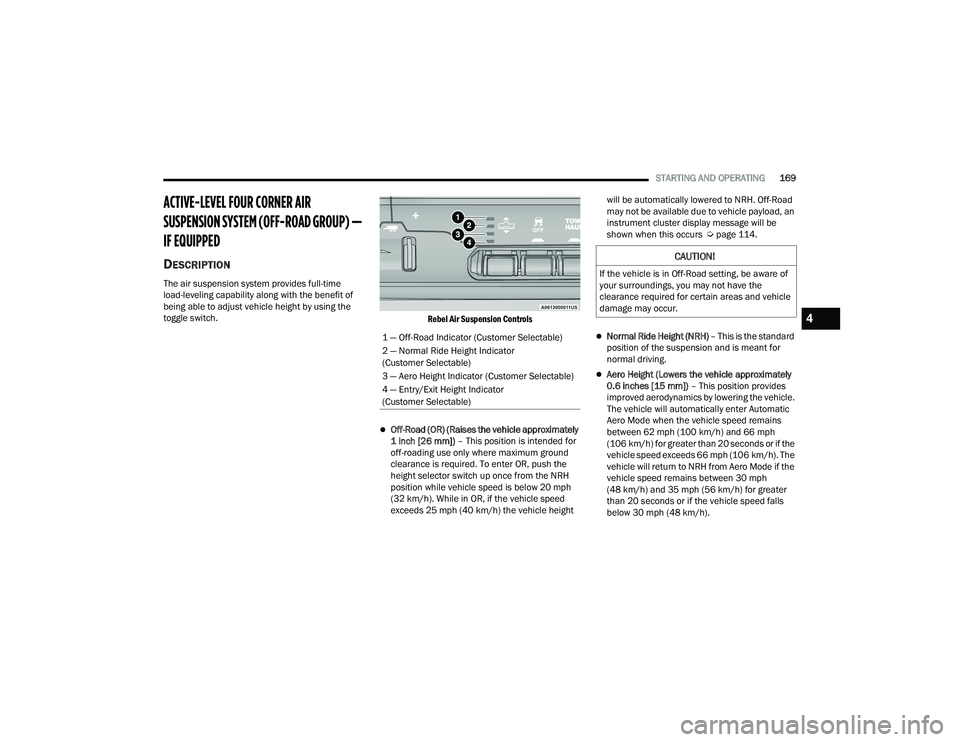
Rebel Air Suspension Controls
Off-Road (OR) (Raises the vehicle approximately
1 inch [26 mm]) – This position is intended for
off-roading use only where maximum ground
clearance is required. To enter OR, push the
height selector switch up once from the NRH
position while vehicle speed is below 20 mph
(32 km/h). While in OR, if the vehicle speed
exceeds 25 mph (40 km/h) the vehicle height will be automatically lowered to NRH. Off-Road
may not be available due to vehicle payload, an
instrument cluster display message will be
shown when this occurs Ú
page 114.
Normal Ride Height (NRH) – This is the standard
position of the suspension and is meant for
normal driving.
Aero Height (Lowers the vehicle approximately
0.6 inches [15 mm]) – This position provides
improved aerodynamics by lowering the vehicle.
The vehicle will automatically enter Automatic
Aero Mode when the vehicle speed remains
between 62 mph (100 km/h) and 66 mph
(106 km/h) for greater than 20 seconds or if the
vehicle speed exceeds 66 mph (106 km/h). The
vehicle will return to NRH from Aero Mode if the
vehicle speed remains between 30 mph
(48 km/h) and 35 mph (56 km/h) for greater
than 20 seconds or if the vehicle speed falls
below 30 mph (48 km/h).
1 — Off-Road Indicator (Customer Selectable)
2 — Normal Ride Height Indicator
(Customer Selectable)
3 — Aero Height Indicator (Customer Selectable)
4 — Entry/Exit Height Indicator
(Customer Selectable)
CAUTION!
If the vehicle is in Off-Road setting, be aware of
your surroundings, you may not have the
clearance required for certain areas and vehicle
damage may occur.
4
22_DT_OM_EN_USC_t.book Page 169
Page 172 of 496
170STARTING AND OPERATING
NOTE:
Automatic Aero mode will be disabled if a
trailer is detected to prevent shifting loads.
Speed thresholds for raising or lowering the
vehicle only apply if Automatic Aero Mode is
enabled through vehicle settings on your
Uconnect Radio.
To enter Aero Height manually push the
height selector switch down once from NRH
at any vehicle speed. To return to NRH push
the height selector switch up once while
vehicle speed is less than 56 mph (90 km/
h).
Automatic Aero Mode may be disabled
through vehicle settings on your Uconnect
Radio.
Entry/Exit Height (Lowers the vehicle approxi -
mately 3 inches [73 mm]) – This position lowers
the vehicle for easier passenger entry and exit
as well as lowering the vehicle for easier loading
and unloading of cargo. To enter Entry/Exit
Mode, push the height selector switch down
twice from the NRH while the vehicle speed is
below 33 mph (53 km/h). Once the vehicle
speed goes below 15 mph (24 km/h) the
vehicle height will begin to lower. If the vehicle
speed remains between 15 mph (24 km/h) and
25 mph (40 km/h) for greater than 60 seconds,
or the vehicle speed exceeds 25 mph (40 km/h)
the Entry/Exit change will be canceled. To return to Normal Height Mode, push the height
selector switch up twice while in Entry/Exit or
drive the vehicle over 15 mph (24 km/h). Entry/
Exit Height may not be available due to vehicle
payload, an instrument cluster display message
will be shown when this occurs Ú
page 114.
The system requires that the ignition be in the ON/
RUN position or the engine running for all user
requested changes. When lowering the vehicle, all
of the doors must be closed. If a door is opened at
any time while the vehicle is lowering, the change
will not be completed until the open door(s) is
closed.
This system uses a lifting and lowering pattern
which keeps the headlights from incorrectly
shining into oncoming traffic. When raising the
vehicle, the rear of the vehicle will move up first
and then the front. When lowering the vehicle, the
front will move down first and then the rear.
After the engine is turned off, it may be noticed that
the air suspension system operates briefly; this is
normal. The system is correcting the position of the
vehicle to ensure a proper appearance. To assist with changing a spare tire, the air
suspension system has a feature which allows the
automatic leveling to be disabled Ú
page 234.
NOTE:Default Ride Height:
Select Aero Height or Normal Ride Height as the
default for all vehicle speeds and operation.
This is the selected height that the suspension
will level for speed changes (e.g. raising from
Entry/Exit Height at speed, lowering from Off
Road Height at speed, etc.).
Default ride height can be changed by manually
adjusting the Air Suspension switch to Normal
Ride Height or Aero Ride Height and staying in
the selected height for 2.5 seconds. It will be
stored as the default ride height and the height
will be maintained until a new default ride
height is selected.
If equipped with a touchscreen radio, all enabling/
disabling of air suspension features must be done
through the radio Ú page 234.
CAUTION!
When in ENTRY/EXIT Height, be aware of your
surroundings, you may not have the clearance
required for certain areas and vehicle damage
may occur.
WARNING!
The air suspension system uses a high pressure
volume of air to operate the system. To avoid
personal injury or damage to the system, see an
authorized dealer for service.
22_DT_OM_EN_USC_t.book Page 170
Page 173 of 496

STARTING AND OPERATING171
AIR SUSPENSION MODES
The air suspension system has multiple modes to
protect the system in unique situations:
Automatic Aero Mode
To improve aerodynamics, the air suspension
system has a feature which will put the vehicle into
Aero height automatically at higher speeds
Úpage 114.
Tire Jack Mode
To assist with changing a tire, the air suspension
system has a feature which allows the automatic
leveling to be disabled Ú page 234.
Transport Mode
For towing your vehicle with four wheels off the
road, the air suspension system has a feature
which will put the vehicle into Entry/Exit height and
disable the automatic load leveling system
Ú page 234.
Wheel Alignment Mode
Before performing a wheel alignment, this mode
must be enabled which moves the vehicle to
normal ride height and disables the automatic
leveling Ú page 234.
Protection Strategy
In order to protect the air suspension system, the
vehicle will disable load leveling as required
(suspension overloaded, battery charge low, etc.). Load leveling will automatically resume as soon as
system operation requirements are met. See an
authorized dealer if system does not resume.
NOTE:For towing with air suspension Ú
page 212.
INSTRUMENT CLUSTER DISPLAY
M
ESSAGES
When the appropriate conditions exist, a message
will appear in the instrument cluster display
Ú page 114.
An audible chime will be heard whenever a system
error has been detected.
See an authorized dealer for system service if
normal operation does not resume.
OPERATION
Air Suspension Switch
The indicator lamps 1 through 4 will illuminate to
show the current position of the vehicle. Flashing
indicator lamps will show a position which the
system is working to achieve. When raising or
lowering, the flashing indicator lamp is the position
the system is working to achieve.
Pushing the height selector switch up once will
move the suspension one position higher from the
current position, assuming all conditions are met
(i.e., key in ON/RUN position, engine running,
speed below threshold, etc.). The height selector
switch can be pushed up multiple times, each push
will raise the requested level by one position up to
a maximum position of OR or the highest position
allowed based on current conditions (i.e., vehicle
speed, etc.).
Pushing the height selector switch down once will
move the suspension one position lower from the
current level, assuming all conditions are met (i.e.,
key in ON/RUN position, engine running, doors
closed, speed below threshold, etc.). The height
selector switch can be pushed down multiple
times, each push will lower the requested level by
one position down to a minimum of Entry/Exit
Mode or the lowest position allowed based on
current conditions (i.e., vehicle speed, etc.).
4
22_DT_OM_EN_USC_t.book Page 171
Page 180 of 496
178STARTING AND OPERATING
(Continued)
Pushing the on/off button or placing the ignition in
the OFF position, erases the set speed from
memory.
ADAPTIVE CRUISE CONTROL (ACC)
Adaptive Cruise Control (ACC) increases the driving
convenience provided by Cruise Control while
traveling on highways and major roadways.
However, it is not a safety system and not designed
to prevent collisions. The Cruise Control function
performs differently
Ú page 176.
ACC will allow you to keep Cruise Control engaged
in light to moderate traffic conditions without the
constant need to reset your speed. ACC utilizes a
radar sensor and a forward facing camera
designed to detect a vehicle directly ahead of you
to maintain a set speed.
NOTE:
If the ACC sensor detects a vehicle ahead, ACC
will apply limited braking or acceleration (not to
exceed the original set speed) automatically to
maintain a preset following distance, while
matching the speed of the vehicle ahead.
Any chassis/suspension or tire size modifica -
tions to the vehicle will affect the performance
of the Adaptive Cruise Control and Forward Colli -
sion Warning system.
Fixed Speed Cruise Control (ACC not enabled)
will not detect vehicles directly ahead of you.
Always be aware of the feature selected
Ú page 480.
WARNING!
Adaptive Cruise Control (ACC) is a conve -
nience system. It is not a substitute for active
driver involvement. It is always the driver’s
responsibility to be attentive of road, traffic,
and weather conditions, vehicle speed,
distance to the vehicle ahead; and, most
importantly, brake operation to ensure safe
operation of the vehicle under all road condi -
tions. Your complete attention is always
required while driving to maintain safe control
of your vehicle. Failure to follow these warn -
ings can result in a collision and death or
serious personal injury.
The ACC system:
Does not react to pedestrians, oncoming
vehicles, and stationary objects (e.g., a
stopped vehicle in a traffic jam or a
disabled vehicle).
Cannot take street, traffic, and weather
conditions into account, and may be
limited upon adverse sight distance condi -
tions.
Does not always fully recognize complex
driving conditions, which can result in
wrong or missing distance warnings.
Will bring your vehicle to a complete stop
while following a vehicle ahead and hold
your vehicle for approximately three
minutes in the stop position. If the vehicle
ahead does not start moving within three
minutes the parking brake will be acti -
vated, and the ACC system will be
cancelled.
You should switch off the ACC system:
When driving in fog, heavy rain, heavy snow,
sleet, heavy traffic, and complex driving situa -
tions (i.e., in highway construction zones).
When entering a turn lane or highway off
ramp; when driving on roads that are winding,
icy, snow-covered, slippery, or have steep
uphill or downhill slopes.
When towing a trailer up or down steep slopes.
When circumstances do not allow safe driving
at a constant speed.
WARNING!
22_DT_OM_EN_USC_t.book Page 178
Page 213 of 496

STARTING AND OPERATING211
3. Stop filling the DEF tank immediately when any of the following happen: DEF stops flowing
from the fill bottle into the DEF tank, DEF
splashes out the filler neck, or a DEF pump
nozzle automatically shuts off.
4. Reinstall cap onto DEF tank.
Filling The Def Tank In Cold Climates
Your vehicle is equipped with an automatic DEF
heating system. This allows the DEF injection
system to operate properly at temperatures below
12°F (-11°C). If your vehicle is not in operation for
an extended period of time with temperatures
below 12°F (-11°C), the DEF in the tank may
freeze. Do not overfill the DEF tank. If the tank is
overfilled and freezes, it could be damaged.
Extra care should be taken when filling with
portable containers to avoid overfilling. Keep an
eye on the DEF gauge in your instrument cluster.
You may safely add a maximum of 2 gallons
(7.6 Liters) when your DEF gauge is reading at
the half mark.
VEHICLE LOADING
GROSS VEHICLE WEIGHT RATING
(GVWR)
The GVWR is the total permissible weight of your
vehicle including driver, passengers, vehicle,
options and cargo. The label also specifies
maximum capacities of front and rear Gross Axle
Weight Rating (GAWR). Total load must be limited
so GVWR and front and rear GAWR are not
exceeded.
PAYLOAD
The payload of a vehicle is defined as the allowable
load weight a truck can carry, including the weight
of the driver, all passengers, options and cargo.
GROSS AXLE WEIGHT RATING (GAWR)
The GAWR is the maximum permissible load on the
front and rear axles. The load must be distributed
in the cargo area so that the GAWR of each axle is
not exceeded.
Each axle GAWR is determined by the components
in the system with the lowest load carrying capacity
(axle, springs, tires or wheels). Heavier axles or
suspension components sometimes specified by
purchasers for increased durability does not
necessarily increase the vehicle's GVWR.
When DEF is spilled, clean the area immedi -
ately with water and use an absorbent mate -
rial to soak up the spills on the ground.
Do not attempt to start your engine if DEF is
accidentally added to the diesel fuel tank as it
can result in severe damage to your engine,
including but not limited to failure of the fuel
pump and injectors.
Never add anything other than DEF to the tank
– especially any form of hydrocarbon such as
diesel fuel, fuel system additives, gasoline, or
any other petroleum-based product. Even a
very small amount of these, less than
100 parts per million or less than 1 oz. per
78 gallons (295 liters) will contaminate the
entire DEF system and will require replace -
ment. If owners use a container, funnel or
nozzle when refilling the tank, it should either
be new or one that has only been used for
adding DEF. Mopar® provides an attachable
nozzle with its DEF for this purpose.
CAUTION!
4
22_DT_OM_EN_USC_t.book Page 211